App Store Connect API Webhook|Automate CI/CD Workflows Seamlessly
Developers facing manual deployment delays can integrate App Store Connect API Webhooks to automate CI/CD pipelines, reducing errors and accelerating app releases efficiently.
This post was translated with AI assistance — let me know if anything sounds off!
Table of Contents
[CI/CD] Using App Store Connect API Webhook to Integrate Automated Workflows
App Store Connect Webhook Use Case Analysis and Practical Integration Tutorial.
{:target="_blank"}](/assets/7c0974856393/1*IqytjX72CmAx9WOx4Rm3gg.webp)
Photo by Volodymyr Hryshchenko
Preface
Apple has been continuously expanding the App Store Connect API in recent years, which is great news for developers. In the past, even certificate management required a “hardcore” web session (with expiration and SMS verification), making it difficult to integrate into CI/CD. Features like store reviews could only rely on unstable RSS feeds.
In recent years, new features have been added almost every year, covering development, testing, and deployment processes, as well as later stages like reviews, finance, and data reports with native support. Additionally, user management, groups, and TestFlight capabilities have been enhanced, allowing App Store Connect API to better improve the Apple developer experience.
Further reading: “App Store Connect API now supports reading and managing Customer Reviews”
WWDC 2025 Automate your development process with the App Store Connect API

The 2025 WWDC also brings the highly anticipated major feature — Webhook Notifications:
Build Upload Status (The status of a build upload changes.)
Receive related data when the build upload status changes.
Complete / Failed / ProcessingApp Version Status (The status of an app version changes.)
Receive relevant data when the app version status changes.
Prepare for Submission / Ready for Review / Waiting for Review / Ready for Distribution / Rejected…TestFlight Version Status (New TestFlight feedback is submitted by a tester.)
Receive related data when a tester leaves feedback (crash report/screenshot feedback).Apple-hosted Asset Pack Status Changes (The status of an Apple-hosted asset pack version changes.)
Receive related data when the status of an Apple-hosted asset pack version changes.
App Store Connect API / Webhook notifications :
Webhooks enable a system to send real-time data to another system over the web.
Unlike traditional APIs, where one system must make a request when receiving data, a webhook enables you to push data to the receiving system as soon as an event occurs.
Webhooks are event-driven, meaning they are triggered by a specific action or event and immediately send the relevant data to a predefined URL, also called the “webhook URL” or “callback URL”.
A notification webhook is an endpoint you create on your server.
This webhook endpoint receives HTTP POST requests from App Store Connect.
The POST requests describe important events about your app.
Use the webhooks notifications endpoint to configure the notifications for events happening to your apps.
5 Use Cases
1. Trigger Submission After Build Processing Completion
Before:
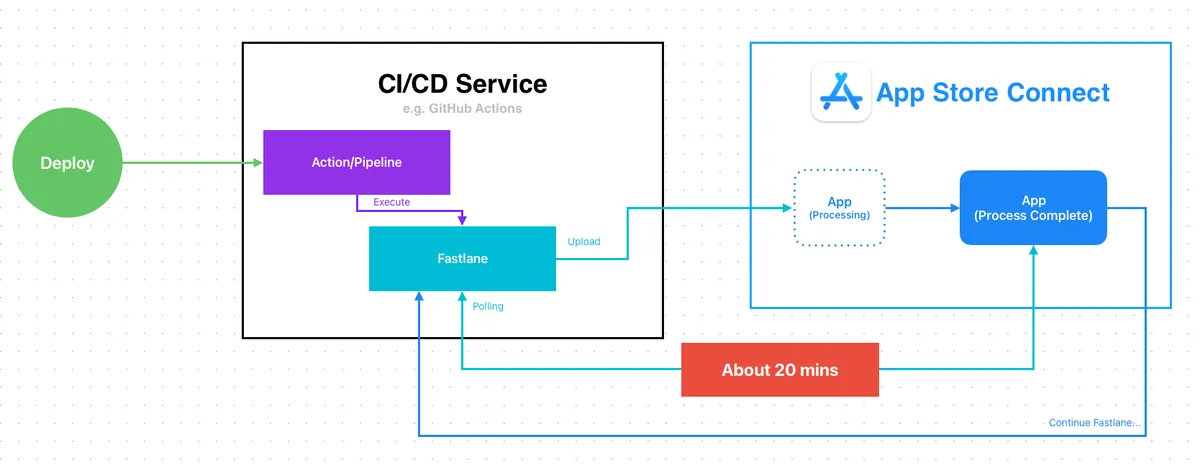
In the past, when implementing App CI/CD packaging and submission, you had to wait for Apple to finish processing after uploading the build before continuing with the submission; Fastlane’s default approach was to poll App Store Connect to check the build status, and only proceed with the submission lane once it was marked Complete.
Waiting time is about 20 minutes which is not a big deal for Self-hosted CI/CD, but if using cloud services, this 20-minute wait is a huge waste of resources. For example, GitHub Runner macOS costs US$ 0.062 per minute, so waiting for review submission alone causes an unnecessary cost of US$ 1.24 each time.
](/assets/7c0974856393/1*2-Zn2ApgVYd5S5KzxMLEMQ.webp)
Ref: Build Completed Processing 通知信 搭配 Gmail Filter + Google Apps Script
In the era without Webhook for active notifications, we previously used “Build Completed Processing notification email combined with Gmail Filter + Google Apps Script to trigger” to achieve the effect, but the process was a bit hardcore.
After:
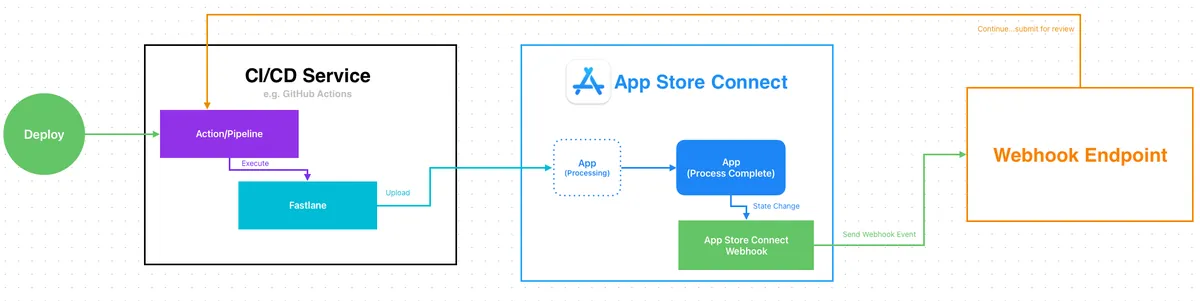
With Webhook, the packaging and uploading step can finish as soon as the upload is complete.
A Webhook notification is sent after the App Store Connect build process completes. We proceed with the submission process upon receiving the notification.
Zero Waiting Cost
2. Align GitFlow Release Process with App Release Timing
Before:
The final step in GitFlow deployment is merging the develop branch back into the master branch, which represents the current live version.
Previously, tasks could only be executed manually or automatically on a fixed schedule. For example, the PM would release the app every Monday and merge develop into master on the same day. Manual execution is tedious, and with automatic execution, what if there’s a delay? Or if Monday happens to be a holiday? The app wouldn’t actually be released, but develop would have already been merged into master.
In most cases, this is not very important. Only in extreme situations, such as needing to insert a hotfix during this time, could there be discrepancies. However, if you aim for a complete and stable CI/CD development process, this is a case worth exploring.
Another approach, similar to above, is using the “App is Ready for Sale notification email with Gmail Filter + Google Apps Script trigger,” which is also feasible.
After:

With Webhook, you can directly trigger CI/CD actions (Master to Develop) upon receiving app release notifications.
Ensure the app is truly live before merging back to Master
3. App Release Messages
After the app is released to users, there is another common internal workflow: sending release notifications to relevant teams, listing tasks included in the version, and completing related tasks.
Before:
Only manual, scheduled automatic, or using email triggered with Gmail Filter + Google Apps Script.
After:
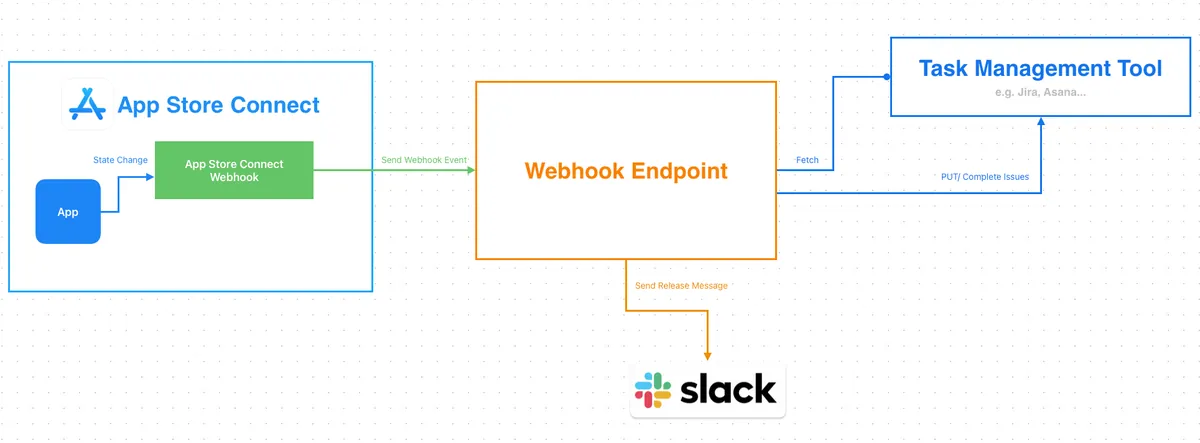
- With Webhook, you can connect to Jira/Asana API upon receiving an App release notification to batch complete tasks for the corresponding version and post release completion messages to Slack.
4. Build Failed / Review Rejected Notifier
Previously in sections 1 and 2, it was mentioned that workflows could be triggered by email notifications. However, in large teams with strict permission controls, iOS developers only have “developer” backend access and cannot release or manage apps, so they do not receive any app status change emails; this includes notifications for rejected uploaded builds or rejected submissions.
Before:
In the past, only a kind person (a.k.a PM) could forward emails to engineers. If that person missed it, the app rejection might only be discovered right before going live!
After:
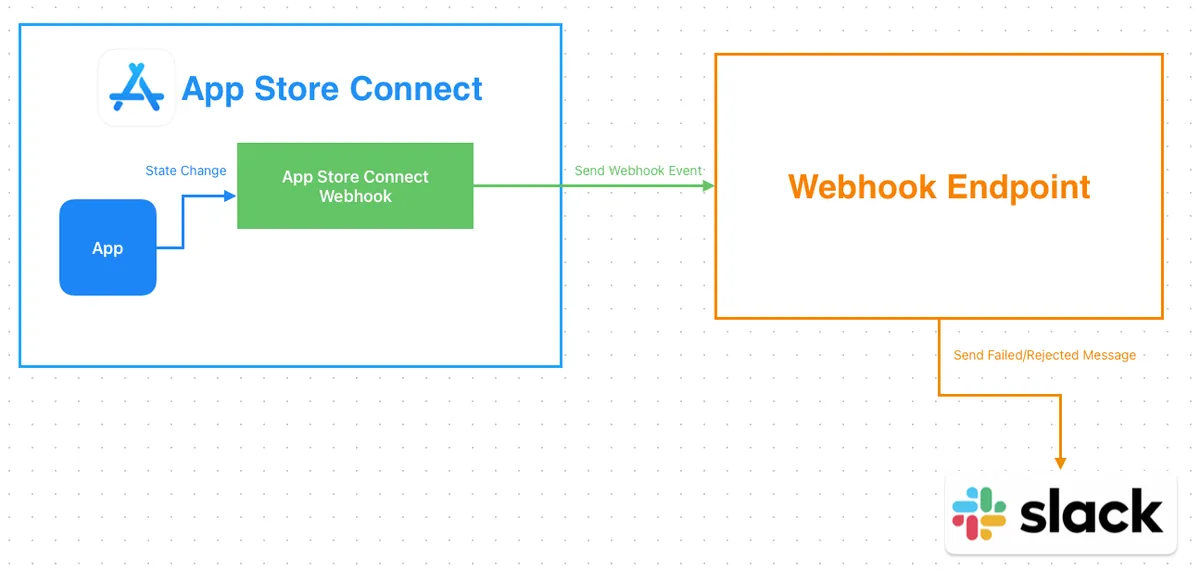
- This case is relatively simple: after receiving the Webhook notification, forward the message to Slack.
5. Testflight Feedback Notifier
Similar to 4, but using TestFlight Feedback Webhook notifications.
Before:
In the past, developers could only check tester feedback or crash issues by logging into the App Store Connect TestFlight backend themselves, which was very easy to overlook (there was even a case where feedback reported a year ago was only seen after a year).
After:
- Forward Testflight Feedback Webhook notifications to Slack after receiving them.
Other applications are welcome for creative ideas. Next, we will introduce how to connect and use it.
App Store Connect API Webhook Setup
Permission requirements: Admin or Account Holder privileges are required to configure.
Setting Up App Store Connect API Webhook Notifications
Navigate to “Users and Access” -> “Integrations”
Click “Webhooks” under “Additional”
Click the “Create Webhook” button
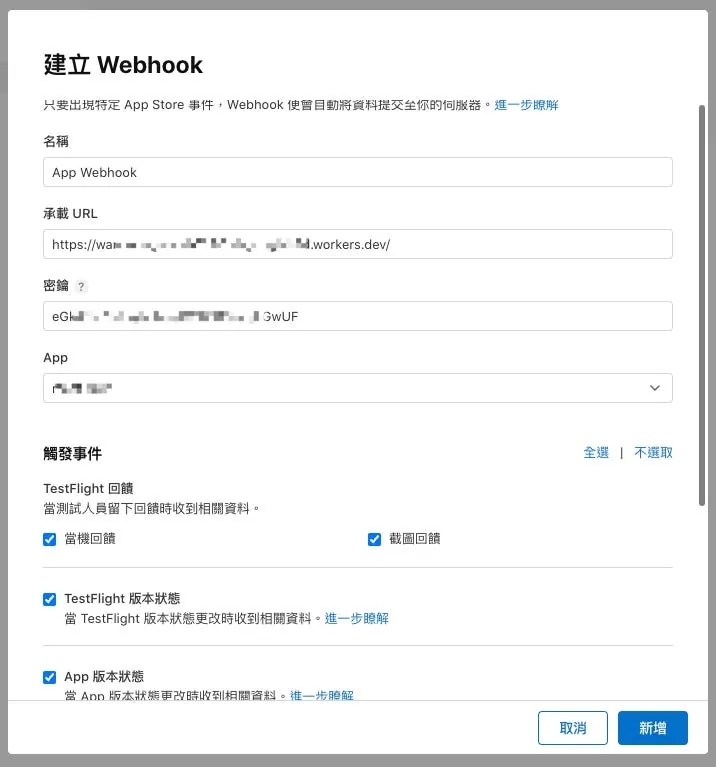
Name: Enter Webhook Name
Payload URL: Enter the URL of your Webhook notification receiving service
Secret String: Webhook Request verification key (you can generate a random string for use)
App: Select the App to Receive Webhook Notifications
Trigger Events:
1
2
3
4
5
6
7
8
9
10
11
12
13
14
15
16
17
18
19
20
21
TestFlight Feedback
Receive related data when testers leave feedback.
[] Crash Feedback
[] Screenshot Feedback

[] TestFlight Version State
Receive related data when the TestFlight version state changes. Learn more

[] App Version State
Receive related data when the App version state changes. Learn more

[] Build Upload State
Receive related data when the build upload state changes. Learn more

Background Assets
Receive related data when specific changes occur in Apple-hosted asset pack versions. Learn more

[] Update App Store Release Version
[] Update External TestFlight Release Version
[] Create Internal TestFlight Release Version
[] Update Asset Pack Version
Select according to your needs, or choose all notifications and decide whether to process them afterward.
Finally, click “Add” to create the Webhook.
Testing App Store Connect API Webhook Notifications
Go to the Webhook page.
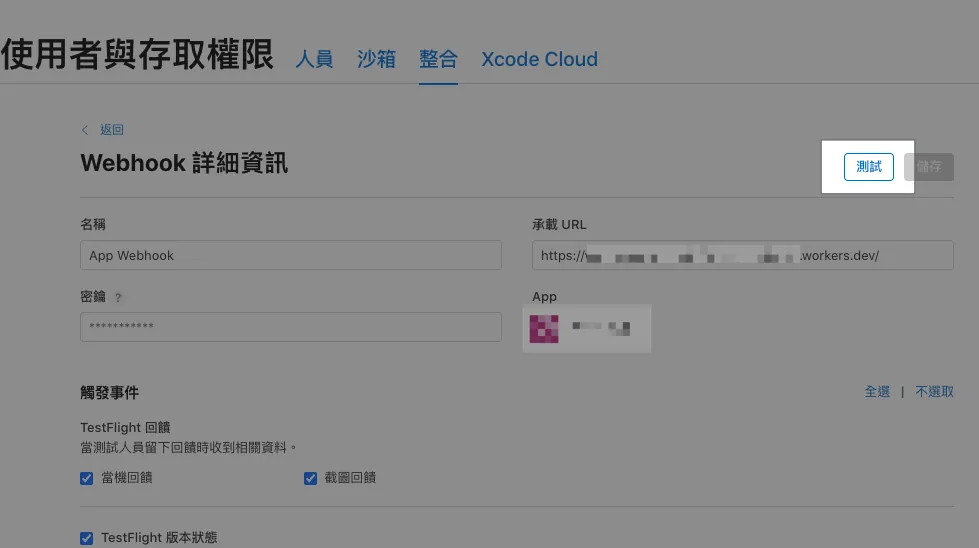
Click the “Test” button at the top right to receive a test notification.
The test notification content is as follows:
1
2
3
4
5
6
7
8
9
10
11
12
13
14
15
16
17
18
19
Headers:
{
  "content-type": "application/json",
  "x-apple-jingle-correlation-key": "PNSCHDQW3MY2AX6VSRFHYYNUL4",
  "x-apple-request-uuid": "7b64238e-16db-31a0-5fd5-944a7c61b45f",
  "x-apple-signature": "hmacsha256=cf50020f0bbd3c5274860594f616f1806965c1f9fb765d8d278f512dff5b4c0e",
}

Body:
{
  "data" : {
    "type" : "webhookPingCreated",
    "id" : "65726e27-cb79-47f2-a3e4-c8ced9f356e8",
    "version" : 1,
    "attributes" : {
      "timestamp" : "2025-12-26T15:47:38.472168681Z"
    }
  }
}
App Store Connect API Webhook Notification Sending Records
The “Recent Deliveries” section at the bottom of the Webhook page shows the most recently sent Webhook events.
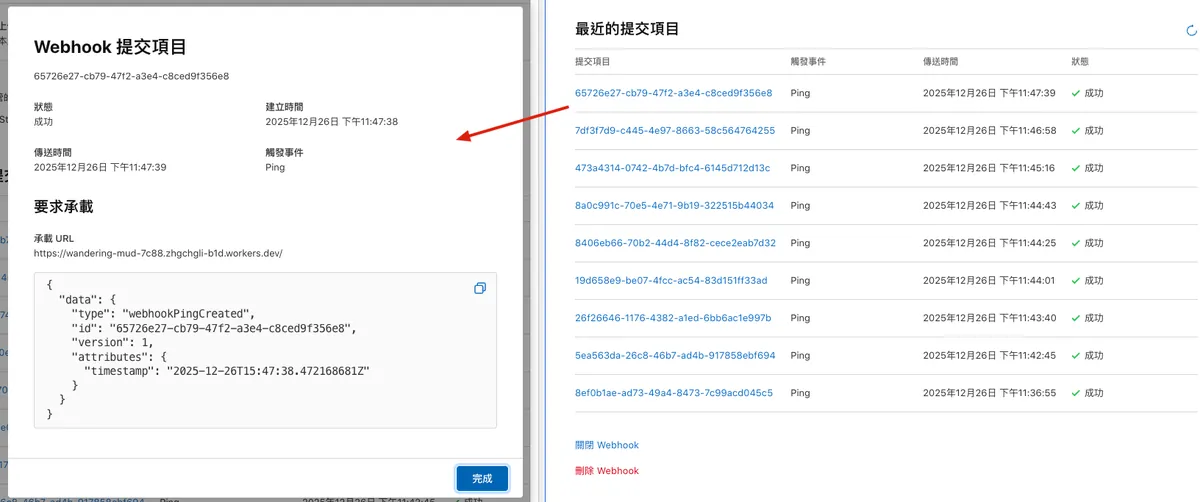
Verify App Store Connect API Webhook Notifications
When creating a Webhook, we enter a “Secret” string. It is recommended to verify requests to prevent the Webhook URL from leaking, which could allow malicious actors to forge and send Webhook events to your service.
Verification Method:
Perform HMAC-SHA256 on the Request Body using your configured secret key and output a HEX string. Compare this string with the value following
hmacsha256=in thex-apple-signaturefield of the Request Headers.
Implementation — Nodejs:
1
2
3
4
5
6
7
8
9
10
import crypto from 'crypto';

function verifyAppleWebhook(rawBody, appleSignature, secret) {
  const hex = crypto
    .createHmac('sha256', secret)
    .update(rawBody, 'utf8')
    .digest('hex');

  return `hmacsha256=${hex}` === appleSignature;
}
Implementation — Cloudflare Worker:
1
2
3
4
5
6
7
8
9
10
11
12
13
14
15
16
17
18
19
20
21
22
23
24
25
26
27
28
29
30
31
32
33
34
function bufferToHex(buffer) {
  return [...new Uint8Array(buffer)]
    .map(b => b.toString(16).padStart(2, '0'))
    .join('');
}

async function hmacSha256Hex(secret, message) {
  const enc = new TextEncoder();

  const key = await crypto.subtle.importKey(
    'raw',
    enc.encode(secret),
    { name: 'HMAC', hash: 'SHA-256' },
    false,
    ['sign']
  );

  const signature = await crypto.subtle.sign(
    'HMAC',
    key,
    enc.encode(message)
  );

  return bufferToHex(signature);
}

async function verifyAppleWebhook(request, secret) {
  const appleSignature = request.headers.get('X-Apple-Signature');

  const rawBody = await request.clone().text();
  const calculated = await hmacSha256Hex(secret, rawBody);

  return "hmacsha256="+calculated === appleSignature;
}
- Cloudflare Worker does not have the crypto module, so use the Web Crypto API (crypto.subtle) instead.
Implementation — Google Apps Script Web App ❌
Due to technical limitations, Google Apps Script Web App doGet(e)/doPost(e) cannot access Request Headers, so this method cannot be used to verify the request source.
You can only add some key parameters in the URL query for simple validation and protection.
App Store Connect API Webhook Notification Payload
Here are several event Payloads received during the App upload and review submission process, provided for your direct reference in automation development.
Webhook only sends event and status names, without other detailed information such as version number or rejection reasons; we need to call the App Store Connect API ourselves using the Relationships Link in the Event Payload to get complete information.
Build Version Upload — Process Complete
1
2
3
4
5
6
7
8
9
10
11
12
13
14
15
16
17
18
19
20
21
22
{
  "data" : {
    "type" : "buildUploadStateUpdated",
    "id" : "xxx-xx-xx-xx-xxx",
    "version" : 1,
    "attributes" : {
      "oldState" : "PROCESSING",
      "newState" : "COMPLETE"
    },
    "relationships" : {
      "instance" : {
        "data" : {
          "type" : "buildUploads",
          "id" : "xxx-xx-xx-xx-xxx"
        },
        "links" : {
          "self" : "https://api.appstoreconnect.apple.com/v1/buildUploads/xxx-xx-xx-xx-xxx"
        }
      }
    }
  }
}
Build Version Upload — Process Failed
1
2
3
4
5
6
7
8
9
10
11
12
13
14
15
16
17
18
19
20
21
22
{
  "data": {
    "type": "buildUploadStateUpdated",
    "id": "xxx-xx-xx-xx-xxx",
    "version": 1,
    "attributes": {
      "oldState": "PROCESSING",
      "newState": "FAILED"
    },
    "relationships": {
      "instance": {
        "data": {
          "type": "buildUploads",
          "id": "xxx-xx-xx-xx-xxx"
        },
        "links": {
          "self": "https://api.appstoreconnect.apple.com/v1/buildUploads/xxx-xx-xx-xx-xxx"
        }
      }
    }
  }
}
Mostly due to binary rejections, such as using the microphone without declaring it.
App Version Status — Prepare For Submission
1
2
3
4
5
6
7
8
9
10
11
12
13
14
15
16
17
18
19
20
21
22
23
{
  "data" : {
    "type" : "appStoreVersionAppVersionStateUpdated",
    "id" : "xxx-xx-xx-xx-xxx",
    "version" : 1,
    "attributes" : {
      "newValue" : "PREPARE_FOR_SUBMISSION",
      "oldValue" : "DEVELOPER_REJECTED",
      "timestamp" : "2025-12-18T05:01:47.118Z"
    },
    "relationships" : {
      "instance" : {
        "data" : {
          "type" : "appStoreVersions",
          "id" : "xxx-xx-xx-xx-xxx"
        },
        "links" : {
          "self" : "https://api.appstoreconnect.apple.com/v1/appStoreVersions/xxx-xx-xx-xx-xxx"
        }
      }
    }
  }
}
When a new version number is created and ready for submission, you can fill in the version information, update details, and select the Build to submit for review at this stage.
App Version Status — Ready For Review
1
2
3
4
5
6
7
8
9
10
11
12
13
14
15
16
17
18
19
20
21
22
23
{
  "data" : {
    "type" : "appStoreVersionAppVersionStateUpdated",
    "id" : "xxx-xx-xx-xx-xxx",
    "version" : 1,
    "attributes" : {
      "newValue" : "READY_FOR_REVIEW",
      "oldValue" : "PREPARE_FOR_SUBMISSION",
      "timestamp" : "2025-12-18T03:41:12.516Z"
    },
    "relationships" : {
      "instance" : {
        "data" : {
          "type" : "appStoreVersions",
          "id" : "xxx-xx-xx-xx-xxx"
        },
        "links" : {
          "self" : "https://api.appstoreconnect.apple.com/v1/appStoreVersions/xxx-xx-xx-xx-xxx"
        }
      }
    }
  }
}
Review data confirmed, ready to submit for review.
App Version Status — Waiting For Review (Submitted, Awaiting Review)
1
2
3
4
5
6
7
8
9
10
11
12
13
14
15
16
17
18
19
20
21
22
23
{
  "data" : {
    "type" : "appStoreVersionAppVersionStateUpdated",
    "id" : "xxx-xx-xx-xx-xxx",
    "version" : 1,
    "attributes" : {
      "newValue" : "WAITING_FOR_REVIEW",
      "oldValue" : "READY_FOR_REVIEW",
      "timestamp" : "2025-12-18T03:41:21.179Z"
    },
    "relationships" : {
      "instance" : {
        "data" : {
          "type" : "appStoreVersions",
          "id" : "xxx-xx-xx-xx-xxx"
        },
        "links" : {
          "self" : "https://api.appstoreconnect.apple.com/v1/appStoreVersions/xxx-xx-xx-xx-xxx"
        }
      }
    }
  }
}
The app has been submitted for review and is awaiting approval.
App Version Status — Developer Rejected
1
2
3
4
5
6
7
8
9
10
11
12
13
14
15
16
17
18
19
20
21
22
23
{
  "data" : {
    "type" : "appStoreVersionAppVersionStateUpdated",
    "id" : "xxx-xx-xx-xx-xxx",
    "version" : 1,
    "attributes" : {
      "newValue" : "DEVELOPER_REJECTED",
      "oldValue" : "WAITING_FOR_REVIEW",
      "timestamp" : "2025-12-18T03:50:30.552Z"
    },
    "relationships" : {
      "instance" : {
        "data" : {
          "type" : "appStoreVersions",
          "id" : "xxx-xx-xx-xx-xxx"
        },
        "links" : {
          "self" : "https://api.appstoreconnect.apple.com/v1/appStoreVersions/xxx-xx-xx-xx-xxx"
        }
      }
    }
  }
}
Developer withdraws the version under review.
App Version Status — In Review (Official Review in Progress)
1
2
3
4
5
6
7
8
9
10
11
12
13
14
15
16
17
18
19
20
21
22
23
{
  "data" : {
    "type" : "appStoreVersionAppVersionStateUpdated",
    "id" : "xxx-xx-xx-xx-xxx",
    "version" : 1,
    "attributes" : {
      "newValue" : "IN_REVIEW",
      "oldValue" : "WAITING_FOR_REVIEW",
      "timestamp" : "2025-12-18T22:05:50.038Z"
    },
    "relationships" : {
      "instance" : {
        "data" : {
          "type" : "appStoreVersions",
          "id" : "xxx-xx-xx-xx-xxx"
        },
        "links" : {
          "self" : "https://api.appstoreconnect.apple.com/v1/appStoreVersions/xxx-xx-xx-xx-xxx"
        }
      }
    }
  }
}
App Version Status — Pending Developer Release (Approved and Waiting for Release)
1
2
3
4
5
6
7
8
9
10
11
12
13
14
15
16
17
18
19
20
21
22
23
{
  "data" : {
    "type" : "appStoreVersionAppVersionStateUpdated",
    "id" : "xxx-xx-xx-xx-xxx",
    "version" : 1,
    "attributes" : {
      "newValue" : "PENDING_DEVELOPER_RELEASE",
      "oldValue" : "IN_REVIEW",
      "timestamp" : "2025-12-18T22:34:18.785Z"
    },
    "relationships" : {
      "instance" : {
        "data" : {
          "type" : "appStoreVersions",
          "id" : "xxx-xx-xx-xx-xxx"
        },
        "links" : {
          "self" : "https://api.appstoreconnect.apple.com/v1/appStoreVersions/xxx-xx-xx-xx-xxx"
        }
      }
    }
  }
}
The time of the Pending Developer Release event minus the time of the Waiting For Review event equals the waiting time between app submission and the release-ready status.
App Version Status — Ready for Distribution (App Ready for Release) a.k.a Ready For Sale
1
2
3
4
5
6
7
8
9
10
11
12
13
14
15
16
17
18
19
20
21
22
23
{
  "data" : {
    "type" : "appStoreVersionAppVersionStateUpdated",
    "id" : "xxx-xx-xx-xx-xxx",
    "version" : 1,
    "attributes" : {
      "newValue" : "READY_FOR_DISTRIBUTION",
      "oldValue" : "PENDING_DEVELOPER_RELEASE",
      "timestamp" : "2025-12-23T06:03:50.925Z"
    },
    "relationships" : {
      "instance" : {
        "data" : {
          "type" : "appStoreVersions",
          "id" : "xxx-xx-xx-xx-xxx"
        },
        "links" : {
          "self" : "https://api.appstoreconnect.apple.com/v1/appStoreVersions/xxx-xx-xx-xx-xxx"
        }
      }
    }
  }
}
App is ready for release (almost equivalent to Ready For Sale, but there is no Ready For Sale event).
Your app has been accepted and is ready for distribution.
To distribute your app, your agreements must be active. The Account Holder can accept the latest agreements in the Business section.
App Store Connect API Webhook Workflow Integration
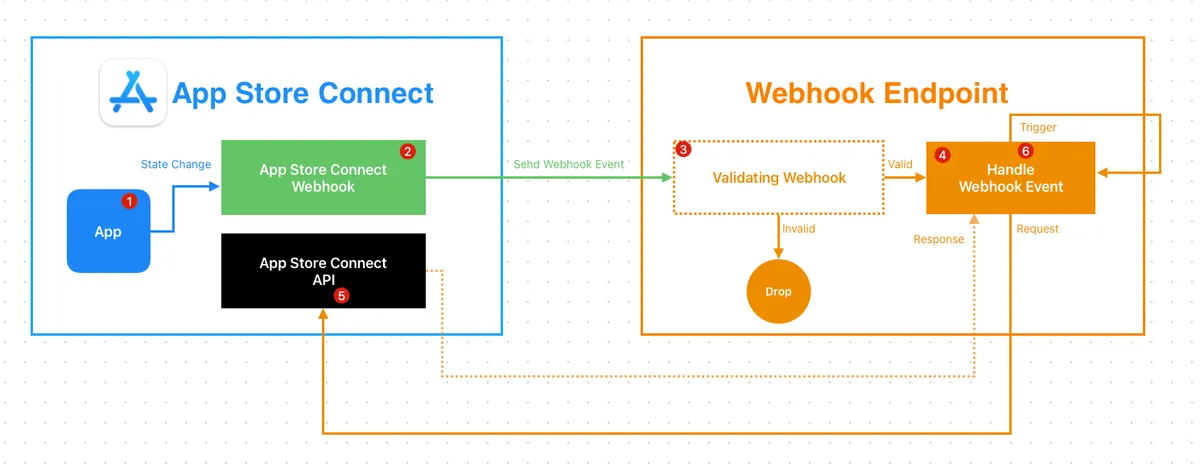
Method 1 — Using Fastlane to Connect with App Store Connect API
The fastest way here is to directly trigger the CI/CD service and use Fastlane’s built-in Spaceship to connect with the App Store Connect API.
If you already use the Fastlane App Store Connect API to manage Match certificates or submissions, this method can be used directly without hassle; if not, first refer to the official documentation to generate an API Key and securely store it in your CI/CD service secrets.
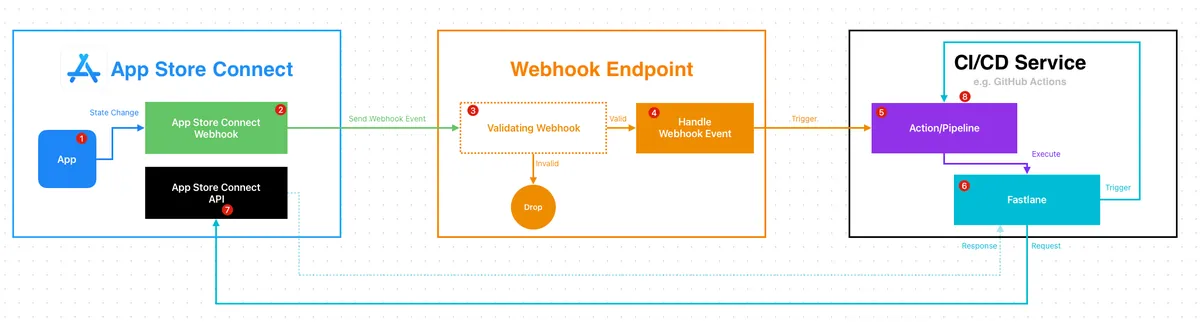
- App Store Connect
- When the app status changes
- Trigger Webhook
- Webhook Endpoint
Can be a self-hosted service/API or a simple FAAS service (Cloudflare Worker / AWS Lambda / Cloud Functions / Google Apps Script)- Verify Webhook (optional)
- Handle Webhook events and forward event requests to CI/CD services for execution
e.g. trigger GitHub Actions via GitHub API..
- CI/CD Service
GitHub Actions / Bitbucket Pipeline / Gitlab Runner…- Trigger Action
- Run Fastlane script, reuse Fastlane Spaceship authentication
- App Store Connect
- Call App Store Connect API to get complete information
- CI/CD Service
- Subsequent steps, such as sending notifications or triggering another action
Fastlane Example:
1
2
3
4
5
6
7
8
9
10
11
12
13
14
15
16
17
18
19
20
21
22
23
24
25
26
27
28
29
30
31
32
33
34
35
36
37
38
39
40
41
42
43
44
45
46
47
48
49
50
51
52
53
54
  # Usage:
  #   bundle exec fastlane appStoreConnectWebhookHandler \
  #     data:'{"data":{"type":"buildUploadStateUpdated","id":"xxx-xxx-xxx-xx-xxx","version":1,"attributes":{"oldState":"PROCESSING","newState":"COMPLETE"},"relationships":{"instance":{"data":{"type":"buildUploads","id":"xxx-xxx-xxx-xx-xxx"},"links":{"self":"https://api.appstoreconnect.apple.com/v1/buildUploads/xxx-xxx-xxx-xx-xxx"}}}}}'
  # Notes:
  # - `data:` must be a JSON string.
  # - This lane is intended for local debugging (it prints the GET response).
  desc "[Automation] Handle App Store Connect webhook payload and fetch related instance via ASC API"
  lane :appStoreConnectWebhookHandler do \\|options\\|
    begin
      data = options[:data]
      UI.user_error!("Missing data") if data.empty?
      data = JSON.parse(data)
      url = data.dig("data", "relationships", "instance", "links", "self").to_s.strip
      UI.user_error!("Missing instance self url in JSON") if url.empty?

      api_key = app_store_connect_api_key(
        key_id: "xxxx",
        issuer_id: "xxxx-xxxx-xxxx-xxxx-165aa6465141",
        key_filepath: "./AuthKey_xxxx.p8",
        duration: 1200, # optional (maximum 1200)
        in_house: false # optional but may be required if using match/sigh
      )

      loadAppStoreConnectAPIKey
      #
      uri = URI.parse(url)
      http = Net::HTTP.new(uri.host, uri.port)
      http.use_ssl = true
      http.verify_mode = OpenSSL::SSL::VERIFY_PEER
      store = OpenSSL::X509::Store.new
      store.set_default_paths
      http.cert_store = store

      request = Net::HTTP::Get.new(uri.request_uri)
      token = Spaceship::ConnectAPI.token
      UI.user_error!("App Store Connect API token is not available. Make sure app_store_connect_api_key is configured correctly.") if token.nil?
      request['Authorization'] = "Bearer #{token.text}"

      request['Content-Type'] = 'application/json'
      request['Accept'] = 'application/json'

      response = http.request(request)
      UI.message("📡 GET #{url} Response: [#{response.code}] #{response.message}")
      UI.message(response.body)
      #

      response
      ## handle response...do next actions...

    rescue => e
        UI.error("❌ Failed handle App Store Connect API Webhook: #{e}")
    end

  end
Method 2 — Handle It Yourself at the Webhook Endpoint
The second method is to handle everything directly on the Webhook Endpoint service, but the drawback is that you need to put the App Store Connect API Key on the service and handle Token verification yourself.
Ruby Example:
1
2
3
4
5
6
7
8
9
10
11
12
13
14
15
16
17
18
19
20
21
22
23
24
25
26
27
28
29
30
require 'jwt'
require 'net/http'
require 'time'

keyFile = File.read('./AuthKey_XXXX.p8') # replace with your .p8 private key file (download from App Store Connect)
privateKey = OpenSSL::PKey::EC.new(keyFile)

payload = {
            iss: 'YOUR_ISSUE_ID', # replace with your issuer ID (found in App Store Connect User Access -> Keys -> App Store Connect API page)
            iat: Time.now.to_i,
            exp: Time.now.to_i + 60*20,
            aud: 'appstoreconnect-v1'
          }

token = JWT.encode payload, privateKey, 'ES256', header_fields={kid:"YOUR_KEY_ID", typ:"JWT"} # replace with your key ID (found in App Store Connect User Access -> Keys -> App Store Connect API page)
puts token

decoded_token = JWT.decode token, privateKey, true, { algorithm: 'ES256' }
puts decoded_token

# Replace with the relationships link from the Webhook Payload
uri = URI("https://api.appstoreconnect.apple.com/v1/apps/APPID/customerReviews") # replace APPID with your app ID in App Store Connect -> Your App -> App Information -> Apple ID
https = Net::HTTP.new(uri.host, uri.port)
https.use_ssl = true

request = Net::HTTP::Get.new(uri)
request['Authorization'] = "Bearer #{token}";

response = https.request(request)
puts response.read_body
For generating App Store Connect API Key, creating Tokens, and using the API, please refer to “App Store Connect API now supports reading and managing Customer Reviews”.
App Store Connect API Response
Here are some example Responses obtained by calling the Relationships Link to get complete information after receiving a Webhook Event.
Build Version Upload — Process Complete
https://api.appstoreconnect.apple.com/v1/buildUploads/xxx-xx-xx-xx-xxx
1
2
3
4
5
6
7
8
9
10
11
12
13
14
15
16
17
18
19
20
21
22
23
24
25
26
27
28
29
30
31
32
33
{
  "data": {
    "type": "buildUploads",
    "id": "xx-xx-xx-xxx-xx",
    "attributes": {
      "cfBundleShortVersionString": "1.101.0",
      "cfBundleVersion": "1",
      "createdDate": "2025-12-25T08:26:43-08:00",
      "state": {
        "errors": [],
        "warnings": [],
        "infos": [],
        "state": "COMPLETE"
      },
      "platform": "IOS",
      "uploadedDate": "2025-12-25T08:28:35-08:00"
    },
    "relationships": {
      "buildUploadFiles": {
        "links": {
          "self": "https://api.appstoreconnect.apple.com/v1/buildUploads/xx-xx-xx-xxx-xx/relationships/buildUploadFiles",
          "related": "https://api.appstoreconnect.apple.com/v1/buildUploads/xx-xx-xx-xxx-xx/buildUploadFiles"
        }
      }
    },
    "links": {
      "self": "https://api.appstoreconnect.apple.com/v1/buildUploads/xx-xx-xx-xxx-xx"
    }
  },
  "links": {
    "self": "https://api.appstoreconnect.apple.com/v1/buildUploads/xx-xx-xx-xxx-xx"
  }
}
Build Version Upload — Process Failed
https://api.appstoreconnect.apple.com/v1/buildUploads/xxx-xx-xx-xx-xxx
1
2
3
4
5
6
7
8
9
10
11
12
13
14
15
16
17
18
19
20
21
22
23
24
25
26
27
28
29
30
31
32
33
34
35
36
37
38
{
  "data": {
    "type": "buildUploads",
    "id": "xx-xx-xx-xx-xxx",
    "attributes": {
      "cfBundleShortVersionString": "1.101.0",
      "cfBundleVersion": "3",
      "createdDate": "2025-12-12T09:03:32-08:00",
      "state": {
        "errors": [
          {
            "code": "90683",
            "description": "Missing purpose string in Info.plist. Your app’s code references one or more APIs that access sensitive user data, or the app has one or more entitlements that permit such access. The Info.plist file for the “My.app” bundle should contain a NSMicrophoneUsageDescription key with a user-facing purpose string explaining clearly and completely why your app needs the data. If you’re using external libraries or SDKs, they may reference APIs that require a purpose string. While your app might not use these APIs, a purpose string is still required. For details, visit: https://developer.apple.com/documentation/uikit/protecting_the_user_s_privacy/requesting_access_to_protected_resources."
          }
        ],
        "warnings": [],
        "infos": [],
        "state": "FAILED"
      },
      "platform": "IOS",
      "uploadedDate": "2025-12-12T09:05:26-08:00"
    },
    "relationships": {
      "buildUploadFiles": {
        "links": {
          "self": "https://api.appstoreconnect.apple.com/v1/buildUploads/xx-xx-xx-xx-xxx/relationships/buildUploadFiles",
          "related": "https://api.appstoreconnect.apple.com/v1/buildUploads/xx-xx-xx-xx-xxx/buildUploadFiles"
        }
      }
    },
    "links": {
      "self": "https://api.appstoreconnect.apple.com/v1/buildUploads/xx-xx-xx-xx-xxx"
    }
  },
  "links": {
    "self": "https://api.appstoreconnect.apple.com/v1/buildUploads/xx-xx-xx-xx-xxx"
  }
}
Taking ITMS-90683 as an example.
App Version Status
https://api.appstoreconnect.apple.com/v1/appStoreVersions/xxx-xx-xx-xx-xxx
1
2
3
4
5
6
7
8
9
10
11
12
13
14
15
16
17
18
19
20
21
22
23
24
25
26
27
28
29
30
31
32
33
34
35
36
37
38
39
40
41
42
43
44
45
46
47
48
49
50
51
52
53
54
55
56
57
58
59
60
61
62
63
64
65
66
67
68
69
70
71
72
73
74
75
76
77
78
79
80
81
82
83
84
85
86
87
88
89
90
91
92
93
94
95
96
97
98
99
100
101
102
103
104
105
{
  "data": {
    "type": "appStoreVersions",
    "id": "xxx-xxx-xxx-xxx",
    "attributes": {
      "platform": "IOS",
      "versionString": "1.101.0",
      "appStoreState": "READY_FOR_SALE",
      "appVersionState": "READY_FOR_DISTRIBUTION",
      "copyright": "© 2025 ZhgChgLi.",
      "reviewType": "APP_STORE",
      "releaseType": "MANUAL",
      "earliestReleaseDate": null,
      "usesIdfa": null,
      "downloadable": true,
      "createdDate": "2025-12-15T19:12:55-08:00"
    },
    "relationships": {
      "ageRatingDeclaration": {
        "links": {
          "self": "https://api.appstoreconnect.apple.com/v1/appStoreVersions/xxx-xxx-xxx-xxx/relationships/ageRatingDeclaration",
          "related": "https://api.appstoreconnect.apple.com/v1/appStoreVersions/xxx-xxx-xxx-xxx/ageRatingDeclaration"
        }
      },
      "appStoreVersionLocalizations": {
        "links": {
          "self": "https://api.appstoreconnect.apple.com/v1/appStoreVersions/xxx-xxx-xxx-xxx/relationships/appStoreVersionLocalizations",
          "related": "https://api.appstoreconnect.apple.com/v1/appStoreVersions/xxx-xxx-xxx-xxx/appStoreVersionLocalizations"
        }
      },
      "build": {
        "links": {
          "self": "https://api.appstoreconnect.apple.com/v1/appStoreVersions/xxx-xxx-xxx-xxx/relationships/build",
          "related": "https://api.appstoreconnect.apple.com/v1/appStoreVersions/xxx-xxx-xxx-xxx/build"
        }
      },
      "appStoreVersionPhasedRelease": {
        "links": {
          "self": "https://api.appstoreconnect.apple.com/v1/appStoreVersions/xxx-xxx-xxx-xxx/relationships/appStoreVersionPhasedRelease",
          "related": "https://api.appstoreconnect.apple.com/v1/appStoreVersions/xxx-xxx-xxx-xxx/appStoreVersionPhasedRelease"
        }
      },
      "gameCenterAppVersion": {
        "links": {
          "self": "https://api.appstoreconnect.apple.com/v1/appStoreVersions/xxx-xxx-xxx-xxx/relationships/gameCenterAppVersion",
          "related": "https://api.appstoreconnect.apple.com/v1/appStoreVersions/xxx-xxx-xxx-xxx/gameCenterAppVersion"
        }
      },
      "routingAppCoverage": {
        "links": {
          "self": "https://api.appstoreconnect.apple.com/v1/appStoreVersions/xxx-xxx-xxx-xxx/relationships/routingAppCoverage",
          "related": "https://api.appstoreconnect.apple.com/v1/appStoreVersions/xxx-xxx-xxx-xxx/routingAppCoverage"
        }
      },
      "appStoreReviewDetail": {
        "links": {
          "self": "https://api.appstoreconnect.apple.com/v1/appStoreVersions/xxx-xxx-xxx-xxx/relationships/appStoreReviewDetail",
          "related": "https://api.appstoreconnect.apple.com/v1/appStoreVersions/xxx-xxx-xxx-xxx/appStoreReviewDetail"
        }
      },
      "appStoreVersionSubmission": {
        "links": {
          "self": "https://api.appstoreconnect.apple.com/v1/appStoreVersions/xxx-xxx-xxx-xxx/relationships/appStoreVersionSubmission",
          "related": "https://api.appstoreconnect.apple.com/v1/appStoreVersions/xxx-xxx-xxx-xxx/appStoreVersionSubmission"
        }
      },
      "appClipDefaultExperience": {
        "links": {
          "self": "https://api.appstoreconnect.apple.com/v1/appStoreVersions/xxx-xxx-xxx-xxx/relationships/appClipDefaultExperience",
          "related": "https://api.appstoreconnect.apple.com/v1/appStoreVersions/xxx-xxx-xxx-xxx/appClipDefaultExperience"
        }
      },
      "appStoreVersionExperiments": {
        "links": {
          "self": "https://api.appstoreconnect.apple.com/v1/appStoreVersions/xxx-xxx-xxx-xxx/relationships/appStoreVersionExperiments",
          "related": "https://api.appstoreconnect.apple.com/v1/appStoreVersions/xxx-xxx-xxx-xxx/appStoreVersionExperiments"
        }
      },
      "appStoreVersionExperimentsV2": {
        "links": {
          "self": "https://api.appstoreconnect.apple.com/v1/appStoreVersions/xxx-xxx-xxx-xxx/relationships/appStoreVersionExperimentsV2",
          "related": "https://api.appstoreconnect.apple.com/v1/appStoreVersions/xxx-xxx-xxx-xxx/appStoreVersionExperimentsV2"
        }
      },
      "customerReviews": {
        "links": {
          "self": "https://api.appstoreconnect.apple.com/v1/appStoreVersions/xxx-xxx-xxx-xxx/relationships/customerReviews",
          "related": "https://api.appstoreconnect.apple.com/v1/appStoreVersions/xxx-xxx-xxx-xxx/customerReviews"
        }
      },
      "alternativeDistributionPackage": {
        "links": {
          "self": "https://api.appstoreconnect.apple.com/v1/appStoreVersions/xxx-xxx-xxx-xxx/relationships/alternativeDistributionPackage",
          "related": "https://api.appstoreconnect.apple.com/v1/appStoreVersions/xxx-xxx-xxx-xxx/alternativeDistributionPackage"
        }
      }
    },
    "links": {
      "self": "https://api.appstoreconnect.apple.com/v1/appStoreVersions/xxx-xxx-xxx-xxx"
    }
  },
  "links": {
    "self": "https://api.appstoreconnect.apple.com/v1/appStoreVersions/xxx-xxx-xxx-xxx"
  }
}
As mentioned earlier, detailed app information, version number, and error reasons can only be obtained by calling the API.
Done
At this point, we can use the App Store Connect API Webhook to better improve App CI/CD and automation workflows, enhancing team development efficiency.
Further Reading
If you have any questions or feedback, feel free to contact me.
This post was originally published on Medium (View original post), and automatically converted and synced by ZMediumToMarkdown.