
iOS/Android/Flutter Daily Auto Job Notifications (Telegram Public Free Channel), Helping You Catch the Latest Job Opportunities
Opening 104, 1111, LinkedIn, and Yourator daily to manually filter iOS, Android, and Flutter developer jobs is time-consuming and easy to miss new opportunities.
This free Telegram notification channel automatically organizes the latest jobs for mobile developers and sends a sorted list by “update date, salary, and keywords” to your phone every day between 00:00 and 01:00. Messages are kept for 30 days, so you won’t miss great jobs even while you sleep.
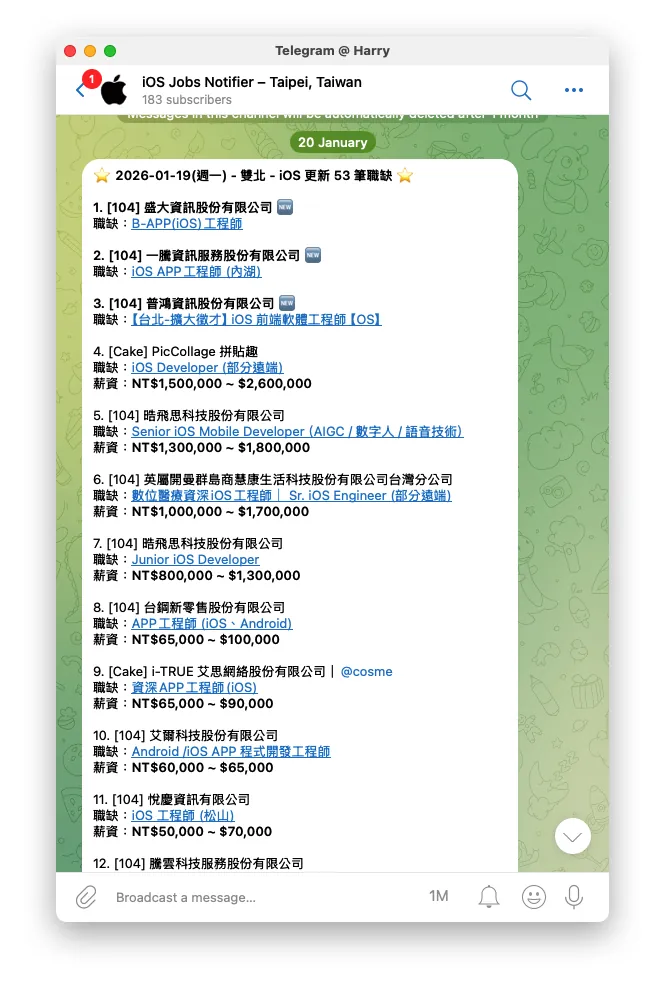
One-Click Subscription: Join Three Dedicated Channels Directly
-
iOS Job Notification Channel: @iosjobstw
-
Android Job Notification Channel: @androidjobstw
-
Flutter Job Notification Channel: @flutterjobstw
It is recommended to pin the Channels you follow in your chat list, enable notifications, or set them to “mute but keep badge count.” This way, you can quickly browse the latest iOS, Android, and Flutter job openings every morning.
Rules and Operation Methods
-
Filter Criteria: Jobs added or updated on YYYY-MM-DD, with “Job category as iOS/Android/Flutter Engineer” or “Job description containing iOS/Android/Flutter keywords.”
-
🆕 Tag: Jobs posted within the last 90 days are marked with 🆕. No salary info means it is negotiable or not disclosed on the original site.
-
Push Notification Time: Sent daily between 00:00–01:00 (times vary by channel), messages are kept for 30 days only.
-
Sorting Logic: Sorted by “newest to oldest job postings, highest to lowest salary, and inclusion of job-related keywords,” making it easy to view the latest and best-paid options first.
-
Platforms Included: 104 Job Bank, 1111 Job Bank, Cake (CakeResume), LinkedIn Jobs, Yourator.
What Does the Daily Message Look Like? (Notification Example)
⭐ 2026-01-20 (Tue) - Taipei & New Taipei - iOS Updated X Job Openings ⭐
1. [104] XXX Co., Ltd.
   Position: iOS Staff Engineer
   Salary: NT$1,500,000 ~ $2,000,000
2. [Cake] XXX Co., Ltd.
   Position: iOS Engineer
   Salary: NT$50,000 and above
...
---
Notes:
...
Key Points:
-
The title includes the date, region, and number of platforms to help you quickly determine if there is a big surge of iOS/Android/Flutter job openings today.
-
Each listing includes the platform, company, job title, and salary range. Click the original link to see the full description.
-
🆕 indicates the job was posted within the last 90 days and is recommended for priority application; a blank salary means it is not disclosed or negotiable on the original site.
Why Do Mobile Developers Need This Telegram Job Notification?
-
Focus on iOS/Android/Flutter Job Openings
-
Fixed Time, Clean and Easy to Read: Delivered daily between 00:00–01:00, so you can catch up as soon as you wake up; message spacing and sorting are optimized for mobile reading.
-
Cross-Platform Integration: Collect iOS, Android, and Flutter job openings from 104 Job Bank, 1111 Job Bank, Cake (CakeResume), LinkedIn Jobs, and Yourator.
-
Mobile-friendly experience: Telegram’s push notifications are reliable, available on both iOS and Android; you can also sync and view on the desktop version of Telegram.
How to Join and Use (Applicable for iOS / Android / Desktop)
-
Install Telegram: iOS version on the App Store, Android version on Google Play, or use the desktop/web version directly.
-
Open the corresponding link to join the Channel:
-
@iosjobstw: Dedicated to iOS job openings and iOS app engineer positions.
-
@androidjobstw: Focused on Android job openings and Android engineer positions.
-
@flutterjobstw: Dedicated to Flutter job openings and cross-platform Flutter engineer positions.
-
-
Pin Chat: Long press (or right-click) the chat in the list and select “Pin” to prevent messages from being buried by other groups.
-
Notification Settings: It is recommended to enable “Daily Summary” or at least keep the red dot alert, so you can quickly scan the list in the morning.
-
Create Favorites: When you find a job you like, quickly save it using Telegram’s “Save Message” or “Forward to Personal Notes.”
-
Mobile Sync: Both desktop and mobile receive updates, making it easy to fill out resumes on desktop during the day and track updates on mobile at night.
Tips for Using iOS, Android, Flutter Job Notifications
-
Salary Sorting Priority: Sorted from highest to lowest salary. Focus on the top three listings first, as a company’s investment in technology usually reflects in its pay.
-
Use Keywords to Confirm Job Direction: When visiting the original site, search for keywords like SwiftUI/Swift, Kotlin/Jetpack Compose, Flutter/BLoC/Riverpod to determine if the job matches your tech stack.
-
Record Submitted Applications: Mark submitted links with a ✅ or save them to avoid duplicate applications and to easily track responses later.
-
Periodic Check 🆕: Focus on 🆕 tags first to speed up your application.
-
Make Good Use of Telegram Search: Use keywords to search within the Channel and quickly find posts with specific criteria.
How to Make Notifications “Actionable”: The Best Path from Viewing to Applying
-
Step 1: Quickly scan the titles: Determine if the location and platform match your job search strategy (e.g., remote work available).
-
Step 2: Prioritize High Salary or 🆕: First open job listings marked with high salary or 🆕 to ensure early application.
-
Step 3: Apply Using Templates: Prepare three resume templates for iOS/Android/Flutter, and adjust technical keywords based on job requirements.
-
Step 4: Record and Track: Write down the company, job title, salary, application date, and response status in your Notion or spreadsheet.
Frequently Asked Questions (FAQ)
-
Why are messages only kept for 30 days? To minimize clutter from outdated job posts and protect company job details.
-
Is the information reliable? Job descriptions and salaries come from the original posting sites. This service does not guarantee completeness or accuracy; please verify on the original site before applying.
-
Want to report an issue or suggestion? Leave a message directly in the Feedback Channel; please include the job link and screenshots before messaging to help with troubleshooting.
Copyright and Usage Statement
-
This service is for non-profit use only. All job content copyrights belong to the original posting websites.
-
⚠️⚠️⚠️ No job postings or advertisements accepted. Please do not message for placement requests; this service will never charge fees or receive any commercial benefits.
-
Job-related information is based on the original website announcements and is not guaranteed to be complete or accurate.
-
If you are an employer, please post or update job openings directly on the job platforms.
Spend 5 minutes every morning scrolling through iOS, Android, and Flutter job notifications on Telegram, and you’ve booked yourself a daily “latest top job list.” No need to open multiple job sites one by one—your phone gathers the newest mobile developer openings for you. Wishing you an early offer you love. ㊗️
Buy me a beer
Donations are used to cover maintenance and server costs.


Comments