
App Store Connect API Now Supports Reading and Managing Customer Reviews
App Store Connect API 2.0+ Comprehensive Update, Supporting In-app Purchases, Subscriptions, and Customer Reviews Management
2022/07/19 News
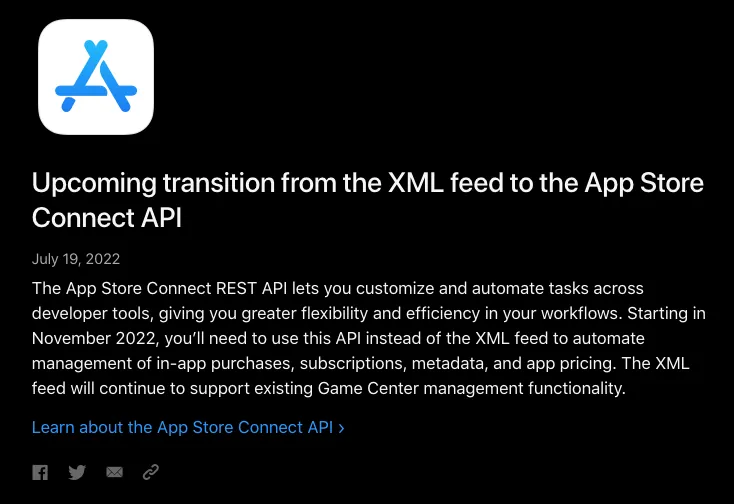
Upcoming transition from the XML feed to the App Store Connect API
This morning, I received the latest news from Apple Developers. The App Store Connect API now supports management of In-app purchases, Subscriptions, and Customer Reviews, allowing developers to integrate Apple’s development process more flexibly and efficiently with CI/CD or business backend systems!
I haven’t worked with In-app purchases or Subscriptions, but Customer Reviews excite me a lot. I previously published an article titled AppStore APP’s Reviews Slack Bot 那些事 exploring how to integrate app reviews into workflows.
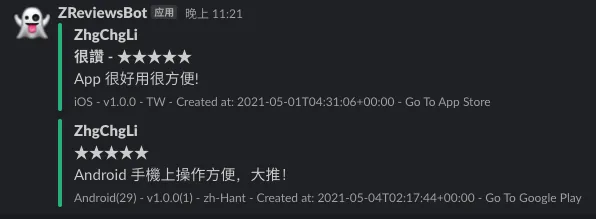
Slack Review Bot — ZReviewsBot
Before the App Store Connect API was supported, there were only two ways to get iOS app reviews:
One method is subscribing to the Public RSS, but this RSS lacks flexible filtering, provides limited information, has quantity limits, and we occasionally encounter data inconsistencies, making it unstable.
2. Using Fastlane — SpaceShip to handle complex web operations and session management, it fetches review data from the App Store Connect backend (essentially acting as a web scraper that simulates a browser to crawl the backend).
-
The advantage is complete and stable data; we have integrated it for a year without any data issues.
-
The downside is that the Session expires every month and requires manual re-login. Also, Apple ID now universally requires 2FA verification, so this step must be done manually to generate a valid Session. Additionally, if the IP used to create the Session differs from the IP used to access it, the Session will expire immediately (making it difficult to run bots on networks with dynamic IPs).

important-note-about-session-duration by Fastlane
- The token expires irregularly every month, requiring frequent updates, which becomes really annoying over time; moreover, this “Know How” is actually hard to transfer to other colleagues.
But since there was no other way, it had to be done like this, until I received news this morning…
⚠️ Note: Apple plans to discontinue the original XML (RSS) access method in November 2022.
2022/08/10 Update
I have developed a new “ZReviewTender — Free and Open-Source App Reviews Monitoring Bot” based on the new App Store Connect API.
App Store Connect API 2.0+ Customer Reviews Trial
Creating an App Store Connect API Key
First, log in to the App Store Connect dashboard, then go to “Users and Access” -> “Keys” -> “App Store Connect API”:
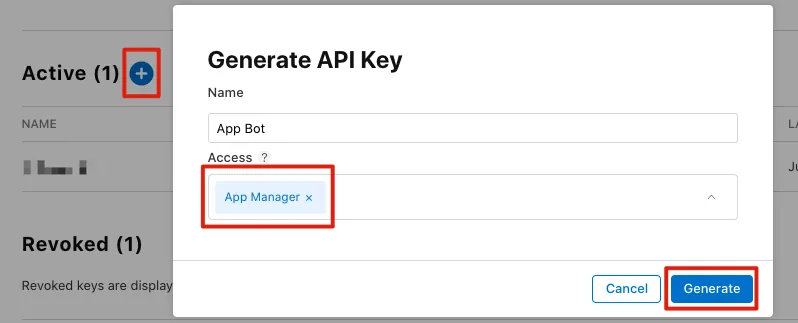
Click the “+” button, enter the name and permissions; for detailed permissions, refer to the official documentation. To minimize testing issues, select “App Manager” here to grant full permissions.

Click the “Download API Key” button on the right to download and save your “AuthKey_XXX.p8” key.
⚠️ Note: This Key can only be downloaded once, so please keep it safe. If lost, you must revoke the existing one and create a new one. ⚠️
⚠️ Do Not Leak the .p8 Key File ⚠️
App Store Connect API Access Methods
curl -v -H 'Authorization: Bearer [signed token]' "https://api.appstoreconnect.apple.com/v1/apps"
How to Generate a Signed Token (JWT, JSON Web Token)
Refer to the official documentation.
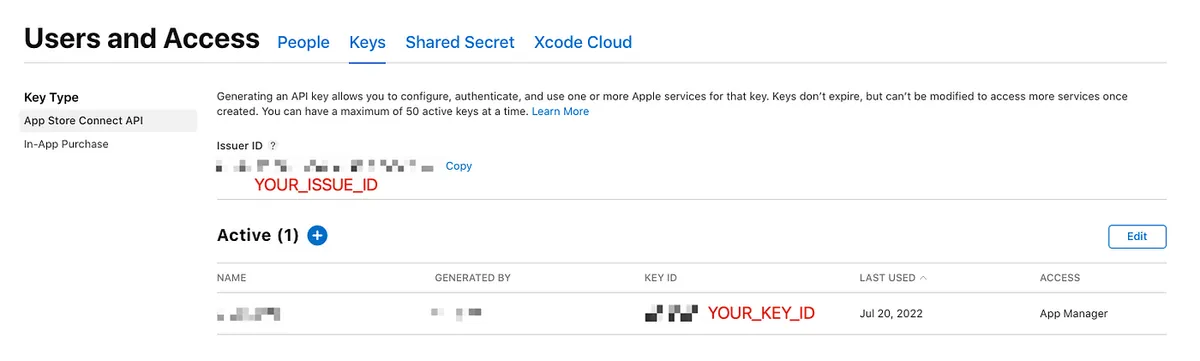
- JWT Header:
{kid:"YOUR_KEY_ID", typ:"JWT", alg:"ES256"}
YOUR_KEY_ID: Refer to the image above.
- JWT Payload:
{
  iss: 'YOUR_ISSUE_ID',
  iat: TOKEN creation time (UNIX TIMESTAMP e.g 1658326020),
  exp: TOKEN expiration time (UNIX TIMESTAMP e.g 1658327220),
  aud: 'appstoreconnect-v1'
}
YOUR_ISSUE_ID: Refer to the image above.
exp TOKEN expiration time: varies depending on the access function or setting; some can be permanent, while others expire after over 20 minutes and require regeneration. For details, please refer to the official documentation.
Generate JWT using JWT.IO or the Ruby example below
jwt.rb:
require 'jwt'
require 'time'

keyFile = File.read('./AuthKey_XXXX.p8') # YOUR .p8 private key file path
privateKey = OpenSSL::PKey::EC.new(keyFile)

payload = {
            iss: 'YOUR_ISSUE_ID',
            iat: Time.now.to_i,
            exp: Time.now.to_i + 60*20,
            aud: 'appstoreconnect-v1'
          }

token = JWT.encode payload, privateKey, 'ES256', header_fields={kid:"YOUR_KEY_ID", typ:"JWT"}
puts token


decoded_token = JWT.decode token, privateKey, true, { algorithm: 'ES256' }
puts decoded_token
- Ruby JWT tool is here: https://github.com/jwt/ruby-jwt
The final result will be a JWT similar to the following:
4oxjoi8j69rHQ58KqPtrFABBWHX2QH7iGFyjkc5q6AJZrKA3AcZcCFoFMTMHpM.pojTEWQufMTvfZUW1nKz66p3emsy2v5QseJX5UJmfRjpxfjgELUGJraEVtX7tVg6aicmJT96q0snP034MhfgoZAB46MGdtC6kv2Vj6VeL2geuXG87Ys6ADijhT7mfHUcbmLPJPNZNuMttcc.fuFAJZNijRHnCA2BRqq7RZEJBB7TLsm1n4WM1cW0yo67KZp-Bnwx9y45cmH82QPAgKcG-y1UhRUrxybi5b9iNN
Give it a try?
With the Token, we can start making requests to the App Store Connect API!
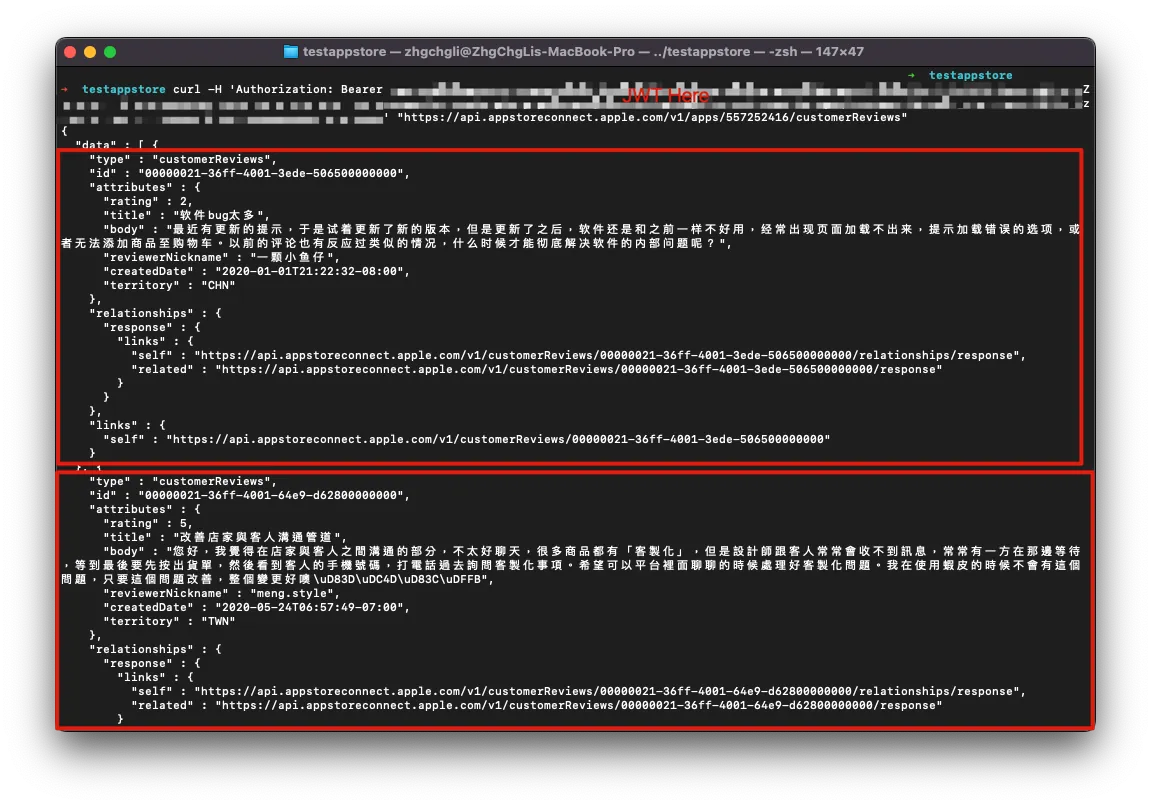
curl -H 'Authorization: Bearer JWT' "https://api.appstoreconnect.apple.com/v1/apps/APPID/customerReviews"
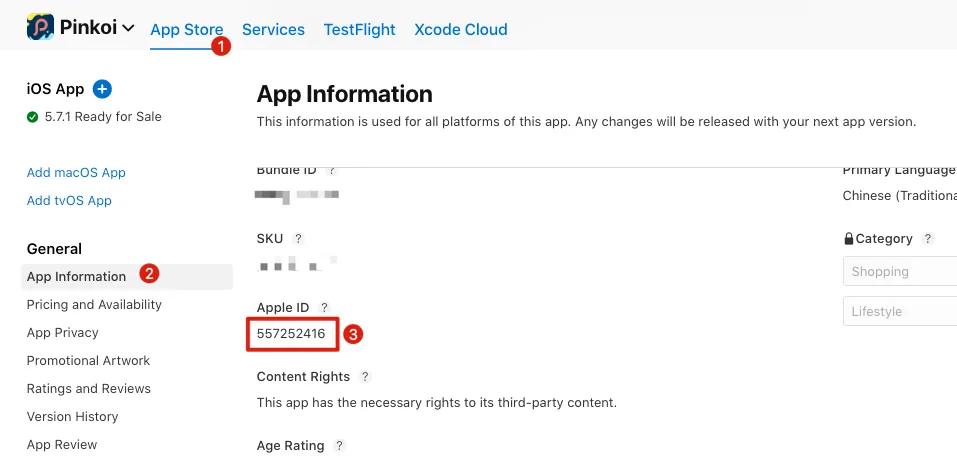
APPIDcan be obtained from the App Store Connect dashboard:
Or the App Store page:
-
APPID =
557252416
-
Success! 🚀 We can now fetch App reviews using this method. The data is complete and fully automatable, requiring no manual routine maintenance (although the JWT will expire, the Private Key will not. We can generate a new JWT for each request by signing with the Private Key).
-
For other filter parameters and operation methods, please refer to the official documentation.
⚠️ You can only access App review data for apps you have permission to view ⚠️
Complete Ruby Test Project
A Ruby file was created to handle the above process, which you can directly clone, fill in the details, and test.
First Launch:
bundle install
Getting Started:
bundle exec ruby jwt.rb
Next
Similarly, we can access and manage through the API ( API Overview ):



Comments