
AppStore APP’s Reviews Slack Bot Matters
Build an App Review Tracking and Slack Notification Bot Using Ruby + Fastlane-SpaceShip

Photo by Austin Distel
Eating Rice Without Knowing the Price of Rice
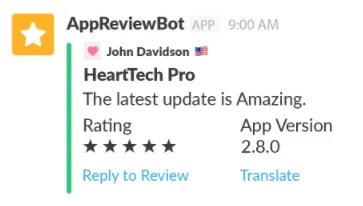
I recently found out that the bot forwarding the latest app reviews to Slack requires a paid subscription. I always thought this feature was free. The cost ranges from $5 to $200 per month because these platforms don’t offer just the “App Review Bot” feature. They also provide data analytics, record keeping, unified dashboards, competitor comparisons, and more. The pricing depends on the services each platform offers. The Review Bot is only a part of their package, but I only want this feature and nothing else. Paying for the full service feels like a waste in this case.
Problem
Originally, we used the free open-source tool TradeMe/ReviewMe for Slack notifications, but this tool has been unmaintained for years. Occasionally, it floods Slack with old reviews, which is alarming (many bugs have long been fixed, making us think there was a new problem!). The cause is unknown.
So consider finding other tools or methods to replace it.
TL;DR [2022/08/10] Update:
The App Reviews Bot has now been redesigned using the brand-new App Store Connect API and relaunched as “ZReviewTender — Free and Open-Source App Reviews Monitoring Bot”.
====
2022/07/20 Update
App Store Connect API now supports reading and managing Customer Reviews. The native App Store Connect API already allows access to app reviews, so there is no longer a need to use Fastlane — Spaceship to fetch reviews from the backend.
Principle Exploration
With the motivation set, let’s next explore the principles behind achieving the goal.
Official API ❌
Apple provides the App Store Connect API, but it does not offer a feature to fetch reviews.
Public URL API (RSS) ⚠️
Apple provides a public APP review RSS subscription URL, offering both rss xml and json formats.
https://itunes.apple.com/國家碼/rss/customerreviews/id=APP_ID/page=1/sortBy=mostRecent/json
-
Country codes: Refer to this document.
-
APP_ID: Go to the App’s web page, and you will get a URL like: https://apps.apple.com/tw/app/APP_NAME/id 12345678. The number after “id” is the App ID (digits only).
-
page: You can request pages 1 to 10; data beyond that cannot be retrieved.
-
sortBy:
mostRecent/jsonfetches the latest reviews in JSON format. You can also usemostRecent/xmlfor XML format.
The review data is returned as follows:
rss.json:
{
  "author": {
    "uri": {
      "label": "https://itunes.apple.com/tw/reviews/id123456789"
    },
    "name": {
      "label": "test"
    },
    "label": ""
  },
  "im:version": {
    "label": "4.27.1"
  },
  "im:rating": {
    "label": "5"
  },
  "id": {
    "label": "123456789"
  },
  "title": {
    "label": "A wonderful existence!"
  },
  "content": {
    "label": "Life is worthwhile~",
    "attributes": {
      "type": "text"
    }
  },
  "link": {
    "attributes": {
      "rel": "related",
      "href": "https://itunes.apple.com/tw/review?id=123456789&type=Purple%20Software"
    }
  },
  "im:voteSum": {
    "label": "0"
  },
  "im:contentType": {
    "attributes": {
      "term": "Application",
      "label": "Application"
    }
  },
  "im:voteCount": {
    "label": "0"
  }
}
Advantages:
-
Publicly accessible without authentication steps
-
Simple and Easy to Use
Disadvantages:
-
This RSS API is very outdated and has not been updated.
-
The returned review information is too limited (no comment time, edited review?, replied?)
-
Encountering Data Disorder Issues (Occasionally Older Data Appears Suddenly on Later Pages)
-
Access up to 10 pages at most
The biggest issue we encountered was 3; however, we are not sure if this is a problem with the Bot tool we used or with the RSS URL data.
Private URL API ✅
This method is somewhat unorthodox and was a sudden idea I came up with; however, after looking into other Review Bots, I found many websites use the same approach. It should be fine, and I saw tools doing this 4 to 5 years ago, though I didn’t study it in depth back then.
Advantages:
-
Same as Apple backend data
-
Complete and up-to-date data
-
More detailed filtering options available
-
APP tools with deep integration also use this method (AppRadar/AppReviewBot…).
Disadvantages:
-
Unofficial Method (Workaround)
-
Since Apple enforces full two-step authentication, the login session must be refreshed regularly.
Step 1 — Sniff the API that loads data for the review section in App Store Connect backend:
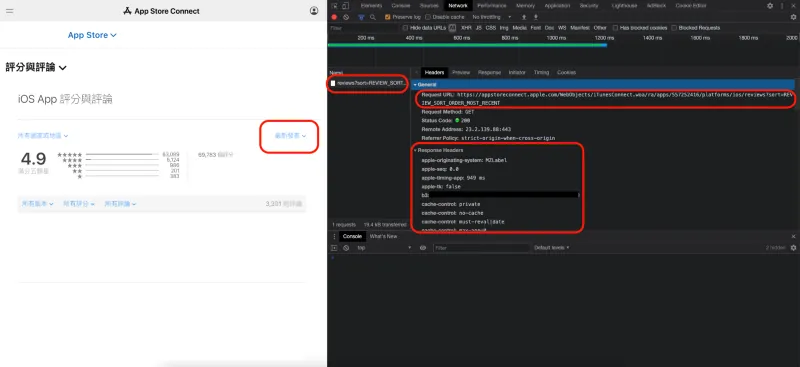
Get Apple’s backend by sending:
https://appstoreconnect.apple.com/WebObjects/iTunesConnect.woa/ra/apps/APP_ID/platforms/ios/reviews?index=0&sort=REVIEW_SORT_ORDER_MOST_RECENT
This endpoint retrieves the list of reviews:
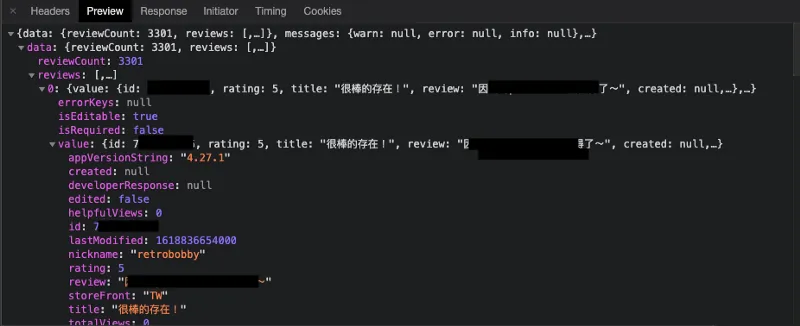
index = Pagination offset, showing up to 100 items at a time.
The review data is returned as follows:
private.json:
{
  "value": {
    "id": 123456789,
    "rating": 5,
    "title": "Great existence!",
    "review": "Life is worthwhile~",
    "created": null,
    "nickname": "test",
    "storeFront": "TW",
    "appVersionString": "4.27.1",
    "lastModified": 1618836654000,
    "helpfulViews": 0,
    "totalViews": 0,
    "edited": false,
    "developerResponse": null
  },
  "isEditable": true,
  "isRequired": false,
  "errorKeys": null
}
After testing, it was found that simply including cookie: myacinfo=<Token> can spoof the request to obtain data:
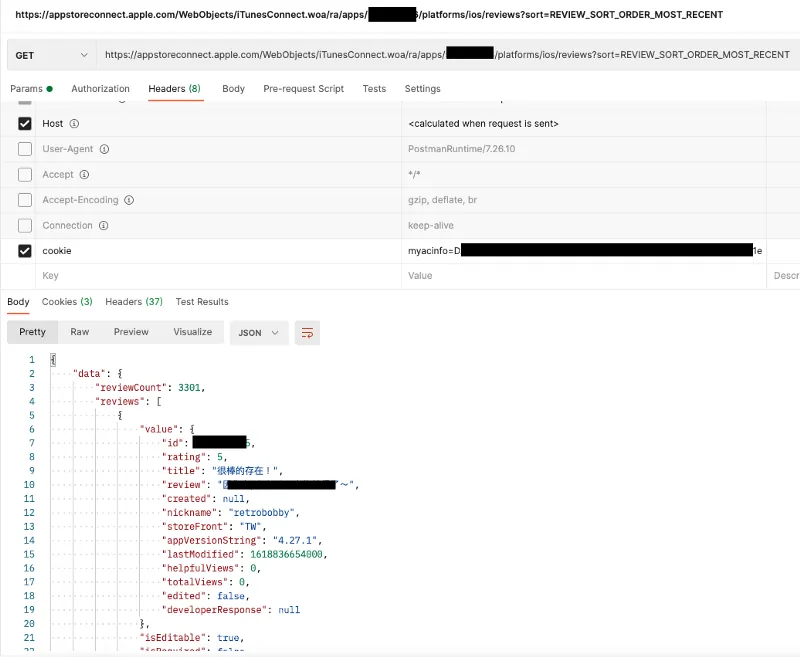
With the API ready and the required headers known, the next step is to find a way to automate retrieving the backend cookie information.
Step 2 — The Versatile Fastlane
Since Apple now enforces full Two-Step Verification, automating login authentication has become more complicated. Fortunately, Fastlane, which has been battling Apple’s security measures, supports official App Store Connect API, iTMSTransporter, and web authentication (including two-step verification). We can directly use Fastlane’s command:
fastlane spaceauth -u <App Store Connect account (Email)>
This command completes the web login authentication (including two-step verification) and saves the cookie into the FASTLANE_SESSION file.
You will get a string like this:
!ruby/object:HTTP::Cookie
name: myacinfo  value: <token>
domain: apple.com for_domain: true  path: "/"
secure: true  httponly: true  expires: max_age:
created_at: 2021-04-21 20:42:36.818821000 +08:00
accessed_at: 2021-04-21 22:02:45.923016000 +08:00
!ruby/object:HTTP::Cookie
name: <hash>  value: <token>
domain: idmsa.apple.com for_domain: true  path: "/"
secure: true  httponly: true  expires: max_age: 2592000
created_at: 2021-04-19 23:21:05.851853000 +08:00
accessed_at: 2021-04-21 20:42:35.735921000 +08:00
!ruby/object:HTTP::Cookie
name: dqsid  value: <token>
domain: appstoreconnect.apple.com  for_domain: false  path: "/"  secure: true  httponly: true  expires: max_age: 1800
created_at: &1 2021-04-21 22:02:47.118437000 +08:00
accessed_at: *1
Assigning myacinfo = value allows you to retrieve the review list.
Step 3 — SpaceShip
I originally thought Fastlane could only help us this far, and that we would have to manually connect the flow from getting the cookie with Fastlane to calling the API. But after some exploration, I found that Fastlane’s authentication module SpaceShip has even more powerful features!
SpaceShip
SpaceShip already provides a packaged method for fetching the review list: Class: Spaceship::TunesClient::get_reviews!
app = Spaceship::Tunes::login(appstore_account, appstore_password)
reviews = app.get_reviews(app_id, platform, storefront, versionId = '')
*storefront = region
Step 4 — Assembly
Fastlane and Spaceship are both written in Ruby, so we will use Ruby to create this Bot tool.
We can create a reviewBot.rb file, and to run it, simply enter the following command in the Terminal:
ruby reviewBot.rb
Done. (For more Ruby environment issues, see the tips at the end of the article)
First, since the original get_reviews method parameters do not meet our needs; I want review data from all regions and all versions, without filtering, and supporting pagination:
extension.rb:
# Extension Spaceship->TunesClient
module Spaceship
  class TunesClient < Spaceship::Client
    def get_recent_reviews(app_id, platform, index)
      r = request(:get, "ra/apps/#{app_id}/platforms/#{platform}/reviews?index=#{index}&sort=REVIEW_SORT_ORDER_MOST_RECENT")
      parse_response(r, 'data')['reviews']
     end
  end
end
So we extend a method in TunesClient ourselves, with parameters only including app_id, platform = ios (all lowercase), and index = page offset.
Next, assemble the login authentication and fetch the review list:
get_recent_reviews.rb:
index = 0
breakWhile = true
while breakWhile
  app = Spaceship::Tunes::login(APPStoreConnect account (Email), APPStoreConnect password)
  reviews = app.get_recent_reviews($app_id, $platform, index)
  if reviews.length() <= 0
    breakWhile = false
    break
  end
  reviews.each { \\|review\\|
    index += 1
    puts review["value"]
  }
end
Use a while loop to iterate through all pages and stop when no content is found.
Next, add a record of the last latest timestamp to notify only new messages that haven’t been notified before:
lastModified.rb:
lastModified = 0
if File.exists?(".lastModified")
  lastModifiedFile = File.open(".lastModified")
  lastModified = lastModifiedFile.read.to_i
end
newLastModified = lastModified
isFirst = true
messages = []

index = 0
breakWhile = true
while breakWhile
  app = Spaceship::Tunes::login(APPStoreConnect account (Email), APPStoreConnect password)
  reviews = app.get_recent_reviews($app_id, $platform, index)
  if reviews.length() <= 0
    breakWhile = false
    break
  end
  reviews.each { \\|review\\|
    index += 1
    if isFirst
      isFirst = false
      newLastModified = review["value"]["lastModified"]
    end

    if review["value"]["lastModified"] > lastModified && lastModified != 0
      # Do not send notification on first use
      messages.append(review["value"])
    else
      breakWhile = false
      break
    end
  }
end

messages.sort! { \\|a, b\\|  a["lastModified"] <=> b["lastModified"] }
messages.each { \\|message\\|
    notify_slack(message)
}

File.write(".lastModified", newLastModified, mode: "w+")
Simply use a .lastModified to record the time obtained during the last execution.
Do not send notifications on the first run to avoid spamming all at once
Final step: Compose the notification message & send it to Slack:
slack.rb:
# Slack Bot
def notify_slack(review)
  rating = review["rating"].to_i
  color = rating >= 4 ? "good" : (rating >= 2 ? "warning" : "danger")
  like = review["helpfulViews"].to_i > 0 ? " - #{review["helpfulViews"]} :thumbsup:" : ""
  date = review["edited"] == false ? "Created at: #{Time.at(review["lastModified"].to_i / 1000).to_datetime}" : "Updated at: #{Time.at(review["lastModified"].to_i / 1000).to_datetime}"


  isResponse = ""
  if review["developerResponse"] != nil && review["developerResponse"]['lastModified'] < review["lastModified"]
    isResponse = " (Reply is outdated)"
  end

  edited = review["edited"] == false ? "" : ":memo: User updated review#{isResponse}:"

  stars = "★" * rating + "☆" * (5 - rating)
  attachments = {
    :pretext => edited,
    :color => color,
    :fallback => "#{review["title"]} - #{stars}#{like}",
    :title => "#{review["title"]} - #{stars}#{like}",
    :text => review["review"],
    :author_name => review["nickname"],
    :footer => "iOS - v#{review["appVersionString"]} - #{review["storeFront"]} - #{date} - <https://appstoreconnect.apple.com/apps/APP_ID/appstore/activity/ios/ratingsResponses\\|Go To App Store>"
  }
  payload = {
   :attachments => [attachments],
   :icon_emoji => ":storm_trooper:",
   :username => "ZhgChgLi iOS Review Bot"
  }.to_json
  cmd = "curl -X POST --data-urlencode 'payload=#{payload}' SLACK_WEB_HOOK_URL"
  system(cmd, :err => File::NULL)
  puts "#{review["id"]} send Notify Success!"
 end
SLACK_WEB_HOOK_URL = Incoming WebHook URL
Final Result
appreviewbot.rb:
require "Spaceship"
require 'json'
require 'date'

# Config
$slack_web_hook = "Target notification web hook url"
$slack_debug_web_hook = "Notification web hook url for bot errors"
$appstore_account = "APPStoreConnect account (Email)"
$appstore_password = "APPStoreConnect password"
$app_id = "APP_ID"
$platform = "ios"

# Extension Spaceship->TunesClient
module Spaceship
  class TunesClient < Spaceship::Client
    def get_recent_reviews(app_id, platform, index)
      r = request(:get, "ra/apps/#{app_id}/platforms/#{platform}/reviews?index=#{index}&sort=REVIEW_SORT_ORDER_MOST_RECENT")
      parse_response(r, 'data')['reviews']
     end
  end
end

# Slack Bot
def notify_slack(review)
  rating = review["rating"].to_i
  color = rating >= 4 ? "good" : (rating >= 2 ? "warning" : "danger")
  like = review["helpfulViews"].to_i > 0 ? " - #{review["helpfulViews"]} :thumbsup:" : ""
  date = review["edited"] == false ? "Created at: #{Time.at(review["lastModified"].to_i / 1000).to_datetime}" : "Updated at: #{Time.at(review["lastModified"].to_i / 1000).to_datetime}"


  isResponse = ""
  if review["developerResponse"] != nil && review["developerResponse"]['lastModified'] < review["lastModified"]
    isResponse = " (Developer response is outdated)"
  end

  edited = review["edited"] == false ? "" : ":memo: User updated review#{isResponse}:"

  stars = "★" * rating + "☆" * (5 - rating)
  attachments = {
    :pretext => edited,
    :color => color,
    :fallback => "#{review["title"]} - #{stars}#{like}",
    :title => "#{review["title"]} - #{stars}#{like}",
    :text => review["review"],
    :author_name => review["nickname"],
    :footer => "iOS - v#{review["appVersionString"]} - #{review["storeFront"]} - #{date} - <https://appstoreconnect.apple.com/apps/APP_ID/appstore/activity/ios/ratingsResponses\\|Go To App Store>"
  }
  payload = {
   :attachments => [attachments],
   :icon_emoji => ":storm_trooper:",
   :username => "ZhgChgLi iOS Review Bot"
  }.to_json
  cmd = "curl -X POST --data-urlencode 'payload=#{payload}' #{$slack_web_hook}"
  system(cmd, :err => File::NULL)
  puts "#{review["id"]} send Notify Success!"
 end

begin
    lastModified = 0
    if File.exists?(".lastModified")
      lastModifiedFile = File.open(".lastModified")
      lastModified = lastModifiedFile.read.to_i
    end
    newLastModified = lastModified
    isFirst = true
    messages = []

    index = 0
    breakWhile = true
    while breakWhile
      app = Spaceship::Tunes::login($appstore_account, $appstore_password)
      reviews = app.get_recent_reviews($app_id, $platform, index)
      if reviews.length() <= 0
        breakWhile = false
        break
      end
      reviews.each { \\|review\\|
        index += 1
        if isFirst
          isFirst = false
          newLastModified = review["value"]["lastModified"]
        end

        if review["value"]["lastModified"] > lastModified && lastModified != 0
          # Do not notify on first use
          messages.append(review["value"])
        else
          breakWhile = false
          break
        end
      }
    end

    messages.sort! { \\|a, b\\|  a["lastModified"] <=> b["lastModified"] }
    messages.each { \\|message\\|
        notify_slack(message)
    }

    File.write(".lastModified", newLastModified, mode: "w+")
rescue => error
    attachments = {
        :color => "danger",
        :title => "AppStoreReviewBot Error occurs!",
        :text => error,
        :footer => "*Due to Apple technical limitations, precise review scraping requires re-login setup about once a month. Thank you for your understanding."
    }
    payload = {
        :attachments => [attachments],
        :icon_emoji => ":storm_trooper:",
        :username => "ZhgChgLi iOS Review Bot"
    }.to_json
    cmd = "curl -X POST --data-urlencode 'payload=#{payload}' #{$slack_debug_web_hook}"
    system(cmd, :err => File::NULL)
    puts error
end
Additionally, a begin…rescue (try…catch) block was added for protection. If an error occurs, a Slack notification is sent to alert us to check (usually due to session expiration).
Finally, just add this script to crontab / schedule or other scheduling tools to run it regularly!
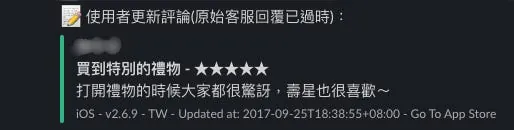
Screenshot:
Other Free Options
-
AppFollow: Using the Public URL API (RSS) is just passable.
-
feedis.io: Uses the Private URL API and requires your account credentials.
-
TradeMe/ReviewMe: A self-hosted service (node.js). We originally used this but faced the issues mentioned above.
-
JonSnow: Self-hosted service (GO), supports one-click deployment to Heroku, author: @saiday
Friendly Reminder
1.⚠️ For the Private URL API method, if the account has two-factor authentication enabled, it requires re-verification every 30 days at most to keep using it, and there is currently no workaround; if you can create an account without two-factor authentication, you can use it smoothly without issues.

#important-note-about-session-duration
2.⚠️ Whether free, paid, or self-hosted as described in this article; never use a developer account. Always create a separate App Store Connect account with only “Customer Support” permissions to prevent security issues.
-
It is recommended to use rbenv to manage Ruby, as the system’s built-in version 2.6 may cause conflicts.
-
If you encounter GEM or Ruby environment errors on macOS Catalina, you can refer to this reply for a solution.
Problem Solved!
After going through the above process, I have a better understanding of how the Slack Bot works and how to scrape iOS App Store reviews. I also got a feel for Ruby—it’s quite nice to write!



Comments