GitHub Actions|iOS App CI/CD Workflow Automation for Faster Builds and Deployments
iOS developers facing manual build and deployment delays can automate their CI/CD pipeline using GitHub Actions to streamline app build, testing, and deployment processes, achieving faster releases and improved reliability.
This post was translated with AI assistance — let me know if anything sounds off!
Table of Contents
CI/CD Practical Guide (Part 3): Implementing iOS App CI and CD Workflows with GitHub Actions
Complete Tutorial for iOS App Automated Build, Test, and Deployment with GitHub Actions
{:target="_blank"}](/assets/4b001d2e8440/1*0LK6m6CTImL6rcsrliiOQA.webp)
Photo by Robs
Preface
In the previous article “CI/CD Practical Guide (Part 2): Complete Guide to Using and Setting up GitHub Actions with Self-hosted Runner,” we introduced the basics of GitHub Actions, its workflow, and how to use your own machine as a Runner, guiding you through three simple automated Actions. This article will focus deeply on building an App (iOS) CI/CD workflow using GitHub Actions in real-world scenarios, walking you through each step while supplementing your GitHub Actions knowledge.
App CI/CD Workflow Diagram
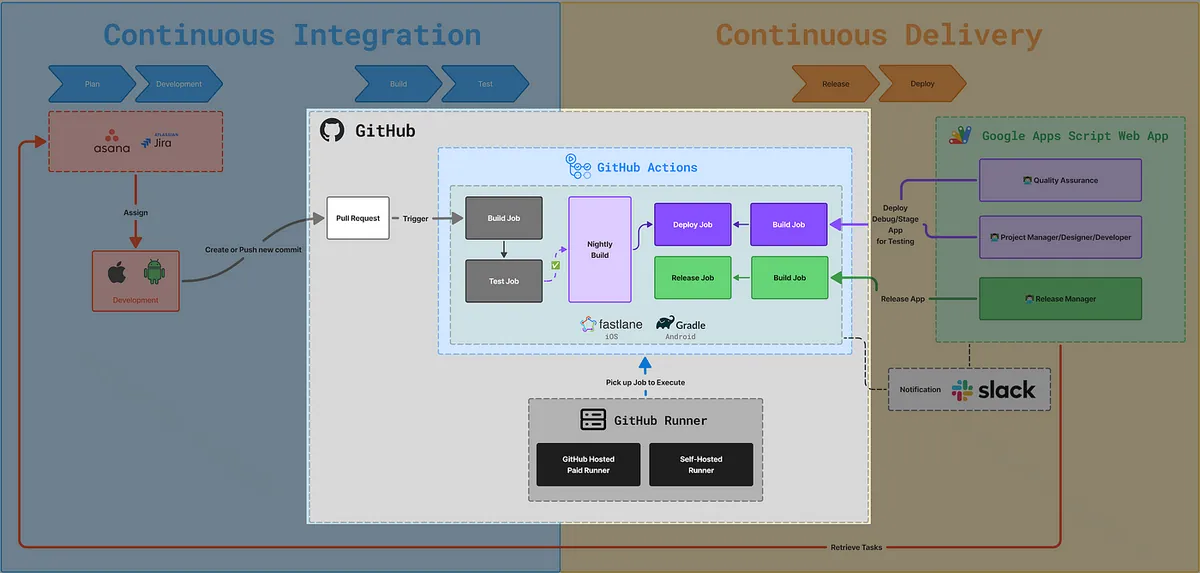
This article focuses on the GitHub Actions section for building CI/CD. The next article, “CI/CD Practical Guide (Part 4): Using Google Apps Script Web App to Connect with GitHub Actions to Build a Free and Easy Packaging Tool Platform,” will introduce the latter part about using Google Apps Script Web App to build a cross-team collaboration packaging platform.
Workflow:
GitHub Actions Triggered by Pull Request or Form or Scheduled
Run Corresponding Workflow Jobs/Steps
Step Executes Corresponding Fastlane (iOS) or (Android Gradle) Script
Fastlane Executes Corresponding xcodebuild (iOS) Commands
Get the Execution Result
Subsequent Workflow Jobs/Steps Handle Results
Completed
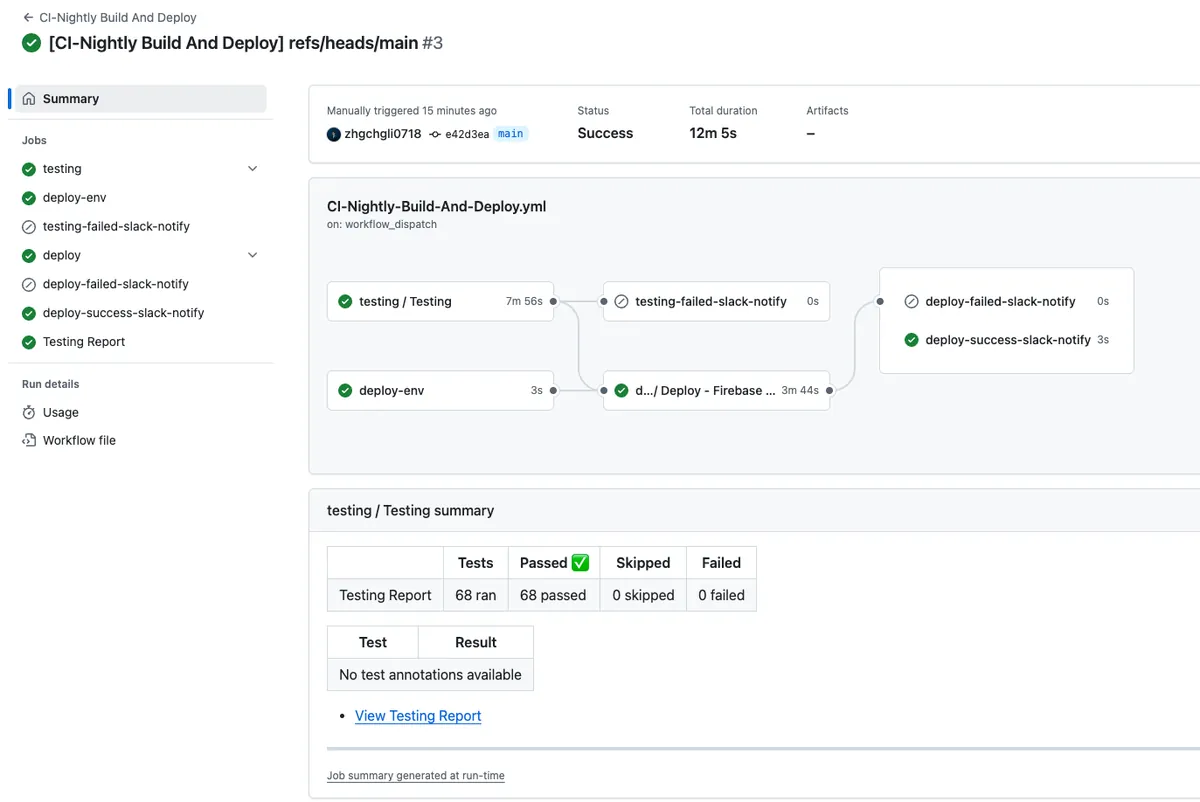
GitHub Actions Result Screenshots
First, let’s show the final result to give everyone some practical motivation!
{:target="_blank"}](/assets/4b001d2e8440/1*5gnQYdVAOtGR-bMK4ZrOhA.webp)
{:target="_blank"}](/assets/4b001d2e8440/1*t9PrQfcTANyvG7gfXXC-bw.webp)
GitHub Actions x Self-hosted Runner Basics
If you are not yet familiar with GitHub Actions and setting up a Self-hosted Runner, it is highly recommended to first read the previous article “CI/CD Practical Guide (Part 2): Complete Guide to Using and Setting up GitHub Actions and Self-hosted Runner” or implement it together with the knowledge from that article.
Implementation begins!
Infra Architecture of the iOS Demo Project
The iOS project content used in this article, including test items, is generated by AI, so there is no need to focus on iOS code details. The discussion is limited to Infra & CI/CD aspects.
The following tools are based on past experience; for new projects, consider using the newer mise and tuist.
Mint
Mint helps us unify the management of dependency tool versions (Gemfile can only manage Ruby Gems), such as XCodeGen, SwiftFormat, SwiftLint, and Periphery.
…etc
Mintfile:
1
2
3
yonaskolb/[email protected]
yonaskolb/[email protected]
nicklockwood/[email protected]
Here we only use three.
If it feels too complicated, you can skip this and directly install the required tools using brew install in the Action Workflow Step.
Bundle
Gemfile:
1
2
3
4
5
6
source 'https://rubygems.org'
gem 'cocoapods', '~>1.16.0'
gem 'fastlane', '~>2.228.0'

plugins_path = File.join(File.dirname(__FILE__), 'Product', 'fastlane', 'Pluginfile')
eval_gemfile(plugins_path) if File.exist?(plugins_path)
Managing Ruby (Gems) dependencies, the most commonly used ones in iOS projects are cocoapods and fastlane.
Cocoapods
Product/podfile:
1
2
3
4
5
6
platform :ios, '13.0'
use_frameworks!

target 'app-ci-cd-github-actions-demo' do
  pod 'SnapKit'
end
Although it has been announced as deprecated, Cocoapods is still common in older iOS projects. Here, we simply add Snapkit as a demo.
XCodeGen
To avoid conflicts caused by changes to .xcodeproj / .xcworkspace during multi-developer collaboration, unify the XCode Project definition using Project.yaml, then generate the Project files locally (do not commit them to Git).
Product/project.yaml:
1
2
3
4
5
6
7
8
9
10
11
12
13
14
15
16
17
18
19
20
21
22
23
24
25
26
27
28
29
30
31
32
33
34
35
36
37
38
39
40
41
42
43
44
45
46
47
48
49
50
51
52
53
54
55
56
57
58
59
60
61
62
63
64
65
66
67
68
69
70
71
72
73
74
75
76
77
78
name: app-ci-cd-github-actions-demo
options:
  bundleIdPrefix: com.example
  deploymentTarget:
    iOS: '13.0'
  usesTabs: false
  indentWidth: 2
  tabWidth: 2

configs:
  Debug: debug
  Release: release

targets:
  app-ci-cd-github-actions-demo:
    type: application
    platform: iOS
    sources:
      - app-ci-cd-github-actions-demo
    resources:
      - app-ci-cd-github-actions-demo/Assets.xcassets
      - app-ci-cd-github-actions-demo/Base.lproj
    info:
      path: app-ci-cd-github-actions-demo/Info.plist
      properties:
        CFBundleIdentifier: $(PRODUCT_BUNDLE_IDENTIFIER)
    settings:
      base:
        PRODUCT_BUNDLE_IDENTIFIER: com.test.appcicdgithubactionsdemo
    cocoapods: true

  app-ci-cd-github-actions-demoTests:
    type: bundle.unit-test
    platform: iOS
    sources:
      - app-ci-cd-github-actions-demoTests
    dependencies:
      - target: app-ci-cd-github-actions-demo
    info:
      path: app-ci-cd-github-actions-demoTests/Info.plist
    settings:
      base:
        PRODUCT_BUNDLE_IDENTIFIER: com.test.appcicdgithubactionsdemo.tests

  app-ci-cd-github-actions-demoUITests:
    type: bundle.ui-testing
    platform: iOS
    sources:
      - app-ci-cd-github-actions-demoUITests
    dependencies:
      - target: app-ci-cd-github-actions-demo
    info:
      path: app-ci-cd-github-actions-demoUITests/Info.plist
    settings:
      base:
        PRODUCT_BUNDLE_IDENTIFIER: com.test.appcicdgithubactionsdemo.uitests

  app-ci-cd-github-actions-demoSnapshotTests:
    type: bundle.unit-test
    platform: iOS
    sources:
      - path: app-ci-cd-github-actions-demoSnapshotTests
        excludes:
          - "**/__Snapshots__/**"
    dependencies:
      - target: app-ci-cd-github-actions-demo
      - product: SnapshotTesting
        package: SnapshotTesting
    info:
      path: app-ci-cd-github-actions-demoSnapshotTests/Info.plist
      settings:
        base:
          PRODUCT_BUNDLE_IDENTIFIER: com.test.appcicdgithubactionsdemo.snapshottests

packages:
  SnapshotTesting:
    url: https://github.com/pointfreeco/swift-snapshot-testing
    from: 1.18.4
SnapshotTesting: Managed with Swift Package Manager.
Fastlane
Encapsulate complex steps such as xcodebuild commands, integrating with App Store Connect API, Firebase API, and other services.
Product/fastlane/Fastfile:
1
2
3
4
5
6
7
8
9
10
11
12
13
14
15
16
17
18
19
20
21
22
23
24
25
26
27
28
29
30
31
32
33
34
35
36
37
38
39
40
41
42
43
44
45
46
47
48
49
50
51
52
53
54
55
56
57
58
59
60
61
62
63
64
65
66
67
68
69
70
71

default_platform(:ios)

platform :ios do
  desc "Run all tests (Unit Tests + UI Tests)"
  lane :run_all_tests do \\|options\\|
    device = options[:device]
    scan(
      scheme: "app-ci-cd-github-actions-demo",
      device: device,
      clean: true,
      output_directory: "fastlane/test_output",
      output_types: "junit"
    )
  end

  desc "Run only Unit Tests"
  lane :run_unit_tests do \\|options\\|
    device = options[:device]
    scan(
      scheme: "app-ci-cd-github-actions-demo",
      device: device,
      clean: true,
      only_testing: [
        "app-ci-cd-github-actions-demoTests"
      ],
      output_directory: "fastlane/test_output",
      output_types: "junit"
    )
  end

  desc "Build and upload to Firebase App Distribution"
  lane :beta do \\|options\\|

    if options[:version_number] && options[:version_number].to_s.strip != ""
      increment_version_number(version_number: options[:version_number])
    end

    if options[:build_number] && options[:build_number].to_s.strip != ""
      increment_build_number(build_number: options[:build_number])
    end

    update_code_signing_settings(
      use_automatic_signing: false,
      path: "app-ci-cd-github-actions-demo.xcodeproj",
      team_id: ENV['TEAM_ID'],
      code_sign_identity: "iPhone Developer",
      sdk: "iphoneos*",
      profile_name: "cicd"
    )

    gym(
      scheme: "app-ci-cd-github-actions-demo",
      clean: true,
      export_method: "development",
      output_directory: "fastlane/build",
      output_name: "app-ci-cd-github-actions-demo.ipa",
      export_options: {
          provisioningProfiles: {
            "com.test.appcicdgithubactionsdemo" => "cicd",
          },
      }
    )

    firebase_app_distribution(
      app: "1:127683058219:ios:98896929fa131c7a80686e",
      firebase_cli_token: ENV["FIREBASE_CLI_TOKEN"],
      release_notes: options[:release_notes] \\|\\| "New beta build"
    )
  end
end
Note: provisioningProfiles and profile_name correspond to the Profiles certificate names in App Developer. (If using match, these specifications are not needed.)
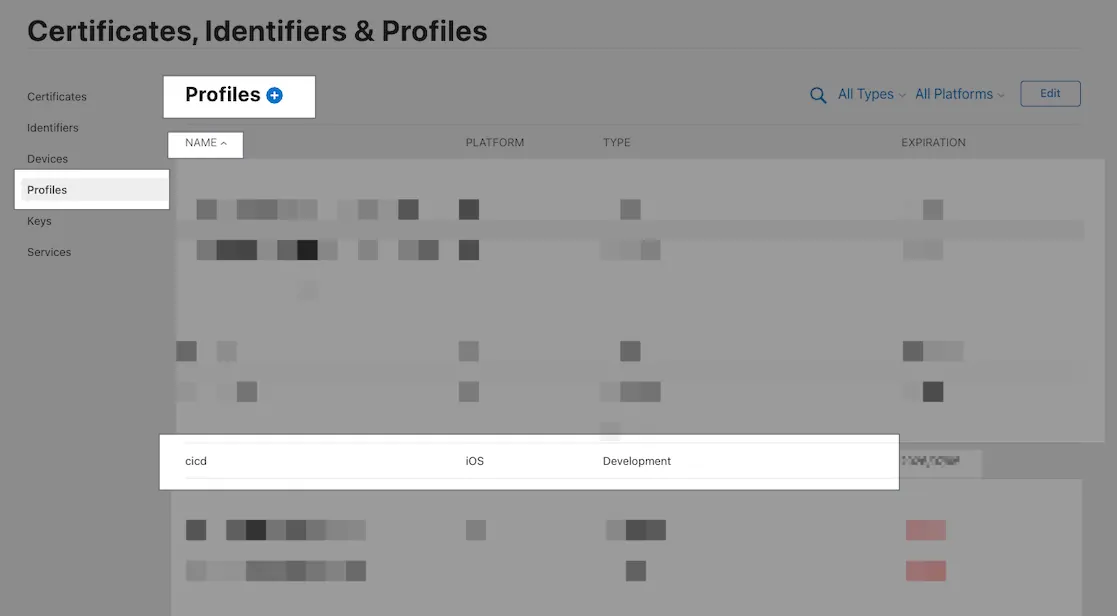
Fastlane is an essential part of iOS CI/CD, allowing you to quickly develop the actual CI/CD execution steps using its pre-packaged methods; we only need to focus on the overall script design without dealing with complex API integrations or command writing.
For example, Fastlane only requires writing scan(xxx) to run tests, whereas using xcodebuild needs xcodebuild -workspace ./xxx.xcworkspace -scheme xxx -derivedDataPath xxx ‘platform=iOS Simulator,id=xxx’ clean build test. Packaging and deployment are even more complicated, requiring manual integration with App Store Connect/Firebase APIs, with key authentication alone needing over 10 lines of code.
The demo project has only three lanes:
run_all_tests: Run all types of tests (Snapshot + Unit)
run_unit_tests: Run only unit tests (Unit)
beta: Build and Deploy to Firebase App Distribution
Fastlane — Match
Due to the demo project limitations, Match is not used here to manage team development and deployment certificates. However, it is recommended to use Match to manage all team development and deployment certificates for easier control and unified updates.
With Match, you can directly use commands like
match allin the project setup step to install all the development certificates needed in one go.
- Fastlane Match uses another Private Repo to manage certificate keys. In GitHub Actions, you need to set up the SSH Agent to clone the other Private Repo.
(Please refer to the appendix at the end)
[2026/02 Update] Further Reading — Additional Details on iOS Certificates, Fastlane Match, and CI/CD Usage:
— — —
Makefile
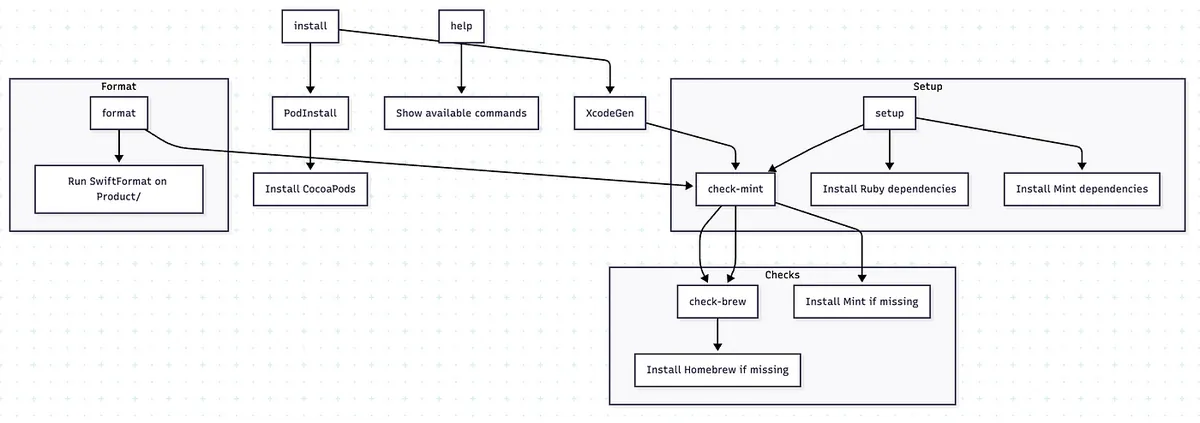
Makefile
Unify the development side and CI/CD to use Makefile for executing commands, making it easier to encapsulate the same environment, paths, and operations.
A classic case is that some people use the locally installed
pod install, while others usebundle exec pod installmanaged by Bundler. Differences in versions may cause discrepancies.
If you find it too complicated, you can skip it and simply write the commands to execute directly in the Action Workflow Step.
Makefile:
1
2
3
4
5
6
7
8
9
10
11
12
13
14
15
16
17
18
19
20
21
22
23
24
25
26
27
28
29
30
31
32
33
34
35
36
37
38
39
40
41
42
43
44
45
46
47
48
49
50
51
52
53
54
55
56
57
58
59
60
#!make
PRODUCT_FOLDER = ./Product/
SHELL         := /bin/zsh
.DEFAULT_GOAL := install
MINT_DIRECTORY := ./mint/

export MINT_PATH=$(MINT_DIRECTORY)

## 👇 Help function
.PHONY: help
help:
 @echo ""
 @echo "📖 Available commands:"
 @grep -E '^[a-zA-Z_-]+:.*?## .*$$' $(MAKEFILE_LIST) \\| \
  awk 'BEGIN {FS = ":.*?## "}; {printf "  \033[36m%-20s\033[0m %s\n", $$1, $$2}'
 @echo ""

## Setup
.PHONY: setup
setup: check-mint ## Install Ruby and Mint dependencies
 @echo "🔨 Installing Ruby dependencies..."
 bundle config set path 'vendor/bundle'
 bundle install
 @echo "🔨 Installing Mint dependencies..."
 mint bootstrap

## Install
.PHONY: install
install: XcodeGen PodInstall ## Run XcodeGen and CocoaPods install

.PHONY: XcodeGen
XcodeGen: check-mint ## Generate .xcodeproj using XcodeGen
 @echo "🔨 Execute XcodeGen"
 cd $(PRODUCT_FOLDER) && \
 mint run yonaskolb/XcodeGen --quiet

.PHONY: PodInstall
PodInstall: ## Install CocoaPods dependencies
 @echo "📦 Installing CocoaPods dependencies..."
 cd $(PRODUCT_FOLDER) && \
 bundle exec pod install

### Mint
check-mint: check-brew ## Check if Mint is installed, install if missing
 @if ! command -v mint &> /dev/null; then \
  echo "🔨 Installing mint..."; \
  brew install mint; \
 fi

### Brew
check-brew: ## Check if Homebrew is installed, install if missing
 @if ! command -v brew &> /dev/null; then \
  echo "🔨 Installing Homebrew..."; \
  /bin/bash -c "$$(curl -fsSL https://raw.githubusercontent.com/Homebrew/install/HEAD/install.sh)"; \
 fi

## Format only git swift files
.PHONY: format
format: check-mint ## Format all Swift files under Product/
 mint run swiftformat $(PRODUCT_FOLDER)
To avoid contaminating the entire system or other projects, we try to specify the paths of dependency packages (e.g., mint, bundle, etc.) within the project directory (combined with .gitignore exclusion).
1
2
3
4
5
6
7
8
9
10
11
12
13
├── mint (Mint dependencies)
│   └── packages
├── Product
│   ├── app-ci-cd-github-actions-demo
│   ├── app-ci-cd-github-actions-demo.xcodeproj
│   ├── app-ci-cd-github-actions-demo.xcworkspace
│   ├── app-ci-cd-github-actions-demoSnapshotTests
│   ├── app-ci-cd-github-actions-demoTests
│   ├── app-ci-cd-github-actions-demoUITests
│   ├── fastlane
│   └── Pods (Cocoapods dependencies)
└── vendor (Bundle dependencies)
    └── bundle
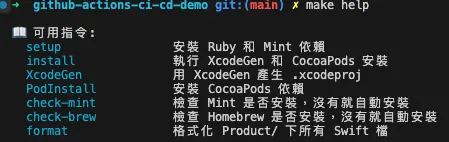
make help
Unified Project Setup Steps Using Makefine:
git clone repocd ./repomake setup
Install necessary tool dependencies (brew, mint, bundle, xcodegen, swiftformat, …)make install
Generate the project (run pod install, xcodegen)Completed
Open and Run the Project
Whether for CI/CD or onboarding new members, follow the above steps to set up the project.
This GitHub Actions CI/CD Example
This article introduces three GitHub Actions CI/CD workflow examples. You can also refer to these steps to build a CI/CD process that fits your team’s workflow.
CI — Run Unit Tests on Pull Request
CD — Build + Deploy to Firebase App Distribution
CI + CD — Nightly Build Running Snapshot + Unit Tests + Packaging + Deployment to Firebase App Distribution
Due to demo limitations, this article only covers packaging and deploying to Firebase App Distribution. Packaging for Testflight or the App Store follows the same steps, with the only difference being the scripts used in Fastlane. Feel free to adapt as needed.
CI — Run Unit Tests on Pull Request
Workflow
The Develop branch cannot be pushed to directly; updates must be done via Pull Requests. All Pull Requests require review approval and passing unit tests before merging, and any new commit push will trigger retesting.
CI-Testing.yml
Repo → Actions → New workflow → set up a workflow yourself.
1
2
3
4
5
6
7
8
9
10
11
12
13
14
15
16
17
18
19
20
21
22
23
24
25
26
27
28
29
30
31
32
33
34
35
36
37
38
39
40
41
42
43
44
45
46
47
48
49
50
51
52
53
54
55
56
57
58
59
60
61
62
63
64
65
66
67
68
69
70
71
72
73
74
75
76
77
78
79
80
81
82
83
84
85
86
87
88
89
90
91
92
93
94
95
96
97
98
99
100
101
102
103
104
105
106
107
108
109
110
111
112
113
114
115
116
117
118
119
120
121
122
123
124
125
126
127
128
129
130
131
132
133
134
135
136
137
138
139
140
141
142
143
144
145
146
147
148
149
150
151
152
153
154
155
156
157
158
159
160
161
162
163
164
165
166
167
168
169
170
171
172
173
174
175
176
177
178
179
180
181
182
183
184
185
186
187
188
189
190
191
192
193
194
195
196
197
198
199
200
201
202
203
204
205
206
207
208
209
210
211
212
213
214
215
216
217
218
219
220
221
222
223
224
225
226
227
228
229
230
231
232
233
234
235
236
237
238
239
240
241
242
243
244
245
246
247
248
249
250
251
252
253
254
255
256
257
258
259
260
261
262
263
264
265
266
267
268
269
270
271
272
273
274
275
276
277
278
279
280
281
282
283
284
285
286
287
288
289
290
291
292
293
294
295
296
297
298
299
300
301
302
# Workflow(Action) Name
name: CI-Testing

# Actions Log Title
run-name: "[CI-Testing] ${{ github.event.pull_request.title \\|\\| github.ref }}"

# Cancel running jobs in the same Concurrency Group if a new job starts
# For example, if a new push commit triggers a job before the previous one finishes, the previous job is canceled
concurrency:
  group: ${{ github.workflow }}-${{ github.event_name }}-${{ github.event.pull_request.number \\|\\| github.ref }}
  cancel-in-progress: true

# Trigger events
on:
  # PR events
  pull_request:
    # PR - opened, synchronized, reopened
    types: [opened, synchronize, reopened]
  # Manual form trigger
  workflow_dispatch:
    # Form inputs
    inputs:
      # Test Fastlane Lane to run
      TEST_LANE:
        description: 'Test Lane'
        default: 'run_unit_tests'
        type: choice
        options:
          - run_unit_tests
          - run_all_tests
  # Called by other workflows
  # Used for Nightly Build
  workflow_call:
    # Form inputs
    inputs:
      # Test Fastlane Lane to run
      TEST_LANE:
        description: 'Test Lane'
        default: 'run_unit_tests'
        # workflow_call inputs do not support choice
        type: string
      BRANCH:
        description: 'Branch'
        type: string

# Jobs
# Jobs run concurrently
jobs:
  # Job ID
  testing:
    # Job name (optional, better readability in logs)
    name: Testing

    # Runner Label - use GitHub Hosted Runner macos-15 to run the job
    # Note: This is a Public Repo with unlimited free usage
    # Note: This is a Public Repo with unlimited free usage
    # Note: This is a Public Repo with unlimited free usage
    # For Private Repos, usage is metered; macOS runners are the most expensive (10x),
    # running 10 times may reach the 2,000 minutes free limit
    # Self-hosted runners are recommended
    runs-on: macos-15

    # Set max timeout to prevent endless waiting on errors
    timeout-minutes: 30

    # use zsh
    # Optional, default is bash, but I prefer zsh
    defaults:
      run:
        shell: zsh {0}

    # Steps
    # Steps run sequentially
    steps:
      # git clone current repo & checkout the branch to run
      - name: Checkout repository
        uses: actions/checkout@v3
        with:
          # Git Large File Storage, not needed in our test environment
          # default: false
          lfs: false

          # Checkout specified branch if provided, otherwise use default (current branch)
          # on: schedule events can only run on main branch, so specify branch for Nightly Build etc.
          # e.g. on: schedule -> main branch, Nightly Build master branch
          ref: ${{ github.event.inputs.BRANCH \\|\\| '' }}

      # ========== Env Setup Steps ==========

      # Read project specified XCode version
      # We manually specify XCode_x.x.x.app later
      # Not using xcversion since it is sunset and unstable
      - name: Read .xcode-version
        id: read_xcode_version
        run: \\|
          XCODE_VERSION=$(cat .xcode-version)
          echo "XCODE_VERSION: ${XCODE_VERSION}"
          echo "xcode_version=${XCODE_VERSION}" >> $GITHUB_OUTPUT

          # You can also set global XCode version here to avoid specifying DEVELOPER_DIR later
          # But this requires sudo privileges; self-hosted runners must have sudo access
          # sudo xcode-select -s "/Applications/Xcode_${XCODE_VERSION}.app/Contents/Developer"

      # Read project specified Ruby version
      - name: Read .ruby-version
        id: read_ruby_version
        run: \\|
          RUBY_VERSION=$(cat .ruby-version)
          echo "RUBY_VERSION: ${RUBY_VERSION}"
          echo "ruby_version=${RUBY_VERSION}" >> $GITHUB_OUTPUT

      # Install or set runner Ruby version to project specified version
      - name: Set up Ruby
        uses: ruby/setup-ruby@v1
        with:
          ruby-version: "${{ steps.read_ruby_version.outputs.ruby_version }}"

      # Optional: previously for self-hosted runners running multiple CI/CD jobs,
      # cocoapods repos share directory causing rare conflicts during simultaneous pod install
      # GitHub Hosted Runners do not need this
      # - name: Change Cocoapods Repos Folder
      #   if: contains(runner.labels, 'self-hosted')
      #   run: \\|
      #     # Each runner uses its own .cocoapods folder to avoid conflicts
      #     mkdir -p "$HOME/.cocoapods-${{ env.RUNNER_NAME }}/"
      #     export CP_HOME_DIR="$HOME/.cocoapods-${{ env.RUNNER_NAME }}"
      #     rm -f "$HOME/.cocoapods-${{ env.RUNNER_NAME }}/repos/cocoapods/.git/index.lock"

      # ========== Cache Setting Steps ==========
      # Note: Even for self-hosted, cache is cloud-based and usage counts
      # Rules: auto delete after 7 days no hit, max 10GB per cache, only cache on success
      # Public Repo: free unlimited
      # Private Repo: starts at 5GB
      # Self-hosted can implement own cache/restore with shell scripts or other tools

      # Bundle Cache (Gemfile)
      # Matches Makefile setting of Bundle install path ./vendor
      - name: Cache Bundle
        uses: actions/cache@v3
        with:
          path: \\|
            ./vendor
          key: ${{ runner.os }}-bundle-${{ hashFiles('Gemfile.lock') }}
          restore-keys: \\|
            ${{ runner.os }}-bundle-

      # CocoaPods Cache (Podfile)
      # Default is project/Pods folder
      - name: Cache CocoaPods
        uses: actions/cache@v3
        with:
          path: \\|
            ./Product/Pods
          key: ${{ runner.os }}-cocoapods-${{ hashFiles('Product/Podfile.lock') }}
          restore-keys: \\|
            ${{ runner.os }}-cocoapods-

      # Mint cache
      # Matches Makefile setting of Mint install path ./mint
      - name: Cache Mint
        uses: actions/cache@v3
        with:
          path: ./mint
          key: ${{ runner.os }}-mint-${{ hashFiles('Mintfile') }}
          restore-keys: \\|
            ${{ runner.os }}-mint-

      # ====================

      # Project Setup & Dependency Installation
      - name: Setup & Install Dependency
        run: \\|
          # Run Setup command wrapped in Makefile, roughly equivalent to:
          # brew install mint
          # bundle config set path 'vendor/bundle'
          # bundle install
          # mint bootstrap
          # ...
          # other setup commands
          make setup

          # Run Install command wrapped in Makefile, roughly equivalent to:
          # mint run yonaskolb/XcodeGen --quiet
          # bundle exec pod install
          # ...
          # other install commands
          make install

      # Run Fastlane Unit Test Lane
      - name: Run Tests
        id: testing
        # Set working directory so no need to cd later
        working-directory: ./Product/
        env:
          # Test plan: run all or only unit tests
          # For PR triggers use run_unit_tests, otherwise use inputs.TEST_LANE or default run_all_tests
          TEST_LANE: ${{ github.event_name == 'pull_request' && 'run_unit_tests' \\|\\| github.event.inputs.TEST_LANE \\|\\| 'run_all_tests' }}

          # Use XCode_x.x.x version specified by DEVELOPER_DIR
          DEVELOPER_DIR: "/Applications/Xcode_${{ steps.read_xcode_version.outputs.xcode_version }}.app/Contents/Developer"

          # Repo -> Settings -> Actions secrets and variables -> variables
          # Simulator name used
          SIMULATOR_NAME: ${{ vars.SIMULATOR_NAME }}
          # Simulator iOS version
          SIMULATOR_IOS_VERSION: ${{ vars.SIMULATOR_IOS_VERSION }}

          # Current runner name
          RUNNER_NAME: ${{ runner.name }}

          # Increase XCodebuild timeout and retry count
          # Machines under heavy load may fail after 3 retries
          FASTLANE_XCODEBUILD_SETTINGS_TIMEOUT: 60
          FASTLANE_XCODEBUILD_SETTINGS_RETRIES: 10
        run: \\|

          # For self-hosted runners running multiple jobs on the same machine,
          # simulator resource conflicts can occur (explained later)
          # To avoid this, name simulators after runner names so each runner uses its own simulator
          # e.g. bundle exec fastlane run_unit_tests device:"${RUNNER_NAME} (${SIMULATOR_IOS_VERSION})"
          # Here using GitHub Hosted Runner so no issue, so device:"${SIMULATOR_NAME} (${SIMULATOR_IOS_VERSION})"

          # Do not exit on error and write all output to temp/testing_output.txt
          # Later we analyze file to distinguish Build Failed or Test Failed and comment accordingly on PR
          set +e

          # EXIT_CODE stores exit code of execution
          # 0 = OK
          # 1 = exit
          EXIT_CODE=0

          # Write all output to file
          bundle exec fastlane ${TEST_LANE} device:"${SIMULATOR_NAME} (${SIMULATOR_IOS_VERSION})" \\| tee "$RUNNER_TEMP/testing_output.txt"
          # If EXIT_CODE is 0, set it to the exit code of fastlane command
          [[ $EXIT_CODE -eq 0 ]] && EXIT_CODE=${PIPESTATUS[0]}

          # Restore exit on error
          set -e

          # Check Testing Output
          # If output contains "Error building", set is_build_error=true for Actions env variable (build failed)
          # If output contains "Tests have failed", set is_test_error=true for Actions env variable (test failed)

          if grep -q "Error building" "$RUNNER_TEMP/testing_output.txt"; then
            echo "is_build_error=true" >> $GITHUB_OUTPUT
            echo "❌ Detected Build Error"
          elif grep -q "Tests have failed" "$RUNNER_TEMP/testing_output.txt"; then
            echo "is_test_error=true" >> $GITHUB_OUTPUT
            echo "❌ Detected Test Error"
          fi

          # Restore Exit Code output
          exit $EXIT_CODE

      # ========== Handle Result Steps ==========

      # Parse *.junit test reports, mark results, comment (if PR)
      - name: Publish Test Report
        # Use existing .junit Parser Action: https://github.com/mikepenz/action-junit-report
        uses: mikepenz/action-junit-report@v5
        # if:
        # previous step (Testing) success or
        # previous step (Testing) failed and is_test_error (skip if build failed)
        if: ${{ (failure() && steps.testing.outputs.is_test_error == 'true') \\|\\| success() }}
        with:
          check_name: "Testing Report"
          comment: true
          updateComment: false
          require_tests: true
          detailed_summary: true
          report_paths: "./Product/fastlane/test_output/*.junit"

      # Build failure comment
      - name: Build Failure Comment
        # if:
        # previous step (Testing) failed and is_build_error and PR number exists
        if: ${{ failure() && steps.testing.outputs.is_build_error == 'true' && github.event.pull_request.number }}
        uses: actions/github-script@v6
        env:
          action_url: "${{ github.server_url }}/${{ github.repository }}/actions/runs/${{ github.run_id }}/attempts/${{ github.run_attempt }}"
        with:
            script: \\|
              const action_url = process.env.action_url
              const pullRequest = context.payload.pull_request \\|\\| {}
              const commitSha = pullRequest.head?.sha \\|\\| context.sha
              const creator = pullRequest.user?.login \\|\\| context.actor

              const commentBody = [
                `# Project or Test Build Failed ❌`,
                `Please ensure your Pull Request builds and tests correctly.`,
                ``,
                `🔗 **Action**: [View Workflow Run](${action_url})`,
                `📝 **Commit**: ${commitSha}`,
                `👤 **Author**: @${creator}`
              ].join('\n')

              await github.rest.issues.createComment({
                owner: context.repo.owner,
                repo: context.repo.repo,
                issue_number: context.payload.pull_request.number,
                body: commentBody
              })
Technical Highlights:
runs-on: It is recommended to use a self-hosted Runner, as GitHub Hosted Runner macOS is very expensive.
Manually read the
.xcode-versionfile to get the specified XCode version and set theDEVELOPER_DIRenv in steps that require a specific XCode. This allows easy switching of XCode without needing Sudo.Cache: Can speed up dependency installation, but note that even self-hosted Runners use GitHub Cloud Cache, which is subject to billing limits.
Use
set +eso the script won’t exit immediately on command failure + redirect all output to a file + read the file to determine if it is Build Failed or Test Failed; otherwise, the message will always be Test Failed.
You can also extend this to detect other errors, for example:Underlying Error: Unable to boot the Simulator.means the simulator failed to start, please try again.Checkout Code accepts specifying a branch: Since the
on: scheduleevent can only trigger on the main (default) branch, if we want the schedule to operate on another branch, we need to specify the branch.Specifying the .cocoapods Repo path is optional. Previously, we encountered an issue where two Runners on the same self-hosted machine both got stuck at pod install because they were accessing the .cocoapods Repo simultaneously, causing a git lock.
(However, this is a rare occurrence.)If you have a Private Pods Repo, you need to set up an SSH Agent to have permission to clone.
(Please refer to the supplementary notes at the end)Remember to add in Repo -> Settings -> Actions secrets and variables -> variables:
SIMULATOR_IOS_VERSIONSimulator iOS version
SIMULATOR_NAMESimulator name
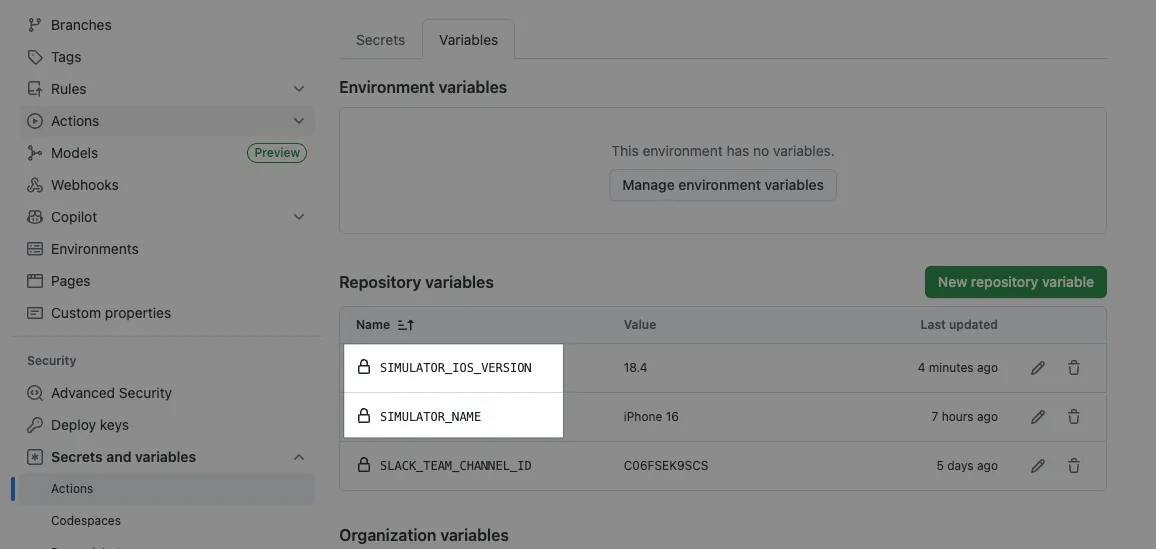
Commit files to the Repo main branch, manually trigger a verification to check correctness:
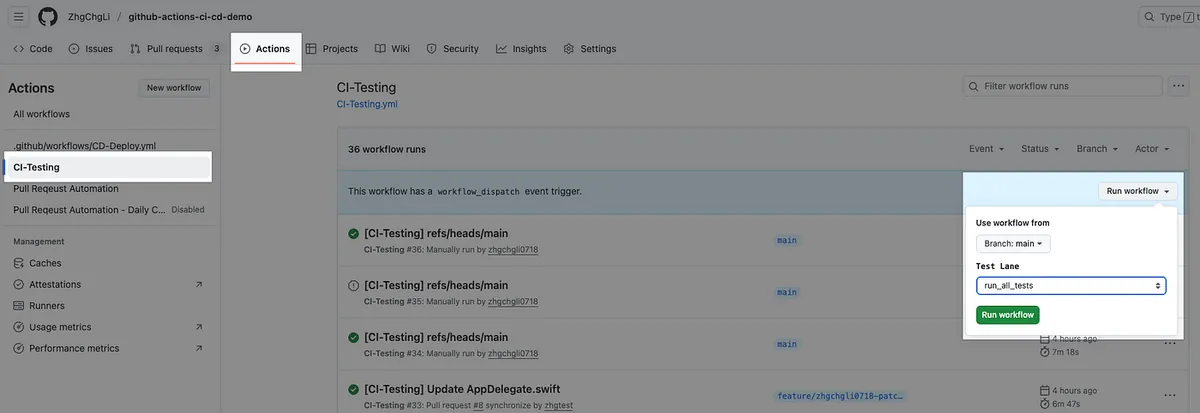
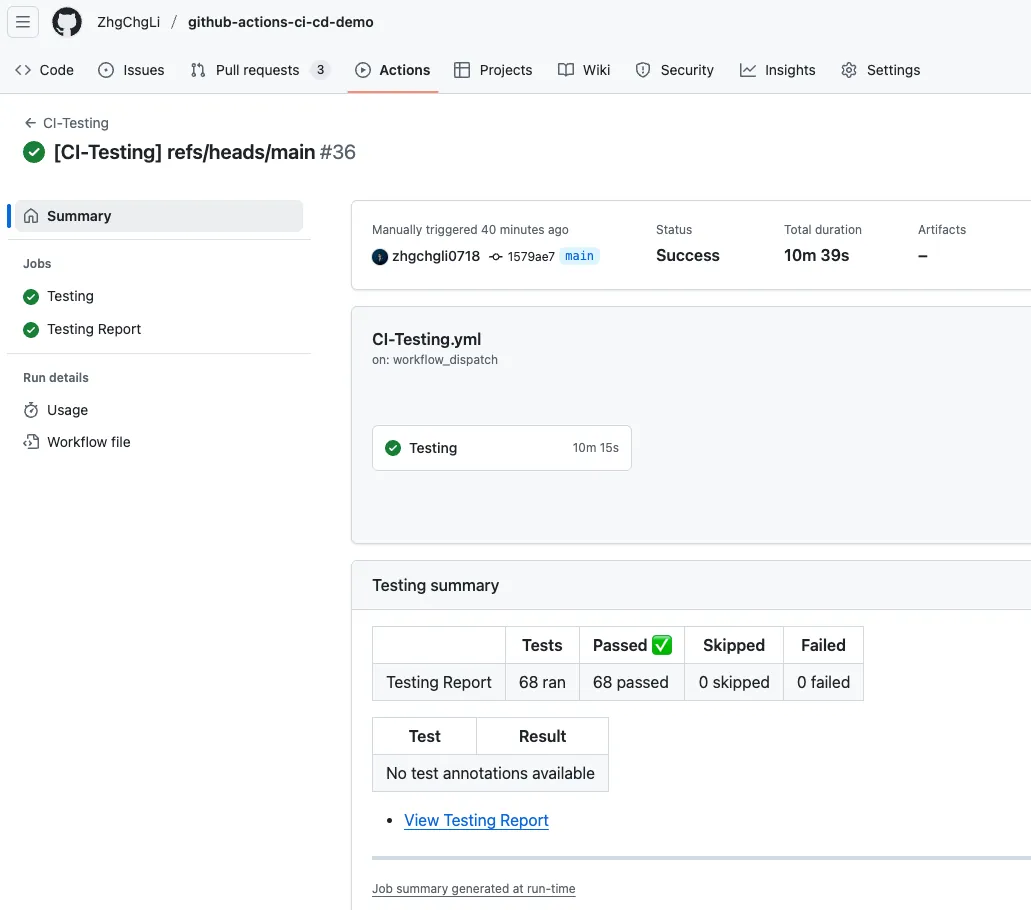
Continue with the correct subsequent settings.
GitHub Workflow Setup
Repo → Settings → Rules → Rulesets.
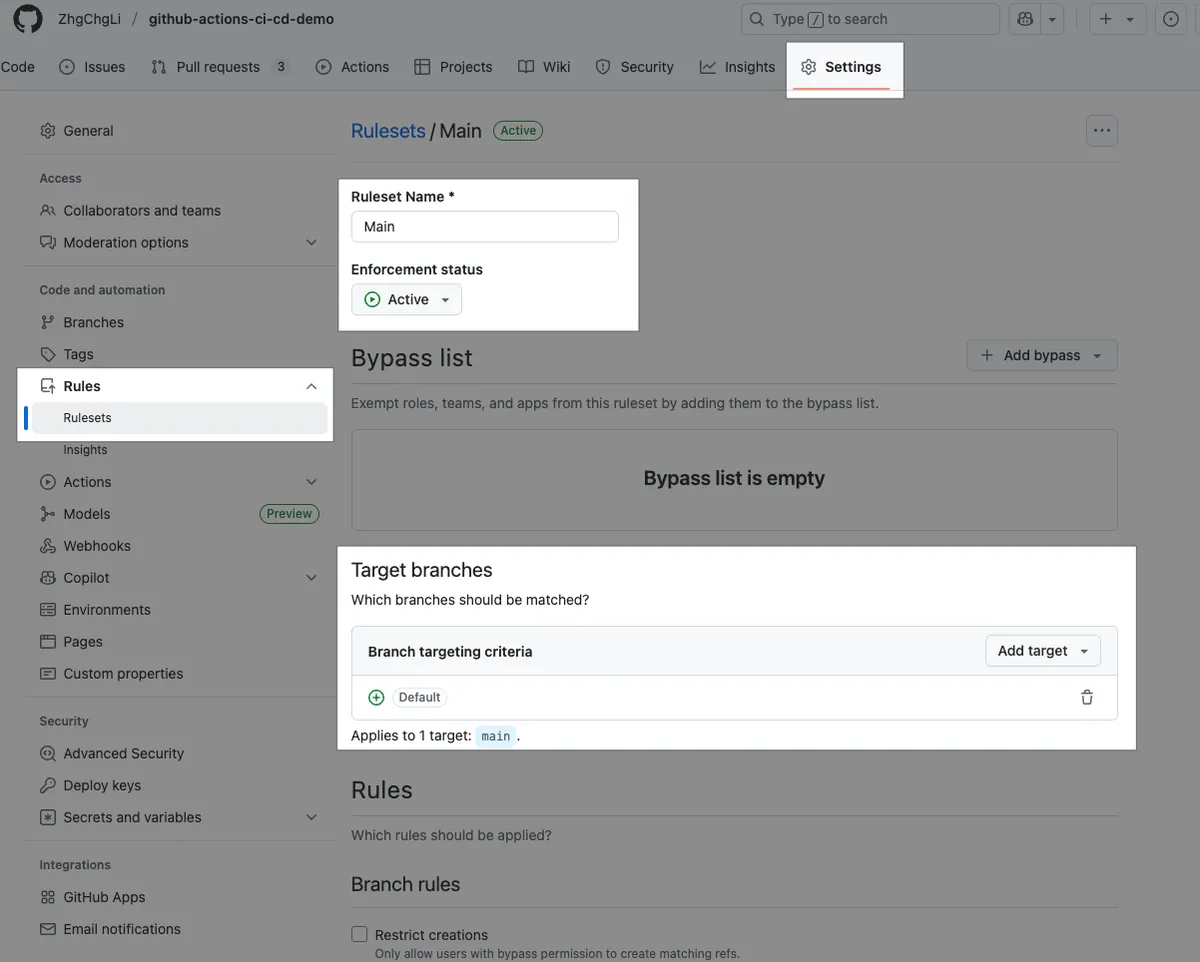
Ruleset Name: Ruleset Name
Enforcement status: Enable/Disable this rule restriction
Target branches: The target Base branches. Setting the Default Branch means all branches intended to merge into main or develop are subject to this rule.
Bypass list: You can specify special identities or Teams that are exempt from this limit
Branch rules:
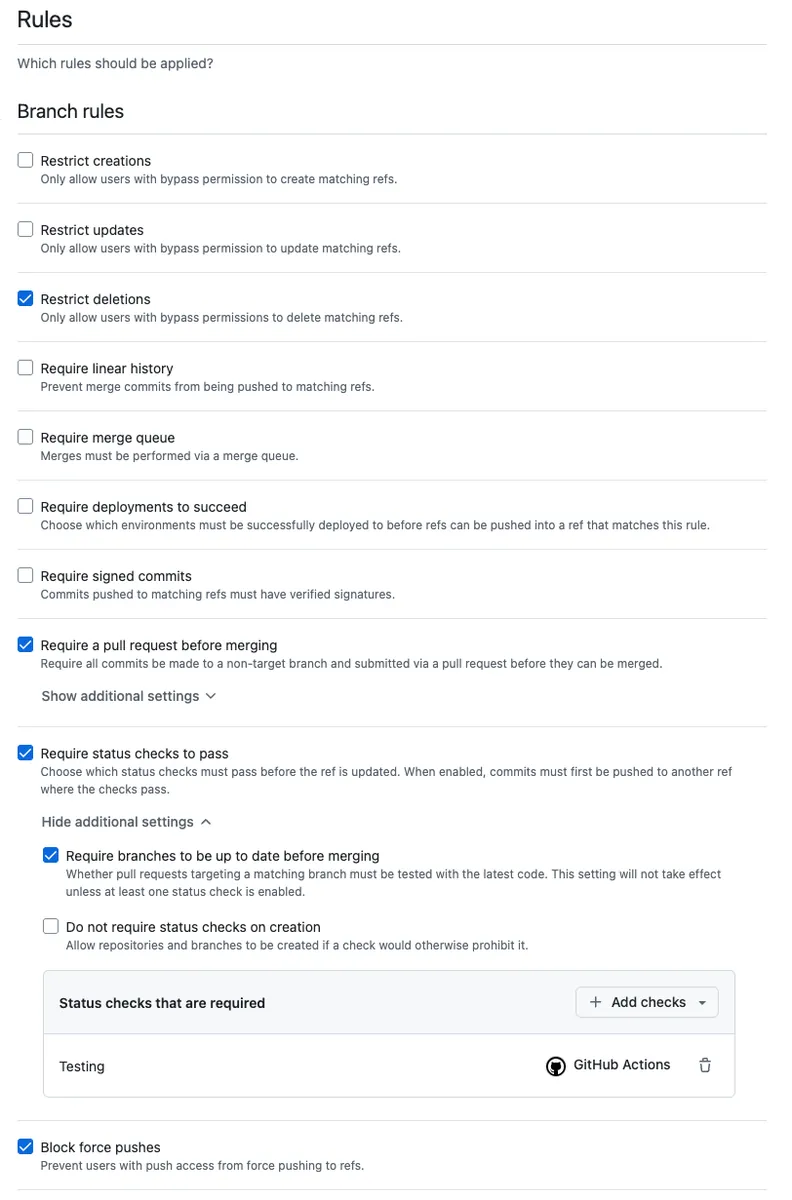
Restrict deletions: Prohibit branch deletion
Require a pull request before merging: Only allow merging via PR
Required approvals: Limit the number of required approvalsRequire status checks to pass: Restrict which checks must pass before merging
Click + Add checks, typeTesting, and select the one with the GitHub Actions icon.
There is a small issue here: if Suggestions cannot findTesting, you need to go back to Actions and trigger it (try opening a PR) to succeed once, then it will appear here.
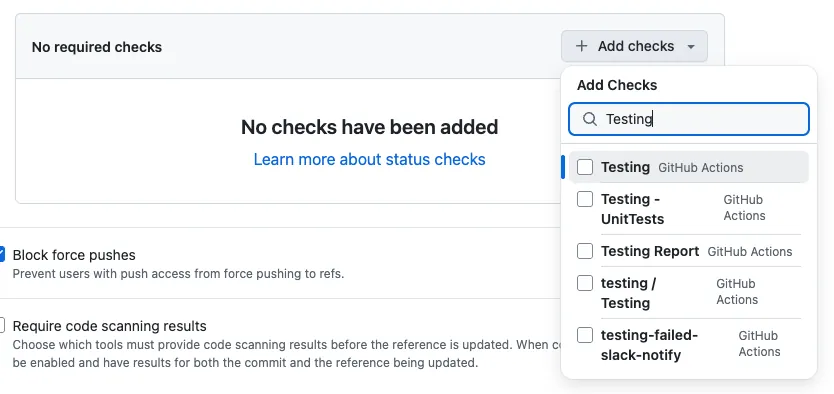
- Block force pushes: Disable force push
After saving and confirming the Enforcement status is Active, the rule will take effect.
After everything is set up, open a PR to test it:
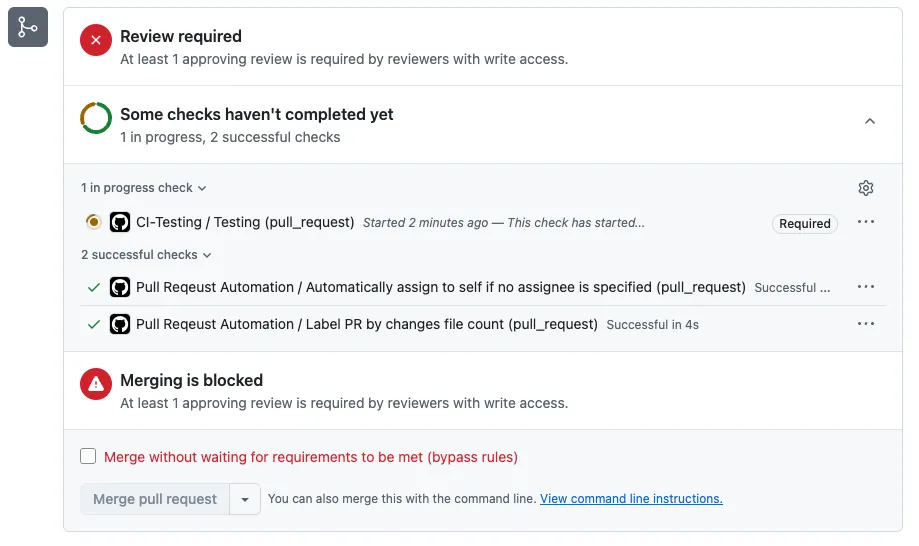
- If you see CI-Testing (Required), Merging is blocked, and At least X approving review is required by reviewers with write access, it means the setup is successful.
If the project build fails (Build Failed), it will Comment:
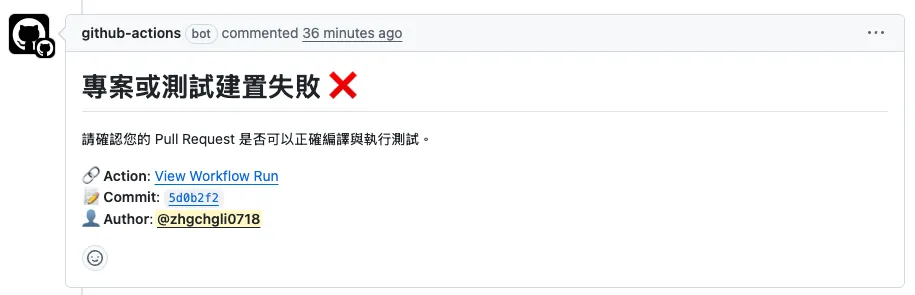
If the project builds successfully but test cases fail (Test Failed), it will Comment:
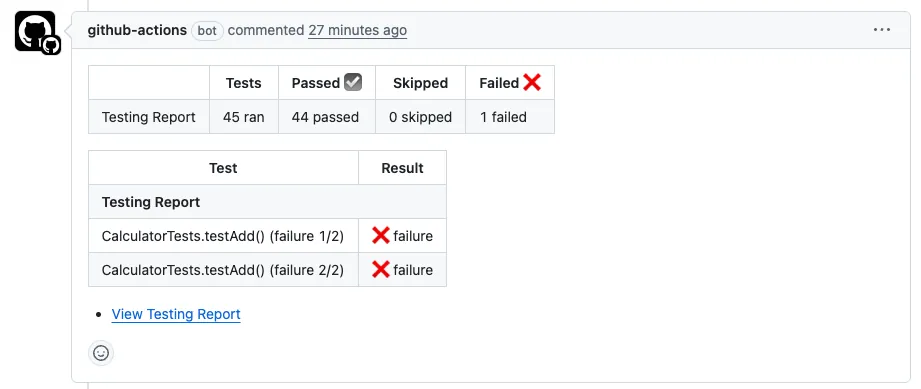
If the project build and tests succeed (Test Success), it will Comment:
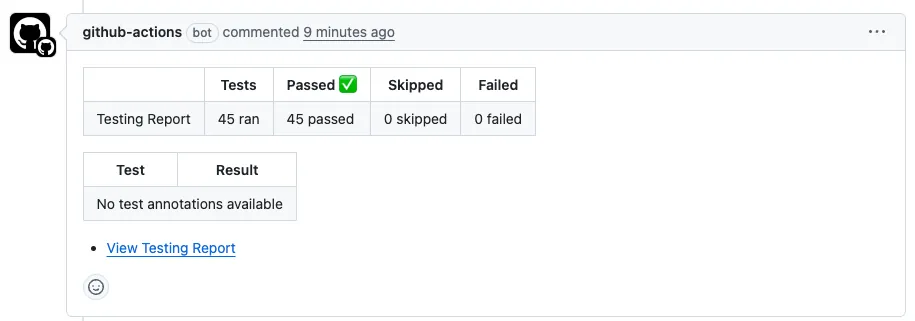
After completing Review Approve + passing Check tests:
Then you can merge the PR.
- If a new commit is pushed, the Checks tests will automatically rerun.
Full code: CI-Testing.yml
Auto-merge:
Also, you can enable the following in Repo Settings → General → Pull Request:
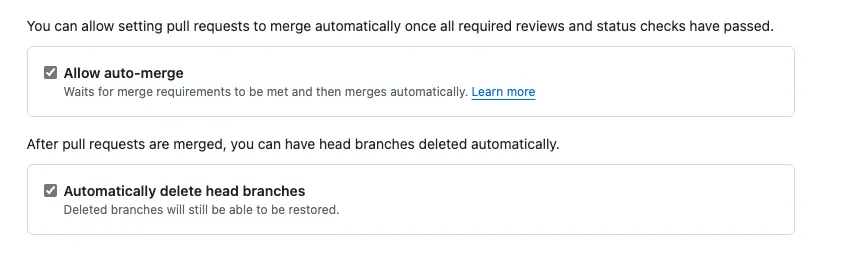
Automatically delete head branches: Automatically delete branches after merging PRs
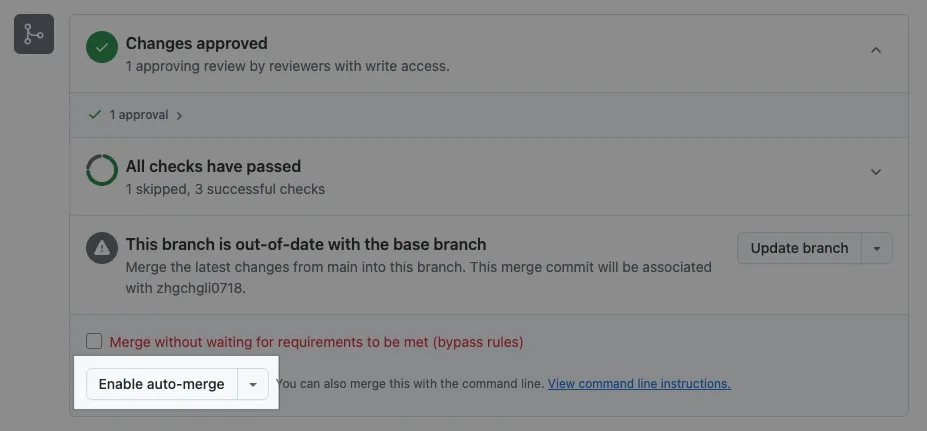
Allow Auto-merge: Automatically merge the PR when Checks pass and required Approvals are met.
The Enable auto-merge button only appears if conditions are set and the current conditions do not yet allow merging.
CD — Build + Deploy to Firebase App Distribution
Workflow
Using GitHub Actions form trigger to package the build, you can specify the version number and Release Notes. After packaging, it will automatically upload to Firebase App Distribution for the team to download and test.
CD-Deploy.yml
Repo → Actions → New workflow → set up a workflow yourself.
1
2
3
4
5
6
7
8
9
10
11
12
13
14
15
16
17
18
19
20
21
22
23
24
25
26
27
28
29
30
31
32
33
34
35
36
37
38
39
40
41
42
43
44
45
46
47
48
49
50
51
52
53
54
55
56
57
58
59
60
61
62
63
64
65
66
67
68
69
70
71
72
73
74
75
76
77
78
79
80
81
82
83
84
85
86
87
88
89
90
91
92
93
94
95
96
97
98
99
100
101
102
103
104
105
106
107
108
109
110
111
112
113
114
115
116
117
118
119
120
121
122
123
124
125
126
127
128
129
130
131
132
133
134
135
136
137
138
139
140
141
142
143
144
145
146
147
148
149
150
151
152
153
154
155
156
157
158
159
160
161
162
163
164
165
166
167
168
169
170
171
172
173
174
175
176
177
178
179
180
181
182
183
184
185
186
187
188
189
190
191
192
193
194
195
196
197
198
199
200
201
202
203
204
205
206
207
208
209
210
211
212
213
214
215
216
217
218
219
220
221
222
223
224
225
226
227
228
229
230
231
232
233
234
235
236
237
238
239
240
241
242
243
244
245
246
247
248
249
250
251
252
253
254
255
256
257
258
259
260
261
262
263
264
265
266
267
268
269
270
271
272
273
274
275
276
277
278
279
280
281
282
283
284
285
286
287
288
289
290
291
292
293
294
295
296
297
298
299
300
301
302
303
304
305
306
307
308
309
310
311
312
313
314
315
316
317
318
319
# Workflow(Action) name
name: CD-Deploy

# Actions Log title
run-name: "[CD-Deploy] ${{ github.ref }}"

# Cancel running jobs in the same concurrency group if a new job starts
# For example, if the same branch triggers multiple packaging jobs, the previous job will be canceled
concurrency:
  group: ${{ github.workflow }}-${{ github.event_name }}-${{ github.ref }}
  cancel-in-progress: true

# Trigger events
on:
  # Manual form trigger
  workflow_dispatch:
    # Form inputs
    inputs:
      # App version number
      VERSION_NUMBER:
        description: 'Version Number of the app (e.g., 1.0.0). Auto-detect from the Xcode project if left blank.'
        required: false
        type: string
      # App build number
      BUILD_NUMBER:
        description: 'Build number of the app (e.g., 1). Will use a timestamp if left blank.'
        required: false
        type: string
      # App release note
      RELEASE_NOTE:
        description: 'Release notes of the deployment.'
        required: false
        type: string
  # Triggered by other workflows calling this workflow
  # Used by Nightly Build
  workflow_call:
    inputs:
      # App version number
      VERSION_NUMBER:
        description: 'Version Number of the app (e.g., 1.0.0). Auto-detect from the Xcode project if left blank.'
        required: false
        type: string
      # App build number
      BUILD_NUMBER:
        description: 'Build number of the app (e.g., 1). Will use a timestamp if left blank.'
        required: false
        type: string
      # App release note
      RELEASE_NOTE:
        description: 'Release notes of the deployment.'
        required: false
        type: string
      BRANCH:
        description: 'Branch'
        type: string


# Define global static variables
env:
  APP_STORE_CONNECT_API_KEY_FILE_NAME: "app_store_connect_api_key.json"

# Job items
# Jobs run concurrently
jobs:
  # Job ID
  deploy:
    # Job name (optional, better readability in logs)
    name: Deploy - Firebase App Distribution

    # Runner Label - use GitHub Hosted Runner macos-15 to run the job
    # Note: Since this is a Public Repo, usage is unlimited and free
    # Note: Since this is a Public Repo, usage is unlimited and free
    # Note: Since this is a Public Repo, usage is unlimited and free
    # For Private Repo, usage is metered and macOS machines are the most expensive (10x),
    # running about 10 times may reach the 2,000 minutes free limit
    # Self-hosted Runner is recommended
    runs-on: macos-15

    # Set maximum timeout to avoid endless waiting in abnormal cases
    timeout-minutes: 30

    # use zsh
    # optional, default is bash, but I prefer zsh
    defaults:
      run:
        shell: zsh {0}

    # Job steps
    # Steps run sequentially
    steps:
      # git clone current repo & checkout the executing branch
      - name: Checkout repository
        uses: actions/checkout@v3
        with:
          # Git Large File Storage, not needed in our test environment
          # default: false
          lfs: false

          # Checkout specified branch if provided, otherwise use default (current branch)
          # Because on: schedule events only run on main branch, specifying branch is needed for Nightly Build etc.
          # e.g. on: schedule -> main branch, Nightly Build master branch
          ref: ${{ github.event.inputs.BRANCH \\|\\| '' }}

      # ========== Certificates Steps ==========

      # Recommended to use Fastlane - Match to manage development certificates and run match in lane directly
      # Match uses another Private Repo to manage certificates, but SSH Agent must be set up for git clone private repo access
      # ref: https://stackoverflow.com/questions/57612428/cloning-private-github-repository-within-organisation-in-actions
      #
      #
      # --- Below is the method without Fastlane - Match, directly download & import certificates to Runner ---
      # ref: https://docs.github.com/en/actions/how-tos/use-cases-and-examples/deploying/installing-an-apple-certificate-on-macos-runners-for-xcode-development
      #
      # GitHub Actions Secrets cannot store files, so all certificate files must be converted to Base64 encoded text in Secrets
      # Then dynamically read and write to TEMP files during steps and move to correct locations for system usage
      # See article for other details
      #
      - name: Install the Apple certificate and provisioning profile
        env:
          BUILD_CERTIFICATE_BASE64: ${{ secrets.BUILD_CERTIFICATE_BASE64 }}
          P12_PASSWORD: ${{ secrets.BUILD_CERTIFICATE_P12_PASSWORD }}
          BUILD_PROVISION_PROFILE_BASE64: ${{ secrets.BUILD_PROVISION_PROFILE_BASE64 }}
          # GitHub Hosted Runner uses custom string
          # Self-hosted Runner uses machine login password
          KEYCHAIN_PASSWORD: ${{ secrets.KEYCHAIN_PASSWORD }}
        run: \\|
          # create variables
          CERTIFICATE_PATH=$RUNNER_TEMP/build_certificate.p12
          PP_PATH=$RUNNER_TEMP/build_pp.mobileprovision
          KEYCHAIN_PATH=$RUNNER_TEMP/app-signing.keychain-db

          # import certificate and provisioning profile from secrets
          echo -n "$BUILD_CERTIFICATE_BASE64" \\| base64 --decode -o $CERTIFICATE_PATH
          echo -n "$BUILD_PROVISION_PROFILE_BASE64" \\| base64 --decode -o $PP_PATH

          # create temporary keychain
          security create-keychain -p "$KEYCHAIN_PASSWORD" $KEYCHAIN_PATH
          security set-keychain-settings -lut 21600 $KEYCHAIN_PATH
          security unlock-keychain -p "$KEYCHAIN_PASSWORD" $KEYCHAIN_PATH

          # import certificate to keychain
          security import $CERTIFICATE_PATH -P "$P12_PASSWORD" -A -t cert -f pkcs12 -k $KEYCHAIN_PATH
          security set-key-partition-list -S apple-tool:,apple: -k "$KEYCHAIN_PASSWORD" $KEYCHAIN_PATH
          security list-keychain -d user -s $KEYCHAIN_PATH

          # apply provisioning profile
          mkdir -p ~/Library/MobileDevice/Provisioning\ Profiles
          cp $PP_PATH ~/Library/MobileDevice/Provisioning\ Profiles

      # App Store Connect API Fastlane JSON Key
      # Another almost essential App Store Connect API Fastlane JSON Key (.json) for packaging environment
      # format: .json content format: https://docs.fastlane.tools/app-store-connect-api/
      # contains App Store Connect API .p8 Key
      # passed to Fastlane later for uploading to Testflight, App Store API usage
      #
      # GitHub Actions Secrets cannot store files, so all certificate files must be converted to Base64 encoded text in Secrets
      # Then dynamically read and write to TEMP files during steps for other steps to use
      # See article for other details
      - name: Read and Write Apple Store Connect API Key to Temp
        env:
          APP_STORE_CONNECT_API_KEY_BASE64: ${{ secrets.APP_STORE_CONNECT_API_KEY_BASE64 }}
          APP_STORE_CONNECT_API_KEY_PATH: "${{ runner.temp }}/${{ env.APP_STORE_CONNECT_API_KEY_FILE_NAME }}"
        run: \\|
          # import certificate and provisioning profile from secrets
          echo -n "$APP_STORE_CONNECT_API_KEY_BASE64" \\| base64 --decode -o $APP_STORE_CONNECT_API_KEY_PATH

      # ========== Env Setup Steps ==========

      # Read project specified XCode version
      # Later we manually specify XCode_x.x.x.app to use
      # Not using xcversion as it is sunset and unstable
      - name: Read .xcode-version
        id: read_xcode_version
        run: \\|
          XCODE_VERSION=$(cat .xcode-version)
          echo "XCODE_VERSION: ${XCODE_VERSION}"
          echo "xcode_version=${XCODE_VERSION}" >> $GITHUB_OUTPUT

          # You can also specify global XCode version here to avoid specifying DEVELOPER_DIR later
          # But this command requires sudo privileges, ensure self-hosted runner has sudo if used
          # sudo xcode-select -s "/Applications/Xcode_${XCODE_VERSION}.app/Contents/Developer"

      # Read project specified Ruby version
      - name: Read .ruby-version
        id: read_ruby_version
        run: \\|
          RUBY_VERSION=$(cat .ruby-version)
          echo "RUBY_VERSION: ${RUBY_VERSION}"
          echo "ruby_version=${RUBY_VERSION}" >> $GITHUB_OUTPUT

      # Install or set Runner Ruby version to project specified version
      - name: Set up Ruby
        uses: ruby/setup-ruby@v1
        with:
          ruby-version: "${{ steps.read_ruby_version.outputs.ruby_version }}"

      # Optional, used previously when running multiple self-hosted runners on same machine due to shared cocoapods repos directory
      # Solves rare conflict when multiple pod install run simultaneously pulling cocoapods repos (default is $HOME/.cocoapods/)
      # Not needed for GitHub Hosted Runner
      # - name: Change Cocoapods Repos Folder
      #   if: contains(runner.labels, 'self-hosted')
      #   run: \\|
      #     # Each Runner uses its own .cocoapods folder to avoid conflicts
      #     mkdir -p "$HOME/.cocoapods-${{ env.RUNNER_NAME }}/"
      #     export CP_HOME_DIR="$HOME/.cocoapods-${{ env.RUNNER_NAME }}"
      #     rm -f "$HOME/.cocoapods-${{ env.RUNNER_NAME }}/repos/cocoapods/.git/index.lock"

      # ========== Cache Setting Steps ==========
      # Note: Even for self-hosted, cache is cloud-based and usage is counted
      # Rules: auto delete after 7 days no hit, max 10 GB per cache, cache only on successful action
      # Public Repo: free unlimited
      # Private Repo: from 5 GB
      # Self-hosted can implement own cache & restore strategies via shell scripts or other tools

      # Bundle Cache (Gemfile)
      # Matches Makefile specifying Bundle install path under ./vendor
      - name: Cache Bundle
        uses: actions/cache@v3
        with:
          path: \\|
            ./vendor
          key: ${{ runner.os }}-bundle-${{ hashFiles('Gemfile.lock') }}
          restore-keys: \\|
            ${{ runner.os }}-bundle-

      # CocoaPods Cache (Podfile)
      # Default is project/Pods directory
      - name: Cache CocoaPods
        uses: actions/cache@v3
        with:
          path: \\|
            ./Product/Pods
          key: ${{ runner.os }}-cocoapods-${{ hashFiles('Product/Podfile.lock') }}
          restore-keys: \\|
            ${{ runner.os }}-cocoapods-

      # Mint cache
      # Matches Makefile specifying Mint install path under ./mint
      - name: Cache Mint
        uses: actions/cache@v3
        with:
          path: ./mint
          key: ${{ runner.os }}-mint-${{ hashFiles('Mintfile') }}
          restore-keys: \\|
            ${{ runner.os }}-mint-

      # ====================

      # Project Setup & dependency installation
      - name: Setup & Install Dependency
        run: \\|
          # Run Makefile encapsulated setup commands, roughly:
          # brew install mint
          # bundle config set path 'vendor/bundle'
          # bundle install
          # mint bootstrap
          # ...
          # other setup commands
          make setup

          # Run Makefile encapsulated install commands, roughly:
          # mint run yonaskolb/XcodeGen --quiet
          # bundle exec pod install
          # ...
          # other install commands
          make install

      - name: Deploy Beta
        id: deploy
        # Specify working directory so no need to cd ./Product/ in commands
        working-directory: ./Product/
        env:
          # Packaging input parameters
          VERSION_NUMBER: ${{ inputs.VERSION_NUMBER \\|\\| '' }}
          BUILD_NUMBER: ${{ inputs.BUILD_NUMBER \\|\\| '' }}
          RELEASE_NOTE: ${{ inputs.RELEASE_NOTE \\|\\| '' }}
          AUTHOR: ${{ github.actor }}

          # Repo -> Settings -> Actions secrets and variables -> secrets
          # Firebase CLI Token secret (see article for how to get)
          FIREBASE_CLI_TOKEN: ${{ secrets.FIREBASE_CLI_TOKEN }}
          # Apple Developer Program Team ID
          TEAM_ID: ${{ secrets.TEAM_ID }}

          # Specify this job to use XCode_x.x.x version
          DEVELOPER_DIR: "/Applications/Xcode_${{ steps.read_xcode_version.outputs.xcode_version }}.app/Contents/Developer"
        run: \\|
          # Get current timestamp
          BUILD_TIMESTAMP=$(date +'%Y%m%d%H%M%S')

          # If BUILD_NUMBER is empty, use timestamp as app build number
          BUILD_NUMBER="${BUILD_NUMBER:-$BUILD_TIMESTAMP}"

          ID="${{ github.run_id }}"
          COMMIT_SHA="${{ github.sha }}"
          BRANCH_NAME="${{ github.ref_name }}"
          AUTHOR="${{ env.AUTHOR }}"

          # Compose release note
          RELEASE_NOTE="${{ env.RELEASE_NOTE }}
          ID: ${ID}
          Commit SHA: ${COMMIT_SHA}
          Branch: ${BRANCH_NAME}
          Author: ${AUTHOR}
          "

          # Run Fastlane packaging & deploy lane
          bundle exec fastlane beta release_notes:"${RELEASE_NOTE}" version_number:"${VERSION_NUMBER}" build_number:"${BUILD_NUMBER}"

      # GitHub Actions recommended self-hosted security cleanup:
      # ref: https://docs.github.com/en/actions/how-tos/use-cases-and-examples/deploying/installing-an-apple-certificate-on-macos-runners-for-xcode-development#required-clean-up-on-self-hosted-runners
      # Corresponding to step: Install the Apple certificate and provisioning profile
      # Purpose is to delete downloaded key certificates on machine
      # If using Match, rewrite to Match's clean
      - name: Clean up keychain and provisioning profile
        if: ${{ always() && contains(runner.labels, 'self-hosted') }}
        run: \\|
          security delete-keychain $RUNNER_TEMP/app-signing.keychain-db
          rm ~/Library/MobileDevice/Provisioning\ Profiles/build_pp.mobileprovision
- Remember to add a
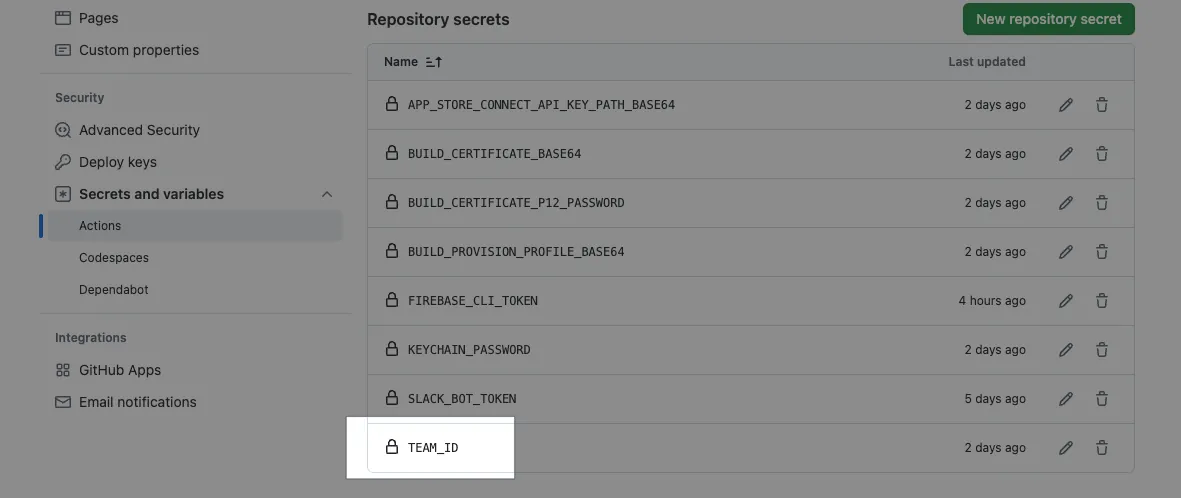
TEAM_IDsecret in Repo -> Settings -> Actions secrets and variables -> secrets, containing your Apple Developer Team ID string.
Commit files to the repo main branch to test the build function:
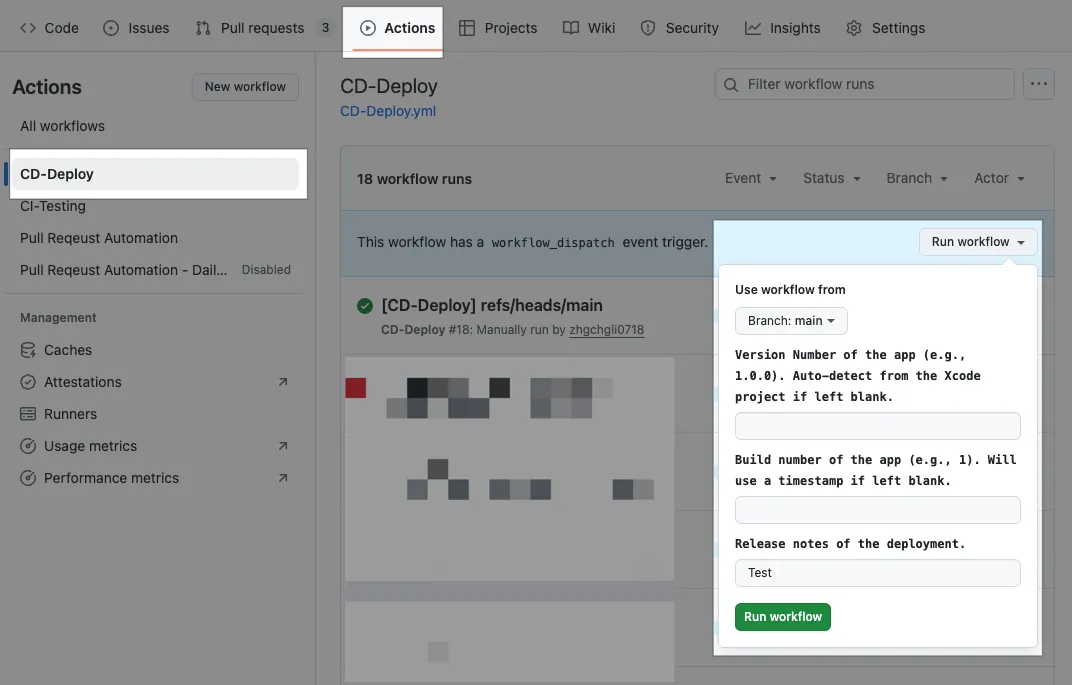
Please note that if other branches want to use this Action, they need to merge the CD-Deploy.yml file from the main branch first.
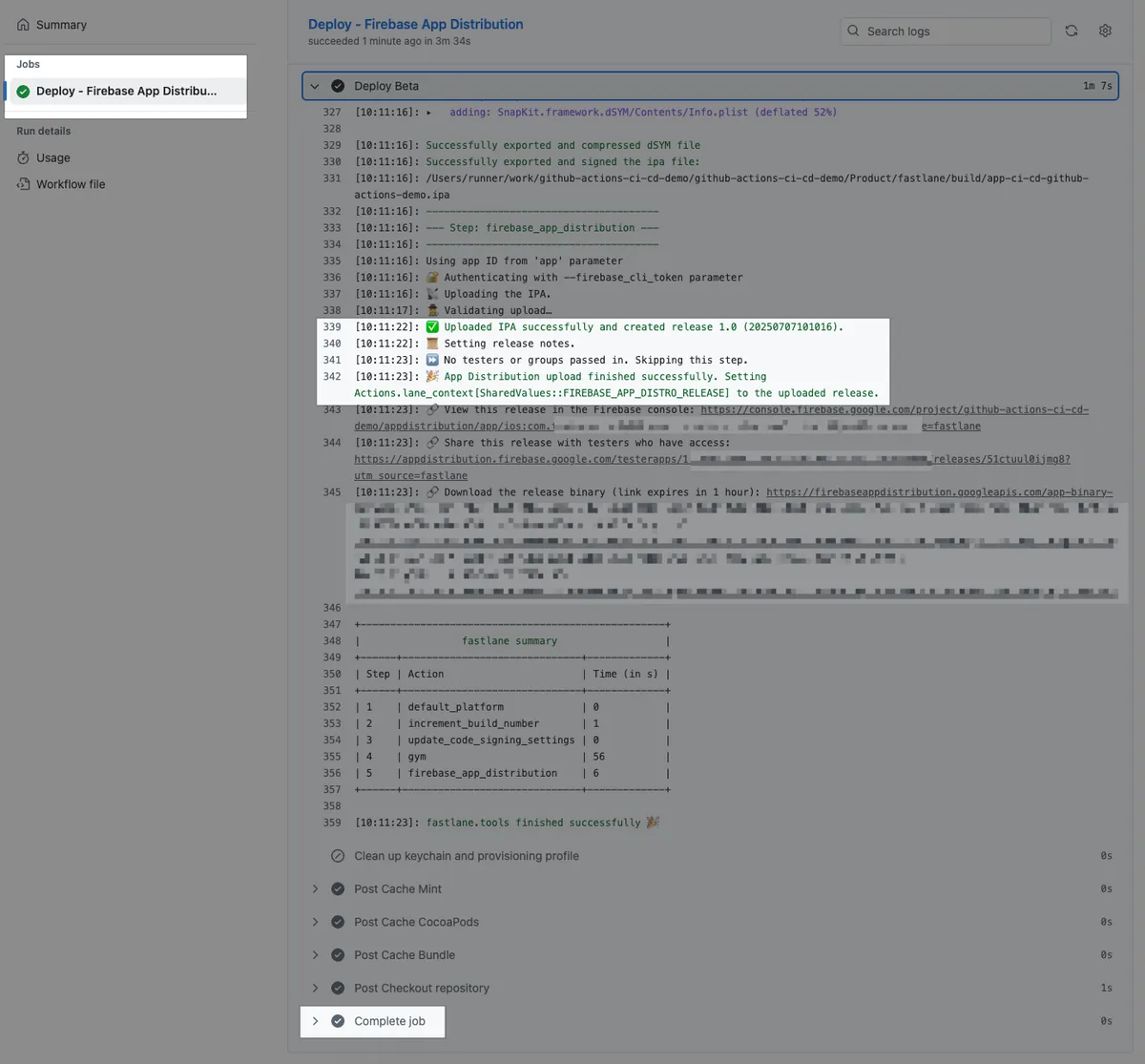
Wait for the task to complete:
{:target="_blank"}](/assets/4b001d2e8440/1*W8PBkatfsITMDFSlp7xpjg.webp)
Build + Deployment Successful ✅
Full code: CD-Deploy.yml
Technical Details — Obtaining & Setting Firebase CLI Token
According to the Firebase official documentation steps:
First, install the Firebase CLI tool:
1
curl -sL https://firebase.tools \\| bash
Execute:
1
firebase login:ci
Complete login and authorization:
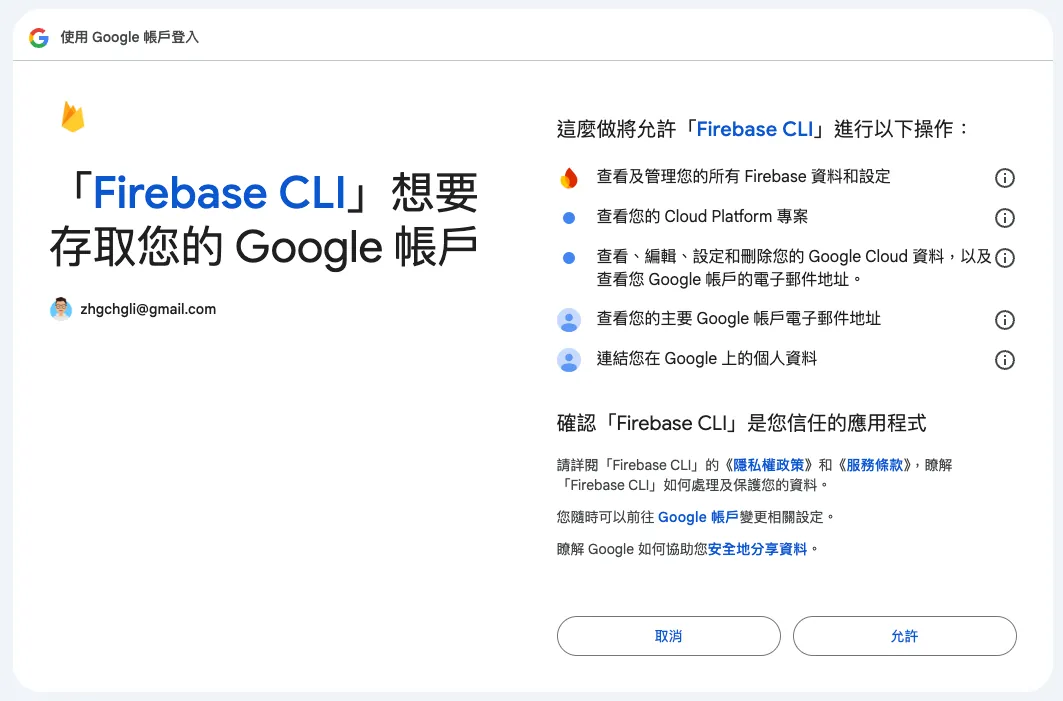
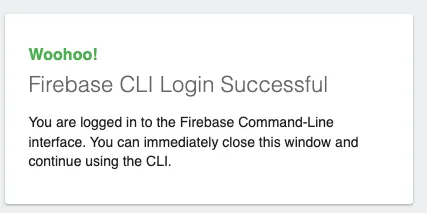
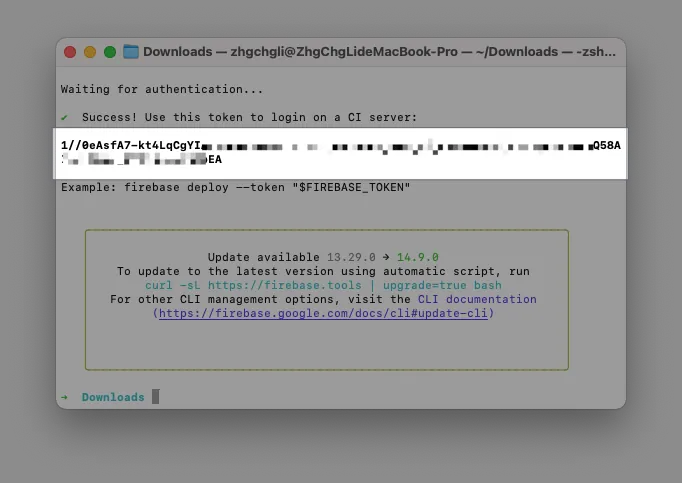
Return to the Terminal and copy the Firebase CLI Token:
Go to Repo → Settings → Secrets and variables → Actions → Add a new Secret: FIREBASE_CLI_TOKEN and paste the Firebase CLI Token.
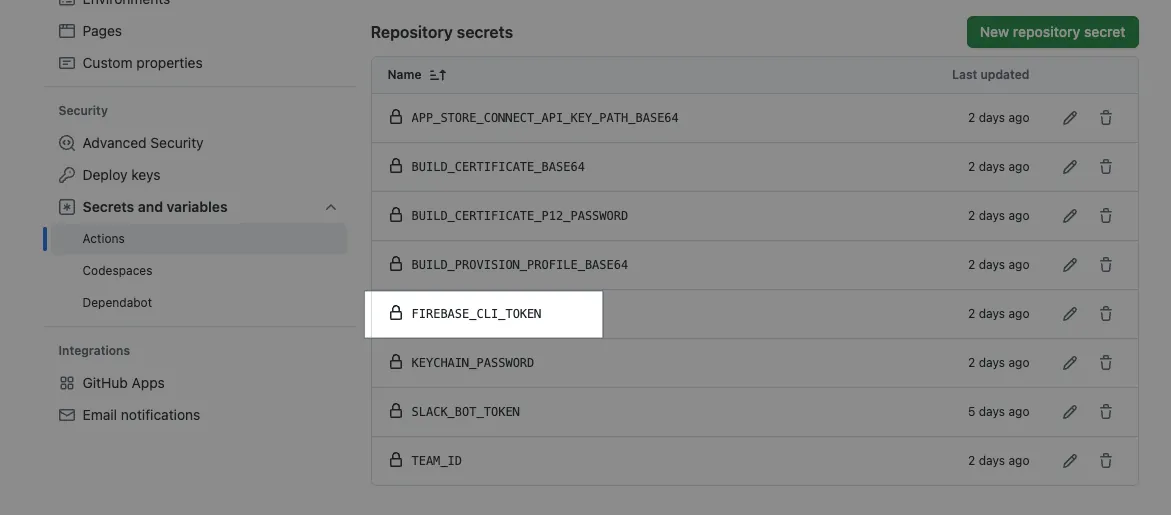
This Token = your login identity Please keep it safe. If the account holder leaves, it must be replaced.
Technical Details — Install the Apple certificate and provisioning profile
Additional details on importing development certificates into the Runner.
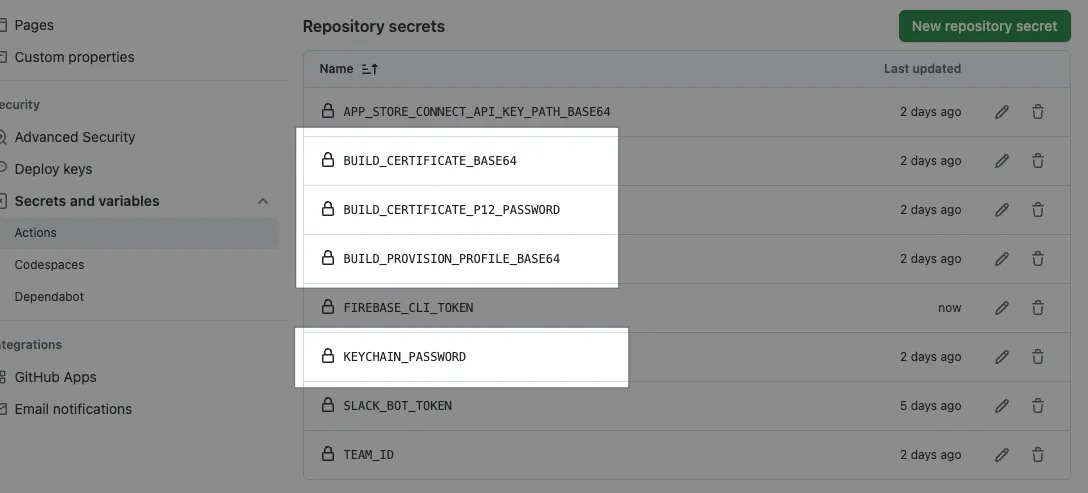
Since GitHub Actions Secrets cannot store files, all credential files must first be converted to Base64 encoded text and stored in Secrets. In the GitHub Actions steps, they are dynamically read, written to TEMP files, and then moved to the correct locations for the system to use.
Packaging Development requires two key certificates:
cicd.mobileprovision
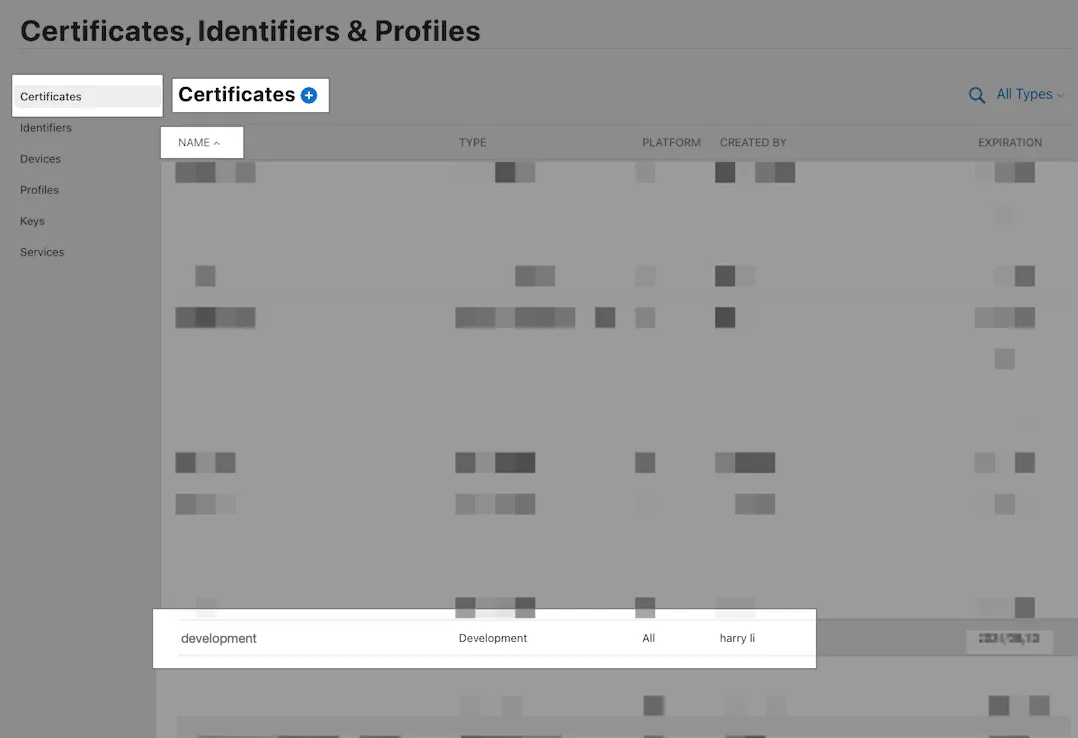
development.cer
The Certificate downloaded from Apple Developer is in .cer format, but we need it in .p12 format. You can double-click the downloaded .cer file to install it into the Keychain, then open Keychain, right-click the certificate, and choose Export.
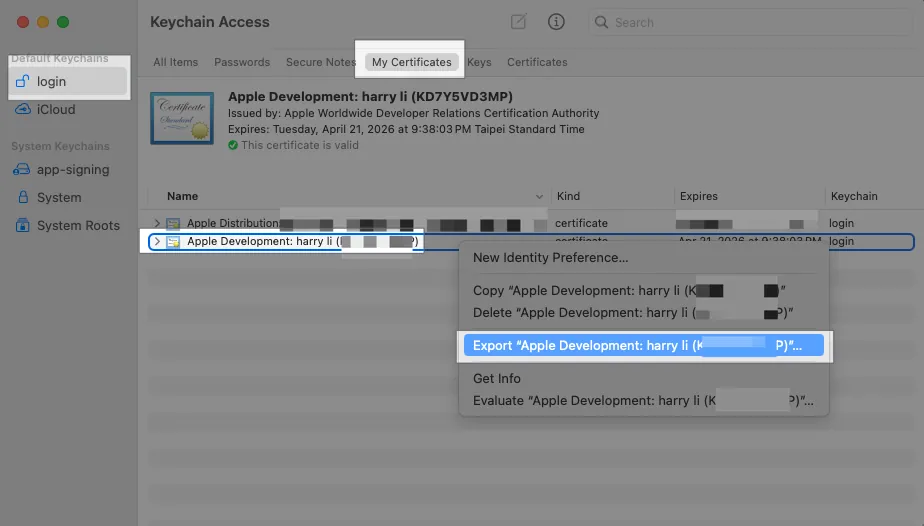
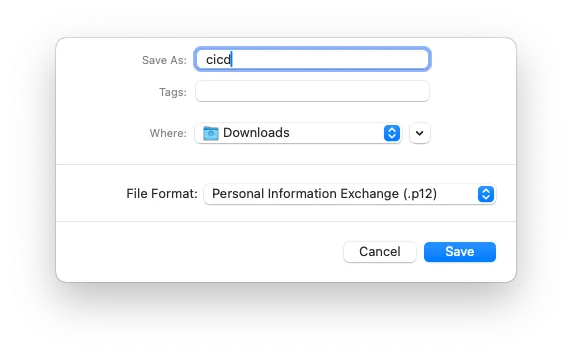
File name: cicd.p12, format .p12
P12 Key Password: Enter a secure custom string (the example is a bad practice, using 123456)
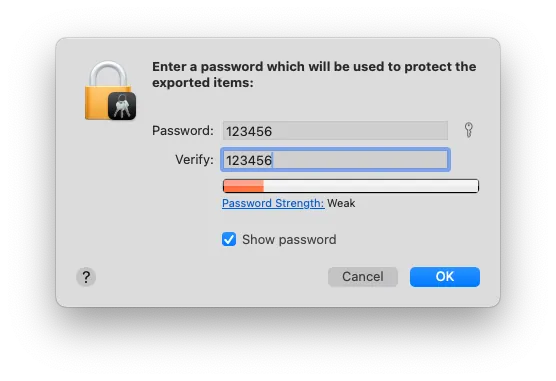
Now two files are ready: cicd.p12, cicd.mobileprovision
Convert to BASE64 string and save to Repo Secrets:
1
base64 -i cicd.mobileprovision \\| pbcopy
Go to Repo → Settings → Secrets and variables → Actions → add a new Secret: BUILD_PROVISION_PROFILE_BASE64 and paste the above content.
-
1
base64 -i cicd.p12 \\| pbcopy
Go to Repo → Settings → Secrets and variables → Actions → Add a new Secret: BUILD_CERTIFICATE_BASE64 and paste the above content.
-
Go to Repo → Settings → Secrets and variables → Actions → add a new Secret: P12_PASSWORD with the password used when exporting the P12 key.
- Go to Repo → Settings → Secrets and variables → Actions → Add a new Secret: KEYCHAIN_PASSWORD : If using a GitHub Hosted Runner, enter any random string. If using a Self-hosted Runner, this should be the macOS Runner user’s login password.
Technical Details — App Store Connect API Key
Fastlane deployment to App Store and Testflight requires the mandatory .json key. Since GitHub Actions Secrets can only store strings, not files, we convert the key content into a Base64 string. In the GitHub Actions step, we dynamically read it, write it to a TEMP file, and provide the file path for Fastlane to use.
First, go to App Store Connect to create & download the App Store Connect API Key (.p8):
-----BEGIN PRIVATE KEY-----
sss
axzzvcxz
zxzvzcxv
vzxcvzxvczxcvz
-----END PRIVATE KEY-----
Add a new app_store_connect_api.json file (refer to content):
1
2
3
4
5
6
7
{
  "key_id": "Key ID written on App Store Connect",
  "issuer_id": "Issuer ID written on App Store Connect",
  "key": "-----BEGIN PRIVATE KEY----- Remember to replace line breaks with \\n -----END PRIVATE KEY-----",
  "duration": 1200, # optional (maximum 1200)
  "in_house": false # optional but may be required if using match/sigh
}
After saving the file, run:
1
base64 -i app_store_connect_api.json \\| pbcopy
Paste the string content into Repo → Settings → Secrets and variables → Actions → Add a new Secret: APP_STORE_CONNECT_API_KEY_BASE64 and paste the above content.
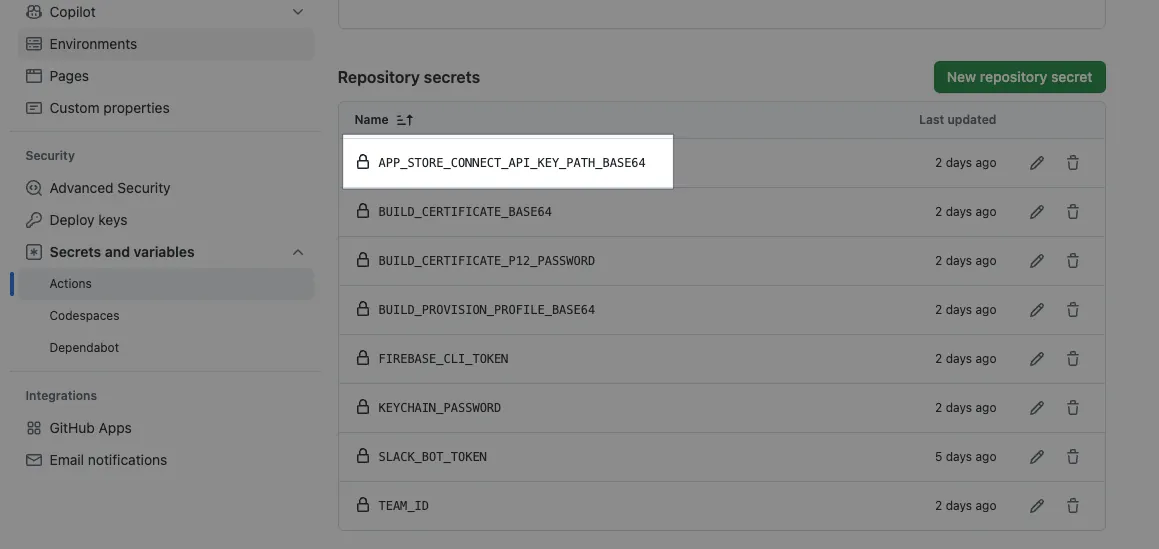
After completing the Read and Write Apple Store Connect API Key to Temp step, just pass the env APP_STORE_CONNECT_API_KEY_PATH in the subsequent steps:
1
2
3
4
5
- name: Deploy
  env:
    APP_STORE_CONNECT_API_KEY_PATH: "${{ runner.temp }}/${{ env.APP_STORE_CONNECT_API_KEY_FILE_NAME }}"
  run: \\|
    ....
Fastlane can be used automatically.
Technical Extension — Reuse Action Workflow to Separate Packaging and Deployment Actions
In this case, we directly use the Fastlane beta lane to perform both packaging and deployment.
In real cases, we may need to deploy the same build result to different platforms (Firebase, Testflight, etc.). Therefore, a better approach is to have packaging as one Action and deployment as another Action, to avoid running the build twice; this also better aligns with the responsibilities in CI/CD.
The following is an example introduction:
CI-Build.yml:
1
2
3
4
5
6
7
8
9
10
11
12
13
14
15
16
17
18
19
20
21
22
23
24
25
26
27
28
29
30
31
32
33
34
name: Build

on:
  push:
    branches:
      - main
  workflow_call:
     inputs:
        RELEASE_NOTE:
          description: 'Release notes of the deployment.'
          required: false
          type: string

jobs:
  build:
    runs-on: macos-latest

    steps:
      - name: Checkout Code
        uses: actions/checkout@v4

      - name: Install Dependencies
        run: \\|
          make steup
          make instal

      - name: Build Project
        run: bundle exec fastlane build

      - name: Upload Build Artifact
        uses: actions/upload-artifact@v4
        with:
          name: build-artifact
          path: ./fastlane/build/
CD-Deploy-Firebase.yml:
1
2
3
4
5
6
7
8
9
10
11
12
13
14
15
16
17
18
19
20
21
22
23
24
25
26
27
28
29
30
31
32
name: Deploy Firebase

on:
  # Automatically trigger when the Build Action completes
  workflow_run:
    workflows: ["Build"]
    types:
      - completed

jobs:
  deploy:
    runs-on: ubuntu-latest
    # Deploy only if the build completed successfully
    if: ${{ github.event.workflow_run.conclusion == 'success' }}

    steps:
      - name: Checkout Code
        uses: actions/checkout@v4

      - name: Install Dependencies
        run: \\|
          make steup

      - name: Download Build Artifact
        uses: actions/download-artifact@v4
        with:
          name: build-artifact
          path: ./fastlane/build/

      - name: Deploy to Production
        run: \\|
          bundle exec fastlane deploy-firebase
CD-Deploy-Testflight.yml:
1
2
3
4
5
6
7
8
9
10
11
12
13
14
15
16
17
18
19
20
21
22
23
24
25
26
27
28
29
30
31
32
name: Deploy Testflight

on:
  # Automatically trigger when the Build Action is completed
  workflow_run:
    workflows: ["Build"]
    types:
      - completed

jobs:
  deploy:
    runs-on: ubuntu-latest
    # Deploy only if completed and successful
    if: ${{ github.event.workflow_run.conclusion == 'success' }}

    steps:
      - name: Checkout Code
        uses: actions/checkout@v4

      - name: Install Dependencies
        run: \\|
          make steup

      - name: Download Build Artifact
        uses: actions/download-artifact@v4
        with:
          name: build-artifact
          path: ./fastlane/build/

      - name: Deploy to Production
        run: \\|
          bundle exec fastlane deploy-testflight
You can also use Reusing Workflow :
CD-Deploy-Firebase.yml:
1
2
3
4
5
6
7
8
9
10
11
12
13
14
15
16
17
18
19
20
21
22
23
24
25
26
27
28
29
30
31
32
33
34
35
36
37
38
39
40
41
name: Deploy Firebase

on:
  # Any trigger condition, here using manual form trigger as an example
  workflow_dispatch:
    inputs:
      RELEASE_NOTE:
        description: 'Release notes of the deployment.'
        required: false
        type: string
jobs:
  build:
    needs: Build
    uses: ./.github/workflows/CD-Build.yml
    secrets: inherit
    with:
      RELEASE_NOTE: ${{ inputs.RELEASE_NOTE }}

  deploy:
    runs-on: ubuntu-latest
    # Jobs run concurrently by default, use needs to wait for build to complete before running
    needs: [build]
    # Deploy only if successful
    if: ${{ always() && needs.deploy.result == 'success' }}
    steps:
      - name: Checkout Code
        uses: actions/checkout@v4

      - name: Install Dependencies
        run: \\|
          make steup

      - name: Download Build Artifact
        uses: actions/download-artifact@v4
        with:
          name: build-artifact
          path: ./fastlane/build/

      - name: Deploy to Production
        run: \\|
          bundle exec fastlane deploy-firebase
GitHub Actions — Artifact
Regarding Cache, currently even the Self-hosted Runner Artifact feature still goes through GitHub Cloud, which is subject to usage limits ( Free account starts at 500MB ).
To achieve similar results with a self-hosted runner, you can create a shared host directory or use alternative tools.
Therefore, I currently use Artifacts only to store small data, such as Snapshot Test failure results, test reports, and so on.
CI— Nightly Build Run Snapshot + Unit Tests + Build + CD Deployment to Firebase App Distribution
Workflow
Run all tests (unit + snapshot tests) automatically every day at 3 AM for the main (develop or master) branch. If the tests fail, send a failure notification to the Slack workspace; if successful, build and deploy a version to Firebase App Distribution. Notifications for both build success and failure will be sent to Slack.
CI-Nightly-Build-And-Deploy.yml
Repo → Actions → New workflow → set up a workflow yourself.
1
2
3
4
5
6
7
8
9
10
11
12
13
14
15
16
17
18
19
20
21
22
23
24
25
26
27
28
29
30
31
32
33
34
35
36
37
38
39
40
41
42
43
44
45
46
47
48
49
50
51
52
53
54
55
56
57
58
59
60
61
62
63
64
65
66
67
68
69
70
71
72
73
74
75
76
77
78
79
80
81
82
83
84
85
86
87
88
89
90
91
92
93
94
95
96
97
98
99
100
101
102
# Workflow(Action) Name
name: CI-Nightly Build And Deploy

# Actions Log Title
run-name: "[CI-Nightly Build And Deploy] ${{ github.ref }}"

# Trigger Events
on:
  # Scheduled automatic execution
  # https://crontab.guru/
  # UTC time
  schedule:
    # 19:00 UTC = 03:00 UTC+8 every day
    - cron: '0 19 * * *'
  # Manual trigger
  workflow_dispatch:

# Job Items
# Jobs run concurrently
jobs:
  # Testing job
  testing:
    # Reuse Workflow (workflow_call)
    uses: ./.github/workflows/CI-Testing.yml
    # Pass all Secrets to CD-Testing.yml
    secrets: inherit
    with:
      # Run all tests
      TEST_LANE: "run_all_tests"
      # Target branch: main, develop or master...etc
      BRANCH: "main"

  deploy-env:
    runs-on: ubuntu-latest
    outputs:
      DATE_STRING: ${{ steps.get_date.outputs.DATE_STRING }}
    steps:
      - name: Get Date String
        id: get_date
        run: \\|
          VERSION_DATE=$(date -u '+%Y%m%d')
          echo "${VERSION_DATE}"
          echo "DATE_STRING=${VERSION_DATE}" >> $GITHUB_ENV
          echo "DATE_STRING=${VERSION_DATE}" >> $GITHUB_OUTPUT

  deploy:
    # Jobs run concurrently by default; use needs to wait for testing and deploy-env to finish
    needs: [testing, deploy-env]
    # Run only if testing succeeds
    if: ${{ needs.testing.result == 'success' }}
    # Reuse Workflow (workflow_call)
    uses: ./.github/workflows/CD-Deploy.yml
    # Pass all Secrets to CD-Deploy.yml
    secrets: inherit
    with:
      VERSION_NUMBER: NightlyBuild-${{ needs.deploy-env.outputs.DATE_STRING }}
      RELEASE_NOTE: NightlyBuild-${{ needs.deploy-env.outputs.DATE_STRING }}
      # Target branch: main, develop or master...etc
      BRANCH: "main"

# ----- Slack Notify -----
  testing-failed-slack-notify:
    needs: [testing]
    runs-on: ubuntu-latest
    if: ${{ needs.testing.result == 'failure' }}
    steps:
      - name: Post text to a Slack channel
        uses: slackapi/[email protected]
        with:
          method: chat.postMessage
          token: ${{ secrets.SLACK_BOT_TOKEN }}
          payload: \\|
            channel: ${{ vars.SLACK_TEAM_CHANNEL_ID }}
            text: ":x: Nightly Build - Testing failed\nWorkflow: <${{ github.server_url }}/${{ github.repository }}/actions/runs/${{ github.run_id }}\\|View Run>"

  deploy-failed-slack-notify:
    needs: [deploy]
    runs-on: ubuntu-latest
    if: ${{ needs.deploy.result == 'failure' }}
    steps:
      - name: Post text to a Slack channel
        uses: slackapi/[email protected]
        with:
          method: chat.postMessage
          token: ${{ secrets.SLACK_BOT_TOKEN }}
          payload: \\|
            channel: ${{ vars.SLACK_TEAM_CHANNEL_ID }}
            text: ":x: Nightly Build Deploy failed\nWorkflow: <${{ github.server_url }}/${{ github.repository }}/actions/runs/${{ github.run_id }}\\|View Run>"

  deploy-success-slack-notify:
    needs: [deploy]
    runs-on: ubuntu-latest
    if: ${{ needs.deploy.result == 'success' }}
    steps:
      - name: Post text to a Slack channel
        uses: slackapi/[email protected]
        with:
          method: chat.postMessage
          token: ${{ secrets.SLACK_BOT_TOKEN }}
          payload: \\|
            channel: ${{ vars.SLACK_TEAM_CHANNEL_ID }}
            text: ":white_check_mark: Nightly Build Deploy succeeded\nWorkflow: <${{ github.server_url }}/${{ github.repository }}/actions/runs/${{ github.run_id }}\\|View Run>"
Commit files to the repo main branch and manually trigger test and build to see the results:
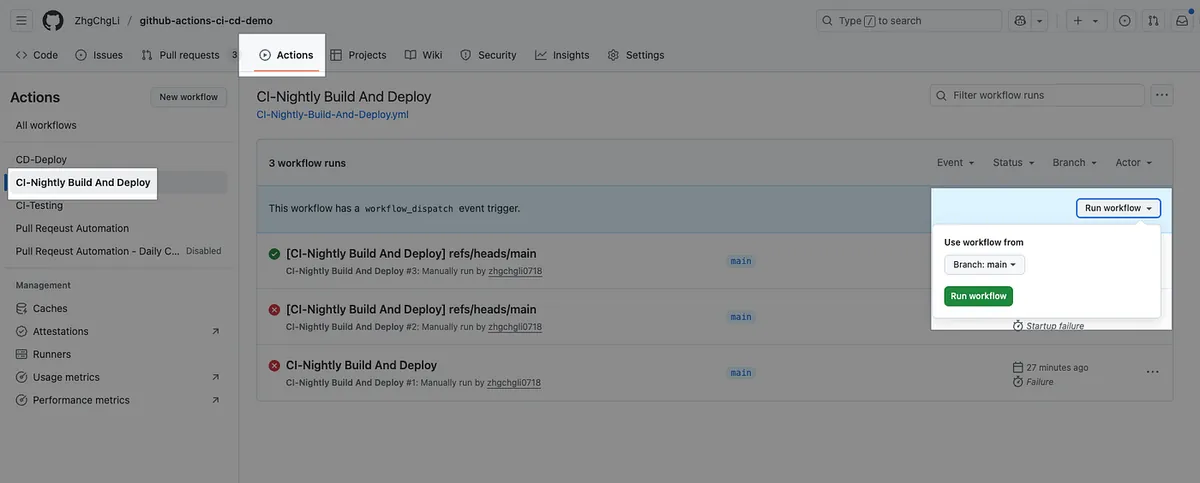
It will be automatically triggered daily in the future.
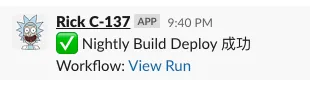
After the test task, build and deploy task, and notification task are all completed, check the results.
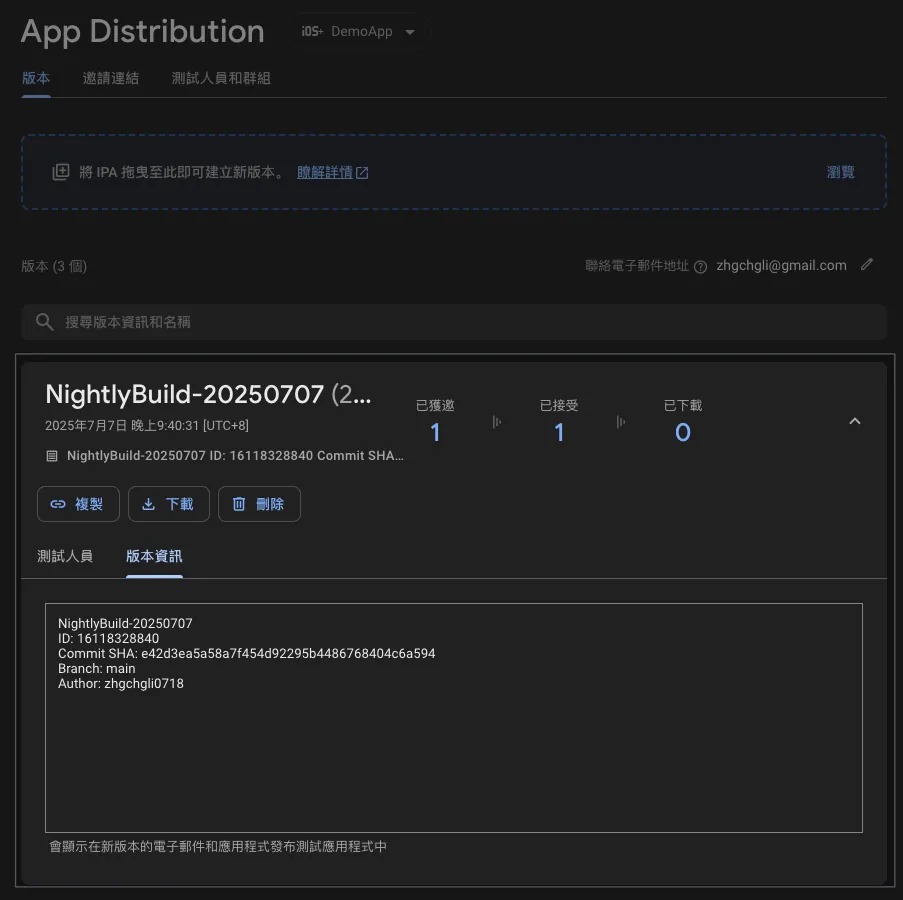
We can directly install the Nightly Build version on our phones for early testing.
Technical Details
This Action directly reuses the previously designed CI-Testing and CD-Deploy, combining them into our Nightly Build. It is very flexible and easy to use!
Complete Code: CI-Nightly-Build-And-Deploy.yml
Self-hosted Runner Notes
This article uses a Public Repo, so it directly uses GitHub Hosted macOS Runners. However, in real work, our Repos are always Private. Using GitHub Hosted Runners is very expensive and not cost-effective (about the price of a Mac Mini per month, which you can set up in the office for unlimited use). Each machine can run multiple Runners concurrently depending on its performance to handle tasks.
For details, please refer to the previous article section “Setting up and Switching to Self-hosted Runner”. After installing XCode and the basic environment on your local machine, register and activate the Runner, then change
runs-onto[self-hosted]in the Action Workflow YAML.*
The issue of multiple Runners on the same machine has mostly been resolved in the Actions above, such as changing all shared dependency directories to local directories. Another problem encountered during testing that needs to be addressed is the simulator conflict: “When two test Jobs are run by two Runners on the same machine simultaneously, specifying the same simulator causes interference and test failures.”
The solution is simple: assign a separate simulator to each individual Runner.
Multiple Runners Configured for Simulators on the Same Machine
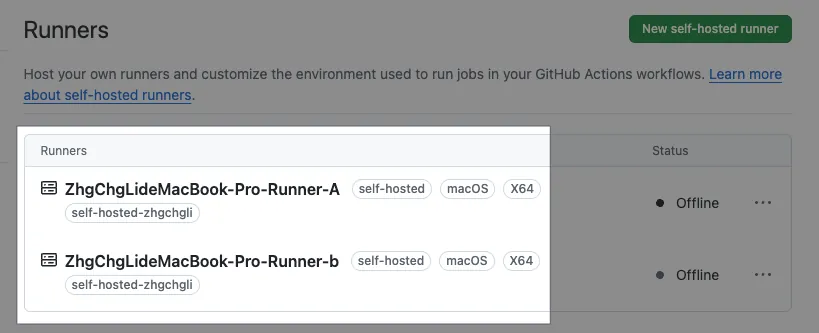
Assuming I have two Runners on the same machine receiving tasks in parallel:
ZhgChgLideMacBook-Pro-Runner-AZhgChgLideMacBook-Pro-Runner-B
In XCode Simulator settings, we need to add two simulators:
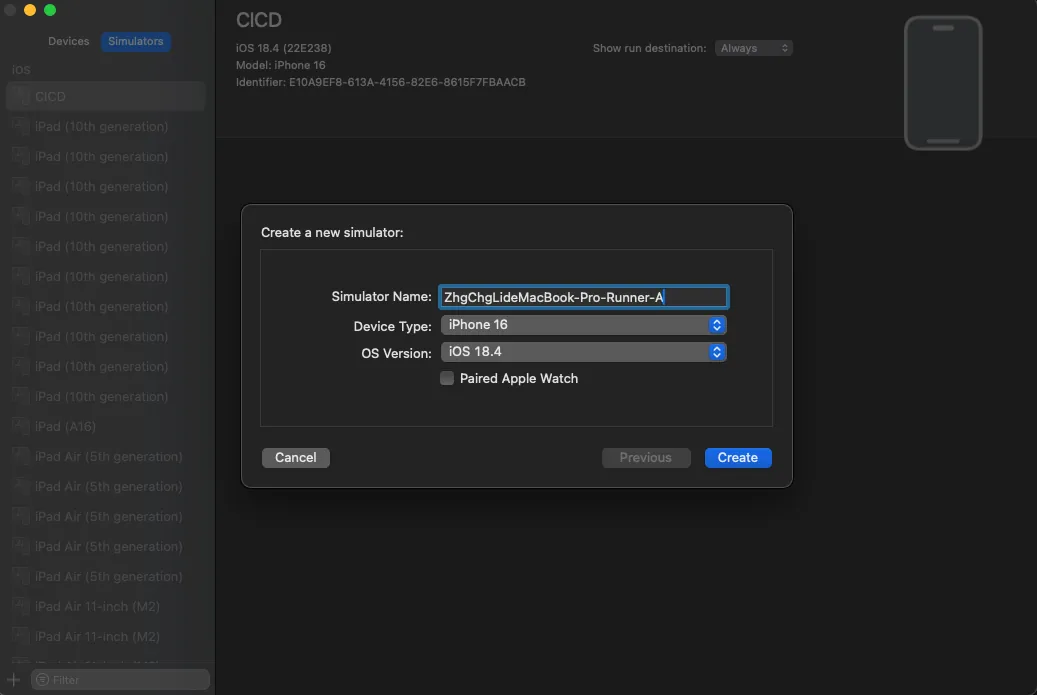
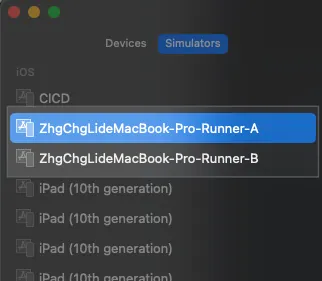
- Device Model, iOS Version, and Test Environment
Change the test step in CI-Testing.yml to:
1
2
3
4
5
6
7
8
9
10
11
12
13
14
15
16
17
18
19
20
# Run Fastlane Unit Test Lane
      - name: Run Tests
        id: testing
        # Set working directory so subsequent commands don't need to cd ./Product/
        working-directory: ./Product/
        env:
          # ...
          # Repo -> Settings -> Actions secrets and variables -> variables
          # iOS version of the simulator
          SIMULATOR_IOS_VERSION: ${{ vars.SIMULATOR_IOS_VERSION }}

          # Current Runner name
          RUNNER_NAME: ${{ runner.name }}

          # ...
        run: \\|

          # ...
          bundle exec fastlane ${TEST_LANE} device:"${RUNNER_NAME} (${SIMULATOR_IOS_VERSION})" \\| tee "$RUNNER_TEMP/testing_output.txt"
          # ...
devicechanged to${RUNNER_NAME} (${SIMULATOR_IOS_VERSION})SIMULATOR_IOS_VERSIONis still consistently set via the Repo variables.
The combined result will be (using 18.4 as an example):
Runner:
ZhgChgLideMacBook-Pro-Runner-A
Simulator: ZhgChgLideMacBook-Pro-Runner-A(18.4)Runner:
ZhgChgLideMacBook-Pro-Runner-BSimulator: ZhgChgLideMacBook-Pro-Runner-B(18.4)
This way, when two Runners run tests simultaneously, two simulators will start and run independently.
Complete Project Repo
Additional SSH Agent Setup — For Fastlane Match or Private CocoaPods Repo
When using Fastlane Match or a Private CocoaPods Repo, since they reside in another Private Repo, the current Repo/Action environment cannot directly git clone. You need to set up the ssh agent so that the Action has permission to operate during execution.
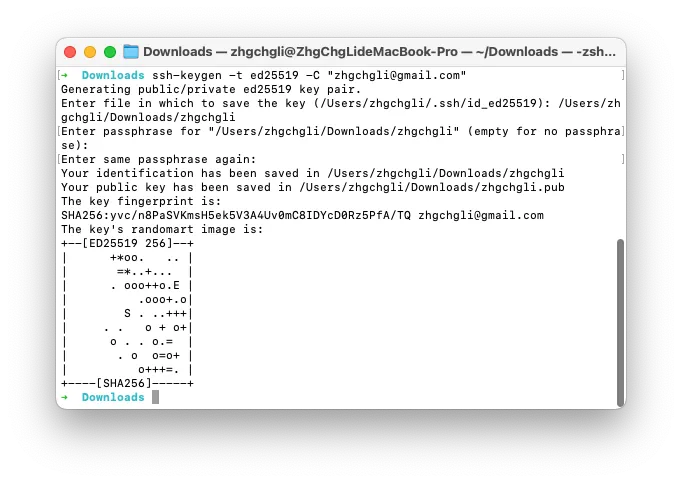
Step 1. Generate SSH Key
1
ssh-keygen -t ed25519 -C "[email protected]"
Enter file in which to save the key (/Users/zhgchgli/.ssh/id_ed25519): /Users/zhgchgli/Downloads/zhgchgli
- Input the download path to make it easier for us to copy the content
Enter passphrase for “/Users/zhgchgli/Downloads/zhgchgli” (empty for no passphrase):
Leave Blank: For CI/CD use, passphrase cannot be entered interactively in the CLI, so please leave it blank
Generation completed ( .pub/private_key)
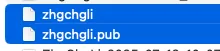
Step 2. Set Deploy Key in Private Repo
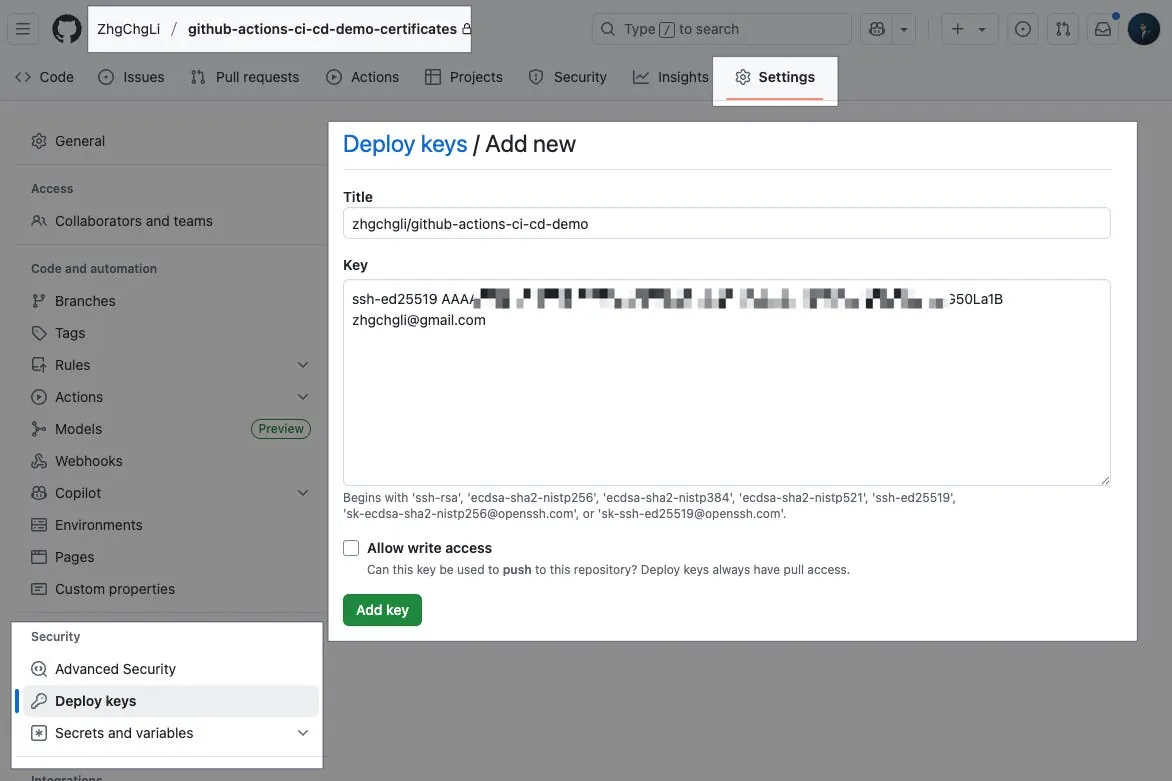
github-actions-ci-cd-demo-certificates Repo
Settings → Security → Deploy keys → Add deploy key。
Title: Enter Key Name
Key:
Paste the .pub Key content
Completed.
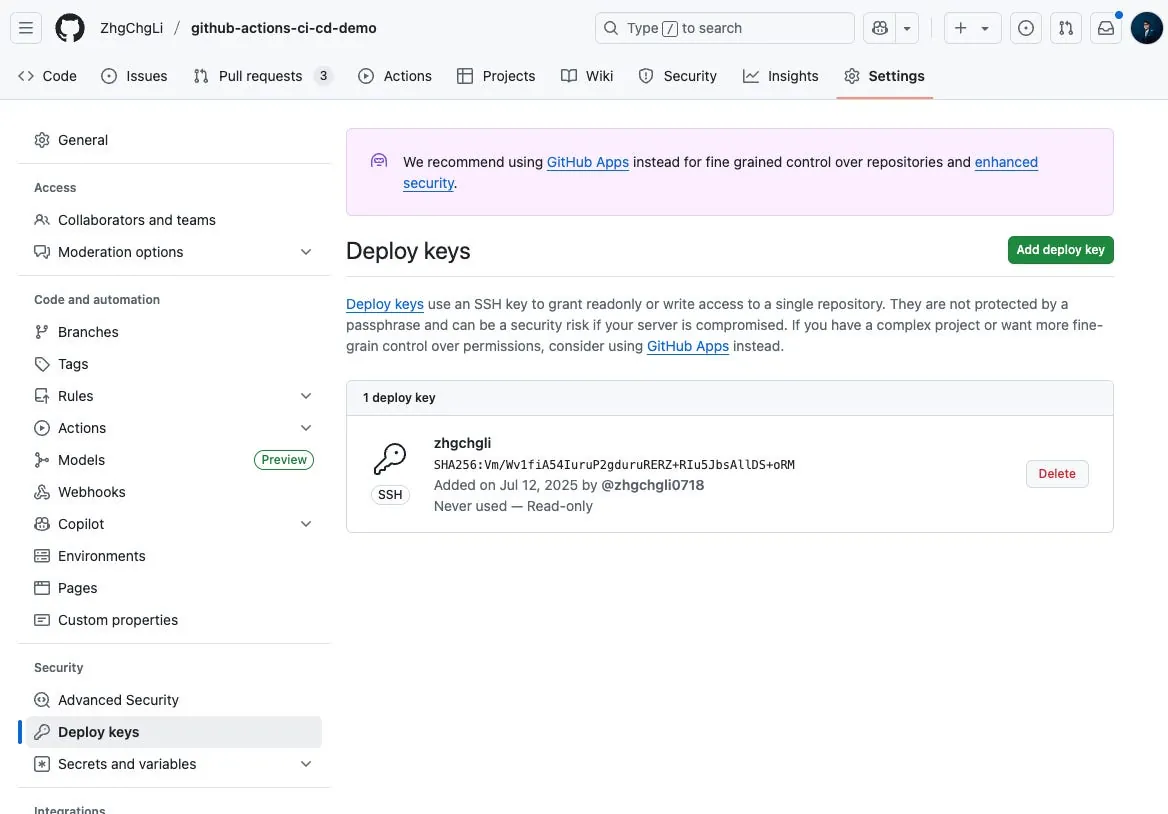
Step 3. Set SSH Private Key to Secrets in the Action’s Repo
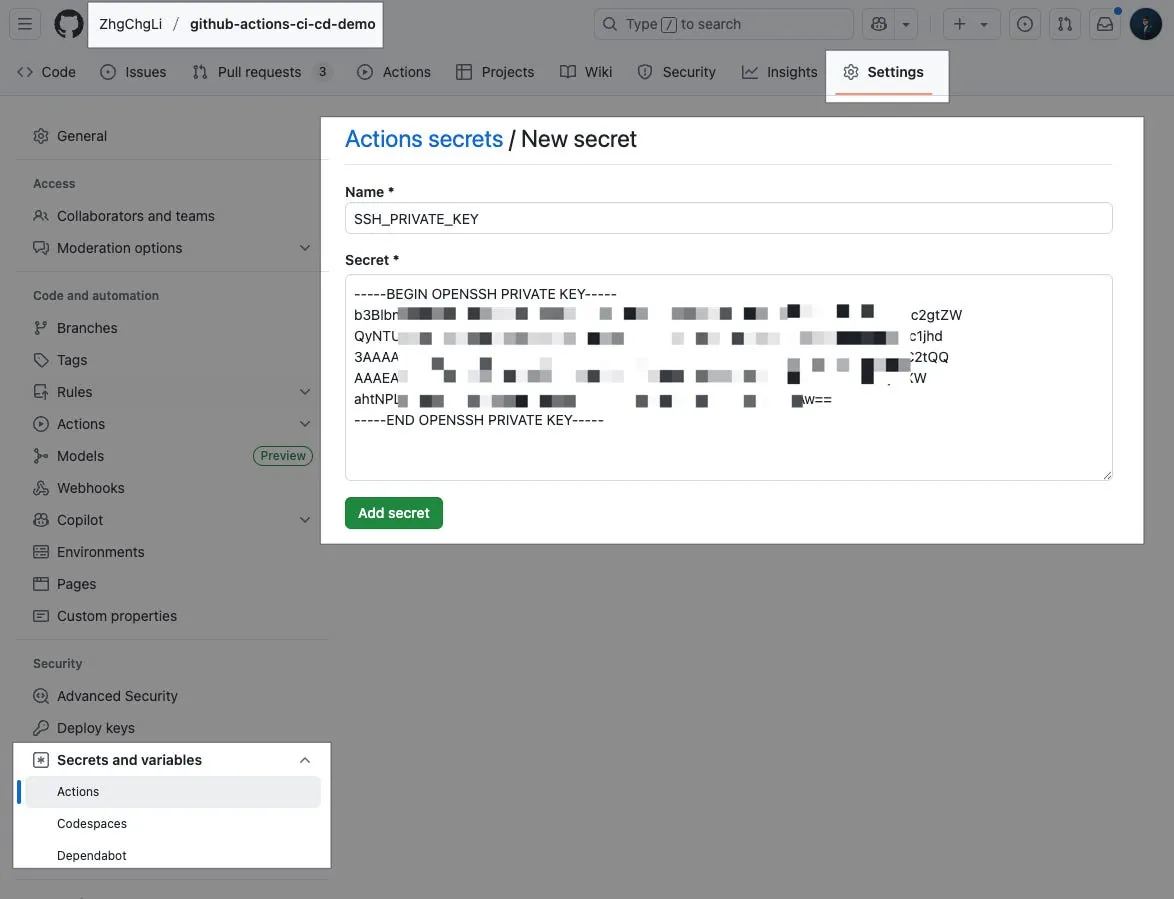
github-actions-ci-cd-demo Repo
Settings → Secrets and variables → Actions → New repository secret.
Name: Enter the secret variable name
SSH_PRIVATE_KEYSecret:
Paste the private_key content
Completed.
Step 4. SSH Agent setup complete, now verify Git Clone Private Repo access rights
Demo-Git-Clone-Private-Repo.yml :
1
2
3
4
5
6
7
8
9
10
11
12
13
14
15
16
17
18
19
20
21
22
23
24
25
26
27
28
29
30
31
32
33
34
35
name: Demo Git Clone Private Repo

on:
  workflow_dispatch:

jobs:
  clone-private-repo:
    name: Git Clone Private Repo
    runs-on: ubuntu-latest
    timeout-minutes: 30

    steps:
      # 🔐 Enable SSH Agent and add private key
      - name: Setup SSH Agent
        uses: webfactory/[email protected]
        with:
          ssh-private-key: ${{ secrets.SSH_PRIVATE_KEY }}

      # 🛡️ Add github.com to known_hosts to avoid host verification errors
      - name: Add GitHub to known_hosts
        run: \\|
          mkdir -p ~/.ssh
          ssh-keyscan github.com >> ~/.ssh/known_hosts
      # 📦 Use SSH to clone private repo and verify
      - name: Clone and Verify Private Repo
        run: \\|
          git clone [email protected]:ZhgChgLi/github-actions-ci-cd-demo-certificates.git ./fakeMatch/
          if [ -d "./fakeMatch/.git" ]; then
            echo "✅ Repo cloned successfully into ./fakeMatch/"
            cd ./fakeMatch
            echo "📌 Current commit: $(git rev-parse --short HEAD)"
          else
            echo "❌ Clone failed. SSH Agent may not be configured properly."
            exit 1
          fi
You can use the above Action to verify if the setup is successful.
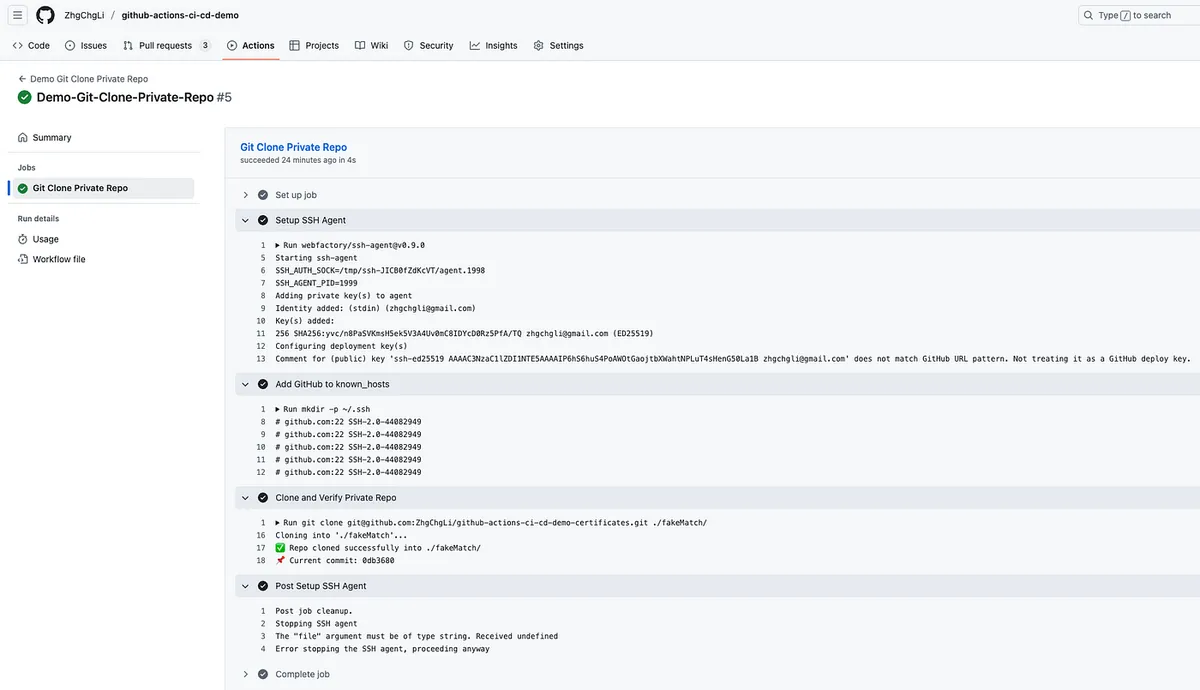
Success. Subsequent fastlane match or pod install for private pods should execute correctly.
Summary
This article documents the complete iOS CI/CD process developed using GitHub Actions. The next article will optimize the user experience (for engineers/PMs/designers) by enhancing Slack notifications and integrating Google Apps Script Web App with GitHub Actions to create a free and easy-to-use cross-team build platform tool.
Series Articles:
🍺 Buy me a beer on PayPal
If you have any questions or feedback, feel free to contact me .
This post was originally published on Medium (View original post), and automatically converted and synced by ZMediumToMarkdown.