LINE Bank to Firstrade Transfer|Fast Deposit & 150 NT Fee Guide with Account Upgrade & Fee Subsidy
Discover how LINE Bank users can deposit to Firstrade quickly with only 150 TWD fees, upgrade accounts, set up scheduled transfers, and apply for fee subsidies through step-by-step instructions ensuring smooth and cost-effective transactions.
This post was translated with AI assistance — let me know if anything sounds off!
Table of Contents
Step-by-Step Guide — LINE Bank Deposit to Firstrade Fast Arrival, Only 150 TWD Fee, and Account Upgrade/Linked Transfer/Fee Reimbursement Application Tutorial
Line Bank Deposit to Firstrade and Account Upgrade Agreement with Fee Subsidy Complete Illustrated Guide
Advantages of LINE Bank
Easy Account Opening: If you have credit records with other banks, you can open an account by simply filling out the online form.
Interbank transfers free of charge: up to 50 times/month
Seamless LINE Transfer Integration: No need to use iPASS MONEY for transfers between friends
24-hour currency exchange available
Multiple flexible high-interest deposit plans available for self-selection
Personal Loan: Fast / Integrated / Easy 10-Year Repayment
Securities: Invest in Taiwan stocks starting from 100 TWD
Line Bank US Remittance Promotion — Outgoing Fee NT$150, Incoming Fee NT$50
[2026/01/01 Extended Again]:
Promotion Period: The original promotion period is from 2026/1/1 to 2026/6/30
Promotion: Foreign currency outbound transfer fee is NT$150 per transaction (originally NT$600), and foreign currency inbound transfer fee is NT$50 per transaction (originally NT$400)
Promotion products: foreign currency outbound remittance, foreign currency inbound remittance
This is the biggest incentive for using LINE Bank. Until 2026/06/30, depositing to Firstrade with a LINE Bank account only incurs a 150 TWD handling fee, with no telegraphic transfer or other fees.
Memo: This promotion started from 2025/01–06 and has been extended twice due to positive feedback (extended from 2025/06 to 2025/12, and again from 2025/12 to 2026/06). Please note the dates!
Click here to apply
{:target="_blank"}](/assets/e4d139fe0685/1*u5qqz4o0pCvUTF16sYHNCg.webp)
Disadvantages
This time, to set up a designated account, since LINE Bank has no physical branches, you must verify with a National ID Certificate; therefore, you need to visit the household registration office to apply for the certificate before use, which is more troublesome than going directly to a bank.
Advantages of Firstrade
Easy account opening, simple interface and features, beginner-friendly for US stock trading
Supports Chinese interface
Trade with 0 commission fees
Established Broker
Please be sure to use the name on your passport for account registration.
Deposit over $10,000 USD to apply for a wire fee rebate up to $25
{:target="_blank"} (up to three times per month)](/assets/e4d139fe0685/1*-4JN2hY_QP3oZaon2BES0A.webp)
Deposit over $10,000 USD to apply for a wire fee rebate up to $25 USD (up to three times per month)
Once the account is fully set up, we can start funding it.
Reference Timeline for Deposit (Fastest 2 Days to Account Credit)
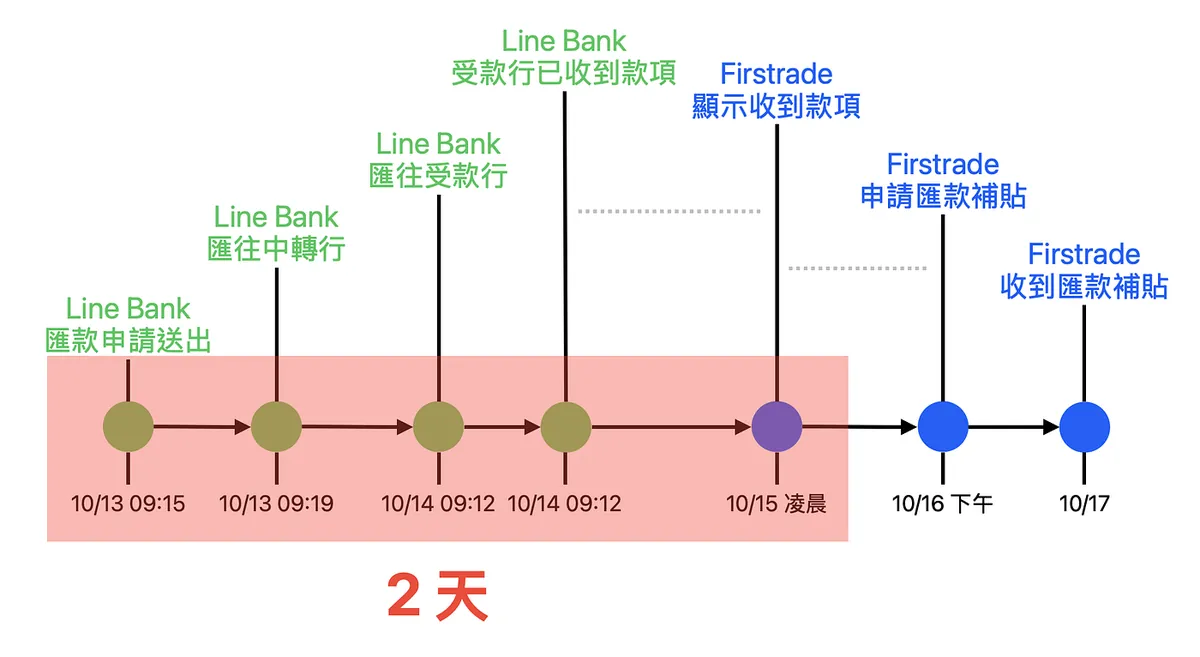
Here is the timeline from my deposit to Firstrade on 10/14 until receiving the remittance subsidy.
Please note that the above assumes the designated account has already been linked or the amount is less than 50,000. The first time linking a designated account takes +2 days to take effect.
LINE Bank shows that the receiving bank has received the funds. There is a time lag before Firstrade actually receives the money. (It probably waits until Firstrade finishes processing during business hours before showing as received)
There may be a delay in applying for the remittance subsidy (for single transfers over $10,000) after Firstrade receives the funds. If you don’t see the record, please check again later or the next day.
LINE Bank Deposit to Firstrade
First, let’s introduce how to deposit funds from Line Bank to Firstrade.
Deposit Your Assets into Firstrade
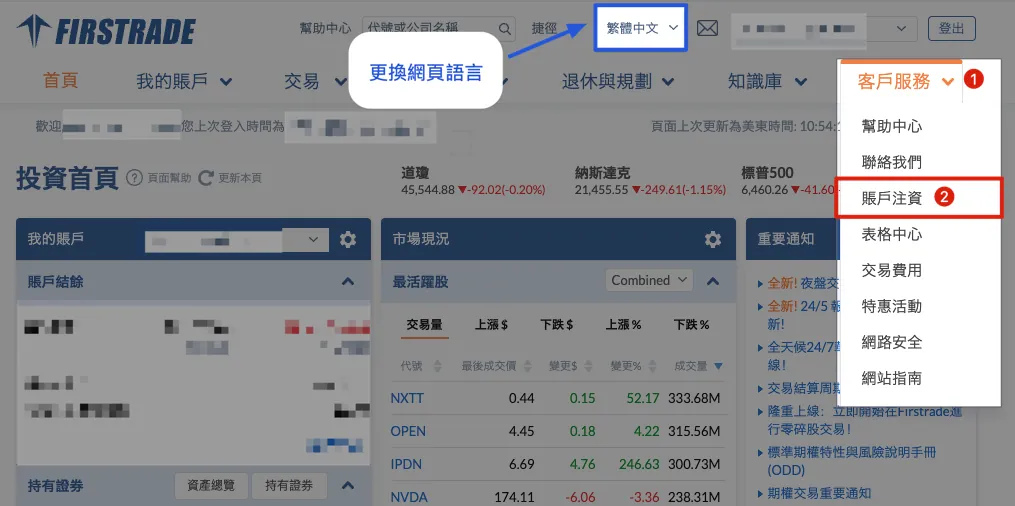
(Please use the desktop version) After logging into Firstrade, select:
Customer Service
Account Funding
If the page is in English, you can select “繁體中文” at the top to change the language.
Obtain Wire Transfer Information
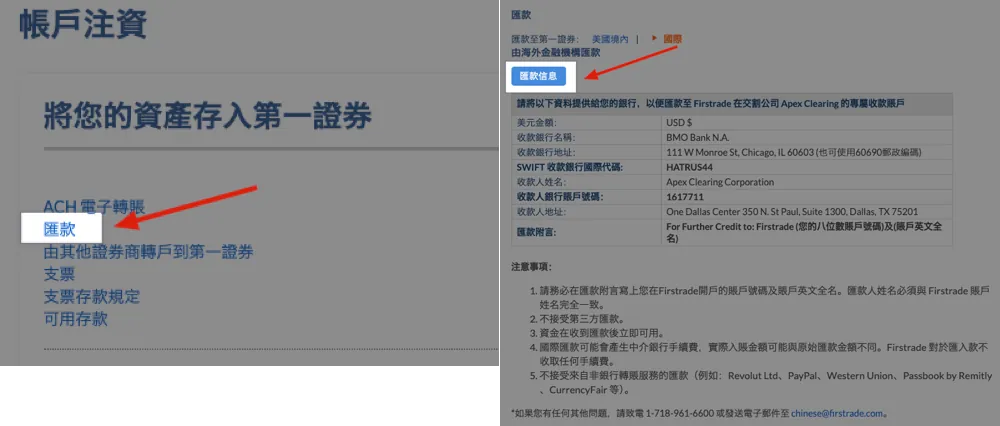
Select “Remittance” → “Remittance Information” to open a PDF file. You can save this file for easy reference when making deposits later:
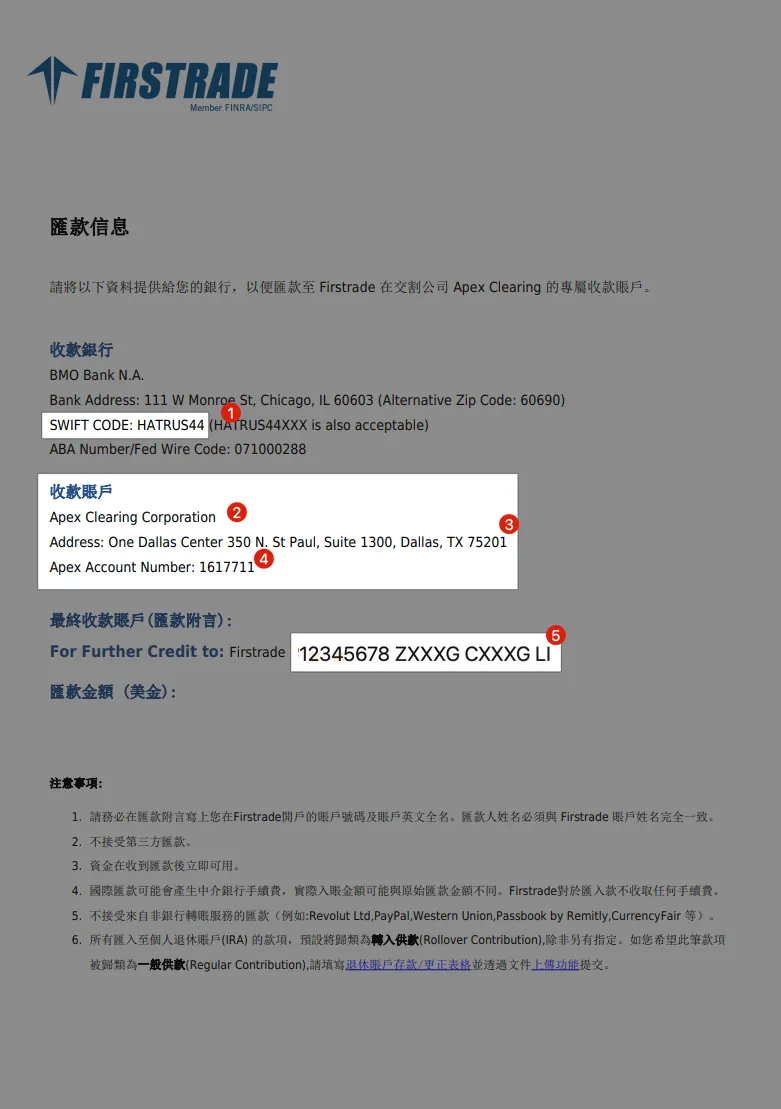
Receiving Bank Information — SWIFT Code
Beneficiary Account Name
Recipient’s English Address
Beneficiary Account Number
Remark
LINE Bank App — Remittance to Overseas
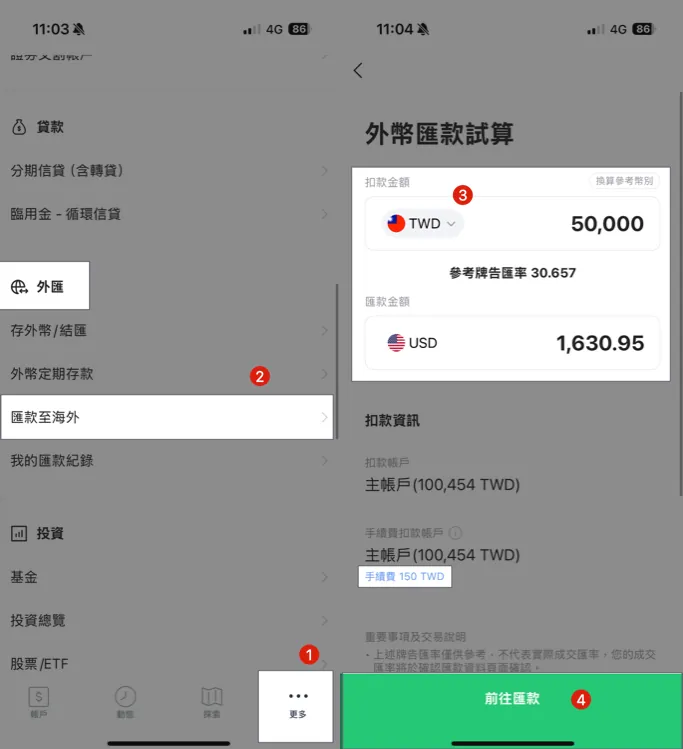
Click “More”
Scroll down to the “Foreign Exchange” section → Click “Remit Overseas”
Select the debit amount in “TWD or USD” and enter the transfer amount.
Please refer to the Line Bank account upgrade and designated account binding tutorial below first.
Please refer to the Line Bank account upgrade and designated account binding tutorial below first.
Please refer to the Line Bank account upgrade and designated account binding tutorial below first.
Otherwise, you can only transfer up to 10,000 TWD.Click “Go to Remittance”
Fee Rate (Flat $150 Until 2026/06/30)
Remittance NTD $10,000 / Fee NTD $150 = 1.5%
Remittance NTD $50,000 / Fee NTD $150 = 0.3%
Remittance NTD $300,000 / Fee NTD $150 = 0.05%
Remittance NTD $500,000 / Fee NTD $150 = 0.03%
The larger the amount per transfer, the lower the fee. For a single Firstrade deposit over $10,000 USD (about 310,000 TWD), you can apply for a fee rebate of up to $25 USD, with up to three rebates per month. Applications must be made within 30 days after the transfer (see the tutorial at the end).
Enter Remittance Information
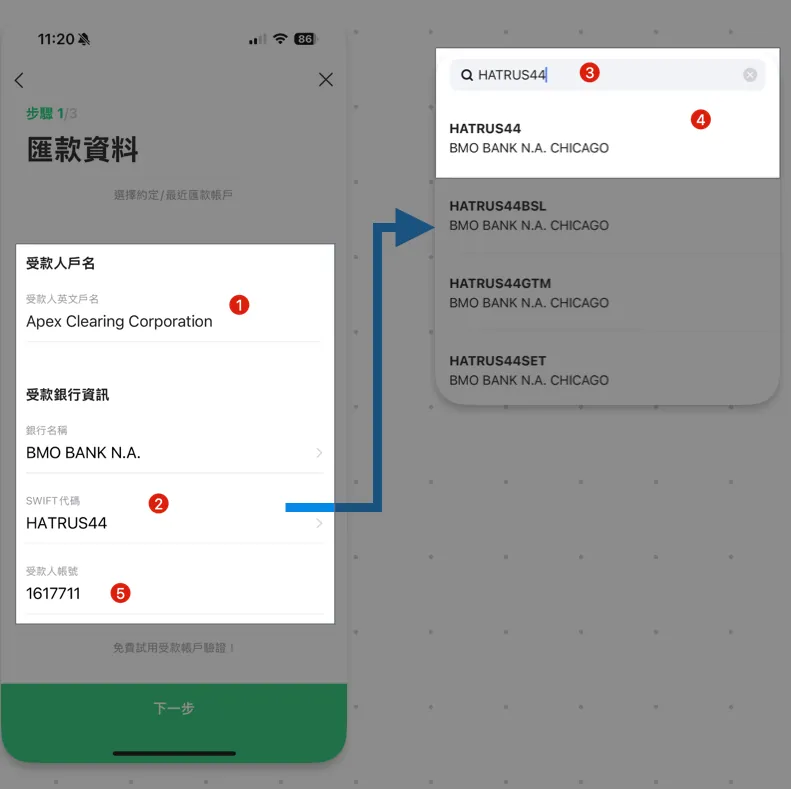
Enter the information from the previous step Remittance Message:
Recipient’s English account name:
Apex Clearing CorporationBeneficiary Bank Information — Automatically filled by entering the SWIFT code directly
Enter search:
HATRUS44Choose the first one:
HATRUS44 — BMO Bank N.A CHICAGORecipient Account Number:
1617711(May change, please refer to actual information)
Scroll down to continue input:
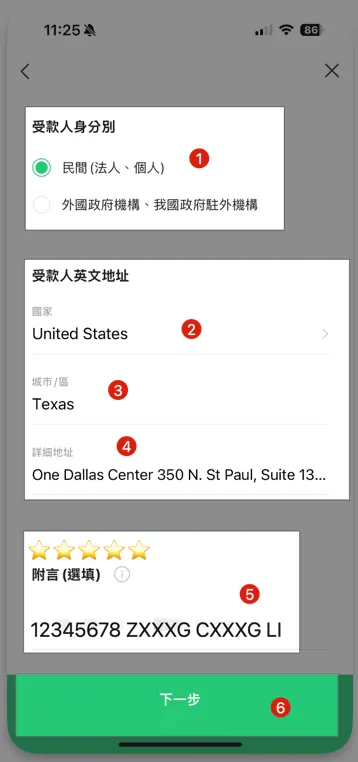
Recipient Type:
Private (Corporate, Individual)Recipient’s English Address — Country: select
United StatesRecipient’s English address — City/District: fill in
TexasRecipient’s English Address — Detailed Address:
One Dallas Center 350 N. St Paul, Suite 1300, Dallas, TX 75201(Refer to the previous remittance information)⭐️️️️️️ The most important remark, please be sure to fill it in
⭐️️️️️️ The most important remark, please be sure to fill it in
⭐️️️️️️ The most important remark, please be sure to fill it in
Enter according to the previous remittance info:8-digit account number + account holder name
As shown in the image above:12345678 ZXXXG CXXXG LIClick “Next”
Nature of Remittance
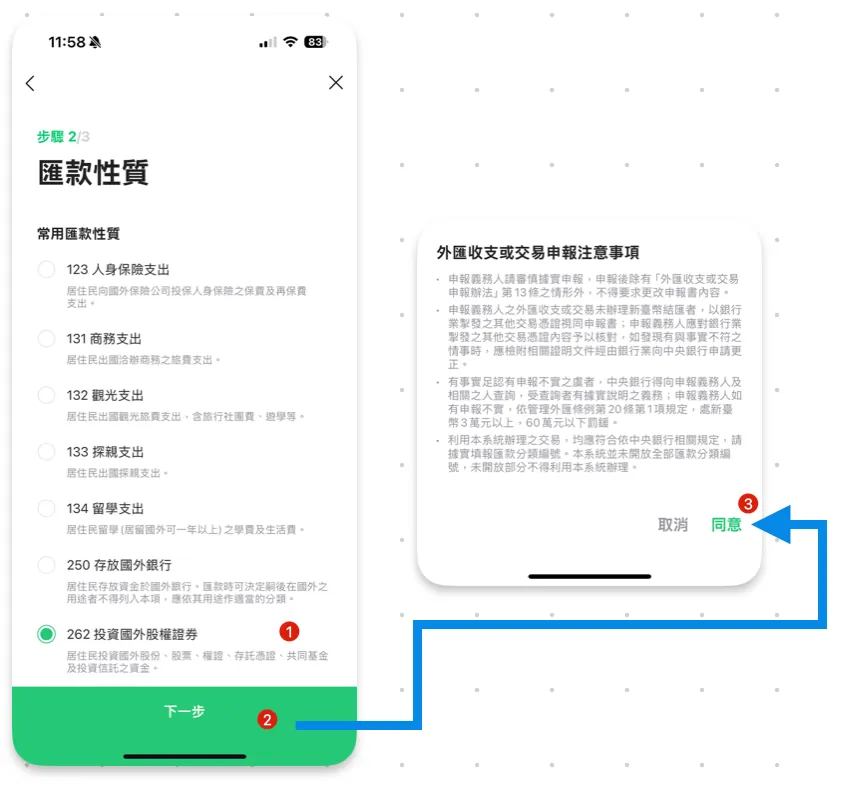
Select “262 Investment in Foreign Equity Securities”
Click “Agree” to acknowledge the important notes
Remittance Confirmation
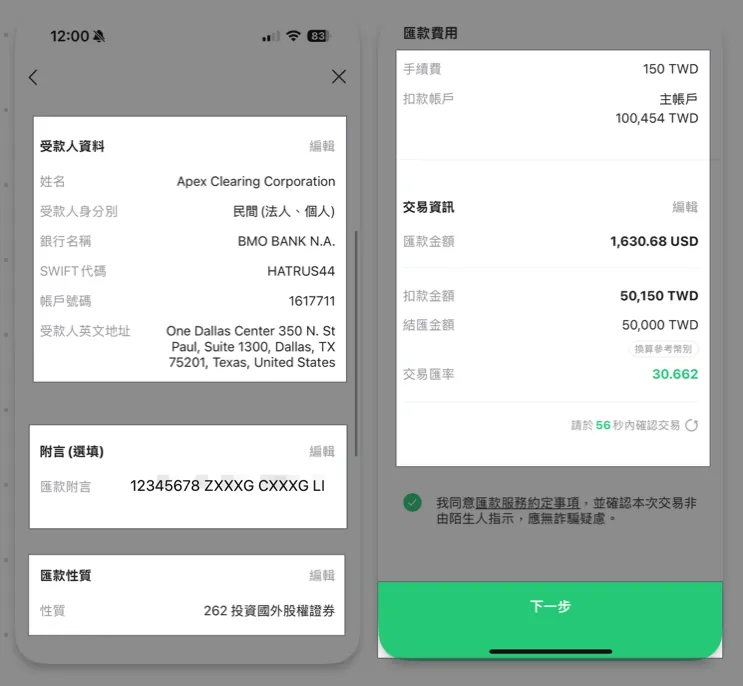
The last step is to confirm that the information entered is correct, especially the recipient account details and the memo section.
If the transaction details cannot be confirmed within 60 seconds, the exchange rate quote may be updated.
No problem, click “Next” to complete the remittance application.
Completed
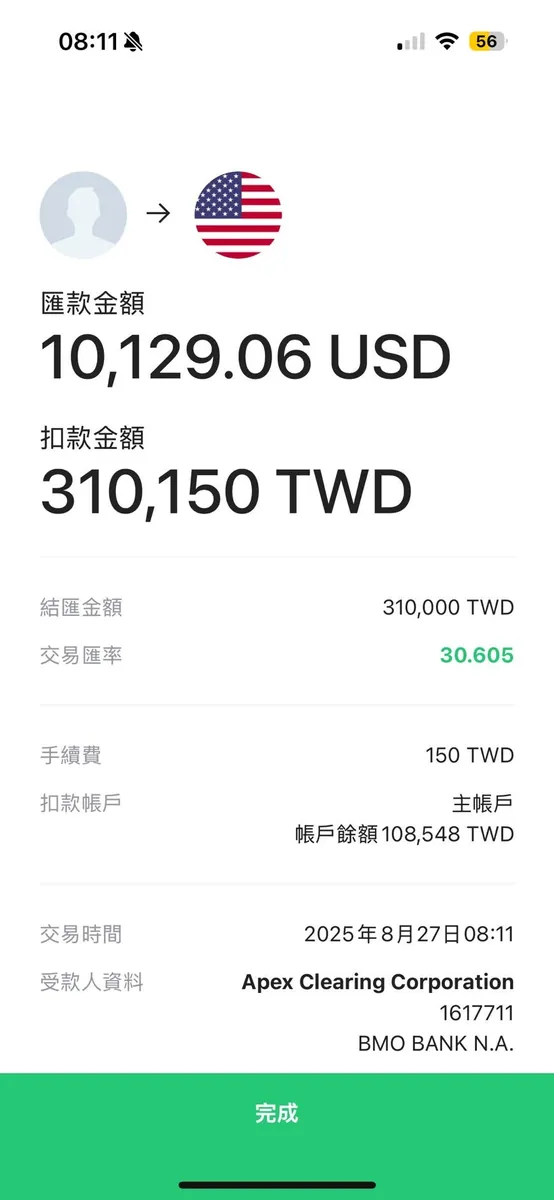
Seeing this screen means the remittance application is complete. Please wait for the deposit notification.
The remittance amounts shown in the images are for reference only. (Some images show 50,000, others 100,000)
LINE Bank Remittance Deposit Firstrade Progress Inquiry
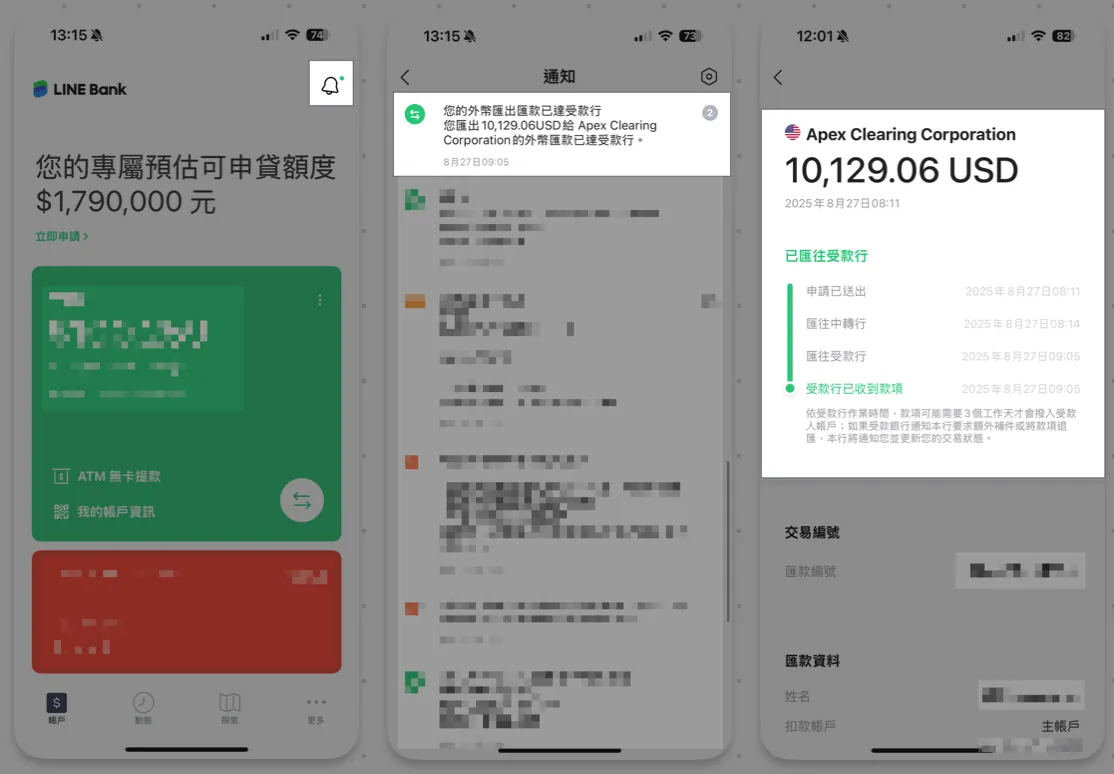
You can find the foreign currency remittance notification in the top right notification area of the LINE Bank App. Click it to check the remittance progress.
On non-holidays, the transfer is usually completed the same day; on holidays, it will be processed on the next business day after two days.
If the beneficiary information is incorrect, the payment will be rejected, and you will need to pay a return transfer fee to resend the payment.
Remittance Application Form (Transaction Record / Receipt)
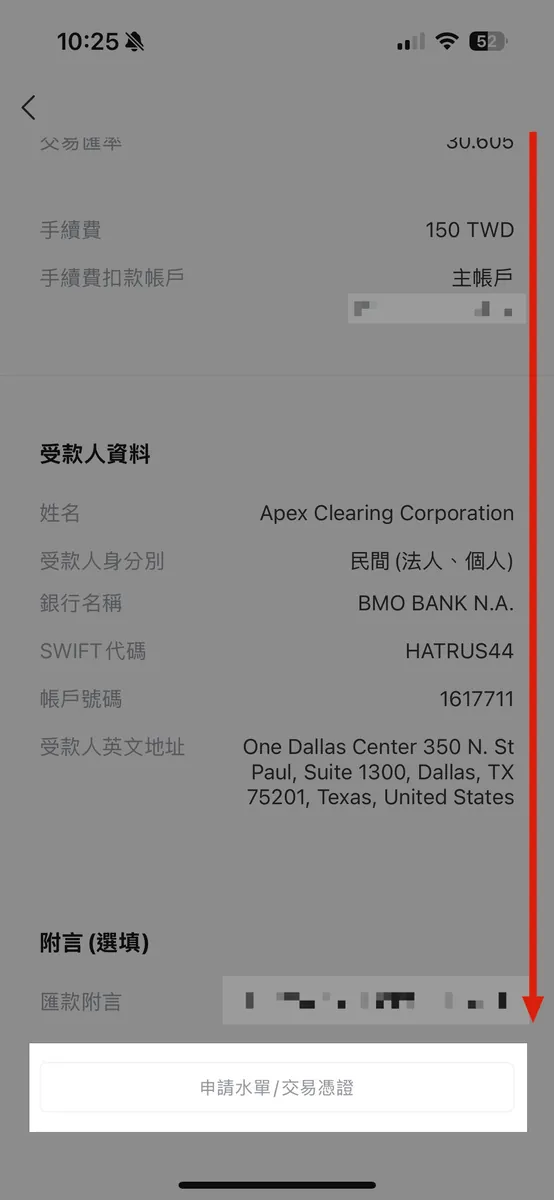
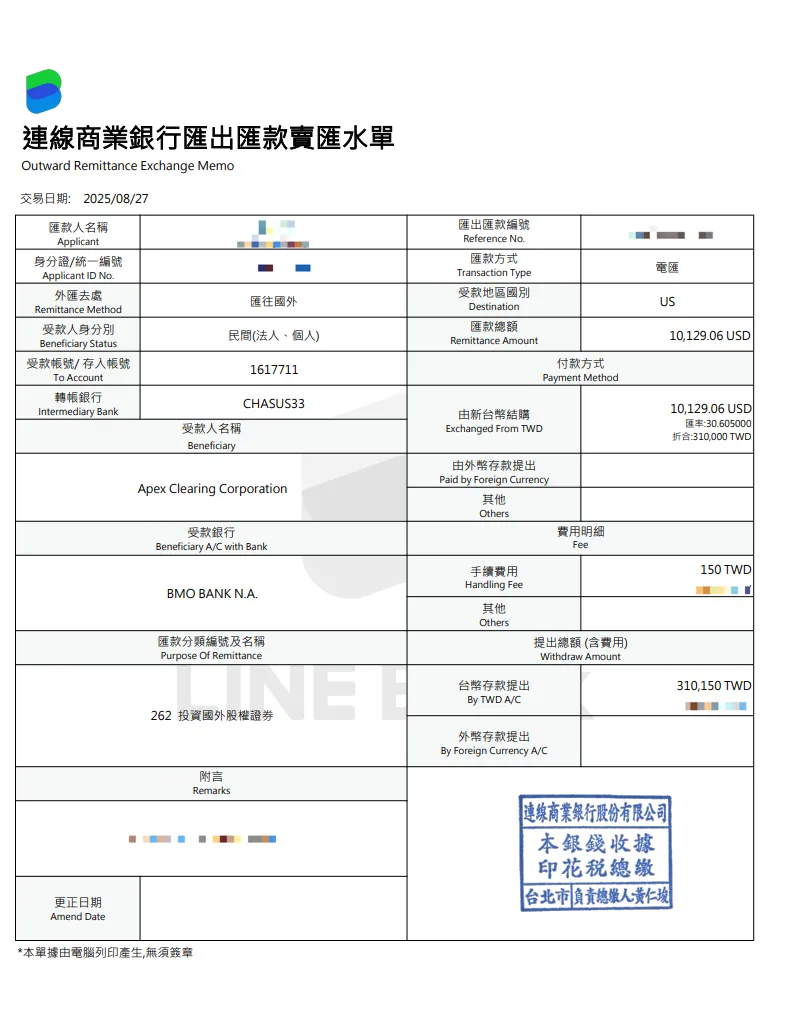
Line Bank App progress inquiry notification (as mentioned above), scroll down to find the “Request Deposit Slip/Transaction Receipt” button. Click it to have the remittance slip sent to your email. You can open the file using your ID number.
The receiving bank has received the funds, but Firstrade hasn’t seen the deposit?
This is normal. Although the remittance status on Line Bank shows “Beneficiary bank has received the funds” and the transfer is complete, Firstrade still needs to wait for a U.S. business day (time) to confirm the funds.
As shown in the image above, although the funds were received at 8/27 AM 09:00, Firstrade only confirmed the funds at 8/28 AM 02:10 and sent the deposit notification email:
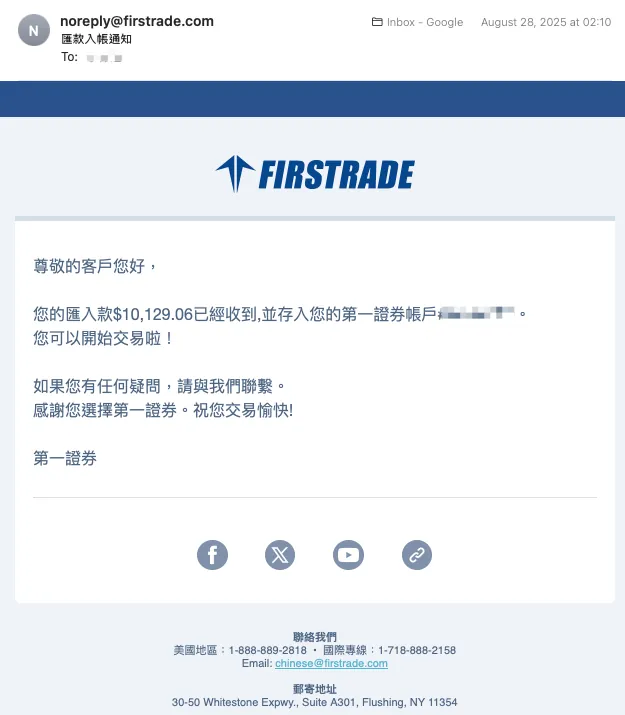
At this point, log in to Firstrade to see the funds credited, and you can start trading US stocks:
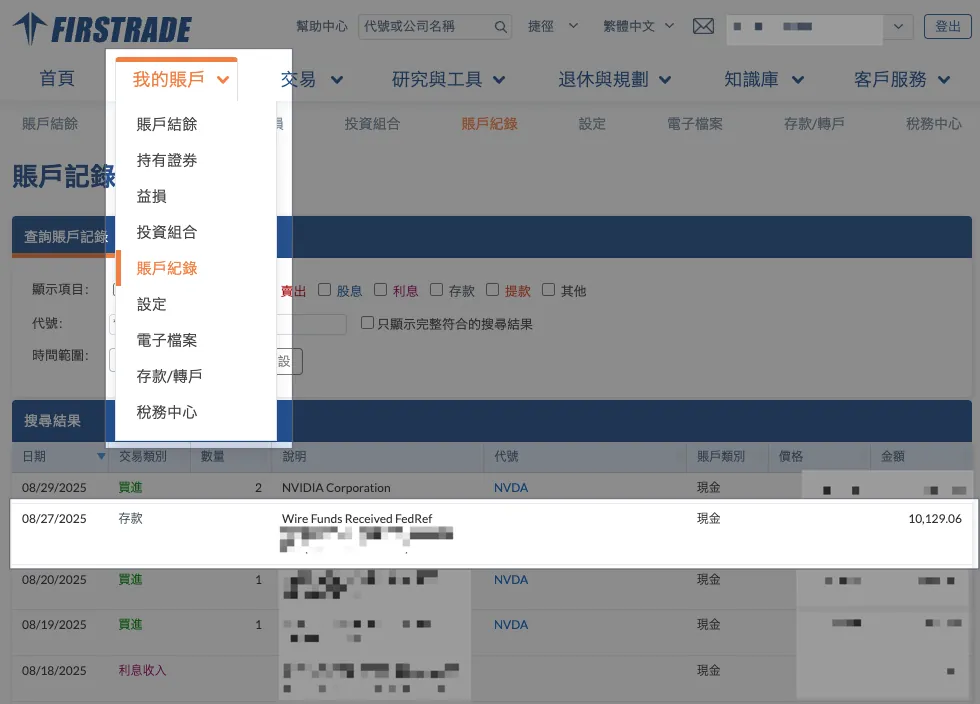
“My Account” → “Account Records” will also have deposit records available for inquiry.
Line Bank Account Upgrade and Binding Designated Account Tutorial
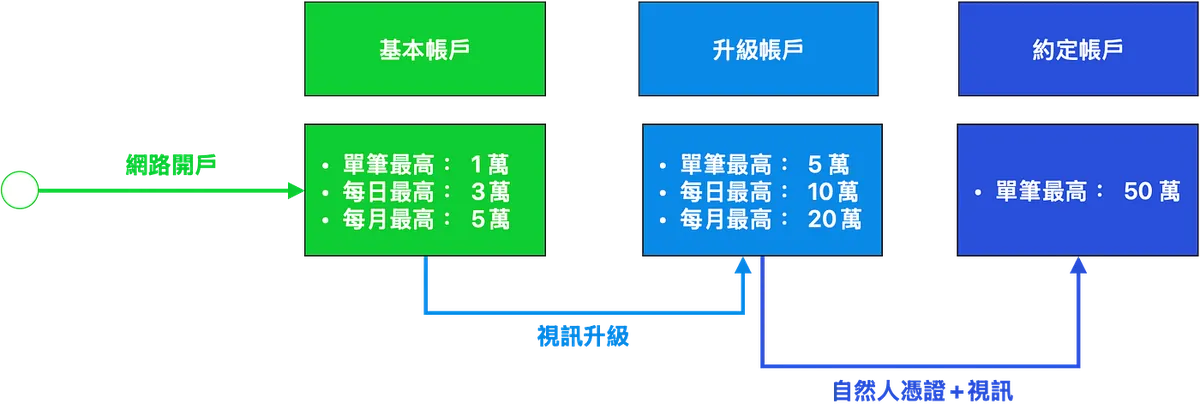
Benefits Comparison:
(Benefit upon account opening) Basic account: maximum NT$10,000 per transaction, NT$30,000 per day, NT$50,000 per month.
(After customer service video call) Account upgrade: single transaction limit up to 50,000, daily limit up to 100,000, monthly limit up to 200,000.
(After natural person certificate + customer service video verification) Designated account: single transaction limit up to 500,000.
Line Bank Account Upgrade
It’s actually just upgrading to the basic limit of other banks. (This step does not require a National ID certificate.)
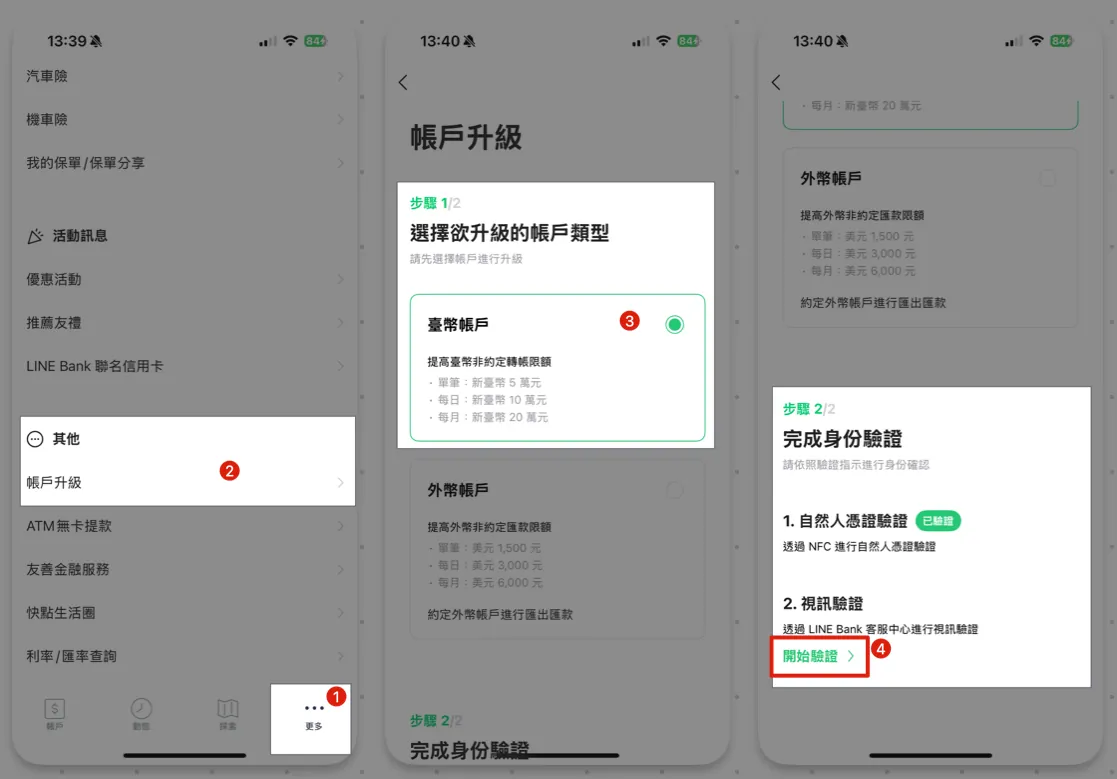
Open the LINE Bank App, scroll down under “More” to find “Others” → “Account Upgrade,” select the type of account to upgrade → choose 2. Video Verification “Start Verification >”.
Please ensure your internet connection is stable and working properly.
Ensure video call is available currently
Clicking will initiate a video call with customer service. You will need to have a video conversation with the representative, who may verify your account information (e.g., ask about your current balance). Once confirmed, your account upgrade will be completed.
Designate Firstrade Remittance Account
It is more recommended to directly set the Firstrade remittance account as the designated account for convenience, speed, and security.
The designated account will take effect after 2 days.
The designated account requires prior verification with a National Identification Certificate.
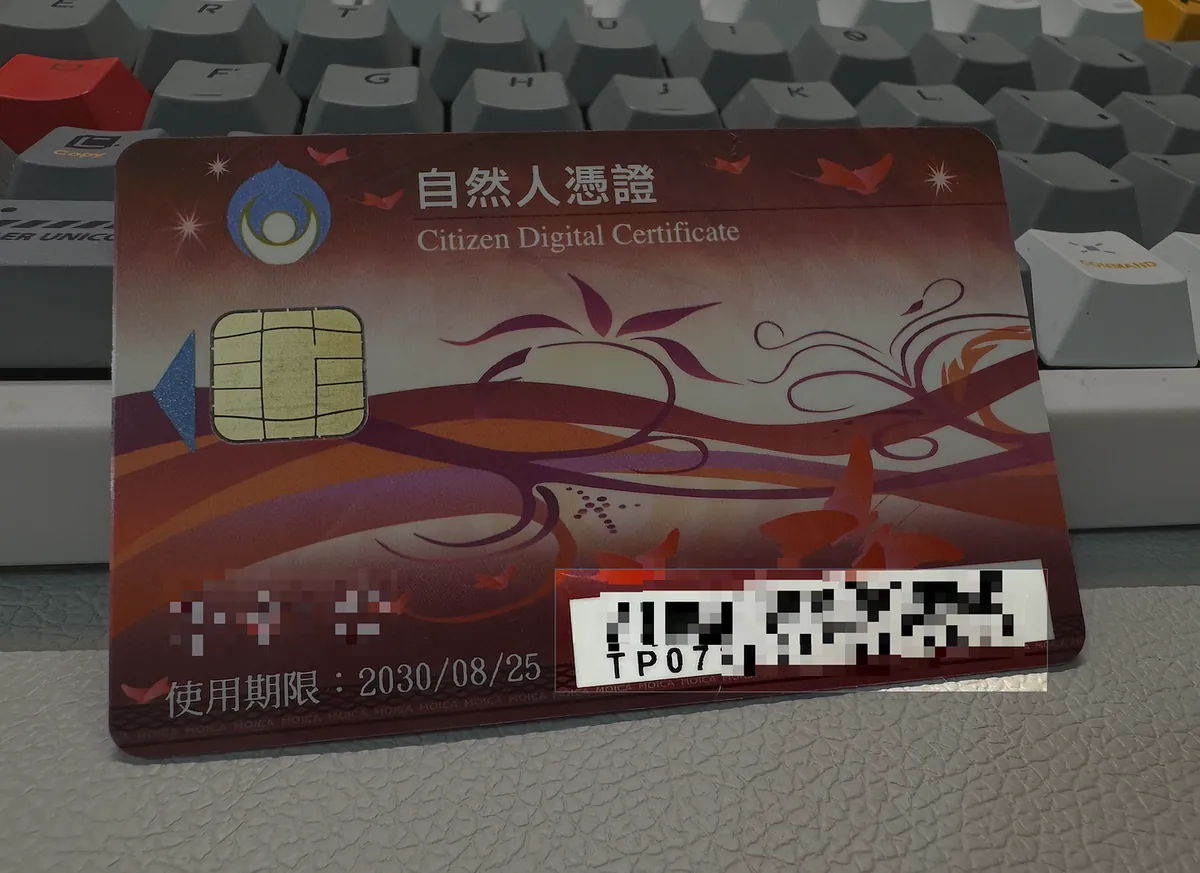
The Citizen Digital Certificate verification only supports cards starting with TP07, which have an NFC chip inside
Applying for a Citizen Digital Certificate
Please first complete the online Natural Person Application Form:
{:target="_blank"}](/assets/e4d139fe0685/1*4xi8pHeUNAPZKijWiXfj1Q.webp)
Natural Person Application Form
After submission, you can go to any household registration office counter (not limited to your registered residence) within 7 days to complete the process.
Processing Fee: $250
On-site processing and on-site distribution
Few people apply for the Natural Person Certificate at the household registration office, which is usually open at noon.
Line Bank Adds Designated Firstrade Overseas Remittance Account
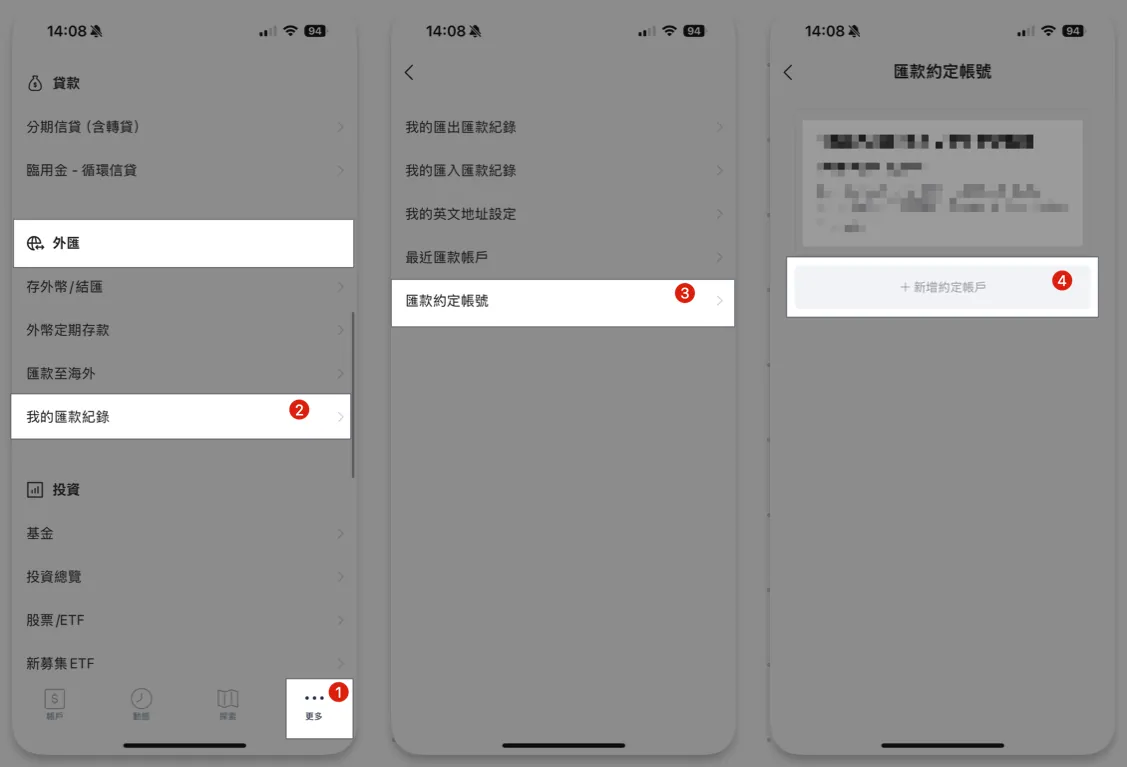
Open the LINE Bank App → “More” → Scroll down to Foreign Exchange, tap “My Remittance Records” → “Agreed Remittance Account” → “Add Agreed Account”.
First Time Use — Complete Account Verification
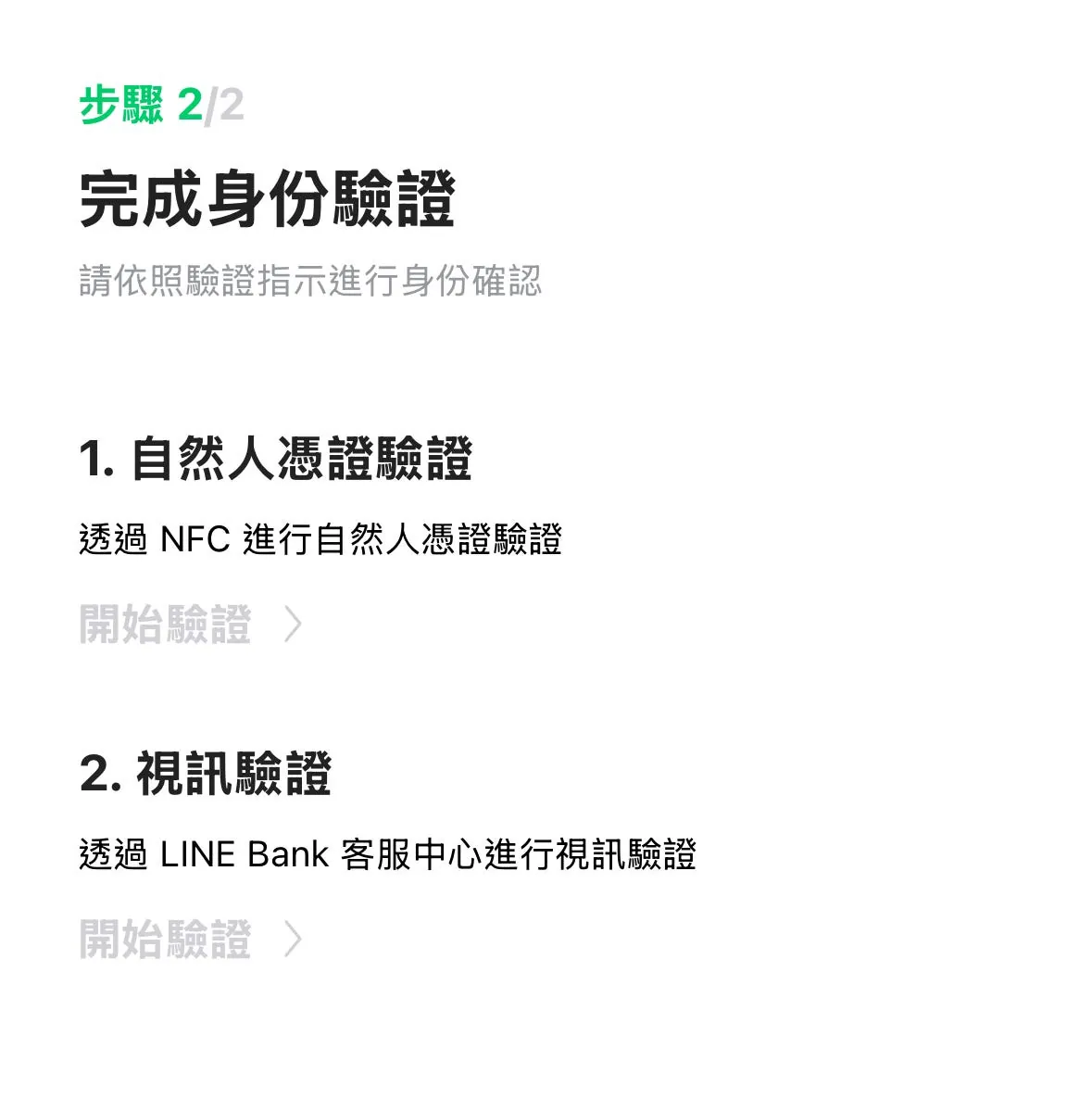
The first binding requires completing both the “National ID Certificate Verification” and “Video Verification.” The video verification, along with account upgrade, must be done via video call with customer service to verify account information.
For the Citizen Digital Certificate, you need to use the newly issued certificate card and complete the verification by tapping the card:
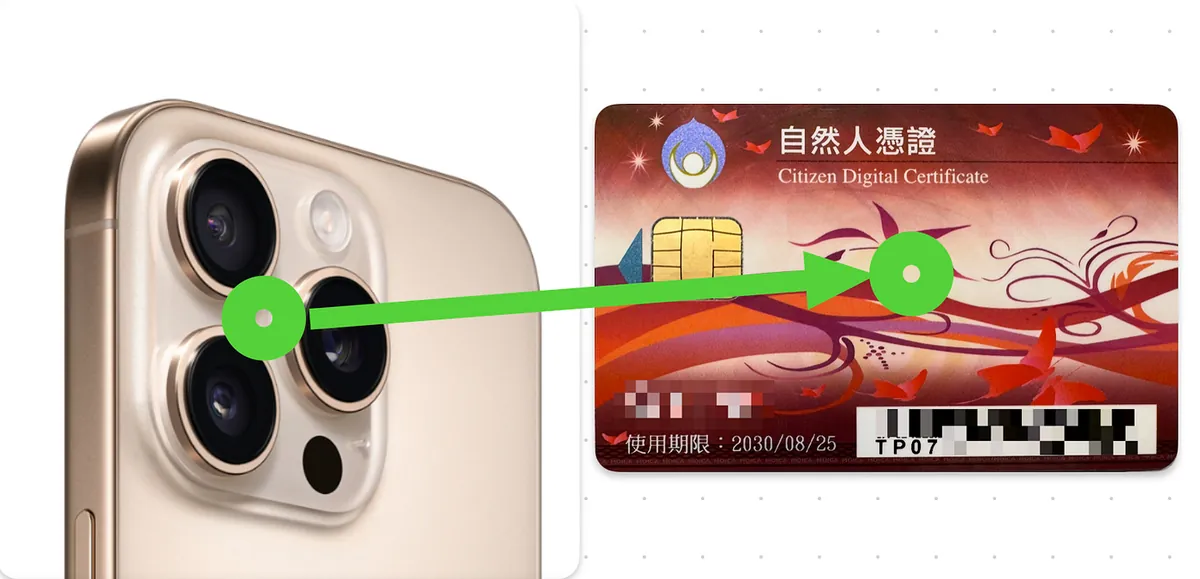
The NFC range of the citizen digital certificate is quite small. I retried several times before succeeding; on iPhone, hold the camera near the center of the card, move the card left and right, and after a few attempts, verification will succeed.
Add Designated Account
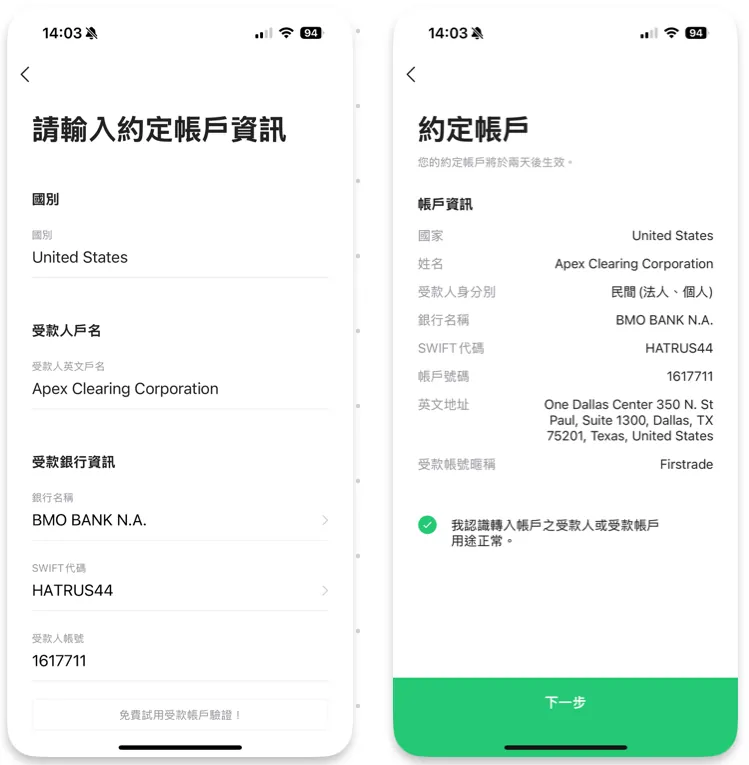
Enter the account information and remittance details as introduced earlier in order. After confirming they are correct, click “Next.”
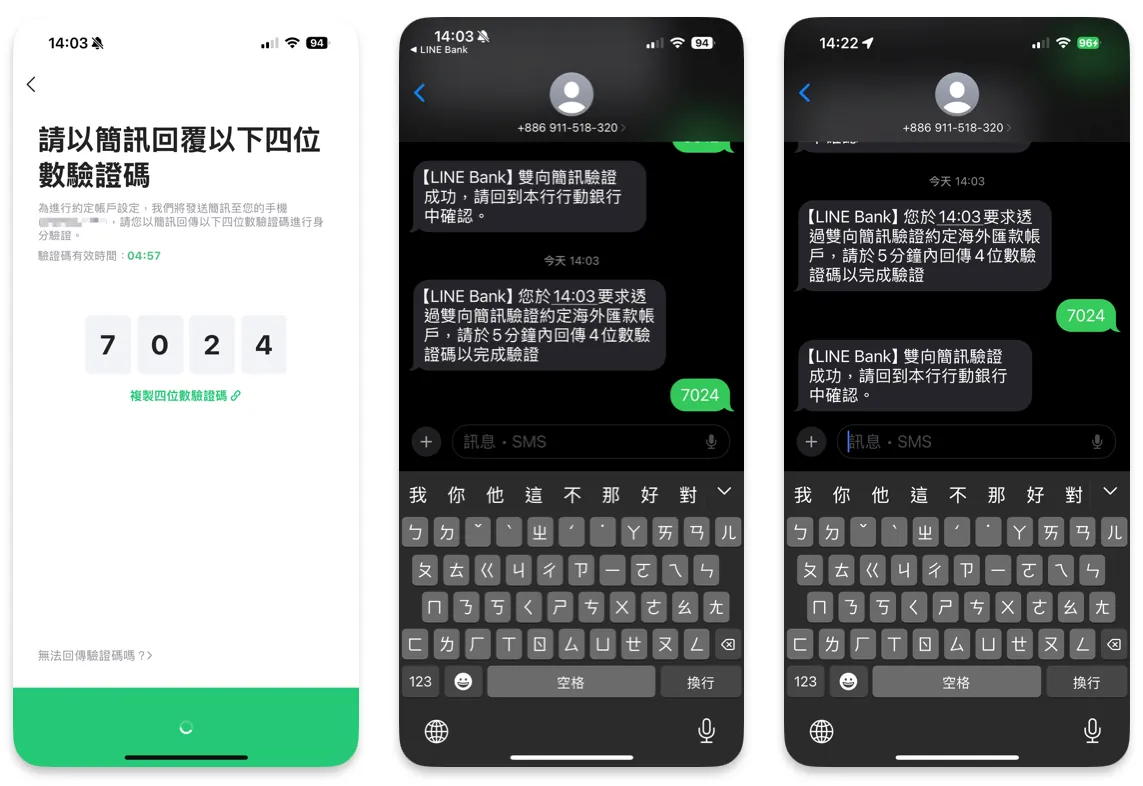
You need to complete two-factor SMS verification by switching to the newly received message and entering the four-digit code; wait about 1–2 minutes, and receiving a confirmation SMS means the verification is complete.
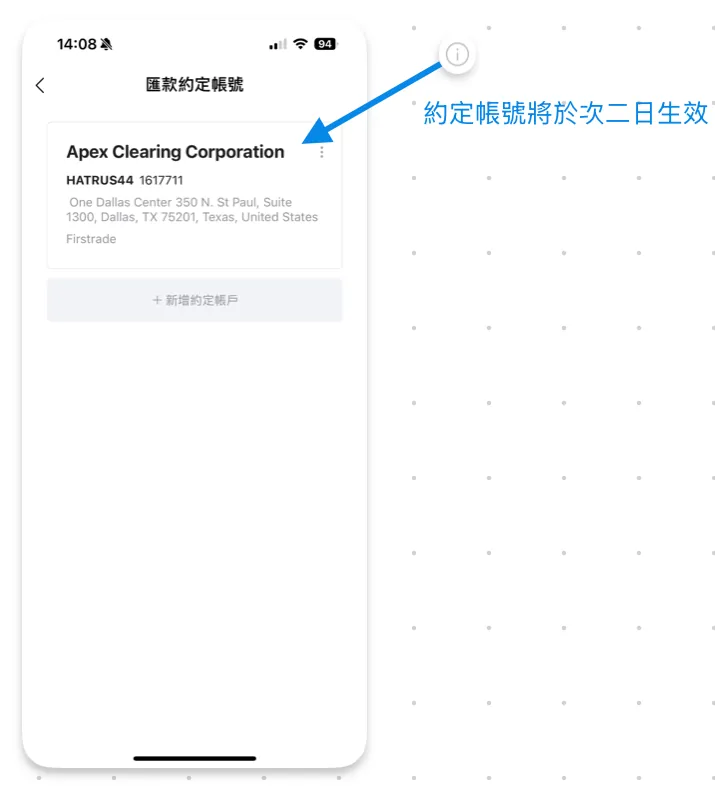
After successful verification, the designated account will be added successfully!
After adding, an exclamation mark will appear at the top right corner, indicating it is not yet effective.
Takes effect after 2 days.
Line Bank Firstrade Designated Account Transfer
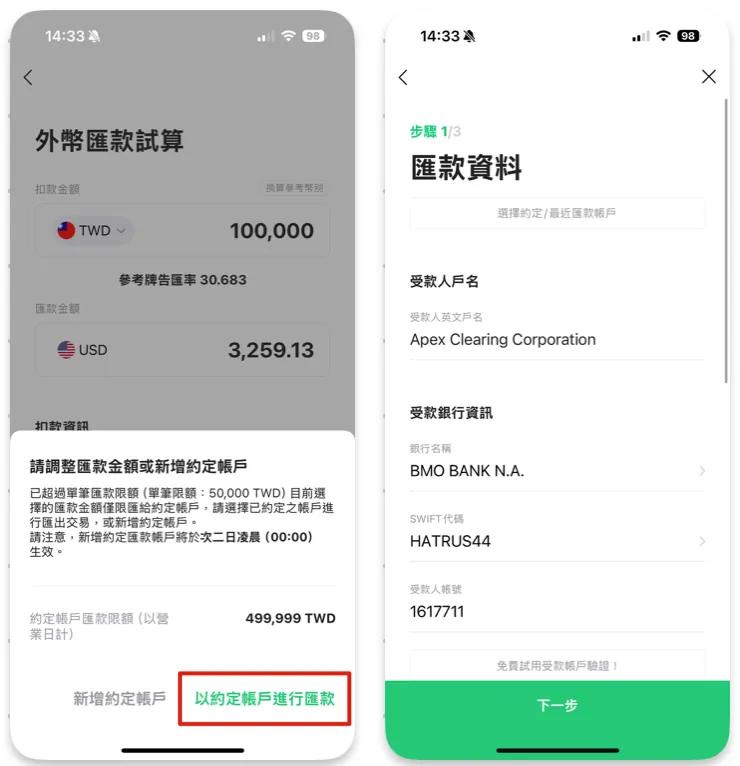
“My Transfer Records” → “Agreed Transfer Account” → Select Account → Enter Amount → Choose “Transfer via Agreed Account” → All information will be filled automatically.
Firstrade Fee Reimbursement Application Guide
Remittance amount requirement: Single transaction greater than $10,000 USD
Subsidy Amount Limit: $25 USD
Limit: Up to 3 times per month
Application period: Apply within 30 days after the remittance
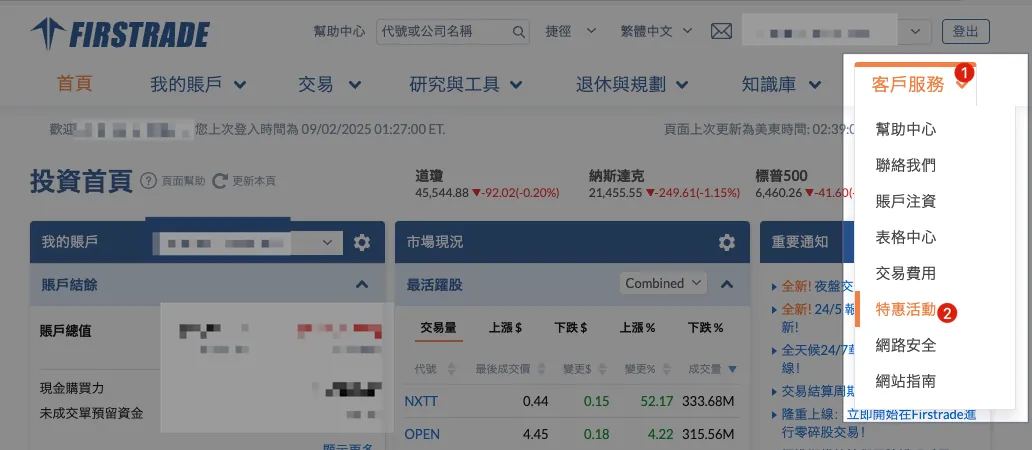
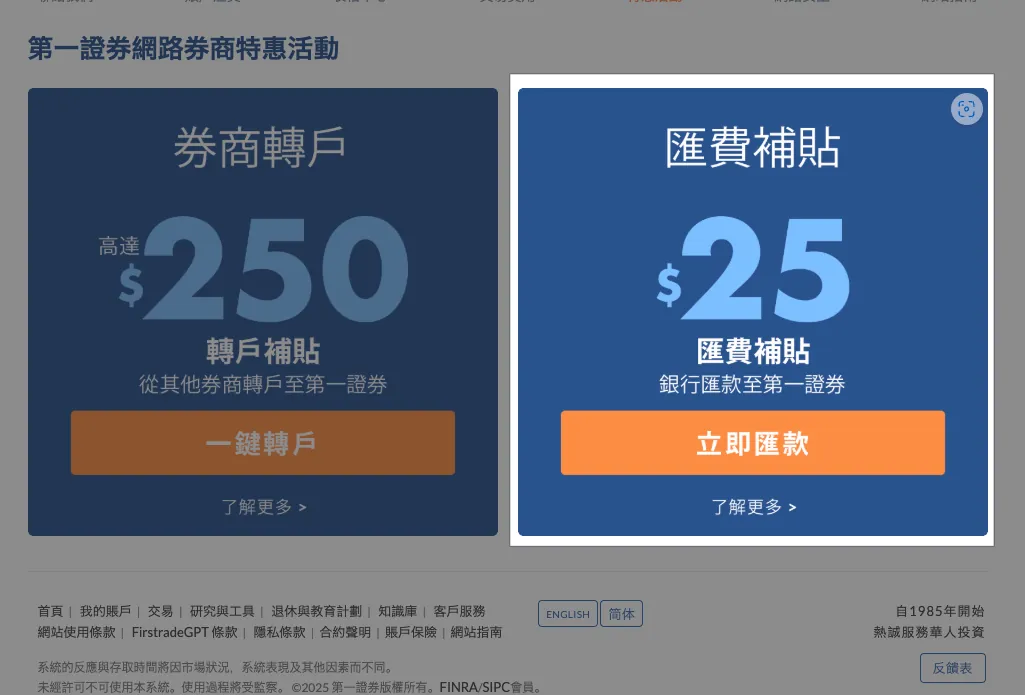
After logging into Firstrade, select “Customer Service” → “Promotions” → “Wire Transfer Rebate.”
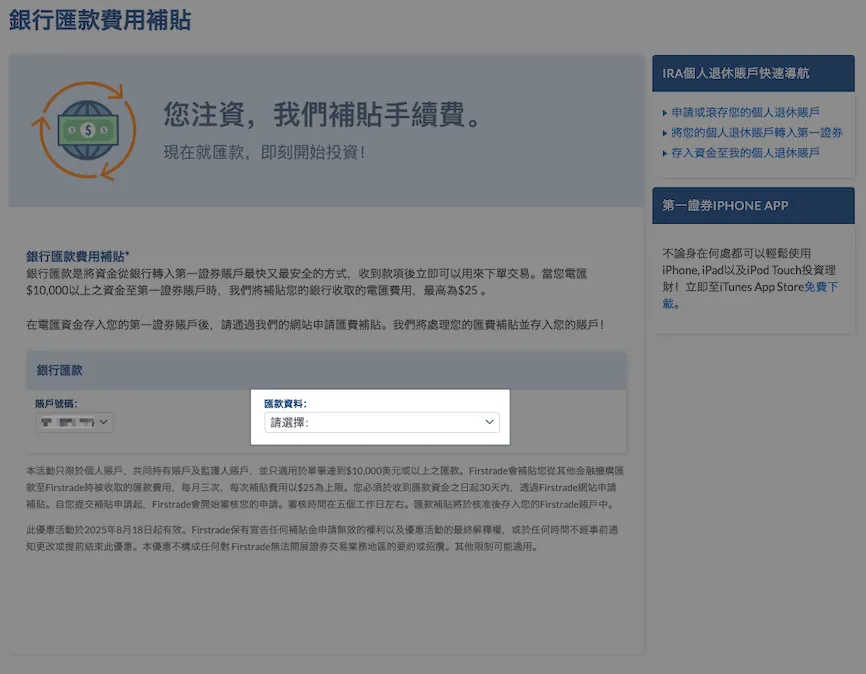
Select remittance information.
If no remittance information appears, please wait a few more days for the details to arrive. (It may not show immediately after the funds arrive)
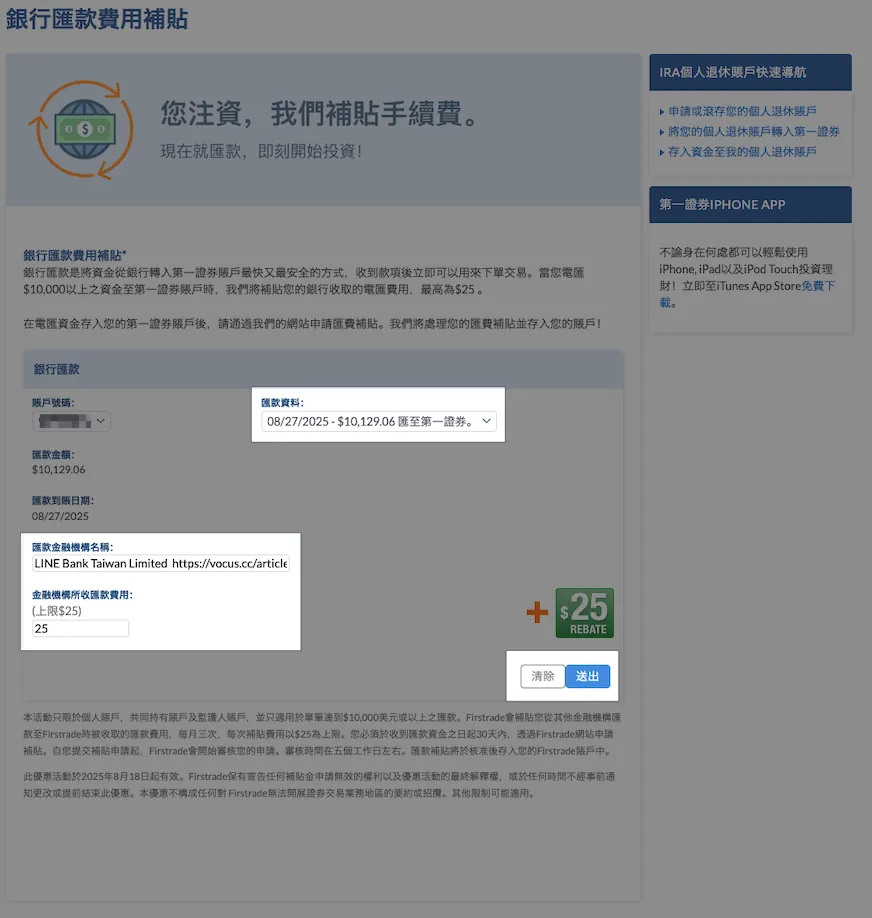
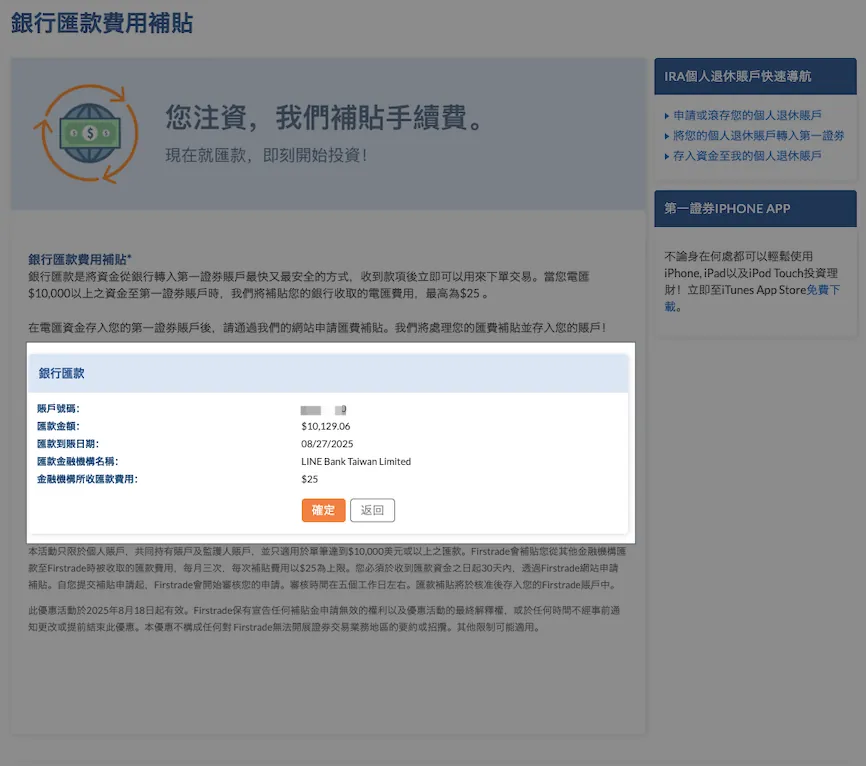
Select Remittance Record Data:
Remittance Financial Institution Name:
LINE Bank Taiwan LimitedRemittance fee charged by financial institutions:
25
Click “Submit” → “Confirm” to complete the application.
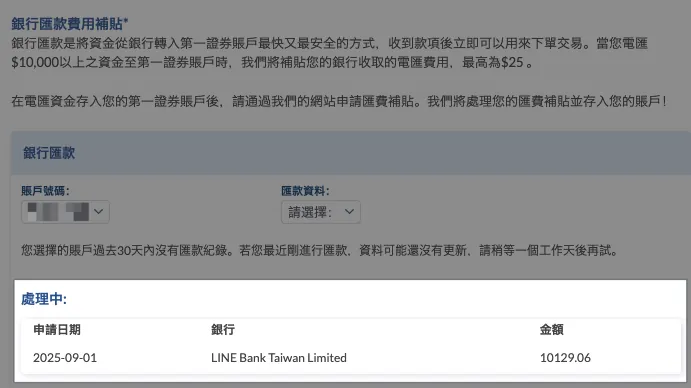
You will receive the remittance subsidy in about 2–3 business days.

You can check the fee subsidy record under “My Account” → “Account Records”.
Firstrade may have a short delay of about one day: the application status disappears, and the account record does not show the subsidy; the deposit record appears after about one more day!
Although LINE Bank only charges TWD $150, the actual remittance fee exceeds USD $25, so we still subsidize USD $25.
Disclaimer
This article is for personal experience sharing only and does not guarantee complete accuracy. Please rely on actual conditions for all usage. The author is not responsible for any losses incurred.
Anti-Fraud Section
Two-Factor Authentication
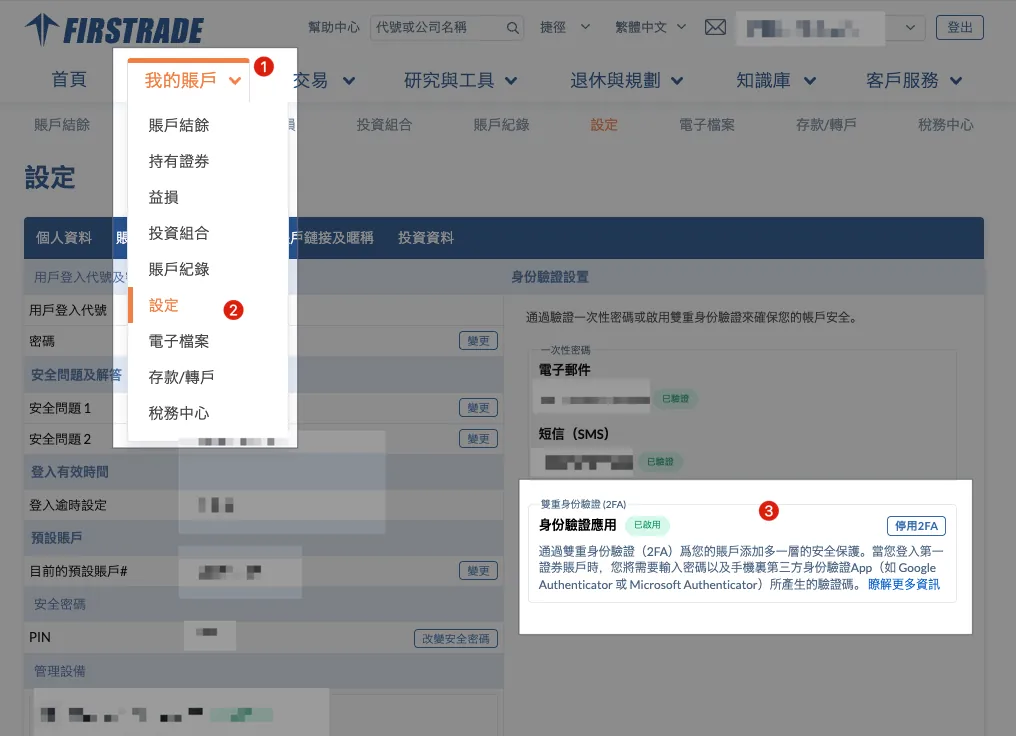
Be sure to go to “My Account” → “Settings” → enable “Authenticator App”.
This way, logging in on an unfamiliar device requires completing two-factor authentication first.
Email and Link Domains
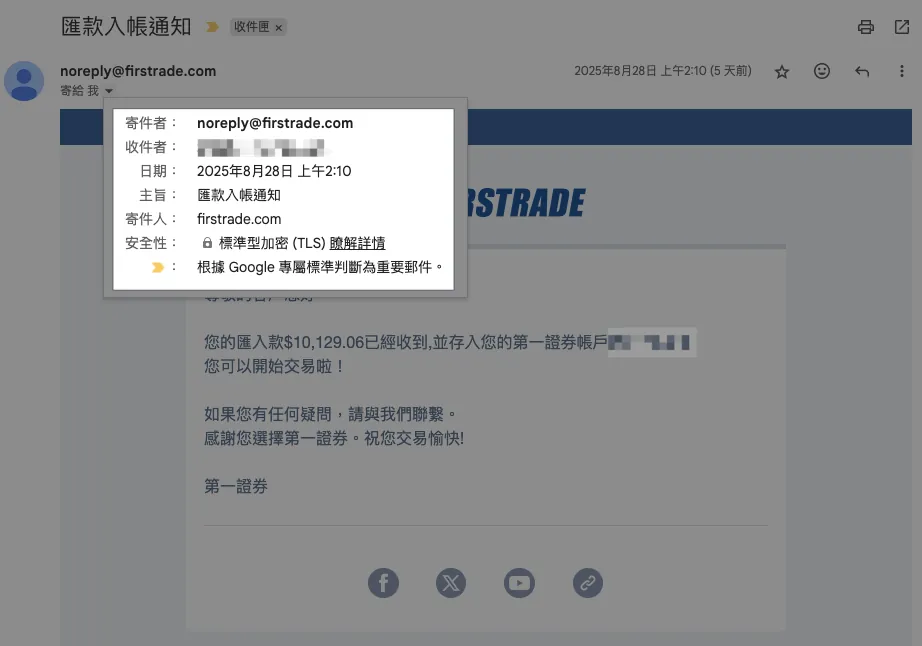

No matter how authentic the email looks, always check if the sender is firstrade.com and do not click any links in the email. If you must click, double-check that the URL is from firstrade.com.
Technically, scam emails and fake websites can look exactly the same, making it hard to tell real from fake; regarding URLs:
If it’s not firstrade.com, it’s a scam! It’s a scam! It’s a scam!
If it’s not firstrade.com, it’s a scam! It’s a scam! It’s a scam!
If it’s not firstrade.com, it’s a scam! It’s a scam! It’s a scam!
If you have any questions or feedback, feel free to contact me.
This post was originally published on Medium (View original post), and automatically converted and synced by ZMediumToMarkdown.