Visitor Pattern|Enhance TableView Readability and Extensibility
Discover how applying the Visitor Pattern improves TableView's code readability and scalability, enabling developers to manage complex UI components efficiently and extend functionality with ease.
This post was translated with AI assistance — let me know if anything sounds off!
Table of Contents
Visitor Pattern in TableView
Using Visitor Pattern to Improve TableView Readability and Extensibility
{:target="_blank"}](/assets/60473cb47550/1*0YcpTUOCDjuV6Ii4jgbK0g.webp)
Photo by Alex wong
Preface
Following the previous article “Visitor Pattern in Swift” which introduced the Visitor pattern and a simple practical use case, this article will present another real-world application in iOS development.
Requirement Scenario
To develop a dynamic wall feature, multiple types of blocks need to be dynamically combined and displayed.
Taking StreetVoice’s dynamic wall as an example:
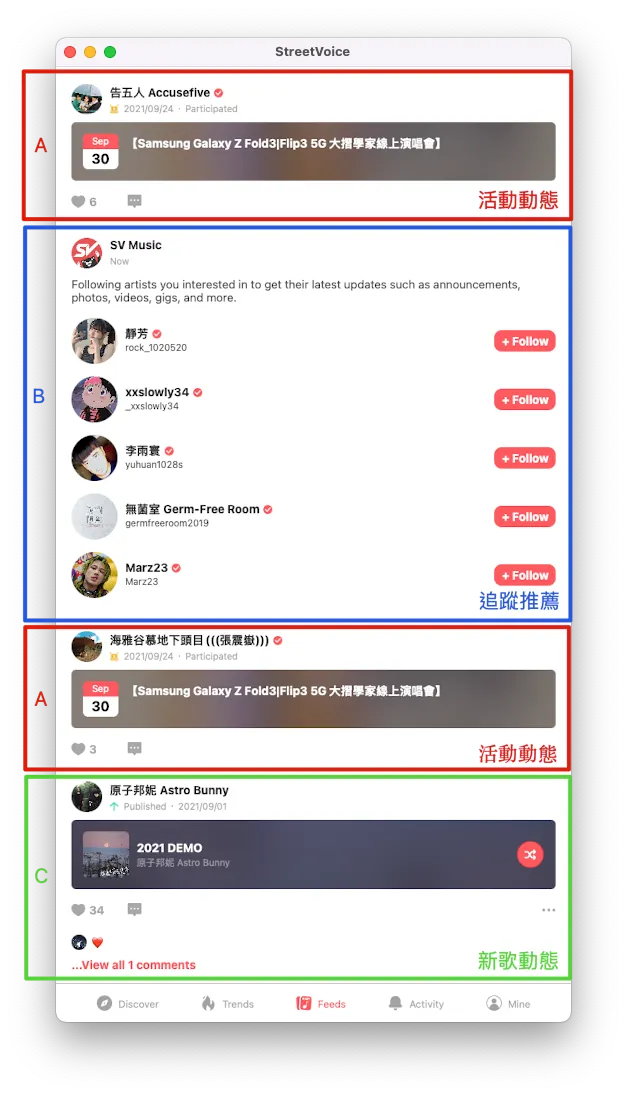
As shown in the above image, the dynamic wall is composed of various types of blocks dynamically combined:
Type A: Activity Feed
Type B: Tracking Recommendation
Type C: New Song Updates
Type D: New Album Updates
Type E: New Tracking Updates
Type …. More
The types are expected to increase as features iterate in the future.
Problem
Without any architectural design, the code might look like this:
1
2
3
4
5
6
7
8
9
10
11
12
13
14
15
16
17
18
19
20
21
22
23
24
25
26
27
28
29
30
31
32
33
34
35
36
37
38
39
40
41
42
43
44
45
func tableView(_ tableView: UITableView, cellForRowAt indexPath: IndexPath) -> UITableViewCell {
    let row = datas[indexPath.row]
    switch row.type {
    case .invitation:
        let cell = tableView.dequeueReusableCell(withIdentifier: "invitation", for: indexPath) as! InvitationCell
        // configure cell with viewObject/viewModel...
        return cell
    case .newSong:
        let cell = tableView.dequeueReusableCell(withIdentifier: "newSong", for: indexPath) as! NewSongCell
        // configure cell with viewObject/viewModel...
        return cell
    case .newEvent:
        let cell = tableView.dequeueReusableCell(withIdentifier: "newEvent", for: indexPath) as! NewEventCell
        // configure cell with viewObject/viewModel...
        return cell
    case .newText:
        let cell = tableView.dequeueReusableCell(withIdentifier: "newText", for: indexPath) as! NewTextCell
        // configure cell with viewObject/viewModel...
        return cell
    case .newPhotos:
        let cell = tableView.dequeueReusableCell(withIdentifier: "newPhotos", for: indexPath) as! NewPhotosCell
        // configure cell with viewObject/viewModel...
        return cell
    }
}

func tableView(_ tableView: UITableView, heightForRowAt indexPath: IndexPath) -> CGFloat {
    let row = datas[indexPath.row]
    switch row.type {
    case .invitation:
        if row.isEmpty {
            return 100
        } else {
            return 300
        }
    case .newSong:
        return 100
    case .newEvent:
        return 200
    case .newText:
        return UITableView.automaticDimension
    case .newPhotos:
        return UITableView.automaticDimension
    }
}
Hard to test: It is difficult to verify which Type corresponds to which logic output.
Difficult to extend and maintain: When adding a new Type, this ViewController must be modified; cellForRow, heightForRow, willDisplay… are scattered across multiple functions, making it easy to forget or make mistakes.
Hard to read: All logic is on the View side.
Visitor Pattern Solution
Why?
Here is the organized object relationship, as shown in the diagram below:
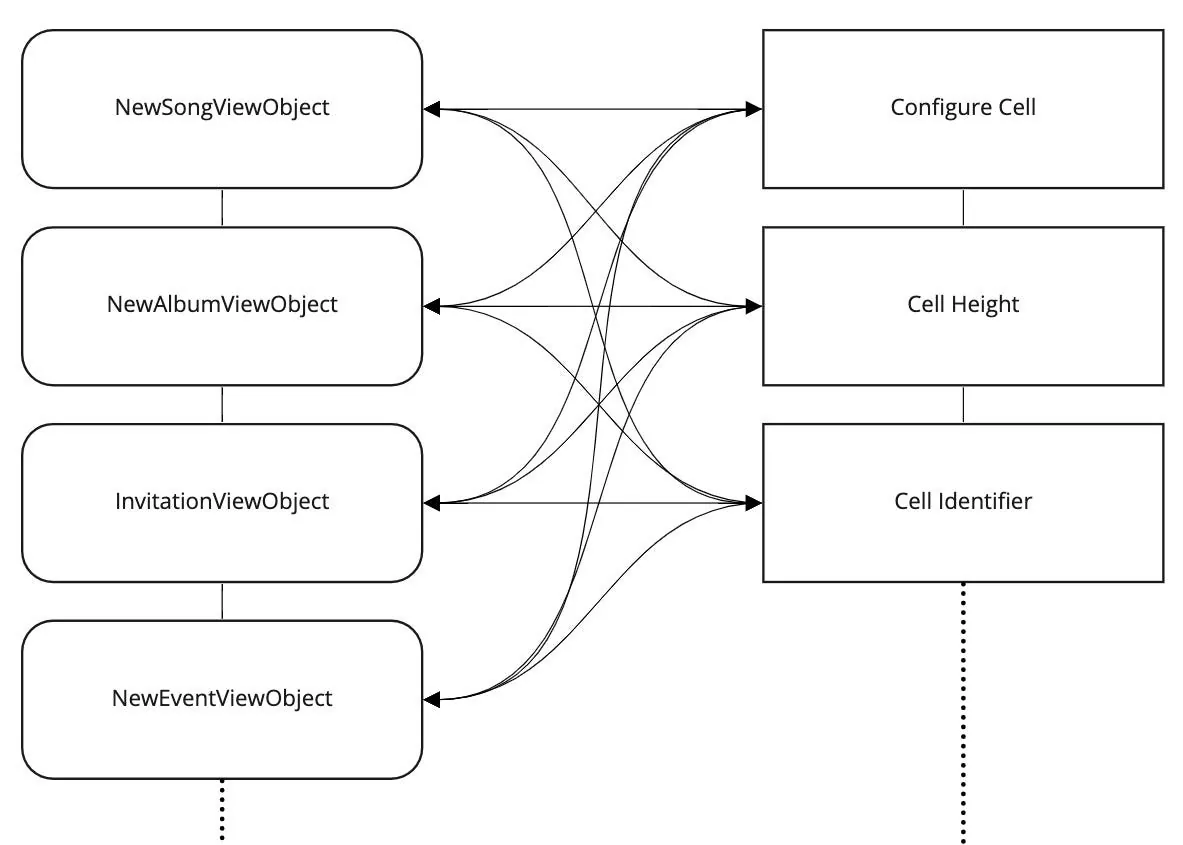
We have many types of DataSource (ViewObject) that need to interact with various types of visitors, which is a typical example of Visitor Double Dispatch.
How?
To simplify the demo code, the following are used: PlainTextFeedViewObject for plain text feeds, MemoriesFeedViewObject for daily memories, and MediaFeedViewObject for image feeds to demonstrate the design.
The architecture diagram applying the Visitor Pattern is as follows:
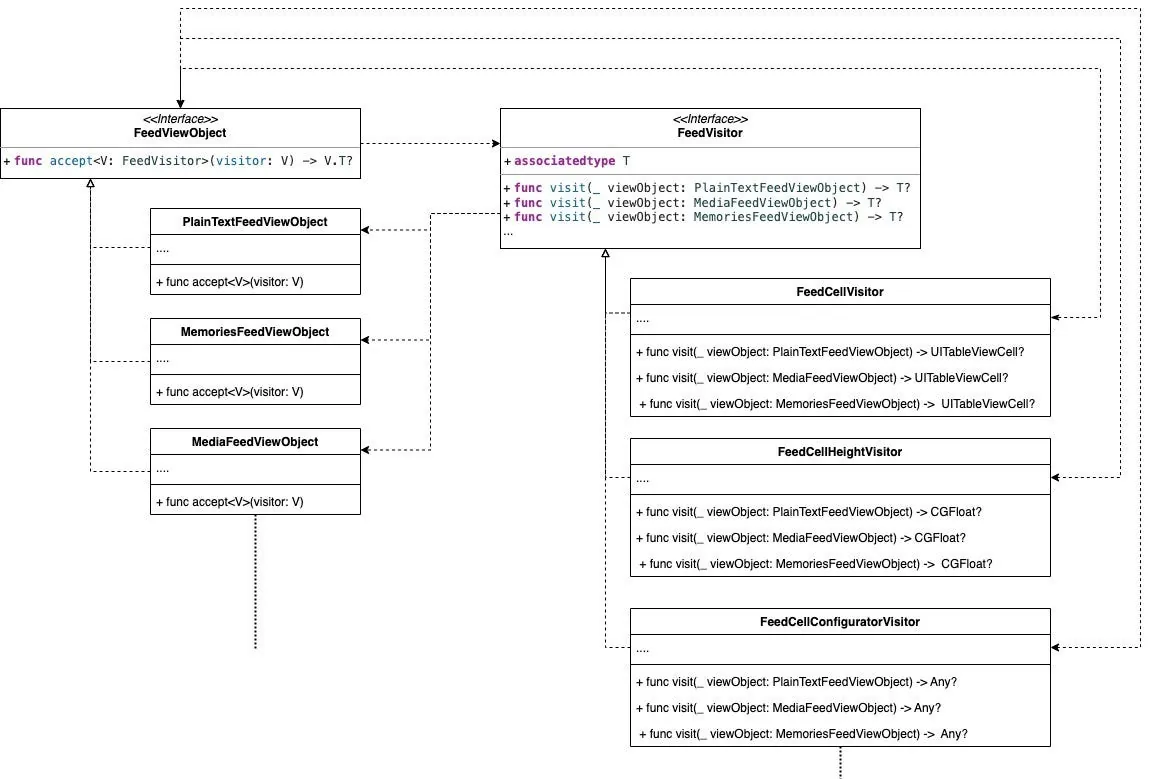
First, define the Visitor interface. This interface abstractly declares the DataSource types that the visitor can accept:
1
2
3
4
5
6
7
protocol FeedVisitor {
    associatedtype T
    func visit(_ viewObject: PlainTextFeedViewObject) -> T?
    func visit(_ viewObject: MediaFeedViewObject) -> T?
    func visit(_ viewObject: MemoriesFeedViewObject) -> T?
    //...
}
Each operator implements the FeedVisitor interface:
1
2
3
4
5
6
7
8
9
10
11
12
13
14
15
struct FeedCellVisitor: FeedVisitor {
    typealias T = UITableViewCell.Type

    func visit(_ viewObject: MediaFeedViewObject) -> T? {
        return MediaFeedTableViewCell.self
    }

    func visit(_ viewObject: MemoriesFeedViewObject) -> T? {
        return MemoriesFeedTableViewCell.self
    }

    func visit(_ viewObject: PlainTextFeedViewObject) -> T? {
        return PlainTextFeedTableViewCell.self
    }
}
Implementing ViewObject <-> UITableViewCell Mapping.
1
2
3
4
5
6
7
8
9
10
11
12
13
14
15
struct FeedCellHeightVisitor: FeedVisitor {
    typealias T = CGFloat

    func visit(_ viewObject: MediaFeedViewObject) -> T? {
        return 30
    }

    func visit(_ viewObject: MemoriesFeedViewObject) -> T? {
        return 10
    }

    func visit(_ viewObject: PlainTextFeedViewObject) -> T? {
        return 10
    }
}
Implementing ViewObject <-> UITableViewCell Height Mapping.
1
2
3
4
5
6
7
8
9
10
11
12
13
14
15
16
17
18
19
20
21
22
23
24
25
26
struct FeedCellConfiguratorVisitor: FeedVisitor {

    private let cell: UITableViewCell

    init(cell: UITableViewCell) {
        self.cell = cell
    }

    func visit(_ viewObject: MediaFeedViewObject) -> Any? {
        guard let cell = cell as? MediaFeedTableViewCell else { return nil }
        // cell.config(viewObject)
        return nil
    }

    func visit(_ viewObject: MemoriesFeedViewObject) -> Any? {
        guard let cell = cell as? MediaFeedTableViewCell else { return nil }
        // cell.config(viewObject)
        return nil
    }

    func visit(_ viewObject: PlainTextFeedViewObject) -> Any? {
        guard let cell = cell as? MediaFeedTableViewCell else { return nil }
        // cell.config(viewObject)
        return nil
    }
}
How to Implement ViewObject <-> Cell Configuration Mapping.
When a new DataSource (ViewObject) needs to be supported, simply add a new method to the FeedVisitor interface and implement the corresponding logic in each visitor.
Binding DataSource (ViewObject) and Visitor:
1
2
3
protocol FeedViewObject {
    @discardableResult func accept<V: FeedVisitor>(visitor: V) -> V.T?
}
Interface for ViewObject Implementation Binding:
1
2
3
4
5
6
7
8
9
10
struct PlainTextFeedViewObject: FeedViewObject {
    func accept<V>(visitor: V) -> V.T? where V : FeedVisitor {
        return visitor.visit(self)
    }
}
struct MemoriesFeedViewObject: FeedViewObject {
    func accept<V>(visitor: V) -> V.T? where V : FeedVisitor {
        return visitor.visit(self)
    }
}
Implementation in UITableView:
1
2
3
4
5
6
7
8
9
10
11
12
13
14
15
16
17
18
19
20
21
22
23
24
25
26
27
28
29
30
31
32
33
34
35
36
37
38
39
40
41
42
43
44
45
46
47
48
49
50
51
52
53
54
55
56
57
58
59
60
61
62
final class ViewController: UIViewController {

    @IBOutlet weak var tableView: UITableView!

    private let cellVisitor = FeedCellVisitor()

    private var viewObjects: [FeedViewObject] = [] {
        didSet {
            viewObjects.forEach { viewObject in
                let cellName = viewObject.accept(visitor: cellVisitor)
                tableView.register(cellName, forCellReuseIdentifier: String(describing: cellName))
            }
        }
    }

    override func viewDidLoad() {
        super.viewDidLoad()

        tableView.delegate = self
        tableView.dataSource = self

        viewObjects = [
            MemoriesFeedViewObject(),
            MediaFeedViewObject(),
            PlainTextFeedViewObject(),
            MediaFeedViewObject(),
            PlainTextFeedViewObject(),
            MediaFeedViewObject(),
            PlainTextFeedViewObject()
        ]
        // Do any additional setup after loading the view.
    }
}

extension ViewController: UITableViewDataSource {
    func numberOfSections(in tableView: UITableView) -> Int {
        return 1
    }

    func tableView(_ tableView: UITableView, numberOfRowsInSection section: Int) -> Int {
        return viewObjects.count
    }

    func tableView(_ tableView: UITableView, cellForRowAt indexPath: IndexPath) -> UITableViewCell {
        let viewObject = viewObjects[indexPath.row]
        let cellName = viewObject.accept(visitor: cellVisitor)

        let cell = tableView.dequeueReusableCell(withIdentifier: String(describing: cellName), for: indexPath)
        let cellConfiguratorVisitor = FeedCellConfiguratorVisitor(cell: cell)
        viewObject.accept(visitor: cellConfiguratorVisitor)
        return cell
    }
}

extension ViewController: UITableViewDelegate {
    func tableView(_ tableView: UITableView, heightForRowAt indexPath: IndexPath) -> CGFloat {
        let viewObject = viewObjects[indexPath.row]
        let cellHeightVisitor = FeedCellHeightVisitor()
        let cellHeight = viewObject.accept(visitor: cellHeightVisitor) ?? UITableView.automaticDimension
        return cellHeight
    }
}
Result
Testing: Complies with the Single Responsibility Principle, allowing tests for each data point of every visitor separately
Extension and Maintenance: When supporting a new DataSource (ViewObject), simply add a method to the Visitor protocol and implement it in the respective Visitor classes. To introduce a new operator, just create a new class that implements it.
Reading: You only need to browse through each visitor object to understand the composition logic of each view on the page.
Complete Project
Murmur…
Article written during a creative low period in July 2022. Please kindly forgive any incomplete descriptions or errors!
Further Reading
Practical Application of Design Patterns (Encapsulating Socket.io)
Practical Application of Design Patterns (Encapsulating WKWebView)
If you have any questions or feedback, feel free to contact me.
This post was originally published on Medium (View original post), and automatically converted and synced by ZMediumToMarkdown.