
Visitor Pattern in Swift (Share Object to XXX Example)
Practical Use Case Analysis of Visitor Pattern
(Sharing Products, Songs, Articles… to Facebook, Line, Linkedin…)

Photo by Daniel McCullough
Preface
I have known about “Design Patterns” for over 10 years now but still can’t confidently say I fully master them. I’ve always had a vague understanding and have gone through all the patterns several times from start to finish, but without internalizing or applying them in practice, I quickly forget.
I’m really useless.
Internal Skills and Techniques
A great analogy I once saw is that techniques like PHP, Laravel, iOS, Swift, SwiftUI, and so on are relatively easy to switch between and learn. However, the fundamentals such as algorithms, data structures, and design patterns are the core skills. These fundamentals and techniques complement each other, but techniques are easier to learn while fundamentals are harder to master. Having strong techniques doesn’t guarantee strong fundamentals, but having solid fundamentals allows you to quickly learn new techniques. So rather than just complementing each other, fundamentals are the foundation that, combined with techniques, make you unstoppable.
Find a Learning Method That Suits You
Based on my previous learning experience, I believe the best way for me to learn Design Patterns is to master a few patterns deeply first; focus on internalizing and flexibly applying them, and develop a sense to judge which pattern fits which scenario. Then, gradually accumulate new patterns until I fully grasp them all. I think the best approach is to find practical scenarios and learn through application.
Learning Resources
Here are two recommended free learning resources:
- Ray Wenderlich Tutorials: Offers high-quality Swift and iOS development tutorials.
- Hacking with Swift: Provides practical Swift projects and explanations for beginners and advanced learners.
-
https://refactoringguru.cn/: A complete introduction to all pattern structures, scenarios, and relationships
-
https://shirazian.wordpress.com/2016/04/11/design-patterns-in-swift/: The author introduces the application of various patterns in real iOS development scenarios. This article will follow the same approach.
Visitor — Behavioral Patterns
Chapter 1 records the Visitor Pattern, which is one of the gold mines I discovered after working at StreetVoice for a year. The StreetVoice app uses Visitor extensively to solve architectural issues. During this experience, I also grasped the core principles of Visitor. So, I decided to start with it in Chapter 1!
What is Visitor
First, understand what Visitor is. What problem does it aim to solve? What is its structure?

Image source from refactoringguru
The detailed content will not be repeated here. Please refer directly to refactoringguru’s explanation of Visitor.
iOS Practical Scenario — Sharing Feature
Assume we have the following Models: UserModel, SongModel, and PlaylistModel. Now we want to implement a sharing feature that can share to three platforms: Facebook, Line, and Instagram. Each Model needs to present different sharing messages, and each platform requires different data:
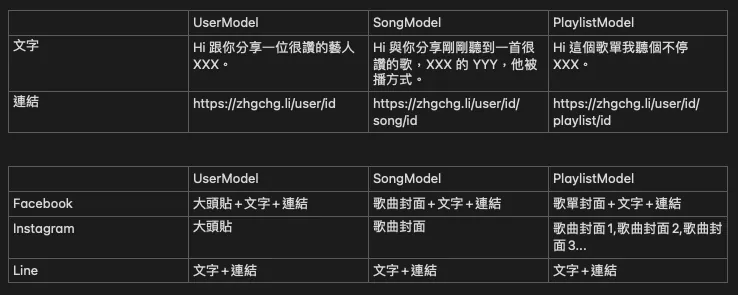
The combined scenario is shown in the above image. The first table displays the customized content for each Model, and the second table shows the data required by each sharing platform.
Especially Instagram requires multiple images when sharing a Playlist, which differs from the sources needed for other shares.
Define Model
First, define the properties for each Model:
// Model
struct UserModel {
    let id: String
    let name: String
    let profileImageURLString: String
}

struct SongModel {
    let id: String
    let name: String
    let user: UserModel
    let coverImageURLString: String
}

struct PlaylistModel {
    let id: String
    let name: String
    let user: UserModel
    let songs: [SongModel]
    let coverImageURLString: String
}

// Data

let user = UserModel(id: "1", name: "Avicii", profileImageURLString: "https://zhgchg.li/profile/1.png")

let song = SongModel(id: "1",
                     name: "Wake me up",
                     user: user,
                     coverImageURLString: "https://zhgchg.li/cover/1.png")

let playlist = PlaylistModel(id: "1",
                            name: "Avicii Tribute Concert",
                            user: user,
                            songs: [
                                song,
                                SongModel(id: "2", name: "Waiting for love", user: UserModel(id: "1", name: "Avicii", profileImageURLString: "https://zhgchg.li/profile/1.png"), coverImageURLString: "https://zhgchg.li/cover/3.png"),
                                SongModel(id: "3", name: "Lonely Together", user: UserModel(id: "1", name: "Avicii", profileImageURLString: "https://zhgchg.li/profile/1.png"), coverImageURLString: "https://zhgchg.li/cover/1.png"),
                                SongModel(id: "4", name: "Heaven", user: UserModel(id: "1", name: "Avicii", profileImageURLString: "https://zhgchg.li/profile/1.png"), coverImageURLString: "https://zhgchg.li/cover/4.png"),
                                SongModel(id: "5", name: "S.O.S", user: UserModel(id: "1", name: "Avicii", profileImageURLString: "https://zhgchg.li/profile/1.png"), coverImageURLString: "https://zhgchg.li/cover/5.png")],
                            coverImageURLString: "https://zhgchg.li/playlist/1.png")
Doing It Without Any Thought
Completely ignoring architecture, here is the dirtiest approach without any consideration.

Stephen Chow — God of Cookery
class ShareManager {
private let title: String
private let urlString: String
private let imageURLStrings: [String]
init(user: UserModel) {
self.title = "Hi, sharing with you an amazing artist \(user.name)."
self.urlString = "https://zhgchg.li/user/\(user.id)"
self.imageURLStrings = [user.profileImageURLString]
}
init(song: SongModel) {
self.title = "Hi, sharing a great song I just heard, \(song.user.name)'s \(song.name)."
self.urlString = "https://zhgchg.li/user/\(song.user.id)/song/\(song.id)"
self.imageURLStrings = [song.coverImageURLString]
}
init(playlist: PlaylistModel) {
self.title = "Hi, I can't stop listening to this playlist \(playlist.name)."
self.urlString = "https://zhgchg.li/user/\(playlist.user.id)/playlist/\(playlist.id)"
self.imageURLStrings = playlist.songs.map({ $0.coverImageURLString })
}
func shareToFacebook() {
// call Facebook share sdk...
print("Share to Facebook...")
print("[)](\(self.urlString))")
}
func shareToInstagram() {
// call Instagram share sdk...
print("Share to Instagram...")
print(self.imageURLStrings.joined(separator: ","))
}
func shareToLine() {
// call Line share sdk...
print("Share to Line...")
print("[\(self.title)](\(self.urlString))")
}
}
Nothing much to say, it’s a zero-architecture mess all mixed together. If you want to add a new sharing platform, change the sharing info of a platform, or add a shareable model, you have to modify ShareManager. Also, imageURLStrings was designed as an array because Instagram requires a set of images when sharing playlists. This is a bit backwards, designing the architecture based on specific needs, which ends up polluting other types that don’t need image sets.
Optimization
Slightly separate the logic.
protocol Shareable {
func getShareText() -> String
func getShareURLString() -> String
func getShareImageURLStrings() -> [String]
}
extension UserModel: Shareable {
func getShareText() -> String {
return "Hi, sharing with you a great artist \(self.name)."
}
func getShareURLString() -> String {
return "https://zhgchg.li/user/\(self.id)"
}
func getShareImageURLStrings() -> [String] {
return [self.profileImageURLString]
}
}
extension SongModel: Shareable {
func getShareText() -> String {
return "Hi, sharing a great song I just heard, \(self.user.name)'s \(self.name)."
}
func getShareURLString() -> String {
return "https://zhgchg.li/user/\(self.user.id)/song/\(self.id)"
}
func getShareImageURLStrings() -> [String] {
return [self.coverImageURLString]
}
}
extension PlaylistModel: Shareable {
func getShareText() -> String {
return "Hi, I can't stop listening to this playlist \(self.name)."
}
func getShareURLString() -> String {
return "https://zhgchg.li/user/\(self.user.id)/playlist/\(self.id)"
}
func getShareImageURLStrings() -> [String] {
return [self.coverImageURLString]
}
}
protocol ShareManagerProtocol {
var model: Shareable { get }
init(model: Shareable)
func share()
}
class FacebookShare: ShareManagerProtocol {
let model: Shareable
required init(model: Shareable) {
self.model = model
}
func share() {
// call Facebook share sdk...
print("Share to Facebook...")
print("[.first))](\(model.getShareURLString())")
}
}
class InstagramShare: ShareManagerProtocol {
let model: Shareable
required init(model: Shareable) {
self.model = model
}
func share() {
// call Instagram share sdk...
print("Share to Instagram...")
print(model.getShareImageURLStrings().joined(separator: ","))
}
}
class LineShare: ShareManagerProtocol {
let model: Shareable
required init(model: Shareable) {
self.model = model
}
func share() {
// call Line share sdk...
print("Share to Line...")
print("[\(model.getShareText())](\(model.getShareURLString())")
}
}
We extracted a CanShare Protocol, so any Model conforming to this protocol supports sharing; the sharing part is also separated into ShareManagerProtocol. For new sharing features, just implement the protocol, and modifications or deletions won’t affect other ShareManagers.
But getShareImageURLStrings is still awkward. Moreover, if a new sharing platform requires completely different Model data—for example, WeChat sharing needs play count, creation date, and other info that only it uses—things will start to get messy.
Visitor
Solution Using Visitor Pattern.
// Visitor Version
protocol Shareable {
func accept(visitor: SharePolicy)
}
extension UserModel: Shareable {
func accept(visitor: SharePolicy) {
visitor.visit(model: self)
}
}
extension SongModel: Shareable {
func accept(visitor: SharePolicy) {
visitor.visit(model: self)
}
}
extension PlaylistModel: Shareable {
func accept(visitor: SharePolicy) {
visitor.visit(model: self)
}
}
protocol SharePolicy {
func visit(model: UserModel)
func visit(model: SongModel)
func visit(model: PlaylistModel)
}
class ShareToFacebookVisitor: SharePolicy {
func visit(model: UserModel) {
// call Facebook share sdk...
print("Share to Facebook...")
print("[](https://zhgchg.li/user/\(model.id)")
}
func visit(model: SongModel) {
// call Facebook share sdk...
print("Share to Facebook...")
print("[)](https://zhgchg.li/user/\(model.user.id)/song/\(model.id)")
}
func visit(model: PlaylistModel) {
// call Facebook share sdk...
print("Share to Facebook...")
print("[)](https://zhgchg.li/user/\(model.user.id)/playlist/\(model.id)")
}
}
class ShareToLineVisitor: SharePolicy {
func visit(model: UserModel) {
// call Line share sdk...
print("Share to Line...")
print("[Hi, sharing a great artist \(model.name) with you.](https://zhgchg.li/user/\(model.id)")
}
func visit(model: SongModel) {
// call Line share sdk...
print("Share to Line...")
print("[Hi, sharing a great song I just heard, \(model.user.name)'s \(model.name), played this way.](https://zhgchg.li/user/\(model.user.id)/song/\(model.id)")
}
func visit(model: PlaylistModel) {
// call Line share sdk...
print("Share to Line...")
print("[Hi, I can't stop listening to this playlist \(model.name).](https://zhgchg.li/user/\(model.user.id)/playlist/\(model.id)")
}
}
class ShareToInstagramVisitor: SharePolicy {
func visit(model: UserModel) {
// call Instagram share sdk...
print("Share to Instagram...")
print(model.profileImageURLString)
}
func visit(model: SongModel) {
// call Instagram share sdk...
print("Share to Instagram...")
print(model.coverImageURLString)
}
func visit(model: PlaylistModel) {
// call Instagram share sdk...
print("Share to Instagram...")
print(model.songs.map({ $0.coverImageURLString }).joined(separator: ","))
}
}
// Use case
let shareToInstagramVisitor = ShareToInstagramVisitor()
user.accept(visitor: shareToInstagramVisitor)
playlist.accept(visitor: shareToInstagramVisitor)
Let’s go through what was done line by line:
-
First, we created a Shareable Protocol to help manage Models that support sharing and provide a unified interface for the Visitor (though defining it is optional).
-
UserModel/SongModel/PlaylistModel implement Shareable
func accept(visitor: SharePolicy). Later, if new models supporting sharing are added, they only need to implement the protocol. -
Define SharePolicy listing the supported Models
(must be concrete type)You might wonder why not define it asvisit(model: Shareable)Instead, that would repeat the problem from the previous version. -
Each Share method implements SharePolicy, assembling the required resources according to the source.
-
Suppose we add a WeChat share option today. It requires special data (play count, creation date) but won’t affect existing code because it can get the information it needs from the concrete model itself.
Achieving low coupling and high cohesion in software development.
The above is a classic Visitor Double Dispatch implementation, but in daily development, we rarely encounter this situation. Usually, there is only one Visitor involved. However, I think this pattern is still very suitable for such cases. For example, if there is a SaveToCoreData requirement, we can directly define accept(visitor: SaveToCoreDataVisitor) without declaring an extra Policy Protocol, which is also a good architectural approach.
protocol Saveable {
  func accept(visitor: SaveToCoreDataVisitor)
}

class SaveToCoreDataVisitor {
    func visit(model: UserModel) {
        // map UserModel to coredata
    }

    func visit(model: SongModel) {
        // map SongModel to coredata
    }

    func visit(model: PlaylistModel) {
        // map PlaylistModel to coredata
    }
}
Other applications: Save, Like, tableview/collectionview cellForRow…
Principles
Finally, let’s talk about some common principles.
-
Code is meant to be read by people; avoid Over Designing
-
Consistency is important; the same scenario within the same codebase should use the same architectural approach.
-
If the scope is controllable or no other scenarios can occur, continuing to break it down further can be considered Over Designed.
-
Use patterns more, invent less; Design Patterns have been in software design for decades, and the scenarios they consider are definitely more complete than creating a new architecture from scratch.
-
If you don’t understand Design Patterns, you can learn them. But if it’s a structure you created yourself, it’s harder to convince others to learn it because it might only apply to that specific case. It wouldn’t be considered common sense.
-
Code duplication does not necessarily mean bad code. Overemphasizing encapsulation can lead to over-design. As mentioned earlier, code is meant to be read by people, so as long as it is readable and has low coupling with high cohesion, it is good code.
-
Do not drastically alter the Pattern; the original design always has its reason. Randomly changing it may cause issues in certain scenarios.
-
Once you start taking detours, you’ll only go further off course, and the code will become messier and messier.
inspired by @saiday
References
-
Design Patterns in Swift: Visitor (Another practical use case of the Visitor pattern)
-
Deep Linking at Scale on iOS (State Pattern)



Comments