
Insure Your iOS Multilingual Strings!
Using SwiftGen & UnitTest to Ensure Safe Multilingual Operations

Photo by Mick Haupt
Problem
Plain Text Files
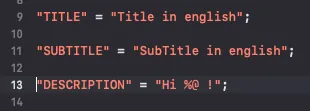
iOS handles multiple languages using plain text Localizable.strings files, unlike Android which uses XML format for management. This creates risks of accidentally corrupting or missing entries in the language files during development. Moreover, multi-language issues are not detected at Build Time and often only discovered after release through user reports from specific regions, which greatly reduces user confidence.
From past painful experiences, developers accustomed to writing Swift often forgot to add ; in Localizable.strings, causing all strings after the missing ; in a certain language to break after release; only an urgent hotfix saved the situation.
If there is a multilingual issue, the Key will be shown directly to the user
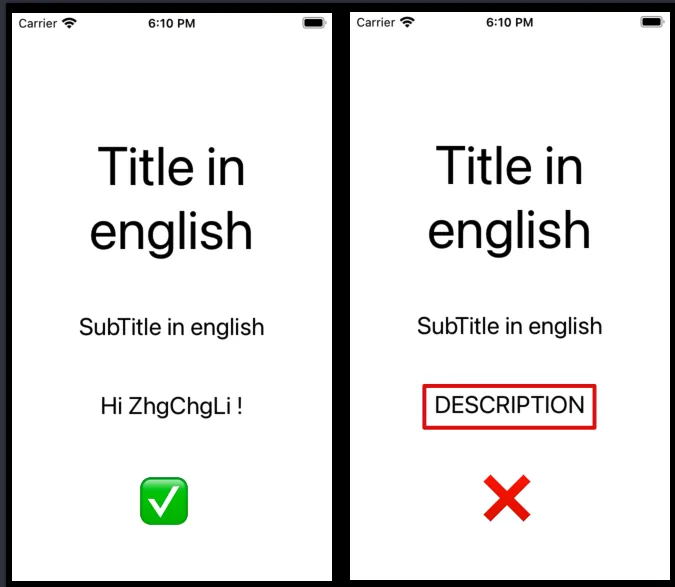
As shown in the image above, if the DESCRIPTION key is missing, the app will directly display DESCRIPTION to the user.
Check Requirements
-
Localizable.strings Format Validation (Line breaks must end with
;, valid Key-Value pairs) -
The multilingual keys used in the code must have corresponding definitions in the Localizable.strings file.
-
Each Localizable.strings file for every language must have the corresponding Key-Value records.
-
Localizable.strings files must not have duplicate Keys (otherwise the Value may be accidentally overwritten)
Solution
Writing a Complete Checker Tool with Swift
The previous approach was to “Use Swift to write Shell Scripts directly in Xcode!” (see /posts/zrealm-dev/swift-run-script-in-xcode-localization-image-asset-checks-automated-41c49a75a743/) and reference the Localize 🏁 tool. This tool uses Swift to develop a Command Line Tool for external localization file checks, then places the script into the Build Phases Run Script to perform checks during Build Time.
Advantages:
The checker is injected externally and does not depend on the project. It can run without Xcode or building the project, and the check can pinpoint the exact file and line number. Additionally, it can perform formatting functions (sorting multilingual keys from A to Z).
Disadvantages:
Increases Build Time (+ ~= 3 mins) and process complexity. If the script has issues or needs adjustment for the project structure, it is hard to hand over and maintain. Since this part is outside the project, only those who added this check understand the entire logic, making it difficult for other collaborators to handle.
Interested readers can refer to the previous article. This article mainly introduces the method of using Xcode 13 + SwiftGen + UnitTest to achieve comprehensive checks of Localizable.strings.
XCode 13 Built-in Build Time Check for Localizable.strings File Format Correctness
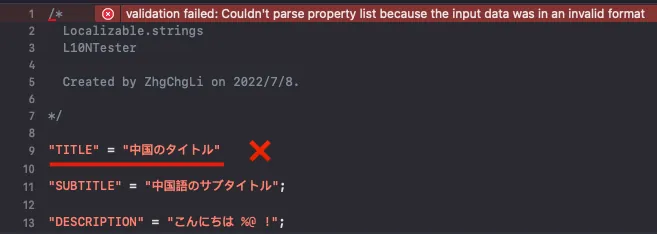
After upgrading to Xcode 13, it now includes a built-in Build Time check for the Localizable.strings file format. Tests show the check is quite thorough; besides missing ;, it also blocks extra meaningless strings.
Using SwiftGen to Replace the Original NSLocalizedString String-Based Access Method
SwiftGen helps us change the original NSLocalizedString string access method to object access, preventing typos and missing key declarations.
SwiftGen is also a Command Line Tool; however, it is quite popular in the industry and has comprehensive documentation and community support, so there is no need to worry about maintenance issues after adopting this tool.
You can choose the installation method based on your environment or CI/CD service. Here, the demo uses the most straightforward CocoaPods installation.
Please note that SwiftGen is not a real CocoaPod; it does not have any dependencies with the project’s code. Installing SwiftGen via CocoaPods simply downloads the Command Line Tool executable.
Add the swiftgen pod in the podfile:
pod 'SwiftGen', '~> 6.0'
Init
After running pod install, open Terminal and cd to the project directory.
/L10NTests/Pods/SwiftGen/bin/swiftGen config init
Initialize the swiftgen.yml configuration file and open it.
strings:
  - inputs:
      - "L10NTests/Supporting Files/zh-Hant.lproj/Localizable.strings"
    outputs:
      templateName: structured-swift5
      output: "L10NTests/Supporting Files/SwiftGen-L10n.swift"
      params:
        enumName: "L10n"
Paste and modify it to match your project’s format:
inputs: Project localization file location (it is recommended to specify the DevelopmentLocalization language file)
outputs:
output: The location of the converted Swift file
params: enumName: Object name
templateName: Conversion template
You can run swiftGen template list to get the list of built-in templates.
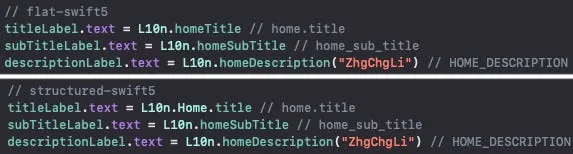
flat vs. structured
The difference is that if the Key style is XXX.YYY.ZZZ, the flat template will convert it to camelCase; the structured template will keep the original style and convert it into a XXX.YYY.ZZZ object.
Pure Swift projects can use the built-in templates directly, but Swift mixed with Objective-C projects need to customize the templates themselves:
flat-swift5-objc.stencil :
// swiftlint:disable all
// Generated using SwiftGen — https://github.com/SwiftGen/SwiftGen

{% if tables.count > 0 %}
{% set accessModifier %}{% if param.publicAccess %}public{% else %}internal{% endif %}{% endset %}
import Foundation

// swiftlint:disable superfluous_disable_command file_length implicit_return

// MARK: - Strings

{% macro parametersBlock types %}{% filter removeNewlines:"leading" %}
  {% for type in types %}
    {% if type == "String" %}
    _ p{{forloop.counter}}: Any
    {% else %}
    _ p{{forloop.counter}}: {{type}}
    {% endif %}
    {{ ", " if not forloop.last }}
  {% endfor %}
{% endfilter %}{% endmacro %}
{% macro argumentsBlock types %}{% filter removeNewlines:"leading" %}
  {% for type in types %}
    {% if type == "String" %}
    String(describing: p{{forloop.counter}})
    {% elif type == "UnsafeRawPointer" %}
    Int(bitPattern: p{{forloop.counter}})
    {% else %}
    p{{forloop.counter}}
    {% endif %}
    {{ ", " if not forloop.last }}
  {% endfor %}
{% endfilter %}{% endmacro %}
{% macro recursiveBlock table item %}
  {% for string in item.strings %}
  {% if not param.noComments %}
  {% for line in string.translation\\|split:"\n" %}
  /// {{line}}
  {% endfor %}
  {% endif %}
  {% if string.types %}
  {{accessModifier}} static func {{string.key\\|swiftIdentifier:"pretty"\\|lowerFirstWord\\|escapeReservedKeywords}}({% call parametersBlock string.types %}) -> String {
    return {{enumName}}.tr("{{table}}", "{{string.key}}", {% call argumentsBlock string.types %})
  }
  {% elif param.lookupFunction %}
  {# custom localization function is mostly used for in-app lang selection, so we want the loc to be recomputed at each call for those (hence the computed var) #}
  {{accessModifier}} static var {{string.key\\|swiftIdentifier:"pretty"\\|lowerFirstWord\\|escapeReservedKeywords}}: String { return {{enumName}}.tr("{{table}}", "{{string.key}}") }
  {% else %}
  {{accessModifier}} static let {{string.key\\|swiftIdentifier:"pretty"\\|lowerFirstWord\\|escapeReservedKeywords}} = {{enumName}}.tr("{{table}}", "{{string.key}}")
  {% endif %}
  {% endfor %}
  {% for child in item.children %}
  {% call recursiveBlock table child %}
  {% endfor %}
{% endmacro %}
// swiftlint:disable function_parameter_count identifier_name line_length type_body_length
{% set enumName %}{{param.enumName\\|default:"L10n"}}{% endset %}
@objcMembers {{accessModifier}} class {{enumName}}: NSObject {
  {% if tables.count > 1 or param.forceFileNameEnum %}
  {% for table in tables %}
  {{accessModifier}} enum {{table.name\\|swiftIdentifier:"pretty"\\|escapeReservedKeywords}} {
    {% filter indent:2 %}{% call recursiveBlock table.name table.levels %}{% endfilter %}
  }
  {% endfor %}
  {% else %}
  {% call recursiveBlock tables.first.name tables.first.levels %}
  {% endif %}
}
// swiftlint:enable function_parameter_count identifier_name line_length type_body_length

// MARK: - Implementation Details

extension {{enumName}} {
  private static func tr(_ table: String, _ key: String, _ args: CVarArg...) -> String {
    {% if param.lookupFunction %}
    let format = {{ param.lookupFunction }}(key, table)
    {% else %}
    let format = {{param.bundle\\|default:"BundleToken.bundle"}}.localizedString(forKey: key, value: nil, table: table)
    {% endif %}
    return String(format: format, locale: Locale.current, arguments: args)
  }
}
{% if not param.bundle and not param.lookupFunction %}

// swiftlint:disable convenience_type
private final class BundleToken {
  static let bundle: Bundle = {
    #if SWIFT_PACKAGE
    return Bundle.module
    #else
    return Bundle(for: BundleToken.self)
    #endif
  }()
}
// swiftlint:enable convenience_type
{% endif %}
{% else %}
// No string found
{% endif %}
Here is a customized template compatible with both Swift and Objective-C, collected from the web. You can create a flat-swift5-objc.stencil file and paste the content, or click here to download the .zip directly.
If using a custom template, do not use templateName; instead, declare templatePath:
swiftgen.yml :
strings:
  - inputs:
      - "L10NTests/Supporting Files/zh-Hant.lproj/Localizable.strings"
    outputs:
      templatePath: "path/to/flat-swift5-objc.stencil"
      output: "L10NTests/Supporting Files/SwiftGen-L10n.swift"
      params:
        enumName: "L10n"
Just set the templatePath to the location of the .stencil template within the project.
Generator
After setting up, you can go back to the Terminal and manually run:
/L10NTests/Pods/SwiftGen/bin/swiftGen
Execute the conversion, then manually drag the converted result file (SwiftGen-L10n.swift) from Finder into the project before the code can be used.
Run Script
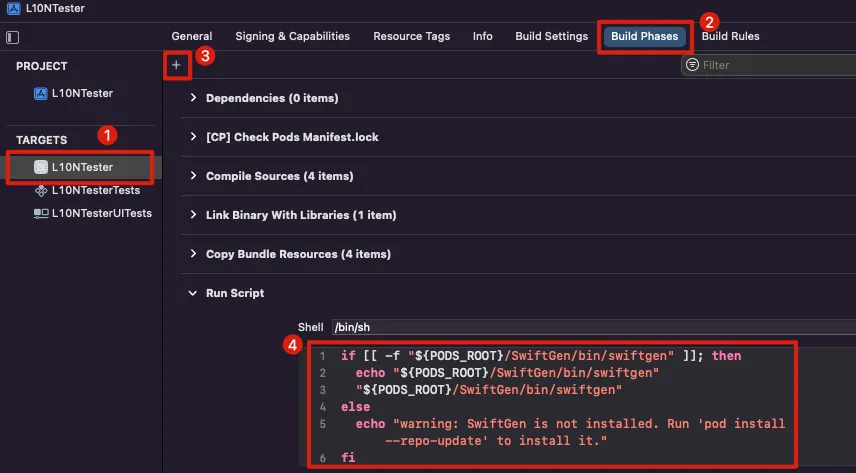
In the project settings -> Build Phases -> + -> New Run Script Phase -> Paste:
if [[ -f "${PODS_ROOT}/SwiftGen/bin/swiftgen" ]]; then
  echo "${PODS_ROOT}/SwiftGen/bin/swiftgen"
  "${PODS_ROOT}/SwiftGen/bin/swiftgen"
else
  echo "warning: SwiftGen is not installed. Run 'pod install --repo-update' to install it."
fi
This way, the generator runs every time the project is built to produce the latest conversion results.
How to use in the CodeBase?
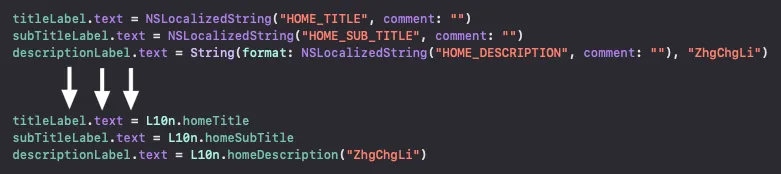
L10n.homeTitle
L10n.homeDescription("ZhgChgLi") // with arg
With Object Access, typos and cases where the Key used in the code is not declared in the Localizable.strings file can no longer occur.
However, SwiftGen can only generate from a specific language, so it cannot prevent cases where a key exists in one language but is missing in others; this issue can only be prevented using the UnitTest below.
Conversion
The hardest part is the conversion because the existing project heavily uses NSLocalizedString, which needs to be converted to the new L10n.XXX format. It becomes even more complex when dealing with parameterized strings like String(format: NSLocalizedString. Additionally, if there is mixed Objective-C code, the different syntax between Objective-C and Swift must also be considered.
There is no special solution; you can only write your own Command Line Tool. You can refer to the previous article 上一篇文章 which uses Swift to scan the project directory and parse NSLocalizedString with Regex to create a small tool for conversion.
It is recommended to convert one scenario at a time and proceed to the next only after a successful build.
-
Swift -> NSLocalizedString without parameters
-
Swift -> NSLocalizedString with Parameters Scenario
-
OC -> NSLocalizedString without parameters
-
OC -> NSLocalizedString with Parameters Situation
Use UnitTest to check for missing keys and duplicates between language files and the main language file
We can write UnitTests to read the contents of .strings files from the Bundle and perform tests.
Read .strings from Bundle and convert to object:
class L10NTestsTests: XCTestCase {

    private var localizations: [Bundle: [Localization]] = [:]

    override func setUp() {
        super.setUp()

        let bundles = [Bundle(for: type(of: self))]

        //
        bundles.forEach { bundle in
            var localizations: [Localization] = []

            bundle.localizations.forEach { lang in
                var localization = Localization(lang: lang)

                if let lprojPath = bundle.path(forResource: lang, ofType: "lproj"),
                   let lprojBundle = Bundle(path: lprojPath) {

                    let filesInLPROJ = (try? FileManager.default.contentsOfDirectory(atPath: lprojBundle.bundlePath)) ?? []
                    localization.localizableStringFiles = filesInLPROJ.compactMap { fileFullName -> L10NTestsTests.Localization.LocalizableStringFile? in
                        let fileName = URL(fileURLWithPath: fileFullName).deletingPathExtension().lastPathComponent
                        let fileExtension = URL(fileURLWithPath: fileFullName).pathExtension
                        guard fileExtension == "strings" else { return nil }
                        guard let path = lprojBundle.path(forResource: fileName, ofType: fileExtension) else { return nil }

                        return L10NTestsTests.Localization.LocalizableStringFile(name: fileFullName, path: path)
                    }

                    localization.localizableStringFiles.enumerated().forEach { (index, localizableStringFile) in
                        if let fileContent = try? String(contentsOfFile: localizableStringFile.path, encoding: .utf8) {
                            let lines = fileContent.components(separatedBy: .newlines)
                            let pattern = "\"(.*)\"(\\s*)(=){1}(\\s*)\"(.+)\";"
                            let regex = try? NSRegularExpression(pattern: pattern, options: [])
                            let values = lines.compactMap { line -> Localization.LocalizableStringFile.Value? in
                                let range = NSRange(location: 0, length: (line as NSString).length)
                                guard let matches = regex?.firstMatch(in: line, options: [], range: range) else { return nil }
                                let key = (line as NSString).substring(with: matches.range(at: 1))
                                let value = (line as NSString).substring(with: matches.range(at: 5))
                                return Localization.LocalizableStringFile.Value(key: key, value: value)
                            }
                            localization.localizableStringFiles[index].values = values
                        }
                    }

                    localizations.append(localization)
                }
            }

            self.localizations[bundle] = localizations
        }
    }
}

private extension L10NTestsTests {
    struct Localization: Equatable {
        struct LocalizableStringFile {
            struct Value {
                let key: String
                let value: String
            }

            let name: String
            let path: String
            var values: [Value] = []
        }

        let lang: String
        var localizableStringFiles: [LocalizableStringFile] = []

        static func == (lhs: Self, rhs: Self) -> Bool {
            return lhs.lang == rhs.lang
        }
    }
}
We define a Localization to store the parsed data. It searches for lproj folders within the Bundle, then finds .strings files inside them. Using regular expressions, it converts the multilingual strings into objects and stores them back into Localization for later testing.
Here are a few points to note:
-
Using
Bundle(for: type(of: self))to Access Resources from Test Target -
Remember to set the Test Target’s STRINGS_FILE_OUTPUT_ENCODING to
UTF-8, otherwise reading file content with String will fail (the default is Binary). -
The reason for using String reading instead of NSDictionary is that we need to test for duplicate Keys. Using NSDictionary will overwrite duplicate Keys during reading.
-
Remember to add the
.stringsfile to the Test Target.
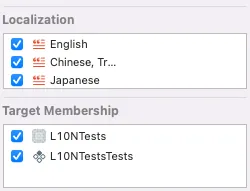
TestCase 1. Test for duplicate Keys within the same .strings file:
func testNoDuplicateKeysInSameFile() throws {
    localizations.forEach { (_, localizations) in
        localizations.forEach { localization in
            localization.localizableStringFiles.forEach { localizableStringFile in
                let keys = localizableStringFile.values.map { $0.key }
                let uniqueKeys = Set(keys)
                XCTAssertTrue(keys.count == uniqueKeys.count, "Localized Strings File: \(localizableStringFile.path) has duplicated keys.")
            }
        }
    }
}
Input:

Result:

TestCase 2. Check for missing or extra Keys compared to the DevelopmentLocalization language:
func testCompareWithDevLangHasMissingKey() throws {
    localizations.forEach { (bundle, localizations) in
        let developmentLang = bundle.developmentLocalization ?? "en"
        if let developmentLocalization = localizations.first(where: { $0.lang == developmentLang }) {
            let othersLocalization = localizations.filter { $0.lang != developmentLang }

            developmentLocalization.localizableStringFiles.forEach { developmentLocalizableStringFile in
                let developmentLocalizableKeys = Set(developmentLocalizableStringFile.values.map { $0.key })
                othersLocalization.forEach { otherLocalization in
                    if let otherLocalizableStringFile = otherLocalization.localizableStringFiles.first(where: { $0.name == developmentLocalizableStringFile.name }) {
                        let otherLocalizableKeys = Set(otherLocalizableStringFile.values.map { $0.key })
                        if developmentLocalizableKeys.count < otherLocalizableKeys.count {
                            XCTFail("Localized Strings File: \(otherLocalizableStringFile.path) has redundant keys.")
                        } else if developmentLocalizableKeys.count > otherLocalizableKeys.count {
                            XCTFail("Localized Strings File: \(otherLocalizableStringFile.path) has missing keys.")
                        }
                    } else {
                        XCTFail("Localized Strings File not found in Lang: \(otherLocalization.lang)")
                    }
                }
            }
        } else {
            XCTFail("developmentLocalization not found in Bundle: \(bundle)")
        }
    }
}
Input: (Compared to DevelopmentLocalization, other languages lack declared Keys)

Output:

Input: (The key “DevelopmentLocalization” does not exist, but it appears in other languages)
Output:

Summary
Combining the above methods, we use:
-
New Xcode Helps Us Ensure .strings File Format Correctness ✅
-
SwiftGen ensures no typos or undeclared references when accessing multilingual strings in the CodeBase ✅
-
UnitTest Ensures Multilingual Content Accuracy ✅
Advantages:
-
Fast execution speed, no impact on Build Time
-
Maintained by every iOS developer.
Advanced
Localized File Format
This solution cannot be achieved, so you still need to use the original Command Line Tool written in Swift to accomplish it. However, the formatting part can be done in git pre-commit; if there is no diff, no action is taken to avoid running it on every build:
#!/bin/sh

diffStaged=${1:-\-\-staged} # use $1 if exists, default --staged.

git diff --diff-filter=d --name-only $diffStaged \\| grep -e 'Localizable.*\.\(strings\\\|stringsdict\)$' \\| \
  while read line; do
    // do format for ${line}
done
.stringdict
The same principle can also be applied to .stringdict.
CI/CD
SwiftGen does not need to be placed in the build phase because it runs every time you build, and the code only appears after the build is complete. Instead, you can run the command to generate code only when there are changes.
Clearly Identify Which Key Is Wrong
The UnitTest code can be optimized to clearly output which Key is Missing/Redundant/Duplicate.
Using Third-Party Tools to Fully Free Engineers from Multilingual Tasks
As mentioned in the previous talk “2021 Pinkoi Tech Career Talk — Secrets of High-Efficiency Engineering Teams,” multilingual work in large teams can be separated through third-party services to manage dependencies in multilingual tasks.
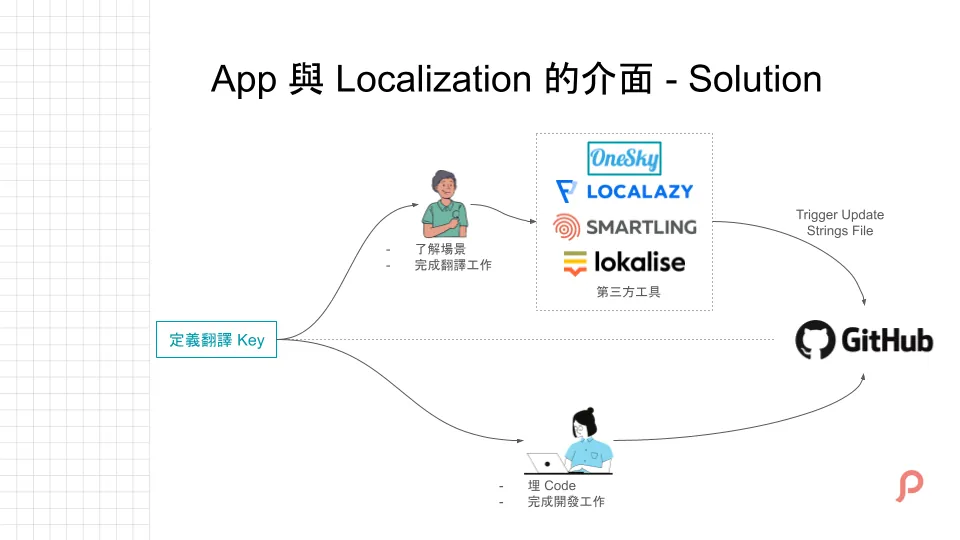
Engineers only need to define the Keys, and the multilingual content will be automatically imported from the platform during the CI/CD stage, reducing manual maintenance and minimizing errors.
Special Thanks

Wei Cao , iOS Developer @ Pinkoi



Comments