
The Past and Present of iOS Privacy and Convenience
Apple Privacy Principles and iOS Privacy Protection Features Over the Years
Theme by slidego
[2023–08–01] iOS 17 Update
Supplement on the latest iOS 17 privacy-related adjustments from the previous presentation.
Link Tracking Protection
Safari automatically removes tracking parameters from URLs (e.g. fbclid, gclid …)
-
Example:
https://zhgchg.li/post/1?gclid=124will becomehttps://zhgchg.li/post/1after clicking. -
Currently testing iOS 17 Developer Beta 4,
fbxxx,gcxxx, etc. are removed, whileutm_parameters remain; it is unclear if the official iOS 17 or future iOS 18 will enhance this further. -
To see the effect under the strictest conditions, you can install the iOS DuckDuckGo browser for testing.
-
For detailed testing information, please refer to the excellent article “iOS17 Safari’s New Feature Removes fbclid and gclid from URLs”.
Privacy Manifest .xprivacy & Report
Developers must declare the User Privacy aspects they use, and also require the SDKs they use to provide the SDK’s Privacy Manifest.
Also added third-party SDK Signature
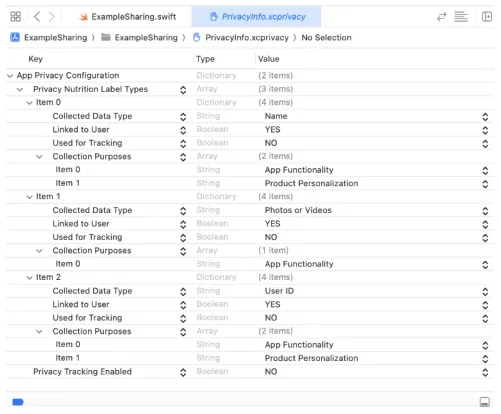
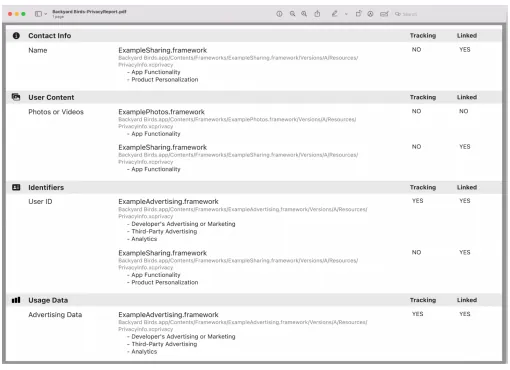
XCode 15 can generate a Privacy Report through the Manifest for developers to set app privacy on the App Store.
Required reason API
To prevent potential misuse of Foundation APIs that could lead to fingerprinting, Apple has started to regulate certain Foundation APIs; developers need to declare the reason for usage in the Manifest.
Currently, the more impactful API is UserDefault, which requires declaration.
Starting from Fall 2023, if your new app or app update uploaded to App Store Connect uses APIs that require a declared purpose (including those from third-party SDKs), and you have not provided an approved purpose in the app’s privacy manifest, you will receive a notification. From Spring 2024, to upload a new app or app update to App Store Connect, you must specify an approved purpose in the app’s privacy manifest to accurately reflect how your app uses the relevant APIs.

If the current approved purposes do not cover a use case for an API that requires a declared purpose, and you believe this use case directly benefits your app users, please let us know.
Tracking Domain
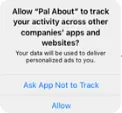
The API domains sending tracking information must be declared in the privacy manifest .xprivacy and can only initiate network requests after the user consents to tracking; otherwise, all network requests to these domains will be blocked by the system.
You can check if the Tracking Domain is blocked using the XCode Network tool:
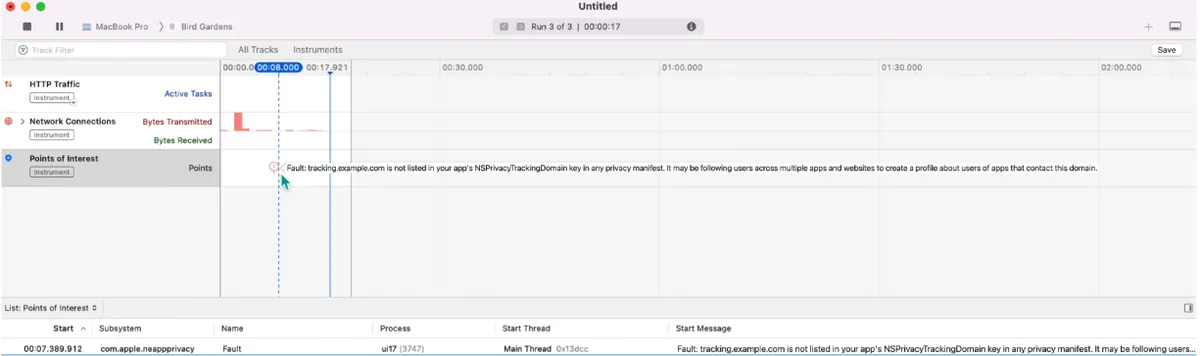
Currently, Facebook and Google’s tracking domains are detected and must be listed as Tracking Domains with user permission requested accordingly.

-
graph.facebook.com : Facebook-related data statistics
-
app-measurement.com : Google-related data analytics: GA/Firebase…
Please note that FB/Google data statistics may significantly drop after iOS 17 because without permission requests and tracking consent, no data will be received; based on past implementations of tracking permission requests, about 70% of users choose not to allow tracking.
-
Developers’ own API calls for sending tracking data must also comply with the tracking domain regulations mentioned above.
-
If the Tracking Domain is the same as the API Domain, a separate independent Tracking Domain is required (e.g. api.zhgchg.li -> tracking.zhgchg.li)
-
Currently, it is not possible to know how Apple controls developers’ own tracking. Testing with XCode 15 on our own app did not detect any tracking.
-
It is unclear whether the official process uses tools to detect behavior or if reviewers manually inspect it.
Fingerprinting remains prohibited.
Preface
I am honored to participate in the MOPCON Talk, but due to the pandemic, it was held online, which is a pity as I couldn’t meet more new friends. The topic of this talk is “The Past and Present of iOS Privacy and Convenience,” where I mainly want to share Apple’s privacy principles and the feature adjustments iOS has made over the years based on these principles.
iOS Privacy and Convenience: Past and Present \| Pinkoi, We Are Hiring!
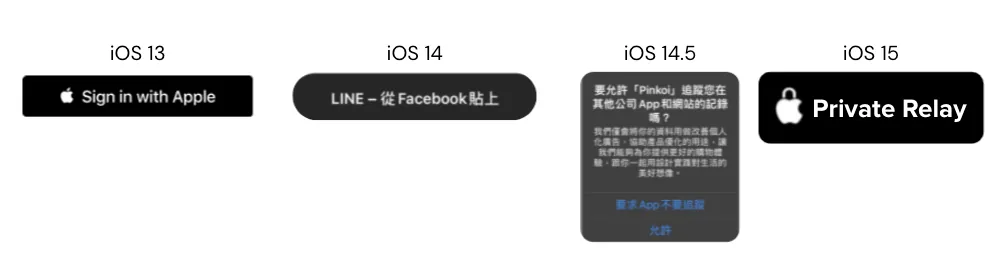
Developers and iPhone users alike have likely become familiar with the following feature changes over the past few years:
-
iOS ≥ 13: All apps supporting third-party login must implement Sign in with Apple, or they cannot be successfully published on the App Store.
-
iOS ≥ 14: Clipboard Access Warning
-
iOS ≥ 14.5: Access to IDFA requires user permission, effectively blocking IDFA usage.
-
iOS ≥ 15: Private Relay uses a proxy to hide the user’s original IP address
-
iOS ≥ 16: Clipboard access requires user permission
-
…and many more, which will be shared with everyone at the end of the article
Why?
If you are not familiar with Apple’s privacy principles, you might wonder why Apple has been constantly clashing with developers and advertisers in recent years. Many features that users are accustomed to have been blocked.
After watching both “WWDC 2021 — Apple’s privacy pillars in focus” and “Apple privacy white paper — A Day in the Life of Your Data,” it was like waking up from a dream. We realized that we have unknowingly leaked a lot of personal privacy, allowing advertisers and social media to profit immensely. This has become pervasive in our daily lives.
Referring to the Apple privacy white paper, the following uses a fictional character, Harry, to illustrate how privacy can be leaked and the potential risks involved.
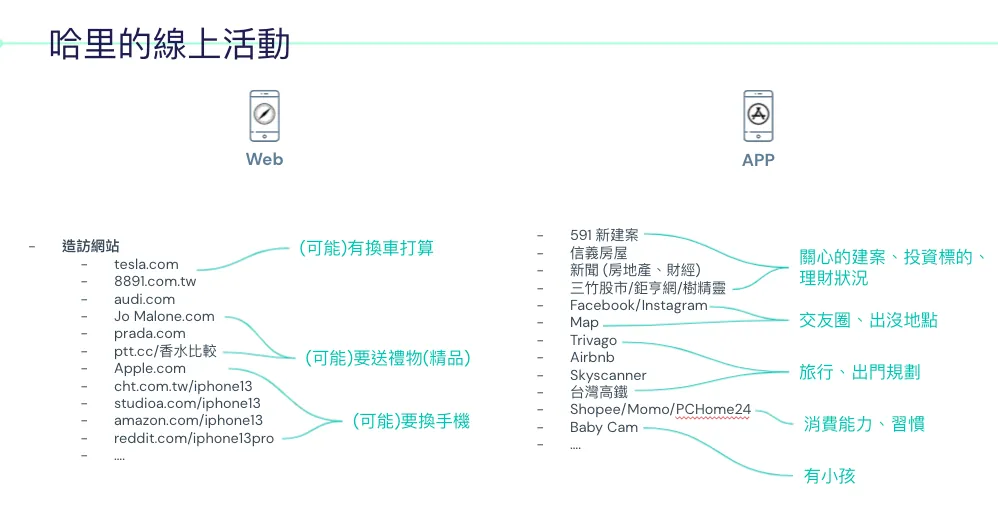
First is Harry’s usage record on the iPhone.
On the left is the web browsing history: You can see visits to websites related to cars, iPhone 13, and luxury goods.
On the right are the installed apps: Investment, travel, social, shopping, and even a baby monitor… these apps
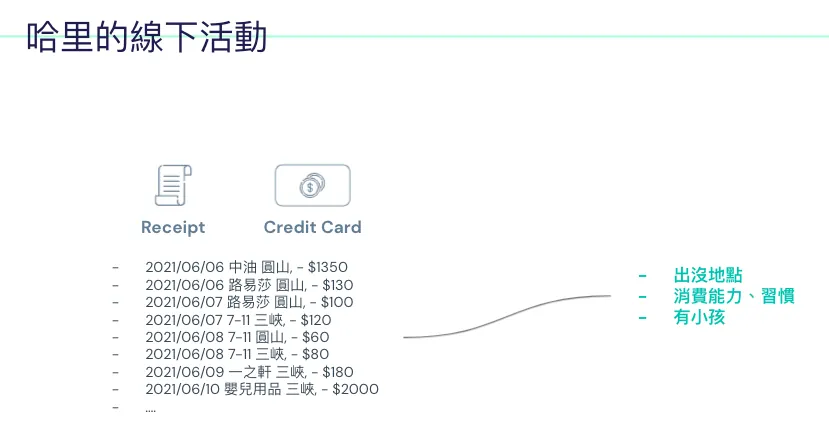
Harry’s Offline Life
Offline activities leave records in places such as: receipts, credit card transaction records, dashcam footage, and so on.
Composition
You might wonder how a service could possibly link all your data when you browse different websites, install various apps (or even don’t log in at all), and then attend offline events.
The answer is: There are technical means, and it is “possible” or has “already” partially occurred.
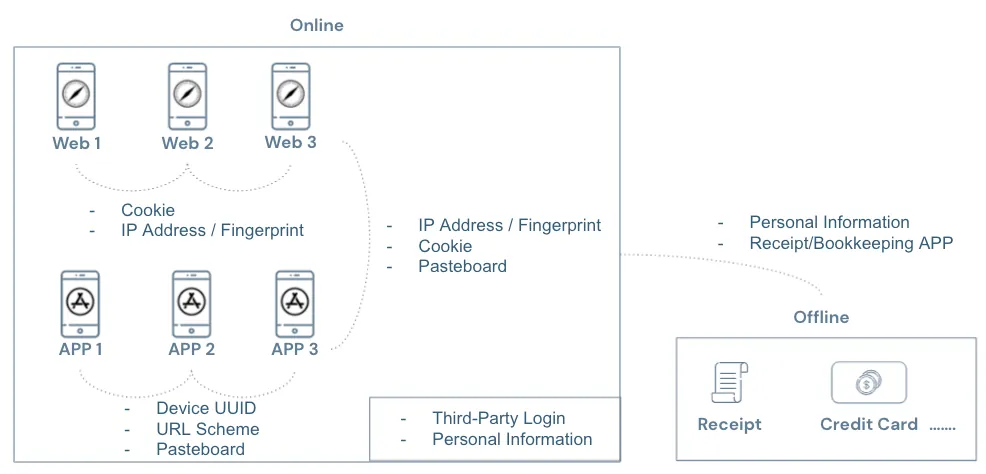
As shown in the image above:
-
When not logged in, websites can identify the same visitor across different sites using third-party cookies, IP address, and device information combined to create a fingerprint.
-
During login, websites can link your data across sites using registration information such as name, birthday, phone number, email, and ID number.
-
Apps can identify the same user across different apps by obtaining the Device UUID, use URL Schemes to detect other installed apps on the device, and use the Pasteboard to transfer data between apps. Additionally, user registration data can be linked after login.
-
Apps and websites can also use Third-Party Cookies, Fingerprints, and Pasteboards to transfer data.
-
The connection between online and offline activities can occur when banks collect credit card transaction records, expense tracking apps, receipt collection apps, dashcam apps, and so on, all of which may link offline activities with online data.
Technically, it is feasible; but who exactly are the third parties behind all websites and apps?
Big companies like Facebook and Google earn a lot from personalized ads; many websites and apps also integrate Facebook and Google SDKs… so it’s hard to tell everything. While some are visible, often we don’t know which third-party ad or data collection services websites and apps use to secretly track our every move.
Let’s assume that behind all of Harry’s activities, the same third party is quietly collecting his data. From their perspective, Harry’s possible profile might look like this:
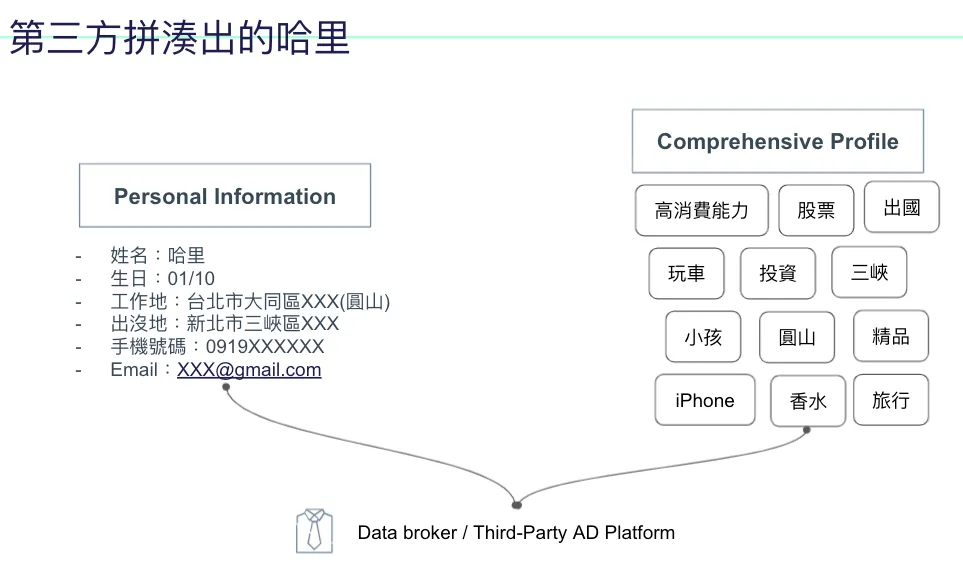
The left side shows personal data, which may come from website registration or delivery information; the right side displays behavior and interest tags based on Harry’s activity records.
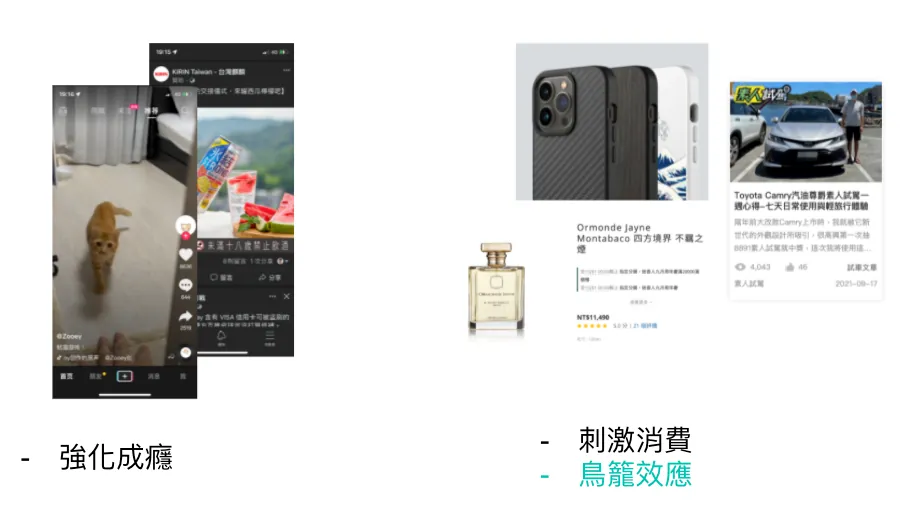
In its eyes, Harry might understand himself better than Harry does; this data, when used on social media, can make users more addicted; when used in advertising, it can push Harry into overconsumption or create a cage effect (e.g., recommending you buy new pants, then after buying pants you buy matching shoes, then after shoes you buy socks… endless).
If you think the above is already scary enough, there is something even scarier:
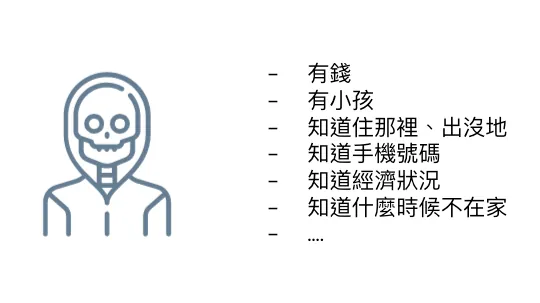
Having your personal information along with knowledge of your financial status… the potential harm is unimaginable, such as kidnapping or theft…
Current Privacy Protection Methods
-
Legal Regulations (e.g., SGS-BS10012 Personal Data Verification, CCPA, GDPR…)
-
Privacy Policy and De-identification
It mainly relies on regulatory constraints; it’s hard to ensure services fully comply 100% of the time. There are many malicious programs online, and it’s difficult to guarantee that services won’t be hacked and cause data leaks. In short, “if it’s malicious, it’s technically feasible to do it; relying solely on regulations and corporate conscience is not enough.”
Besides, most of the time, we are “forced” to accept privacy policies. We cannot selectively authorize privacy permissions; either we don’t use the entire service or we accept all privacy terms to use it. Privacy policies are often not transparent, leaving us unaware of how our data is collected and used, and whether a third party is secretly gathering our information without our knowledge.
Apple also mentioned that personal privacy of minors is mostly collected by services without the consent of their guardians.
Apple’s privacy principles
After understanding the risks of personal privacy leaks, let’s take a look at Apple’s privacy principles.
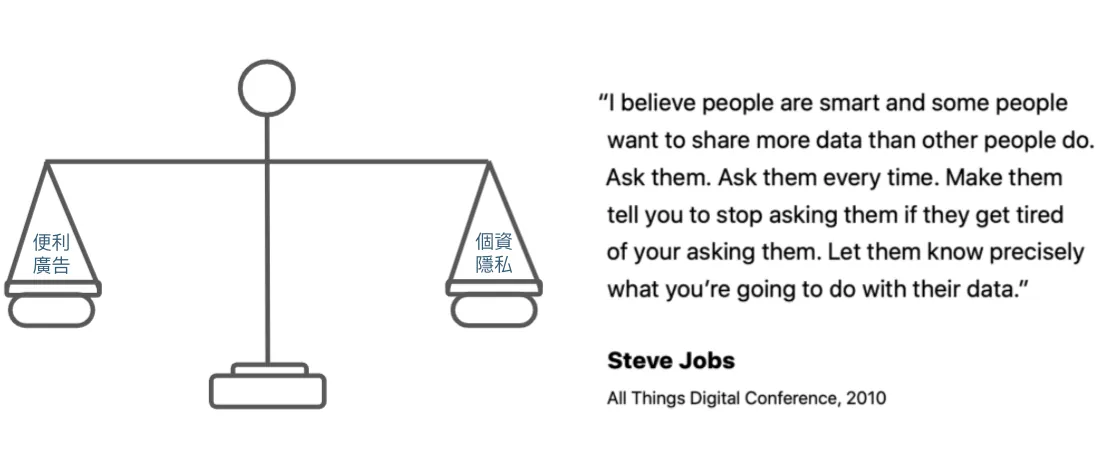
Excerpt from Apple Privacy White Paper: Apple’s ideal is not total blocking but balance. For example, many people have installed AD Blockers in recent years to completely block ads, which is not what Apple wants; because completely cutting off makes it difficult to provide better services.
Steve Jobs said at the 2010 All Things Digital Conference:
I believe people are smart; some are more willing to share data than others. Always ask them each time until they get annoyed and tell you to stop asking, so they clearly understand how you intend to use their data. — translate by Chun-Hsiu Liu
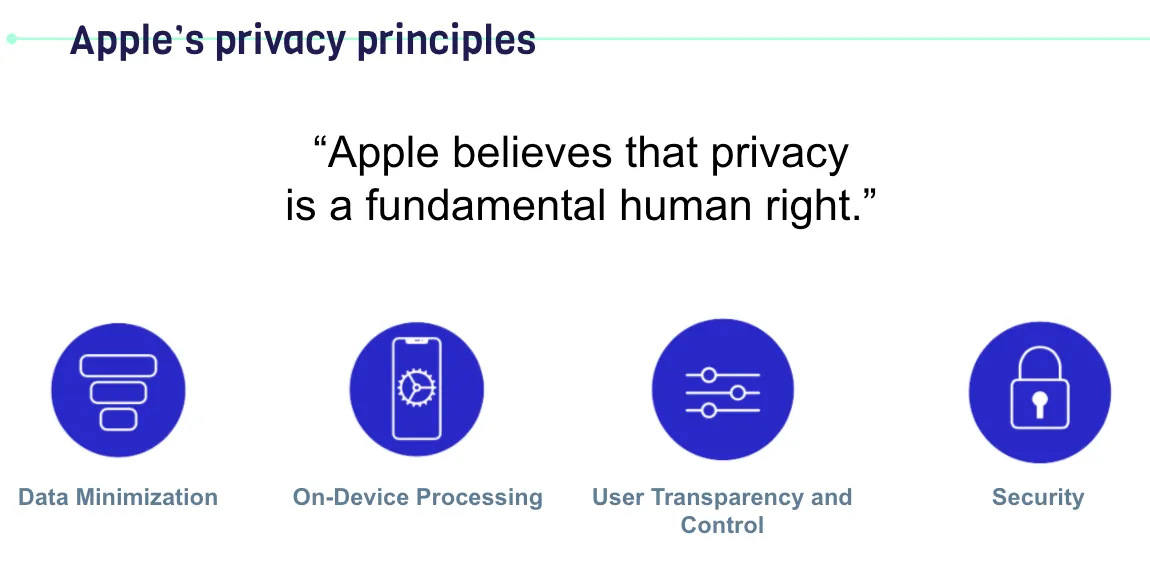
Apple believes privacy is a fundamental human right
Apple’s Four Privacy Principles:
-
Data Minimization: Only collect the data you need.
-
On-Device Processing: Apple leverages powerful processor chips to ensure that personal privacy-related data is processed locally whenever possible.
-
User Transparency and Control: Inform users about what privacy data is collected and how it is used. Also, allow users to control sharing settings for each privacy item.
-
Security: Ensure the safety of data storage and transmission.
iOS Privacy Protection Feature Updates Over the Years
After understanding the risks of personal privacy leaks and Apple’s privacy principles, let’s look at the technical measures iOS has implemented over the years to protect personal privacy.
Between Websites
It was mentioned earlier that
The first method uses Third-Party Cookies to link visitor data across websites:
🈲, Safari on iOS >= 11 has implemented Intelligent Tracking Prevention (WebKit)
Enabled by default, the browser actively identifies and blocks third-party cookies used for tracking and advertising; each year, the iOS version continuously improves the detection algorithm to prevent misses.
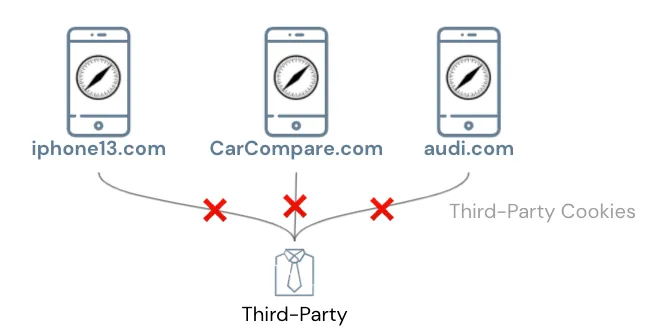
Tracking users across websites via Third-Party Cookies is basically no longer feasible on Safari.
The second method is using a fingerprint calculated from the IP Address + device information to identify the same visitor across different websites:
🈲, iOS >= 15 Private Relay
Especially after Third-Party Cookies were banned, more and more services have adopted this method, and Apple is aware… Fortunately, iOS 15 even obfuscates your IP information!
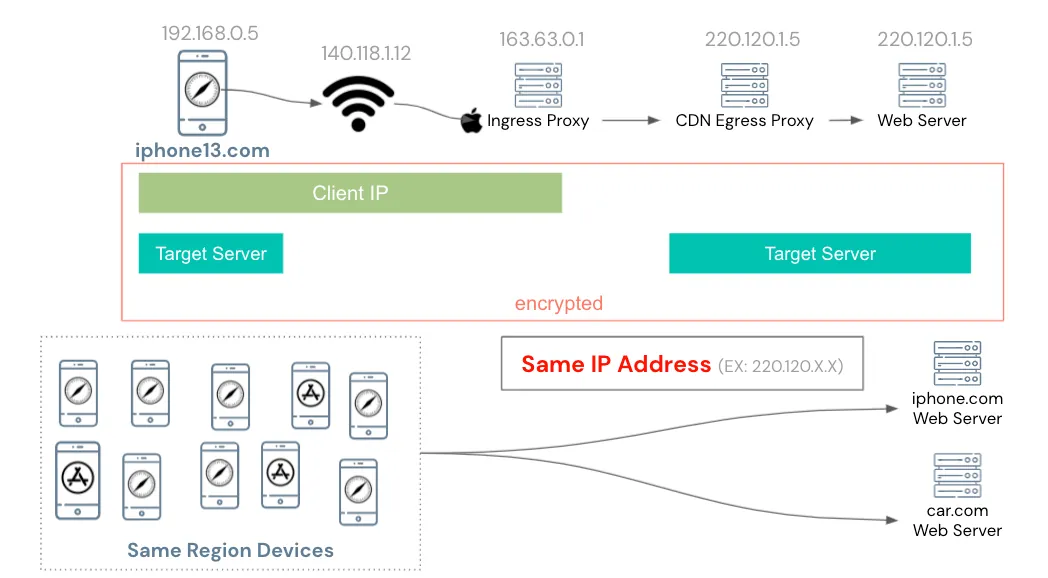
The Private Relay service first sends the user’s original request randomly to Apple’s Ingress Proxy, then Apple randomly assigns it to a partner CDN’s Egress Proxy, which finally requests the target website.
The entire process is encrypted and can only be decrypted by your iPhone’s chip. Only you know both the IP and the target website of the request. Apple’s Ingress Proxy only knows your IP, the CDN’s Egress Proxy only knows the IP of Apple’s Ingress Proxy and the target website, and the website only knows the IP of the CDN’s Egress Proxy.
From an application perspective, all devices in the same region use the same shared CDN Egress Proxy IP to request the target website; therefore, the website can no longer use IP as fingerprint information.
Technical details can be found in “WWDC 2021 — Get ready for iCloud Private Relay”.
Supplement on Private Relay:
-
Apple/CDN providers do not have complete logs for tracing:
I checked how Apple prevents misuse in malicious scenarios but found no clear answer; it might be similar to how Apple refuses to unlock criminals’ iPhones for the FBI. Privacy is a fundamental human right for everyone. -
Enabled by default, no special connection needed
-
No impact on speed or performance
-
IP will be guaranteed within the same country and time zone (users can choose to blur the city), but cannot specify the exact IP
-
Effective Only for Some Traffic
iCloud+ users: All traffic on Safari + Insecure HTTP Requests within apps
Regular users: Only effective for third-party trackers installed on websites in Safari -
The official CDN Egress IP List is provided for website developers to identify (do not mistakenly block Egress IPs, as it may cause widespread issues).
-
Network administrators can ban DNS to disable Private Relay for all users
-
iPhone Can Disable Private Relay for Specific Network Connections
-
Connecting to VPN/Proxy will disable Private Relay
-
Currently still in Beta (2021/10/24). After activation, some services may not connect (China region, Chinese version of TikTok) or services may frequently log out.
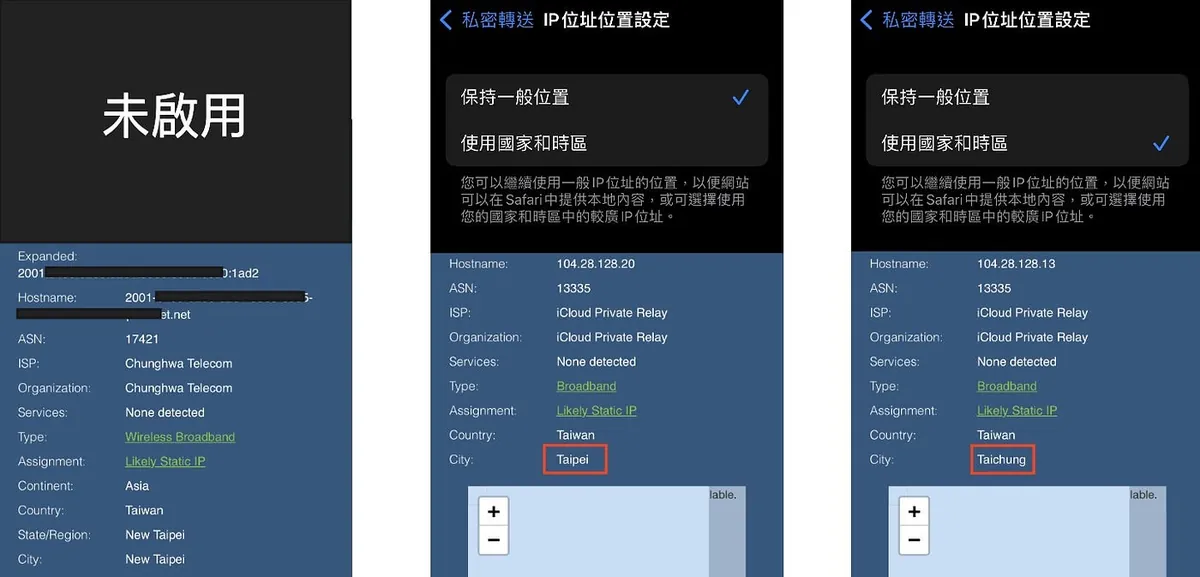
Private Relay Test Image
-
Figure 1 Disabled: Original IP Address
-
Figure 2 Enable Private Relay — Maintain General Location: IP becomes CDN IP but still in Taipei
-
Figure 3 Enabling Private Relay — Usage by Country and Time Zone (Expanded Obfuscation): IP changes to CDN IP & location changes to Taichung, but remains in the same time zone and country
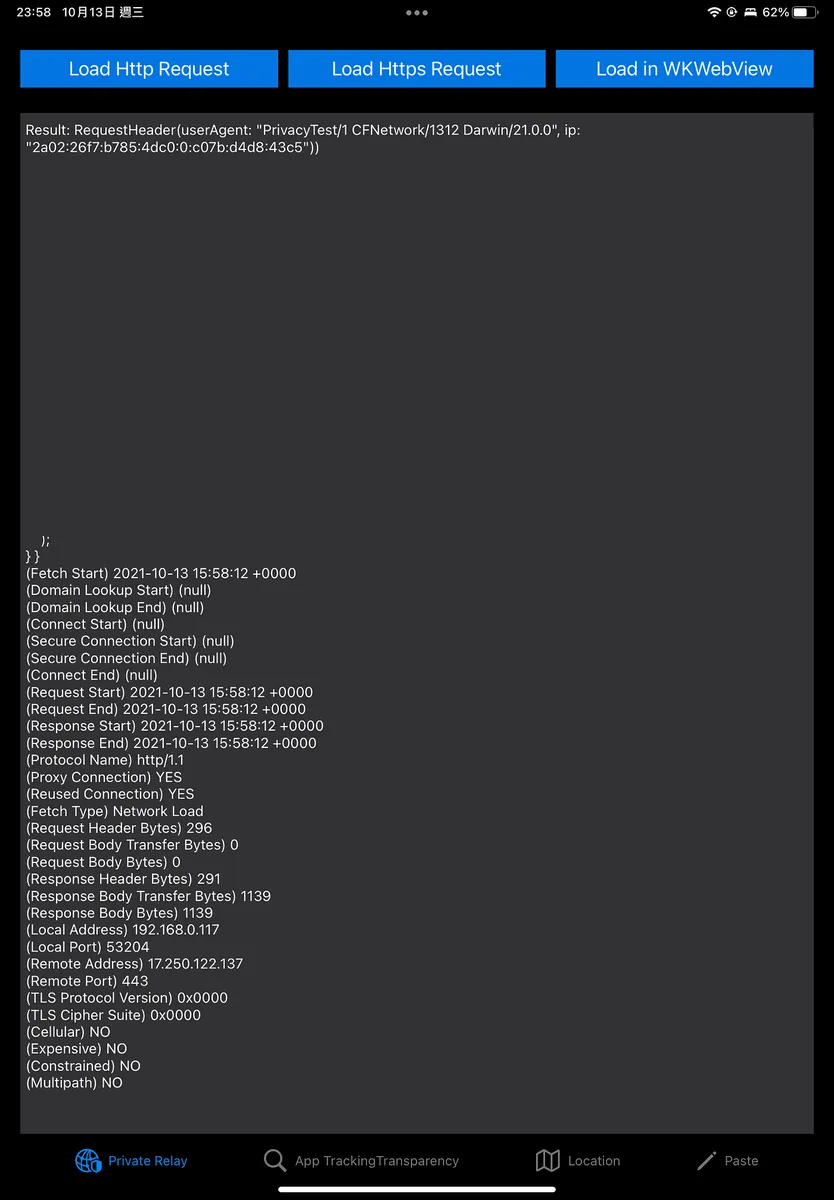
Apps can use URLSessionTaskMetrics to analyze connection records of Private Relay.
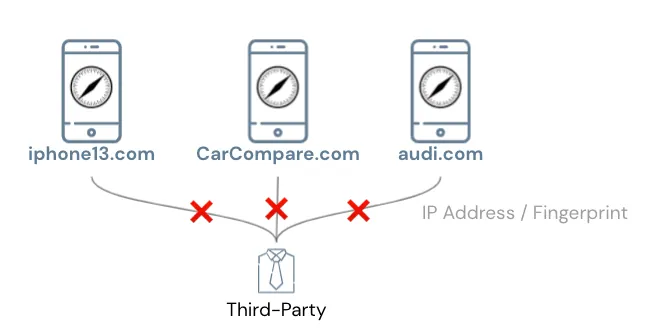
Going off-topic, therefore the method of using IP addresses to obtain fingerprints for user identification can no longer be used.
Between Apps
The first method was early access to the Device UUID:
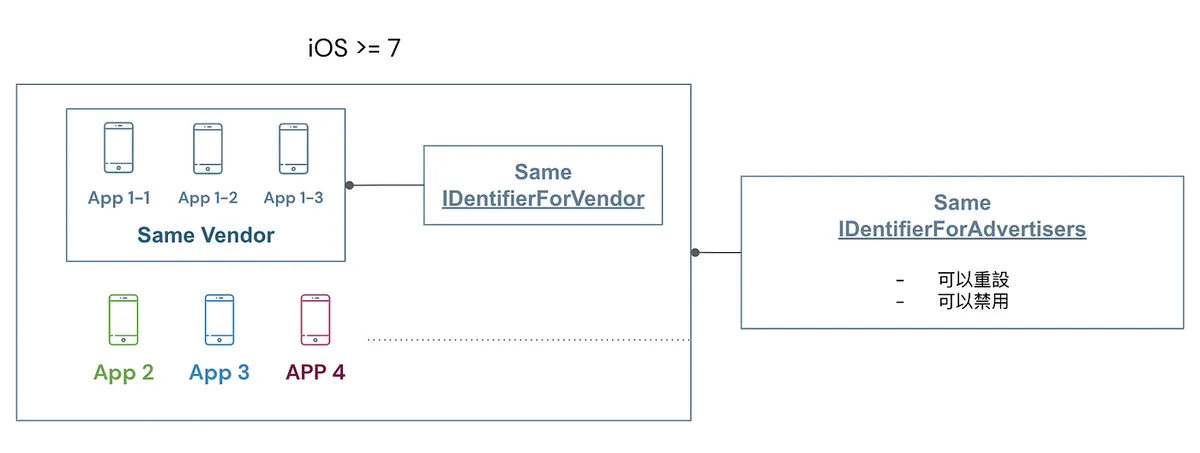
🈲, iOS >= 7 prohibits access to Device UUID,
Replacing with IDentifierForAdvertisers/IDentifierForVendor
-
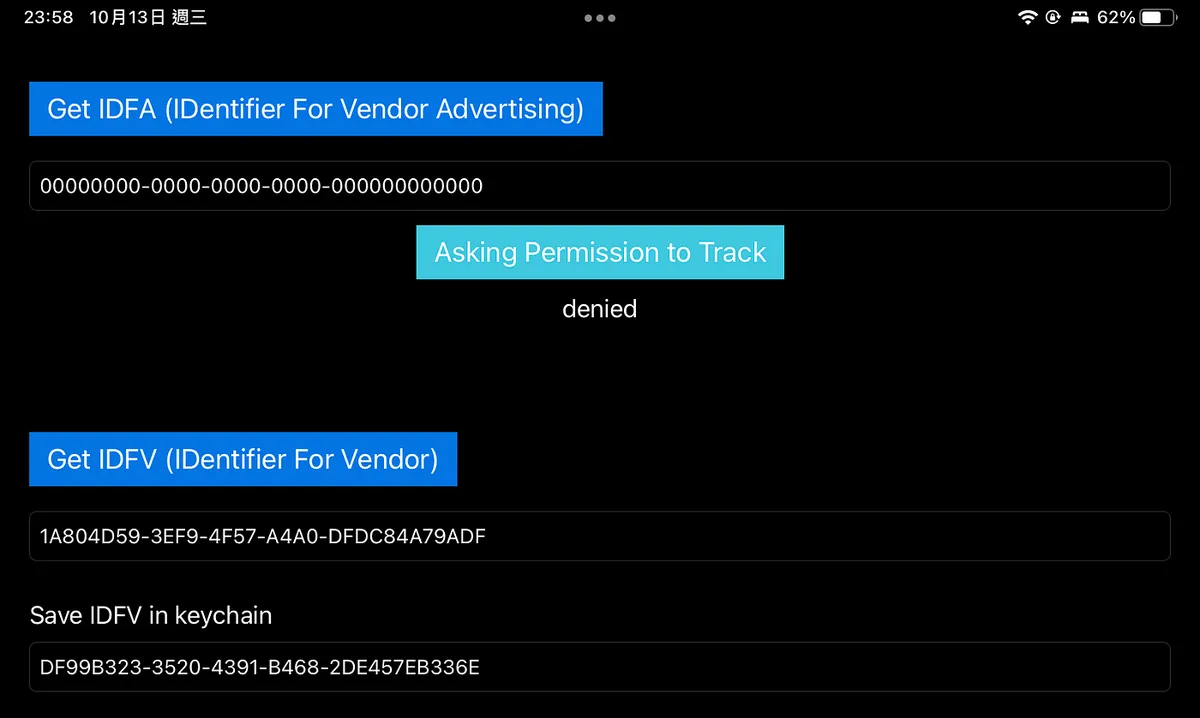
IDFV: All apps within the same developer account can access the same UUID; combined with KeyChain, it is currently the method to identify user UUID.
-
IDFA: Different developers and apps can access the same UUID, but users can reset or disable the IDFA.
🈲,iOS >= 14.5 IDentifierForAdvertisers requires user permission before use
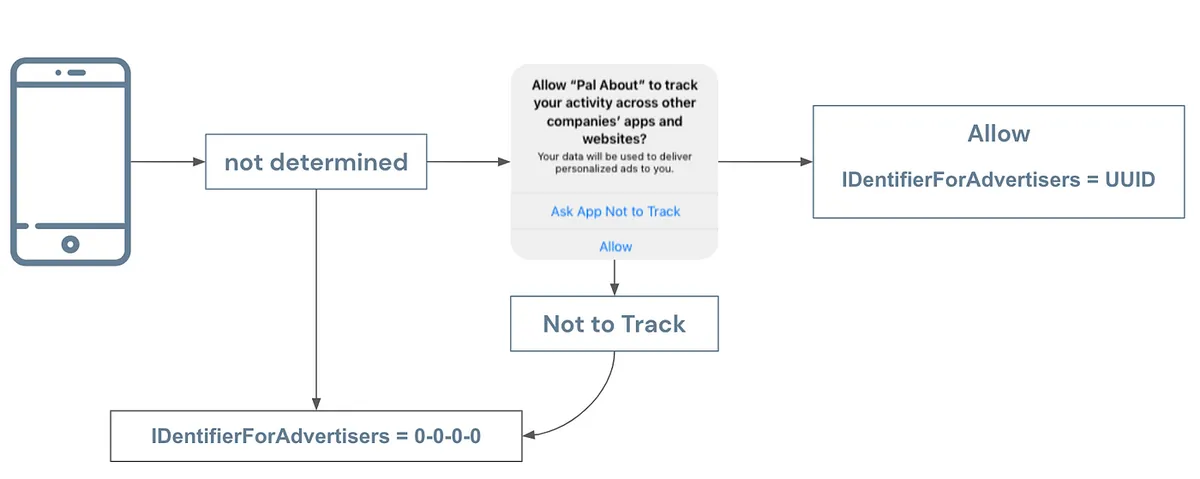
After iOS 14.5, Apple strengthened restrictions on accessing IDFA. Apps must ask users for permission before obtaining the IDFA UUID; without asking or without permission, the value cannot be accessed.
Market research firms’ preliminary data show that about 70% of users (some recent data say 90%) do not allow tracking using IDFA, which is why people say IDFA is dead!
The second method for communication between apps is URL Scheme:
iOS apps can use canOpenURL to check if a specific app is installed on the user’s device.
🈲,iOS >= 9 requires in-app settings before use; arbitrary probing is not allowed.
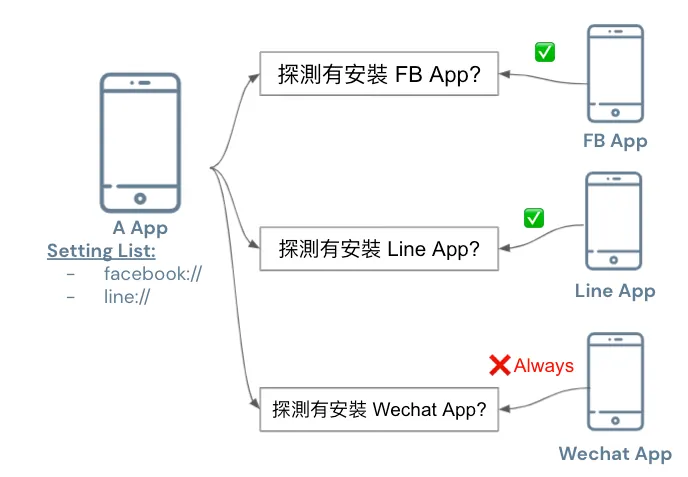
iOS ≥ 15 added a limit: you can set up to 50 schemes for other apps at most.
Apps linked on or after iOS 15 are limited to a maximum of 50 entries in the LSApplicationQueriesSchemes key.
Between Websites and Apps
As stated above
The first method also connects through Cookies:
In early iOS versions, Safari cookies and App WebView cookies could be shared, allowing data to be linked between websites and apps.
One method is to secretly embed a 1-pixel WebView element in the app’s background to read Safari cookies.
🈲, iOS >= 11 prohibits sharing cookies between Safari and App WebView

If you need to access Safari’s cookies (e.g., using website cookies for login), you can use the SFSafariViewController component; however, this component forces a prompt window and cannot be customized, ensuring users are not unknowingly having their cookies stolen.
The second method is to identify the same visitor across different websites using a fingerprint calculated from the IP Address + device information within the same site:
As mentioned earlier, iOS ≥ 15 is already obfuscated by Private Relay.
The last and only remaining method — Pasteboard:
Using the clipboard to connect cross-platform information is allowed because Apple cannot disable clipboard use across apps, but it can notify the user.
⚠️ iOS >= 14 Added Clipboard Access Warning
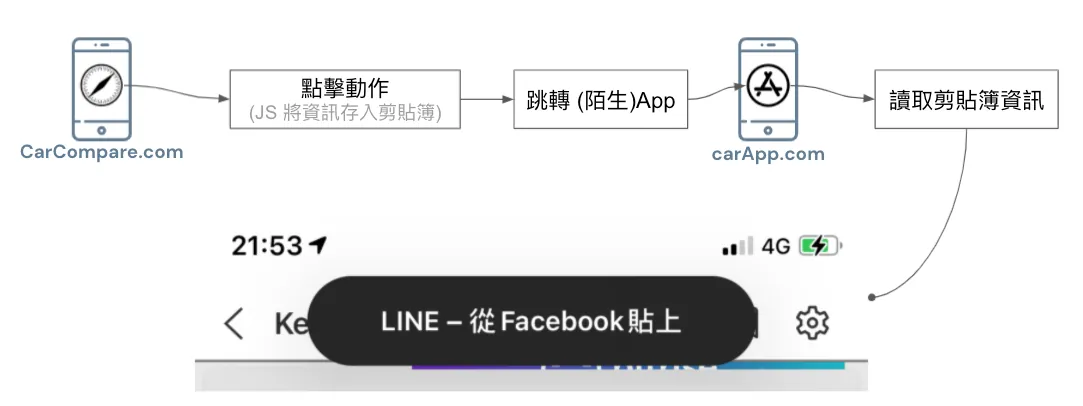
⚠️ 2022/07/22 Update: iOS 16 Upcoming Changes
Starting from iOS 16, if an app actively reads the clipboard without the user initiating a paste action, a prompt will appear. The user must tap Allow for the app to access the clipboard content.
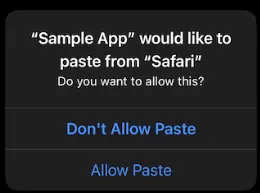
UIPasteBoard’s privacy change in iOS 16
Implementing Deferred Deep Link Using Pasteboard
Here, I want to highlight the iOS 14 clipboard privacy panic. For more details, please refer to my previous article “iOS 14 Clipboard Privacy Panic: The Dilemma Between Privacy and Convenience”
Although reading the clipboard could be for data theft, more often it is because our app needs to provide a better user experience:
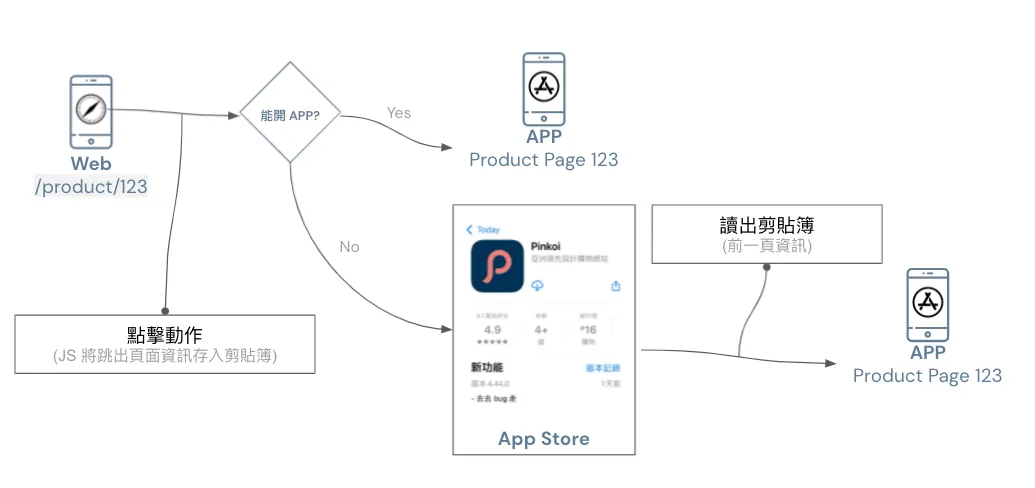
Before implementing Deferred Deep Link, when guiding users to install an app from a website, opening the app after installation would default to the homepage; a better user experience should open the app to the corresponding page related to where the user left off on the website.
To achieve this function, data exchange between the website and the app is necessary. As other methods mentioned earlier have been blocked, currently the clipboard is the only available medium for storing information (as shown above).
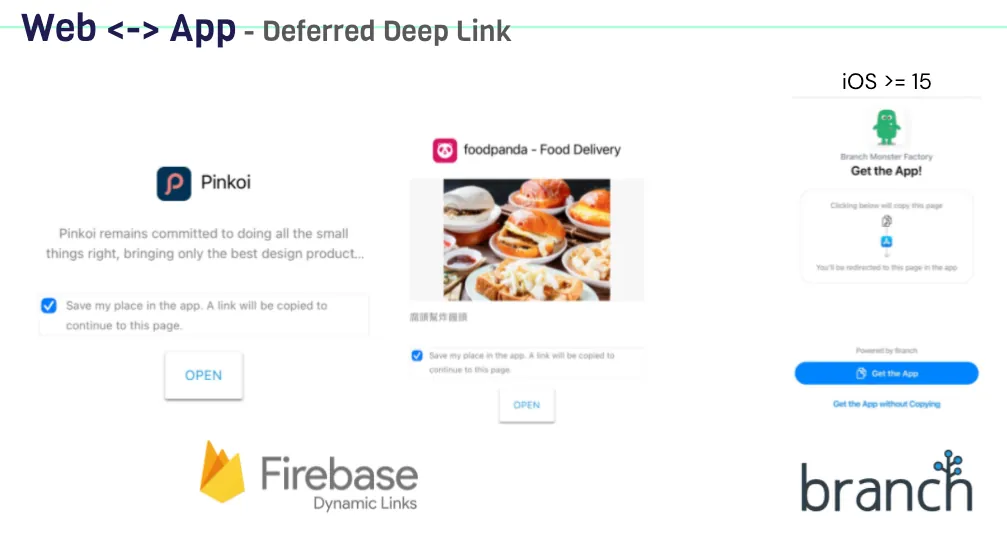
Both Firebase Dynamic Links and the latest version of Branch.io (previously using IP Address Fingerprint) now use the clipboard for Deferred Deep Link.
For implementation, you can refer to my previous article: iOS Deferred Deep Link 延遲深度連結實作(Swift)
Generally, to implement Deferred Deep Link, the clipboard information is only read the first time the app is opened or when returning to the app, not during use or at unusual times. This is an important point to note.
A better approach is to first use UIPasteboard.general.detectPatterns to detect if the clipboard data is what we need before reading it.

Starting from iOS 15, the clipboard prompt has been optimized so that if the paste action is performed by the user themselves, the prompt will no longer appear!
Advertising Effectiveness Solutions
As mentioned in the previous text about Apple’s privacy principles, the goal is balance, not completely blocking users from services.
Website and Website Advertising Performance Statistics:
The feature on Safari corresponding to blocking Intelligent Tracking Prevention is Private Click Measurement ( WebKit ), used to measure ad performance without compromising personal privacy.
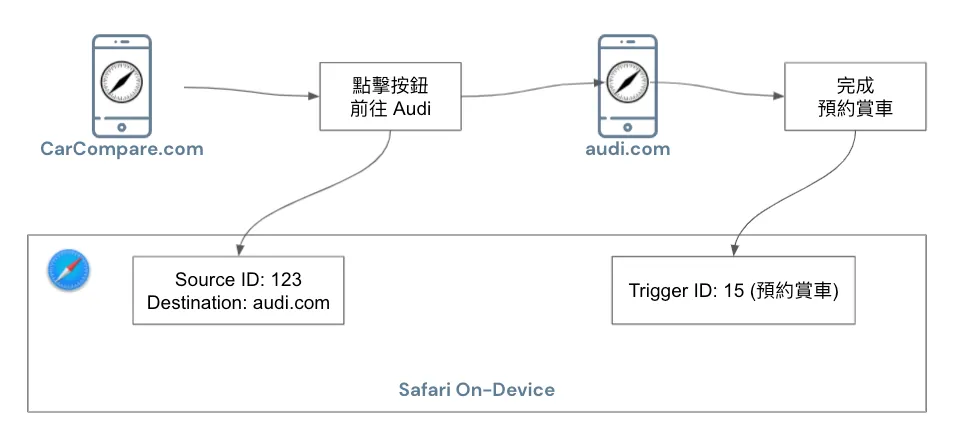
The specific process is shown in the above diagram. When a user clicks an ad on website A to go to website B, the browser records a Source ID (identifying the same user) and Destination information (target website). When the user completes a conversion on website B, a Trigger ID (representing the action) is also recorded in the browser.
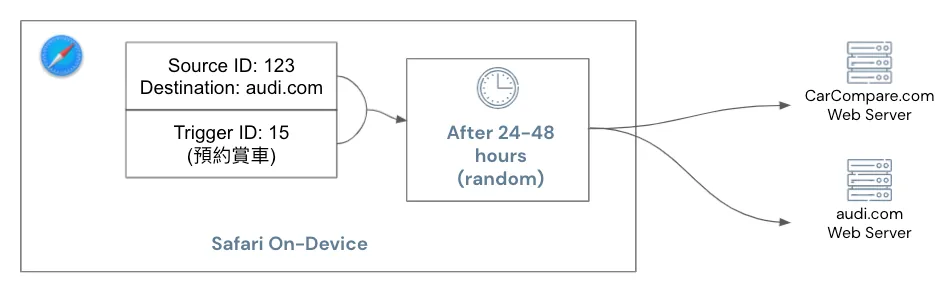
These two pieces of information will be combined and sent to websites A and B after a random 24 to 48 hours to obtain ad performance results.
Everything is handled on-device by Safari itself, and protection against malicious clicks is also provided by Safari.
Ad Performance Measurement Between Apps and Websites or Apps:
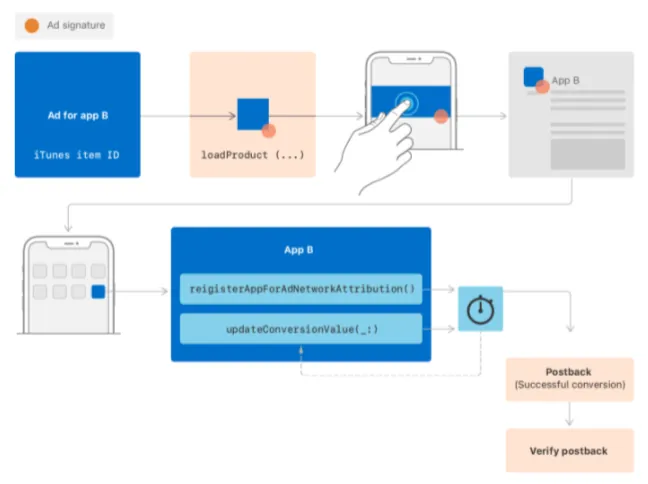
You can use SKAdNetwork (requires Apple approval to join), similar to Private Click Measurement, no further explanation provided.
It can be added that Apple is not working in isolation; SKAdNetwork is now at version 2.0, and Apple continues to gather developers’ and advertisers’ feedback to balance personal privacy controls while continuously improving the SDK features.
Here, I sincerely hope Deferred Deep Link can be integrated via SDK, as our goal is to enhance user experience without intending to invade personal privacy.
Technical details can be found in “WWDC 2021 — Meet privacy-preserving ad attribution”.
Cross-Platform

All apps supporting third-party login on iOS ≥ 13 must implement Sign in with Apple, or they cannot be successfully published on the App Store
-
Name can be edited freely
-
Can hide real Email (use Apple-generated virtual Email as a substitute)
-
Users can request account deletion Apps must implement by 2022/01/31 🆕

iOS >= 15 iCloud+ users support Hide My Email
-
Support all email fields in Safari and Apps
-
Users can freely generate virtual email addresses in the settings.
Like Sign in with Apple, Apple-generated virtual emails replace your real email address. When a message is received, Apple forwards it to your real inbox, protecting your email information.
Similar to a 10-minute email but more powerful; as long as you keep using it, that virtual email address is yours permanently. There is no limit on adding new addresses—you can create unlimited ones. It’s unclear how Apple prevents abuse.
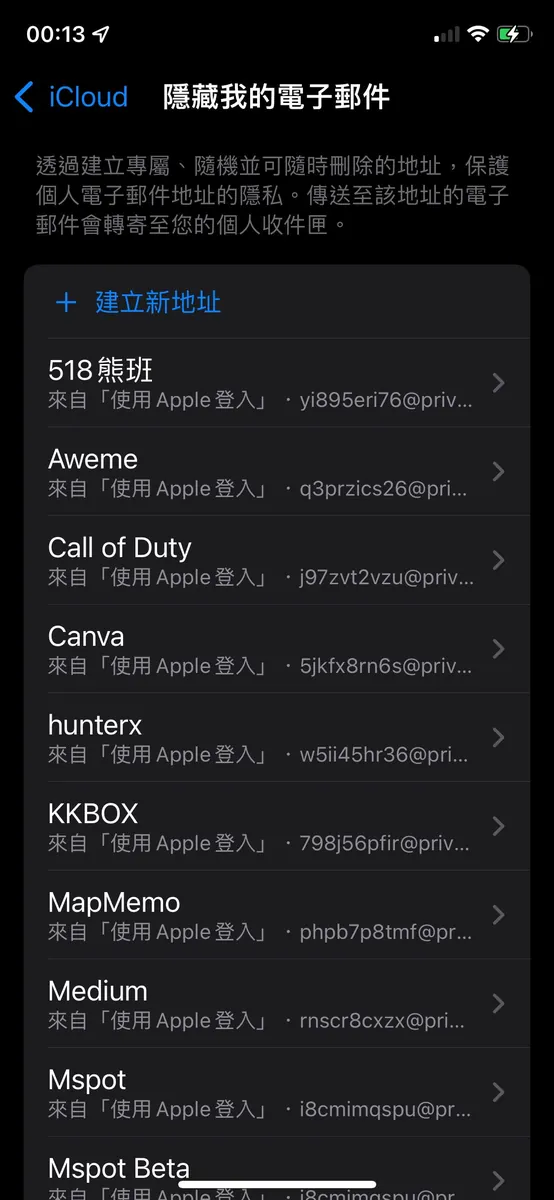
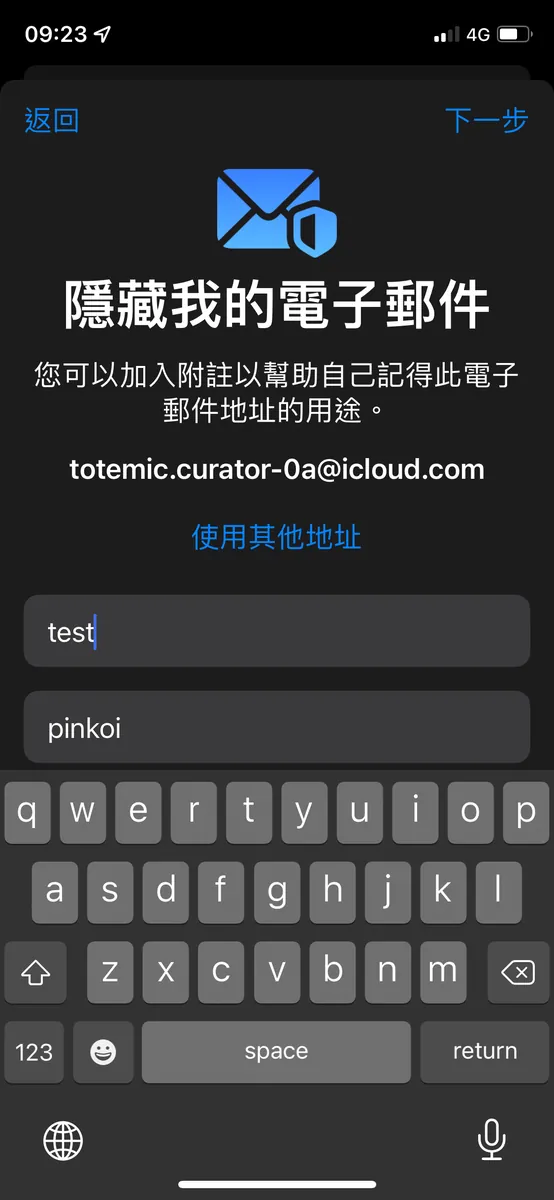
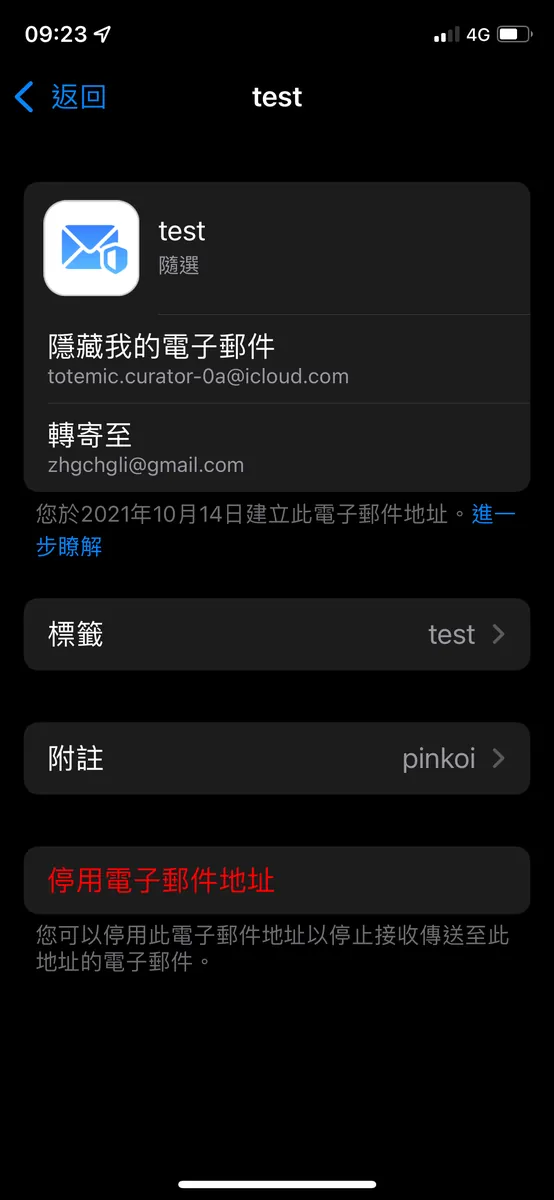
Settings -> Apple ID -> Hide My Email
Others
App privacy details on the App Store:
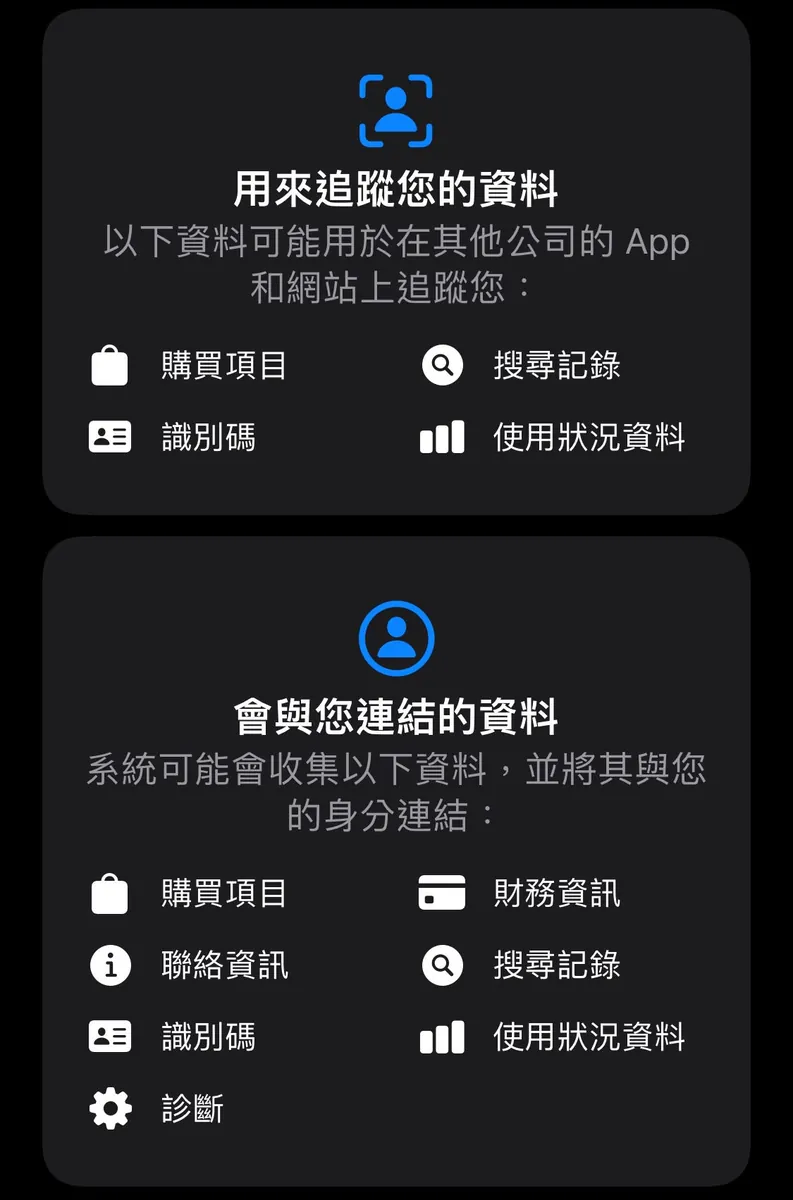
Apps must disclose on the App Store which data will be tracked and how it is used _.*
For detailed information, please refer to: “App privacy details on the App Store”.
Fine-Grained Control of Personal Privacy Data:
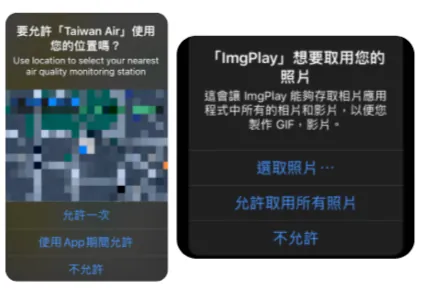
iOS ≥ 14 introduced more precise controls for location and photo access, letting users grant permission for specific photos only or allow location access only when the app is in use.
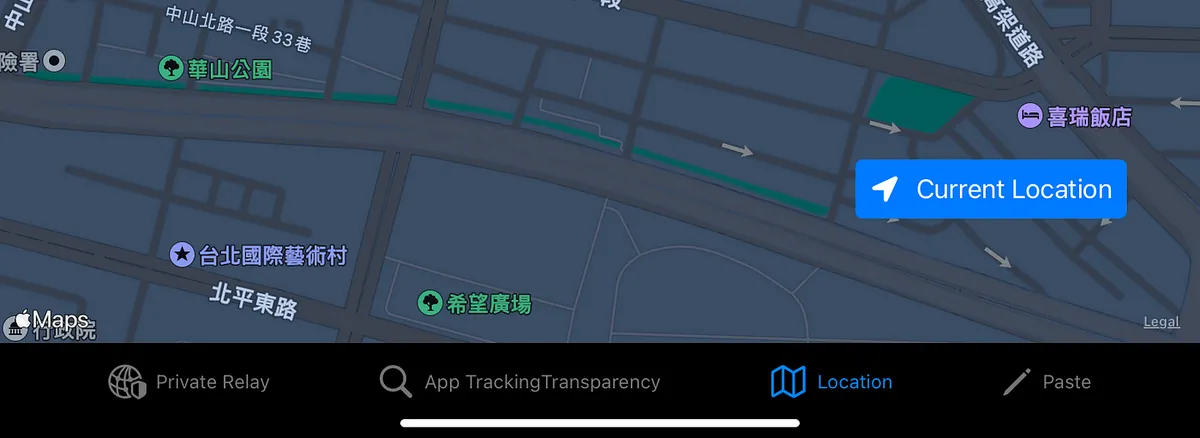
iOS ≥ 15 adds the CLLocationButton to improve user experience. It enables getting the current location via user tap without prior consent or prompt. This button is not customizable and can only be triggered by user interaction.
Personal Privacy Access Notice:
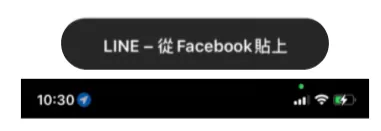
iOS ≥ 15, added access prompts for personal privacy features, such as clipboard, location, camera, and microphone
App Privacy Report:
iOS ≥ 15 allows exporting a report of all apps’ privacy-related feature usage and network activity records from the past 7 days.
-
Since the report file is a
.ndjsonplain text file and not easy to read directly, you can first download the “App Privacy Insights” app from the App Store to view the report. -
Go to Settings -> Privacy -> Scroll to the bottom to “Record App Activity” -> Enable Record App Activity
-
Saving App Activity
-
Select “Import to Privacy Insights”
-
After importing, you can view the privacy report immediately
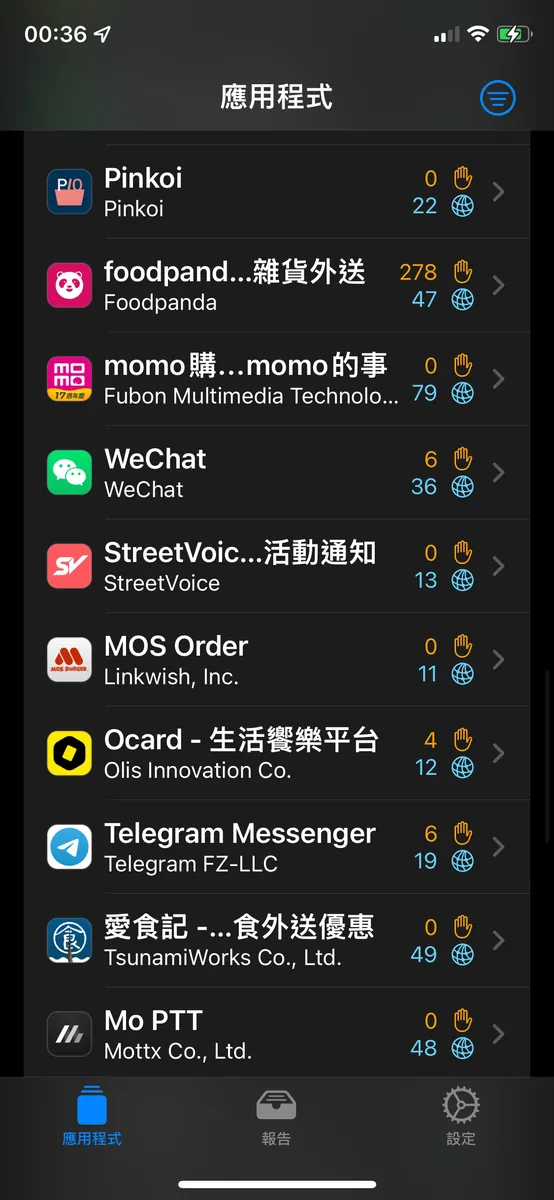
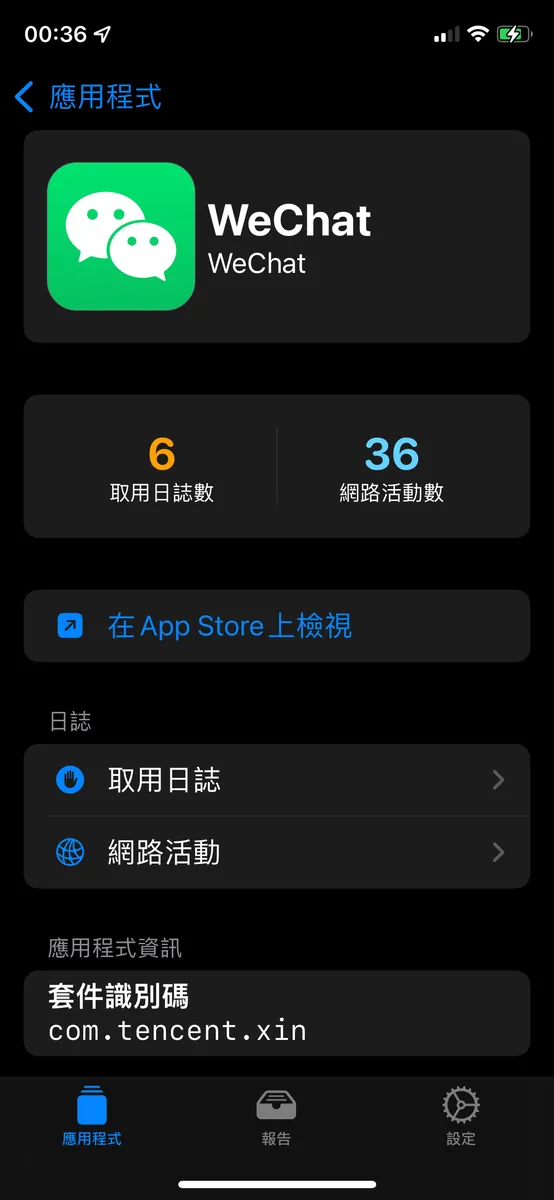
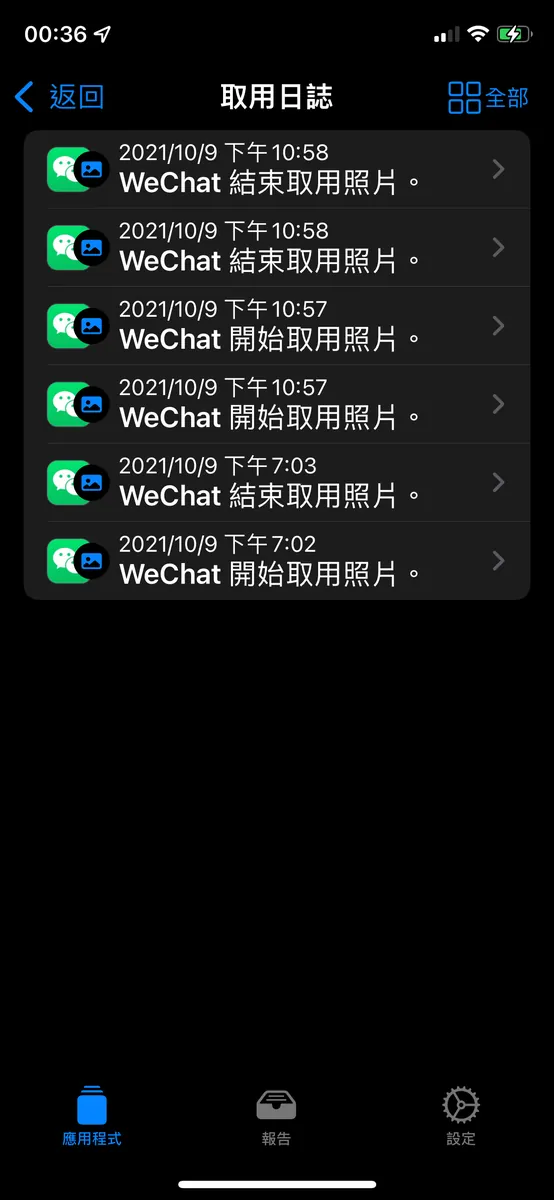
As mentioned in the news, Wechat does secretly read photo information in the background when the app is relaunched.
Additionally, I found several Chinese apps misbehaving, so I disabled all their permissions in the settings.
If it weren’t for this feature exposing them, we wouldn’t know how long our data had been stolen!
Recap
Apple’s privacy principles
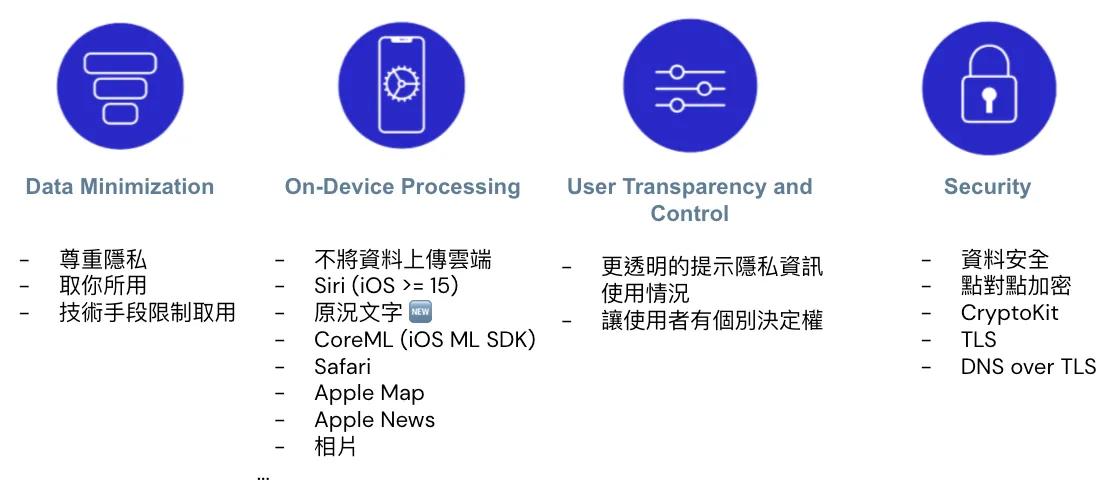
After understanding the annual adjustments to privacy features, let’s review Apple’s privacy principles:
-
Data Minimization: Apple employs technical methods to restrict access to only the necessary data.
-
On-Device Processing: Private data is not uploaded to the cloud; all processing happens locally. Examples include Safari Private Click Measurement, Apple’s machine learning SDK CoreML running locally, Siri/Live Text in Camera on iOS ≥ 15, Apple Maps, News, photo recognition features, and more.
-
User Transparency and Control: New Privacy Access Prompts, Activity Reports, and Granular Privacy Controls.
-
Security: Secure data storage and transmission, preventing misuse of UserDefault. iOS 15 supports point-to-point encryption and decryption with CryptoKit, and transmission security with Private Relay.
Fragmented Data
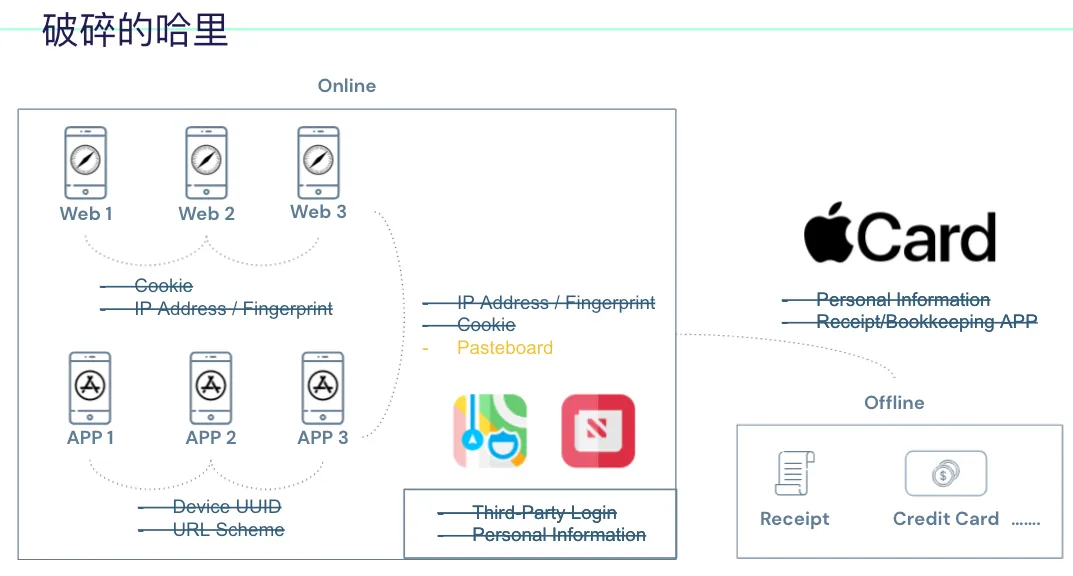
Returning to the initial technical method of piecing together Harry’s connection graph, websites and apps are blocked from linking, leaving only clipboard use available, but with prompts.
Personal data for service registration and third-party login can be protected by using Sign in with Apple and Hide My Email features; alternatively, use more native iOS apps.
Could offline events possibly modify Apple Card to prevent privacy leaks?
No one has a chance to piece together Harry’s activity profile anymore.
Apple Puts People First

Therefore, “people-centered” is the philosophy I associate with Apple. It takes strong conviction to go against the commercial market. Related to this, “technology-centered” is the term I associate with Google, as Google always creates many geeky tech projects. Lastly, “business-centered” is what I associate with Facebook, because FB pursues commercial gains on many levels.
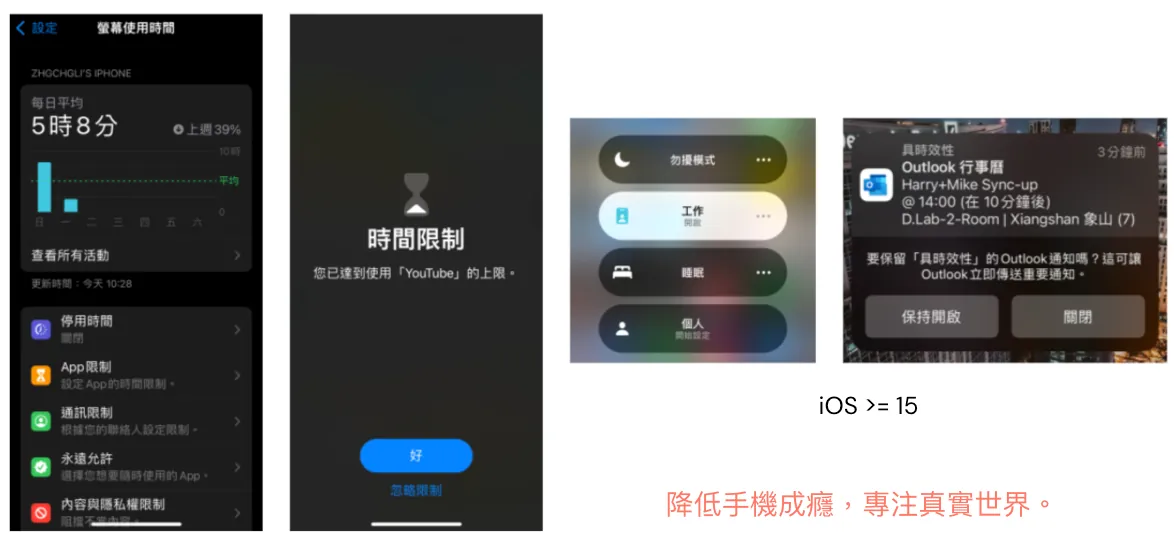
Besides adjustments to privacy features, iOS has also continuously enhanced tools to prevent phone addiction in recent years, introducing features like “Screen Time Report,” “App Usage Limits,” and “Focus Mode” to help users break free from phone addiction.
Finally, I hope everyone can
-
Respecting Personal Privacy
-
Not Controlled by Capital
-
Reducing Virtual Addiction
-
Preventing Social Decline
Live a Wonderful Life in the Real World!



Comments