
iOS 14 Clipboard Privacy Panic: The Dilemma Between Privacy and Convenience
Why Do So Many iOS Apps Read Your Clipboard?

Photo by Clint Patterson
⚠️ 2022/07/22 Update: iOS 16 Upcoming Changes
Starting from iOS 16, if an app actively reads the clipboard without the user performing a paste action, a prompt will appear. The user must allow it for the app to access the clipboard content.
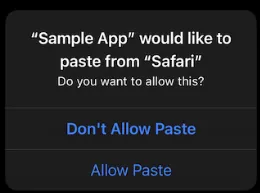
UIPasteBoard’s privacy change in iOS 16
Issue
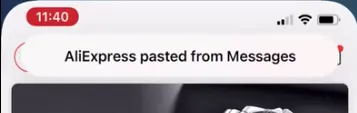
Top banner notification when the clipboard is accessed by an APP
Starting with iOS 14, users are notified when an app reads their clipboard. Apps from mainland China already had a bad reputation, and media coverage has amplified privacy concerns. However, it’s not just Chinese apps—American, Taiwanese, Japanese, and many other apps worldwide have been caught as well. So why do so many apps need to read the clipboard?
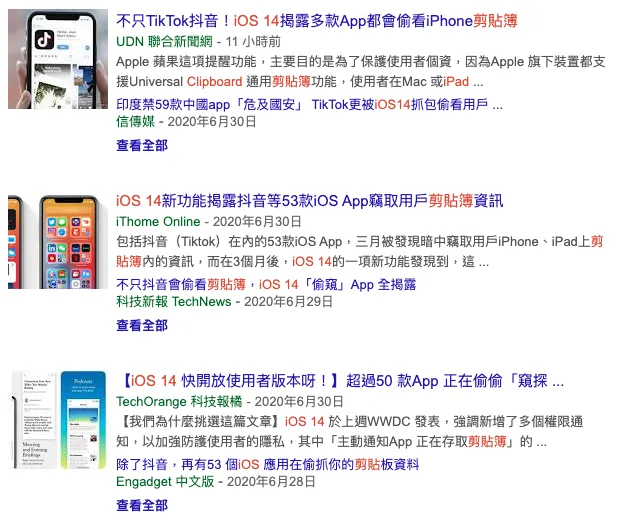
Google Search
Security
The clipboard may contain personal privacy data or even passwords, such as when copying passwords using 1Password, LastPass, or other password managers. If an app can read the clipboard, it can also send the data back to its server. It all depends on the developer’s integrity. If you want to check, you can use man-in-the-middle sniffing to monitor whether the app sends clipboard information back to the server.
Background
Clipboard API has been available since iOS 3 in 2009. The only change is that starting from iOS 14, users receive additional prompts notifying them. Over the past decade, if an app were malicious, it would have already collected enough data.
Why
Why do so many apps, both domestic and international, read the clipboard when opened?
Here, I need to clarify that the situation I refer to is “when the APP is launched”, not when the APP reads the clipboard during use; reading the clipboard during use is more related to in-app features, such as Google Maps automatically pasting a recently copied address, though it does not rule out some APPs continuously stealing clipboard information.
“A kitchen knife can be used to cut vegetables or to harm someone; it depends on how the user chooses to use it.”
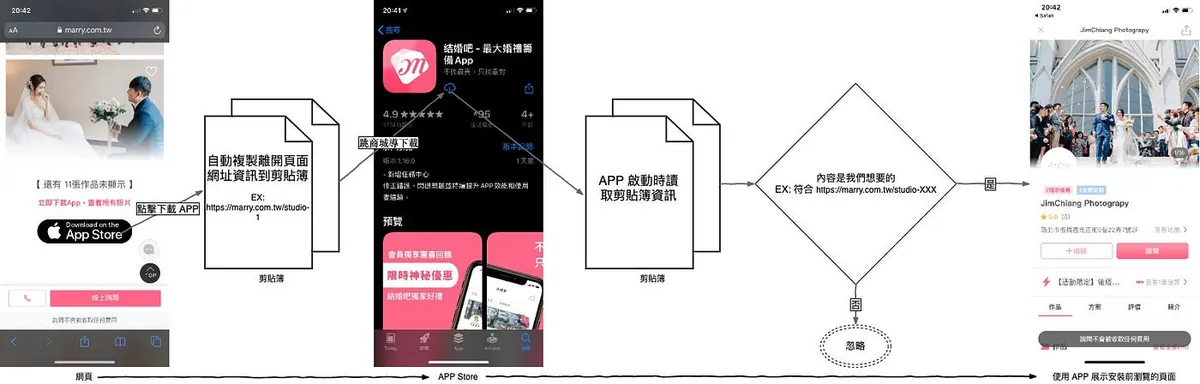
The main reason apps read the clipboard on launch is to implement iOS Deferred Deep Link to enhance user experience. As shown in the process above, when a product offers both a website and an app, we prefer users to install the app (due to higher engagement). So when users browse the web version, they are guided to download the app, and we want the app to automatically open the page they left off on after installation.
EX: When I browse the PxHome mobile website on Safari -> see a product I like and want to buy -> PxHome wants to drive traffic to the APP -> download the APP -> open the APP -> display the product I just saw on the website
If this is not done, users can only 1. go back to the webpage and click again, or 2. search for the product again within the app; both options increase the difficulty and hesitation time for users to make a purchase, which may lead to them not buying at all!
On the other hand, from an operational perspective, knowing which source led to a successful installation greatly helps with marketing and advertising budget allocation.
Why must the clipboard be used? Are there alternative methods?
This is a cat-and-mouse game because Apple iOS itself does not want developers to track user sources. Before iOS 9, the method was to store information in web cookies, then read the cookies after the app was installed. After iOS 10, Apple blocked this method; with no other options left, everyone resorted to the final tactic — “using the clipboard to pass information.” iOS 14 then introduced a new move, alerting users and putting developers in an awkward position.
Another approach is to use Branch.io to record user profiles (IP, device info) and then match the data. This method is feasible in principle but requires significant manpower (involving backend, database, and app) to research and implement, and it may result in misjudgments or collisions.
Android Google on the other side has always supported this feature, no need to go through so many hoops like iOS.
Affected APPs
Many app developers may not realize they also have clipboard privacy issues because Google’s Firebase Dynamic Links service uses the same principle:
// This string ensures that only FDL links copied to the clipboard by the AppPreview Page
// JavaScript code are recognized and used in the copy-unique-match process. If the user
// copies an FDL link manually, it should not be used in the copy-unique-match process.
// This constant must be kept in sync with the constant in the server version at
// durabledeeplink/click/ios/click_page.js
So any APP using Google Firebase Dynamic Links service may trigger the clipboard privacy issue!
Personal Viewpoint
There are security concerns, but it comes down to trust—trusting that developers use the data for the right reasons. If developers intend to do harm, there are many more effective ways to do so, such as stealing credit card information or logging real passwords, which are far more impactful than this.
The purpose of the prompt is to alert users when the clipboard is accessed, so if the timing seems unusual, they should be cautious!
Reader Questions
Q: Is the statement “TikTok accesses the clipboard to detect spam behavior” correct?
A: I personally think it’s just an excuse to deflect public opinion. TikTok probably means “to prevent users from copying and pasting ads everywhere.” But in reality, blocking or filtering can be done when the message is completed or sent. There’s no need to constantly monitor the user’s clipboard! Should the clipboard be controlled just because it has ads or “sensitive” content? I haven’t even pasted or posted anything.
What Developers Can Do
If you don’t have a spare device to upgrade to iOS 14 for testing, you can first try using the simulator by downloading XCode 12 from Apple.
Everything is still very new. If you are integrating Firebase, you can first refer to Firebase-iOS-SDK/Issue #5893 and update to the latest SDK.
If you implement DeepLink yourself, you can refer to the Firebase-iOS-SDK #PR 5905 changes:
Swift:
if #available(iOS 10.0, *) {
  if (UIPasteboard.general.hasURLs) {
      //UIPasteboard.general.string
  }
} else {
  //UIPasteboard.general.string
}
Objective-C:
if (@available(iOS 10.0, *)) {
    if ([[UIPasteboard generalPasteboard] hasURLs]) {
      //[UIPasteboard generalPasteboard].string;
    }
  } else {
    //[UIPasteboard generalPasteboard].string;
  }
  return pasteboardContents;
}
First check if the clipboard content is a URL (matching the copied content from the webpage JavaScript with URL parameters) before reading it. This way, the clipboard won’t be read every time the app opens.
This is the only option for now; the prompt will still appear, but it will be more focused.
Apple has also introduced a new API: DetectPattern, which helps developers more accurately identify if the clipboard content is what they need before reading and prompting. This allows users to feel more secure while developers can continue using this feature.
DetectPattern is still in Beta and can only be implemented using Objective-C.
Or…
-
Switch to Branch.io instead
-
Implement the Principle of Branch.io by Yourself
-
APP shows a custom alert to inform the user before reading the clipboard (to reassure the user)
-
Add New Privacy Policy
-
iOS 14 Latest App Clips? Webpage -> Launch Lightweight App Clips -> Deep Operation Leads to APP



Comments