
iOS UUID Matters (Swift/iOS ≥ 6)
iPlayground 2018 Recap & The Story of UUID
Preface:
Last Saturday and Sunday, I attended the iPlayground Apple software developer conference. A colleague passed the event information to me, and I wasn’t familiar with it before going.
Over the two days, the entire event and schedule flowed smoothly. The agenda included:
-
Fun topics: Bicycles, Decaying Code, iOS/API Evolution, Where’s Wally (CoreML Vision)
-
Practical: Testing classes (XCUITest, dependency injection), alternatives to SpriteKit for animation effects, GraphQL
-
Real Skills: In-Depth Analysis of Swift, iOS Jailbreak/Tweak Development, Redux
The bicycle project was impressive. It used an iPhone as a sensor to detect pedal rotations, allowing the user to switch slides by riding the bike on stage. (The senior developer’s main goal was to create an open-source version of Zwift and shared many pitfalls, such as client/server communication, latency issues, and magnetic interference.)
Withering Dirty Code; it resonates deeply and brings a knowing smile inside. Technical debt accumulates this way—rushed development leads to quick but poorly structured solutions, and successors lack time to refactor, so the debt keeps growing. In the end, the only option might be to start over from scratch.
Test Classes (Design Patterns in XCUITest) KKBOX Seniors openly shared their methods, code examples, encountered issues, and solutions without holding back. This session was one of the most helpful for our work. Testing is an area I’ve always wanted to improve, so I plan to study it thoroughly.
I really wanted to go up and share during the Lighting Talk session while listening from the audience 😂 Next time, I’ll prepare earlier!
The official party after the event had generous drinks, food, and venue. Listening to the seniors’ honest stories was not only relaxing and fun but also helped me gain a lot of workplace soft skills.

NTU Backend Cafe
I just found out this is the first edition. I’m truly honored to participate. Thanks to all the staff and speakers for their hard work!
The purpose of attending a seminar is basically to: broaden your horizons by absorbing new knowledge, understanding the ecosystem, and encountering topics you don’t usually deal with; and deepen your understanding by reviewing familiar topics to see if you missed anything or if there are alternative approaches you haven’t discovered.
I took many notes to review and study at my own pace later.
About UUID
Because I immediately applied what I learned to my app after the session; this class was taught by senior developer Zonble, and I was amazed hearing about development from iPhone OS 2 up to iOS 12. Since I started late in the industry, I began coding from iOS 11/Swift 4, so I never experienced the chaotic period caused by Apple’s API changes.
It makes sense that UUID access was eventually restricted; when used properly, it helps identify user devices, supports advertising, or allows third parties to use uniqueness for ad targeting. However, if a company has malicious intent, they could reverse-engineer this mechanism to learn about the phone owner. For example, having travel apps + Taipei bus apps + BMW app + baby care apps could suggest that you often travel abroad, have children, and live in Taipei. Combined with personal data you enter in apps, the potential misuse is unimaginable.
However, this also affected many legitimate users. For example, those who originally used UUID as the user’s data decryption key or for device identification were greatly impacted. I really admire the engineers from that time—they had to come up with alternative solutions quickly while dealing with complaints from both bosses and users.
Alternative Solutions:
This article focuses on obtaining a UUID to uniquely identify a device. If you are looking for alternatives to know which apps a user has installed, you can refer to the following keywords for search methods: UIPasteboard pasteboardWithName: create: (using clipboard to share between apps), canOpenURL: info.plist LSApplicationQueriesSchemes (using canOpenURL to check if an app is installed, must be listed in info.plist, up to 50 entries).
-
Using MAC Address as UUID, but Later It Was Also Banned
-
Finger Printing (Canvas/User-Agent…): Not researched, but this is mainly used to generate the same UUID for Safari and apps, used in Deferred Deep Linking
AmIUnique? -
ID entifier F or V endor (IDFV): The current mainstream solution 🏆
The concept is that Apple generates a UUID for the user based on your Bundle ID prefix. The same Bundle ID prefix will generate the same UUID. For example: com.518.work/com.518.job on the same device will get the same UUID.
As the original term “ID For Vendor” implies, Apple considers apps with the same prefix as from the same vendor, so sharing the UUID is allowed.
ID entifier F or V endor (IDFV):
let DEVICE_UUID:String = UIDevice.current.identifierForVendor?.uuidString ?? UUID().uuidString
Note: When all apps from the same vendor are deleted and then reinstalled, a new UUID will be generated ( if both com.518.work and com.518.job are deleted, then reinstalling com.518.work will generate a new UUID )
Similarly, if you have only one app, deleting and reinstalling it will generate a new UUID
Because of this feature, other apps in our company use the Keychain to solve this problem. After listening to the senior speaker’s advice, we confirmed that this approach is correct!
The process is as follows:
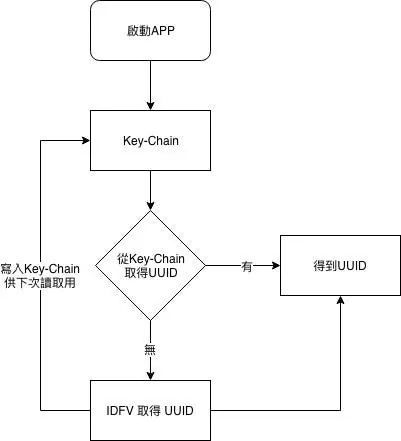
Retrieve the value from the Key-Chain UUID field if it exists; otherwise, get the IDFA UUID value and write it back.
Key-Chain write method:
if let data = DEVICE_UUID.data(using: .utf8) {
    let query = [
        kSecClass as String       : kSecClassGenericPassword as String,
        kSecAttrAccount as String : "DEVICE_UUID",
        kSecValueData as String   : data ] as [String : Any]

    SecItemDelete(query as CFDictionary) // Delete existing item if any
    SecItemAdd(query as CFDictionary, nil) // Add new item to Keychain
}
Key-Chain Reading Method:
let query = [
    kSecClass as String       : kSecClassGenericPassword,
    kSecAttrAccount as String : "DEVICE_UUID",
    kSecReturnData as String  : kCFBooleanTrue,
    kSecMatchLimit as String  : kSecMatchLimitOne ] as [String : Any]

var dataTypeRef: AnyObject? = nil
let status: OSStatus = SecItemCopyMatching(query as CFDictionary, &dataTypeRef)
if status == noErr, let dataTypeRef = dataTypeRef as? Data, let uuid = String(data: dataTypeRef, encoding: .utf8) {
   // uuid
}
If you find Keychain operations too cumbersome, you can encapsulate them yourself or use third-party libraries.
Complete CODE:
let DEVICE_UUID:String = {
    let query = [
        kSecClass as String       : kSecClassGenericPassword,
        kSecAttrAccount as String : "DEVICE_UUID",
        kSecReturnData as String  : kCFBooleanTrue,
        kSecMatchLimit as String  : kSecMatchLimitOne ] as [String : Any]

    var dataTypeRef: AnyObject? = nil
    let status: OSStatus = SecItemCopyMatching(query as CFDictionary, &dataTypeRef)
    if status == noErr,let dataTypeRef = dataTypeRef as? Data,let uuid = String(data:dataTypeRef, encoding: .utf8) {
        return uuid
    } else {
        let DEVICE_UUID:String = UIDevice.current.identifierForVendor?.uuidString ?? UUID().uuidString
        if let data = DEVICE_UUID.data(using: .utf8) {
            let query = [
                kSecClass as String       : kSecClassGenericPassword as String,
                kSecAttrAccount as String : "DEVICE_UUID",
                kSecValueData as String   : data ] as [String : Any]

            SecItemDelete(query as CFDictionary)
            SecItemAdd(query as CFDictionary, nil)
        }
        return DEVICE_UUID
    }
}()
Because I also need to reference it in other Extension Targets, I wrapped it directly as a closure parameter for use.



Comments