
The Story Behind Building a Custom HTML Parser by Hand
Development Record of ZMarkupParser HTML to NSAttributedString Rendering Engine
Tokenization of HTML Strings, Normalization Processing, Generation of Abstract Syntax Tree, Application of Visitor Pattern / Builder Pattern, and Some Miscellaneous Notes…
Continuation
Last year, I published an article titled “[TL;DR] Implementing iOS NSAttributedString HTML Render by Myself,” which briefly introduced using XMLParser to parse HTML and convert it into NSAttributedString.Key. The code structure and approach in the article were quite messy, as it was just a quick record of issues I encountered before and I didn’t spend much time researching this topic at that time.
Convert HTML String to NSAttributedString
Revisiting this topic, we need to convert the HTML string provided by the API into an NSAttributedString and apply the corresponding styles to display it in a UITextView/UILabel.
e.g. <b>Test<a>Link</a></b> should display as Test Link
-
Note 1
Using HTML as a communication and rendering medium between the app and data is not recommended. HTML specifications are too flexible, the app cannot support all HTML styles, and there is no official HTML conversion rendering engine. -
Note 2
Starting from iOS 14, you can use the native AttributedString to parse Markdown or integrate the apple/swift-markdown Swift Package to parse Markdown. -
Note 3
Due to the large scale of our projects and the long-term use of HTML as a medium, we are currently unable to fully switch to Markdown or other markup languages. -
Note 4
The HTML here is not meant to display a full web page, but to use HTML as styled Markdown for rendering string styles.
(For rendering full pages or complex HTML with images and tables, you still need to use WebView loadHTML)
It is highly recommended to use Markdown as the string rendering markup language. If your project faces the same issues as mine and you have no choice but to use HTML without an elegant tool to convert to NSAttributedString, please consider using this.
朋友們如果看過上一篇文章,可以直接跳到 ZhgChgLi / ZMarkupParser 章節。
NSAttributedString.DocumentType.html
The common approach for HTML to NSAttributedString found online is to use NSAttributedString’s built-in options to render HTML directly. An example is shown below:
let htmlString = "<b>Test<a>Link</a></b>"
let data = htmlString.data(using: String.Encoding.utf8)!
let attributedOptions:[NSAttributedString.DocumentReadingOptionKey: Any] = [
  .documentType :NSAttributedString.DocumentType.html,
  .characterEncoding: String.Encoding.utf8.rawValue
]
let attributedString = try! NSAttributedString(data: data, options: attributedOptions, documentAttributes: nil)
Problems with this approach:
-
Poor performance: This method renders styles through the WebView Core, then switches back to the Main Thread for UI display; rendering over 300 characters takes about 0.03 seconds.
-
Missing text: For example, marketing copy might use
<Congratulation!>, which will be treated as an HTML tag and removed. -
Cannot customize: For example, it is not possible to specify the exact boldness level of HTML bold tags in NSAttributedString.
-
In iOS 15, there were many crashes. Testing found that under low battery conditions, crashes occurred 100% of the time (fixed in iOS ≥ 15.2).
-
Strings that are too long will cause a crash. Testing shows that inputting a string longer than 54,600+ characters will 100% crash (EXC_BAD_ACCESS).
The most painful issue for us was still the crash problem. Before the fix from iOS 15 release to 15.2, the app was dominated by this issue. According to data, from 2022/03/11 to 2022/06/08, it caused over 2.4K crashes, affecting more than 1.4K users.
This crash issue has existed since iOS 12. iOS 15 just hit a bigger pitfall, but I guess the fix in iOS 15.2 is only a patch; Apple can’t completely eliminate it.
The second issue is performance. As a string style Markup Language, it is heavily used in UILabel/UITextView within apps. As mentioned earlier, a single label takes about 0.03 seconds, so multiplying this by multiple UILabels/UITextViews can cause noticeable lag in user interactions.
XMLParser
The second solution is introduced in the previous article, which uses XMLParser to parse into corresponding NSAttributedString keys and apply styles.
You can refer to the implementation of SwiftRichString and the previous article.
The previous article only explored using XMLParser to parse HTML and perform corresponding conversions, completing an experimental implementation. However, it was not designed as a well-structured and extensible “tool.”
Problems with this approach:
-
Error tolerance 0:
<br>/<Congratulation!>/<b>Bold<i>Bold+Italic</b>Italic</i>
These three possible HTML scenarios will cause XMLParser to throw an error and display blank when parsing. -
Using XMLParser requires the HTML string to fully comply with XML rules, and it cannot display normally with fault tolerance like browsers or NSAttributedString.DocumentType.html.
Standing on the Shoulders of Giants
Neither of the two solutions could perfectly and elegantly solve the HTML problem, so I started searching for existing solutions.
-
johnxnguyen / Down
Only supports converting input Markdown to Any (XML/NSAttributedString…), but does not support input HTML conversion. -
malcommac / SwiftRichString
The underlying parser uses XMLParser, and testing the above cases also shows the same zero fault tolerance issue. -
scinfu / SwiftSoup
Only supports HTML parsing (Selector) does not support conversion to NSAttributedString.
After searching everywhere, the results are all similar to the projects above Orz, no giant shoulders to stand on.
ZhgChgLi/ZMarkupParser
Without the shoulders of giants, I had to become the giant myself, so I developed my own HTML String to NSAttributedString tool.
Developed purely in Swift, it uses Regex to parse HTML tags and perform tokenization, analyzes and corrects tag accuracy (fixing tags without an end or misaligned tags), then converts them into an abstract syntax tree. Finally, it uses the Visitor Pattern to map HTML tags with abstract styles to produce the final NSAttributedString result—all without relying on any parser library.
Features
-
Supports HTML Render (to NSAttributedString) / Stripper (remove HTML Tags) / Selector features
-
Higher Performance Than
NSAttributedString.DocumentType.html -
Automatic Analysis and Correction of Tag Accuracy (Fixing Tags Without End Tags & Misplaced Tags)
-
Support dynamic style setting from
style="color:red…” -
Support custom style specification, such as making bold text even bolder
-
Support flexible and extensible tags or custom tags and attributes
For detailed introduction, installation, and usage, please refer to this article: 「 ZMarkupParser HTML String to NSAttributedString Tool 」
You can directly git clone the project, then open ZMarkupParser.xcworkspace, select the ZMarkupParser-Demo target, and build & run to try it out.
Technical Details
Next is the technical detail about developing this tool that this article wants to share.
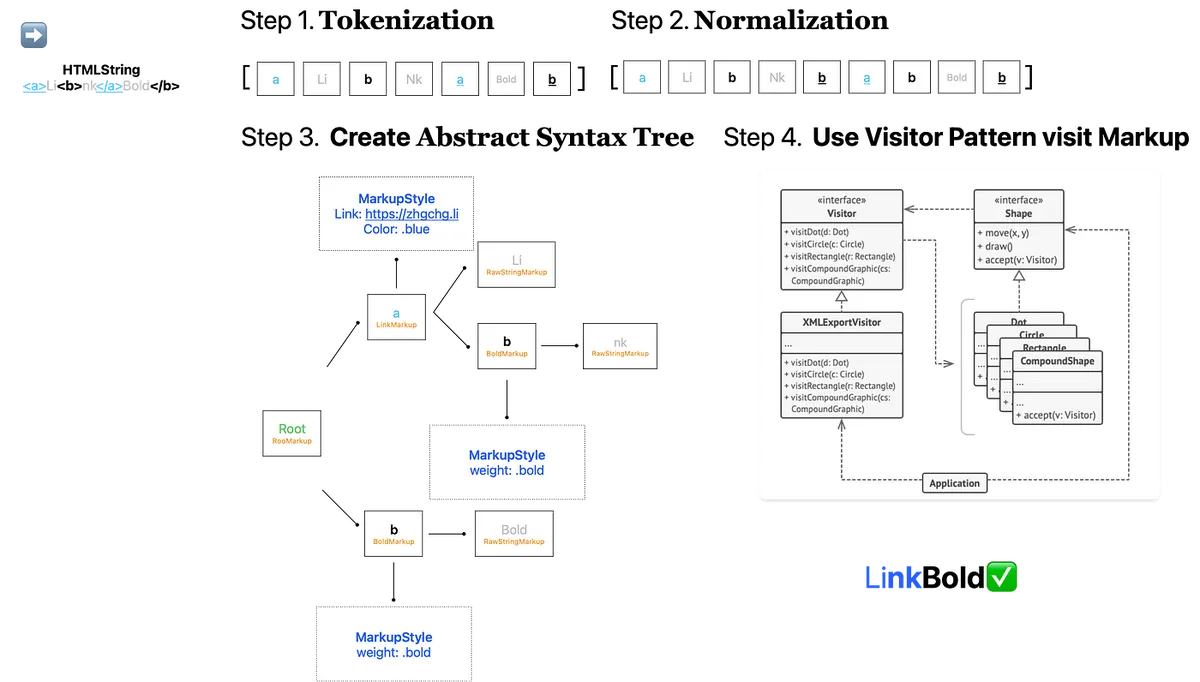
Overview of the Workflow
The above diagram shows the general workflow. The following sections will introduce each step with code examples.
⚠️️️️️️ This article simplifies the demo code, reduces abstraction and performance considerations, and focuses on explaining the working principles; for the final results, please refer to the project Source Code.
Tokenization
a.k.a parser, parsing
When it comes to HTML rendering, the most important part is parsing. In the past, HTML was parsed as XML using XMLParser; however, this approach cannot handle the fact that everyday HTML is not 100% valid XML, which causes parser errors and lacks dynamic correction.
After ruling out the use of XMLParser, the only option left for us in Swift is to use Regex for matching and parsing.
At first, I didn’t think much and planned to directly use regex to extract “paired” HTML tags, then recursively look for HTML tags layer by layer until the end; however, this approach couldn’t handle nested HTML tags or support error correction for misaligned tags. Therefore, we changed the strategy to extract “single” HTML tags, recording whether they are Start Tags, Close Tags, or Self-Closing Tags, along with other strings, to form the parsed result array.
The Tokenization structure is as follows:
enum HTMLParsedResult {
    case start(StartItem) // <a>
    case close(CloseItem) // </a>
    case selfClosing(SelfClosingItem) // <br/>
    case rawString(NSAttributedString)
}

extension HTMLParsedResult {
    class SelfClosingItem {
        let tagName: String
        let tagAttributedString: NSAttributedString
        let attributes: [String: String]?

        init(tagName: String, tagAttributedString: NSAttributedString, attributes: [String : String]?) {
            self.tagName = tagName
            self.tagAttributedString = tagAttributedString
            self.attributes = attributes
        }
    }

    class StartItem {
        let tagName: String
        let tagAttributedString: NSAttributedString
        let attributes: [String: String]?

        // Start Tag could be an invalid HTML Tag or normal text e.g. <Congratulation!>. After Normalization, if it is found to be an isolated Start Tag, it will be marked as True.
        var isIsolated: Bool = false

        init(tagName: String, tagAttributedString: NSAttributedString, attributes: [String : String]?) {
            self.tagName = tagName
            self.tagAttributedString = tagAttributedString
            self.attributes = attributes
        }

        // Used for automatic correction during later Normalization
        func convertToCloseParsedItem() -> CloseItem {
            return CloseItem(tagName: self.tagName)
        }

        // Used for automatic correction during later Normalization
        func convertToSelfClosingParsedItem() -> SelfClosingItem {
            return SelfClosingItem(tagName: self.tagName, tagAttributedString: self.tagAttributedString, attributes: self.attributes)
        }
    }

    class CloseItem {
        let tagName: String
        init(tagName: String) {
            self.tagName = tagName
        }
    }
}
The regular expressions used are as follows:
<(?:(?<closeTag>\/)?(?<tagName>[A-Za-z0-9]+)(?<tagAttributes>(?:\s*(\w+)\s*=\s*(["\\|']).*?\5)*)\s*(?<selfClosingTag>\/)?>)
-
closeTag: matches <
/a> -
tagName: Matches <
a> or </a> -
tagAttributes: match <a
href=”https://zhgchg.li” style=”color:red”> -
selfClosingTag: matches <br
/>
This regex can still be optimized, will do it later
The latter part of the article provides additional information about regular expressions for those interested.
Put together, it is:
var tokenizationResult: [HTMLParsedResult] = []

let expression = try? NSRegularExpression(pattern: pattern, options: expressionOptions)
let attributedString = NSAttributedString(string: "<a>Li<b>nk</a>Bold</b>")
let totalLength = attributedString.string.utf16.count // utf-16 supports emoji
var lastMatch: NSTextCheckingResult?

// Start Tags Stack, First In Last Out (FILO)
// Check if HTML string needs subsequent Normalization to fix misalignment or add Self-Closing Tag
var stackStartItems: [HTMLParsedResult.StartItem] = []
var needForamatter: Bool = false

expression.enumerateMatches(in: attributedString.string, range: NSMakeRange(0, totalLength)) { match, _, _ in
  if let match = match {
    // Check the string between tags or before the first tag
    // e.g. Test<a>Link</a>zzz<b>bold</b>Test2 -> Test,zzz
    let lastMatchEnd = lastMatch?.range.upperBound ?? 0
    let currentMatchStart = match.range.lowerBound
    if currentMatchStart > lastMatchEnd {
      let rawStringBetweenTag = attributedString.attributedSubstring(from: NSMakeRange(lastMatchEnd, (currentMatchStart - lastMatchEnd)))
      tokenizationResult.append(.rawString(rawStringBetweenTag))
    }

    // <a href="https://zhgchg.li">, </a>
    let matchAttributedString = attributedString.attributedSubstring(from: match.range)
    // a, a
    let matchTag = attributedString.attributedSubstring(from: match.range(withName: "tagName"))?.string.trimmingCharacters(in: .whitespacesAndNewlines).lowercased()
    // false, true
    let matchIsEndTag = matchResult.attributedString(from: match.range(withName: "closeTag"))?.string.trimmingCharacters(in: .whitespacesAndNewlines) == "/"
    // href="https://zhgchg.li", nil
    // Use regex to parse HTML Attributes into [String: String], see Source Code
    let matchTagAttributes = parseAttributes(matchResult.attributedString(from: match.range(withName: "tagAttributes")))
    // false, false
    let matchIsSelfClosingTag = matchResult.attributedString(from: match.range(withName: "selfClosingTag"))?.string.trimmingCharacters(in: .whitespacesAndNewlines) == "/"

    if let matchAttributedString = matchAttributedString,
       let matchTag = matchTag {
        if matchIsSelfClosingTag {
          // e.g. <br/>
          tokenizationResult.append(.selfClosing(.init(tagName: matchTag, tagAttributedString: matchAttributedString, attributes: matchTagAttributes)))
        } else {
          // e.g. <a> or </a>
          if matchIsEndTag {
            // e.g. </a>
            // Find the last occurrence of the same TagName in the Stack
            if let index = stackStartItems.lastIndex(where: { $0.tagName == matchTag }) {
              // If not the last one, means misalignment or missing closing tag
              if index != stackStartItems.count - 1 {
                  needForamatter = true
              }
              tokenizationResult.append(.close(.init(tagName: matchTag)))
              stackStartItems.remove(at: index)
            } else {
              // Extra close tag e.g </a>
              // Ignore without affecting subsequent processing
            }
          } else {
            // e.g. <a>
            let startItem: HTMLParsedResult.StartItem = HTMLParsedResult.StartItem(tagName: matchTag, tagAttributedString: matchAttributedString, attributes: matchTagAttributes)
            tokenizationResult.append(.start(startItem))
            // Push to Stack
            stackStartItems.append(startItem)
          }
        }
     }

    lastMatch = match
  }
}

// Check for trailing RawString
// e.g. Test<a>Link</a>Test2 -> Test2
if let lastMatch = lastMatch {
  let currentIndex = lastMatch.range.upperBound
  if totalLength > currentIndex {
    // Remaining string exists
    let resetString = attributedString.attributedSubstring(from: NSMakeRange(currentIndex, (totalLength - currentIndex)))
    tokenizationResult.append(.rawString(resetString))
  }
} else {
  // lastMatch = nil means no tags found, all plain text
  let resetString = attributedString.attributedSubstring(from: NSMakeRange(0, totalLength))
  tokenizationResult.append(.rawString(resetString))
}

// Check if Stack is empty, if not means some Start Tags have no matching End
// Mark them as isolated Start Tags
for stackStartItem in stackStartItems {
  stackStartItem.isIsolated = true
  needForamatter = true
}

print(tokenizationResult)
// [
//    .start("a",["href":"https://zhgchg.li"])
//    .rawString("Li")
//    .start("b",nil)
//    .rawString("nk")
//    .close("a")
//    .rawString("Bold")
//    .close("b")
// ]
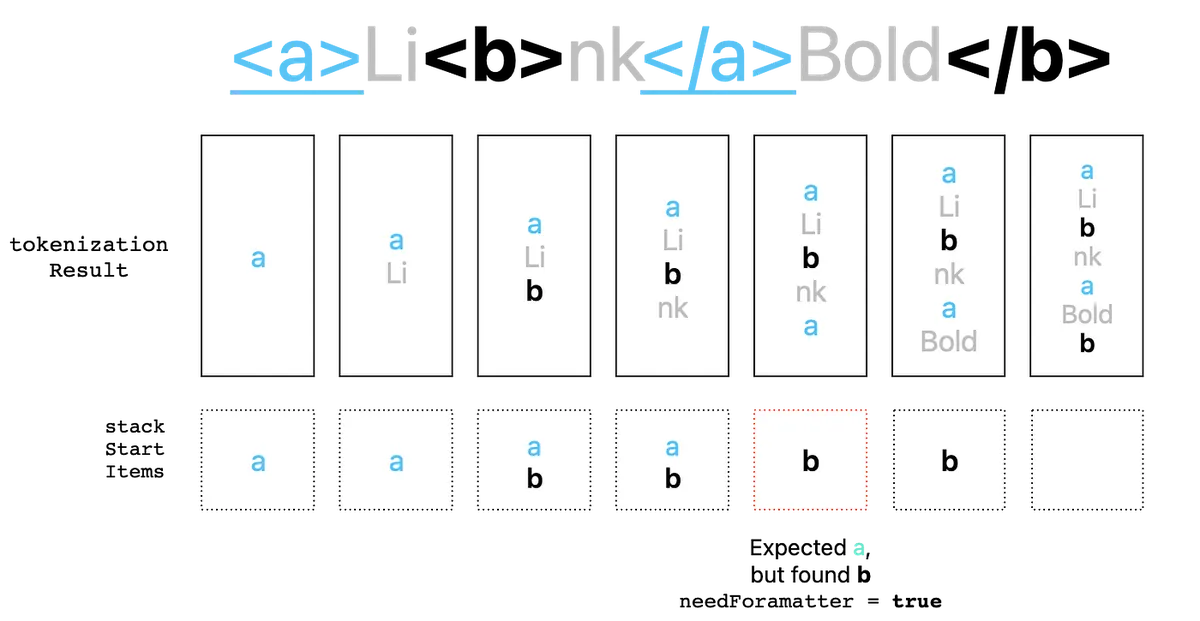
The workflow is shown in the above diagram.
In the end, a Tokenization result array is obtained.
Corresponding implementation in the source code HTMLStringToParsedResultProcessor.swift
Normalization
a.k.a Formatter, Normalization
After obtaining the initial parsing result in the previous step, if normalization is still needed during parsing, this step is required to automatically fix HTML tag issues.
There are three types of HTML tag issues:
-
HTML Tag without Close Tag: for example
<br> -
Plain text treated as HTML Tag: for example
<Congratulation!> -
HTML tag misalignment issue: for example
<a>Li<b>nk</a>Bold</b>
The fix is also simple. We need to iterate through the elements in the Tokenization results and try to fill in the missing parts.
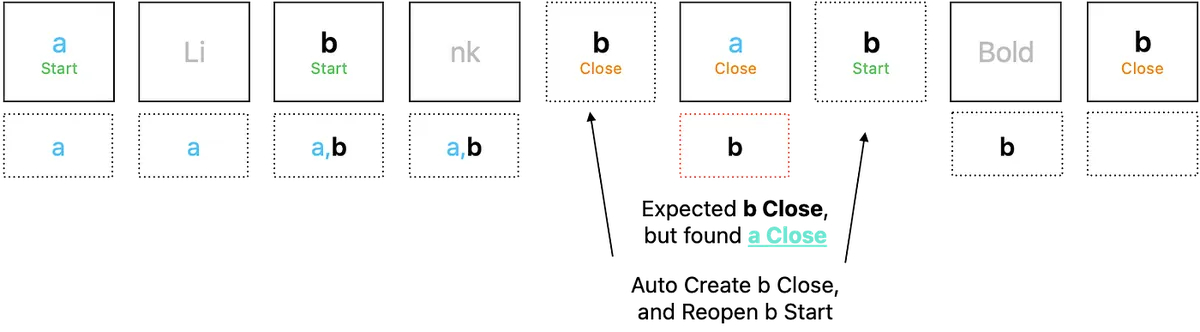
The workflow is shown in the above diagram.
var normalizationResult = tokenizationResult

// Start Tags Stack, First In Last Out (FILO)
var stackExpectedStartItems: [HTMLParsedResult.StartItem] = []
var itemIndex = 0
while itemIndex < newItems.count {
    switch newItems[itemIndex] {
    case .start(let item):
        if item.isIsolated {
            // If it is an isolated Start Tag
            if WC3HTMLTagName(rawValue: item.tagName) == nil && (item.attributes?.isEmpty ?? true) {
                // If it is not a WC3 defined HTML Tag & has no HTML Attributes
                // WC3HTMLTagName Enum can be found in Source Code
                // Considered as normal text treated as HTML Tag
                // Change to raw string type
                normalizationResult[itemIndex] = .rawString(item.tagAttributedString)
            } else {
                // Otherwise, convert to self-closing tag, e.g. <br> -> <br/>
                normalizationResult[itemIndex] = .selfClosing(item.convertToSelfClosingParsedItem())
            }
            itemIndex += 1
        } else {
            // Normal Start Tag, push to Stack
            stackExpectedStartItems.append(item)
            itemIndex += 1
        }
    case .close(let item):
        // Encounter Close Tag
        // Get Tags between Start Stack Tag and this Close Tag
        // e.g <a><u><b>[CurrentIndex]</a></u></b> -> gap 0
        // e.g <a><u><b>[CurrentIndex]</a></u></b> -> gap b,u

        let reversedStackExpectedStartItems = Array(stackExpectedStartItems.reversed())
        guard let reversedStackExpectedStartItemsOccurredIndex = reversedStackExpectedStartItems.firstIndex(where: { $0.tagName == item.tagName }) else {
            itemIndex += 1
            continue
        }

        let reversedStackExpectedStartItemsOccurred = Array(reversedStackExpectedStartItems.prefix(upTo: reversedStackExpectedStartItemsOccurredIndex))

        // Gap 0 means tag is correctly aligned
        guard reversedStackExpectedStartItemsOccurred.count != 0 else {
            // is pair, pop
            stackExpectedStartItems.removeLast()
            itemIndex += 1
            continue
        }

        // There are gaps, automatically insert missing tags before
        // e.g <a><u><b>[CurrentIndex]</a></u></b> ->
        // e.g <a><u><b>[CurrentIndex]</b></u></a><b></u></u></b>
        let stackExpectedStartItemsOccurred = Array(reversedStackExpectedStartItemsOccurred.reversed())
        let afterItems = stackExpectedStartItemsOccurred.map({ HTMLParsedResult.start($0) })
        let beforeItems = reversedStackExpectedStartItemsOccurred.map({ HTMLParsedResult.close($0.convertToCloseParsedItem()) })
        normalizationResult.insert(contentsOf: afterItems, at: newItems.index(after: itemIndex))
        normalizationResult.insert(contentsOf: beforeItems, at: itemIndex)

        itemIndex = newItems.index(after: itemIndex) + stackExpectedStartItemsOccurred.count

        // Update Start Stack Tags
        // e.g. -> b,u
        stackExpectedStartItems.removeAll { startItem in
            return reversedStackExpectedStartItems.prefix(through: reversedStackExpectedStartItemsOccurredIndex).contains(where: { $0 === startItem })
        }
    case .selfClosing, .rawString:
        itemIndex += 1
    }
}

print(normalizationResult)
// [
//    .start("a",["href":"https://zhgchg.li"])
//    .rawString("Li")
//    .start("b",nil)
//    .rawString("nk")
//    .close("b")
//    .close("a")
//    .start("b",nil)
//    .rawString("Bold")
//    .close("b")
// ]
Corresponding to the implementation in the source code HTMLParsedResultFormatterProcessor.swift
Abstract Syntax Tree
a.k.a AST, Abstract Syntax Tree
After completing the Tokenization & Normalization data preprocessing, the next step is to convert the result into an abstract syntax tree 🌲.
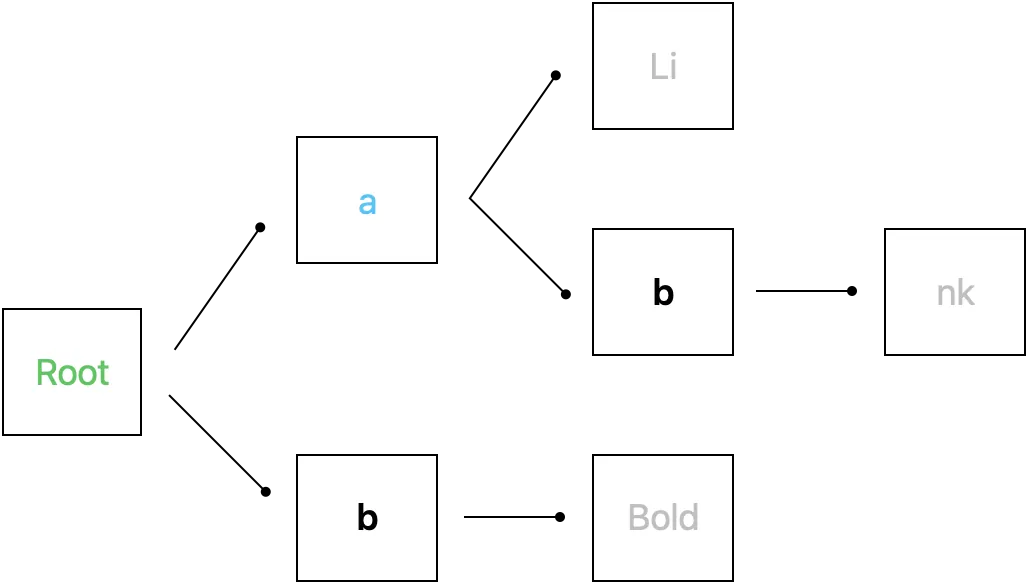
As shown in the above image
Converting to an abstract tree makes future operations and extensions easier, such as implementing Selector functionality or other conversions like HTML to Markdown. Similarly, if you want to add Markdown to NSAttributedString later, you only need to implement Markdown Tokenization & Normalization to achieve it.
First, we define a Markup Protocol with Child & Parent properties to record leaf and branch information:
protocol Markup: AnyObject {
    var parentMarkup: Markup? { get set }
    var childMarkups: [Markup] { get set }

    func appendChild(markup: Markup)
    func prependChild(markup: Markup)
    func accept<V: MarkupVisitor>(_ visitor: V) -> V.Result
}

extension Markup {
    func appendChild(markup: Markup) {
        markup.parentMarkup = self
        childMarkups.append(markup)
    }

    func prependChild(markup: Markup) {
        markup.parentMarkup = self
        childMarkups.insert(markup, at: 0)
    }
}
Additionally, combined with the use of the Visitor Pattern, each style attribute is defined as an object Element, and different Visit strategies are used to obtain individual applied results.
protocol MarkupVisitor {
    associatedtype Result

    func visit(markup: Markup) -> Result

    func visit(_ markup: RootMarkup) -> Result
    func visit(_ markup: RawStringMarkup) -> Result

    func visit(_ markup: BoldMarkup) -> Result
    func visit(_ markup: LinkMarkup) -> Result
    //...
}

extension MarkupVisitor {
    func visit(markup: Markup) -> Result {
        return markup.accept(self)
    }
}
Basic Markup Nodes:
// Root node
final class RootMarkup: Markup {
    weak var parentMarkup: Markup? = nil
    var childMarkups: [Markup] = []

    func accept<V>(_ visitor: V) -> V.Result where V : MarkupVisitor {
        return visitor.visit(self)
    }
}

// Leaf node
final class RawStringMarkup: Markup {
    let attributedString: NSAttributedString

    init(attributedString: NSAttributedString) {
        self.attributedString = attributedString
    }

    weak var parentMarkup: Markup? = nil
    var childMarkups: [Markup] = []

    func accept<V>(_ visitor: V) -> V.Result where V : MarkupVisitor {
        return visitor.visit(self)
    }
}
Define Markup Style Nodes:
// Branch nodes:

// Link style
final class LinkMarkup: Markup {
    weak var parentMarkup: Markup? = nil
    var childMarkups: [Markup] = []

    func accept<V>(_ visitor: V) -> V.Result where V : MarkupVisitor {
        return visitor.visit(self)
    }
}

// Bold style
final class BoldMarkup: Markup {
    weak var parentMarkup: Markup? = nil
    var childMarkups: [Markup] = []

    func accept<V>(_ visitor: V) -> V.Result where V : MarkupVisitor {
        return visitor.visit(self)
    }
}
Corresponding to the Markup implementation in the source code
Before converting to the abstract tree, we also need to…
MarkupComponent
Because our tree structure does not depend on any data structures (for example, an “a” node/LinkMarkup needs URL information for further rendering).
We therefore define a separate container to store tree nodes and their related data:
protocol MarkupComponent {
    associatedtype T
    var markup: Markup { get }
    var value: T { get }

    init(markup: Markup, value: T)
}

extension Sequence where Iterator.Element: MarkupComponent {
    func value(markup: Markup) -> Element.T? {
        return self.first(where:{ $0.markup === markup })?.value as? Element.T
    }
}
Implementation corresponding to MarkupComponent in the source code
You can also declare Markup as Hashable and directly use a Dictionary to store values [Markup: Any], but in this case, Markup cannot be used as a regular type and must be written as any Markup.
HTMLTag & HTMLTagName & HTMLTagNameVisitor
For the HTML Tag Name part, we also added a layer of abstraction, allowing users to decide which tags need to be processed. This also makes future extensions easier. For example, the <strong> tag name can correspond to BoldMarkup.
public protocol HTMLTagName {
    var string: String { get }
    func accept<V: HTMLTagNameVisitor>(_ visitor: V) -> V.Result
}

public struct A_HTMLTagName: HTMLTagName {
    public let string: String = WC3HTMLTagName.a.rawValue

    public init() {

    }

    public func accept<V>(_ visitor: V) -> V.Result where V : HTMLTagNameVisitor {
        return visitor.visit(self)
    }
}

public struct B_HTMLTagName: HTMLTagName {
    public let string: String = WC3HTMLTagName.b.rawValue

    public init() {

    }

    public func accept<V>(_ visitor: V) -> V.Result where V : HTMLTagNameVisitor {
        return visitor.visit(self)
    }
}
public protocol HTMLTagNameVisitor {
    associatedtype Result

    func visit(tagName: HTMLTagName) -> Result

    func visit(_ tagName: A_HTMLTagName) -> Result
    func visit(_ tagName: B_HTMLTagName) -> Result
    //...
}

public extension HTMLTagNameVisitor {
    func visit(tagName: HTMLTagName) -> Result {
        return tagName.accept(self)
    }
}
Corresponding to the implementation of HTMLTagNameVisitor in the source code
Also refer to the W3C wiki listing HTML tag name enums: WC3HTMLTagName.swift
HTMLTag is simply a container object because we want to allow external specification of styles corresponding to HTML tags, so we declare a container to hold them together:
struct HTMLTag {
    let tagName: HTMLTagName
    let customStyle: MarkupStyle? // Will be explained later in Render

    init(tagName: HTMLTagName, customStyle: MarkupStyle? = nil) {
        self.tagName = tagName
        self.customStyle = customStyle
    }
}
Corresponding to the implementation of HTMLTag in the source code
HTMLTagNameToHTMLMarkupVisitor
struct HTMLTagNameToMarkupVisitor: HTMLTagNameVisitor {
    typealias Result = Markup

    let attributes: [String: String]?

    func visit(_ tagName: A_HTMLTagName) -> Result {
        return LinkMarkup()
    }

    func visit(_ tagName: B_HTMLTagName) -> Result {
        return BoldMarkup()
    }
    //...
}
Corresponding to the implementation of HTMLTagNameToHTMLMarkupVisitor in the source code
Convert to Abstract Tree with HTML Data
We need to convert the normalized HTML data into an abstract tree. First, declare a MarkupComponent data structure to store the HTML data:
struct HTMLElementMarkupComponent: MarkupComponent {
    struct HTMLElement {
        let tag: HTMLTag
        let tagAttributedString: NSAttributedString
        let attributes: [String: String]?
    }

    typealias T = HTMLElement

    let markup: Markup
    let value: HTMLElement
    init(markup: Markup, value: HTMLElement) {
        self.markup = markup
        self.value = value
    }
}
Convert to Markup Abstract Tree:
var htmlElementComponents: [HTMLElementMarkupComponent] = []
let rootMarkup = RootMarkup()
var currentMarkup: Markup = rootMarkup

let htmlTags: [String: HTMLTag]
init(htmlTags: [HTMLTag]) {
  self.htmlTags = Dictionary(uniqueKeysWithValues: htmlTags.map{ ($0.tagName.string, $0) })
}

// Start Tags Stack, ensure correct pop of tags
// Normalization has been done before, so errors should not occur, just a safeguard
var stackExpectedStartItems: [HTMLParsedResult.StartItem] = []
for thisItem in from {
    switch thisItem {
    case .start(let item):
        let visitor = HTMLTagNameToMarkupVisitor(attributes: item.attributes)
        let htmlTag = self.htmlTags[item.tagName] ?? HTMLTag(tagName: ExtendTagName(item.tagName))
        // Use Visitor to get corresponding Markup
        let markup = visitor.visit(tagName: htmlTag.tagName)

        // Add self as a leaf node of the current branch
        // Become the current branch node
        htmlElementComponents.append(.init(markup: markup, value: .init(tag: htmlTag, tagAttributedString: item.tagAttributedString, attributes: item.attributes)))
        currentMarkup.appendChild(markup: markup)
        currentMarkup = markup

        stackExpectedStartItems.append(item)
    case .selfClosing(let item):
        // Directly add as a leaf node of the current branch
        let visitor = HTMLTagNameToMarkupVisitor(attributes: item.attributes)
        let htmlTag = self.htmlTags[item.tagName] ?? HTMLTag(tagName: ExtendTagName(item.tagName))
        let markup = visitor.visit(tagName: htmlTag.tagName)
        htmlElementComponents.append(.init(markup: markup, value: .init(tag: htmlTag, tagAttributedString: item.tagAttributedString, attributes: item.attributes)))
        currentMarkup.appendChild(markup: markup)
    case .close(let item):
        if let lastTagName = stackExpectedStartItems.popLast()?.tagName,
           lastTagName == item.tagName {
            // When encountering a Close Tag, go back to the previous level
            currentMarkup = currentMarkup.parentMarkup ?? currentMarkup
        }
    case .rawString(let attributedString):
        // Directly add as a leaf node of the current branch
        currentMarkup.appendChild(markup: RawStringMarkup(attributedString: attributedString))
    }
}

// print(htmlElementComponents)
// [(markup: LinkMarkup, (tag: a, attributes: ["href":"zhgchg.li"]...)]
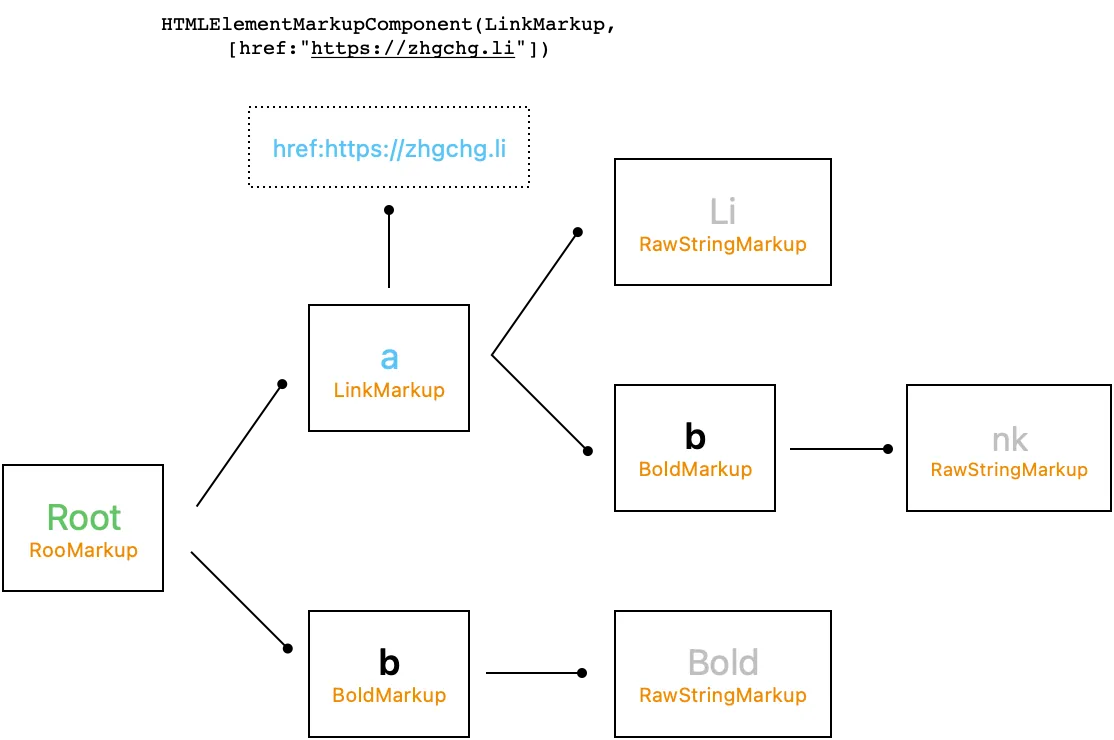
The operation result is shown in the above image.
Corresponding to the source code in HTMLParsedResultToHTMLElementWithRootMarkupProcessor.swift implementation
At this point, we have actually completed the Selector functionality 🎉
public class HTMLSelector: CustomStringConvertible {

    let markup: Markup
    let componets: [HTMLElementMarkupComponent]
    init(markup: Markup, componets: [HTMLElementMarkupComponent]) {
        self.markup = markup
        self.componets = componets
    }

    public func filter(_ htmlTagName: String) -> [HTMLSelector] {
        let result = markup.childMarkups.filter({ componets.value(markup: $0)?.tag.tagName.isEqualTo(htmlTagName) ?? false })
        return result.map({ .init(markup: $0, componets: componets) })
    }

    //...
}
We can filter leaf node objects layer by layer.
Corresponding to the HTMLSelector implementation in the source code
Parser — HTML to MarkupStyle (Abstract of NSAttributedString.Key)
Next, we need to complete the conversion from HTML to MarkupStyle (NSAttributedString.Key).
NSAttributedString sets text styles through NSAttributedString.Key attributes. We abstracted all NSAttributedString.Key fields into MarkupStyle, MarkupStyleColor, MarkupStyleFont, and MarkupStyleParagraphStyle.
Purpose:
-
The original Attributes data structure is
[NSAttributedString.Key: Any?]. If exposed directly, it is hard to control the values users input, and incorrect values may cause crashes, such as.font: 123. -
Styles need to be inheritable. For example, in
<a><b>test</b></a>, the style of the string “test” inherits from the link and is bold (bold + link). Directly exposing a Dictionary makes it difficult to properly manage inheritance rules. -
Encapsulate iOS/macOS (UIKit/AppKit) related objects
MarkupStyle Struct
public struct MarkupStyle {
    public var font:MarkupStyleFont
    public var paragraphStyle:MarkupStyleParagraphStyle
    public var foregroundColor:MarkupStyleColor? = nil
    public var backgroundColor:MarkupStyleColor? = nil
    public var ligature:NSNumber? = nil
    public var kern:NSNumber? = nil
    public var tracking:NSNumber? = nil
    public var strikethroughStyle:NSUnderlineStyle? = nil
    public var underlineStyle:NSUnderlineStyle? = nil
    public var strokeColor:MarkupStyleColor? = nil
    public var strokeWidth:NSNumber? = nil
    public var shadow:NSShadow? = nil
    public var textEffect:String? = nil
    public var attachment:NSTextAttachment? = nil
    public var link:URL? = nil
    public var baselineOffset:NSNumber? = nil
    public var underlineColor:MarkupStyleColor? = nil
    public var strikethroughColor:MarkupStyleColor? = nil
    public var obliqueness:NSNumber? = nil
    public var expansion:NSNumber? = nil
    public var writingDirection:NSNumber? = nil
    public var verticalGlyphForm:NSNumber? = nil
    //...

    // Inherit from...
    // Default: when field is nil, fill from the current data object 'from'
    mutating func fillIfNil(from: MarkupStyle?) {
        guard let from = from else { return }

        var currentFont = self.font
        currentFont.fillIfNil(from: from.font)
        self.font = currentFont

        var currentParagraphStyle = self.paragraphStyle
        currentParagraphStyle.fillIfNil(from: from.paragraphStyle)
        self.paragraphStyle = currentParagraphStyle
        //..
    }

    // MarkupStyle to NSAttributedString.Key: Any
    func render() -> [NSAttributedString.Key: Any] {
        var data: [NSAttributedString.Key: Any] = [:]

        if let font = font.getFont() {
            data[.font] = font
        }

        if let ligature = self.ligature {
            data[.ligature] = ligature
        }
        //...
        return data
    }
}

public struct MarkupStyleFont: MarkupStyleItem {
    public enum FontWeight {
        case style(FontWeightStyle)
        case rawValue(CGFloat)
    }
    public enum FontWeightStyle: String {
        case ultraLight, light, thin, regular, medium, semibold, bold, heavy, black
        // ...
    }

    public var size: CGFloat?
    public var weight: FontWeight?
    public var italic: Bool?
    //...
}

public struct MarkupStyleParagraphStyle: MarkupStyleItem {
    public var lineSpacing:CGFloat? = nil
    public var paragraphSpacing:CGFloat? = nil
    public var alignment:NSTextAlignment? = nil
    public var headIndent:CGFloat? = nil
    public var tailIndent:CGFloat? = nil
    public var firstLineHeadIndent:CGFloat? = nil
    public var minimumLineHeight:CGFloat? = nil
    public var maximumLineHeight:CGFloat? = nil
    public var lineBreakMode:NSLineBreakMode? = nil
    public var baseWritingDirection:NSWritingDirection? = nil
    public var lineHeightMultiple:CGFloat? = nil
    public var paragraphSpacingBefore:CGFloat? = nil
    public var hyphenationFactor:Float? = nil
    public var usesDefaultHyphenation:Bool? = nil
    public var tabStops: [NSTextTab]? = nil
    public var defaultTabInterval:CGFloat? = nil
    public var textLists: [NSTextList]? = nil
    public var allowsDefaultTighteningForTruncation:Bool? = nil
    public var lineBreakStrategy: NSParagraphStyle.LineBreakStrategy? = nil
    //...
}

public struct MarkupStyleColor {
    let red: Int
    let green: Int
    let blue: Int
    let alpha: CGFloat
    //...
}
Corresponding to the MarkupStyle implementation in the source code
Also refer to the W3c wiki, browser predefined color name lists corresponding color name text & color R,G,B enum: MarkupStyleColorName.swift
HTMLTagStyleAttribute & HTMLTagStyleAttributeVisitor
Here, let’s elaborate on these two objects because HTML tags allow styling through CSS settings; accordingly, we apply the same abstraction used for HTMLTagName to the HTML Style Attribute as well.
For example, the HTML might be: <a style=”color:red;font-size:14px”>RedLink</a>, which means this link should be styled with red color and font size 14px.
public protocol HTMLTagStyleAttribute {
    var styleName: String { get }

    func accept<V: HTMLTagStyleAttributeVisitor>(_ visitor: V) -> V.Result
}

public protocol HTMLTagStyleAttributeVisitor {
    associatedtype Result

    func visit(styleAttribute: HTMLTagStyleAttribute) -> Result
    func visit(_ styleAttribute: ColorHTMLTagStyleAttribute) -> Result
    func visit(_ styleAttribute: FontSizeHTMLTagStyleAttribute) -> Result
    //...
}

public extension HTMLTagStyleAttributeVisitor {
    func visit(styleAttribute: HTMLTagStyleAttribute) -> Result {
        return styleAttribute.accept(self)
    }
}
public struct ColorHTMLTagStyleAttribute: HTMLTagStyleAttribute {
    public let styleName: String = "color"

    public init() {

    }

    public func accept<V>(_ visitor: V) -> V.Result where V : HTMLTagStyleAttributeVisitor {
        return visitor.visit(self)
    }
}

public struct FontSizeHTMLTagStyleAttribute: HTMLTagStyleAttribute {
    public let styleName: String = "font-size"

    public init() {

    }

    public func accept<V>(_ visitor: V) -> V.Result where V : HTMLTagStyleAttributeVisitor {
        return visitor.visit(self)
    }
}
// ...
Corresponding to the implementation of HTMLTagStyleAttribute in the source code
HTMLTagStyleAttributeToMarkupStyleVisitor
struct HTMLTagStyleAttributeToMarkupStyleVisitor: HTMLTagStyleAttributeVisitor {
    typealias Result = MarkupStyle?

    let value: String

    func visit(_ styleAttribute: ColorHTMLTagStyleAttribute) -> Result {
        // Regex extract Color Hex or Mapping from HTML Pre-defined Color Name, please refer to Source Code
        guard let color = MarkupStyleColor(string: value) else { return nil }
        return MarkupStyle(foregroundColor: color)
    }

    func visit(_ styleAttribute: FontSizeHTMLTagStyleAttribute) -> Result {
        // Regex extract 10px -> 10, please refer to Source Code
        guard let size = self.convert(fromPX: value) else { return nil }
        return MarkupStyle(font: MarkupStyleFont(size: CGFloat(size)))
    }
    // ...
}
Corresponding to the source code implementation in HTMLTagAttributeToMarkupStyleVisitor.swift
The value of init is set to the attribute’s value and converted to the corresponding MarkupStyle field according to the visit type.
HTMLElementMarkupComponentMarkupStyleVisitor
After introducing the MarkupStyle object, we will convert the Normalization result of HTMLElementComponents into MarkupStyle.
// MarkupStyle policy
public enum MarkupStylePolicy {
    case respectMarkupStyleFromCode // Prioritize styles from code, fill in from HTML Style Attribute
    case respectMarkupStyleFromHTMLStyleAttribute // Prioritize styles from HTML Style Attribute, fill in from code
}

struct HTMLElementMarkupComponentMarkupStyleVisitor: MarkupVisitor {

    typealias Result = MarkupStyle?

    let policy: MarkupStylePolicy
    let components: [HTMLElementMarkupComponent]
    let styleAttributes: [HTMLTagStyleAttribute]

    func visit(_ markup: BoldMarkup) -> Result {
        // .bold is just the default style defined in MarkupStyle, see Source Code
        return defaultVisit(components.value(markup: markup), defaultStyle: .bold)
    }

    func visit(_ markup: LinkMarkup) -> Result {
        // .link is just the default style defined in MarkupStyle, see Source Code
        var markupStyle = defaultVisit(components.value(markup: markup), defaultStyle: .link) ?? .link

        // Get the HtmlElement corresponding to LinkMarkup from HtmlElementComponents
        // Find the href attribute in HtmlElement's attributes (HTML URL string)
        if let href = components.value(markup: markup)?.attributes?["href"] as? String,
           let url = URL(string: href) {
            markupStyle.link = url
        }
        return markupStyle
    }

    // ...
}

extension HTMLElementMarkupComponentMarkupStyleVisitor {
    // Get the customized MarkupStyle specified in the HTMLTag container
    private func customStyle(_ htmlElement: HTMLElementMarkupComponent.HTMLElement?) -> MarkupStyle? {
        guard let customStyle = htmlElement?.tag.customStyle else {
            return nil
        }
        return customStyle
    }

    // Default action
    func defaultVisit(_ htmlElement: HTMLElementMarkupComponent.HTMLElement?, defaultStyle: MarkupStyle? = nil) -> Result {
        var markupStyle: MarkupStyle? = customStyle(htmlElement) ?? defaultStyle
        // Get the HtmlElement corresponding to LinkMarkup from HtmlElementComponents
        // Check if HtmlElement's attributes contain a `style` attribute
        guard let styleString = htmlElement?.attributes?["style"],
              styleAttributes.count > 0 else {
            // None found
            return markupStyle
        }

        // Has Style Attributes
        // Split the style value string into an array
        // font-size:14px;color:red -> ["font-size":"14px","color":"red"]
        let styles = styleString.split(separator: ";").filter { $0.trimmingCharacters(in: .whitespacesAndNewlines) != "" }.map { $0.split(separator: ":") }

        for style in styles {
            guard style.count == 2 else {
                continue
            }
            // e.g. font-size
            let key = style[0].trimmingCharacters(in: .whitespacesAndNewlines)
            // e.g. 14px
            let value = style[1].trimmingCharacters(in: .whitespacesAndNewlines)

            if let styleAttribute = styleAttributes.first(where: { $0.isEqualTo(styleName: key) }) {
                // Use HTMLTagStyleAttributeToMarkupStyleVisitor above to convert back to MarkupStyle
                let visitor = HTMLTagStyleAttributeToMarkupStyleVisitor(value: value)
                if var thisMarkupStyle = visitor.visit(styleAttribute: styleAttribute) {
                    // When Style Attribute returns a value...
                    // Merge with previous MarkupStyle result
                    thisMarkupStyle.fillIfNil(from: markupStyle)
                    markupStyle = thisMarkupStyle
                }
            }
        }

        // If there is a default style
        if var defaultStyle = defaultStyle {
            switch policy {
                case .respectMarkupStyleFromHTMLStyleAttribute:
                  // Style Attribute MarkupStyle takes priority,
                  // then merge defaultStyle
                    markupStyle?.fillIfNil(from: defaultStyle)
                case .respectMarkupStyleFromCode:
                  // defaultStyle takes priority,
                  // then merge Style Attribute MarkupStyle
                  defaultStyle.fillIfNil(from: markupStyle)
                  markupStyle = defaultStyle
            }
        }

        return markupStyle
    }
}
Corresponding to the source code implementation in HTMLTagAttributeToMarkupStyleVisitor.swift
We define some default styles in MarkupStyle. If certain Markup tags do not have styles specified externally from the code, these default styles will be used.
There are two style inheritance strategies:
-
respectMarkupStyleFromCode:
Use the default style first; then check which styles can be added from Style Attributes. If a value already exists, ignore it. -
respectMarkupStyleFromHTMLStyleAttribute:
Primarily consider the Style Attributes; then check what styles can be supplemented from the default styles, ignoring any values that already exist.
HTMLElementWithMarkupToMarkupStyleProcessor
Convert Normalization results into AST & MarkupStyleComponent.
Declare a new MarkupComponent to store the corresponding MarkupStyle this time:
struct MarkupStyleComponent: MarkupComponent {
    typealias T = MarkupStyle

    let markup: Markup
    let value: MarkupStyle
    init(markup: Markup, value: MarkupStyle) {
        self.markup = markup
        self.value = value
    }
}
Simple traversal of the Markup Tree & HTMLElementMarkupComponent structure:
let styleAttributes: [HTMLTagStyleAttribute]
let policy: MarkupStylePolicy

func process(from: (Markup, [HTMLElementMarkupComponent])) -> [MarkupStyleComponent] {
  var components: [MarkupStyleComponent] = []
  let visitor = HTMLElementMarkupComponentMarkupStyleVisitor(policy: policy, components: from.1, styleAttributes: styleAttributes)
  walk(markup: from.0, visitor: visitor, components: &components)
  return components
}

func walk(markup: Markup, visitor: HTMLElementMarkupComponentMarkupStyleVisitor, components: inout [MarkupStyleComponent]) {

  if let markupStyle = visitor.visit(markup: markup) {
    components.append(.init(markup: markup, value: markupStyle))
  }

  for markup in markup.childMarkups {
    walk(markup: markup, visitor: visitor, components: &components)
  }
}

// print(components)
// [(markup: LinkMarkup, MarkupStyle(link: https://zhgchg.li, color: .blue)]
// [(markup: BoldMarkup, MarkupStyle(font: .init(weight: .bold))]
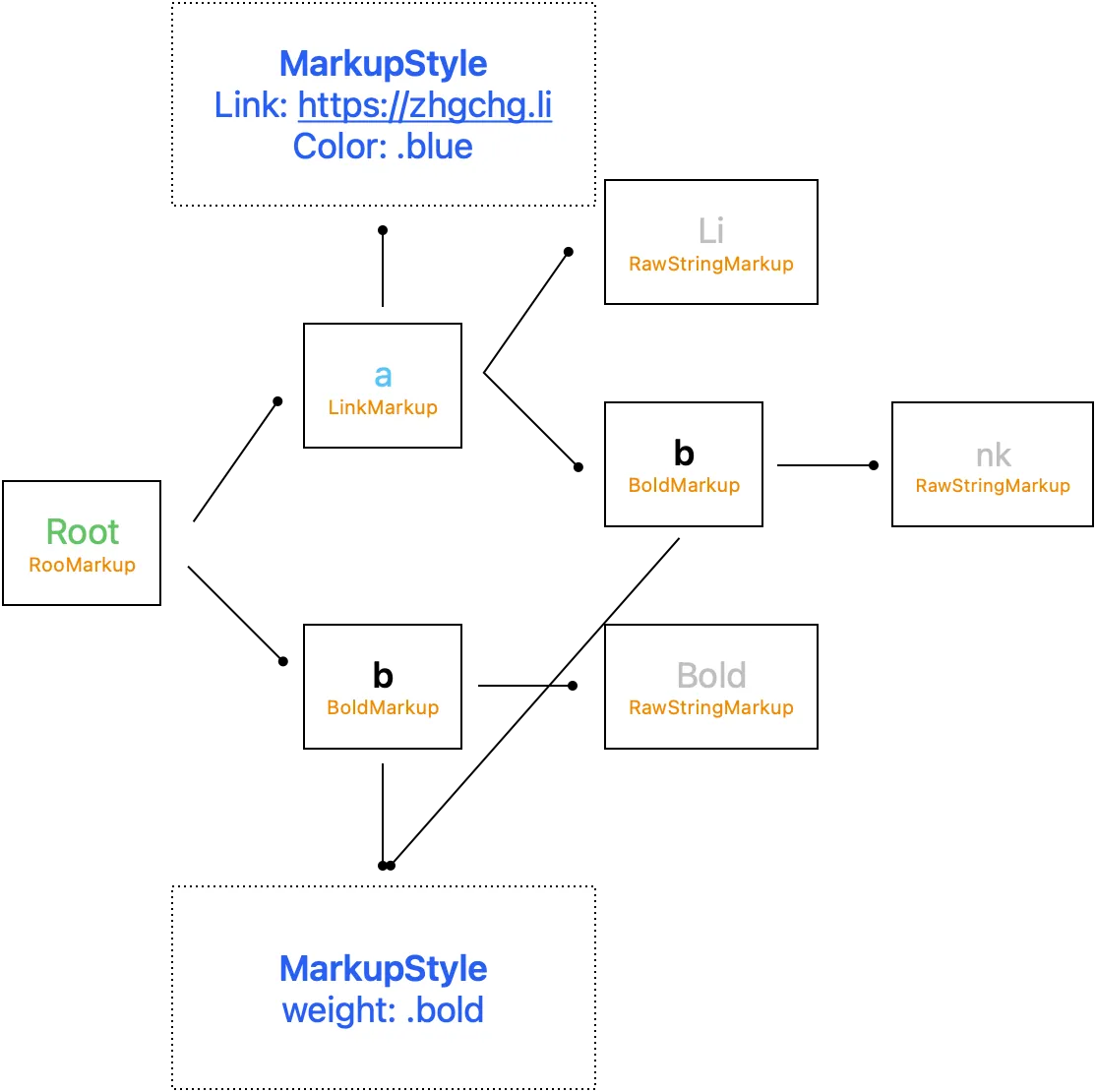
The process result is shown in the above image.
Render — Convert To NSAttributedString
Now that we have the HTML tag abstract tree structure and the corresponding MarkupStyle, the final step is to generate the final NSAttributedString rendering result.
MarkupNSAttributedStringVisitor
visit markup to NSAttributedString
struct MarkupNSAttributedStringVisitor: MarkupVisitor {
    typealias Result = NSAttributedString

    let components: [MarkupStyleComponent]
    // root / base MarkupStyle, specified externally, e.g., to set the entire text size
    let rootStyle: MarkupStyle?

    func visit(_ markup: RootMarkup) -> Result {
        // Look down to RawString objects
        return collectAttributedString(markup)
    }

    func visit(_ markup: RawStringMarkup) -> Result {
        // Return Raw String
        // Collect all MarkupStyles along the chain
        // Apply Style to NSAttributedString
        return applyMarkupStyle(markup.attributedString, with: collectMarkupStyle(markup))
    }

    func visit(_ markup: BoldMarkup) -> Result {
        // Look down to RawString objects
        return collectAttributedString(markup)
    }

    func visit(_ markup: LinkMarkup) -> Result {
        // Look down to RawString objects
        return collectAttributedString(markup)
    }
    // ...
}

private extension MarkupNSAttributedStringVisitor {
    // Apply Style to NSAttributedString
    func applyMarkupStyle(_ attributedString: NSAttributedString, with markupStyle: MarkupStyle?) -> NSAttributedString {
        guard let markupStyle = markupStyle else { return attributedString }
        let mutableAttributedString = NSMutableAttributedString(attributedString: attributedString)
        mutableAttributedString.addAttributes(markupStyle.render(), range: NSMakeRange(0, mutableAttributedString.string.utf16.count))
        return mutableAttributedString
    }

    func collectAttributedString(_ markup: Markup) -> NSMutableAttributedString {
        // collect from downstream
        // Root -> Bold -> String("Bold")
        //      \
        //       > String("Test")
        // Result: Bold Test
        // Recursively visit and combine raw strings layer by layer to form the final NSAttributedString
        return markup.childMarkups.compactMap({ visit(markup: $0) }).reduce(NSMutableAttributedString()) { partialResult, attributedString in
            partialResult.append(attributedString)
            return partialResult
        }
    }

    func collectMarkupStyle(_ markup: Markup) -> MarkupStyle? {
        // collect from upstream
        // String("Test") -> Bold -> Italic -> Root
        // Result: style: Bold+Italic
        // Look up parent tag markupstyles layer by layer
        // Then inherit styles step by step
        var currentMarkup: Markup? = markup.parentMarkup
        var currentStyle = components.value(markup: markup)
        while let thisMarkup = currentMarkup {
            guard let thisMarkupStyle = components.value(markup: thisMarkup) else {
                currentMarkup = thisMarkup.parentMarkup
                continue
            }

            if var thisCurrentStyle = currentStyle {
                thisCurrentStyle.fillIfNil(from: thisMarkupStyle)
                currentStyle = thisCurrentStyle
            } else {
                currentStyle = thisMarkupStyle
            }

            currentMarkup = thisMarkup.parentMarkup
        }

        if var currentStyle = currentStyle {
            currentStyle.fillIfNil(from: rootStyle)
            return currentStyle
        } else {
            return rootStyle
        }
    }
}
對應的程式碼實作在原始碼 MarkupNSAttributedStringVisitor.swift
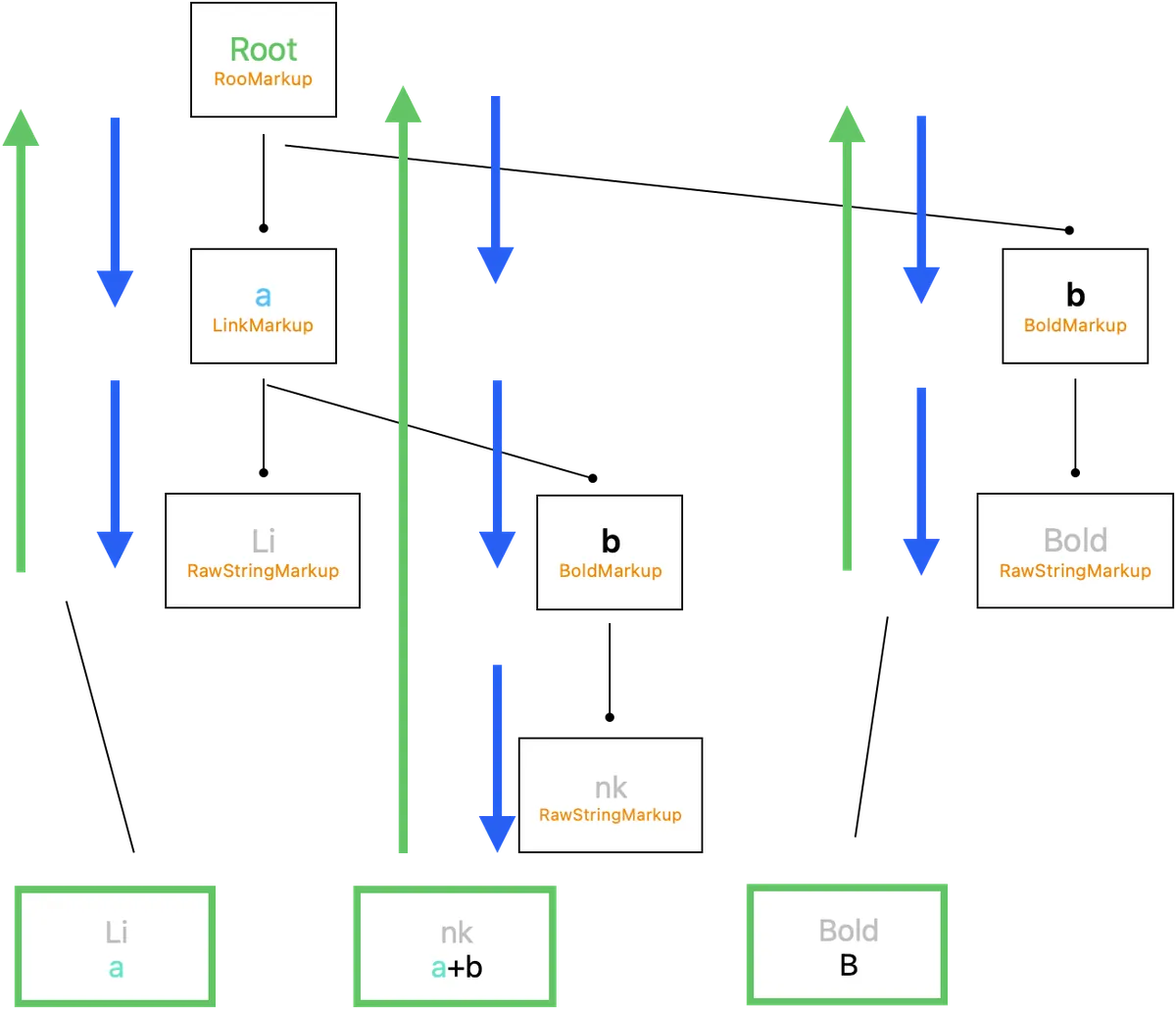
The workflow and results are shown in the above image.
In the end, we get:

Li{
    NSColor = "Blue";
    NSFont = "<UICTFont: 0x145d17600> font-family: \".SFUI-Regular\"; font-weight: normal; font-style: normal; font-size: 13.00pt";
    NSLink = "https://zhgchg.li";
}nk{
    NSColor = "Blue";
    NSFont = "<UICTFont: 0x145d18710> font-family: \".SFUI-Semibold\"; font-weight: bold; font-style: normal; font-size: 13.00pt";
    NSLink = "https://zhgchg.li";
}Bold{
    NSFont = "<UICTFont: 0x145d18710> font-family: \".SFUI-Semibold\"; font-weight: bold; font-style: normal; font-size: 13.00pt";
}
🎉🎉🎉🎉Done🎉🎉🎉🎉
At this point, we have completed the entire conversion process from HTML String to NSAttributedString.
Stripper — Remove HTML Tags
Stripping HTML tags is relatively simple and only requires:
func attributedString(_ markup: Markup) -> NSAttributedString {
  if let rawStringMarkup = markup as? RawStringMarkup {
    return rawStringMarkup.attributedString
  } else {
    return markup.childMarkups.compactMap({ attributedString($0) }).reduce(NSMutableAttributedString()) { partialResult, attributedString in
      partialResult.append(attributedString)
      return partialResult
    }
  }
}
Corresponding implementation in the source code MarkupStripperProcessor.swift
Similar to Render, but simply returns the content after finding RawStringMarkup.
Extend — Dynamic Extension
To support all HTMLTags and Style Attributes, a dynamic extension point was created to allow direct runtime extension of objects from code.
public struct ExtendTagName: HTMLTagName {
    public let string: String

    public init(_ w3cHTMLTagName: WC3HTMLTagName) {
        self.string = w3cHTMLTagName.rawValue
    }

    public init(_ string: String) {
        self.string = string.trimmingCharacters(in: .whitespacesAndNewlines).lowercased()
    }

    public func accept<V>(_ visitor: V) -> V.Result where V : HTMLTagNameVisitor {
        return visitor.visit(self)
    }
}
// to
final class ExtendMarkup: Markup {
    weak var parentMarkup: Markup? = nil
    var childMarkups: [Markup] = []

    func accept<V>(_ visitor: V) -> V.Result where V : MarkupVisitor {
        return visitor.visit(self)
    }
}

//----

public struct ExtendHTMLTagStyleAttribute: HTMLTagStyleAttribute {
    public let styleName: String
    public let render: ((String) -> (MarkupStyle?)) // Dynamically change MarkupStyle using closure

    public init(styleName: String, render: @escaping ((String) -> (MarkupStyle?))) {
        self.styleName = styleName
        self.render = render
    }

    public func accept<V>(_ visitor: V) -> V.Result where V : HTMLTagStyleAttributeVisitor {
        return visitor.visit(self)
    }
}
ZHTMLParserBuilder
Finally, we use the Builder Pattern to allow external modules to quickly construct the objects needed by ZMarkupParser, while ensuring proper Access Level Control.
public final class ZHTMLParserBuilder {

    private(set) var htmlTags: [HTMLTag] = []
    private(set) var styleAttributes: [HTMLTagStyleAttribute] = []
    private(set) var rootStyle: MarkupStyle?
    private(set) var policy: MarkupStylePolicy = .respectMarkupStyleFromCode

    public init() {

    }

    public static func initWithDefault() -> Self {
        var builder = Self.init()
        for htmlTagName in ZHTMLParserBuilder.htmlTagNames {
            builder = builder.add(htmlTagName)
        }
        for styleAttribute in ZHTMLParserBuilder.styleAttributes {
            builder = builder.add(styleAttribute)
        }
        return builder
    }

    public func set(_ htmlTagName: HTMLTagName, withCustomStyle markupStyle: MarkupStyle?) -> Self {
        return self.add(htmlTagName, withCustomStyle: markupStyle)
    }

    public func add(_ htmlTagName: HTMLTagName, withCustomStyle markupStyle: MarkupStyle? = nil) -> Self {
        // Only one tagName can exist
        htmlTags.removeAll { htmlTag in
            return htmlTag.tagName.string == htmlTagName.string
        }

        htmlTags.append(HTMLTag(tagName: htmlTagName, customStyle: markupStyle))

        return self
    }

    public func add(_ styleAttribute: HTMLTagStyleAttribute) -> Self {
        styleAttributes.removeAll { thisStyleAttribute in
            return thisStyleAttribute.styleName == styleAttribute.styleName
        }

        styleAttributes.append(styleAttribute)

        return self
    }

    public func set(rootStyle: MarkupStyle) -> Self {
        self.rootStyle = rootStyle
        return self
    }

    public func set(policy: MarkupStylePolicy) -> Self {
        self.policy = policy
        return self
    }

    public func build() -> ZHTMLParser {
        // ZHTMLParser init is internal only, external code cannot init directly
        // It can only be initialized through ZHTMLParserBuilder
        return ZHTMLParser(htmlTags: htmlTags, styleAttributes: styleAttributes, policy: policy, rootStyle: rootStyle)
    }
}
Corresponding to the implementation in the source code ZHTMLParserBuilder.swift
initWithDefault by default includes all implemented HTMLTagName/Style Attributes
public extension ZHTMLParserBuilder {
    static var htmlTagNames: [HTMLTagName] {
        return [
            A_HTMLTagName(),
            B_HTMLTagName(),
            BR_HTMLTagName(),
            DIV_HTMLTagName(),
            HR_HTMLTagName(),
            I_HTMLTagName(),
            LI_HTMLTagName(),
            OL_HTMLTagName(),
            P_HTMLTagName(),
            SPAN_HTMLTagName(),
            STRONG_HTMLTagName(),
            U_HTMLTagName(),
            UL_HTMLTagName(),
            DEL_HTMLTagName(),
            TR_HTMLTagName(),
            TD_HTMLTagName(),
            TH_HTMLTagName(),
            TABLE_HTMLTagName(),
            IMG_HTMLTagName(handler: nil),
            // ...
        ]
    }
}

public extension ZHTMLParserBuilder {
    static var styleAttributes: [HTMLTagStyleAttribute] {
        return [
            ColorHTMLTagStyleAttribute(),
            BackgroundColorHTMLTagStyleAttribute(),
            FontSizeHTMLTagStyleAttribute(),
            FontWeightHTMLTagStyleAttribute(),
            LineHeightHTMLTagStyleAttribute(),
            WordSpacingHTMLTagStyleAttribute(),
            // ...
        ]
    }
}
ZHTMLParser init is only internal, so it cannot be directly initialized from outside. It can only be initialized through ZHTMLParserBuilder.
ZHTMLParser encapsulates Render/Selector/Stripper operations:
public final class ZHTMLParser: ZMarkupParser {
    let htmlTags: [HTMLTag]
    let styleAttributes: [HTMLTagStyleAttribute]
    let rootStyle: MarkupStyle?

    internal init(...) {
    }

    // Get link style attributes
    public var linkTextAttributes: [NSAttributedString.Key: Any] {
        // ...
    }

    public func selector(_ string: String) -> HTMLSelector {
        // ...
    }

    public func selector(_ attributedString: NSAttributedString) -> HTMLSelector {
        // ...
    }

    public func render(_ string: String) -> NSAttributedString {
        // ...
    }

    // Allow rendering NSAttributedString inside nodes from HTMLSelector results
    public func render(_ selector: HTMLSelector) -> NSAttributedString {
        // ...
    }

    public func render(_ attributedString: NSAttributedString) -> NSAttributedString {
        // ...
    }

    public func stripper(_ string: String) -> String {
        // ...
    }

    public func stripper(_ attributedString: NSAttributedString) -> NSAttributedString {
        // ...
    }

  // ...
}
Corresponding to the implementation in the source code ZHTMLParser.swift
UIKit Issues
The most common use of NSAttributedString results is displaying them in a UITextView, but be aware:
-
The link style in UITextView is uniformly controlled by the
linkTextAttributessetting and does not consider NSAttributedString.Key configurations, nor does it allow individual style customization. This is whyZMarkupParser.linkTextAttributesis provided as an interface. -
UILabel currently has no way to change link styles, and since UILabel lacks TextStorage, loading NSTextAttachment images requires additional handling of UILabel.
public extension UITextView {
    func setHtmlString(_ string: String, with parser: ZHTMLParser) {
        self.setHtmlString(NSAttributedString(string: string), with: parser)
    }

    func setHtmlString(_ string: NSAttributedString, with parser: ZHTMLParser) {
        self.attributedText = parser.render(string)
        self.linkTextAttributes = parser.linkTextAttributes
    }
}
public extension UILabel {
    func setHtmlString(_ string: String, with parser: ZHTMLParser) {
        self.setHtmlString(NSAttributedString(string: string), with: parser)
    }

    func setHtmlString(_ string: NSAttributedString, with parser: ZHTMLParser) {
        let attributedString = parser.render(string)
        attributedString.enumerateAttribute(NSAttributedString.Key.attachment, in: NSMakeRange(0, attributedString.string.utf16.count), options: []) { (value, effectiveRange, nil) in
            guard let attachment = value as? ZNSTextAttachment else {
                return
            }

            attachment.register(self)
        }

        self.attributedText = attributedString
    }
}
Therefore, by extending UIKit, external code only needs to simply call setHTMLString() to complete the binding.
Complex Rendering Items — Lists
Implementation notes on the project list.
Use <ol> / <ul> to wrap <li> in HTML to represent item lists:
<ul>
    <li>ItemA</li>
    <li>ItemB</li>
    <li>ItemC</li>
    //...
</ul>
Using the same parsing method as before, we can obtain other list items and know the current list index in visit(_ markup: ListItemMarkup) (thanks to the conversion into an AST).
func visit(_ markup: ListItemMarkup) -> Result {
  let siblingListItems = markup.parentMarkup?.childMarkups.filter({ $0 is ListItemMarkup }) ?? []
  let position = (siblingListItems.firstIndex(where: { $0 === markup }) ?? 0)
}
NSParagraphStyle has an NSTextList object that can be used to display list items, but it does not allow customization of the space width (personally, I find the space too wide). If there is a space between the bullet and the text, line breaks may occur there, causing the display to look a bit odd, as shown below:
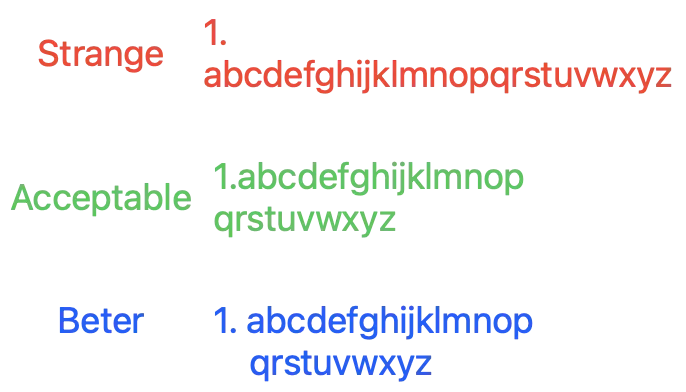
The Better part could potentially be achieved through setting headIndent, firstLineHeadIndent, NSTextTab, but tests showed that with very long strings or size changes, the results still couldn’t be perfectly rendered.
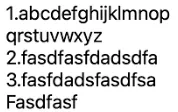
Currently only achieved Acceptable; manually combine list item strings and insert them at the beginning of the string.
We only use NSTextList.MarkerFormat for list item symbols, not NSTextList directly.
Supported list symbols can be found in: MarkupStyleList.swift
Final display result: ( <ol><li> )
Complex Rendering Items — Table
Similar to the implementation of list items, but for tables.
In HTML, use <table> to wrap rows <tr>, which wrap cells <td>/<th> representing table columns:
<table>
  <tr>
    <th>Company</th>
    <th>Contact</th>
    <th>Country</th>
  </tr>
  <tr>
    <td>Alfreds Futterkiste</td>
    <td>Maria Anders</td>
    <td>Germany</td>
  </tr>
  <tr>
    <td>Centro comercial Moctezuma</td>
    <td>Francisco Chang</td>
    <td>Mexico</td>
  </tr>
</table>
Testing shows that the native NSAttributedString.DocumentType.html uses the private macOS API NSTextBlock to render, allowing full display of HTML table styles and content.
A bit of cheating! We can’t use Private API 🥲
    func visit(_ markup: TableColumnMarkup) -> Result {
        let attributedString = collectAttributedString(markup)
        let siblingColumns = markup.parentMarkup?.childMarkups.filter({ $0 is TableColumnMarkup }) ?? []
        let position = (siblingColumns.firstIndex(where: { $0 === markup }) ?? 0)

        // Check if a desired width is specified externally; can set .max to avoid truncating string
        var maxLength: Int? = markup.fixedMaxLength
        if maxLength == nil {
            // If not specified, find the string length of the first row's same column as max length
            if let tableRowMarkup = markup.parentMarkup as? TableRowMarkup,
               let firstTableRow = tableRowMarkup.parentMarkup?.childMarkups.first(where: { $0 is TableRowMarkup }) as? TableRowMarkup {
                let firstTableRowColumns = firstTableRow.childMarkups.filter({ $0 is TableColumnMarkup })
                if firstTableRowColumns.indices.contains(position) {
                    let firstTableRowColumnAttributedString = collectAttributedString(firstTableRowColumns[position])
                    let length = firstTableRowColumnAttributedString.string.utf16.count
                    maxLength = length
                }
            }
        }

        if let maxLength = maxLength {
            // Truncate string if column exceeds maxLength
            if attributedString.string.utf16.count > maxLength {
                attributedString.mutableString.setString(String(attributedString.string.prefix(maxLength))+"...")
            } else {
                attributedString.mutableString.setString(attributedString.string.padding(toLength: maxLength, withPad: " ", startingAt: 0))
            }
        }

        if position < siblingColumns.count - 1 {
            // Add spaces as spacing; external can specify spacing width in number of spaces
            attributedString.append(makeString(in: markup, string: String(repeating: " ", count: markup.spacing)))
        }

        return attributedString
    }

    func visit(_ markup: TableRowMarkup) -> Result {
        let attributedString = collectAttributedString(markup)
        attributedString.append(makeBreakLine(in: markup)) // Add line break, see Source Code for details
        return attributedString
    }

    func visit(_ markup: TableMarkup) -> Result {
        let attributedString = collectAttributedString(markup)
        attributedString.append(makeBreakLine(in: markup)) // Add line break, see Source Code for details
        attributedString.insert(makeBreakLine(in: markup), at: 0) // Add line break, see Source Code for details
        return attributedString
    }
The final rendering effect is shown in the image below:

Not perfect, but acceptable.
Complex Rendering Item — Image
Finally, the biggest challenge: loading remote images into NSAttributedString.
Using <img> to represent images in HTML:
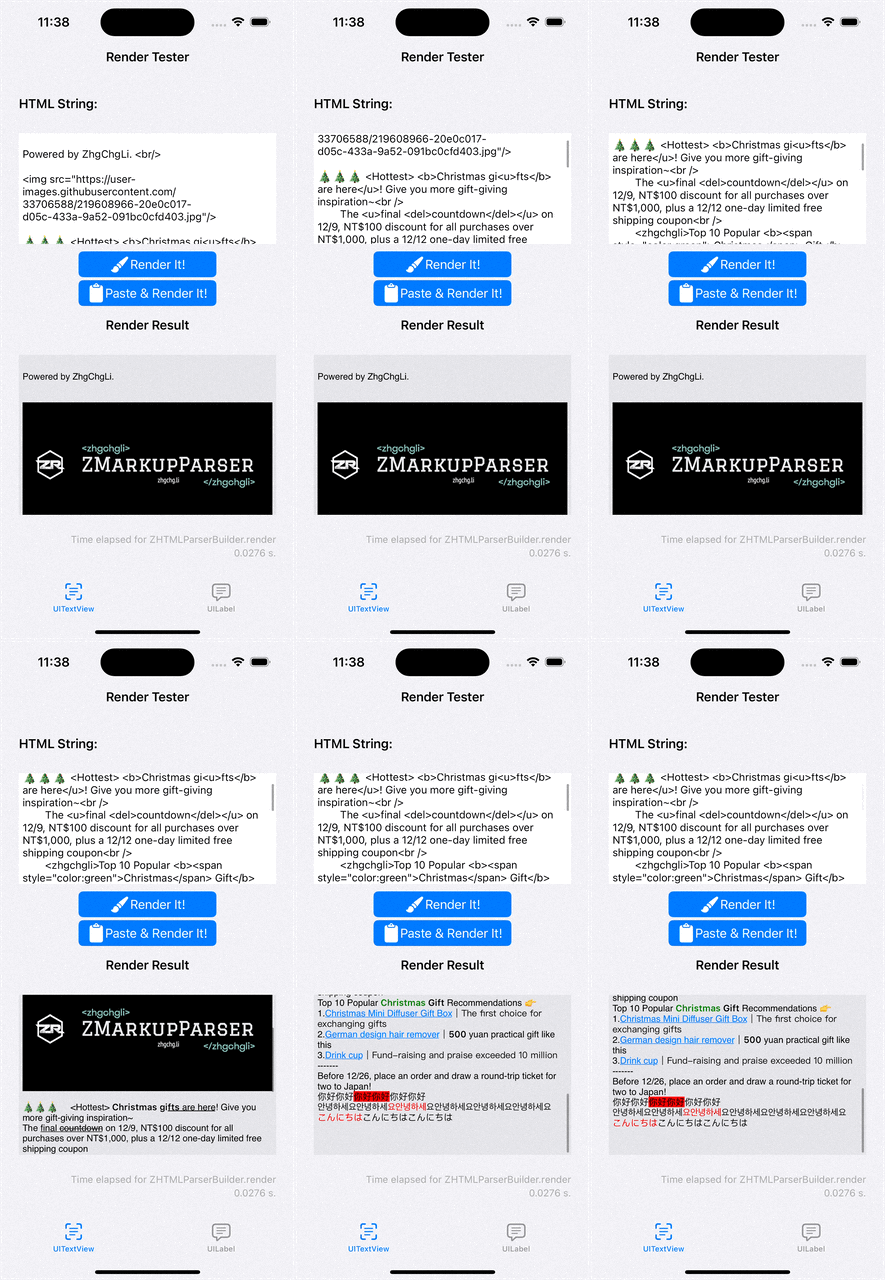
<img src="https://user-images.githubusercontent.com/33706588/219608966-20e0c017-d05c-433a-9a52-091bc0cfd403.jpg" width="300" height="125"/>
You can specify the desired display size through the width / height HTML attributes.
Displaying images in NSAttributedString is much more complicated than expected; there is no good implementation. I encountered some issues before when working on UITextView text wrapping, but after researching again, I still haven’t found a perfect solution.
For now, ignore the native NSTextAttachment issue of not being able to reuse and release memory. Focus on implementing downloading images from remote sources, placing them into NSTextAttachment, then into NSAttributedString, and achieving automatic content updates.
This series of operations is further split into another small project for implementation, aiming for easier optimization and reuse in other projects in the future:
Mainly based on the Asynchronous NSTextAttachments series of articles, but replaced the final update part (UI needs to refresh after download to display) and added Delegate/DataSource for external extension.
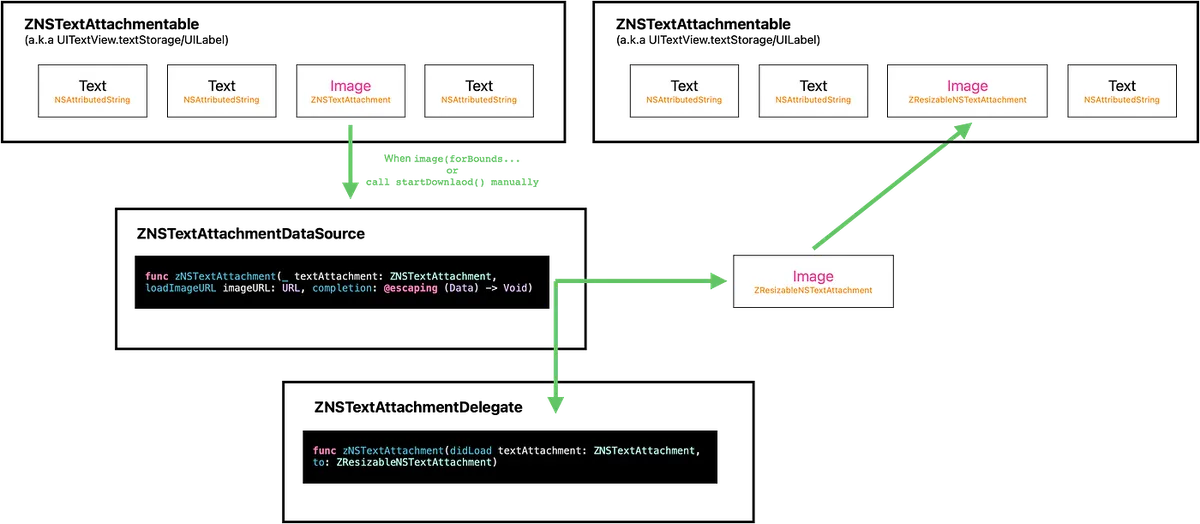
The operation flow and relationships are shown in the above diagram.
-
Declare a ZNSTextAttachmentable object that encapsulates the NSTextStorage object (built-in to UITextView) and the UILabel itself (UILabel does not have NSTextStorage).
The operation method is only to implement replacing attributedString from NSRange. (func replace(attachment: ZNSTextAttachment, to: ZResizableNSTextAttachment)) -
The implementation first uses
ZNSTextAttachmentto wrap the imageURL, PlaceholderImage, and the display size information, then directly shows the image using the placeholder. -
When the system needs this image on the screen, it will call the
image(forBounds…)method. At this point, we start downloading the Image Data. -
DataSource is exposed to allow external control over how to download or implement Image Cache Policy. By default, it uses URLSession to request image data directly.
-
After downloading, create a new
ZResizableNSTextAttachmentand implement the logic for custom image size inattachmentBounds(for…). -
Call the
replace(attachment: ZNSTextAttachment, to: ZResizableNSTextAttachment)method to replace the position ofZNSTextAttachmentwithZResizableNSTextAttachment. -
Send didLoad delegate notification to allow external integration when needed
-
Completed
For detailed code, please refer to the Source Code.
The reason for not using NSLayoutManager.invalidateLayout(forCharacterRange: range, actualCharacterRange: nil) or NSLayoutManager.invalidateDisplay(forCharacterRange: range) to refresh the UI is that the UI does not update correctly. Since the exact Range is known, directly replacing the NSAttributedString ensures the UI updates properly.
The final display result is as follows:
<span style="color:red">Hello</span>HelloHello <br />
<img src="https://user-images.githubusercontent.com/33706588/219608966-20e0c017-d05c-433a-9a52-091bc0cfd403.jpg"/>

Testing & Continuous Integration
In this project, besides writing Unit Tests, Snapshot Tests were also created for integration testing to facilitate comprehensive comparison of the final NSAttributedString.
The main functional logic is covered by Unit Tests along with integration tests. The final Test Coverage is around 85%.

Snapshot Test
Directly Importing the Framework for Use:
import SnapshotTesting
// ...
func testShouldKeppNSAttributedString() {
  let parser = ZHTMLParserBuilder.initWithDefault().build()
  let textView = UITextView()
  textView.frame.size.width = 390
  textView.isScrollEnabled = false
  textView.backgroundColor = .white
  textView.setHtmlString("html string...", with: parser)
  textView.layoutIfNeeded()
  assertSnapshot(matching: textView, as: .image, record: false)
}
// ...

Directly compare the final results to ensure the integration and adjustments have no issues.
Codecov Test Coverage
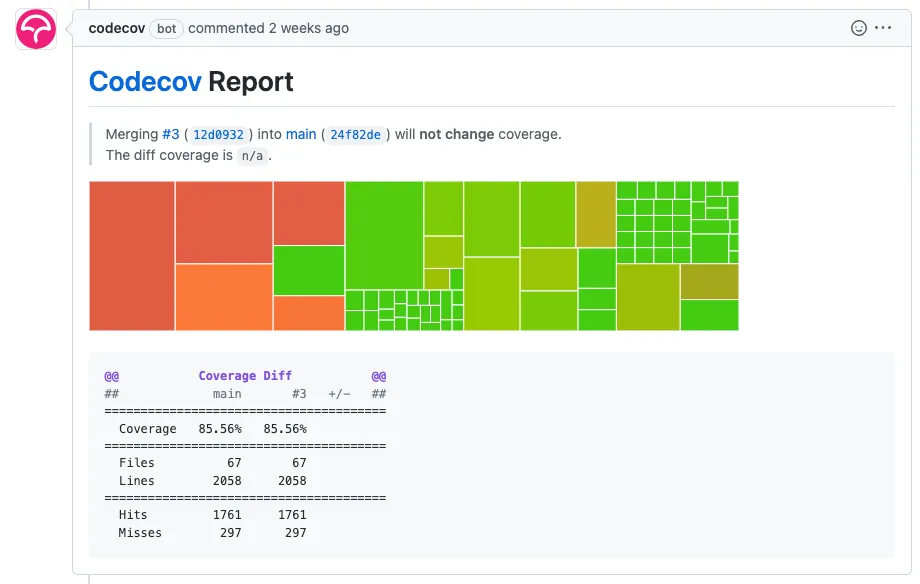
Integrate with Codecov.io (free for Public Repos) to evaluate Test Coverage by simply installing the Codecov GitHub App and configuring it.

After setting up Codecov <-> Github Repo, you can also add a codecov.yml file in the project root directory.
comment:                  # this is a top-level key
  layout: "reach, diff, flags, files"
  behavior: default
  require_changes: false  # if true: only post the comment if coverage changes
  require_base: no        # [yes :: must have a base report to post]
  require_head: yes       # [yes :: must have a head report to post]
Configuration file to enable automatic commenting of CI results on each PR after it is submitted.
Continuous Integration
Github Action, CI Integration: ci.yml
name: CI

on:
  workflow_dispatch:
  pull_request:
    types: [opened, reopened]
  push:
    branches:
    - main

jobs:
  build:
    runs-on: self-hosted
    steps:
      - uses: actions/checkout@v3
      - name: spm build and test
        run: \\|
          set -o pipefail
          xcodebuild test -workspace ZMarkupParser.xcworkspace -testPlan ZMarkupParser -scheme ZMarkupParser -enableCodeCoverage YES -resultBundlePath './scripts/TestResult.xcresult' -destination 'platform=iOS Simulator,name=iPhone 14,OS=16.1' build test \\| xcpretty
      - name: Codecov
        uses: codecov/[email protected]
        with:
          xcode: true
          xcode_archive_path: './scripts/TestResult.xcresult'
This setting runs build and test when a PR is opened/reopened or when pushing to the main branch, and finally uploads the test coverage report to codecov.
Regex
Regarding regular expressions, each time I use them, I improve my skills further; this time I didn’t use them much, but since I originally wanted to use one regex to extract paired HTML tags, I studied how to write it more carefully.
Some cheat sheet notes I learned this time…
-
?:allows () to match a group without capturing the result
e.g.(?:https?:\/\/)?(?:www\.)?example\.comwill return the entire URL inhttps://www.example.cominstead ofhttps://orwww -
.+?non-greedy match (returns the nearest match)
e.g.<.+?>in<a>test</a>will return<a>and</a>instead of the whole string -
(?=XYZ)any string until the substringXYZappears; note that a similar pattern[^XYZ]means any character untilX or Y or Zappears
e.g.(?:__)(.+?(?=__))(?:__)(any string until__) will matchtest -
?Rrecursively searches inward for the same pattern value
e.g.\((?:[^()]\\|((?R)))+\)will match(simple),(and(nested)), and(nested)in(simple) (and(nested)) -
?<GroupName>…\k<GroupName>matches the previous Group Name
e.g.(?<tagName><a>).*(\k<GroupName>) -
(?(X)yes\\|no)matches the conditionyesif theXth capture group (or Group Name) has a value; otherwise, it matchesno.
Not supported in Swift yet
Other Great Regex Articles:
-
How do regular expressions work? -> Can be referenced for future optimization of this project’s regex performance
-
An Incident Where a Regex Error Caused Infinite Searching and Ultimately Server Failure
-
You can check all regex rules at the bottom right of Regex101
Swift Package Manager & Cocoapods
This is also my first time developing with SPM & Cocoapods… quite interesting. SPM is really convenient; however, if two projects depend on the same package at the same time, opening both projects simultaneously may cause one of them to fail to find the package and fail to build…
Cocoapods has uploaded ZMarkupParser but hasn’t tested if it works properly, because I use SPM 😝.
ChatGPT
Based on actual development experience, I found it most useful only when polishing the Readme; I haven’t felt significant benefits during development. When asking mid-senior level questions, they often couldn’t provide a definite answer or sometimes gave incorrect ones (e.g., when asking about some regex rules, the answers were not quite accurate). So in the end, I still resorted to manually searching on Google for the correct solutions.
Not to mention asking it to write code, unless it’s a simple Code Gen Object; otherwise, don’t expect it to complete the entire tool architecture directly. (At least for now, it seems Copilot might be more helpful for coding tasks.)
But it can provide a general direction for knowledge gaps, allowing us to quickly get a rough idea of how certain things should be done. Sometimes, when our understanding is too low, it’s hard to quickly find the right direction on Google. In such cases, ChatGPT is quite helpful.
Disclaimer
After more than three months of research and development, I am exhausted, but I must state that this approach is just a feasible result from my study. It may not be the best solution and there might still be room for optimization. This project is more like a stepping stone, hoping to find a perfect answer for Markup Language to NSAttributedString. Contributions are very welcome; many aspects still need the power of the community to improve.
Contributing

Here are some areas for improvement I thought of at this moment (2023/03/12), which I will record later in the Repo:
-
Performance/algorithm optimization: Although faster and more stable than the native
NSAttributedString.DocumentType.html, there is still much room for improvement. I believe the performance will never match that of XMLParser; hopefully, one day it can achieve similar performance while maintaining customization and automatic error correction. -
Support more HTML tags and style attribute conversion parsing.
-
ZNSTextAttachment further optimized to support reuse and memory release; may need to study CoreText.
-
Support Markdown parsing because the underlying abstraction is not limited to HTML; as long as the Markdown is converted to Markup objects, Markdown parsing can be completed. Therefore, I named it ZMarkupParser instead of ZHTMLParser, hoping to support Markdown to NSAttributedString someday.
-
Support Any to Any, e.g. HTML to Markdown, Markdown to HTML. Since we have the original AST tree (Markup objects), it is possible to implement conversion between any Markup formats.
-
Implement CSS
!importantfunctionality to enhance the inheritance strategy of the abstract MarkupStyle. -
Enhance the HTML Selector functionality; currently, it only has the most basic filter features.
-
So many, feel free to open an issue.
Summary

This concludes all the technical details and my journey in developing ZMarkupParser. It took me nearly three months of after-work and weekend time, countless research and practice, writing tests, improving test coverage, and setting up CI. Only then did I achieve a somewhat presentable result. I hope this tool can help those facing similar challenges, and I also hope everyone can work together to make this tool even better.

Currently applied in our company’s iOS app for pinkoi.com, no issues have been found. 😄



Comments