
ZMarkupParser HTML String to NSAttributedString Converter Tool
Convert HTML String to NSAttributedString Corresponding Key Style Settings
ZhgChgLi / ZMarkupParser

Features
-
Developed purely in Swift, it parses HTML tags using Regex and performs tokenization, analyzes and corrects tag accuracy (fixing tags without ends & misaligned tags), then converts them into an abstract syntax tree. Finally, it uses the Visitor Pattern to map HTML tags to abstract styles, producing the final NSAttributedString result; it does not rely on any parser libraries.
-
Supports HTML Render (to NSAttributedString) / Stripper (Remove HTML Tags) / Selector Features
-
Automatically Analyze and Correct Tag Accuracy (Fix Missing End Tags & Misplaced Tags)
<br>-><br/>
<b>Bold<i>Bold+Italic</b>Italic</i>-><b>Bold<i>Bold+Italic</i></b><i>Italic</i>
<Congratulation!>-><Congratulation!>(treat as String) -
Support Custom Style Specification
e.g.<b></b>->weight: .semibold & underline: 1 -
Support Custom Extension of HTML Tag Parsing
e.g. Parse<zhgchgli></zhgchgli>into the desired style -
Includes architecture design for easy HTML tag extension
Currently, besides supporting basic styles, it also supports rendering ul/ol/li lists and hr separators. Future extensions for other HTML tags can be quickly supported. -
Support for Extended Style Parsing from
styleHTML Attribute
HTML can specify text styles through the style attribute. Similarly, this package supports specifying styles from thestyleattribute.
e.g.<b style=”font-size: 20px”></b>->Bold + font size 20 px -
Supports iOS/macOS
-
Support HTML Color Name to UIColor/NSColor
-
Test Coverage: 80%+
-
Supports parsing of HTML tags such as
<img>images,<ul>lists,<table>tables, and more. -
Higher Performance than
NSAttributedString.DocumentType.html
Performance Analysis
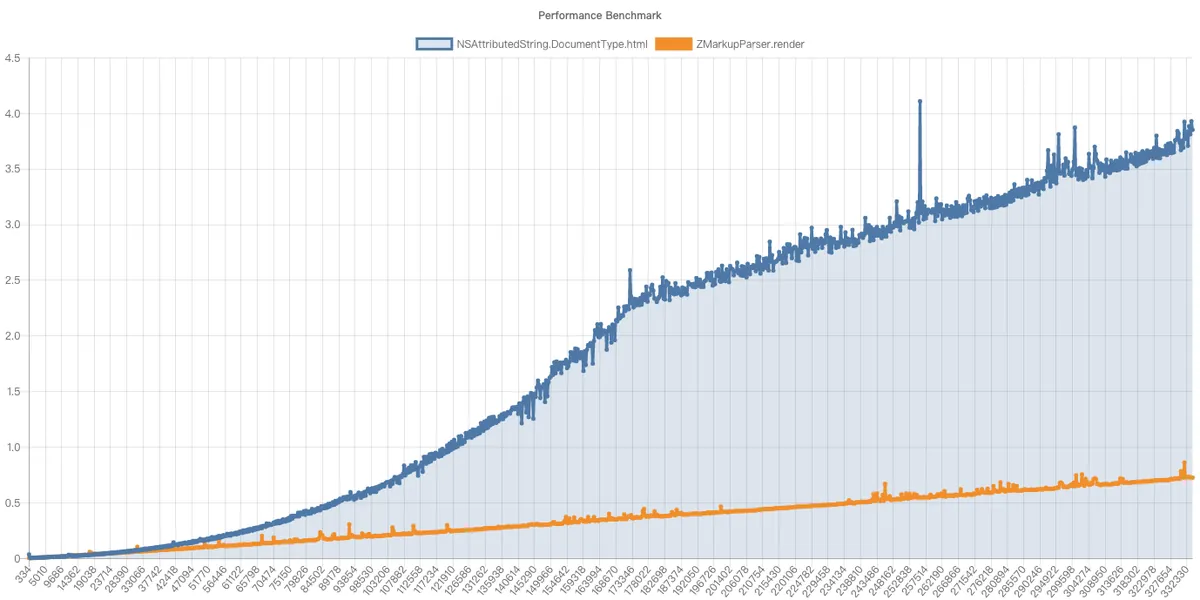
-
Test Environment: 2022/M2/24GB Memory/macOS 13.2/XCode 14.1
-
X-axis: Number of HTML characters
-
Y-axis: Rendering Time (seconds)
*Additionally, NSAttributedString.DocumentType.html will crash (EXC_BAD_ACCESS) with strings longer than 54,600+ characters.
Try It Out
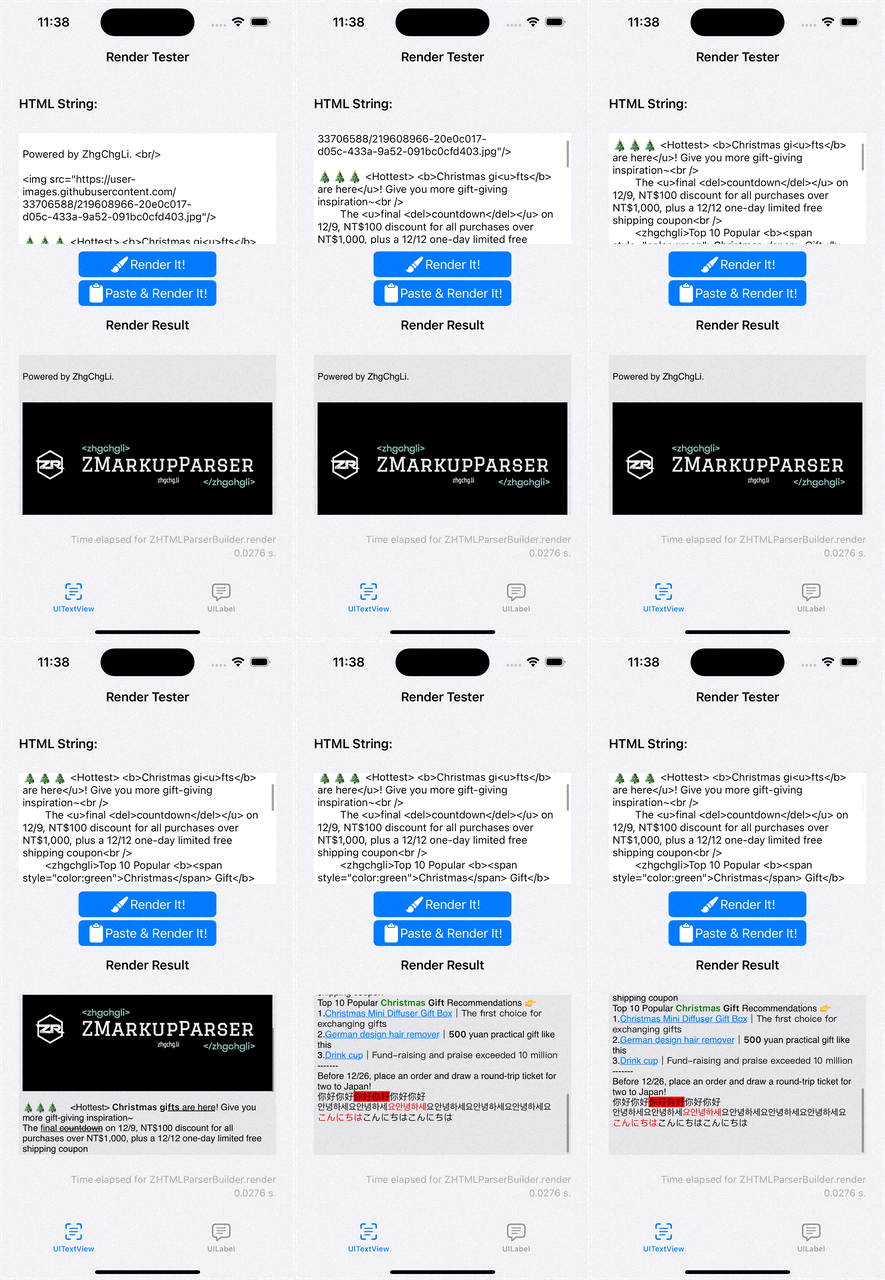
You can directly download the project, open ZMarkupParser.xcworkspace, select the ZMarkupParser-Demo target, then build & run to test the functionality.
Installation
Supports SPM/Cocoapods. Please refer to Readme.
Usage
Style Declaration
MarkupStyle/MarkupStyleColor/MarkupStyleParagraphStyle are wrappers corresponding to NSAttributedString.Key.
var font:MarkupStyleFont
var paragraphStyle:MarkupStyleParagraphStyle
var foregroundColor:MarkupStyleColor? = nil
var backgroundColor:MarkupStyleColor? = nil
var ligature:NSNumber? = nil
var kern:NSNumber? = nil
var tracking:NSNumber? = nil
var strikethroughStyle:NSUnderlineStyle? = nil
var underlineStyle:NSUnderlineStyle? = nil
var strokeColor:MarkupStyleColor? = nil
var strokeWidth:NSNumber? = nil
var shadow:NSShadow? = nil
var textEffect:String? = nil
var attachment:NSTextAttachment? = nil
var link:URL? = nil
var baselineOffset:NSNumber? = nil
var underlineColor:MarkupStyleColor? = nil
var strikethroughColor:MarkupStyleColor? = nil
var obliqueness:NSNumber? = nil
var expansion:NSNumber? = nil
var writingDirection:NSNumber? = nil
var verticalGlyphForm:NSNumber? = nil
...
You can declare your own styles to apply to the corresponding HTML tags as you wish:
let myStyle = MarkupStyle(font: MarkupStyleFont(size: 13), backgroundColor: MarkupStyleColor(name: .aquamarine))
HTML Tag
Declare the HTML tags to be rendered and their corresponding Markup Styles. The currently predefined HTML tag names are as follows:
A_HTMLTagName(), // <a></a>
B_HTMLTagName(), // <b></b>
BR_HTMLTagName(), // <br></br>
DIV_HTMLTagName(), // <div></div>
HR_HTMLTagName(), // <hr></hr>
I_HTMLTagName(), // <i></i>
LI_HTMLTagName(), // <li></li>
OL_HTMLTagName(), // <ol></ol>
P_HTMLTagName(), // <p></p>
SPAN_HTMLTagName(), // <span></span>
STRONG_HTMLTagName(), // <strong></strong>
U_HTMLTagName(), // <u></u>
UL_HTMLTagName(), // <ul></ul>
DEL_HTMLTagName(), // <del></del>
IMG_HTMLTagName(handler: ZNSTextAttachmentHandler), // <img> and image downloader
TR_HTMLTagName(), // <tr>
TD_HTMLTagName(), // <td>
TH_HTMLTagName(), // <th>
...and more
...
// HTMLTag
HTMLTag(tagName: A_HTMLTagName(), customStyle: myStyle)
This way, the specified MarkupStyle will be applied when parsing the <a> tag.
Extending HTMLTagName:
let zhgchgli = ExtendTagName("zhgchgli")
HTML Style Attribute
As mentioned earlier, HTML supports specifying styles via the Style Attribute. Here, we also abstract it to allow specifying supported styles and extensions. The currently predefined HTML Style Attributes are as follows:
ColorHTMLTagStyleAttribute(), // color
BackgroundColorHTMLTagStyleAttribute(), // background-color
FontSizeHTMLTagStyleAttribute(), // font-size
FontWeightHTMLTagStyleAttribute(), // font-weight
LineHeightHTMLTagStyleAttribute(), // line-height
WordSpacingHTMLTagStyleAttribute(), // word-spacing
...
Extend Style Attribute:
ExtendHTMLTagStyleAttribute(styleName: "text-decoration", render: { value in
  var newStyle = MarkupStyle()
  if value == "underline" {
    newStyle.underline = NSUnderlineStyle.single
  } else {
    // ...
  }
  return newStyle
})
Usage
import ZMarkupParser

let parser = ZHTMLParserBuilder.initWithDefault().set(rootStyle: MarkupStyle(font: MarkupStyleFont(size: 13))).build()
initWithDefault automatically adds predefined HTML Tag Names, default corresponding MarkupStyles, and predefined Style Attributes.
set(rootStyle:) can specify the default style for the entire string, or it can be left unspecified.
Customization
let parser = ZHTMLParserBuilder.initWithDefault().add(ExtendTagName("zhgchgli"), withCustomStyle: MarkupStyle(backgroundColor: MarkupStyleColor(name: .aquamarine))).build() // will use markupstyle you specify to render extend html tag <zhgchgli></zhgchgli>
let parser = ZHTMLParserBuilder.initWithDefault().add(B_HTMLTagName(), withCustomStyle: MarkupStyle(font: MarkupStyleFont(size: 18, weight: .style(.semibold)))).build() // will use markupstyle you specify to render <b></b> instead of default bold markup style
HTML Render
let attributedString = parser.render(htmlString) // NSAttributedString

// work with UITextView
textView.setHtmlString(htmlString)
// work with UILabel
label.setHtmlString(htmlString)
HTML Stripper
parser.stripper(htmlString)
Selector HTML String
let selector = parser.selector(htmlString) // HTMLSelector e.g. input: <a><b>Test</b>Link</a>
selector.first("a")?.first("b").attributedString // will return Test
selector.filter("a").attributedString // will return Test Link

// render from selector result
let selector = parser.selector(htmlString) // HTMLSelector e.g. input: <a><b>Test</b>Link</a>
parser.render(selector.first("a")?.first("b"))
Async
For rendering long strings, you can use the async method to prevent UI blocking.
parser.render(String) { _ in }...
parser.stripper(String) { _ in }...
parser.selector(String) { _ in }...
Know-how
-
The hyperlink style in UITextView depends on linkTextAttributes, so even if NSAttributedString.key is set, the effect may not appear.
-
UILabel does not support specifying URL styles, so NSAttributedString.key may be set but have no visible effect.
-
For rendering complex HTML, you still need to use WKWebView (including JS/tables rendering).



Comments