
Slack & ChatGPT Integration
Build Your Own ChatGPT OpenAI API for Slack App (Google Cloud Functions & Python)
Background
Recently, we have been promoting the use of Generative AI within the team to improve work efficiency. Initially, we only aim to achieve an AI Assistant (ChatGPT functionality) to reduce time spent on daily data queries, organizing tedious data, and manual data processing, thereby enhancing productivity. We hope that engineers, designers, PMs, marketing, and others can all freely use it.
The simplest way is to directly purchase the ChatGPT Team plan, which costs $25 USD per seat per year. However, since the usage frequency and volume are uncertain, and there is a desire to integrate with more external collaboration and development workflows, we chose to use the OpenAI API instead, then wrap and integrate it through other services for team members.
You can generate an OpenAI API Key from this page. The Key is not tied to a specific Model version; you specify the Model version when using the API, which determines the token cost.
We need a service that can set the OpenAI API Key by itself and use that key for ChatGPT-like functionality.
Whether it’s a Chrome Extension or a Slack App, it’s quite hard to find services that allow users to set their own OpenAI API Key. Most services sell their own subscription plans, so letting users customize the API Key means they can’t make money and are basically doing charity.
[Chrome Extension] SidebarGPT
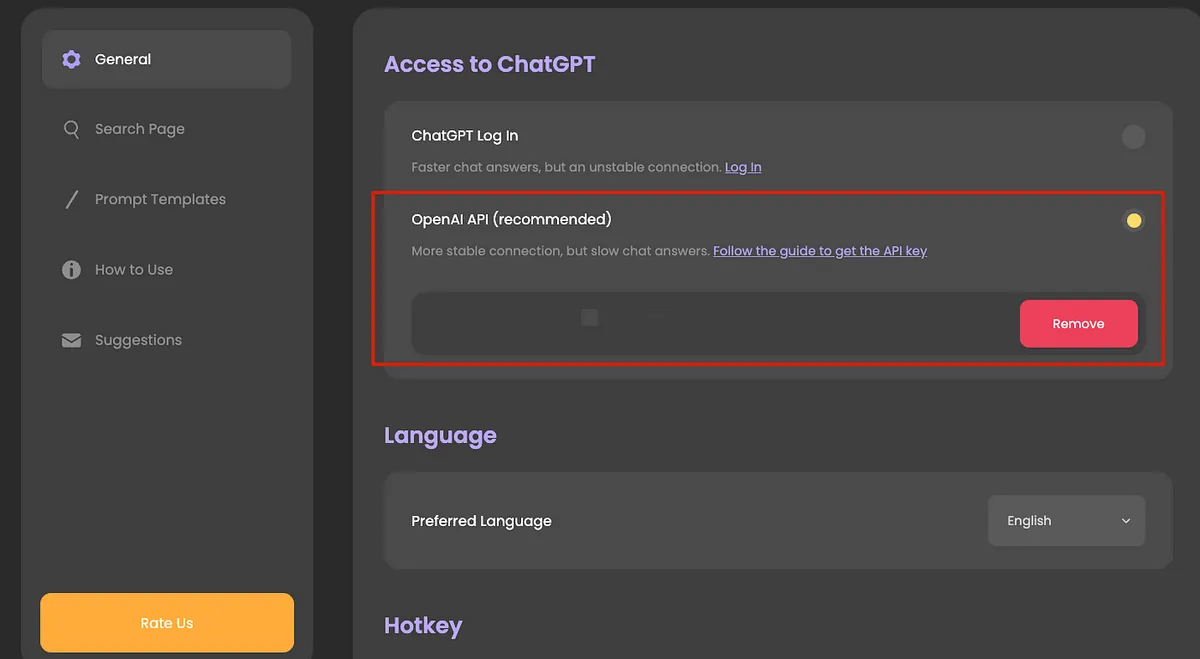
After installation, go to Settings -> General -> enter your OpenAI API Key.
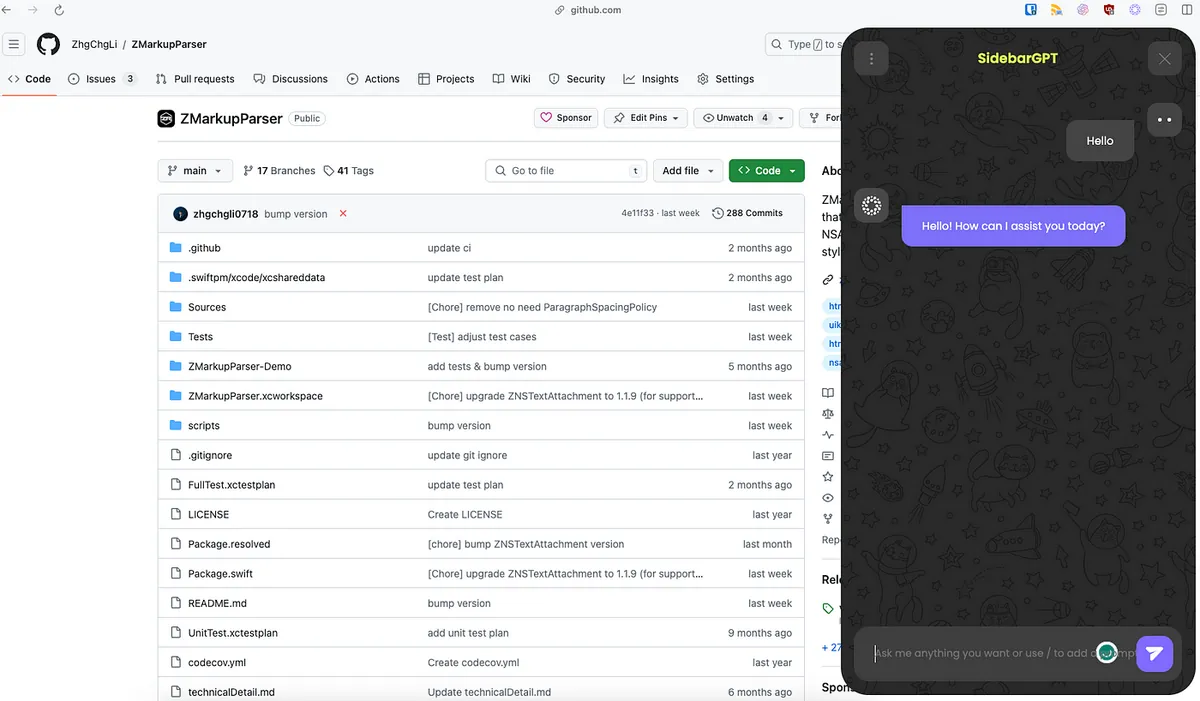
You can directly open the chat interface from the browser toolbar or the sidebar icon and use it immediately:
[Chrome Extension] OpenAI Translator
If you only need translation, you can use this. You can customize the OpenAI API Key for translation.

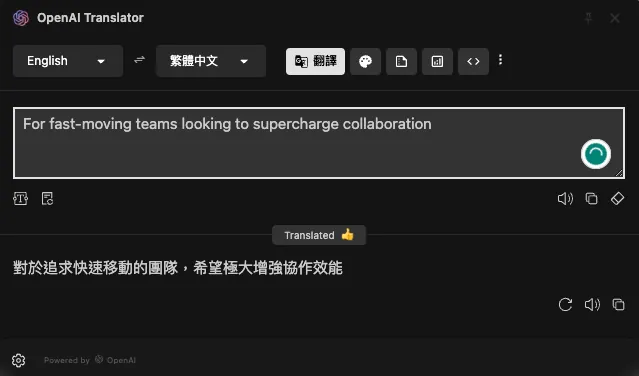
It is also an open-source project and offers desktop applications for macOS and Windows:
The advantage of Chrome Extensions is that they are fast, simple, and easy to use—just install and start using. The downside is that you need to share the API Key with all members, making it hard to control leaks. Also, using third-party services makes it difficult to ensure data security for everyone.
[Self-hosted] LibreChat
An OpenAI API Chat wrapper service recommended by colleagues from the R&D department, offering authentication and an open-source project that closely replicates the ChatGPT interface with more powerful features than ChatGPT.
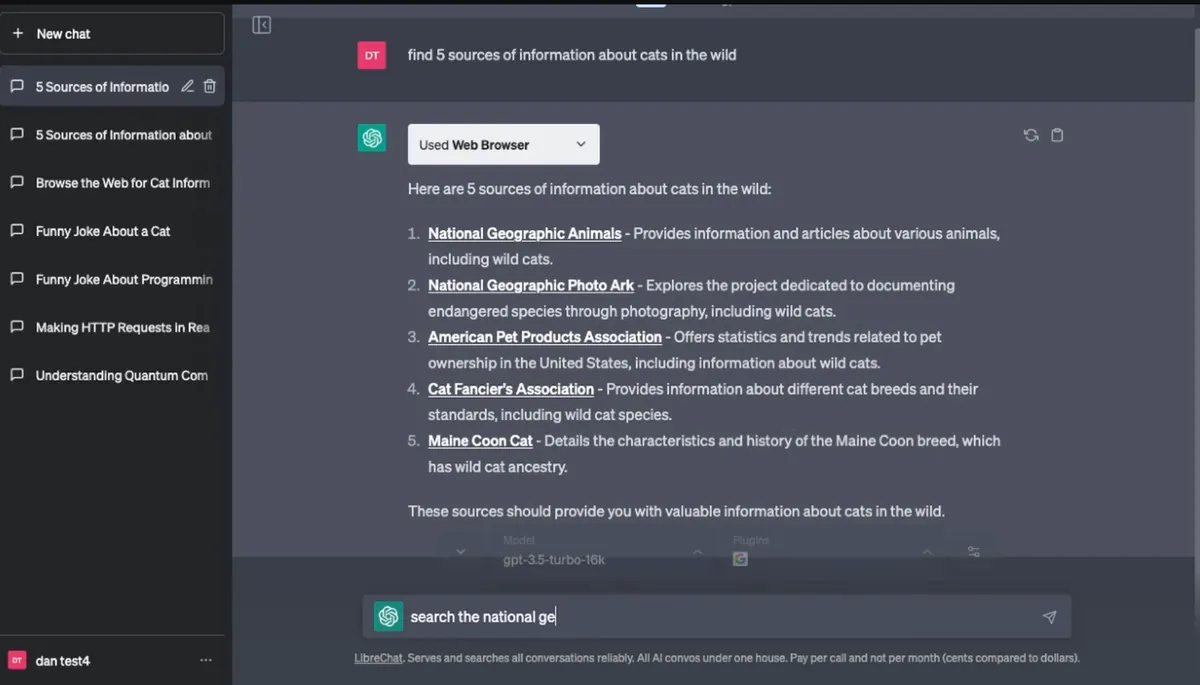
Just clone the project, install Docker, set up the .env file, and start the Docker service to access and use it directly through the website.
Tried it out and it’s flawless—essentially a local version of ChatGPT service; the only downside is that it requires server deployment. If there are no other concerns, you can directly use this open-source project.
Slack App
Actually, LibreChat works well once deployed on a server, but I had a sudden thought: wouldn’t it be more convenient if it were integrated into daily tools? Plus, the company server has strict permission settings, so running services freely is difficult.
At that time, I didn’t think much and assumed there would be many Slack Apps integrating OpenAI API services, so I just wanted to find one and set it up quickly; but it turned out not to be that simple.
Google search only found one official Slack x OpenAI press release from March 2023, “Why we built the ChatGPT app for Slack,” and some Beta images:
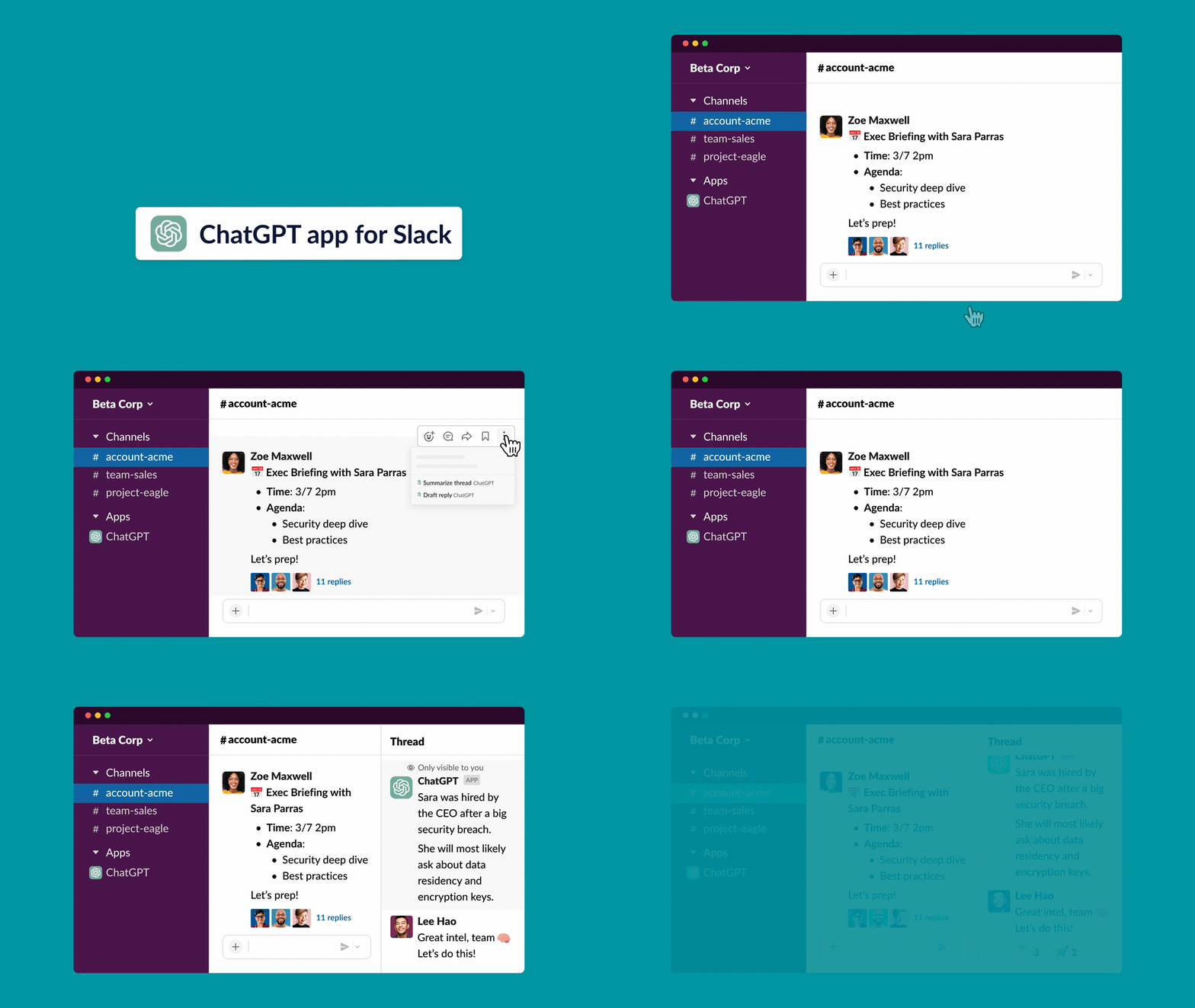
https://www.salesforce.com/news/stories/chatgpt-app-for-slack/
The features seem very complete and can greatly improve work efficiency. However, as of January 2024, there is no release news. The Beta registration link provided at the end of the article is also no longer valid, with no updates for now. (Or maybe Microsoft wants Teams support first?)
[2024/02/14 Update]:
- See Slack official news for speculation that the integration with ChatGPT (OpenAI) may have been discontinued or merged into Slack AI.
Slack Apps
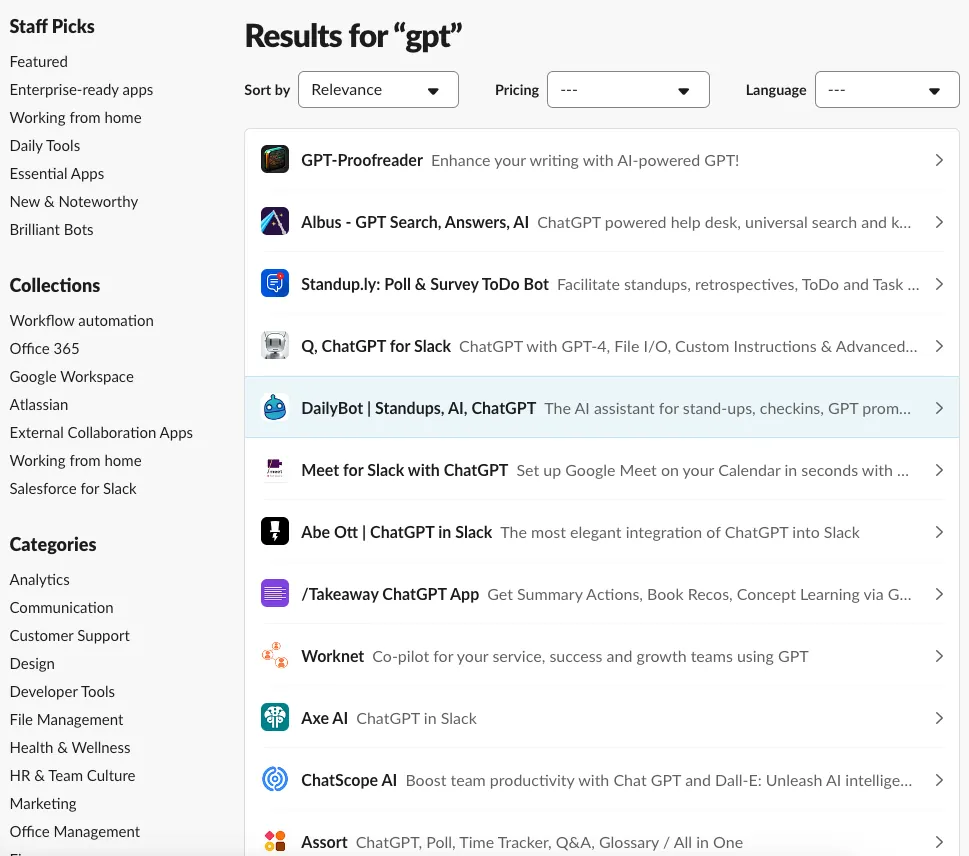
Since there is no official app, I turned to third-party developers’ apps. I searched and tried several but hit dead ends; not only are there few suitable apps, none offer a custom key feature. They are all designed to sell services and make money.
Implementing ChatGPT OpenAI API for Slack App by Yourself
Having some prior experience with Slack App development, I decided to build one myself.
⚠️Disclaimer⚠️
This article uses integrating the OpenAI API as an example to demonstrate how to create a Slack App and quickly use Google Cloud Functions to meet the requirements. Slack Apps have many possible applications, so feel free to explore and customize.
⚠️⚠️ Google Cloud Functions, a Function as a Service (FaaS), offers the advantages of convenience, speed, and free quotas. Once the code is written, it can be deployed and run immediately with automatic scaling. The downside is that the service environment is controlled by GCP. If the service is not called for a long time, it goes into sleep mode. When called again, it undergoes a Cold Start, resulting in longer response times. It is also more difficult to have multiple services interact with each other.
For more comprehensive or high-demand usage, it is still recommended to set up your own VM (App Engine) to run the server service.
Final Result Screenshot
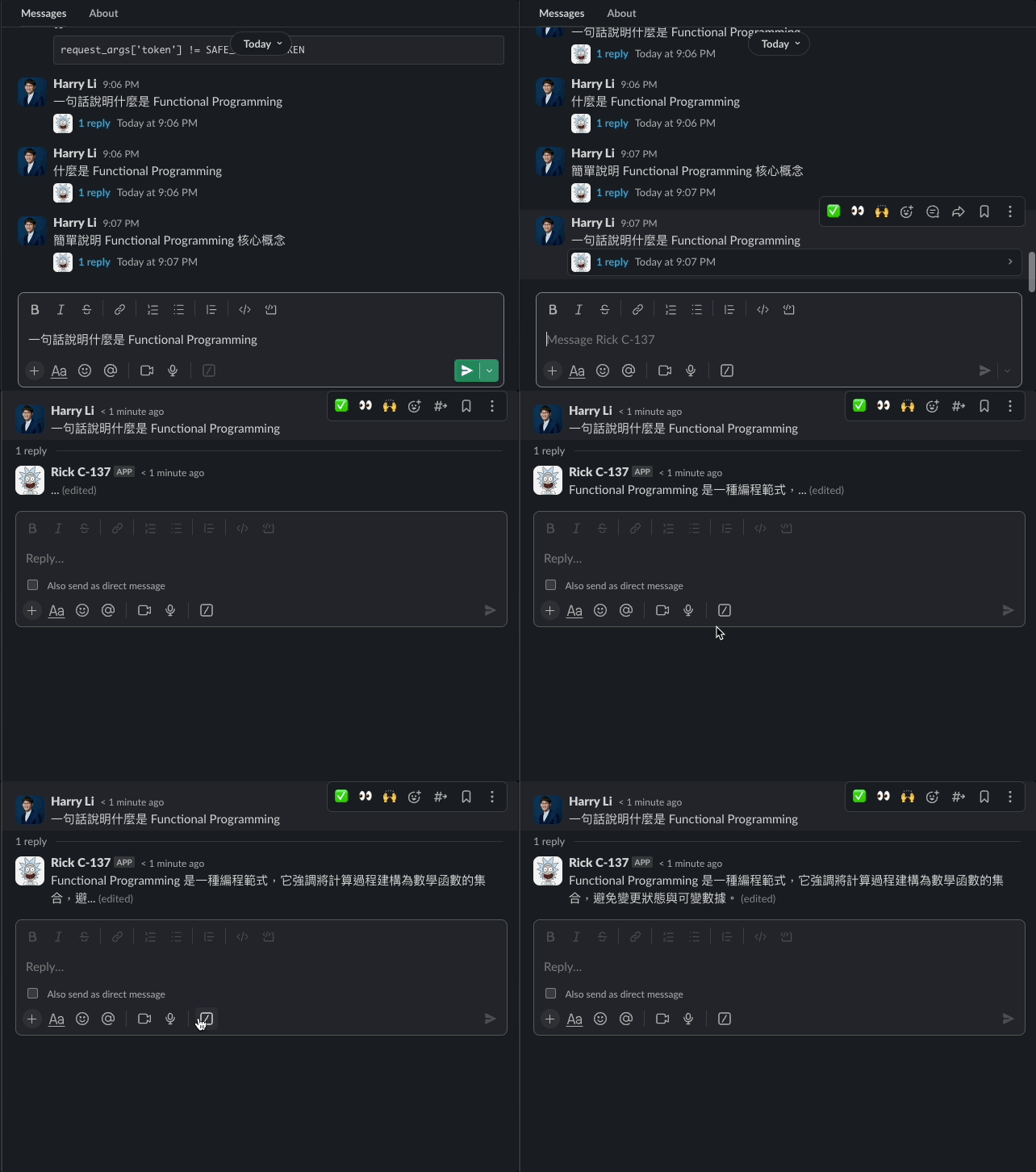
The complete Cloud Functions Python code and Slack App configuration are provided at the end of the article. For those who don’t want to go through it step by step, you can quickly refer to them.
Step 1. Create a Slack App
Go to Slack App:
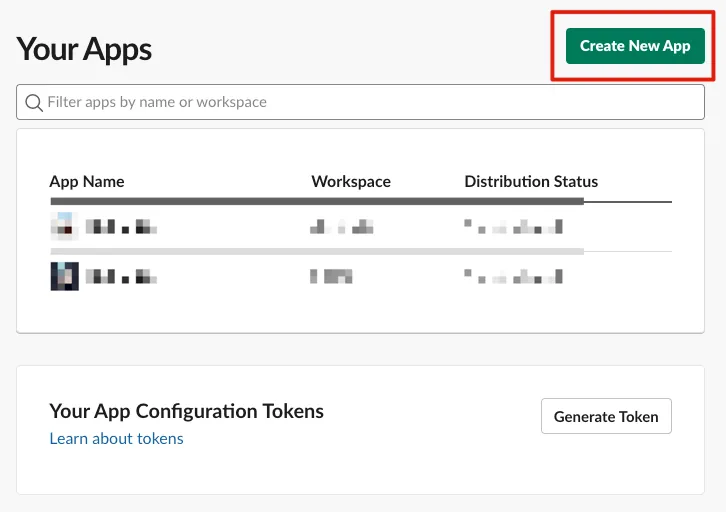
Click “Create New App”
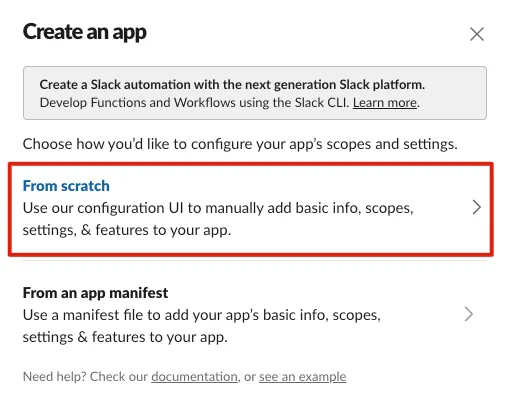
Select “From scratch”
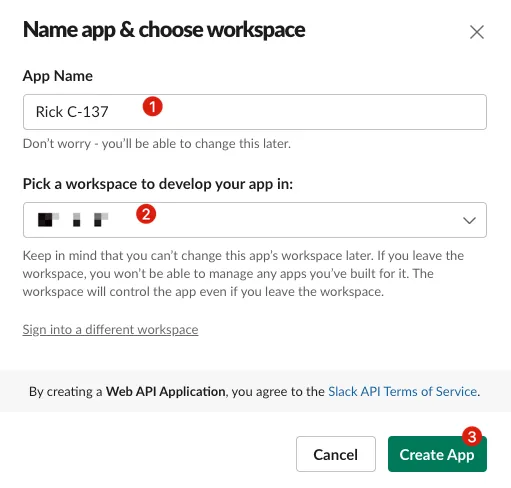
Enter the “App Name” and select the Workspace to add it to.
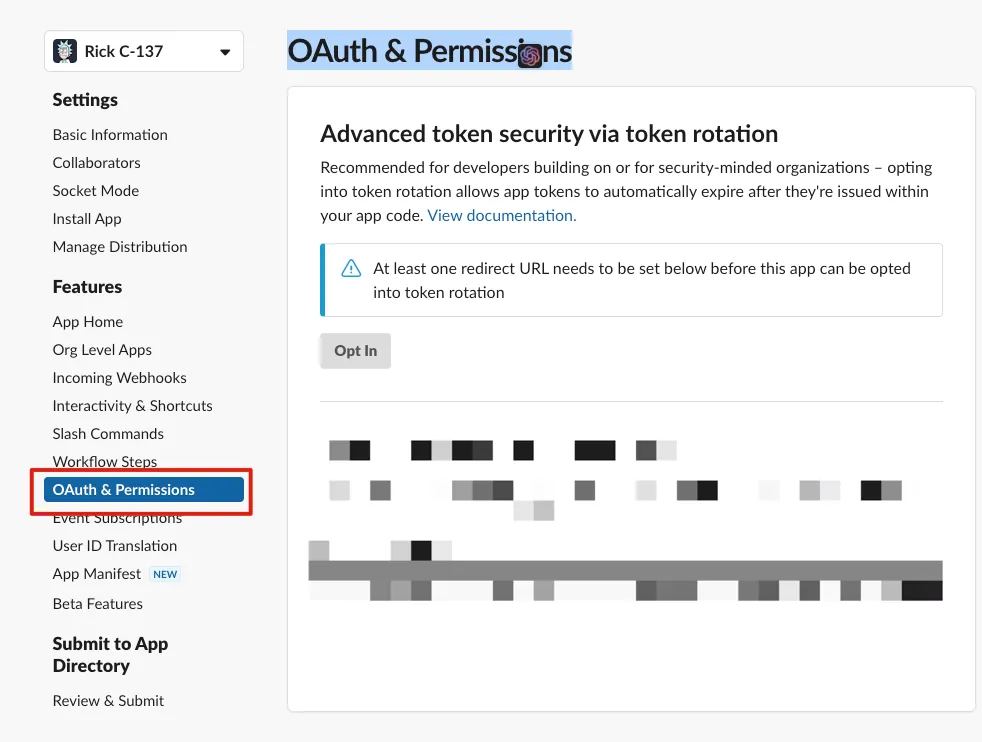
After creation, go to “OAuth & Permissions” to add the required permissions for the Bot.
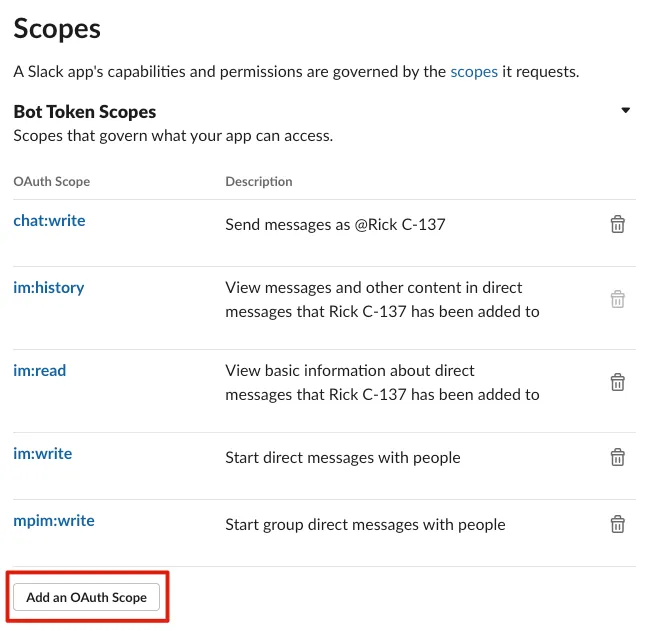
Scroll down to the “Scopes” section, click “Add an OAuth Scope,” and search to add the following permissions:
-
chat:write
-
im:history
-
im:read
-
im:write
After adding Bot permissions, click “Install App” on the left -> “Install to Workspace”
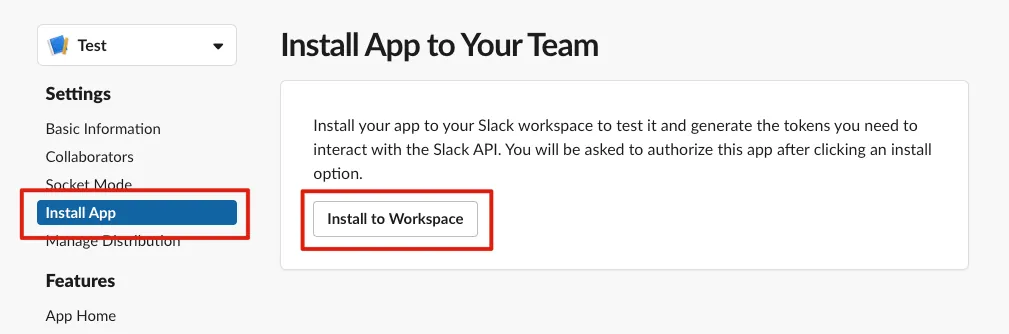
If the Slack App adds new permissions in the future, you will need to click “Reinstall” again for them to take effect.
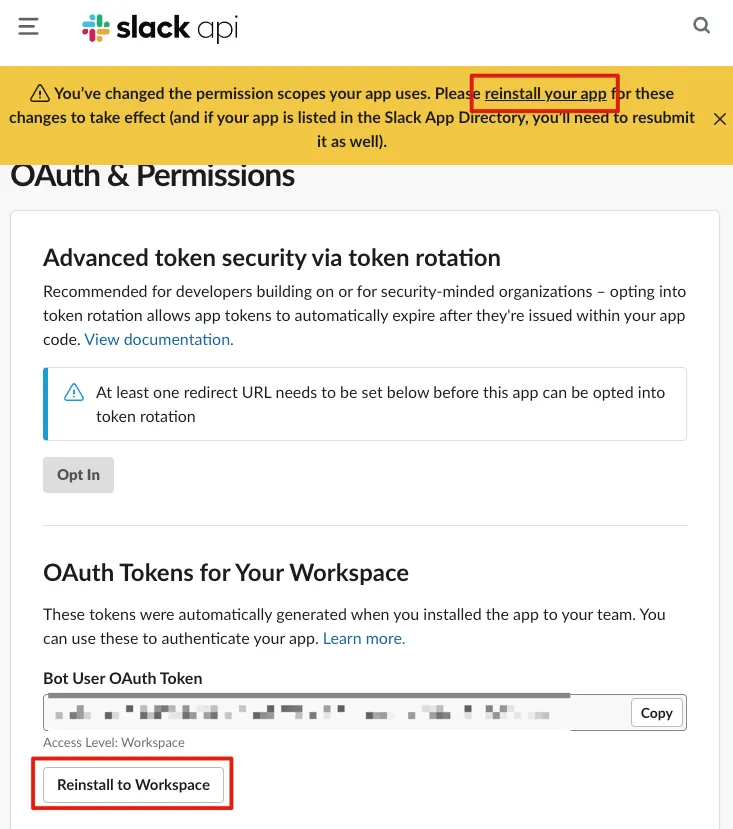
Rest assured, the Bot Token will not change due to reinstallation.
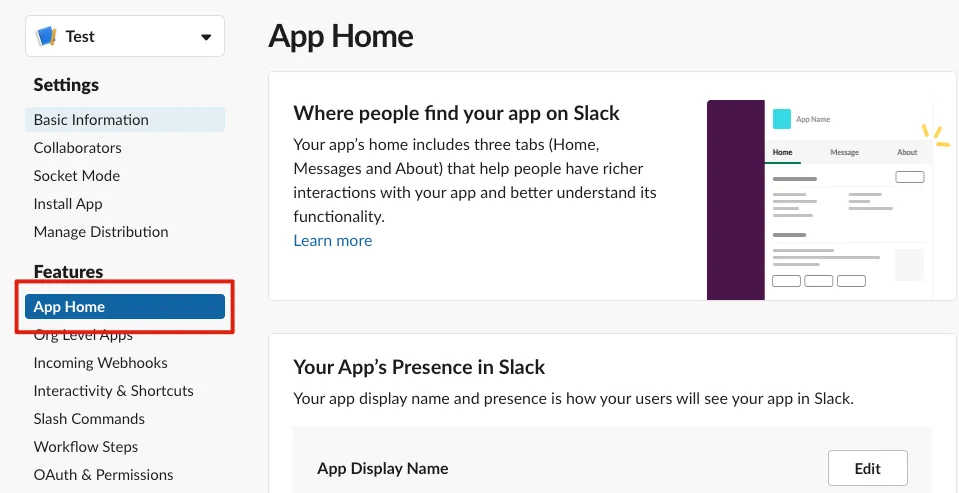
After setting the Slack Bot Token permissions, go to “App Home”:
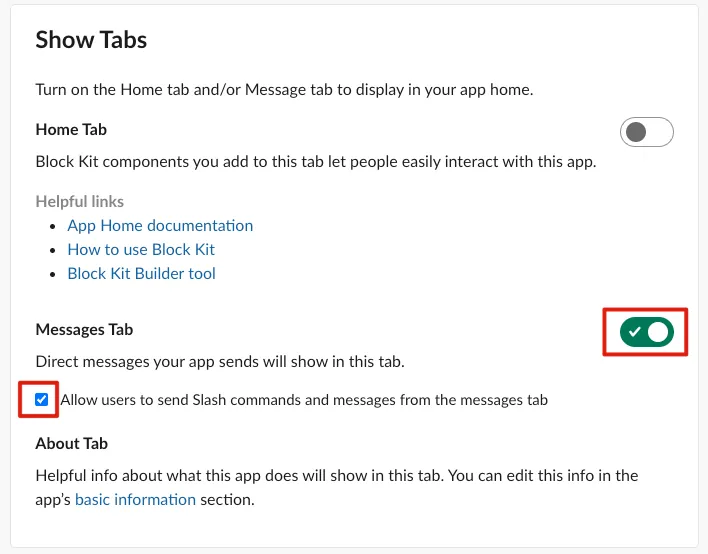
Scroll down to the “Show Tabs” section and enable “Messages Tab” and “Allow users to send Slash commands and messages from the messages tab” (if this is not checked, users cannot send messages and will see “Sending messages to this app has been turned off.”)
Return to the Slack Workspace and press “Command+R” to refresh the screen. You will see the newly created Slack App and the message input box:
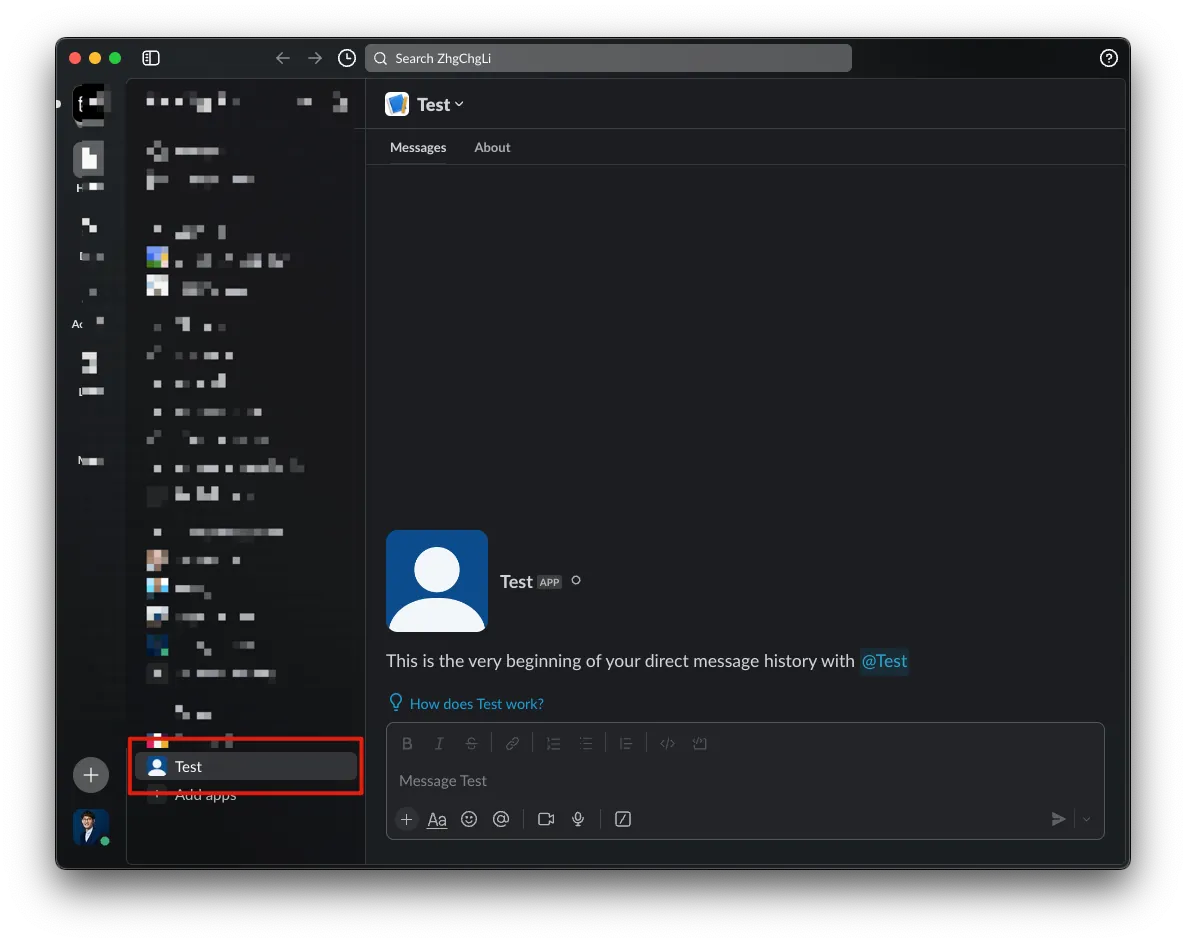
At this point, sending messages to the App has no functionality yet.
Enable Event Subscriptions Feature
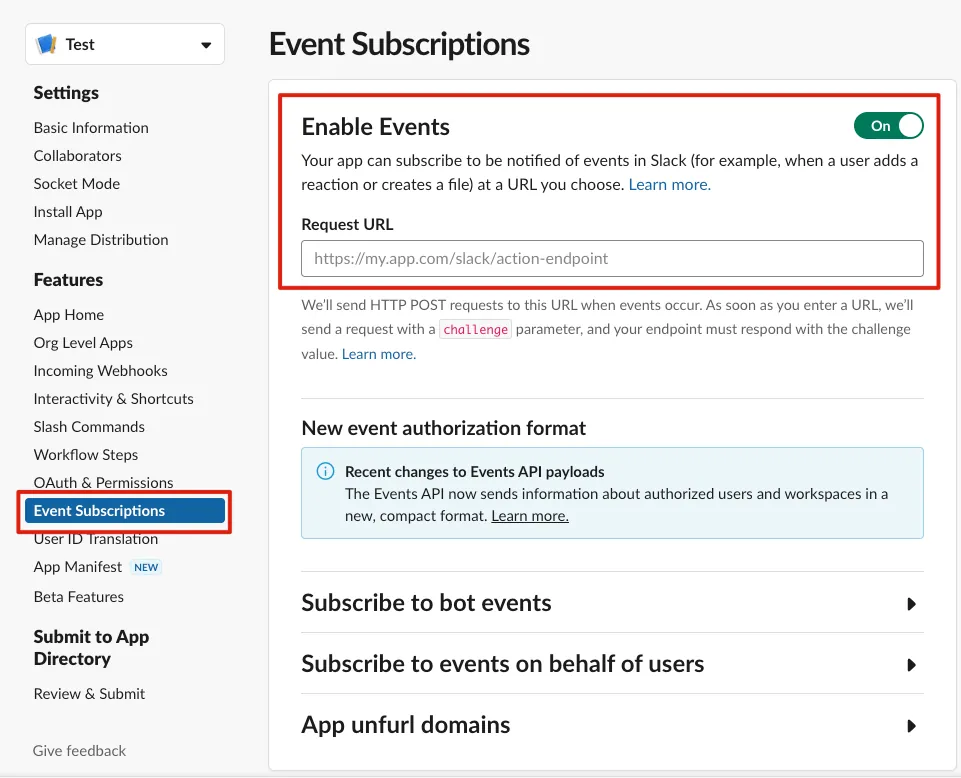
Next, we need to enable the event subscription feature of the Slack App, which will send API requests to the specified URL when certain events occur.
Add Google Cloud Functions
For the Request URL part, Google Cloud Functions will come into play.
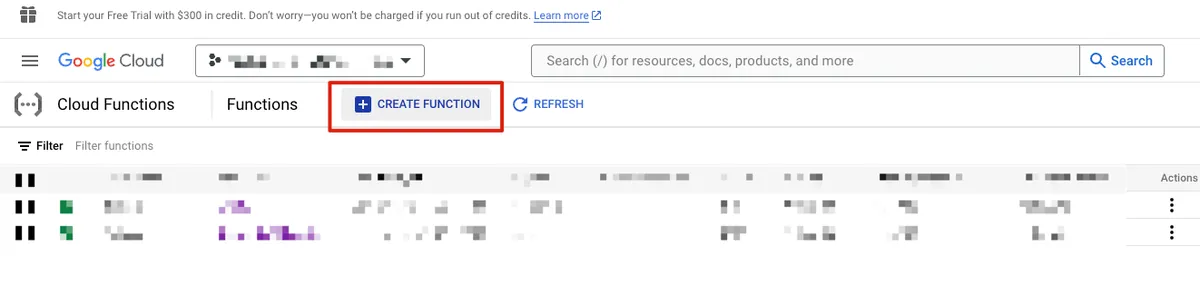
After setting up the project and billing information, click “Create Function”
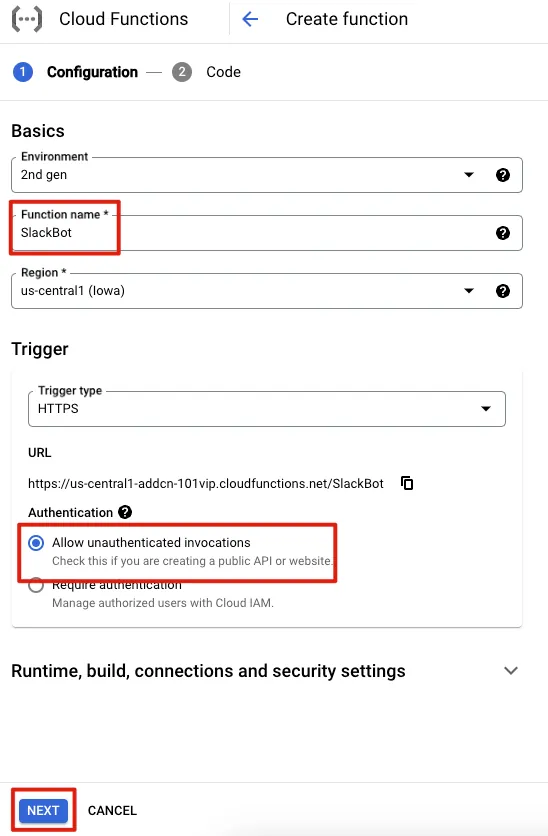
Function name: Enter the project name. For Authentication, select “Allow unauthenticated invocations,” which means anyone with the URL can access it.
If you cannot create a Function or change Authentication, it means your GCP account lacks full Google Cloud Functions permissions. You need to ask your organization admin to grant you the Cloud Functions Admin role in addition to your current role.
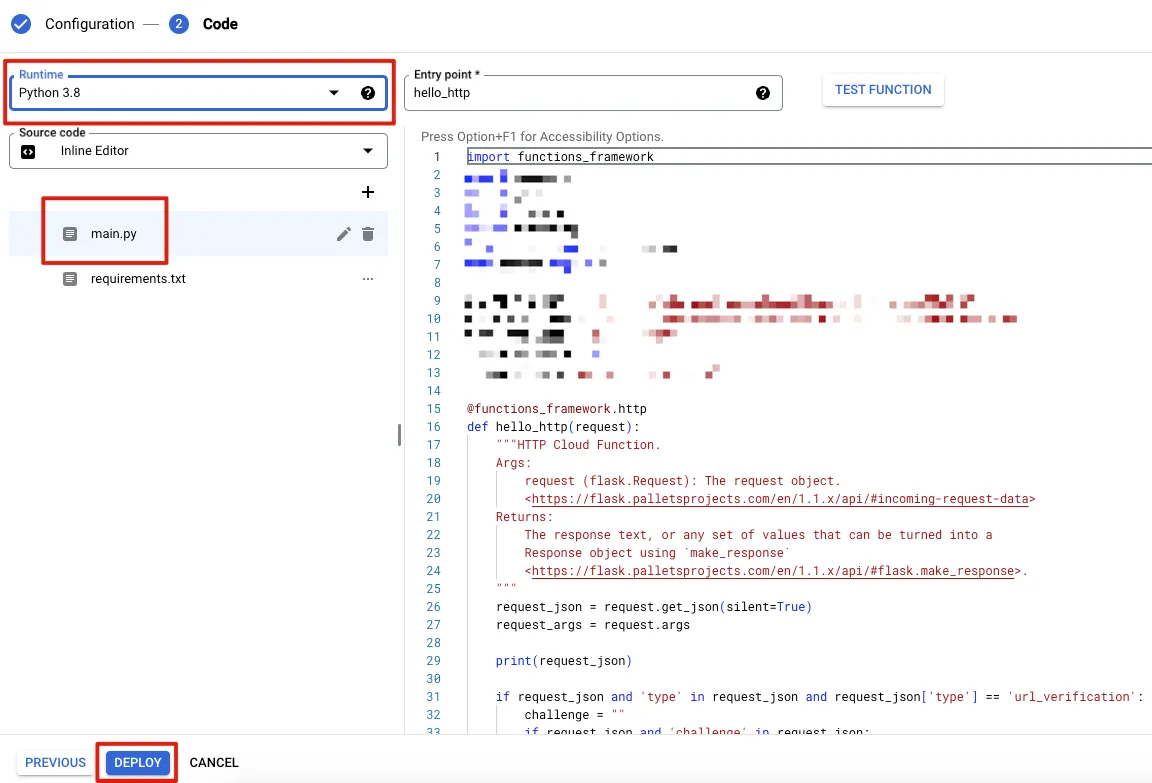
Runtime: Python 3.8 or higher
main.py :
import functions_framework

@functions_framework.http
def hello_http(request):
    request_json = request.get_json(silent=True)
    request_args = request.args
    request_headers = request.headers

    # You can simply use print to log runtime info, viewable in Logs
    # For advanced logging levels, see: https://cloud.google.com/logging/docs/reference/libraries
    print(request_json)

    # Due to FAAS (Cloud Functions) cold start, if the service is idle for a while,
    # subsequent calls may not respond within Slack's 3-second limit
    # Also, OpenAI API requests can take some time (up to nearly 1 minute depending on response length)
    # Slack treats no response within the timeout as lost request and retries
    # This causes duplicate requests and responses, so we set X-Slack-No-Retry: 1 in Response Headers
    # to tell Slack not to retry even if no timely response is received
    headers = {'X-Slack-No-Retry':1}

    # Ignore Slack Retry requests...
    if request_headers and 'X-Slack-Retry-Num' in request_headers:
        return ('OK!', 200, headers)

    # Slack App Event Subscriptions Verify
    # https://api.slack.com/events/url_verification
    if request_json and 'type' in request_json and request_json['type'] == 'url_verification':
        challenge = ""
        if 'challenge' in request_json:
            challenge = request_json['challenge']
        return (challenge, 200, headers)

    return ("Access Denied!", 400, headers)
requirements.txt Enter the following dependencies:
functions-framework==3.*
requests==2.31.0
openai==1.9.0
There are no features yet; this only allows the Slack App to pass Event Subscriptions verification. You can simply click “Deploy” to complete the initial deployment.
⚠️If you are not familiar with the Cloud Functions editor, you can scroll down to the bottom of the article for additional information.
After the deployment is complete (green checkmark), copy the Cloud Functions URL:
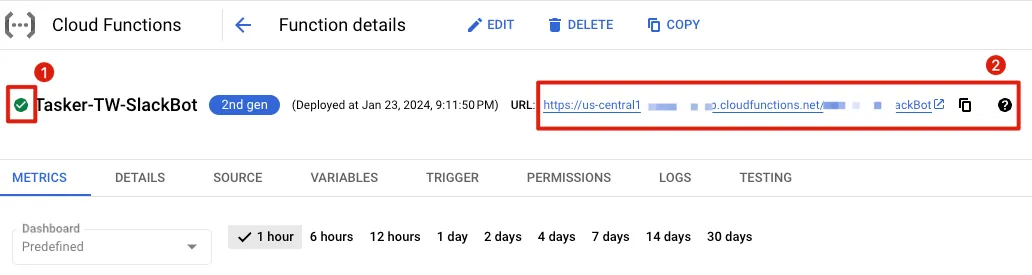
Paste the Request URL back into Slack App Enable Events.
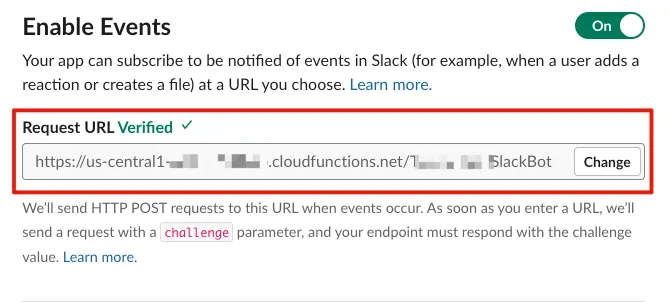
If there are no issues, “Verified” will appear to complete the verification.
Here, what is done is handling the verification request sent from Slack:
{
    "token": "Jhj5dZrVaK7ZwHHjRyZWjbDl",
    "challenge": "3eZbrw1aBm2rZgRNFdxV2595E9CY3gmdALWMmHkvFXO7tYXAYM8P",
    "type": "url_verification"
}
Responding to the challenge field content will pass the verification.
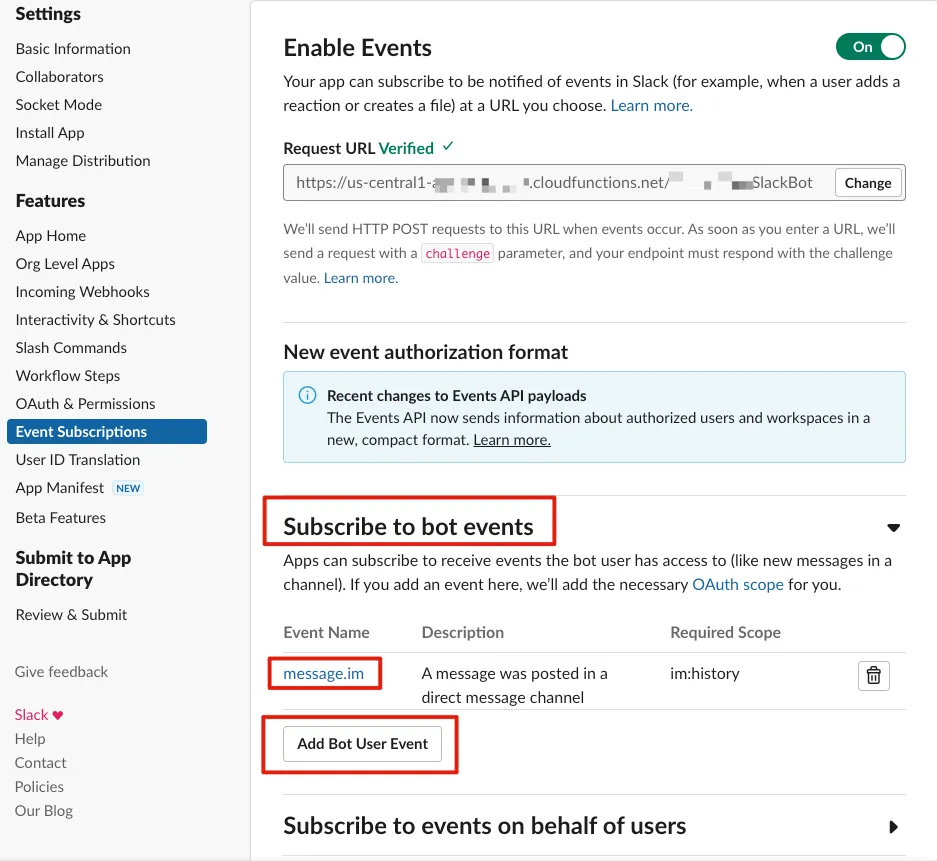
After enabling successfully, scroll down to the “Subscribe to bot events” section and click “Add Bot User Event” to add the “message.im” permission.
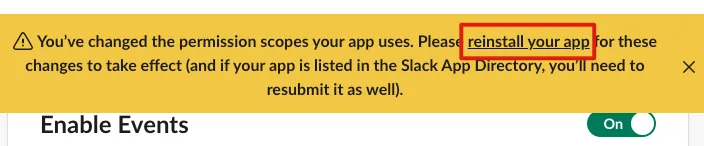
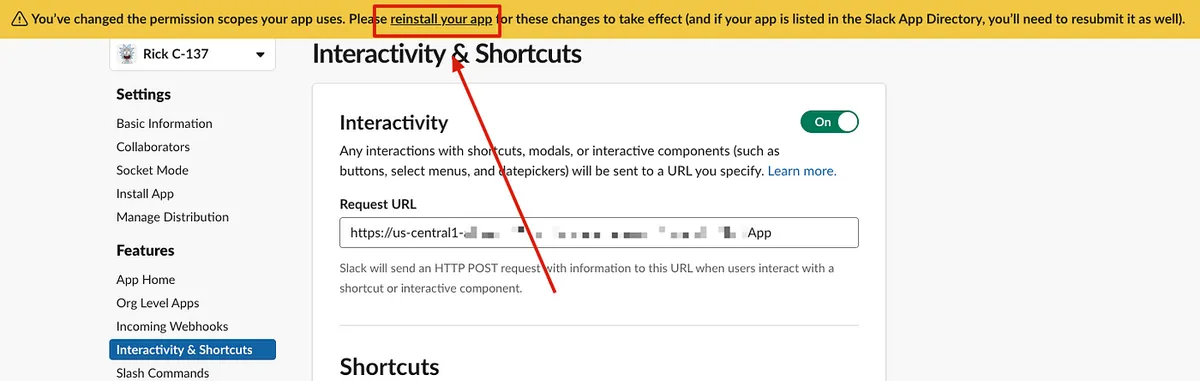
After adding full permissions, click the “reinstall your app” link above to reinstall the Slack App to your Workspace. This completes the Slack App setup.
You can also customize the Slack App’s name and avatar in the “App Home” or “Basic Information” sections.
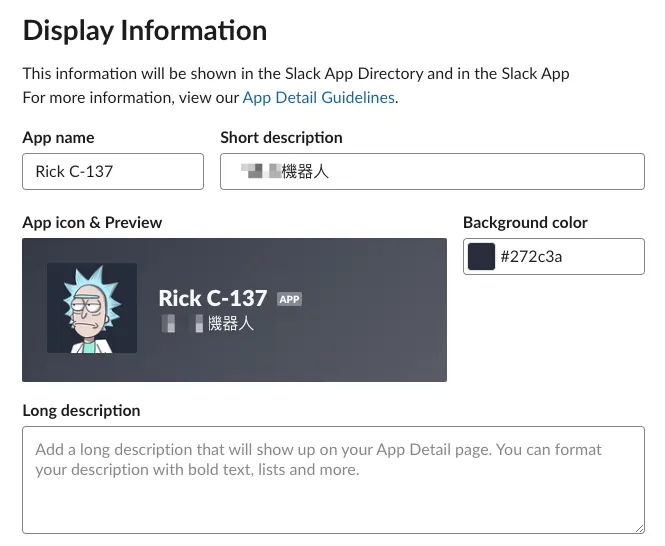
Basic Information
Step 2. Improve OpenAI API and Slack App Integration (Direct Messages)
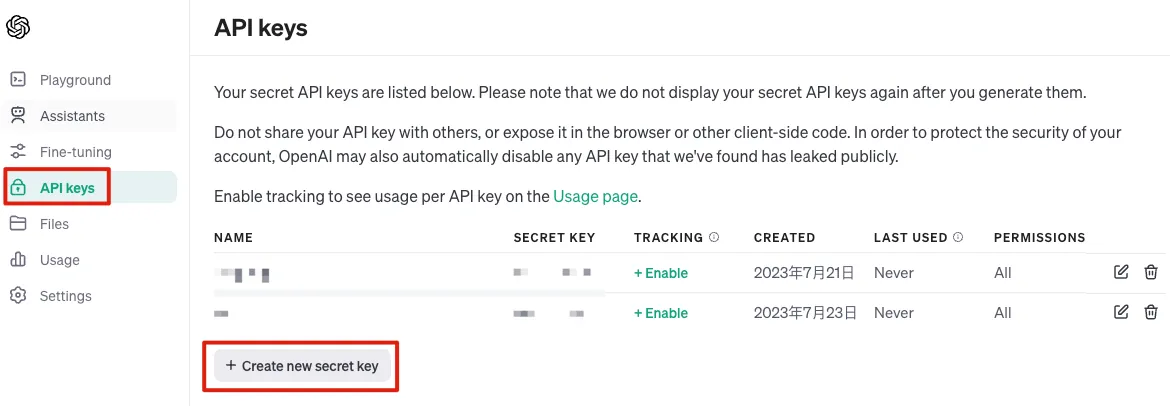
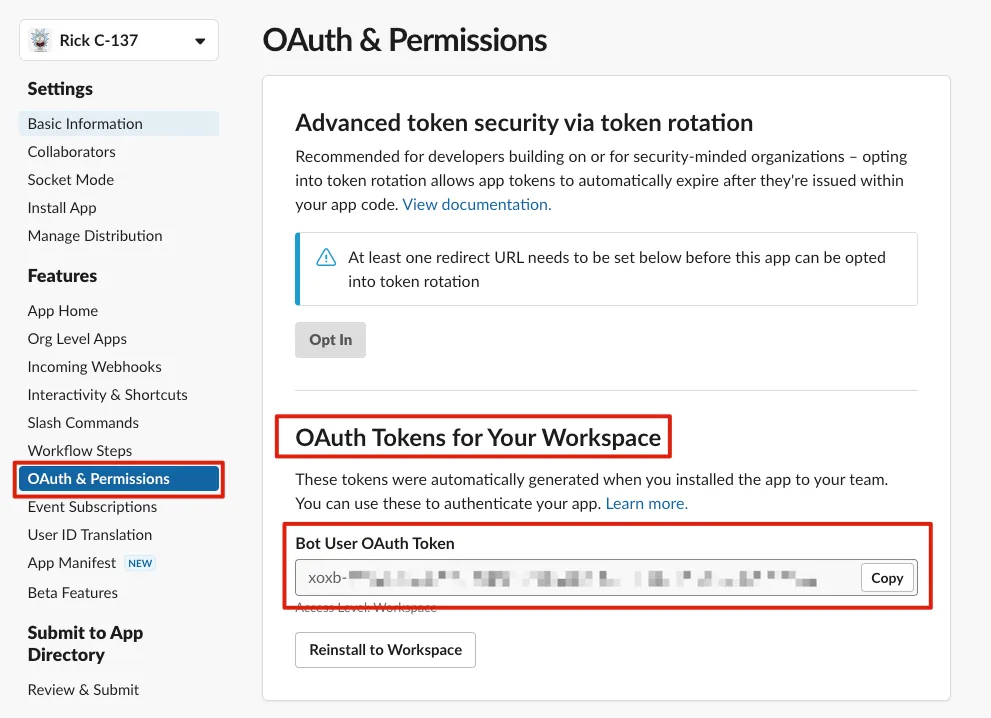
First, we need to obtain the required OPENAI API KEY and Bot User OAuth Token keys.
OPENAI API KEY: OpenAI API key page .
Bot User OAuth Token: OAuth Tokens for Your Workspace
Handling Direct Message (IM) Event & Connecting to OpenAI API for Response
When a user sends a message to the Slack App, the following Event JSON Payload is received:
{
  "token": "XXX",
  "team_id": "XXX",
  "context_team_id": "XXX",
  "context_enterprise_id": null,
  "api_app_id": "XXX",
  "event": {
    "client_msg_id": "XXX",
    "type": "message",
    "text": "Hello",
    "user": "XXX",
    "ts": "1707920753.115429",
    "blocks": [
      {
        "type": "rich_text",
        "block_id": "orfng",
        "elements": [
          {
            "type": "rich_text_section",
            "elements": [
              {
                "type": "text",
                "text": "Hello"
              }
            ]
          }
        ]
      }
    ],
    "team": "XXX",
    "channel": "XXX",
    "event_ts": "1707920753.115429",
    "channel_type": "im"
  },
  "type": "event_callback",
  "event_id": "XXX",
  "event_time": 1707920753,
  "authorizations": [
    {
      "enterprise_id": null,
      "team_id": "XXX",
      "user_id": "XXX",
      "is_bot": true,
      "is_enterprise_install": false
    }
  ],
  "is_ext_shared_channel": false,
  "event_context": "4-XXX"
}
Based on the above Json Payload, we can complete the integration from Slack message to OpenAI API and then back to replying to the Slack message:
Cloud Functions main.py :
import functions_framework
import requests
import asyncio
import json
import time
from openai import AsyncOpenAI

OPENAI_API_KEY = "OPENAI API KEY"
SLACK_BOT_TOKEN = "Bot User OAuth Token"

# The OPENAI API Model used
# https://platform.openai.com/docs/models
OPENAI_MODEL = "gpt-4-1106-preview"

@functions_framework.http
def hello_http(request):
    request_json = request.get_json(silent=True)
    request_args = request.args
    request_headers = request.headers

    # You can simply use print to log runtime logs, viewable in Logs
    # For advanced Logging Levels, see: https://cloud.google.com/logging/docs/reference/libraries
    print(request_json)

    # Due to FAAS (Cloud Functions) limitation, if the service is not called for a long time,
    # the next call triggers cold start and may not respond within Slack's 3-second limit
    # Also, OpenAI API requests take time (up to nearly 1 minute depending on response length)
    # If Slack doesn't receive a response in time, it considers the request lost and retries
    # This causes duplicate requests and responses, so we set X-Slack-No-Retry: 1 in Response Headers
    # to tell Slack not to retry even if no timely response is received
    headers = {'X-Slack-No-Retry':1}

    # Ignore Slack Retry requests...
    if request_headers and 'X-Slack-Retry-Num' in request_headers:
        return ('OK!', 200, headers)

    # Slack App Event Subscriptions Verify
    # https://api.slack.com/events/url_verification
    if request_json and 'type' in request_json and request_json['type'] == 'url_verification':
        challenge = ""
        if 'challenge' in request_json:
            challenge = request_json['challenge']
        return (challenge, 200, headers)

    # Handle Event Subscriptions Events...
    if request_json and 'event' in request_json and 'type' in request_json['event']:
        # If the event source is the App itself and App ID == Slack App ID,
        # it means the event is triggered by this Slack App itself
        # Ignore it to avoid infinite loop Slack App -> Cloud Functions -> Slack App -> Cloud Functions...
        if 'api_app_id' in request_json and 'app_id' in request_json['event'] and request_json['api_app_id'] == request_json['event']['app_id']:
            return ('OK!', 200, headers)

        # Event name, e.g., message, app_mention...
        eventType = request_json['event']['type']

        # SubType, e.g., message_changed, message_deleted...
        # New messages have no Sub Type
        eventSubType = None
        if 'subtype' in request_json['event']:
            eventSubType = request_json['event']['subtype']

        if eventType == 'message':
            # All with Sub Type are edits, deletes, replies...
            # Ignore them
            if eventSubType is not None:
                return ("OK!", 200, headers)

            # Sender of the event message
            eventUser = request_json['event']['user']
            # Channel of the event message
            eventChannel = request_json['event']['channel']
            # Content of the event message
            eventText = request_json['event']['text']
            # Event message TS (message ID)
            eventTS = request_json['event']['event_ts']

            # Thread parent message TS (message ID) of the event message
            # Only new messages in a thread have this data
            eventThreadTS = None
            if 'thread_ts' in request_json['event']:
                eventThreadTS = request_json['event']['thread_ts']

            openAIRequest(eventChannel, eventTS, eventThreadTS, eventText)
            return ("OK!", 200, headers)


    return ("Access Denied!", 400, headers)

def openAIRequest(eventChannel, eventTS, eventThreadTS, eventText):

    # Set Custom instructions
    # Thanks to colleague (https://twitter.com/je_suis_marku) for support
    messages = [
        {"role": "system", "content": "I only understand Traditional Chinese (Taiwan) and English."},
        {"role": "system", "content": "I do not understand Simplified Chinese."},
        {"role": "system", "content": "If I speak Chinese, I will answer in Traditional Chinese used in Taiwan."},
        {"role": "system", "content": "If I speak English, I will answer in English."},
        {"role": "system", "content": "Do not respond to greetings."},
        {"role": "system", "content": "There must be a space between Chinese and English. There must be a space between Chinese and any other language characters including numbers and emojis."},
        {"role": "system", "content": "If you don't know the answer or your knowledge is outdated, please search online before answering."},
        {"role": "system", "content": "I will tip you 200 USD, if you answer well."}
    ]

    messages.append({
        "role": "user", "content": eventText
    })

    replyMessageTS = slackRequestPostMessage(eventChannel, eventTS, "Generating response...")
    asyncio.run(openAIRequestAsync(eventChannel, replyMessageTS, messages))

async def openAIRequestAsync(eventChannel, eventTS, messages):
    client = AsyncOpenAI(
      api_key=OPENAI_API_KEY,
    )

    # Stream Response (chunked response)
    stream = await client.chat.completions.create(
      model=OPENAI_MODEL,
      messages=messages,
      stream=True,
    )

    result = ""

    try:
        debounceSlackUpdateTime = None
        async for chunk in stream:
            result += chunk.choices[0].delta.content or ""

            # Update message every 0.8 seconds to avoid frequent Slack Update API calls,
            # which may cause failure or waste Cloud Functions requests
            if debounceSlackUpdateTime is None or time.time() - debounceSlackUpdateTime >= 0.8:
                response = slackUpdateMessage(eventChannel, eventTS, None, result+"...")
                debounceSlackUpdateTime = time.time()
    except Exception as e:
        print(e)
        result += "...*[Error occurred]*"

    slackUpdateMessage(eventChannel, eventTS, None, result)


### Slack ###
def slackUpdateMessage(channel, ts, metadata, text):
    endpoint = "/chat.update"
    payload = {
        "channel": channel,
        "ts": ts
    }
    if metadata is not None:
        payload['metadata'] = metadata

    payload['text'] = text

    response = slackRequest(endpoint, "POST", payload)
    return response

def slackRequestPostMessage(channel, target_ts, text):
    endpoint = "/chat.postMessage"
    payload = {
        "channel": channel,
        "text": text,
    }
    if target_ts is not None:
        payload['thread_ts'] = target_ts

    response = slackRequest(endpoint, "POST", payload)

    if response is not None and 'ts' in response:
        return response['ts']
    return None

def slackRequest(endpoint, method, payload):
    url = "https://slack.com/api"+endpoint

    headers = {
        "Authorization": f"Bearer {SLACK_BOT_TOKEN}",
        "Content-Type": "application/json",
    }

    response = None
    if method == "POST":
        response = requests.post(url, headers=headers, data=json.dumps(payload))
    elif method == "GET":
        response = requests.post(url, headers=headers)

    if response and response.status_code == 200:
        result = response.json()
        return result
    else:
        return None
Back to Slack for testing:
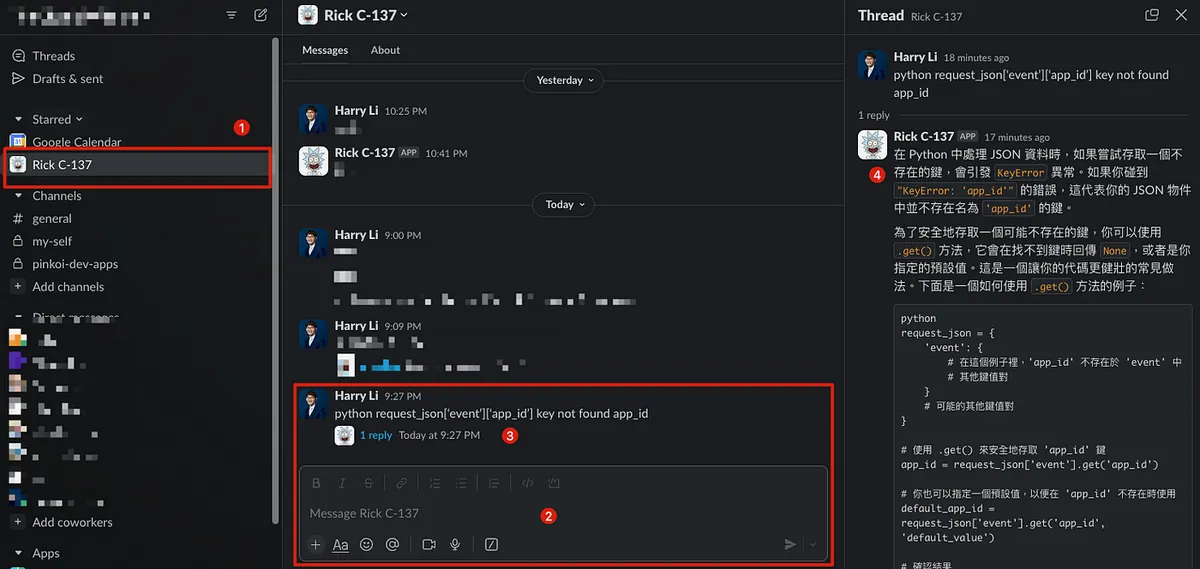
You can now interact with ChatGPT-like Q&A using the OpenAI API.
Add Interrupt Stream Response Feature to Save Tokens
There are many ways to implement this. For example, if the user sends a new message in the same thread before the previous response is complete, the previous response can be interrupted. Alternatively, users can click a message to trigger a Shortcut that stops the response.
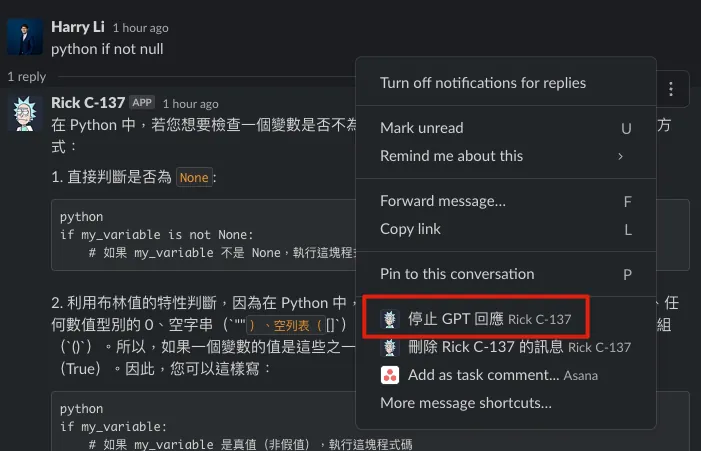
This article uses adding a “Message Interrupt” Shortcut as an example.
Regardless of the interruption method, the core principle is the same because we do not store generated messages or message status information in a database. Therefore, the implementation relies on Slack message metadata fields (which can store custom information within specific messages).
When using the chat.update API Endpoint, a successful call returns the current message text and metadata. Therefore, in the OpenAI API Stream -> Slack Update Message code above, we added a check to see if the response metadata contains a “stop” flag. If it does, we interrupt the OpenAI Stream Response.
First, you need to add a Slack App message Shortcut
Go to the Slack App management page, find the “Interactivity & Shortcuts” section, click to enable it, and use the same Cloud Functions URL.
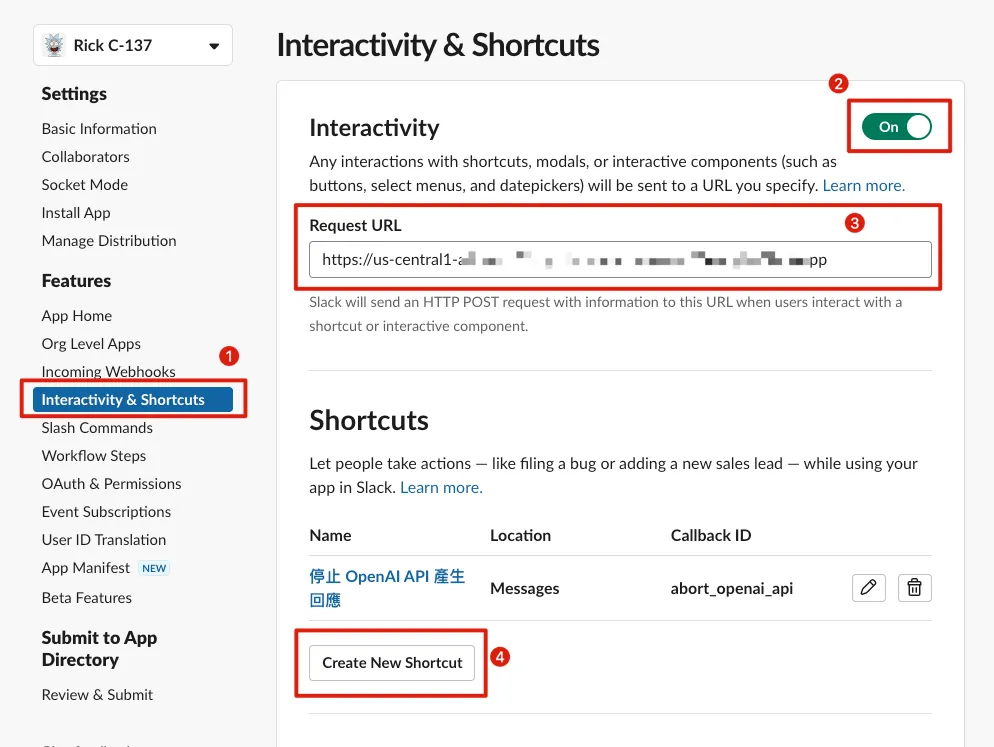
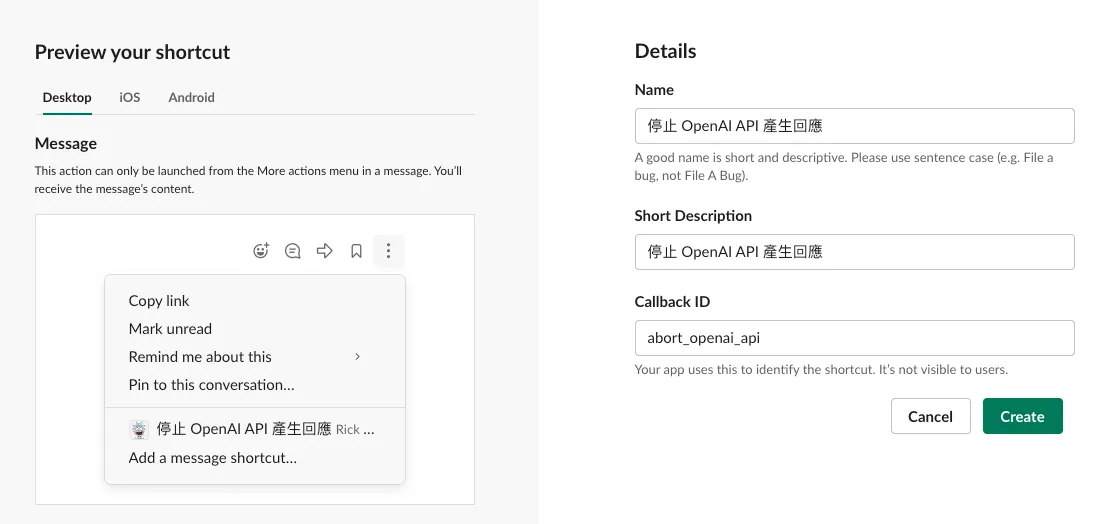
Click “Create New Shortcut” to add a new message Shortcut.
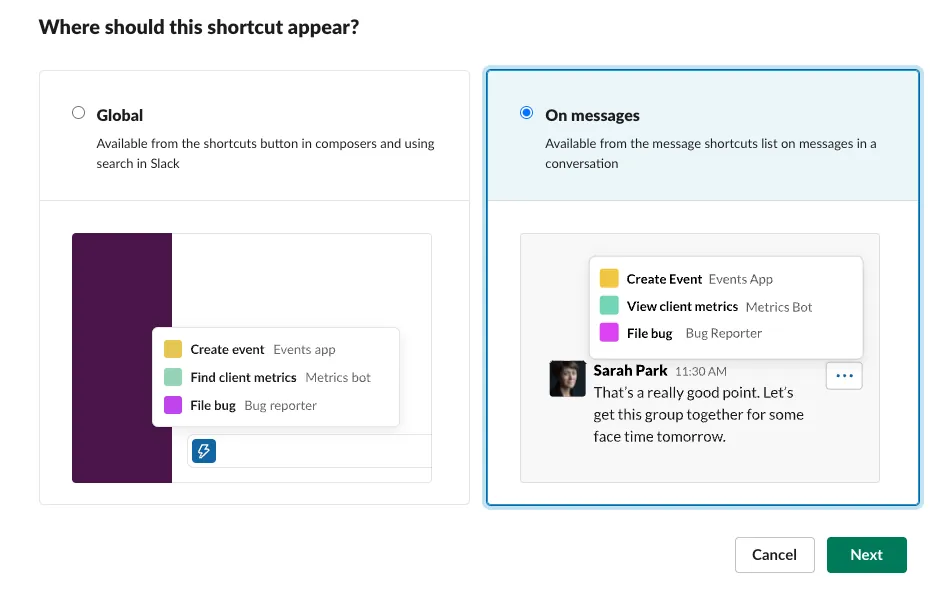
Select “On messages”.
-
Name Action Title:
Stop OpenAI API Response Generation -
Short Description:
Stop OpenAI API from generating responses -
Callback ID:
abort_openai_api(used for program identification, customizable)
After clicking “Create” to finish, remember to click “Save Changes” at the bottom right to save the settings.

Click “reinstall your app” above again for the changes to take effect.
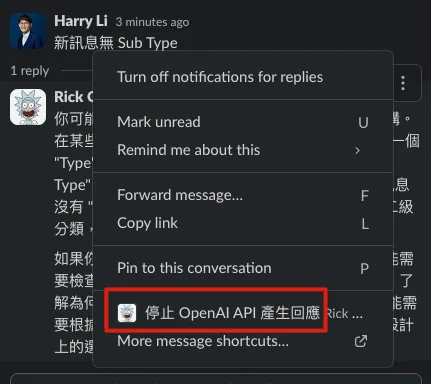
Back in Slack, click the “…” at the top right of a message to see the “Stop OpenAI API Response” shortcut (clicking it now has no effect).
When a user clicks the Shortcut on a message, an Event Json Payload is sent:
{
  "type": "message_action",
  "token": "XXXXXX",
  "action_ts": "1706188005.387646",
  "team": {
    "id": "XXXXXX",
    "domain": "XXXXXX-XXXXXX"
  },
  "user": {
    "id": "XXXXXX",
    "username": "zhgchgli",
    "team_id": "XXXXXX",
    "name": "zhgchgli"
  },
  "channel": {
    "id": "XXXXXX",
    "name": "directmessage"
  },
  "is_enterprise_install": false,
  "enterprise": null,
  "callback_id": "abort_openai_api",
  "trigger_id": "XXXXXX",
  "response_url": "https://hooks.slack.com/app/XXXXXX/XXXXXX/XXXXXX",
  "message_ts": "1706178957.161109",
  "message": {
    "bot_id": "XXXXXX",
    "type": "message",
    "text": "The English translation of 高麗菜包 is \"cabbage wrap.\" If you use it as a dish name, sometimes it specifies the content, such as \"pork cabbage wrap\" or \"vegetable cabbage wrap.\"",
    "user": "XXXXXX",
    "ts": "1706178957.161109",
    "app_id": "XXXXXX",
    "blocks": [
      {
        "type": "rich_text",
        "block_id": "eKgaG",
        "elements": [
          {
            "type": "rich_text_section",
            "elements": [
              {
                "type": "text",
                "text": "The English translation of 高麗菜包 is \"cabbage wrap.\" If you use it as a dish name, sometimes it specifies the content, such as \"pork cabbage wrap\" or \"vegetable cabbage wrap.\""
              }
            ]
          }
        ]
      }
    ],
    "team": "XXXXXX",
    "bot_profile": {
      "id": "XXXXXX",
      "deleted": false,
      "name": "Rick C-137",
      "updated": 1706001605,
      "app_id": "XXXXXX",
      "icons": {
        "image_36": "https://avatars.slack-edge.com/2024-01-23/6517244582244_0c708dfa3f893c72d4c2_36.png",
        "image_48": "https://avatars.slack-edge.com/2024-01-23/6517244582244_0c708dfa3f893c72d4c2_48.png",
        "image_72": "https://avatars.slack-edge.com/2024-01-23/6517244582244_0c708dfa3f893c72d4c2_72.png"
      },
      "team_id": "XXXXXX"
    },
    "edited": {
      "user": "XXXXXX",
      "ts": "1706187989.000000"
    },
    "thread_ts": "1706178832.102439",
    "parent_user_id": "XXXXXX"
  }
}
Enhance Cloud Functions main.py:
import functions_framework
import requests
import asyncio
import json
import time
from openai import AsyncOpenAI

OPENAI_API_KEY = "OPENAI API KEY"
SLACK_BOT_TOKEN = "Bot User OAuth Token"

# Used OPENAI API Model
# https://platform.openai.com/docs/models
OPENAI_MODEL = "gpt-4-1106-preview"

@functions_framework.http
def hello_http(request):
    request_json = request.get_json(silent=True)
    request_args = request.args
    request_headers = request.headers

    # Shortcut events provide data in the post payload field
    # https://api.slack.com/reference/interaction-payloads/shortcuts
    payload = request.form.get('payload')
    if payload is not None:
        payload = json.loads(payload)

    # You can simply use print to log runtime logs, viewable in Logs
    # For advanced logging levels, refer to: https://cloud.google.com/logging/docs/reference/libraries
    print(payload)

    # Due to FAAS (Cloud Functions) limitations, if service is idle too long,
    # subsequent calls may trigger cold start and fail to respond within Slack's 3-second limit
    # OpenAI API requests take time (up to nearly 1 minute depending on response length)
    # Slack considers requests lost if no response within time limit and retries
    # This causes duplicate requests and responses, so set X-Slack-No-Retry: 1 in response headers
    # to tell Slack not to retry even if no timely response is received
    headers = {'X-Slack-No-Retry':1}

    # Ignore Slack retry requests...
    if request_headers and 'X-Slack-Retry-Num' in request_headers:
        return ('OK!', 200, headers)

    # Slack App Event Subscriptions Verify
    # https://api.slack.com/events/url_verification
    if request_json and 'type' in request_json and request_json['type'] == 'url_verification':
        challenge = ""
        if 'challenge' in request_json:
            challenge = request_json['challenge']
        return (challenge, 200, headers)

    # Handle Event Subscriptions Events...
    if request_json and 'event' in request_json and 'type' in request_json['event']:
        # If event source is the app itself and app ID matches Slack App ID,
        # ignore to avoid infinite loop Slack App -> Cloud Functions -> Slack App...
        if 'api_app_id' in request_json and 'app_id' in request_json['event'] and request_json['api_app_id'] == request_json['event']['app_id']:
            return ('OK!', 200, headers)

        # Event name, e.g., message, app_mention...
        eventType = request_json['event']['type']

        # SubType, e.g., message_changed, message_deleted...
        # New messages have no Sub Type
        eventSubType = None
        if 'subtype' in request_json['event']:
            eventSubType = request_json['event']['subtype']

        if eventType == 'message':
            # All with Sub Type are edits, deletes, replies...
            # Ignore these
            if eventSubType is not None:
                return ("OK!", 200, headers)

            # Event message sender
            eventUser = request_json['event']['user']
            # Event message channel
            eventChannel = request_json['event']['channel']
            # Event message content
            eventText = request_json['event']['text']
            # Event message TS (message ID)
            eventTS = request_json['event']['event_ts']

            # Event thread parent message TS (message ID)
            # Only present for new thread messages
            eventThreadTS = None
            if 'thread_ts' in request_json['event']:
                eventThreadTS = request_json['event']['thread_ts']

            openAIRequest(eventChannel, eventTS, eventThreadTS, eventText)
            return ("OK!", 200, headers)


    # Handle Shortcut
    if payload and 'type' in payload:
        payloadType = payload['type']

        # If message shortcut
        if payloadType == 'message_action':
            print(payloadType)
            callbackID = None
            channel = None
            ts = None
            text = None
            triggerID = None

            if 'callback_id' in payload:
                callbackID = payload['callback_id']
            if 'channel' in payload:
                channel = payload['channel']['id']
            if 'message' in payload:
                ts = payload['message']['ts']
                text = payload['message']['text']
            if 'trigger_id' in payload:
                triggerID = payload['trigger_id']

            if channel is not None and ts is not None and text is not None:
                # If shortcut is to abort OpenAI API response generation
                if callbackID == "abort_openai_api":
                    slackUpdateMessage(channel, ts, {"event_type": "aborted", "event_payload": { }}, text)
                    if triggerID is not None:
                        slackOpenModal(triggerID, callbackID, "Successfully stopped OpenAI API response generation!")
                        return ("OK!", 200, headers)

        return ("OK!", 200, headers)


    return ("Access Denied!", 400, headers)

def openAIRequest(eventChannel, eventTS, eventThreadTS, eventText):

    # Set Custom instructions
    # Thanks to colleague (https://twitter.com/je_suis_marku) for support
    messages = [
        {"role": "system", "content": "I only understand Taiwan Traditional Chinese and English"},
        {"role": "system", "content": "I do not understand Simplified Chinese"},
        {"role": "system", "content": "If I speak Chinese, I reply in Taiwan Traditional Chinese using common Taiwan expressions."},
        {"role": "system", "content": "If I speak English, I reply in English."},
        {"role": "system", "content": "Do not respond with greetings."},
        {"role": "system", "content": "There should be a space between Chinese and English. There should be a space between Chinese characters and any other language characters including numbers and emojis."},
        {"role": "system", "content": "If you don't know the answer or your knowledge is outdated, please search online before answering."},
        {"role": "system", "content": "I will tip you 200 USD, if you answer well."}
    ]

    messages.append({
        "role": "user", "content": eventText
    })

    replyMessageTS = slackRequestPostMessage(eventChannel, eventTS, "Generating response...")
    asyncio.run(openAIRequestAsync(eventChannel, replyMessageTS, messages))

async def openAIRequestAsync(eventChannel, eventTS, messages):
    client = AsyncOpenAI(
      api_key=OPENAI_API_KEY,
    )

    # Stream Response (chunked response)
    stream = await client.chat.completions.create(
      model=OPENAI_MODEL,
      messages=messages,
      stream=True,
    )

    result = ""

    try:
        debounceSlackUpdateTime = None
        async for chunk in stream:
            result += chunk.choices[0].delta.content or ""

            # Update message every 0.8 seconds to avoid frequent Slack Update API calls that may fail or waste Cloud Functions requests
            if debounceSlackUpdateTime is None or time.time() - debounceSlackUpdateTime >= 0.8:
                response = slackUpdateMessage(eventChannel, eventTS, None, result+"...")
                debounceSlackUpdateTime = time.time()

                # If message metadata & metadata event_type == aborted, user marked this response as aborted
                if response and 'ok' in response and response['ok'] == True and 'message' in response and 'metadata' in response['message'] and 'event_type' in response['message']['metadata'] and response['message']['metadata']['event_type'] == "aborted":
                    break
                    result += "...*[Aborted]*"
                # Message was deleted
                elif response and 'ok' in response and response['ok'] == False and 'error' in response and response['error'] == "message_not_found" :
                    break

        await stream.close()

    except Exception as e:
        print(e)
        result += "...*[Error occurred]*"

    slackUpdateMessage(eventChannel, eventTS, None, result)


### Slack ###
def slackOpenModal(trigger_id, callback_id, text):
    slackRequest("/views.open", "POST", {
        "trigger_id": trigger_id,
        "view": {
            "type": "modal",
            "callback_id": callback_id,
            "title": {
                "type": "plain_text",
                "text": "Notice"
            },
            "blocks": [
                {
                    "type": "section",
                    "text": {
                        "type": "mrkdwn",
                        "text": text
                    }
                }
            ]
        }
    })

def slackUpdateMessage(channel, ts, metadata, text):
    endpoint = "/chat.update"
    payload = {
        "channel": channel,
        "ts": ts
    }
    if metadata is not None:
        payload['metadata'] = metadata

    payload['text'] = text

    response = slackRequest(endpoint, "POST", payload)
    return response

def slackRequestPostMessage(channel, target_ts, text):
    endpoint = "/chat.postMessage"
    payload = {
        "channel": channel,
        "text": text,
    }
    if target_ts is not None:
        payload['thread_ts'] = target_ts

    response = slackRequest(endpoint, "POST", payload)

    if response is not None and 'ts' in response:
        return response['ts']
    return None

def slackRequest(endpoint, method, payload):
    url = "https://slack.com/api"+endpoint

    headers = {
        "Authorization": f"Bearer {SLACK_BOT_TOKEN}",
        "Content-Type": "application/json",
    }

    response = None
    if method == "POST":
        response = requests.post(url, headers=headers, data=json.dumps(payload))
    elif method == "GET":
        response = requests.post(url, headers=headers)

    if response and response.status_code == 200:
        result = response.json()
        return result
    else:
        return None
Back to Slack for testing:
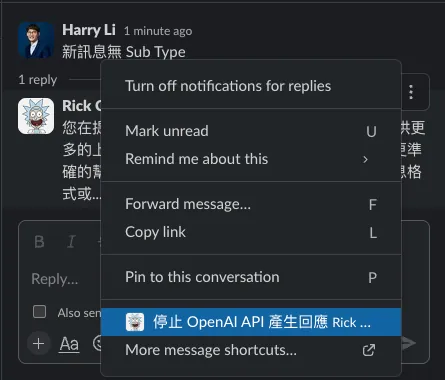
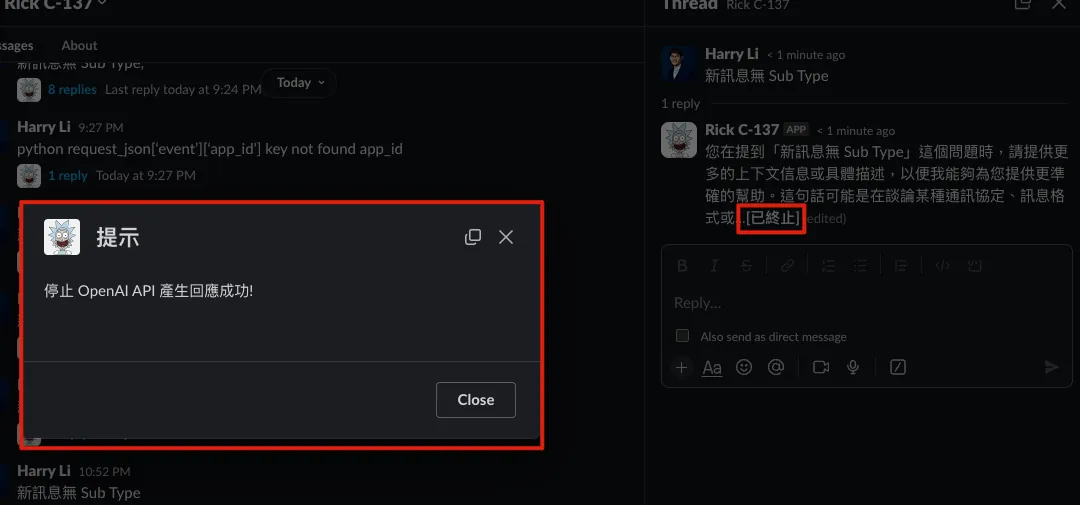
Success! After we complete the Stop OpenAI API Shortcut, the ongoing response will be terminated and reply with [Terminated].
Similarly, using the same principle, you can create a Shortcut to delete messages, enabling the deletion of messages sent by the Slack App.
Add Context Functionality Within the Same Thread (Threads)
If you send a new message in the same thread, it can be treated as a follow-up question to the original. At this point, you can add a feature that appends the previous conversation content to the new prompt.
Add slackGetReplies & Fill Content into OpenAI API Prompt:
Enhance Cloud Functions main.py:
import functions_framework
import requests
import asyncio
import json
import time
from openai import AsyncOpenAI

OPENAI_API_KEY = "OPENAI API KEY"
SLACK_BOT_TOKEN = "Bot User OAuth Token"

# The OPENAI API Model used
# https://platform.openai.com/docs/models
OPENAI_MODEL = "gpt-4-1106-preview"

@functions_framework.http
def hello_http(request):
    request_json = request.get_json(silent=True)
    request_args = request.args
    request_headers = request.headers

    # Shortcut events provide payload in post payload field
    # https://api.slack.com/reference/interaction-payloads/shortcuts
    payload = request.form.get('payload')
    if payload is not None:
        payload = json.loads(payload)

    # Simple print can log runtime logs, viewable in Logs
    # For advanced logging levels refer to: https://cloud.google.com/logging/docs/reference/libraries
    print(payload)

    # Due to FAAS (Cloud Functions) cold start, if service is idle too long,
    # subsequent calls may not respond within Slack's 3-second limit.
    # OpenAI API requests may take some time (up to about 1 minute depending on response length).
    # Slack treats no response within limit as Request lost and retries.
    # To avoid duplicate requests/responses, set X-Slack-No-Retry: 1 in Response Headers to tell Slack not to retry even if no timely response.
    headers = {'X-Slack-No-Retry':1}

    # Ignore Slack retry requests...
    if request_headers and 'X-Slack-Retry-Num' in request_headers:
        return ('OK!', 200, headers)

    # Slack App Event Subscriptions Verify
    # https://api.slack.com/events/url_verification
    if request_json and 'type' in request_json and request_json['type'] == 'url_verification':
        challenge = ""
        if 'challenge' in request_json:
            challenge = request_json['challenge']
        return (challenge, 200, headers)

    # Handle Event Subscriptions Events...
    if request_json and 'event' in request_json and 'type' in request_json['event']:
        apiAppID = None
        if 'api_app_id' in request_json:
            apiAppID = request_json['api_app_id']
        # If event source is App and App ID == Slack App ID, it means event triggered by own Slack App
        # Ignore to avoid infinite loop Slack App -> Cloud Functions -> Slack App -> Cloud Functions...
        if 'app_id' in request_json['event'] and apiAppID == request_json['event']['app_id']:
            return ('OK!', 200, headers)

        # Event name, e.g., message, app_mention...
        eventType = request_json['event']['type']

        # SubType, e.g., message_changed, message_deleted...
        # New messages have no SubType
        eventSubType = None
        if 'subtype' in request_json['event']:
            eventSubType = request_json['event']['subtype']

        if eventType == 'message':
            # SubType means edited, deleted, replied messages...
            # Ignore these
            if eventSubType is not None:
                return ("OK!", 200, headers)

            # Event message sender
            eventUser = request_json['event']['user']
            # Event message channel
            eventChannel = request_json['event']['channel']
            # Event message content
            eventText = request_json['event']['text']
            # Event message TS (message ID)
            eventTS = request_json['event']['event_ts']

            # Event message thread parent TS (message ID)
            # Only new messages in thread have this
            eventThreadTS = None
            if 'thread_ts' in request_json['event']:
                eventThreadTS = request_json['event']['thread_ts']

            openAIRequest(apiAppID, eventChannel, eventTS, eventThreadTS, eventText)
            return ("OK!", 200, headers)


    # Handle Shortcut (message)
    if payload and 'type' in payload:
        payloadType = payload['type']

        # If message Shortcut
        if payloadType == 'message_action':
            callbackID = None
            channel = None
            ts = None
            text = None
            triggerID = None

            if 'callback_id' in payload:
                callbackID = payload['callback_id']
            if 'channel' in payload:
                channel = payload['channel']['id']
            if 'message' in payload:
                ts = payload['message']['ts']
                text = payload['message']['text']
            if 'trigger_id' in payload:
                triggerID = payload['trigger_id']

            if channel is not None and ts is not None and text is not None:
                # If Shortcut is to abort OpenAI API response generation
                if callbackID == "abort_openai_api":
                    slackUpdateMessage(channel, ts, {"event_type": "aborted", "event_payload": { }}, text)
                    if triggerID is not None:
                        slackOpenModal(triggerID, callbackID, "Successfully stopped OpenAI API response generation!")
                        return ("OK!", 200, headers)


    return ("Access Denied!", 400, headers)

def openAIRequest(apiAppID, eventChannel, eventTS, eventThreadTS, eventText):

    # Set Custom instructions
    # Thanks to colleague (https://twitter.com/je_suis_marku) for support
    messages = [
        {"role": "system", "content": "I only understand Traditional Chinese (Taiwan) and English."},
        {"role": "system", "content": "I do not understand Simplified Chinese."},
        {"role": "system", "content": "If I speak Chinese, I will reply in Taiwanese Traditional Chinese using common Taiwanese expressions."},
        {"role": "system", "content": "If I speak English, I will reply in English."},
        {"role": "system", "content": "Do not respond with greetings or small talk."},
        {"role": "system", "content": "There should be a space between Chinese and English. There should be a space between Chinese characters and any other language characters including numbers and emojis."},
        {"role": "system", "content": "If you don't know the answer or your knowledge is outdated, please search online before answering."},
        {"role": "system", "content": "I will tip you 200 USD, if you answer well."}
    ]

    if eventThreadTS is not None:
        threadMessages = slackGetReplies(eventTS, eventThreadTS)
        if threadMessages is not None:
            for threadMessage in threadMessages:
                appID = None
                if 'app_id' in threadMessage:
                    appID = threadMessage['app_id']
                threadMessageText = threadMessage['text']
                threadMessageTs = threadMessage['ts']
                # If Slack App (OpenAI API Response), mark as assistant
                if appID and appID == apiAppID:
                    messages.append({
                        "role": "assistant", "content": threadMessageText
                    })
                else:
                # User message content marked as user
                    messages.append({
                        "role": "user", "content": threadMessageText
                    })

    messages.append({
        "role": "user", "content": eventText
    })

    replyMessageTS = slackRequestPostMessage(eventChannel, eventTS, "Generating response...")
    asyncio.run(openAIRequestAsync(eventChannel, replyMessageTS, messages))

async def openAIRequestAsync(eventChannel, eventTS, messages):
    client = AsyncOpenAI(
      api_key=OPENAI_API_KEY,
    )

    # Stream Response (partial response)
    stream = await client.chat.completions.create(
      model=OPENAI_MODEL,
      messages=messages,
      stream=True,
    )

    result = ""

    try:
        debounceSlackUpdateTime = None
        async for chunk in stream:
            result += chunk.choices[0].delta.content or ""

            # Update message every 0.8 seconds to avoid frequent Slack Update API calls causing failures or wasting Cloud Functions request quota
            if debounceSlackUpdateTime is None or time.time() - debounceSlackUpdateTime >= 0.8:
                response = slackUpdateMessage(eventChannel, eventTS, None, result+"...")
                debounceSlackUpdateTime = time.time()

                # If message has metadata & metadata event_type == aborted, it means user marked response as aborted
                if response and 'ok' in response and response['ok'] == True and 'message' in response and 'metadata' in response['message'] and 'event_type' in response['message']['metadata'] and response['message']['metadata']['event_type'] == "aborted":
                    break
                    result += "...*[Aborted]*"
                # Message has been deleted
                elif response and 'ok' in response and response['ok'] == False and 'error' in response and response['error'] == "message_not_found" :
                    break

        await stream.close()

    except Exception as e:
        print(e)
        result += "...*[Error occurred]*"

    slackUpdateMessage(eventChannel, eventTS, None, result)


### Slack ###
def slackGetReplies(channel, ts):
    endpoint = "/conversations.replies?channel="+channel+"&ts="+ts
    response = slackRequest(endpoint, "GET", None)

    if response is not None and 'messages' in response:
        return response['messages']
    return None

def slackOpenModal(trigger_id, callback_id, text):
    slackRequest("/views.open", "POST", {
        "trigger_id": trigger_id,
        "view": {
            "type": "modal",
            "callback_id": callback_id,
            "title": {
                "type": "plain_text",
                "text": "Notice"
            },
            "blocks": [
                {
                    "type": "section",
                    "text": {
                        "type": "mrkdwn",
                        "text": text
                    }
                }
            ]
        }
    })

def slackUpdateMessage(channel, ts, metadata, text):
    endpoint = "/chat.update"
    payload = {
        "channel": channel,
        "ts": ts
    }
    if metadata is not None:
        payload['metadata'] = metadata

    payload['text'] = text

    response = slackRequest(endpoint, "POST", payload)
    return response

def slackRequestPostMessage(channel, target_ts, text):
    endpoint = "/chat.postMessage"
    payload = {
        "channel": channel,
        "text": text,
    }
    if target_ts is not None:
        payload['thread_ts'] = target_ts

    response = slackRequest(endpoint, "POST", payload)

    if response is not None and 'ts' in response:
        return response['ts']
    return None

def slackRequest(endpoint, method, payload):
    url = "https://slack.com/api"+endpoint

    headers = {
        "Authorization": f"Bearer {SLACK_BOT_TOKEN}",
        "Content-Type": "application/json",
    }

    response = None
    if method == "POST":
        response = requests.post(url, headers=headers, data=json.dumps(payload))
    elif method == "GET":
        response = requests.post(url, headers=headers)

    if response and response.status_code == 200:
        result = response.json()
        return result
    else:
        return None
Back to Slack for testing:
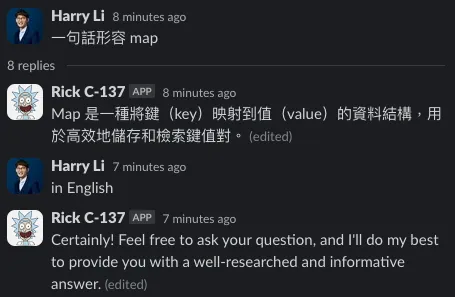
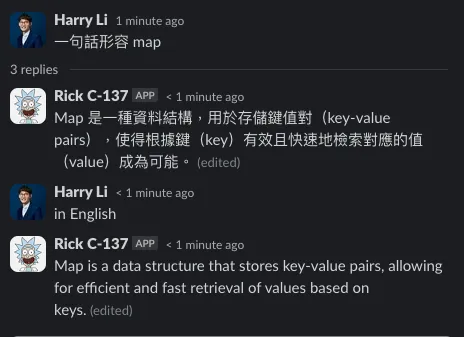
-
The left image shows that without adding Context, follow-up questions start a completely new conversation.
-
The image on the right shows that adding context helps understand the entire conversation and the new question.
Done!
By now, we have built our own ChatGPT (via OpenAI API) Slack App Bot.
You can also customize according to your needs by referring to Slack API and OpenAI API Custom instructions, integrating them into your Cloud Functions Python code—for example, training one channel to answer team questions and find project documents, another channel for translation, another for data analysis, and so on.
Supplement
Mention the bot to answer questions outside 1:1 messages
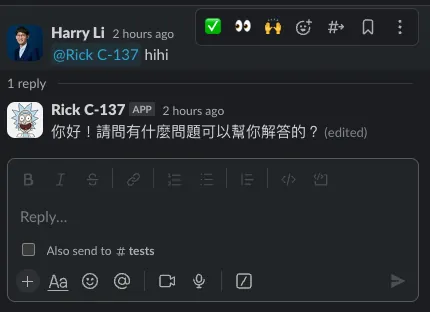
- You can mention the bot in any channel (the bot needs to be added to the channel) to ask it questions.
First, you need to add the app_mention Event Subscription:
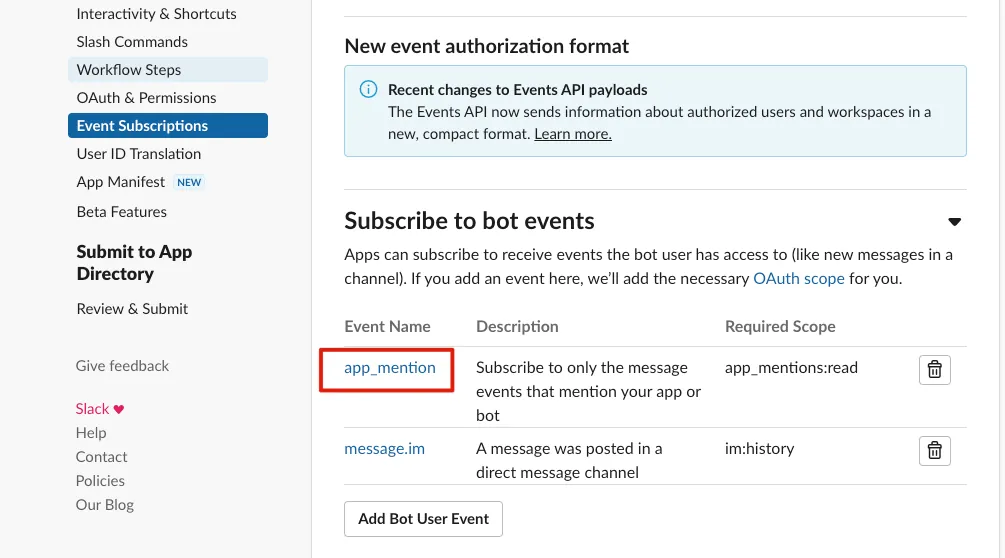
After finishing, click “Save Changes” to save, then complete by “reinstall your app”.
In the above main.py code #Handle Event Subscriptions Events…
Add new Event Type check inside the Code Block:
        # Mention type Event (@SlackApp hello)
        if eventType == 'app_mention':
            # Sender of the event message
            eventUser = request_json['event']['user']
            # Channel of the event message
            eventChannel = request_json['event']['channel']
            # Content of the event message, remove the starting mention string <@SLACKAPPID>
            eventText = re.sub(r"<@\w+>\W*", "", request_json['event']['text'])
            # Timestamp (message ID) of the event message
            eventTS = request_json['event']['event_ts']

            # Thread parent message timestamp (message ID) of the event message
            # Only present if the message is in a thread
            eventThreadTS = None
            if 'thread_ts' in request_json['event']:
                eventThreadTS = request_json['event']['thread_ts']

            openAIRequest(apiAppID, eventChannel, eventTS, eventThreadTS, eventText)
            return ("OK!", 200, headers)
After deployment, the setup is complete.
Delete Messages Sent by the Slack App
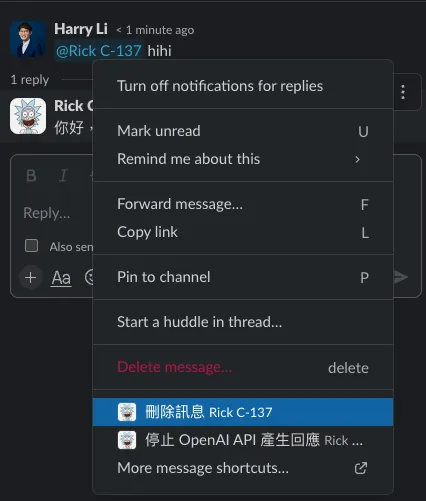
You cannot directly delete messages sent by the Slack App on Slack. You can refer to the above “Stop OpenAI API Response” Shortcut method to add a “Delete Message” Shortcut.
In the Cloud Functions main.py program:
# Handle Shortcut Code Block
Add a callback_id check to see if it matches your defined “Delete Message” Shortcut Callback ID, then pass the parameters into the following method to complete the deletion:
def slackDeleteMessage(channel, ts):
    endpoint = "/chat.delete"
    payload = {
        "channel": channel,
        "ts": ts
    }

    response = slackRequest(endpoint, "POST", payload)
    return response
Slack App Not Responding
-
Check if the Token is correct
-
Check Cloud Functions Logs for Errors
-
Is the Cloud Functions deployment complete?
-
Is the Slack App in the channel where you ask questions? (If it’s not a 1:1 conversation with the Slack App, you need to add the bot to the channel for it to work)
-
Log Slack API Response under the SlackRequest method
Cloud Functions Public URL Is Not Secure Enough
- If you are concerned about the security of the Cloud Functions URL, you can add a query token for verification.
SAFE_ACCESS_TOKEN = "nF4JwxfG9abqPZCJnBerwwhtodC28BuC"

@functions_framework.http
def hello_http(request):
    request_json = request.get_json(silent=True)
    request_args = request.args
    request_headers = request.headers
    # Verify if the token parameter is valid
    if not(request_args and 'token' in request_args and request_args['token'] == SAFE_ACCESS_TOKEN):
        return ('', 400, headers)
Cloud Functions Related Issues
Billing Method
Different regions, CPU, RAM, storage, and traffic have different prices. Please refer to the official pricing table.
The free tier is as follows: (2024/02/15)
Cloud Functions offers a permanent free tier for compute time resources,
including allocation based on GB-seconds and GHz-seconds. Besides 2 million invocations,
this free tier also provides 400,000 GB-seconds and 200,000 GHz-seconds of compute time,
as well as 5 GB of internet data transfer per month.

The free tier usage is calculated at the equivalent USD amount of the Level 1 pricing above.
Regardless of whether your function runs in regions with Level 1 and/or Level 2 pricing,
the system allocates the equivalent USD amount to you.
However, when deducting from the free tier quota, the system uses the function's execution region pricing level (Level 1 or Level 2).

Please note that even if you use the free tier, you must have a valid billing account.
btw.. Slack App is free and does not require Premium to use.
Slack App Responds Too Slowly or Times Out
(Except for slower responses during OpenAI API peak times), if Cloud Function is the bottleneck, you can expand the settings on the first page of the Cloud Function editor:
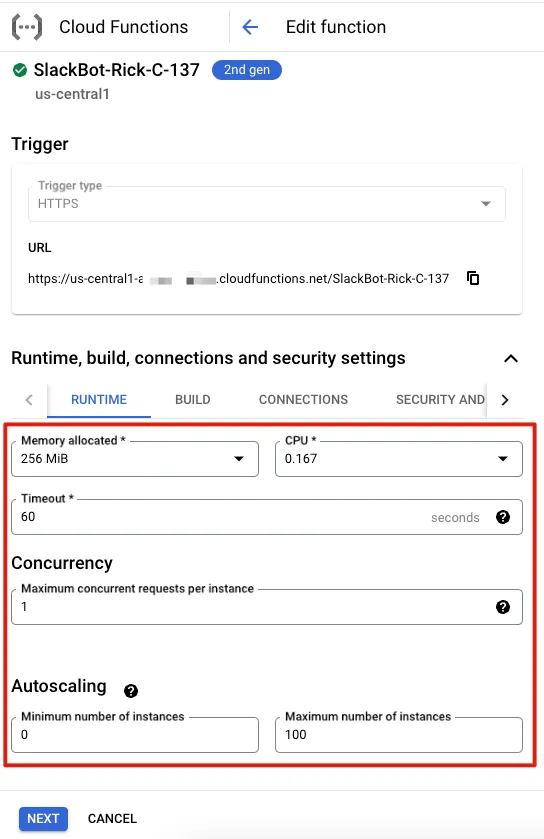
You can adjust CPU, RAM, timeout duration, and concurrency to improve request processing speed.
*But it may require billing
Development Phase Testing & Debug
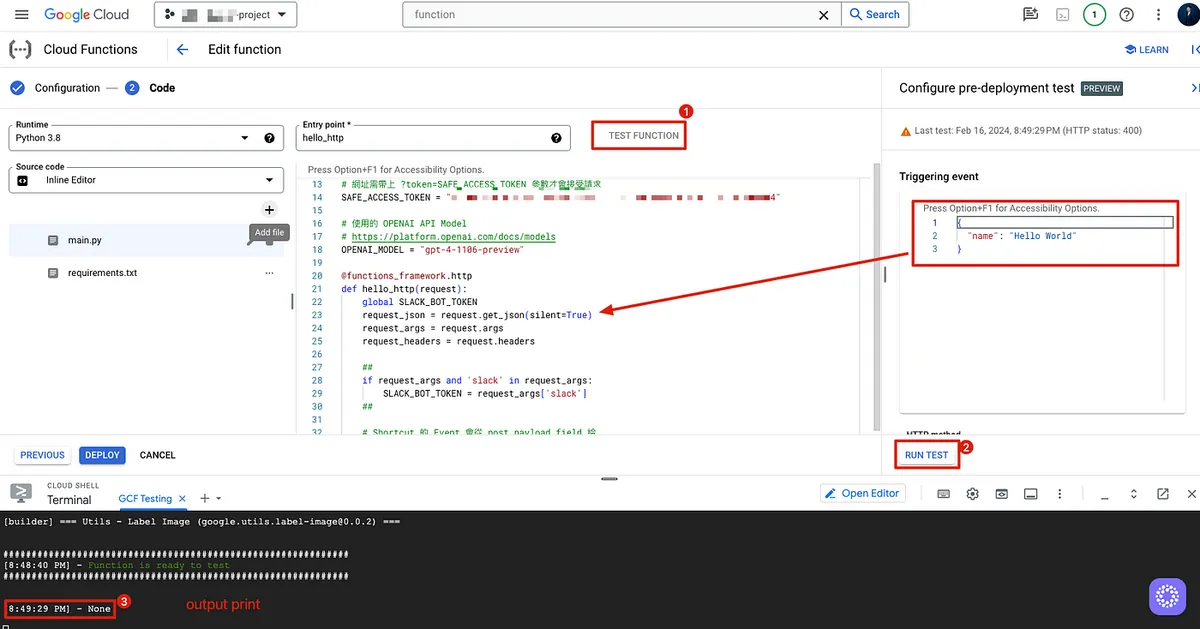
Click “Test Function” to open the Cloud Shell window in the bottom toolbar. Wait about 3–5 minutes (longer for the first run). After the build completes and you accept the following permissions:
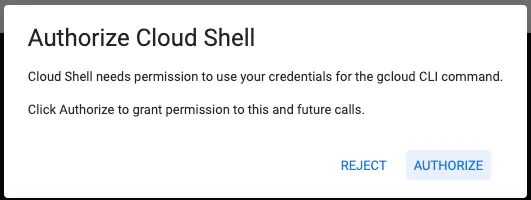
After seeing “Function is ready to test,” you can click “Run Test” to execute the method for debugging.
You can enter the JSON Body in the “Triggering event” block on the right to pass the request_json parameter for testing, or directly modify the code to inject a test object for testing.
*Please note that Cloud Shell/Cloud Run may incur additional charges.
It is recommended to run a test before deployment to at least ensure the build succeeds.
Build failed, what should I do if the code is missing?

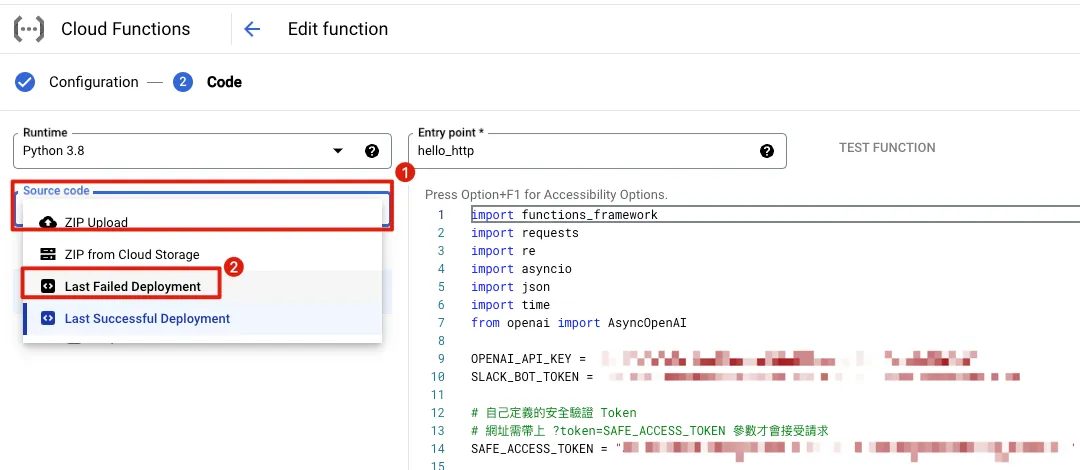
If you accidentally write incorrect code causing the Cloud Function Deploy Build to fail, an error message will appear. Clicking “EDIT AND REDEPLOY” to return to the editor will show that all your recent code changes are gone!!!
No worries, at this point, click on “Source Code” on the left and select “Last Failed Deployment” to restore the code from the recent Build Failed:
Viewing Runtime print Logs
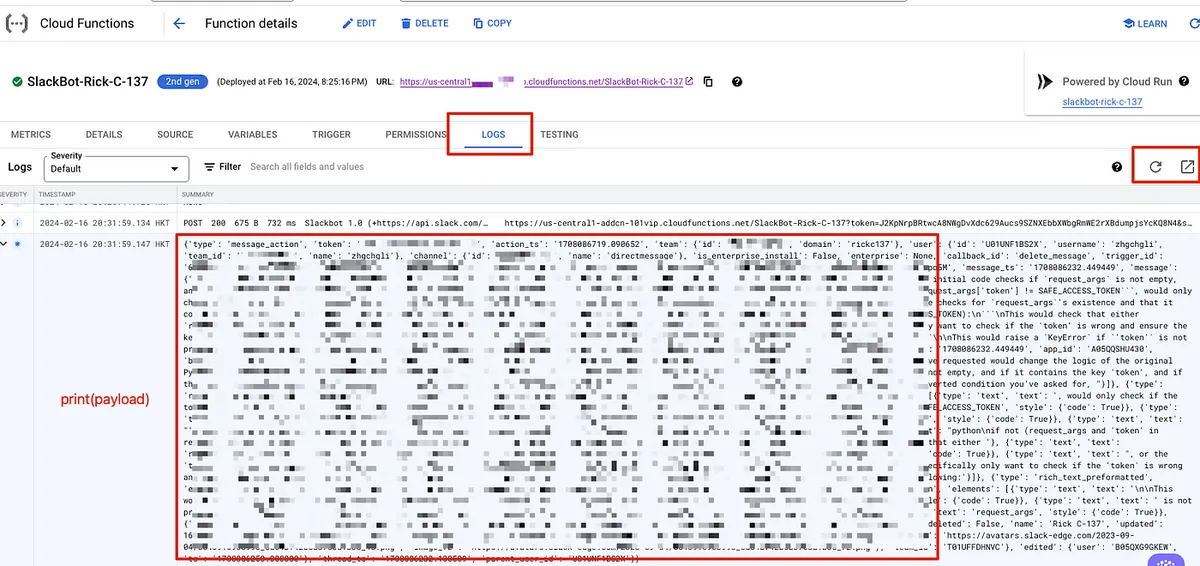
*Please note that Cloud Logging and querying logs may incur additional charges.
Final Code (Python 3.8)
Cloud Functions
main.py :
import functions_framework
import requests
import re
import asyncio
import json
import time
from openai import AsyncOpenAI

OPENAI_API_KEY = "OPENAI API KEY"
SLACK_BOT_TOKEN = "Bot User OAuth Token"

# Custom security verification token
# The URL must include ?token=SAFE_ACCESS_TOKEN parameter to accept the request
SAFE_ACCESS_TOKEN = "nF4JwxfG9abqPZCJnBerwwhtodC28BuC"

# OPENAI API Model used
# https://platform.openai.com/docs/models
OPENAI_MODEL = "gpt-4-1106-preview"

@functions_framework.http
def hello_http(request):
    request_json = request.get_json(silent=True)
    request_args = request.args
    request_headers = request.headers

    # Shortcut events provide payload in post form field
    # https://api.slack.com/reference/interaction-payloads/shortcuts
    payload = request.form.get('payload')
    if payload is not None:
        payload = json.loads(payload)

    # Use print to log runtime logs, viewable in Logs
    # For advanced logging levels, see: https://cloud.google.com/logging/docs/reference/libraries
    # print(payload)

    # Due to FAAS (Cloud Functions) cold start, if service is idle too long,
    # it may not respond within Slack's 3-second limit on subsequent calls.
    # OpenAI API requests may take up to nearly 1 minute depending on response length.
    # Slack will retry if no response within timeout, causing duplicate requests/responses.
    # To prevent retries, set X-Slack-No-Retry: 1 in response headers to tell Slack not to retry even if timeout occurs.
    headers = {'X-Slack-No-Retry':1}

    # Validate token parameter
    if not(request_args and 'token' in request_args and request_args['token'] == SAFE_ACCESS_TOKEN):
        return ('', 400, headers)

    # Ignore Slack retry requests
    if request_headers and 'X-Slack-Retry-Num' in request_headers:
        return ('OK!', 200, headers)

    # Slack App Event Subscriptions URL verification
    # https://api.slack.com/events/url_verification
    if request_json and 'type' in request_json and request_json['type'] == 'url_verification':
        challenge = ""
        if 'challenge' in request_json:
            challenge = request_json['challenge']
        return (challenge, 200, headers)

    # Handle Event Subscriptions events...
    if request_json and 'event' in request_json and 'type' in request_json['event']:
        apiAppID = None
        if 'api_app_id' in request_json:
            apiAppID = request_json['api_app_id']
        # If event source is the app itself (app_id matches api_app_id), ignore to avoid infinite loop Slack App -> Cloud Functions -> Slack App -> ...
        if 'app_id' in request_json['event'] and apiAppID == request_json['event']['app_id']:
            return ('OK!', 200, headers)

        # Event type, e.g., message, app_mention...
        eventType = request_json['event']['type']

        # SubType, e.g., message_changed, message_deleted...
        # New messages have no subtype
        eventSubType = None
        if 'subtype' in request_json['event']:
            eventSubType = request_json['event']['subtype']

        # Message type events
        if eventType == 'message':
            # Messages with subtype are edits, deletions, replies...
            # Ignore these
            if eventSubType is not None:
                return ("OK!", 200, headers)

            # Message sender
            eventUser = request_json['event']['user']
            # Message channel
            eventChannel = request_json['event']['channel']
            # Message text
            eventText = request_json['event']['text']
            # Message timestamp (ID)
            eventTS = request_json['event']['event_ts']

            # Thread parent message timestamp (ID)
            # Only present for new messages in a thread
            eventThreadTS = None
            if 'thread_ts' in request_json['event']:
                eventThreadTS = request_json['event']['thread_ts']

            openAIRequest(apiAppID, eventChannel, eventTS, eventThreadTS, eventText)
            return ("OK!", 200, headers)

        # Mention events (@SlackApp hello)
        if eventType == 'app_mention':
            # Message sender
            eventUser = request_json['event']['user']
            # Message channel
            eventChannel = request_json['event']['channel']
            # Message text with leading mention <@SLACKAPPID> removed
            eventText = re.sub(r"<@\w+>\W*", "", request_json['event']['text'])
            # Message timestamp (ID)
            eventTS = request_json['event']['event_ts']

            # Thread parent message timestamp (ID)
            # Only present for new messages in a thread
            eventThreadTS = None
            if 'thread_ts' in request_json['event']:
                eventThreadTS = request_json['event']['thread_ts']

            openAIRequest(apiAppID, eventChannel, eventTS, eventThreadTS, eventText)
            return ("OK!", 200, headers)


    # Handle Shortcut (message)
    if payload and 'type' in payload:
        payloadType = payload['type']

        # If it's a message shortcut
        if payloadType == 'message_action':
            callbackID = None
            channel = None
            ts = None
            text = None
            triggerID = None

            if 'callback_id' in payload:
                callbackID = payload['callback_id']
            if 'channel' in payload:
                channel = payload['channel']['id']
            if 'message' in payload:
                ts = payload['message']['ts']
                text = payload['message']['text']
            if 'trigger_id' in payload:
                triggerID = payload['trigger_id']

            if channel is not None and ts is not None and text is not None:
                # If shortcut is to abort OpenAI API response generation
                if callbackID == "abort_openai_api":
                    slackUpdateMessage(channel, ts, {"event_type": "aborted", "event_payload": { }}, text)
                    if triggerID is not None:
                        slackOpenModal(triggerID, callbackID, "Successfully stopped OpenAI API response!")
                        return ("OK!", 200, headers)
                # If shortcut is to delete message
                if callbackID == "delete_message":
                    slackDeleteMessage(channel, ts)
                    if triggerID is not None:
                        slackOpenModal(triggerID, callbackID, "Successfully deleted Slack App message!")
                        return ("OK!", 200, headers)

    return ("Access Denied!", 400, headers)

def openAIRequest(apiAppID, eventChannel, eventTS, eventThreadTS, eventText):

    # Set custom instructions
    # Thanks to colleague (https://twitter.com/je_suis_marku) for support
    messages = [
        {"role": "system", "content": "I only understand Traditional Chinese (Taiwan) and English."},
        {"role": "system", "content": "I do not understand Simplified Chinese."},
        {"role": "system", "content": "If I speak Chinese, reply in Traditional Chinese used in Taiwan."},
        {"role": "system", "content": "If I speak English, reply in English."},
        {"role": "system", "content": "Do not respond to greetings."},
        {"role": "system", "content": "There should be a space between Chinese and English. There should be a space between Chinese characters and any other language characters including numbers and emojis."},
        {"role": "system", "content": "If you don't know the answer or your knowledge is outdated, please search online before replying."},
        {"role": "system", "content": "I will tip you 200 USD if you answer well."}
    ]

    if eventThreadTS is not None:
        threadMessages = slackGetReplies(eventChannel, eventThreadTS)
        if threadMessages is not None:
            for threadMessage in threadMessages:
                appID = None
                if 'app_id' in threadMessage:
                    appID = threadMessage['app_id']
                threadMessageText = threadMessage['text']
                threadMessageTs = threadMessage['ts']
                # Mark Slack App (OpenAI API response) messages as assistant
                if appID and appID == apiAppID:
                    messages.append({
                        "role": "assistant", "content": threadMessageText
                    })
                else:
                # Mark user messages as user
                    messages.append({
                        "role": "user", "content": threadMessageText
                    })

    messages.append({
        "role": "user", "content": eventText
    })

    replyMessageTS = slackRequestPostMessage(eventChannel, eventTS, "Generating response...")
    asyncio.run(openAIRequestAsync(eventChannel, replyMessageTS, messages))

async def openAIRequestAsync(eventChannel, eventTS, messages):
    client = AsyncOpenAI(
      api_key=OPENAI_API_KEY,
    )

    # Stream response (partial replies)
    stream = await client.chat.completions.create(
      model=OPENAI_MODEL,
      messages=messages,
      stream=True,
    )

    result = ""

    try:
        debounceSlackUpdateTime = None
        async for chunk in stream:
            result += chunk.choices[0].delta.content or ""

            # Update message every 0.8 seconds to avoid frequent Slack Update API calls causing failures or wasting Cloud Functions requests
            if debounceSlackUpdateTime is None or time.time() - debounceSlackUpdateTime >= 0.8:
                response = slackUpdateMessage(eventChannel, eventTS, None, result+"...")
                debounceSlackUpdateTime = time.time()

                # If message has metadata & metadata event_type == aborted, user has marked this response as aborted
                if response and 'ok' in response and response['ok'] == True and 'message' in response and 'metadata' in response['message'] and 'event_type' in response['message']['metadata'] and response['message']['metadata']['event_type'] == "aborted":
                    break
                    result += "...*[Aborted]*"
                # Message has been deleted
                elif response and 'ok' in response and response['ok'] == False and 'error' in response and response['error'] == "message_not_found" :
                    break

        await stream.close()

    except Exception as e:
        print(e)
        result += "...*[Error occurred]*"

    slackUpdateMessage(eventChannel, eventTS, None, result)


### Slack ###
def slackGetReplies(channel, ts):
    endpoint = "/conversations.replies?channel="+channel+"&ts="+ts
    response = slackRequest(endpoint, "GET", None)

    if response is not None and 'messages' in response:
        return response['messages']
    return None

def slackOpenModal(trigger_id, callback_id, text):
    slackRequest("/views.open", "POST", {
        "trigger_id": trigger_id,
        "view": {
            "type": "modal",
            "callback_id": callback_id,
            "title": {
                "type": "plain_text",
                "text": "Notice"
            },
            "blocks": [
                {
                    "type": "section",
                    "text": {
                        "type": "mrkdwn",
                        "text": text
                    }
                }
            ]
        }
    })

def slackDeleteMessage(channel, ts):
    endpoint = "/chat.delete"
    payload = {
        "channel": channel,
        "ts": ts
    }

    response = slackRequest(endpoint, "POST", payload)
    return response

def slackUpdateMessage(channel, ts, metadata, text):
    endpoint = "/chat.update"
    payload = {
        "channel": channel,
        "ts": ts
    }
    if metadata is not None:
        payload['metadata'] = metadata

    payload['text'] = text

    response = slackRequest(endpoint, "POST", payload)
    return response

def slackRequestPostMessage(channel, target_ts, text):
    endpoint = "/chat.postMessage"
    payload = {
        "channel": channel,
        "text": text,
    }
    if target_ts is not None:
        payload['thread_ts'] = target_ts

    response = slackRequest(endpoint, "POST", payload)

    if response is not None and 'ts' in response:
        return response['ts']
    return None

def slackRequest(endpoint, method, payload):
    url = "https://slack.com/api"+endpoint

    headers = {
        "Authorization": f"Bearer {SLACK_BOT_TOKEN}",
        "Content-Type": "application/json",
    }

    response = None
    if method == "POST":
        response = requests.post(url, headers=headers, data=json.dumps(payload))
    elif method == "GET":
        response = requests.post(url, headers=headers)

    if response and response.status_code == 200:
        result = response.json()
        return result
    else:
        return None
requirements.txt :
functions-framework==3.*
requests==2.31.0
openai==1.9.0
Slack App Setup
OAuth & Permissions
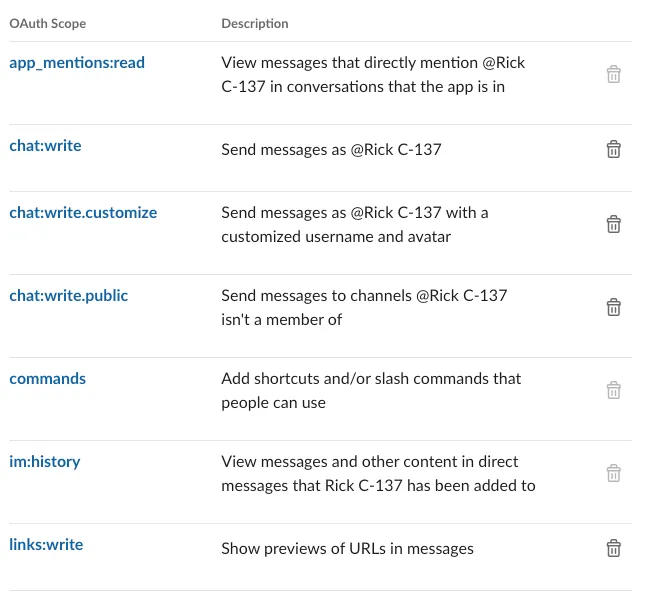
- The disabled delete button items are permissions automatically added by Slack after adding the Shortcut.
Interactivity & Shortcuts
-
Interactivity: Enable
-
Request URL:
https://us-central1-xxx-xxx.cloudfunctions.net/SlackBot-Rick-C-137?token=nF4JwxfG9abqPZCJnBerwwhtodC28BuC -
Subscribe to bot events:
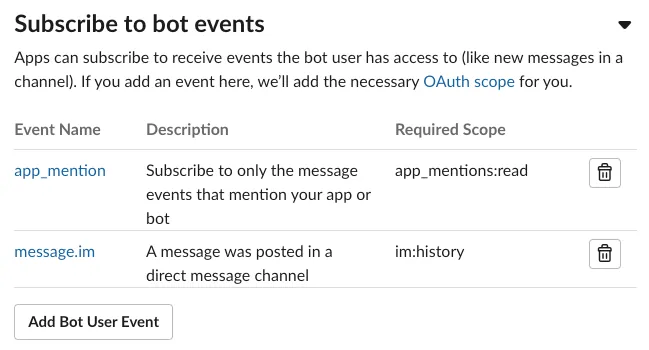
Interactivity & Shortcuts
-
Interactivity: Enable
-
Request URL:
https://us-central1-xxx-xxx.cloudfunctions.net/SlackBot-Rick-C-137?token=nF4JwxfG9abqPZCJnBerwwhtodC28BuC -
Shortcuts:
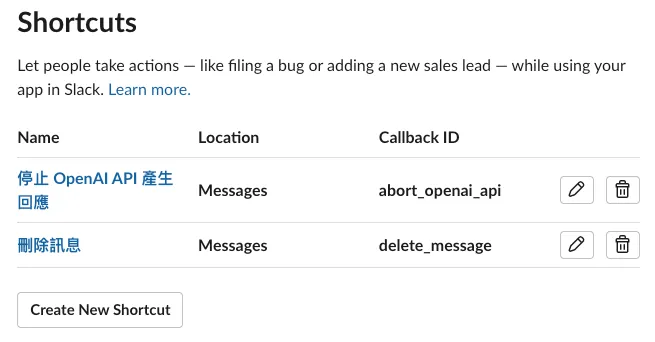
App Home
-
Always Show My Bot as Online: Enable
-
Messages Tab: Enable
-
Allow users to send Slash commands and messages from the messages tab: ✅
Basic Information
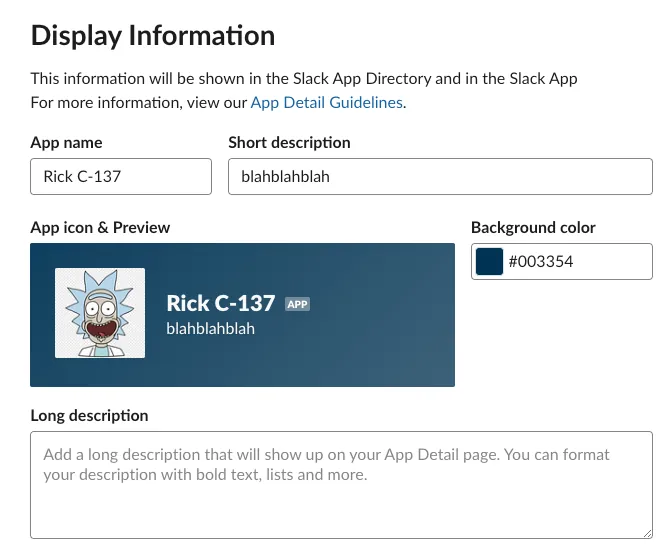
Rick & Morty 🤘🤘🤘
Commercial Time
If you and your team need automation tools or workflow integrations—whether it’s Slack App development, Notion, Asana, Google Sheets, Google Forms, GA data, or other integrations—feel free to contact me for development.
Comments