
linkyee — Quickly and freely create a personal LinkTree-like page using GitHub Pages
Create Your Own Link Page Quickly with GitHub Pages: 100% Free, Customizable, and Supports Custom Domains
Result
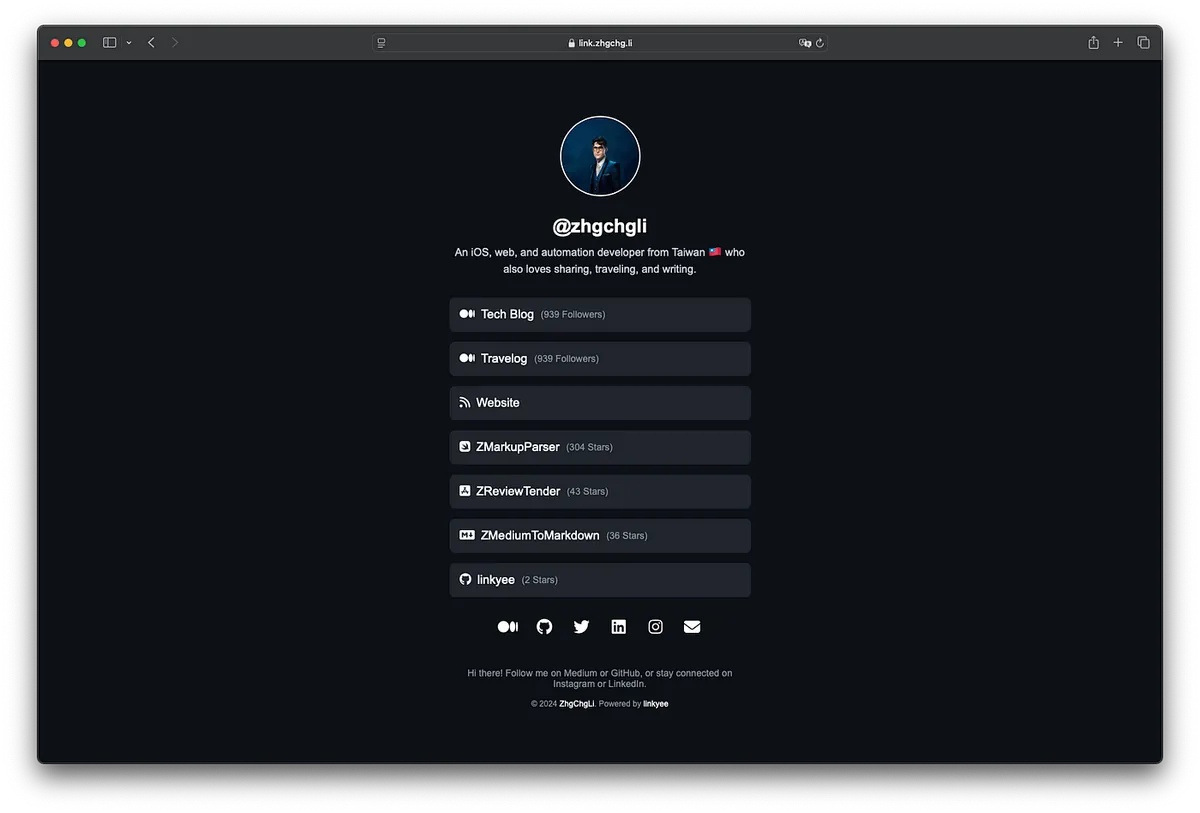
I have open-sourced the project and packaged it as a Template Repo (linkyee). Friends who need it can directly Fork to quickly deploy and use it.
linkyee — Your Own Link Pages
Advantages:
-
Direct Deployment on GitHub Pages: Stable and Free
-
Full control over the HTML source files allows you to freely modify layout, styles, remove ads, and copyright notices; (the default style was created using GenAI ChatGPT)
-
Support Custom Domains
-
Supports dynamic variables, such as default Medium followers and GitHub repo star count variables, which can be automatically inserted and updated on the page. 🚀🚀🚀
-
Fast Page Loading
-
You can complete the setup and deployment in just a few simple steps according to this article.
Github Pages
GitHub Pages is a free static site hosting service provided by GitHub. All GitHub Free accounts can use it directly for Public Repos, while Private Repos require a paid GitHub account upgrade.
Limitations
-
Can only host static file resources: HTML, CSS, JavaScript, font files, image files, PDFs, audio files, text files, etc.
-
The website (repo) size must not exceed: 1 GB. This is likely a soft limit, as my GitHub Pages Jekyll repo is already nearly 5 GB.
-
Longest deployment time: 10 minutes
-
Maximum deployments per hour: 10 times (soft limit)
-
Monthly Traffic Limit: 100 GB (soft limit)
-
Too many requests may result in an HTTP 429 response.
Other Github Pages Application Articles
Getting Started — Deploy on GitHub Pages
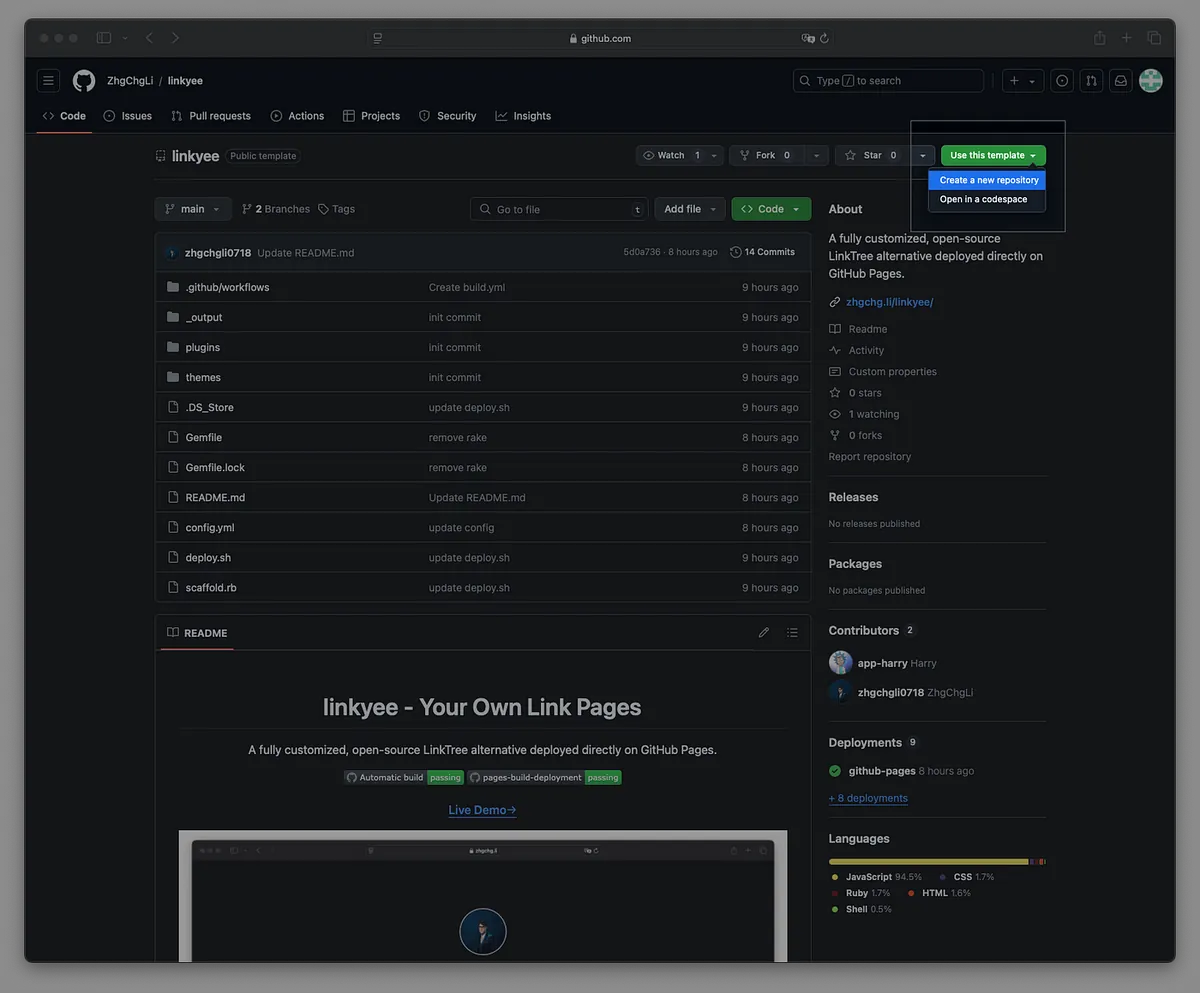
Step 1. Click the “Use this template” button at the top right of the linkyee template repo -> “Create a new repository”:
Step 2. Check “Include all branches,” enter your desired GitHub Pages repository name, and click “Create repository”:
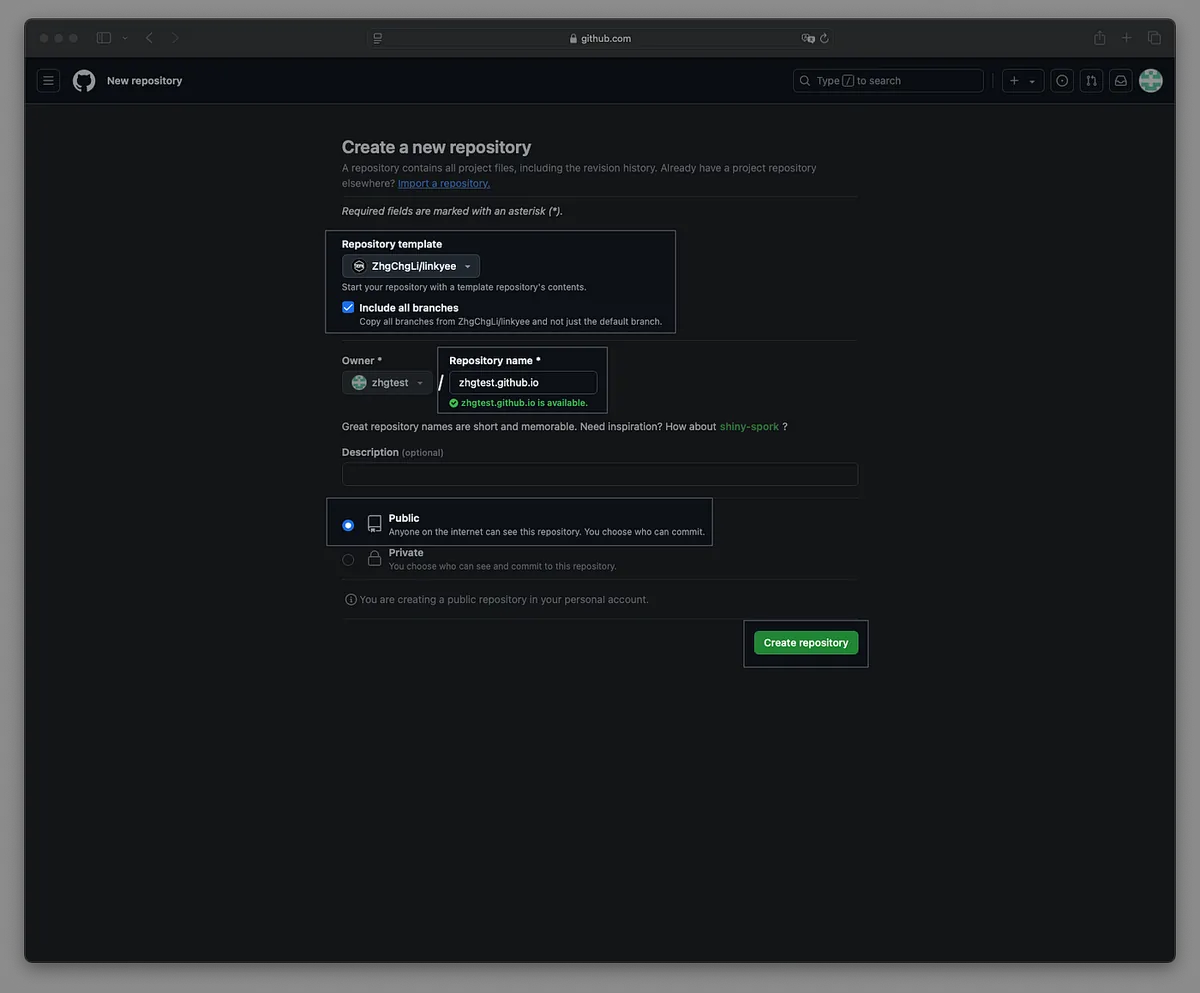
The GitHub Pages repo name will be the access URL.
If you name the repo
your-username.github.io, it will become the direct URL for your GitHub Pages site.
If you already have a
your-username.github.iorepo, the GitHub Pages URL will beyour-username.github.io/Repo-Name.
Wait for the Fork to complete. You may encounter deployment errors initially due to permission issues with the Forked repository. Next, we will follow the steps to adjust this.

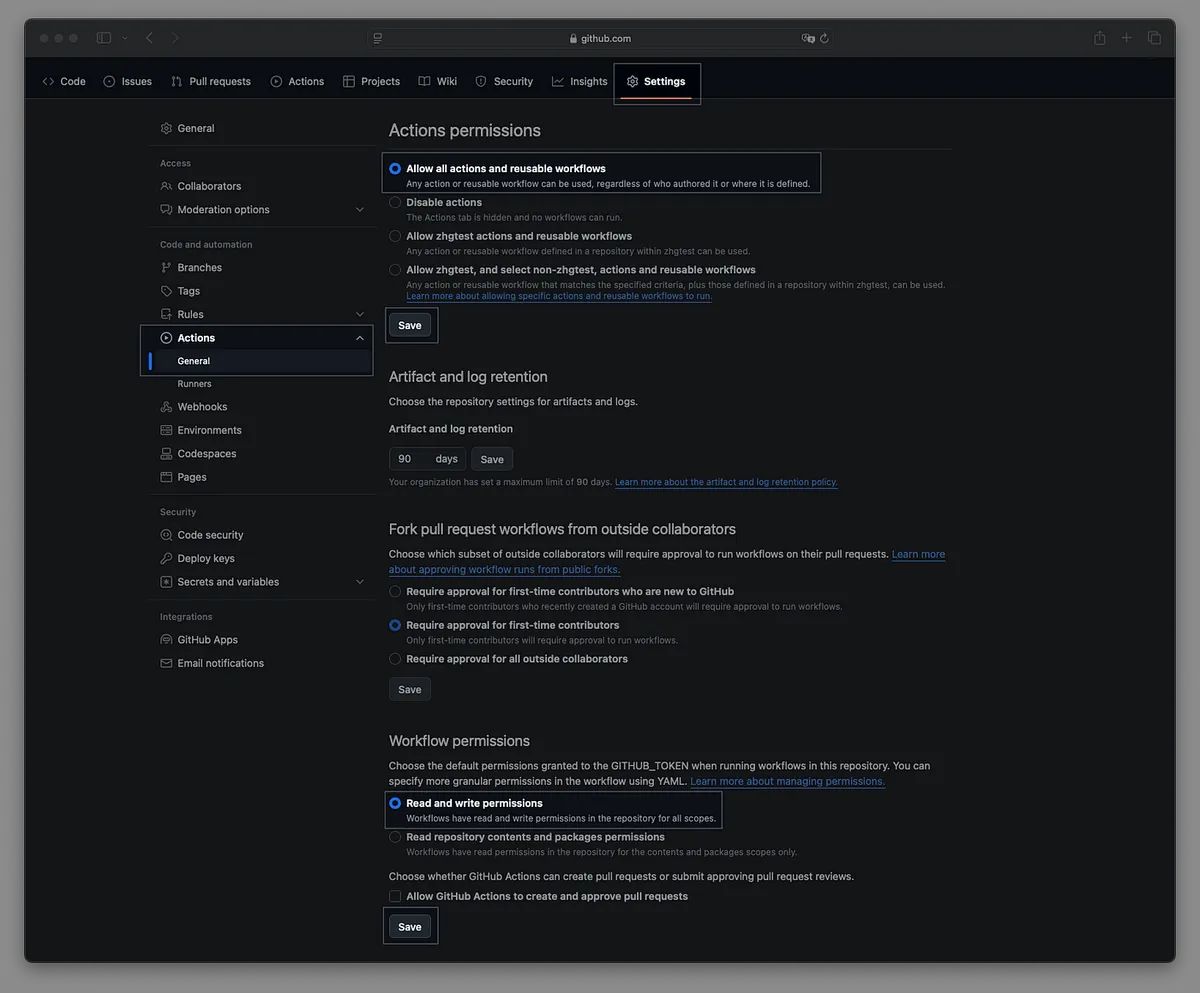
Step 4. Go to Settings -> Actions -> General, and make sure to select the following options:
-
Actions permissions: Allow all actions and reusable workflows
-
Workflow permissions: Read and write permissions
After making your selection, click the Save button to save the changes.
Step 5. Go to Settings -> Pages, and confirm the GitHub Pages branch is set to “gh-pages”:
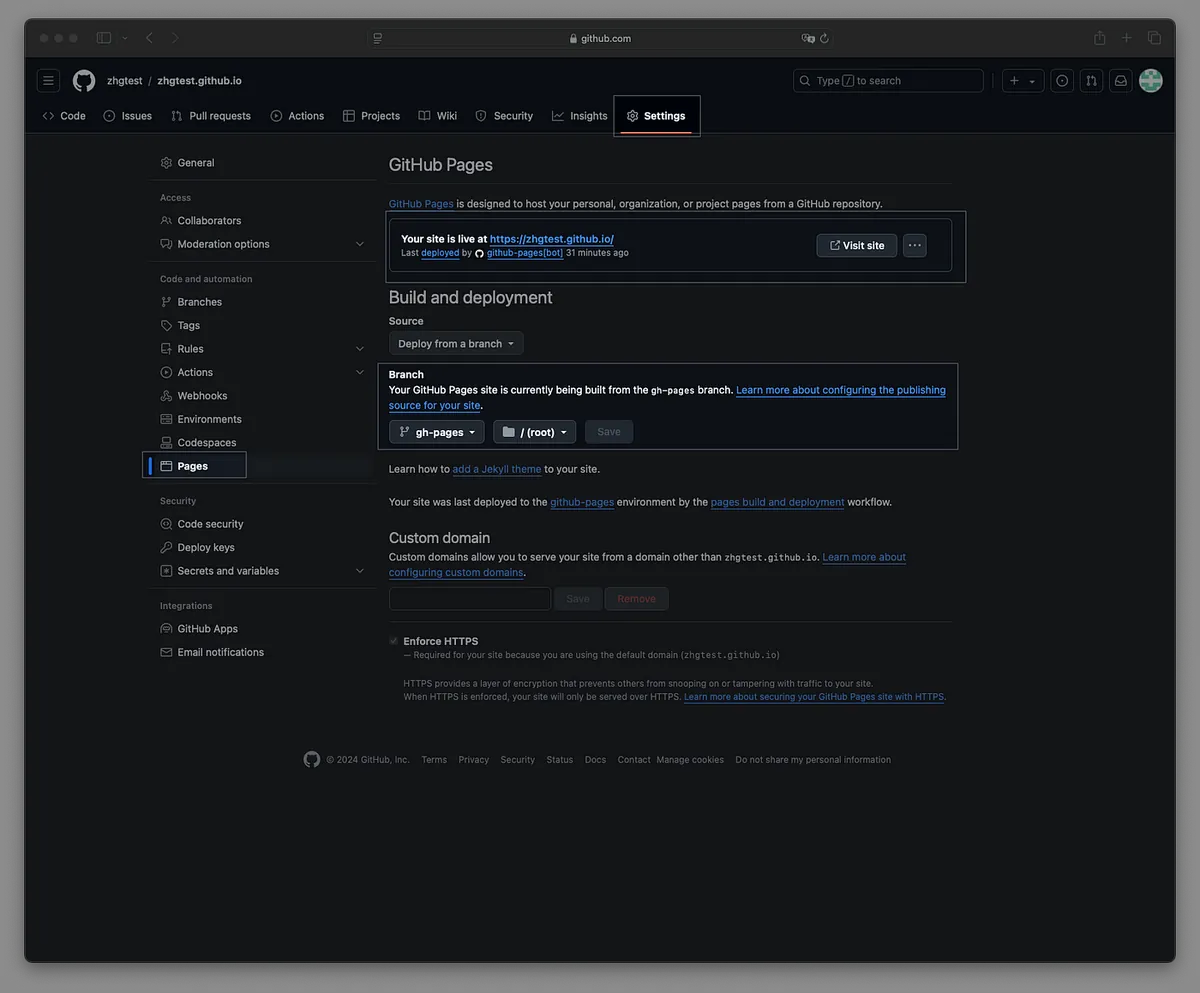
The message “Your site is live at: XXXX” is your GitHub Pages public access URL.
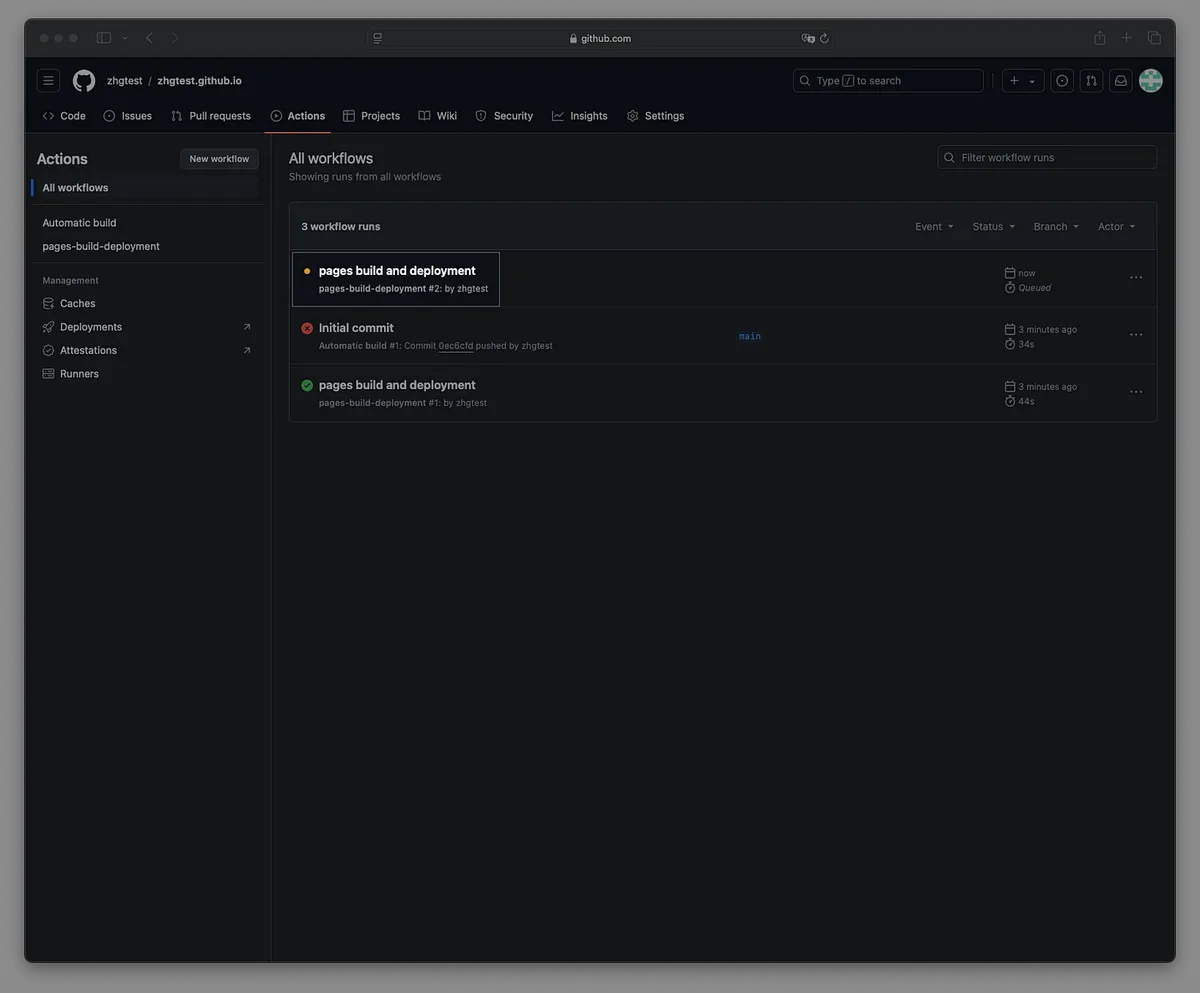
Step 6. Go to Settings -> Actions, and wait for the first deployment to complete:
Step 7. Visit the GitHub Pages URL to confirm if the Fork was successful:
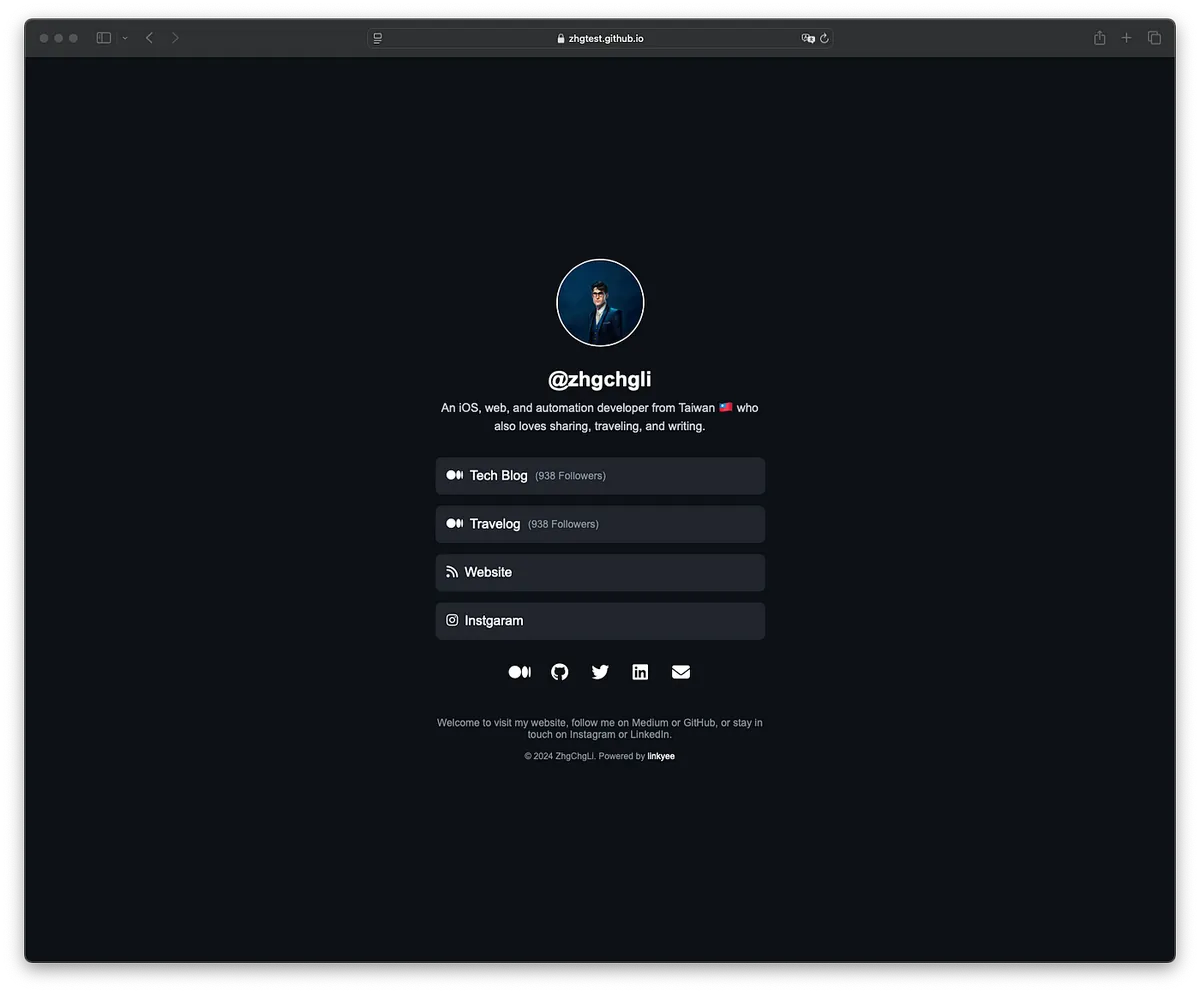
Congratulations! Deployment successful. You can now edit the configuration file and replace it with your own information. 🎉🎉🎉
Setup
Configuration File
Edit the config.yml file located in the root directory.
# Website Configuration

# Theme name, corresponds to directory: ./theme/xxxx
theme: default

# HTML language setting
lang: "en"

# Plugins (implemented in ./plugins/PLUGIN_NAME)
# Use {{ vars.PLUGIN_NAME }} in the settings below

# Plugin output can be used below, e.g.: {{vars.MediumFollowersCountPlugin}}
plugins:
  # Automatically get Medium followers count
  - MediumFollowersCountPlugin:
      username: zhgchgli
  # Automatically get GitHub repository stars count
  - GithubRepoStarsCountPlugin:
      - ZhgChgLi/ZMarkupParser
      - ZhgChgLi/ZReviewTender
      - ZhgChgLi/ZMediumToMarkdown
      - ZhgChgLi/linkyee

# Google Analytics tracking ID
google_analytics_id:

# HTML title
title: "ZhgChgLi's Link Collection"

# Avatar image path
avatar: "./images/profile.jpeg"

# Name block text
name: "@zhgchgli"

# Tagline block text
tagline: >-
    An iOS, web, and automation developer from Taiwan who loves sharing, traveling, and writing.

# Links list
# icon: use Font Awesome icons (https://fontawesome.com/search?o=r&m=free)
# text: text shown on the link
# title: link title
# url: link URL
# alt: alternative text (for accessibility)
# target: `_blank` opens in new tab, `_self` opens in the same page
links:
  - link:
      icon: "fa-brands fa-medium"
      text: "Tech Blog <span class='link-button-text'>({{vars.MediumFollowersCountPlugin}} Followers)</span>"
      url: "https://blog.zhgchg.li"
      alt: "ZhgChgLi's Tech Blog"
      title: "ZhgChgLi's Tech Blog"
      target: "_blank"
  - link:
      icon: "fa-brands fa-medium"
      text: "Travel Journal <span class='link-button-text'>({{vars.MediumFollowersCountPlugin}} Followers)</span>"
      url: "https://medium.com/ztravel"
      alt: "ZhgChgLi's Travel Journal"
      title: "ZhgChgLi's Travel Journal"
      target: "_blank"
  - link:
      icon: "fa-solid fa-rss"
      text: "Personal Website"
      url: "https://zhgchg.li/"
      alt: "ZhgChgLi's Website"
      title: "ZhgChgLi's Website"
      target: "_blank"
  - link:
      icon: "fa-brands fa-swift"
      text: "ZMarkupParser <span class='link-button-text'>({{vars.GithubRepoStarsCountPlugin['ZhgChgLi/ZMarkupParser']}} Stars)</span>"
      url: "https://github.com/ZhgChgLi/ZMarkupParser"
      alt: "ZMarkupParser is a pure Swift library for converting HTML strings into NSAttributedString with custom styles."
      title: "ZMarkupParser is a pure Swift library for converting HTML strings into NSAttributedString with custom styles."
      target: "_blank"
  - link:
      icon: "fa-brands fa-app-store-ios"
      text: "ZReviewTender <span class='link-button-text'>({{vars.GithubRepoStarsCountPlugin['ZhgChgLi/ZReviewTender']}} Stars)</span>"
      url: "https://github.com/ZhgChgLi/ZReviewTender"
      alt: "ZReviewTender is a tool to fetch app reviews from App Store and Google Play Console and integrate them into workflows."
      title: "ZReviewTender is a tool to fetch app reviews from App Store and Google Play Console and integrate them into workflows."
      target: "_blank"
  - link:
      icon: "fa-brands fa-markdown"
      text: "ZMediumToMarkdown <span class='link-button-text'>({{vars.GithubRepoStarsCountPlugin['ZhgChgLi/ZMediumToMarkdown']}} Stars)</span>"
      url: "https://github.com/ZhgChgLi/ZMediumToMarkdown"
      alt: "ZMediumToMarkdown is a powerful tool to easily download and convert Medium articles to Markdown format."
      title: "ZMediumToMarkdown is a powerful tool to easily download and convert Medium articles to Markdown format."
      target: "_blank"
  - link:
      icon: "fa-brands fa-github"
      text: "linkyee <span class='link-button-text'>({{vars.GithubRepoStarsCountPlugin['ZhgChgLi/linkyee']}} Stars)</span>"
      url: "https://github.com/ZhgChgLi/linkyee"
      alt: "linkyee is a fully customizable and open-source LinkTree alternative that can be deployed directly on GitHub Pages."
      title: "linkyee is a fully customizable and open-source LinkTree alternative that can be deployed directly on GitHub Pages."
      target: "_blank"

# Social media links list
# icon: use Font Awesome icons (https://fontawesome.com/search?o=r&m=free)
# title: link title
# url: social media link URL
# alt: alternative text (for accessibility)
# target: `_blank` opens in new tab, `_self` opens in the same page
socials:
  - social:
      icon: "fa-brands fa-medium"
      url: "https://blog.zhgchg.li"
      title: "ZhgChgLi's Medium"
      alt: "ZhgChgLi's Medium"
      target: "_blank"
  - social:
      icon: "fa-brands fa-github"
      url: "https://github.com/ZhgChgLi"
      title: "ZhgChgLi's GitHub"
      alt: "ZhgChgLi's GitHub"
      target: "_blank"
  - social:
      icon: "fa-brands fa-twitter"
      url: "https://twitter.com/zhgchgli"
      title: "ZhgChgLi's Twitter"
      alt: "ZhgChgLi's Twitter"
      target: "_blank"
  - social:
      icon: "fa-brands fa-linkedin"
      url: "https://www.linkedin.com/in/zhgchgli/"
      title: "ZhgChgLi's LinkedIn"
      alt: "ZhgChgLi's LinkedIn"
      target: "_blank"
  - social:
      icon: "fa-brands fa-instagram"
      url: "https://www.instagram.com/zhgchgli/"
      title: "Instagram"
      alt: "ZhgChgLi's Instagram"
      target: "_blank"
  - social:
      icon: "fa-solid fa-envelope"
      url: "[email protected]"
      title: "Email: [email protected]"
      alt: "[email protected]"
      target: "_blank"

# Footer text
footer: >
    Welcome to my website! Follow me on Medium or GitHub for the latest updates, or stay connected on Instagram and LinkedIn.

# Footer copyright statement
# Linkyee is a 100% free open-source project—you can freely modify the copyright statement. :)
copyright: >
  © 2024 <a href="https://zhgchg.li" target="_blank">ZhgChgLi</a>. Powered by <a href="https://github.com/ZhgChgLi/linkyee" target="_blank">linkyee</a>.
Please note that after each file modification, you need to wait for GitHub Actions to finish the automatic build and the page build and deployment tasks.
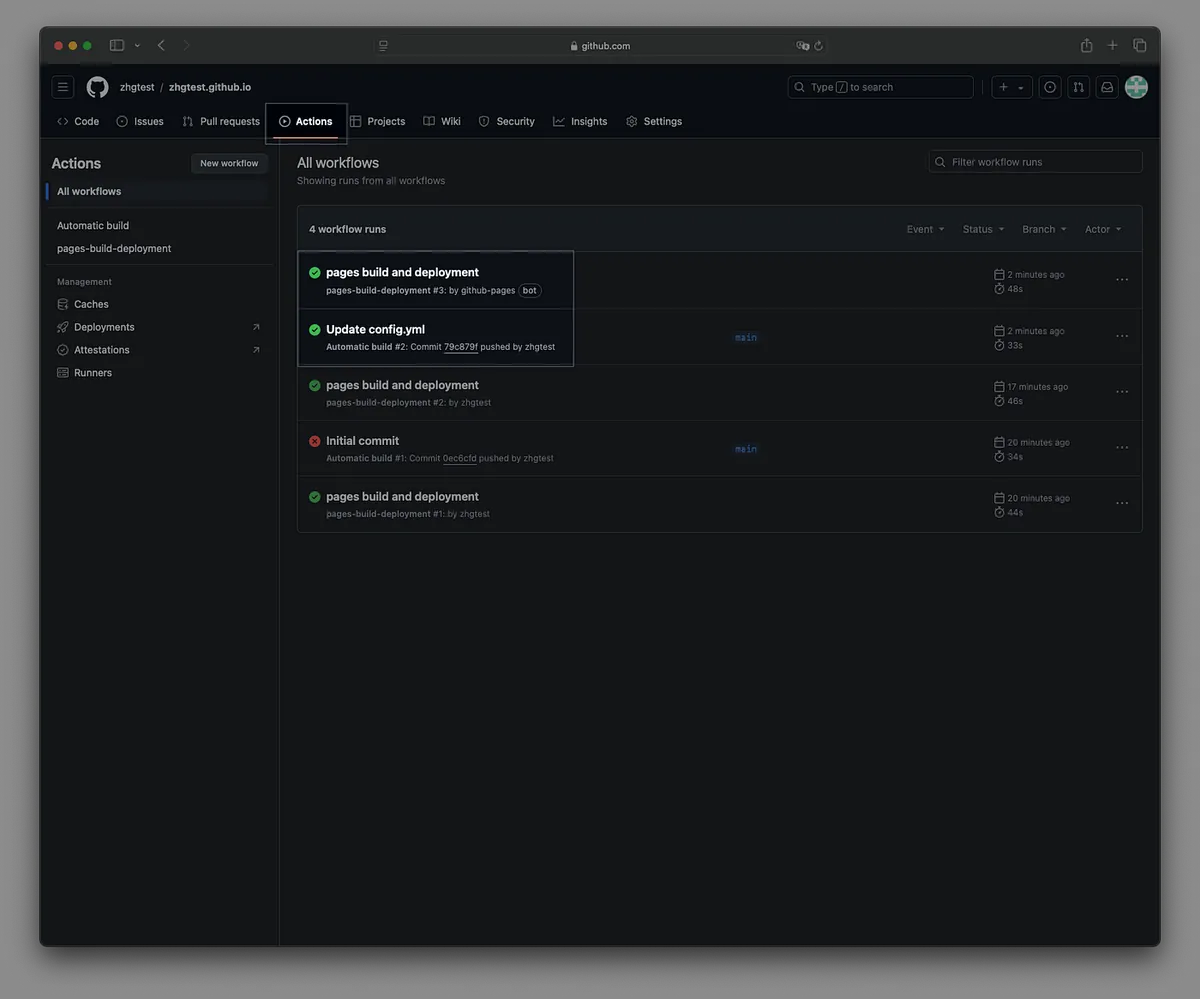
Refresh the page to apply the changes. 🚀
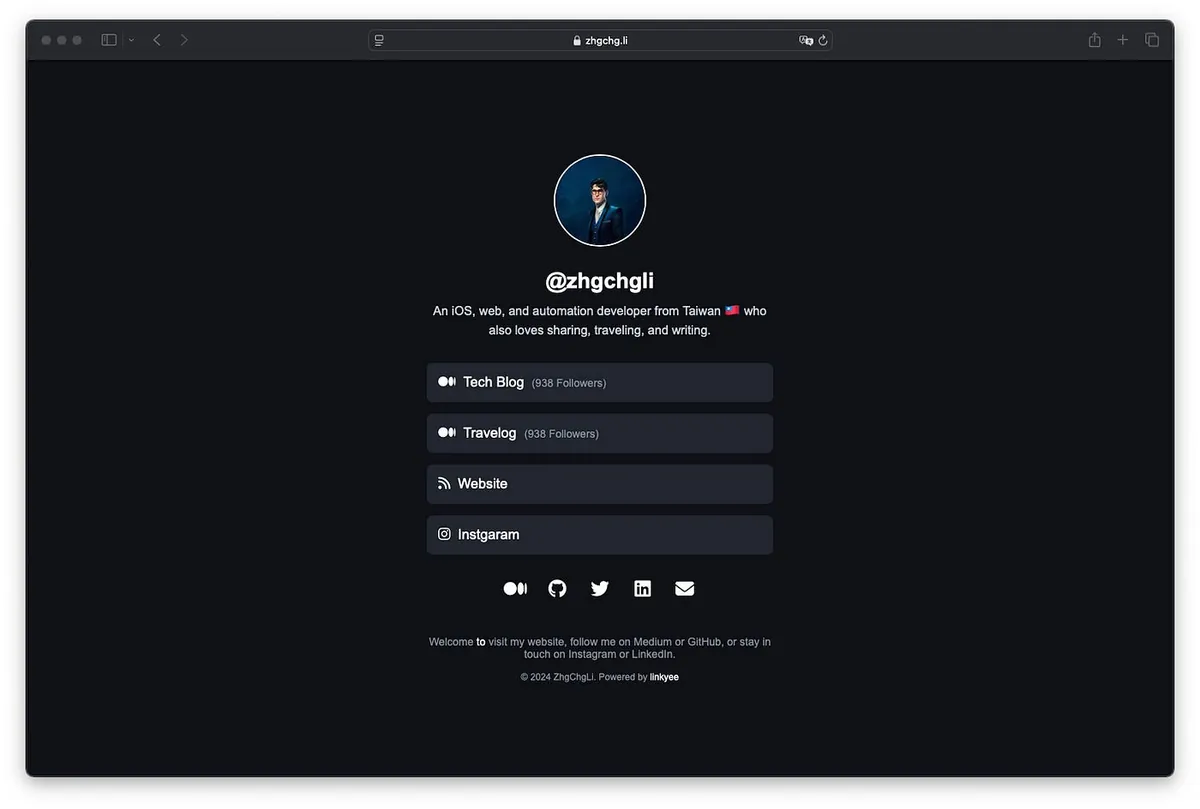
Success!!
Customize Styles and Modify the Default Theme
-
./themes/default/index.html -
./themes/default/styles.css -
./themes/default/scripts.js
Create a New Theme
-
./themes/
YOUR_THEME -
Update to
theme:YOUR_THEMEin the config.yml file
Yes, you can use GenAI tools like ChatGPT to help you create a custom link page! (The default style was also generated by ChatGPT)
Automatic Redeployment
By default, the project automatically redeploys once a day to refresh the plugin’s dynamic variable values. You can adjust the cron settings in Github Action — Automatic build (.github/workflows/build.yml):
schedule:
 - cron: '0 0 * * *' # Run daily at midnight 00:00 (UTC)
If you don’t need scheduled redeployment, you can simply delete the schedule block.
Custom Domain ❤️❤️❤️
You can set a custom GitHub Pages domain, for example mine: https://link.zhgchg.li .
You can refer to my previous article “Github Pages Custom Domain Tutorial” for a step-by-step guide from purchasing to binding a domain. You can also buy a domain through my Namecheap referral link — I will receive a small commission, which helps me continue contributing to open source projects.
Buy me a coffee ❤️❤️❤️

https://www.paypal.com/ncp/payment/CMALMPT8UUTY2
If this project helps you, please consider Starring the Repo or recommending it to friends, or buying me a coffee. Thank you for your support!
Feel free to submit an Issue or contribute fixes via Pull Request. :)


Comments