
2026 Online Tax Filing Complete Guide: Applying for Citizen Digital Certificate / Mobile Citizen Digital Certificate + Tax Filing Steps + 2025 New Regulations All in One
Tax season comes every May. The 2026 comprehensive income tax filing period (Year 114) is 2026/5/1 – 2026/6/1 (extended one day since 5/31 falls on Sunday). The Ministry of Finance still offers “6 Ways to File Taxes Online at Home,” but for those who want to complete everything online and support all financial/government services, the Natural Person Certificate remains the most complete option.
This article mainly uses three gov.tw sources: Ministry of Finance E-Filing and Tax Payment Service, Central Taiwan National Taxation Bureau “6 Tips for Filing Taxes at Home Online”, and MOICA National Certification Authority. It covers 2026 tax filing, natural person certificate application/use, filing steps, and key new regulations all at once.
本文彙整自官方資訊,可能隨政策或網站更新有所變動,請以財政部、MOICA及各服務網站公告為準。
延伸閱讀(銀行實務案例):LINE Bank入金Firstrade、升級帳戶、指定帳戶教學
1. Complete 2026 Tax Filing Schedule (Declaration + Refund)
According to the Ministry of Finance and the Central Tax Bureau Direct Refund Schedule, the entire process spans from May to January of the following year:
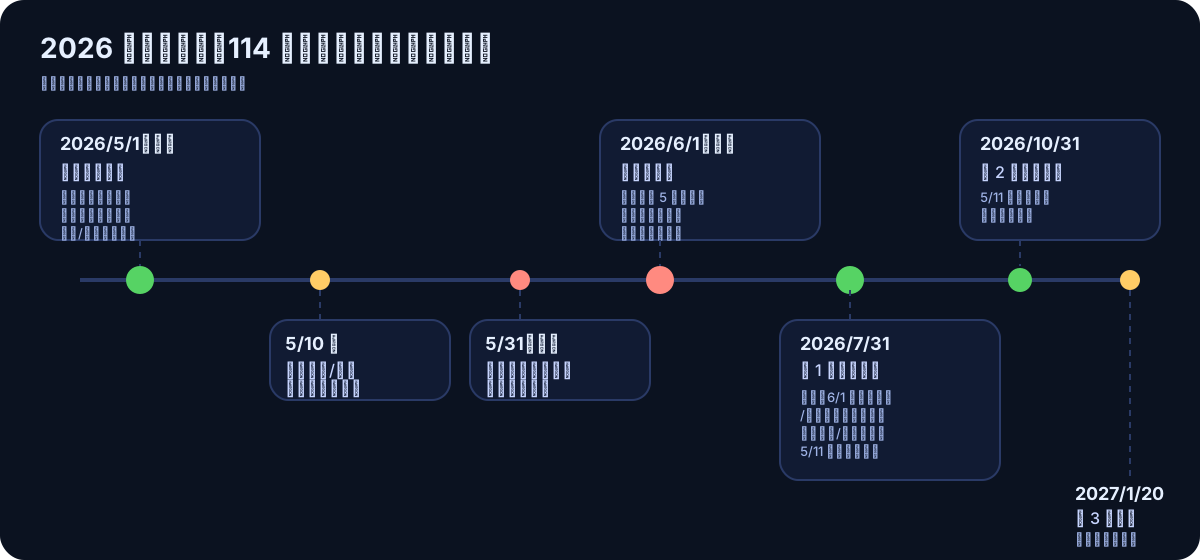
1) Filing Period
\| Date \| Event \| Notes \| \|—\|—\|—\| \| 2026/5/1 (Fri) \| Start of filing period \| Labor Day is a national holiday; no in-person service at tax offices. Online/mobile filing available 24 hours \| \| Before 5/10 \| Barcode/manual filing with tax payment \| Tax payment and filing must be completed by this date \| \| Before 5/11 \| Paper tax calculation return \| Affects eligibility for the first batch of tax refunds (see below) \| \| 5/31 (Sun) \| Original filing deadline \| Falls on Sunday, so extended by law \| \| 2026/6/1 (Mon) \| Filing deadline \| Recommended to finish by 5 PM; system may be congested, filing 3 days early is safest \|
2) Tax Refund in 3 Batches
\| Batch \| Payment/Deposit Date \| Applicable Targets \| \|—\|—\|—\| \| Batch 1 \| 2026/7/31 \| Those who completed online/mobile filing, online tax estimation registration, phone voice response, or paper response before 5/11 \| \| Batch 2 \| 2026/10/31 \| QR code/manual filings and paper responses submitted after 5/11 \| \| Batch 3 \| 2027/1/20 \| Late filings, cases originally declared as tax payable or no refund, and cases converted to refunds after tax office approval \|
Tax Refund Status Check: Ministry of Finance Tax Portal — Comprehensive Income Tax Filing Refund Payment Status Inquiry (Enter ID number + verification code).
3) Understand in One Sentence
\| Item \| Details \| \|—\|—\| \| Tax Year \| Year 114 (Income from 2025/1/1 – 2025/12/31) \| \| Filing Period \| 2026/5/1 (Fri) – 2026/6/1 (Mon) \| \| Filing System \| efile.tax.nat.gov.tw \| \| Customer Service Hotline \| 0800-000-321 (08:30–17:30) \|
2. Comparison of 6 Identity Verification Methods for 2026 Online Tax Filing
According to Ministry of Finance Central Taiwan National Taxation Bureau “6 Tips for Filing Taxes Online at Home”, in 2026 you can log in to the e-filing system using the following 6 methods:
\| Method \| What You Need \| Suitable For \| \|—\|—\|—\| \| Citizen Digital Certificate \| Card + PIN + Card Reader \| Those who want to complete everything online (including financial verification) and have a card reader at home \| \| Mobile Citizen Digital Certificate \| Mobile App (biometric binding) \| Those who don’t want to use a card and prefer to complete everything on their phone \| \| Registered Health Insurance Card \| Health Insurance Card + Password + Card Reader \| Those already registered with the Health Insurance Bureau/branch \| \| Electronic Certificate \| Certificate issued by financial institutions and approved by the Ministry of Finance + Password \| Those who already have a bank or brokerage electronic certificate \| \| Mobile Phone Verification \| Personal postpaid phone number + ID number + Health Insurance Card number \| No card reader, quickest to start; Wi-Fi must be off and mobile data on \| \| Household Number + Inquiry Code \| Household number + Inquiry code (printed at convenience store kiosk or via Citizen Digital Certificate/Health Insurance Card) \| No card or phone verification needed at all \|
All 6 methods can complete basic tax filing, but only the Citizen Digital Certificate / Mobile Citizen Digital Certificate are least likely to cause issues when applying for other government or financial services later. Therefore, this article focuses on these two.
3. Summary of Tax Filing Regulations for 2026 (Year 114)
The following figures apply to May 2026 declaration for the 114th tax year, according to the Ministry of Finance Taxation Agency announcement and the Ministry of Finance Taipei National Taxation Bureau:
1) Exemption Amount
\| Target Group \| Amount \| \|—\|—\| \| General \| 97,000 NTD per person \| \| Taxpayers aged 70 and above, their spouses, and direct ascendants \| 145,500 NTD per person \|
2) Standard Deduction (Choose Either Standard or Itemized Deduction)
\| Filing Status \| Amount \| \|—\|—\| \| Single \| 131,000 NTD \| \| Married Filing Jointly \| 262,000 NTD \|
3) Itemized Deductions (Used When Amounts Are Larger)
\| Item \| Limit/Rule \| \|—\|—\| \| Donations \| To education/culture/public welfare/charity organizations: within 20% of total comprehensive income; donations to government or national defense support are unlimited \| \| Insurance Premiums \| Life insurance, labor insurance, national insurance, employment insurance, military/public education insurance: 24,000 NTD per person per year; national health insurance is unlimited \| \| Medical and Maternity Expenses \| Public hospitals, NHI contracted hospitals, or those recognized by the Ministry of Finance: actual itemized expenses (insurance reimbursements cannot be deducted) \| \| Mortgage Interest on Owner-Occupied Residence \| Up to 300,000 NTD per year, limited to one house (must deduct special savings and investment deductions) \| \| Disaster Losses \| Losses from force majeure disasters (proof required, deduct insurance compensation) \| \| Political Donations \| According to the Political Donations Act \|
4) Special Deductions
\| Item \| Amount for 2025 (Year 114) \| \|—\|—\| \| Special Deduction for Salary Income \| NT$218,000 per person (actual amount if salary is less) \| \| Special Deduction for Savings and Investment \| Household limit of NT$270,000 \| \| Special Deduction for Disability \| NT$218,000 per person \| \| Special Deduction for Education Tuition \| NT$25,000 per child (college level or above) \| \| Special Deduction for Preschool Children \| NT$150,000 for 1st child / NT$225,000 per child from 2nd onward \| \| Special Deduction for Long-term Care \| NT$180,000 per person (increased from Year 114) \| \| Special Deduction for Housing Rent Expenses \| Household limit of NT$180,000 (changed from itemized to special deduction since Year 113) \|
Note: The three deductions for preschool children, long-term care, and housing rent have a “wealth exclusion clause.” Taxpayers with combined basic income tax and separate dividend tax exceeding 940,000 NTD and a tax rate above 20% are not eligible to claim these deductions.
5) Basic Living Expenses
Each person 213,000 NTD (for 2026, increased by 3,000 NTD from the previous year).
If the total basic living expenses exceed the sum of the “exemption amount + general deduction + some special deductions,” the difference can be further deducted from the total comprehensive income.
6) Tax Brackets and Progressive Difference
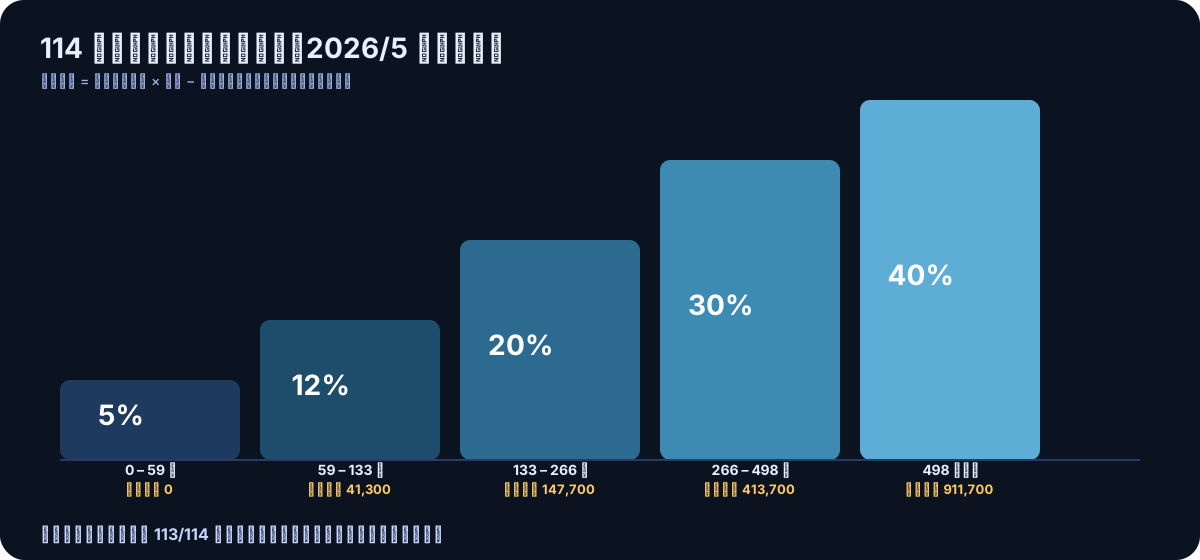
\| Bracket (Net Comprehensive Income) \| Tax Rate \| Progressive Deduction \| \|—\|—\|—\| \| 0 – 590,000 \| 5% \| 0 \| \| 590,001 – 1,330,000 \| 12% \| 41,300 \| \| 1,330,001 – 2,660,000 \| 20% \| 147,700 \| \| 2,660,001 – 4,980,000 \| 30% \| 413,700 \| \| Over 4,980,001 \| 40% \| 911,700 \|
Quick Calculation Formula: Tax Payable = Net Comprehensive Income × Tax Rate − Progressive Deduction
Source: Taipei National Tax Administration, Ministry of Finance — Applicable Tax Rates, Ministry of Finance Taxation Agency Announcement
7) Tax Exemption Threshold Calculation (Single Employee, No Dependents)
97,000 (exemption) + 131,000 (standard deduction) + 218,000 (salary deduction) = annual income below 446,000 is tax-exempt
If the “House Rent Expense” special deduction applies (up to 180,000), the threshold can be raised to about 626,000.
3-1. Practical Example: How Much Tax to Pay on an Annual Salary of 1 Million / 1.8 Million?
The following assumptions apply to single employees, no dependents, standard deduction, salary as the sole income:
Example A: Annual Salary of 1 Million
\| Step \| Calculation \| Amount \| \|—\|—\|—\| \| Total Comprehensive Income \| Salary \| 1,000,000 \| \| − Exemption \| 97,000 \| −97,000 \| \| − Standard Deduction \| Single 131,000 \| −131,000 \| \| − Special Salary Deduction \| 218,000 \| −218,000 \| \| = Net Comprehensive Income \| \| 554,000 \| \| Applicable Tax Rate \| Falls in 5% bracket (≤ 590,000) \| 5% \| \| Tax Payable \| 554,000 × 5% − 0 \| = 27,700 NTD \|
Example B: Annual Salary of 1.8 Million
\| Step \| Calculation \| Amount \| \|—\|—\|—\| \| Total Comprehensive Income \| Salary \| 1,800,000 \| \| − Exemption \| 97,000 \| −97,000 \| \| − Standard Deduction \| Single 131,000 \| −131,000 \| \| − Special Salary Deduction \| 218,000 \| −218,000 \| \| = Net Comprehensive Income \| \| 1,354,000 \| \| Applicable Tax Rate \| Falls in 20% bracket (1,330,000 – 2,660,000) \| 20% \| \| Tax Payable \| 1,354,000 × 20% − 147,700 \| = 123,100 NTD \|
Want to reduce your tax amount? You can add:
-
Special Deduction for House Rent (up to 180,000) → Saves 36,000 when taxed at the 20% bracket
-
Savings and Investment Special Deduction (limit 270,000) → Suitable for those earning higher interest from savings accounts
-
Insurance Expense Itemization (24,000 per person) → Changed to itemized deduction (only beneficial if exceeding 131,000)
-
Dependent Relatives (an additional NT$97,000 exemption per person) → See FAQ Q14 for details
Want to precisely calculate your tax? It is recommended to use the official Ministry of Finance Tax Portal — Income Tax Estimator tool.
4. Option A: Filing Taxes Using the “Physical Citizen Digital Certificate”
1) What You Need
-
Citizen Digital Certificate IC Card (Activated, PIN Not Locked)
-
USB Smart Card Reader
-
Computer (Windows / macOS) + Browser
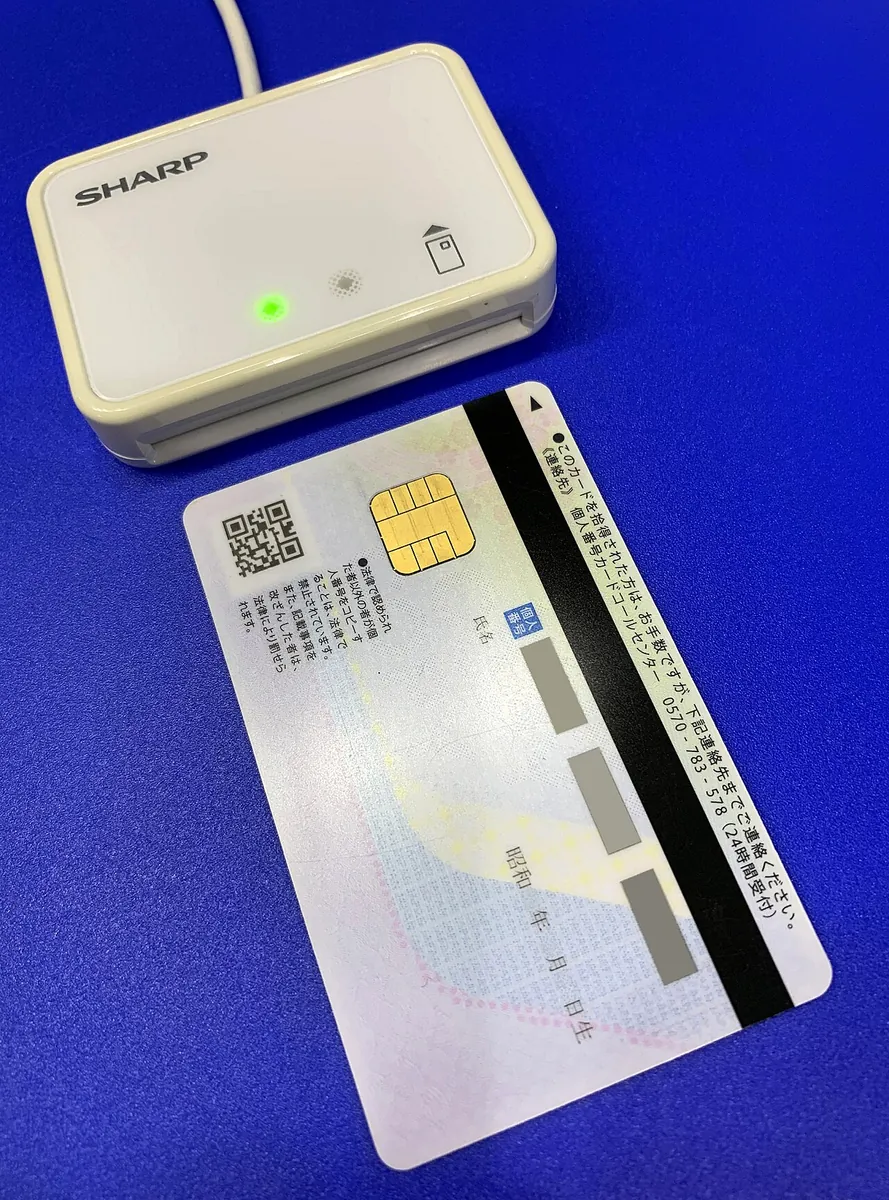 (Image source: Wikimedia Commons / CC BY-SA 4.0 / Project Kei / https://commons.wikimedia.org/wiki/File:IC_Card_Reader_Writer_RW-5100W.jpg)
2) Install Tax Filing Components
Different browsers and operating systems require different components. The most reliable method is to install directly from the official download page:
-
Tax Filing System Component: Integrated Income Tax Electronic Filing and Payment System (The homepage will guide you to download)
-
Natural Person Certificate Cross-Platform Web Component: MOICA Cross-Platform Web Component Download
Reminder: Some components may require restarting the browser or computer. Following the steps usually resolves the issue.
3) Standard Tax Filing Process
-
Insert the Citizen Digital Certificate into the card reader
-
Open efile.tax.nat.gov.tw and select “Comprehensive Income Tax Electronic Filing and Payment System.”
-
Select “Natural Person Certificate” for identity verification, then enter the PIN
-
The system automatically downloads your income and deduction data
-
Confirm/Edit → Estimate Tax → Choose Payment Method (Credit Card / Mobile Payment / Demand Deposit Deduction / Chip Debit Card / Convenience Store)
-
Upload declaration → Obtain receipt copy (PDF download recommended for record)
-
Card Removal
4) Common Troubleshooting (Computer)
-
Website can’t read the card: Try switching USB ports, reconnecting the card reader, changing the cable, or testing on another computer.
-
Constantly prompts component not installed: Check if the browser/component versions match (especially after major macOS updates).
-
PIN always incorrect: Stop immediately! Don’t keep trying to avoid locking the card; confirm if the PIN was changed by you.
5. Option B: Using the “Mobile Natural Person Certificate” for Tax Filing
1) Conditions
-
Phones that support biometric authentication (fingerprint/face recognition)
-
The Mobile Natural Person Certificate App has been downloaded and linked (binding fee is 30 NTD, and an in-person visit is required once beforehand).
2) Tax Filing Process (Mobile)
-
Open the “Individual Income Tax Electronic Filing and Payment System” mobile version/mobile app
-
Select “Mobile Natural Person Certificate” for identity verification
-
The system launches the Mobile Citizen Digital Certificate App to complete verification using fingerprint/face recognition
-
The subsequent steps are the same as the desktop version (download data → trial calculation → pay tax → upload).
3) Key Features of Mobile Citizen Digital Certificate (According to Official Announcements)
-
A user can usually bind only one set of certificates per device.
-
You may need to update or renew the key periodically (for example, you can renew for 1 year within 60 days before expiration).
-
Has a valid usage period (e.g., up to 8 years, after which in-person renewal is required)
6. What is a Citizen Digital Certificate? When Should You Choose Each Type?
Citizen Digital Certificate is a digital ID issued by the Ministry of the Interior Certification Authority (MOICA). It allows you to do two things online:
-
Identity Verification: Proves “you are who you are” for login, inquiry, or application purposes.
-
Digital Signature: Signing documents online (often recognized as equivalent to a personal signature or seal in many processes).
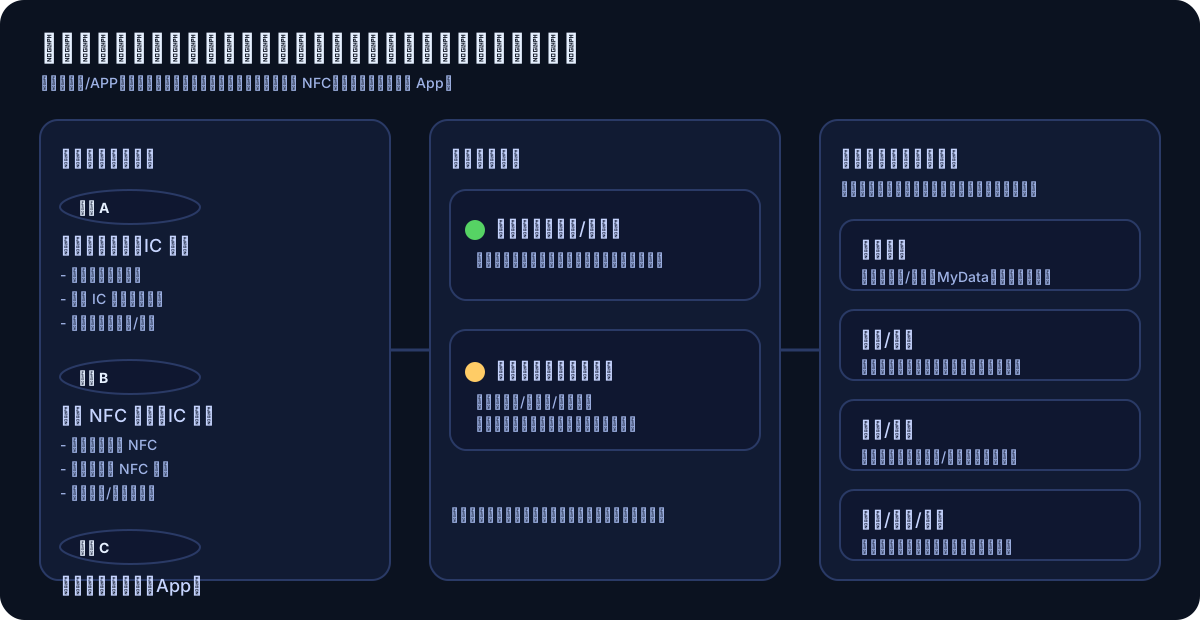
How to Choose Between Physical Card and Mobile Certificate?
\| \| Citizen Digital Certificate IC Card \| Mobile Citizen Digital Certificate \| \|—\|—\|—\| \| Form \| Physical chip card \| App bound to the phone \| \| Fee \| 250 NTD \| 30 NTD (mobile device binding fee) \| \| Common Use \| Computer + card reader / phone NFC \| App biometric authentication \| \| Tax Filing \| ✅ \| ✅ \| \| Bank Upgrade/Account Linking \| ✅ (widely supported) \| Depends on bank support \| \| Usable without card reader? \| Some services support NFC \| ✅ No card reader needed \|
Source: MOICA Certificate Operation Fees
7. Natural Person Certificate Application Process: Online Form → In-Person at Household Registration Office → Card Pickup
In one sentence: Online is only for “filling in information first”; you must go to the household registration office in person in the end.
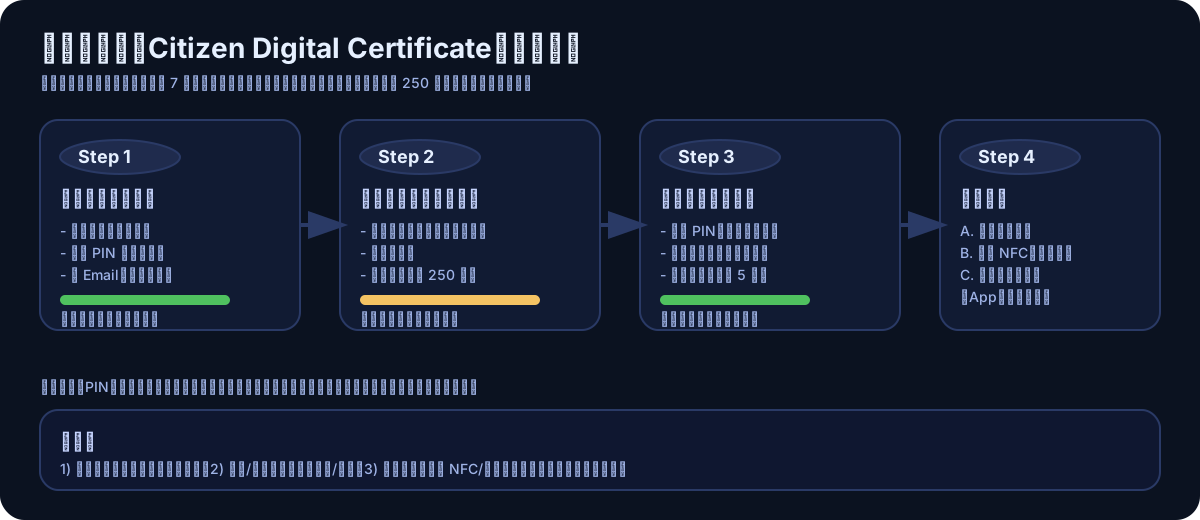
Eligibility and Fees
-
At least 18 years old, registered household, in person (original ID card required)
-
Citizen Digital Certificate IC Card: Issuance Fee 250 NTD
-
Mobile Citizen Digital Certificate: Binding Fee 30 NTD
-
Card Reader: Purchase on Your Own
Step 1: Fill in the Application Form Online (RAC)
Official Entry: MOICA Citizen Digital Certificate Application Form
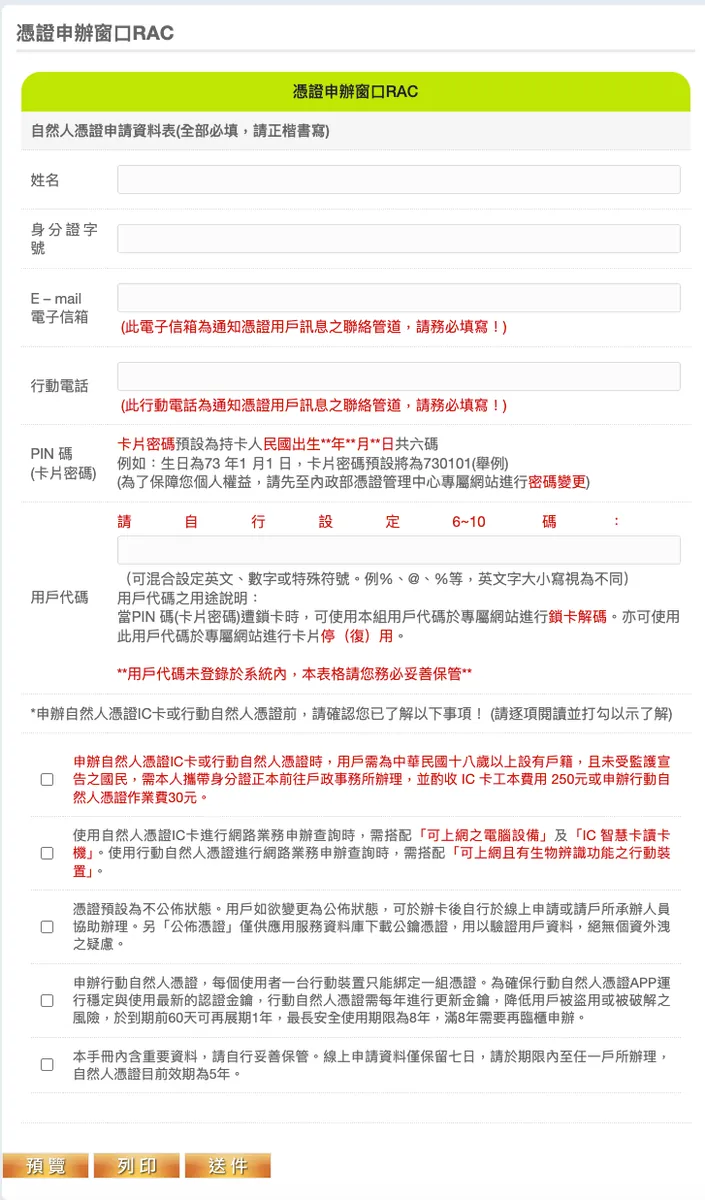
Two Key Reminders:
-
Online application data is usually kept for only 7 days: don’t leave it unfinished, make sure to visit the household registration office in time.
-
The “User Code” you enter in the form will not be recorded by the authorities, so you must keep it safe yourself.
Step 2: Visit Any Household Registration Office for In-Person Processing
The key point is “any household registration office”: usually, you do not need to return to your registered domicile.
On-site process: identity verification → payment → set/confirm password → card collection.
Step 3: After receiving the card, first perform “Activation and Security Settings”
Do not rush to log in to the website right after receiving the card. First, finish reading the next chapter (PIN / User Code / Security).
8. What Exactly Are the PIN Code/User Code? (Avoid 80% of Common Mistakes After Reading)
The most common issues on tax filing day are not “lack of operation skills,” but rather: forgetting the PIN, locking the card due to incorrect PIN entries, and not knowing the user code.
1) PIN Code (Card Password)
The unlock password required each time you “use the card”. Many processes require entering the PIN to complete verification or signing.
MOICA Form Common Instructions: The PIN may have a default pattern (e.g., the last 4 digits of your ID number + birth month and day MMDD). It is recommended to change the PIN on MOICA immediately after receiving the card. Default PINs are easy to guess and must be changed.
2) User Code
The user code is used for management operations such as “unlocking/deactivating/reactivating.”
Official frequent reminder: The user code is not registered in the system, so you must keep it safe yourself (offline writing is the safest).
3) Security Management Checklist
9. Mobile NFC Reading of the Citizen Digital Certificate (Backup for Those Without a Card Reader)
If you only have the physical card but no card reader, some services support using your phone’s NFC to read the card for verification.
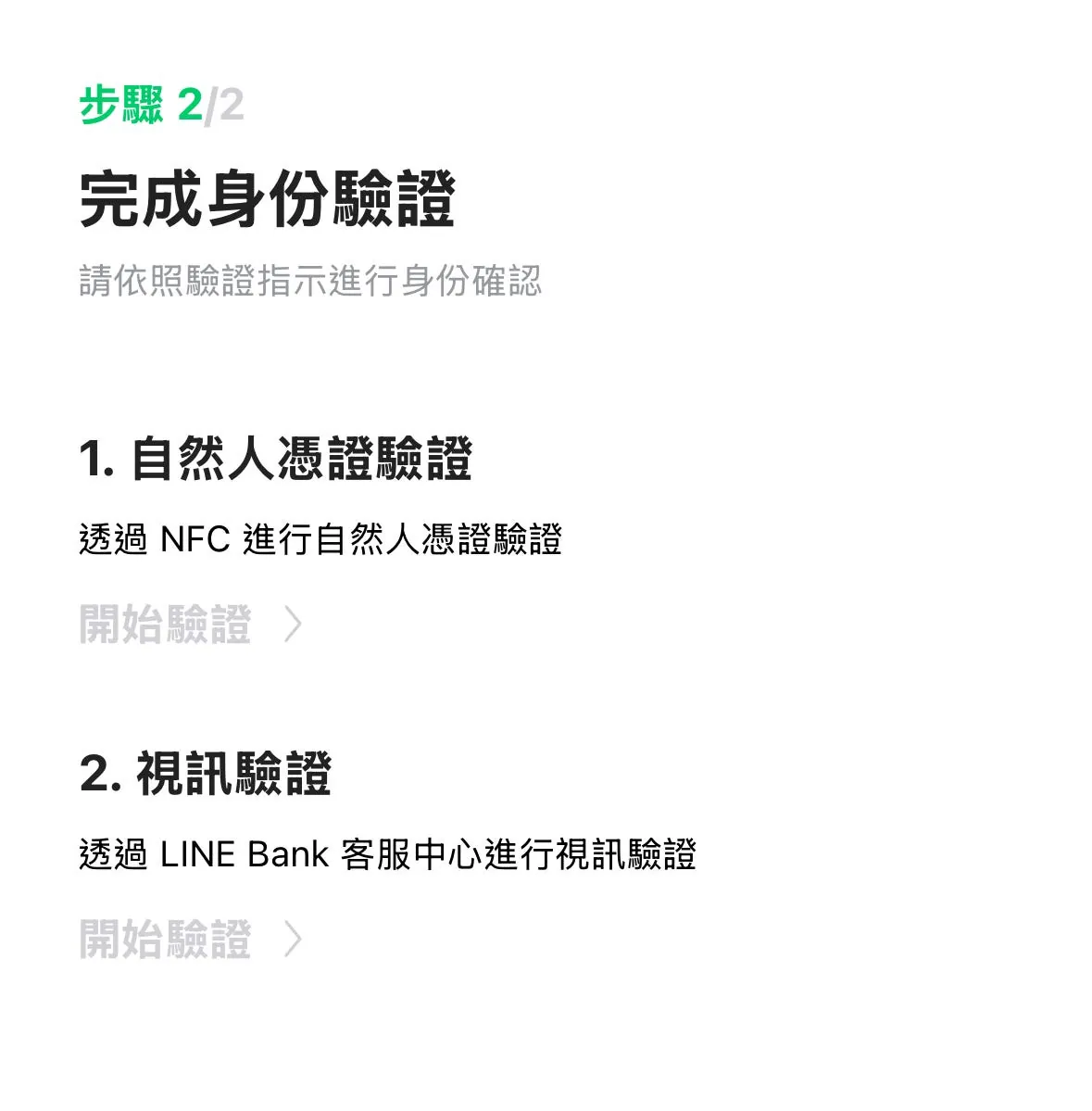
1) Three Conditions Must Be Met Simultaneously
-
Mobile Phone NFC Support
-
Server-side (APP/Website) Support for Reading Natural Person Certificate via NFC
-
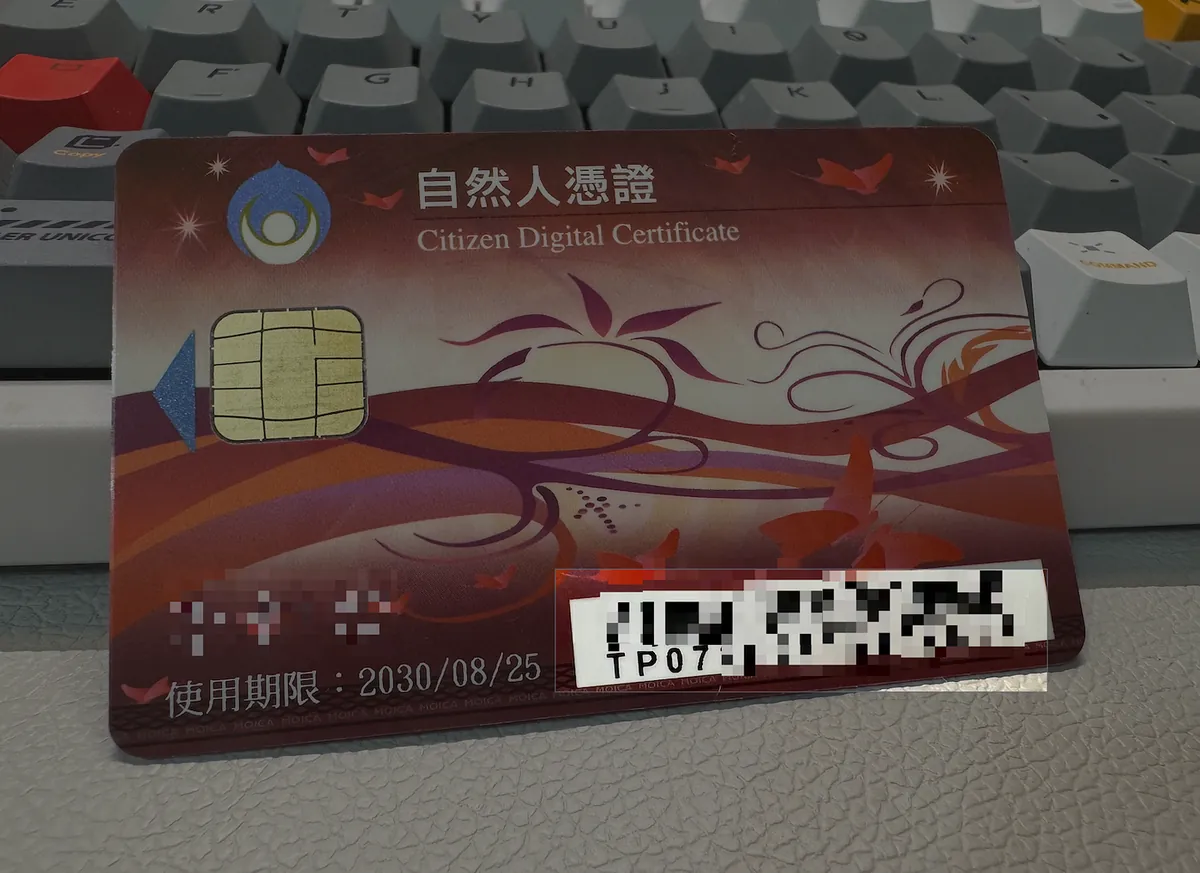
Card Version Supports NFC (some services require specific card number prefixes like TP07)
2) NFC Tips
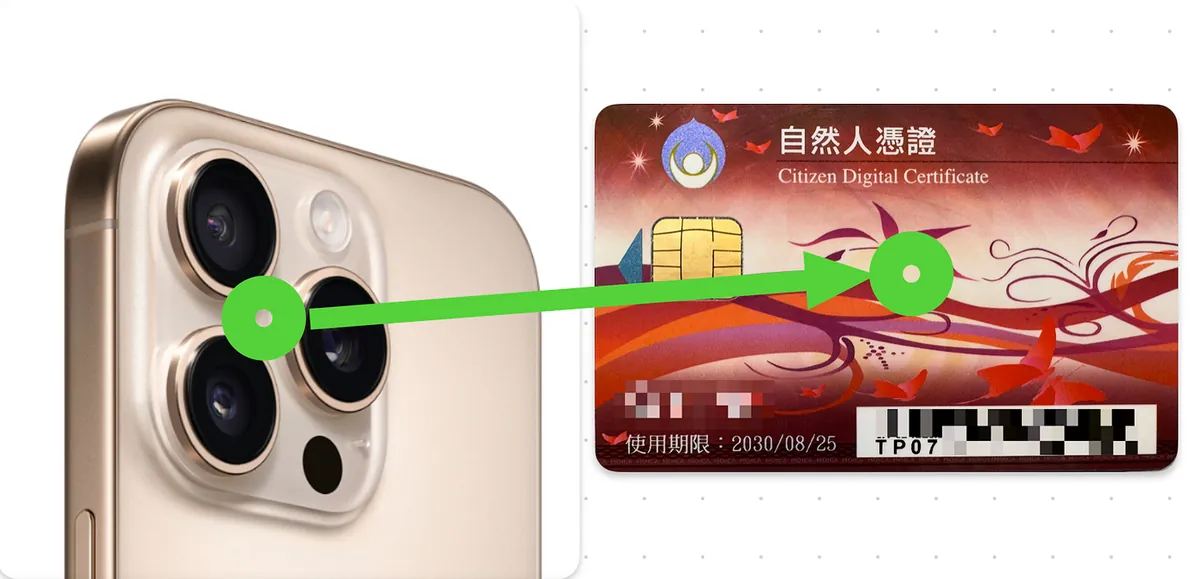
The NFC range of the Citizen Digital Certificate is very short and requires “precise alignment”:
-
iPhone: Hold the card near the upper back of the phone/near the camera, and slowly move to find the sensing point
-
Android: Usually on the upper-middle or center of the back, depending on the brand
-
Common: Keep the card flat, move it slowly left/right or up/down, do not remove it quickly
The tax filing system currently promotes the “Mobile Natural Person Certificate App” process, while NFC contact with the physical card is more common in banking app scenarios.
10. Other Uses of the Citizen Digital Certificate (Beyond Tax Filing)
After filing taxes, don’t just put this card away; it’s very useful in situations that require trusted identity verification or digital signatures.
1) Government/Public Services
-
Online Tax Filing (Main Topic of This Article)
-
MyData Platform — Access Personal Data Online and Authorize Data Exchange
-
Household Registration/Land Administration Related Applications (depending on each city/county and system support)
-
Various Government Portal Logins
2) Finance/Banking/Securities (Risk Control Scenarios)
-
Increase Transfer Limit
-
Set Up Designated Account (Whitelist)
-
Online Signing of Consent Forms/Contracts
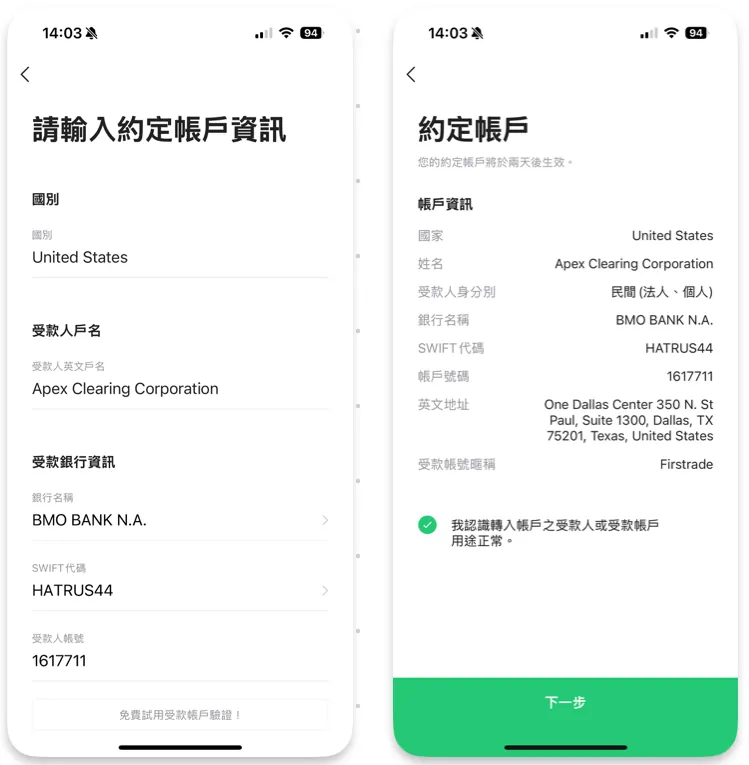
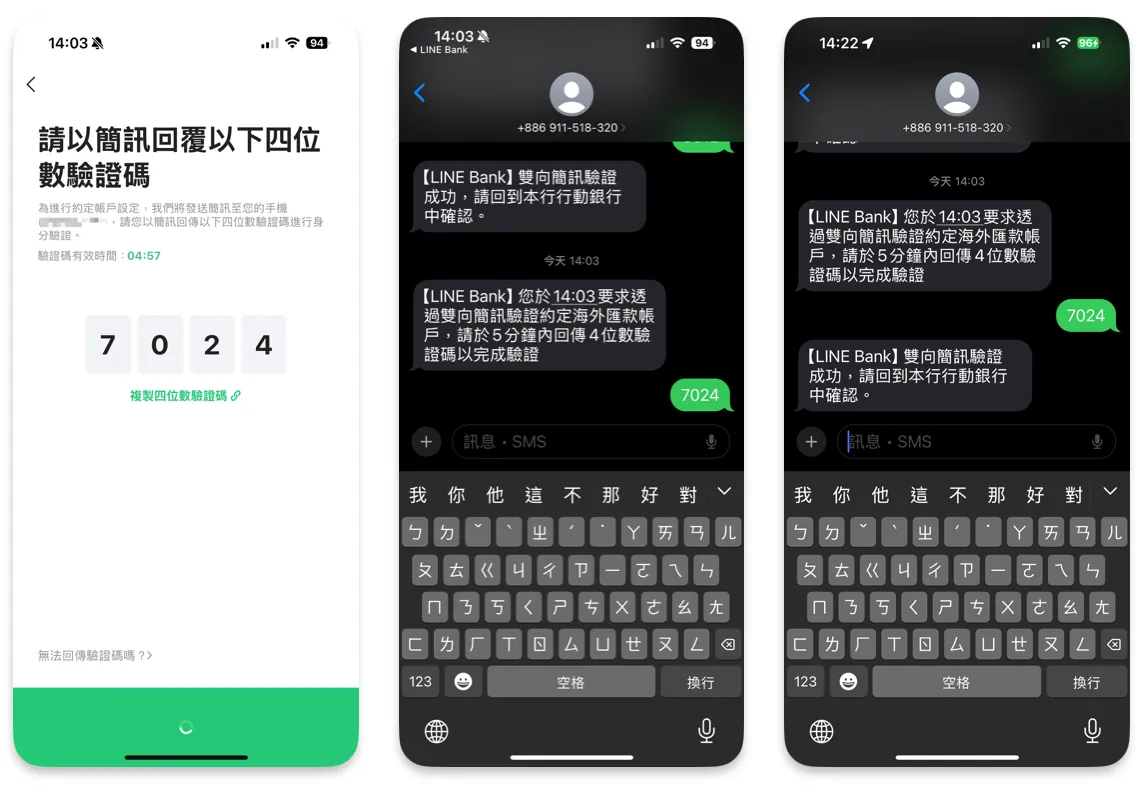
Example: LINE Bank “Add Remittance Designated Account” Requires Natural Person Certificate Verification
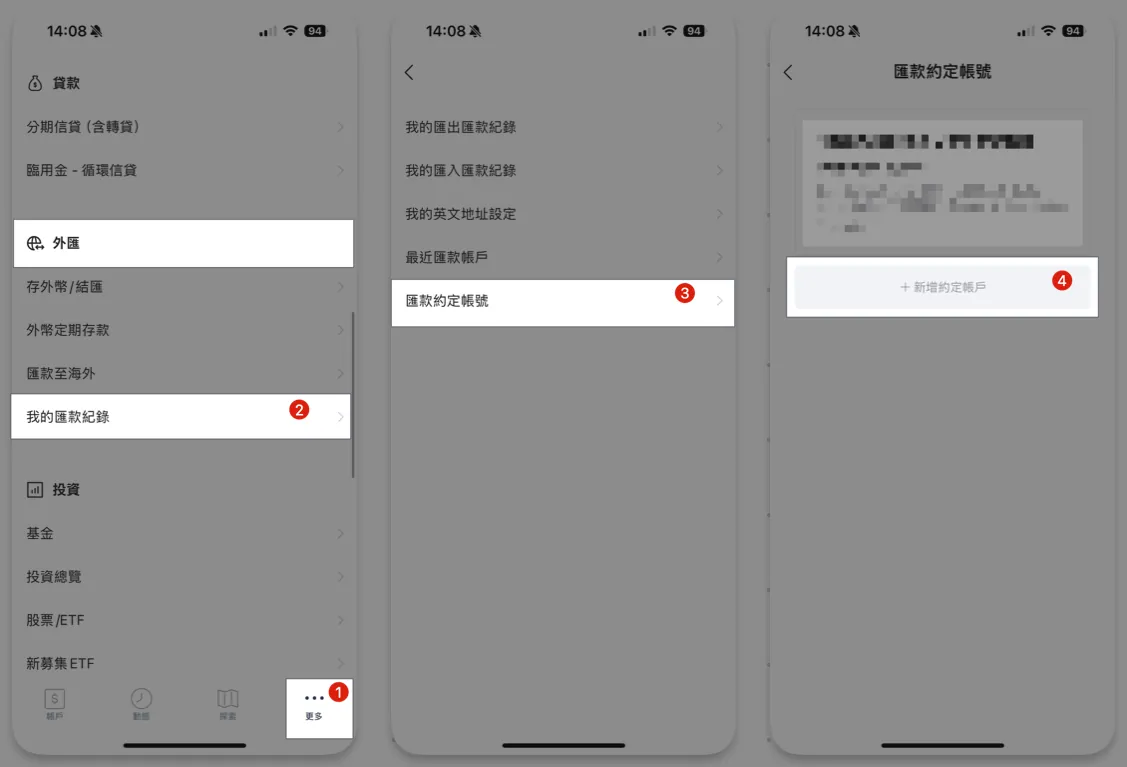
For first-time users, usually start with “Citizen Digital Certificate Verification + Video Verification.” After completion, you can add a designated bank account:
After completing the SMS verification, you will see a successful addition message:
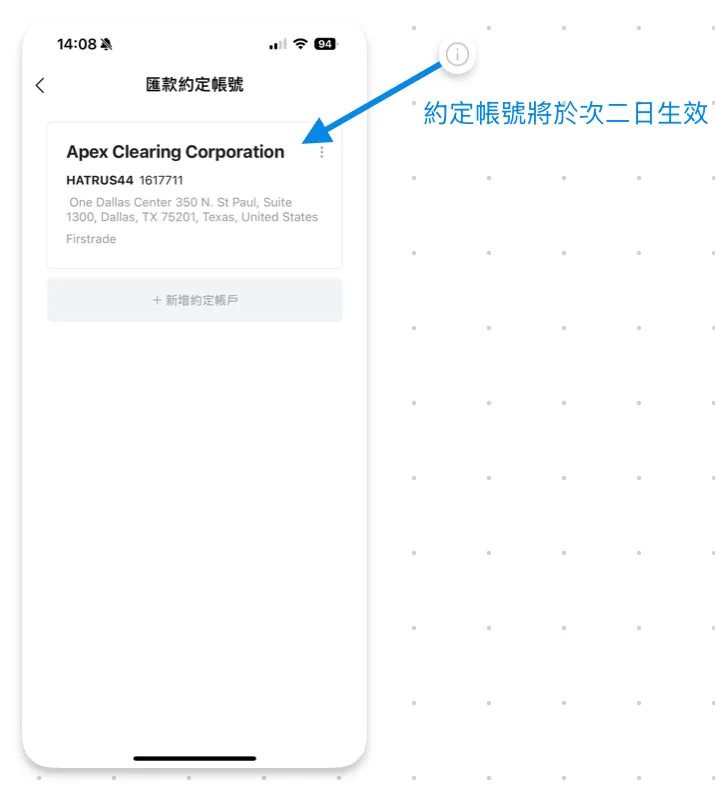
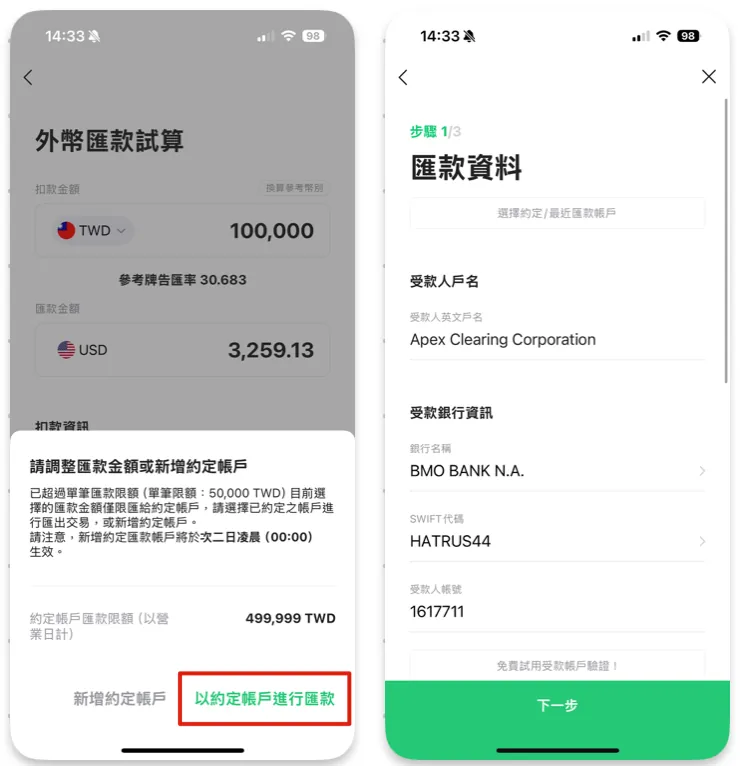
Next time you make a transfer, you can choose “Transfer from the designated account,” making the process faster and more secure:
3) Medical/Insurance/Personal Data Inquiry
These services often offer multiple login options (Natural Person Certificate, Health Insurance Card, Mobile Verification). The differences usually lie in the “depth of accessible data” and “whether a digital signature is required.”
11. 2026 Tax Filing + Natural Person Certificate FAQ
Q1: What is the tax filing deadline for 2026?
2026/6/1 (Monday). Originally scheduled for 5/31, postponed by one day due to Sunday, as required by law.
Q2: Is a Personal Certificate mandatory for tax filing?
Not necessarily. The Ministry of Finance offers 6 verification methods (see Chapter 2), but the Citizen Digital Certificate / Mobile Citizen Digital Certificate are the most convenient for “downloading complete income data” and “supporting subsequent financial services.”
Q3: No card reader or card at all, what’s the fastest way to file?
“Mobile Phone Authentication”: Use your postpaid mobile number + ID number + National Health Insurance card number; it takes 5 minutes to complete. During the process, turn off Wi-Fi and enable mobile data.
Q4: What should I do if I forget my PIN code?
Do not try randomly to avoid locking your card. According to official rules, most cases have an “unlock/reset” process (via user code or in-person). It is recommended to handle it directly through the MOICA official channel.
Q5: What should I do if I forget my user code?
Official reminder: “The user code will not be recorded by the system.” If lost, you usually need to handle it in person at the service counter. Therefore, be sure to keep it offline.
Q6: Why does mobile NFC/Smart Citizen Digital Certificate keep failing?
-
Place the card flat and move it slowly to locate the sensing point.
-
The iPhone starts scanning near the camera.
-
The Mobile Citizen Digital Certificate Confirmation App is bound, and biometric authentication works normally.
-
The server requires “Do not move after sensing until completion.”
Q7: How long is the validity period of the Citizen Digital Certificate?
According to the MOICA form FAQ, the physical Citizen Digital Certificate typically has a validity period of 5 years (please refer to the card or official announcements for confirmation).
Q8: What should I do if my Citizen Digital Certificate is lost?
Principle: Invalidate the certificate first (deactivate/revoke), then proceed with reissuance. This prevents misuse by anyone who might find it.
Q9: What should I do if I find an error after filing my tax return?
You can refile within the filing period (the system will use the last submission); after the period, you must follow the correction/supplementary filing procedures as announced by the tax authority.
Q10: When will the tax refund be credited? How to check the progress?
According to the Central Taiwan National Taxation Bureau Direct Refund Schedule announcement:
-
Batch 1: 2026/7/31 (For those who complete online/mobile filing, online tax calculation registration, phone voice response before 6/1, or paper response before 5/11)
-
Batch 2: 2026/10/31 (QR code/manual filing cases submitted after 5/11)
-
Batch 3: 2027/1/20 (Late filings, cases originally paying tax or no payment/refund but later amended to a refund)
Progress Inquiry: Check the “Comprehensive Income Tax Filing and Refund Status” on the Ministry of Finance Tax Portal.
Q11: Can I go to the tax office for in-person tax filing on Labor Day (5/1)?
No. The Ministry of Finance announced that May 1st is a national holiday, so the National Taxation Bureau will not provide in-person services, but the online and mobile filing systems will remain open 24 hours as usual.
Q12: What is the minimum annual income required for tax filing?
-
Single Employee: Annual income below 446,000 NTD is not taxable, but filing is still recommended (only withholding tax will be refunded).
-
Single renter: Can reduce taxable income to about 626,000 NTD (using a housing rent special deduction of 180,000 NTD).
-
Even if your annual income is below the threshold, you should file a tax return as long as your employer has withheld taxes (salary withholding); otherwise, you won’t get the money back.
Q13: Should a married couple file jointly or separately?
According to the Income Tax Act, spouses should generally file jointly (while the marriage is valid). The system offers 3 calculation methods and automatically selects the “lowest tax amount”:
-
Combined Taxation of All Income
-
Separate Taxation for Salary Income (Other Income Combined)
-
Separate Taxation for Different Types of Income (Other Income Combined)
Key point: The tax returns must be submitted as a combined filing, but the tax calculation system will automatically choose the most favorable option for you. If a couple files separately, the tax authority will automatically combine them and may request additional tax payment.
Q14: Who can be claimed as a dependent?
According to the National Taxation Bureau regulations, the following dependents can be claimed:
-
Direct Lineal Ascendants (parents, grandparents, maternal grandparents): 60 years old or above or under 60 but incapable of self-support; no need to live together or share the same household registration
-
Children: Minors; or adults who are still in school, have disabilities, or cannot support themselves
-
Siblings: Minors; or adults who are still studying, have disabilities, or cannot support themselves
-
Other relatives (such as uncles, aunts, nephews, nieces): must actually live together as one household and meet the above conditions
Note: The dependent’s income will be included in your total comprehensive income, so it is only beneficial if the relative’s income is below the exemption amount.
Q15: Do I need to report income from side jobs, extra work, or freelance projects?
Income tax is based on the total annual income, regardless of main or side jobs. Common types include:
-
Salary Income (Category 50): Part-time jobs have withholding tax statement 50
-
Business Income (9A/9B): Freelance work, manuscript fees, lecturer fees (some have a fixed NT$180,000 tax exemption)
-
Other Income (92): Side jobs, platform revenue sharing
-
Rental Income (51): When landlords collect rent
All income will be automatically populated in the “Income Data Download” (using the Citizen Digital Certificate / Mobile Citizen Digital Certificate provides the most complete data). Missing reports will result in additional tax and fines.
Q16: I didn’t receive any information this year. Do I still need to file taxes?
It is recommended to check the system once more. Even if you think you have no income, you might still have:
-
Bank interest (even if below the 270,000 special savings deduction exemption, it will still appear)
-
Dividend income
-
Part-time and occasional income
-
Mistakenly reported as a dependent
Log in to efile with your Citizen Digital Certificate, and your “Income Data” will be displayed instantly.
Q17: What should I do if I can’t pay the tax bill?
According to the Ministry of Finance regulations, you can apply for deferred or installment payment:
-
Application Threshold: Individuals with tax arrears of 20,000 or more can apply for installment payments, with a maximum of 36 installments (minimum 2,000 per installment)
-
Application Method: Select installment payment within the efile system during the tax filing period or apply to the National Taxation Bureau afterward.
-
Note: Installment payments will include interest (calculated based on the one-year postal savings fixed deposit rate).
Q18: Citizen Digital Certificate, Health Insurance Card, or Mobile Phone Authentication — Which Should I Choose?
-
For the most complete option / also needed for bank verification later → Natural Person Certificate / Mobile Natural Person Certificate
-
No card reader, want to get started quickly → Mobile phone authentication (done in 5 minutes)
-
Have a card reader at home + Health Insurance Card registered → Health Insurance Card (also very convenient)
-
Do not want to file online at all → Account number + inquiry code (printed at convenience store Kiosk)
For a detailed comparison, see Chapter 2.
12. Official Resources and Important Links (Recommended to Bookmark)
Tax Filing Information (Ministry of Finance)
-
Comprehensive Income Tax Electronic Filing and Payment System efile
-
Ministry of Finance Tax Portal (including refund status inquiry)
-
Ministry of Finance Central Taiwan National Taxation Bureau — 6 Tips for Online Tax Filing at Home
-
Ministry of Finance Central Taiwan National Taxation Bureau — Direct Refund Schedule
-
Ministry of Finance Taxation Agency — Announcement of 2025 Comprehensive Income Tax Related Amounts
-
Ministry of Finance Taipei National Taxation Bureau — Exemptions and Deductions
Related to Citizen Digital Certificate (MOICA)
Further Reading (Practical Financial Cases)
If you want to handle “bank verification / increase transfer limit / set up designated accounts” after filing your taxes, we recommend you continue reading:


Comments