
[Psychic Notes] Things You Should Test When Upgrading XCode…
Encounter ghost crashes or logic issues that only appear in the Build Configuration Release (official, online version), while Debug runs perfectly fine.

Photo by Tommaso Pecchioli
TL;DR
Before packaging and releasing a project with the new XCode, besides directly Build & Run to check for layout issues or errors, please also remember to try:
-
App Target
-
Select
Build Settings -
Search for
Optimization Level -
Find the
Optimization Levelsection -
Set the
Debugenvironment to the same value asRelease(e.g.Fastest, Smallest [-Os]) -
Build & Run to check for any issues
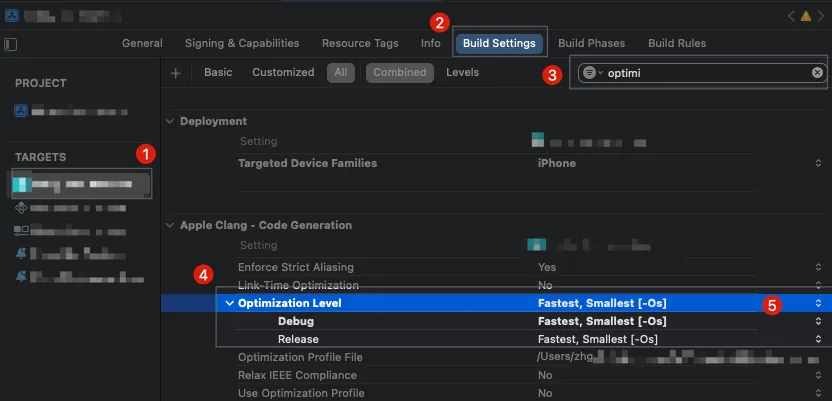
Not choosing to package directly to TestFlight for testing allows us to use breakpoints to quickly locate the root cause when issues arise.
If users report issues (crashes or abnormal behavior) in the Release (official/online) version that developers cannot reproduce locally, try changing this setting and test it locally.
Possible Issues
-
Code looks correct, but results are abnormal
-
The app crashes in places where the code should not crash
All the above work fine in the Debug environment with Optimization Level = None [-O0] and only occur at Optimization Level = Fastest, Smallest [-Os], which is the Release setting.
Solution
If there is an issue, it is usually not the developer’s fault; it is caused by a bug in XCode’s optimization. If you must use this version of XCode for packaging, you can only adjust your code as a workaround and wait for a new XCode version to see if the problem is resolved.
It is not recommended to directly change Release to None, as it may cause more other issues.
Story Time
Here are some real problem scenarios I have encountered with this issue over the years.
Story 1 — The App Keeps Showing the Invite to Rate App Popup
Our app previously had a feature that would “invite users to rate the app in the App Store” when opening the app. The rule was to show the prompt three times and then stop; however, many users reported that it appears every time they open the app, lasting for a long time and becoming very annoying.
However, from the code perspective and when building & running locally on the simulator or real device, there are no issues. We also tested various edge case scenarios but couldn’t reproduce the problem. I even wrote a UI Test that repeatedly runs the flow and clears data to retry… running thousands of times without encountering the issue.
I remember that time I was frustrated until past 3 a.m., feeling hopeless and unable to figure out the issue. I started aimlessly checking the project settings. Suddenly, I had an idea to change all the Build Settings to the Release values and try again. That’s when I discovered the problem could be reproduced with Optimization Level = Fastest, Smallest [-Os], which helped me locate the source of the issue.
Pseudocode
var invitedTimes = 0 // Loaded from UserDefaults; will be saved back after update
func requestAppStoreReviewIfNeeded() {
  defer {
    invitedTimes += 1 // Works for now, but may have unintended side effects
  }

  guard invitedTimes < 3 else {
    return
  }

  self.present(AppStoreReviewRequestAlert())
}
This code was developed by a predecessor. Although it has side effects, the logic is correct, it compiles properly, and previous versions ran without issues.
But when I set Optimization Level = Fastest, Smallest [-Os] and put a breakpoint to print the value, I found an anomaly: after invitedTimes += 1, it would suddenly explode into -24760045646797946, a huge negative number. As a result, the user gets the rating invitation every time.
At that time, we directly changed the defer usage here, and no users reported similar issues afterward; later, when testing subsequent XCode versions, the same code with Optimization Level = Fastest, Smallest [-Os] worked fine.
Story 2 — A Certain Page Crashes Immediately
During internal testing of the Release (Testflight) version, we found that a page (WebView) would crash immediately upon clicking. However, the engineers could Build & Run on the simulator or device without any issues. Each time we suspected a cause, we would upload a new Testflight build with added logs or attempted fixes, which was very time-consuming and frustrating. This reminded me of past struggles, so I immediately asked a colleague to change the local setting to Optimization Level = Fastest, Smallest [-Os]. After rebuilding and running locally, the crash issue finally reproduced.
The main issue lies in a variable within our customized WebView Obj-C code that becomes null when Optimization Level = Fastest, Smallest [-Os] is set. The cause is unknown, so we can only add extra checks for protection. It worked fine in previous versions, so we have to wait for a new XCode release to see if it gets fixed.
Summary
Actually, I’ve been caught by this pitfall more than twice, and some I can’t even remember. In short, here’s a mindset to keep in mind:
-
When packaging and releasing with a new XCode version for the first time, it’s best to test this.
-
The issue only occurs in Release (official, online version). Basically, this is the problem. You can directly change the settings locally to see if it can be reproduced.



Comments