
[POC] App End-to-End Testing Local Snapshot API Mock Server
Feasibility Verification of Implementing E2E Testing for Existing Apps and API Architectures

Photo by freestocks
Preface
As a project that has been running online for many years, continuously improving stability is a highly challenging issue.
Unit Testing

Because the app is developed with Swift/Kotlin, which are static, compiled, and strongly typed languages, or involves dynamic-to-static migration from Objective-C to Swift, the interface dependencies were not properly decoupled with testability in mind. Adding Unit Testing later is almost impossible. However, refactoring introduces instability, creating a chicken-and-egg dilemma.
UI Testing
For UI interactions and button testing; it can be achieved by slightly decoupling data dependencies in newly developed or existing screens.
SnapShot Testing
Verify whether the UI display content and styles are consistent before and after adjustments; similar to UI Testing, this can be achieved by slightly decoupling data dependencies in newly developed or existing screens.
Useful for converting Storyboard/XIB to Code Layout or UIView from OC to Swift; you can directly import pointfreeco / swift-snapshot-testing for quick implementation.
Although we can add UI Testing and Snapshot Testing later, the coverage is very limited; most errors are not related to UI styles but to process or logic issues that cause users to interrupt their actions. If this occurs in the checkout process, involving revenue, the problem becomes very serious.
End-to-End Testing
As mentioned earlier, since it is not easy to add unit tests or consolidate units for integration tests in the current project, the only protection for logic and flow is to perform End-to-End black-box testing from the outside. This approach operates from the user’s perspective to verify whether key processes (registration/checkout, etc.) function correctly.
For major feature refactoring, you can first create flow tests before the refactor, then re-validate after refactoring to ensure the functionality works as expected.
Refactoring simultaneously includes Unit Testing and Integration Testing to improve stability, breaking the chicken-and-egg problem.
QA Team
The most straightforward and brute-force approach to End-to-End Testing is to have a QA team manually test according to the Test Plan, then continuously optimize or introduce automation; calculating the cost, it requires at least 2 engineers + 1 leader spending at least six months to a year to see results.
Evaluate time and cost to see if there is anything we can do now or prepare for the future QA Team, so when the QA Team arrives, we can directly move to optimization, automation, or even AI implementation(?).
Automation
At this stage, the goal is to introduce automated End-to-End Testing within the CI/CD pipeline. The test coverage doesn’t need to be complete; as long as it can prevent major workflow issues, it is already valuable. The Test Plan can be gradually iterated and expanded over time to cover more areas.
End-to-End Testing — Technical Challenges
UI Operation Issues
The app works more like using another test app to operate the app under test, then locating target elements through the View Hierarchy. During testing, it cannot access the log or output of the app under test because they are essentially two separate apps.
iOS needs to improve View Accessibility Identifiers to enhance efficiency and accuracy, and also handle Alerts (e.g., push notification requests).
Android previously encountered issues locating target objects when mixing Compose and Fragment, but according to a teammate, the latest Compose version has resolved this.
Besides the common traditional issues, a bigger problem is the difficulty in integrating dual platforms (running one test on two platforms); currently, we are trying to use new testing tools mobile-dev-inc / maestro:
You can write the Test Plan in YAML and run tests on both platforms. Details on usage and trial experience will be shared by another teammate, cc’ed Alejandra Ts. 😝.
API Data Issues
The biggest variable in App E2E Testing is the API data. Without guaranteed and consistent data, test instability increases, causing false positives and eventually leading to a loss of confidence in the Test Plan.
For example, when testing the checkout process, if a product might be removed or disappear, and these status changes are not controlled by the app, the above issues are likely to occur.
There are many ways to solve data issues, such as creating a clean Staging or Testing environment, or using an Auto-Gen Mock API Server based on Open API. However, these methods rely on the backend and external API factors. Since the backend API, like the App, has been running online for many years and some specifications are still being restructured and migrated, a Mock Server is temporarily not feasible.
Based on the above factors, if you get stuck here, the problem won’t change, and the chicken-and-egg dilemma can’t be resolved. The only option is to “take the risk” and make changes first, dealing with any issues later.
Snapshot API Local Mock Server
“As long as the mindset doesn’t falter, there are always more methods than difficulties.”
We can consider a different approach: if the UI can be captured as snapshot images for replay and validation testing, can the API do the same? Can we save the API Request & Response and replay them later for validation testing?
This introduces the main focus of this article: creating a “Snapshot API Local Mock Server” to Record API Requests & Replay Responses, removing dependency on API data.
This article only presents a POC concept verification and has not fully implemented high-coverage End To End Testing. Therefore, the approach is for reference only, and we hope it inspires new ideas for your current environment.
Snapshot API Local Mock Server
Core Concept — Record & Replay API Data
[Record] — After completing the End-to-End Testing test case development, enable the recording option and run the test once. All API requests and responses during the process will be saved in the respective test case directories.
[Replay] — During test case execution, find the corresponding recorded response data from the test case directory based on the request to complete the test process.
Diagram
Assuming we want to test the purchase flow: after the user opens the App, they click a product card on the homepage to enter the product detail page, tap the purchase button at the bottom, a login prompt appears to complete login, then complete the purchase, and finally a purchase success message pops up:
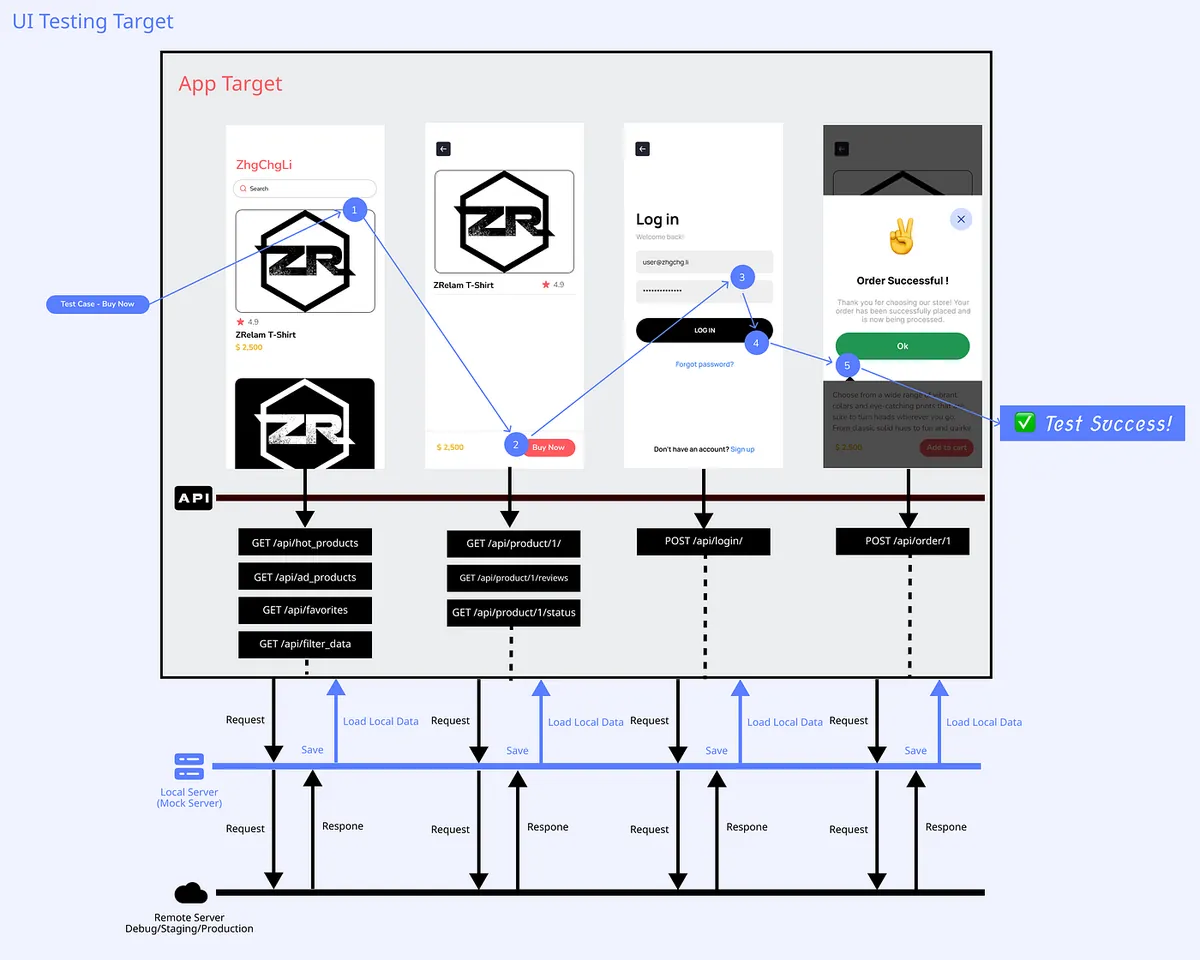
How to control button clicks, text field inputs, etc., in UI Testing is not the main focus of this article; you can refer to existing testing frameworks for direct use.
Regular Proxy or Reverse Proxy
To achieve Record & Replay API, a proxy must be added between the App and the API to perform a man-in-the-middle attack. You can refer to my earlier article “APP uses HTTPS transmission, but data is still stolen.”
Simply put, there is an intermediary proxy between the App and the API, like passing notes. All requests and responses between both sides go through it. It can open the content of the notes or forge the content for either side without them noticing any interference.
Regular Proxy:
A forward proxy is when the client sends a request to the proxy server, which then forwards the request to the target server and returns the target server’s response to the client. In forward proxy mode, the proxy server initiates the request on behalf of the client. The client must explicitly specify the proxy server’s address and port, and send the request to the proxy server.
Reverse Proxy:
A reverse proxy is the opposite of a forward proxy; it sits between the target server and the client. The client sends requests to the reverse proxy server, which forwards the requests to the backend target server based on certain rules and returns the target server’s responses to the client. To the client, the target server appears as the reverse proxy server, and the client does not need to know the real address of the target server.
For our needs, both forward and reverse proxy can achieve the goal. The only consideration is the proxy setup method:
A forward proxy requires setting up a proxy on the computer or the network settings of the phone or simulator:
-
Android can set up Proxy individually and directly in the emulator
-
The iOS Simulator shares the computer’s network environment and cannot set a Proxy individually. This means you have to change the computer’s settings to enable the Proxy. All traffic from the computer will go through this Proxy, and if tools like Proxyman or Charles are running simultaneously, they may forcibly change the Proxy settings to their own, causing it to fail.
The reverse proxy requires changing the API Host in the Codebase and declaring all API Domains to be proxied:
-
The API Host in the codebase must be replaced with the Proxy Server IP during testing
-
Which Domains Should Be Routed Through the Proxy When Enabling Reverse Proxy
-
Only declared Domains will go through the Proxy; undeclared ones will pass through directly.
For the iOS App, the following POC is based on iOS & using a Reverse Proxy. The same approach can be applied to Android.
Let the iOS App Know It Is Running End-to-End Testing Now
We need to let the App know that End-to-End Testing is running so that we can add API Host replacement logic in the App code:
// UI Testing Target:
let app = XCUIApplication()
app.launchArguments = ["duringE2ETesting"]
app.launch()
// App Target:
var api: String = {
  if (CommandLine.arguments.contains("duringE2ETesting")) {
    // during UITesting
    return "http://127.0.0.1:8080" // local mock reverse proxy server address
  } else {
    return "https://api.zhgchg.li" // real remote api server...
  }
}
//...
We make decisions and replacements at the Network layer.
This adjustment is a last resort; try to avoid changing the App’s code solely for testing purposes.
Using MITMProxy to Implement a Reverse Proxy Server
You can also develop a Swift Server using Swift to achieve this. Since this article is just a POC, it directly uses the MITMProxy tool.
[2023–09–04 Update] Mitmproxy-rodo Has Been Open Sourced
The following implementation has been open-sourced in the mitmproxy-rodo project. Feel free to refer to it directly.
Some structure and content have been adjusted; further changes were made after open-sourcing:
-
Save the directory structure as
host / requestPath / method / hash -
Fix header information storage to use Bytes Data instead of plain JSON String
-
Fix some errors
-
Add Auto-Extension Feature for Set-Cookie Expiry Time
⚠️ The following script is for demo reference only. Future script adjustments will be maintained in the open-source project.
⚠️ The following script is for demo reference only. Future script adjustments will be maintained in the open-source project.
⚠️ The following script is for demo reference only. Future script adjustments will be maintained in the open-source project.
⚠️ The following script is for demo reference only. Future script adjustments will be maintained in the open-source project.
⚠️ The following script is for demo reference only. Future script adjustments will be maintained in the open-source project.
MITMProxy
Install according to the MITMProxy official website:
brew install mitmproxy
For detailed usage of MITMProxy, please refer to my earlier article “APP uses HTTPS transmission, but data was still stolen.”
-
mitmproxyprovides an interactive command-line interface. -
mitmwebprovides a browser-based graphical user interface. -
mitmdumpprovides non-interactive terminal output.
Implementing Record & Replay
Since MITMProxy Reverse Proxy does not natively support recording (or dumping) requests and mapping request replay, we need to write our own scripts to implement this feature.
mock.py :
"""
Example:
    Record: mitmdump -m reverse:https://yourapihost.com -s mock.py --set record=true --set dumper_folder=loginFlow --set config_file=config.json
    Replay: mitmdump -m reverse:https://yourapihost.com -s mock.py --set dumper_folder=loginFlow --set config_file=config.json
"""

import re
import logging
import mimetypes
import os
import json
import hashlib

from pathlib import Path
from mitmproxy import ctx
from mitmproxy import http

class MockServerHandler:

    def load(self, loader):
        self.readHistory = {}
        self.configuration = {}

        loader.add_option(
            name="dumper_folder",
            typespec=str,
            default="dump",
            help="Response Dump directory, can be created by Test Case Name",
        )

        loader.add_option(
            name="network_restricted",
            typespec=bool,
            default=True,
            help="If no local mapping data... set true to return 404, false to request real API for data.",
        )

        loader.add_option(
            name="record",
            typespec=bool,
            default=False,
            help="Set true to record Request's Response",
        )

        loader.add_option(
            name="config_file",
            typespec=str,
            default="",
            help="Set file path, example file below",
        )

    def configure(self, updated):
        self.loadConfig()

    def loadConfig(self):
        configFile = Path(ctx.options.config_file)
        if ctx.options.config_file == "" or not configFile.exists():
            return

        self.configuration = json.loads(open(configFile, "r").read())

    def hash(self, request):
        query = request.query
        requestPath = "-".join(request.path_components)

        ignoredQueryParameterByPaths = self.configuration.get("ignored", {}).get("paths", {}).get(request.host, {}).get(requestPath, {}).get(request.method, {}).get("queryParamters", [])
        ignoredQueryParameterGlobal = self.configuration.get("ignored", {}).get("global", {}).get("queryParamters", [])

        filteredQuery = []
        if query:
            filteredQuery = [(key, value) for key, value in query.items() if key not in ignoredQueryParameterByPaths + ignoredQueryParameterGlobal]

        formData = []
        if request.get_content() != None and request.get_content() != b'':
            formData = json.loads(request.get_content())

        # or just formData = request.urlencoded_form
        # or just formData = request.multipart_form
        # depends on your api design

        ignoredFormDataParametersByPaths = self.configuration.get("ignored", {}).get("paths", {}).get(request.host, {}).get(requestPath, {}).get(request.method, {}).get("formDataParameters", [])
        ignoredFormDataParametersGlobal = self.configuration.get("ignored", {}).get("global", {}).get("formDataParameters", [])

        filteredFormData = []
        if formData:
            filteredFormData = [(key, value) for key, value in formData.items() if key not in ignoredFormDataParametersByPaths + ignoredFormDataParametersGlobal]

        # Serialize the dictionary to a JSON string
        hashData = {"query":sorted(filteredQuery), "form": sorted(filteredFormData)}
        json_str = json.dumps(hashData, sort_keys=True)

        # Apply SHA-256 hash function
        hash_object = hashlib.sha256(json_str.encode())
        hash_string = hash_object.hexdigest()

        return hash_string

    def readFromFile(self, request):
        host = request.host
        method = request.method
        hash = self.hash(request)
        requestPath = "-".join(request.path_components)

        folder = Path(ctx.options.dumper_folder) / host / method / requestPath / hash

        if not folder.exists():
            return None

        content_type = request.headers.get("content-type", "").split(";")[0]
        ext = mimetypes.guess_extension(content_type) or ".json"


        count = self.readHistory.get(host, {}).get(method, {}).get(requestPath, {}) or 0

        filepath = folder / f"Content-{str(count)}{ext}"

        while not filepath.exists() and count > 0:
            count = count - 1
            filepath = folder / f"Content-{str(count)}{ext}"

        if self.readHistory.get(host) is None:
            self.readHistory[host] = {}
        if self.readHistory.get(host).get(method) is None:
            self.readHistory[host][method] = {}
        if self.readHistory.get(host).get(method).get(requestPath) is None:
            self.readHistory[host][method][requestPath] = {}

        if filepath.exists():
            headerFilePath = folder / f"Header-{str(count)}.json"
            if not headerFilePath.exists():
                headerFilePath = None

            count += 1
            self.readHistory[host][method][requestPath] = count

            return {"content": filepath, "header": headerFilePath}
        else:
            return None


    def saveToFile(self, request, response):
        host = request.host
        method = request.method
        hash = self.hash(request)
        requestPath = "-".join(request.path_components)

        iterable = self.configuration.get("ignored", {}).get("paths", {}).get(request.host, {}).get(requestPath, {}).get(request.method, {}).get("iterable", False)

        folder = Path(ctx.options.dumper_folder) / host / method / requestPath / hash

        # create dir if not exists
        if not folder.exists():
            os.makedirs(folder)

        content_type = response.headers.get("content-type", "").split(";")[0]
        ext = mimetypes.guess_extension(content_type) or ".json"

        repeatNumber = 0
        filepath = folder / f"Content-{str(repeatNumber)}{ext}"
        while filepath.exists() and iterable == False:
            repeatNumber += 1
            filepath = folder / f"Content-{str(repeatNumber)}{ext}"

        # dump to file
        with open(filepath, "wb") as f:
            f.write(response.content or b'')


        headerFilepath = folder / f"Header-{str(repeatNumber)}.json"
        with open(headerFilepath, "wb") as f:
            responseDict = dict(response.headers.items())
            responseDict['_status_code'] = response.status_code
            f.write(json.dumps(responseDict).encode('utf-8'))

        return {"content": filepath, "header": headerFilepath}

    def request(self, flow):
        if ctx.options.record != True:
            host = flow.request.host
            path = flow.request.path

            result = self.readFromFile(flow.request)
            if result is not None:
                content = b''
                headers = {}
                statusCode = 200

                if result.get('content') is not None:
                    content = open(result['content'], "r").read()

                if result.get('header') is not None:
                    headers = json.loads(open(result['header'], "r").read())
                    statusCode = headers['_status_code']
                    del headers['_status_code']


                headers['_responseFromMitmproxy'] = '1'
                flow.response = http.Response.make(statusCode, content, headers)
                logging.info("Fulfill response from local with "+str(result['content']))
                return

            if ctx.options.network_restricted == True:
                flow.response = http.Response.make(404, b'', {'_responseFromMitmproxy': '1'})

    def response(self, flow):
        if ctx.options.record == True and flow.response.headers.get('_responseFromMitmproxy') != '1':
            result = self.saveToFile(flow.request, flow.response)
            logging.info("Save response to local with "+str(result['content']))

addons = [MockServerHandler()]
You can refer to the official documentation and adjust the script content according to your needs.
The script design logic is as follows:
-
File path logic:
dumper_folder(a.k.a Test Case Name)/Reverse's api host/HTTP Method/Path joined with -(e.g.app/launch->app-launch) /Hash(Get Query & Post Content)/ -
File logic: Response content:
Content-0.xxx,Content-1.xxx(second time the same request is made)… and so on; Response header info:Header-0.json(same logic asContent-x)
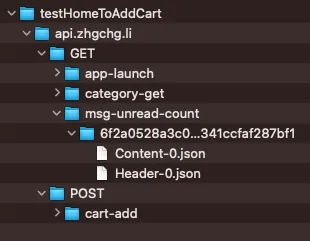
-
When saving, files are stored sequentially according to the path and file logic; during Replay, they are retrieved in the same order.
-
If the number of times does not match, for example, the same path is called 3 times during Replay, but the Record only saved data up to the 2nd time; it will continue to respond with the result of the 2nd time, which is the last recorded response.
-
When
recordisTrue, it sends requests to the target server to get responses and saves them according to the logic above; whenFalse, it only reads data locally (equivalent to Replay Mode). -
When
network_restrictedisFalse, if there is no local Mapping data, it will respond with404directly; when it isTrue, it will fetch data from the target Server. -
_responseFromMitmproxyis used to inform the Response Method that the current response comes from Local and can be ignored, while_status_codeborrows the Header.json field to store the HTTP Response status code.
config_file.json configuration file logic design is as follows:
{
  "ignored": {
    "paths": {
      "yourapihost.com": {
        "add-to-cart": {
          "POST": {
            "queryParamters": [
              "created_timestamp"
            ],
            "formDataParameters": []
          }
        },
        "api-status-checker": {
          "GET": {
            "iterable": true
          }
        }
      }
    },
    "global": {
      "queryParamters": [
        "timestamp"
      ],
      "formDataParameters": []
    }
  }
}
queryParamters & formDataParameters :
Since some API parameters may change with each call, such as endpoints including a timestamp parameter, the value of Hash(Query Parameter & Body Content) will differ during Replay Request due to the server design. This causes a failure to map to the Local Response. To handle this, an additional config.json was created. It allows excluding certain parameters from the hash calculation either by Endpoint Path or globally, enabling consistent mapping results.
iterable :
Since some polling APIs may be called repeatedly at regular intervals, the server design generates many Content-x.xxx & Header-x.json files; however, if we don’t mind, we can set it to True, and the response will continuously overwrite the first files Content-0.xxx & Header-0.json.
Enable Reverse Proxy Record Mode:
mitmdump -m reverse:https://yourapihost.com -s mock.py --set record=true --set dumper_folder=loginFlow --set config_file=config.json
Enable Reverse Proxy Replay Mode:
mitmdump -m reverse:https://yourapihost.com -s mock.py --set dumper_folder=loginFlow --set config_file=config.json
Assembly & Proof Of Concept
0. Replace Hosts in the Codebase Completed
Make sure the API is switched to http://127.0.0.1:8080 when running tests.
1. Start Snapshot API Local Mock Server (a.k.a Reverse Proxy Server) Record Mode
mitmdump -m reverse:https://yourapihost.com -s mock.py --set record=true --set dumper_folder=addCart --set config_file=config.json
2. Execute E2E Testing UI Operations
Using Pinkoi iOS App as an example, test the following flow:
Launch App -> Home -> Scroll Down -> Similar to Wish List Items Section -> First Product -> Click First Product -> Enter Product Page -> Click Add to Cart -> UI Response Added to Cart -> Test Successful ✅
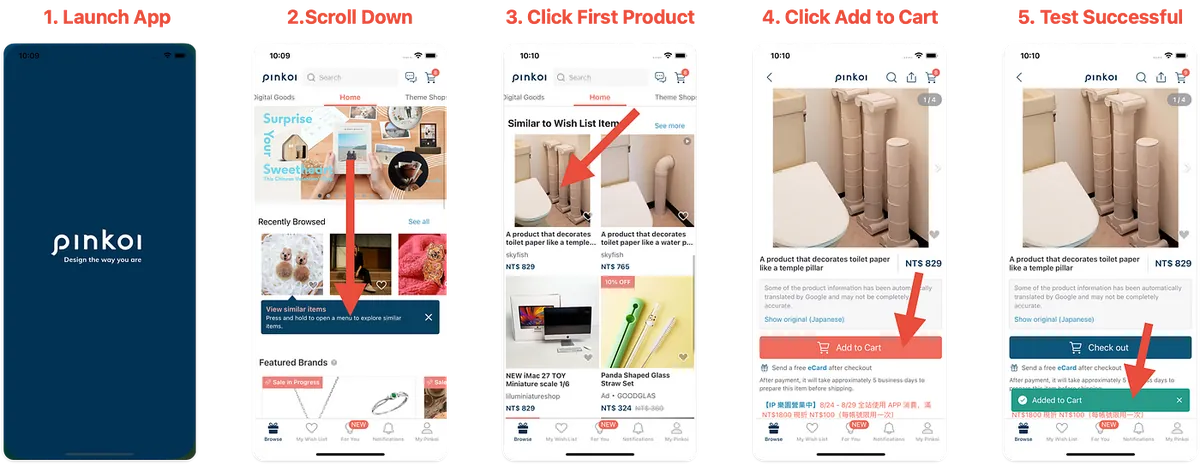
The UI automation method was mentioned earlier; here, we first manually test the same process to verify the results.
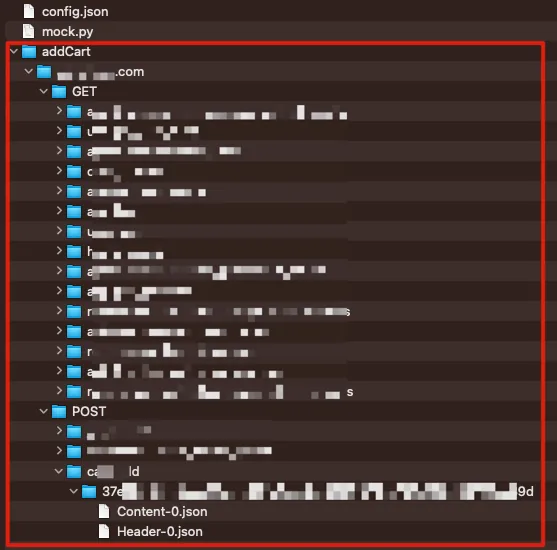
3. Get Record Results
After the operation is complete, press ^ + C to stop the Snapshot API Mock Server, then check the recording results in the file directory:
4. Replay to verify the same flow, start Server & Using Replay Mode
mitmdump -m reverse:https://yourapihost.com -s mock.py --set dumper_folder=addCart --set config_file=config.json
5. Re-run the previous UI actions to verify the results
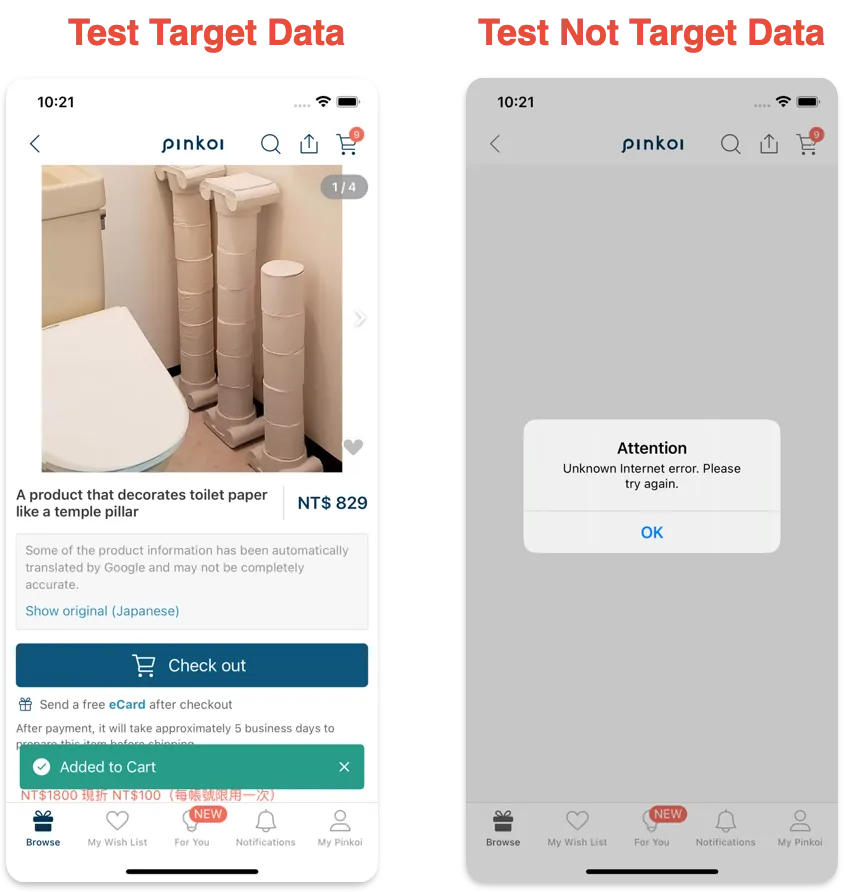
-
Left: Test Successful ✅
-
Right: Test clicking on a product different from the recorded one. An error occurs because there is no local data and
network_restrictedis set toFalseby default. Without local data, it returns a 404 and does not fetch data from the network.
6. Proof Of Concept ✅
The proof of concept is successful. We can indeed use a Reverse Proxy Server to save API Requests & Responses ourselves and serve as a Mock API Server to respond with data to the App during testing 🎉🎉🎉.
[2023–09–04] mitmproxy-rodo Open Sourced
Follow-up and Notes
This article only covers the proof of concept; there are many areas to improve and more features to implement in the future.
-
Integration with maestro UI Testing Tool
-
CI/CD Pipeline Integration Design (How to Automatically Start the Reverse Proxy? Where to Start It?)
-
How to Package MITMProxy Within a Development Tool?
-
Validating More Complex Test Scenarios
-
For validating sent Tracking Requests, implement storing the Request Body and then extract which Tracking Event Data were triggered and whether the events sent match the expected workflow
Cookie Issues
#...
    def response(self, flow):
        setCookies = flow.response.headers.get_all("set-cookie")
        # setCookies = ['ad=0; Domain=.xxx.com; expires=Wed, 23 Aug 2023 04:59:07 GMT; Max-Age=1800; Path=/', 'sessionid=xxxx; Secure; HttpOnly; Domain=.xxx.com; expires=Wed, 23 Aug 2023 04:59:07 GMT; Max-Age=1800; Path=/']

        # OR Replace Cookie Domain From .xxx.com To 127.0.0.1
        setCookies = [re.sub(r"\s*\.xxx\.com\s*", "127.0.0.1", s) for s in setCookies]

        # AND Remove security-related restrictions
        setCookies = [re.sub(r";\s*Secure\s*", "", s) for s in setCookies]
        setCookies = [re.sub(r";\s*HttpOnly;\s*", "", s) for s in setCookies]

        flow.response.headers.set_all("Set-Cookie", setCookies)

        #...
If you encounter issues related to Cookies, such as the API responding with Cookies but the App not receiving them, you can refer to the adjustments mentioned above.
The Last Article at Pinkoi
During over 900 days at Pinkoi, I realized many of my career and iOS/App development process ideas. Thanks to all my teammates for going through the pandemic and challenges together. The courage to say goodbye is like the courage I had when I first pursued my dream job.



Comments