
iOS WKWebView Page and File Resource Preload / Cache Research
Research on Preloading and Caching Resources in iOS WKWebView to Improve Page Load Speed.

Photo by Antoine Gravier
Background
For some reason, I have always had a connection with “Cache.” Previously, I was responsible for researching and implementing AVPlayer’s “iOS HLS Cache Implementation Exploration” and “AVPlayer Local Cache Features Collection.” Unlike streaming cache, which aims to reduce playback data usage, this time the main task is to improve In-app WKWebView loading speed, which also involves studying WKWebView’s preloading and caching. Honestly, the WKWebView scenario is more complex. Unlike AVPlayer streaming media, which consists of one or multiple continuous chunk files that only need file caching, WKWebView not only handles page files but also imported resource files (.js, .css, font, image…) that are rendered by the browser engine to display the page to the user. Many aspects in this process are beyond the app’s control, from the network to frontend JavaScript performance and rendering methods, all of which require time.
This article only explores the technical feasibility on iOS and is not necessarily the final solution. Overall, it is better for frontend developers to optimize from the frontend side to achieve the most effective results. Frontend teams should optimize the First Contentful Paint and improve the HTTP Cache mechanism. This will speed up Web/mWeb itself, positively affect the speed of Android/iOS in-app WebViews, and also boost Google SEO ranking.
Technical Details
iOS Limitations
According to Apple Review Guidelines 2.5.6:
Apps that browse the web must use the appropriate WebKit framework and WebKit JavaScript. You may apply for an entitlement to use an alternative web browser engine in your app. Learn more about these entitlements .
Apps can only use Apple’s WebKit Framework (WKWebView) and are not allowed to use third-party or modified WebKit engines, or they will be rejected from the App Store. Additionally, starting from iOS 17.4, to comply with regulations, users in the EU region can use other browser engines with special permission from Apple.
What Apple doesn’t allow, we cannot do either.
[Unverified] According to research, even the iOS versions of Chrome and Firefox can only use Apple WebKit (WKWebView).
Another very important thing:
WKWebView runs on a separate thread outside the App’s main thread, so all requests and operations do not pass through our App.
HTTP Cache Flow
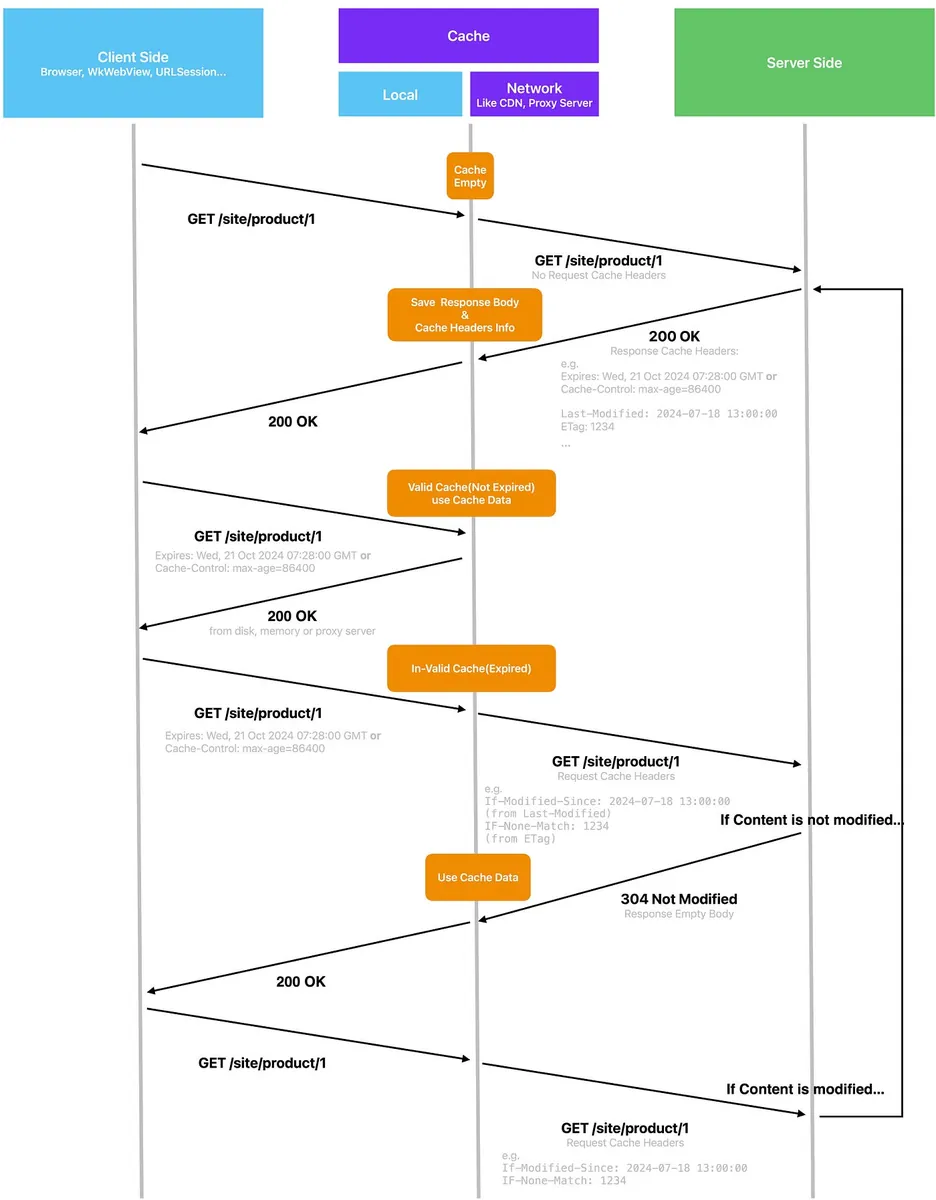
The HTTP protocol already includes Cache mechanisms, and all network-related components (URLSession, WKWebView, etc.) have built-in Cache handling by the system. Therefore, the client app does not need to implement anything, and it is not recommended to create a custom Cache system. Relying directly on the HTTP protocol is the fastest, most stable, and most effective approach.
The general workflow of HTTP Cache is as shown in the above diagram:
-
Client Initiates Request
-
Server response cache strategy is set in the Response Header. The system’s URLSession, WKWebView, etc., will automatically cache the response based on the Cache Header, and subsequent requests will automatically apply this strategy.
-
When requesting the same resource again, if the cache has not expired, respond directly to the App by reading the local cache from memory or disk.
-
If expired (expiration does not mean invalid), a real network request is sent to the server. If the content has not changed (still valid despite expiration), the server responds with 304 Not Modified (Empty Body). Although a real network request is made, the response is basically milliseconds and has no response body, resulting in minimal data usage.
-
If the content changes, provide the data and Cache Header again.
Cache may exist not only locally but also on Network Proxy Servers or along the network path.
Common HTTP Response Cache Header Parameters:
expires: RFC 2822 date
pragma: no-cache
# Newer parameters:
cache-control: private/public/no-store/no-cache/max-age/s-max-age/must-revalidate/proxy-revalidate...
etag: XXX
Common HTTP Request Cache Header Parameters:
If-Modified-Since: 2024-07-18 13:00:00
IF-None-Match: 1234
In iOS, network-related components (URLSession, WKWebView, etc.) automatically handle HTTP Request/Response Cache Headers and manage caching. We do not need to handle Cache Header parameters ourselves.
For more detailed HTTP Cache operation details, please refer to “Huli’s Step-by-Step Guide to Understanding HTTP Cache Mechanism”.
Overview of iOS WKWebView
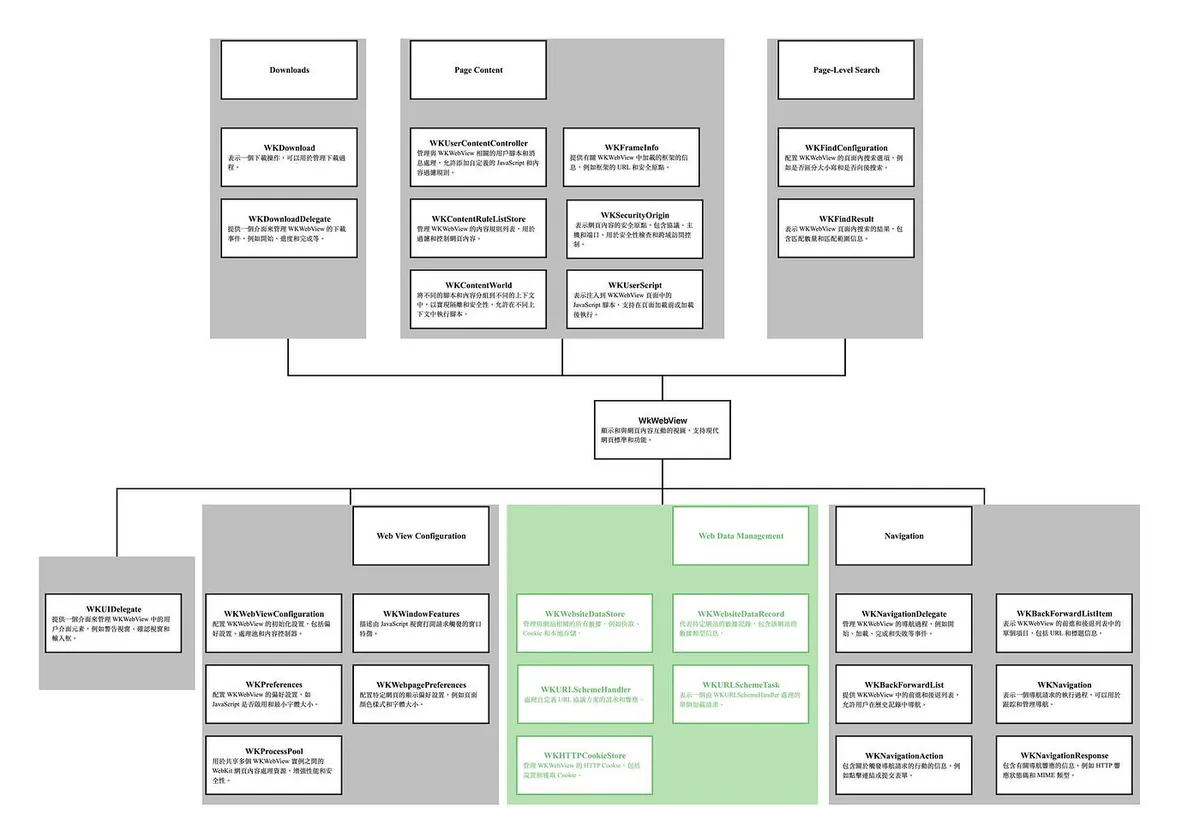
Back to iOS, since we can only use Apple WebKit, we have to rely on the WebKit methods provided by Apple to explore possible ways to achieve preload caching.
The above image shows all Apple iOS WebKit (WKWebView) related methods introduced by ChatGPT 4o, along with brief descriptions; the green sections indicate methods related to data storage.
Sharing with everyone a few interesting methods:
-
WKProcessPool: Allows multiple WKWebViews to share resources, data, cookies, and more.
-
WKHTTPCookieStore: Manages WKWebView cookies, including cookies shared between WKWebViews or between URLSession in the app and WKWebView.
-
WKWebsiteDataStore: Manages website cache files. (Can only read information and clear data)
-
WKURLSchemeHandler: When WKWebView cannot recognize a URL Scheme, you can register a custom handler to process it.
-
WKContentWorld: Allows grouping and managing injected JavaScript (WKUserScript) scripts.
-
WKFindXXX: Allows control over the page search functionality.
-
WKContentRuleListStore: Allows implementing content blocker features within WKWebView (e.g., blocking ads).
Feasibility Study on iOS WKWebView Preload and Cache Solutions
Proper HTTP Cache Setup ✅
As introduced earlier about the HTTP Cache mechanism, we can ask the Web Team to improve the HTTP Cache settings for the event pages. On the Client iOS side, we only need to simply check the CachePolicy settings; the system handles everything else!
CachePolicy Settings
URLSession:
let configuration = URLSessionConfiguration.default
configuration.requestCachePolicy = .useProtocolCachePolicy
let session = URLSession(configuration: configuration)
URLRequest/WKWebView:
var request = URLRequest(url: url)
request.cachePolicy = .reloadRevalidatingCacheData
//
wkWebView.load(request)
-
useProtocolCachePolicy : Default, follows the default HTTP Cache control.
-
reloadIgnoringLocalCacheData: Do not use local cache; each request loads data from the network (but allows network and proxy caching).
-
reloadIgnoringLocalAndRemoteCacheData: Always load data from the network, ignoring both local and remote cache.
-
returnCacheDataElseLoad: Use cached data if available; otherwise, load data from the network.
-
returnCacheDataDontLoad : Use only cached data; if no cache is available, do not make a network request.
-
reloadRevalidatingCacheData: Sends a request to check if the local cache is expired. If not expired (304 Not Modified), it uses the cached data; otherwise, it reloads data from the network.
Setting Cache Size
App Global:
let memoryCapacity = 512 * 1024 * 1024 // 512 MB
let diskCapacity = 10 * 1024 * 1024 * 1024 // 10 GB
let urlCache = URLCache(memoryCapacity: memoryCapacity, diskCapacity: diskCapacity, diskPath: "myCache")

URLCache.shared = urlCache
Individual URLSession:
let memoryCapacity = 512 * 1024 * 1024 // 512 MB
let diskCapacity = 10 * 1024 * 1024 * 1024 // 10 GB
let cache = URLCache(memoryCapacity: memoryCapacity, diskCapacity: diskCapacity, diskPath: "myCache")

let configuration = URLSessionConfiguration.default
configuration.urlCache = cache
Also as mentioned above, WKWebView runs on a separate thread outside the app’s main thread, so the cache of URLRequest and URLSession is not shared with WKWebView.
How to Use Safari Developer Tools with WKWebView?
Check if local Cache is being used.
Enable Developer Features in Safari:
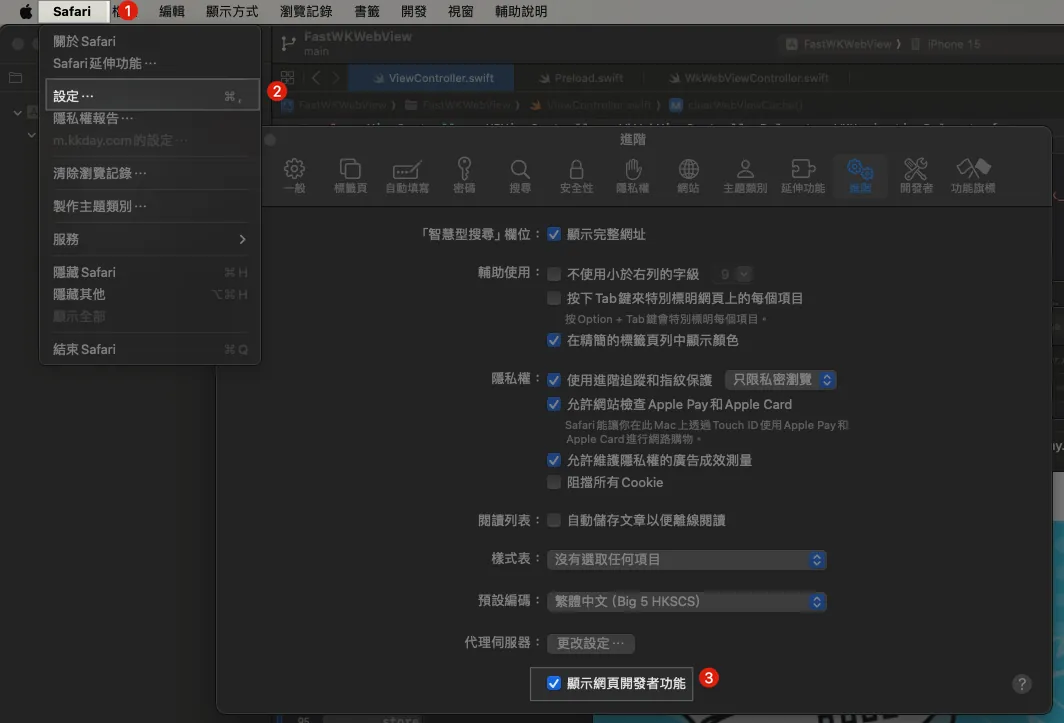
Enable isInspectable in WKWebView:
func makeWKWebView() -> WKWebView {
 let webView = WKWebView(frame: .zero)
 webView.isInspectable = true // is only available in iOS 16.4 or newer
 return webView
}
WKWebView requires webView.isInspectable = true to use Safari Developer Tools in Debug Build.
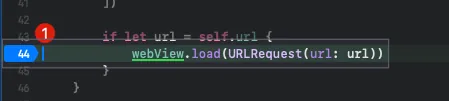
p.s. This is a separate test project for WKWebView.
Set a breakpoint at the webView.load line.
Start Testing:
Build & Run:
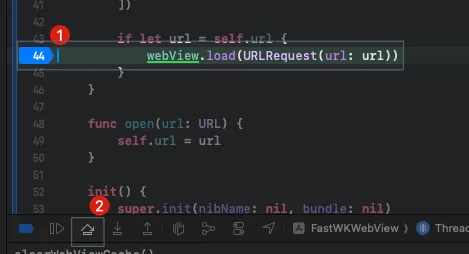
When reaching the breakpoint at webView.load, click “Step Over”.
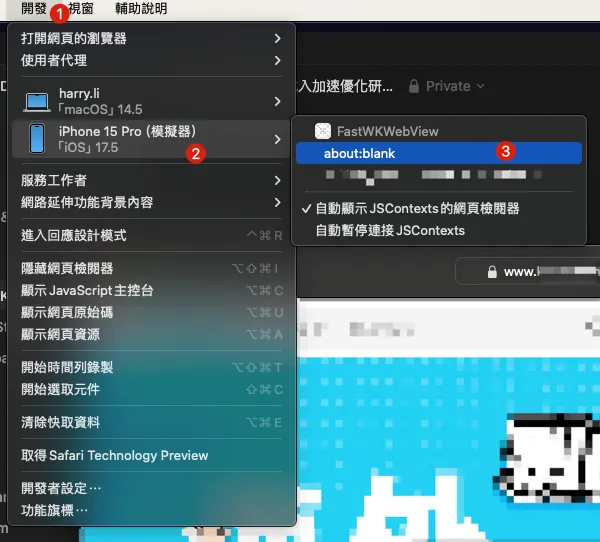
Back to Safari, select the toolbar menu “Develop” -> “Simulator” -> “Your Project” -> “about:blank”.
-
Since the page has not started loading yet, the URL will be about:blank
-
If about:blank does not appear, return to XCode and click the step-by-step debug button again until it shows up.
The developer tools corresponding to this page appear:

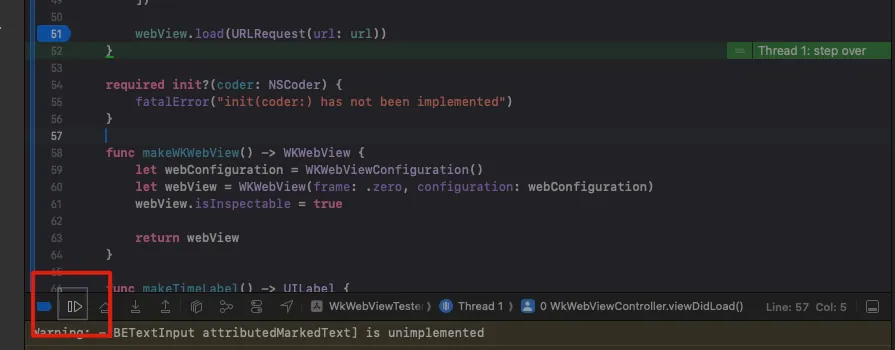
Go back to XCode and click Continue to run:
Back in Safari Developer Tools, you can see the resource loading status along with the full developer tools features (components, storage debugging, etc.).
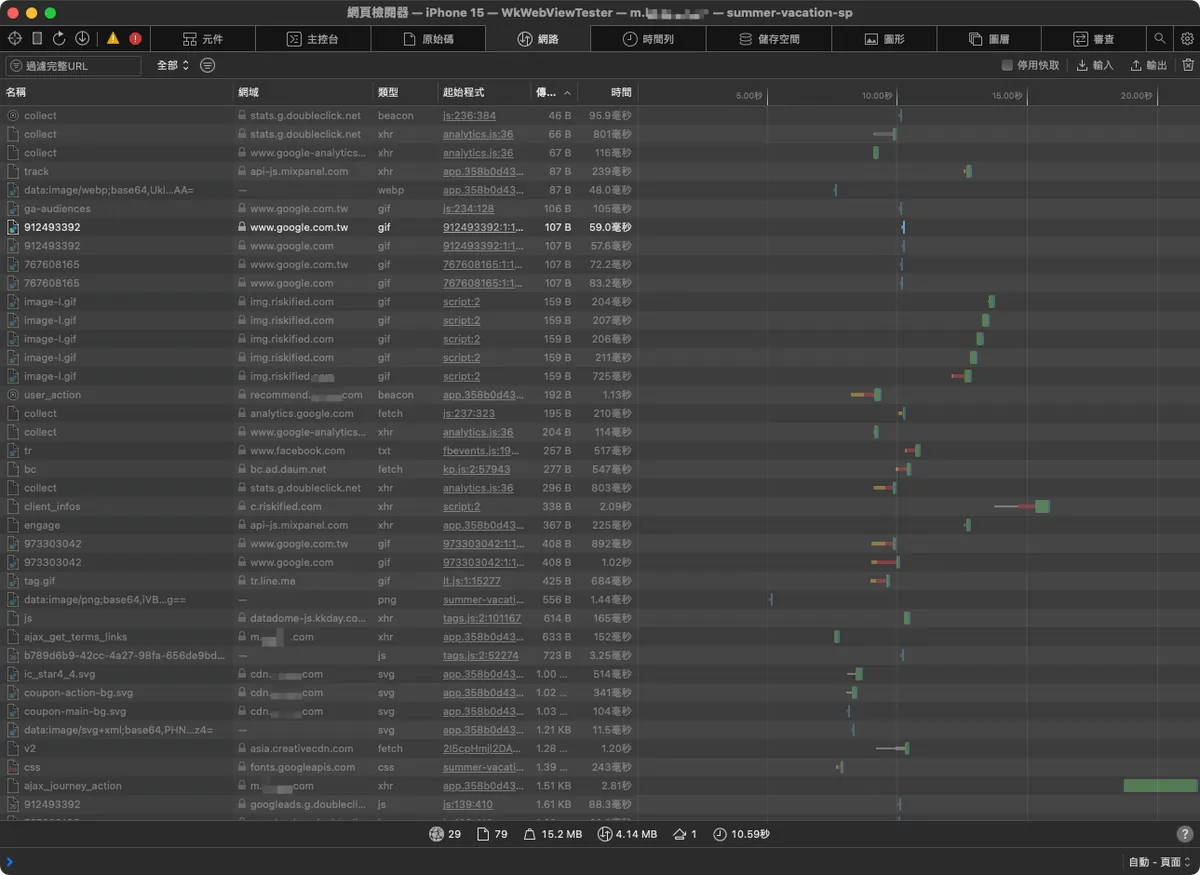
If the network resource has HTTP Cache, the transmitted size will show as “disk”:
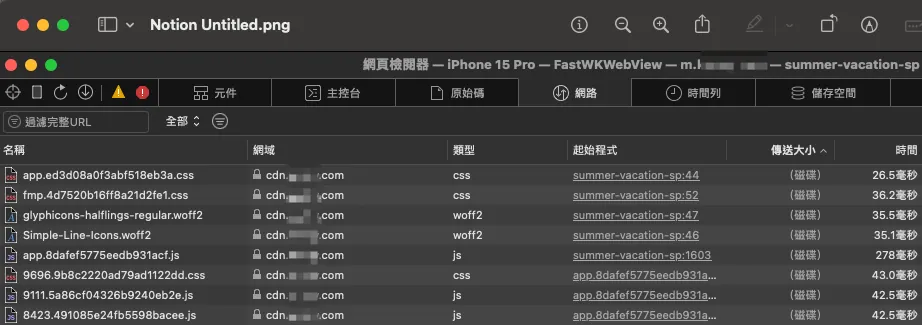
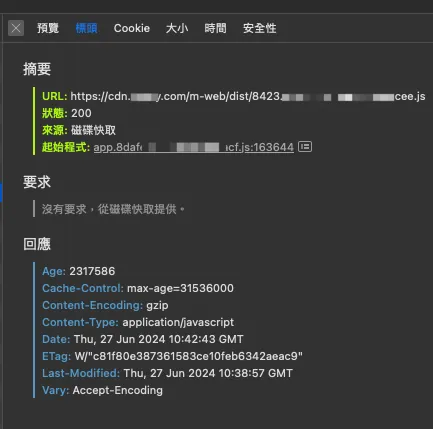
Clicking in also shows the cache information.
Clearing WKWebView Cache
// Clean Cookies
HTTPCookieStorage.shared.removeCookies(since: Date.distantPast)

// Clean Stored Data, Cache Data
let dataTypes = WKWebsiteDataStore.allWebsiteDataTypes()
let store = WKWebsiteDataStore.default()
store.fetchDataRecords(ofTypes: dataTypes) { records in
 records.forEach { record in
  store.removeData(
   ofTypes: record.dataTypes,
   for: records,
   completionHandler: {
          print("clearWebViewCache() - \(record)")
   }
  )
 }
}
You can use the above methods to clear WKWebView’s cached resources, local data, and cookie data.
But improving HTTP Cache only affects caching (fast on the second visit), it does not impact preloading (first visit). ✅
Perfect HTTP Cache + WKWebView Full Page Preload 😕
class WebViewPreloader {
    static let shared = WebViewPreloader()

    private var _webview: WKWebView = WKWebView()

    private init() { }

    func preload(url: URL) {
        let request = URLRequest(url: url)
        Task { @MainActor in
            webview.load(request)
        }
    }
}

WebViewPreloader.shared.preload("https://zhgchg.li/campaign/summer")
After improving the HTTP Cache, the second time WKWebView loads, it will have cached data. We can preload all URLs from the list or homepage once to create the cache, so when users enter, the loading will be faster.
After testing, it is technically feasible; however, it causes significant performance and network traffic overhead ; users might never even enter the detail page, but we preload all pages anyway, which feels like shooting blindly.
Personally, I believe it is impractical in reality and the drawbacks outweigh the benefits, making it a case of cutting off one’s nose to spite one’s face.😕
Improve HTTP Cache + WKWebView Preload Pure Resources 🎉
Based on the above optimization methods, we can use the HTML Link Preload approach to preload only the resource files used in the page (e.g., .js, .css, font, image…). This allows users to directly use cached resources without making additional network requests for those files.
This means I no longer preload everything on the entire page; I only preload resource files that the page will use, which may also be shared across pages. The page file .html is still fetched from the network and combined with the preloaded files to render the page.
Please note: HTTP Cache is still used here, so these resources must support HTTP Cache; otherwise, future requests will still go through the network.
Please note: HTTP Cache is still used here, so these resources must support HTTP Cache; otherwise, future requests will still go through the network.
Please note: HTTP Cache is still used here, so these resources must support HTTP Cache; otherwise, future requests will still go through the network.
<!DOCTYPE html>
<html lang="zh-tw">
 <head>
    <link rel="preload" href="https://cdn.zhgchg.li/dist/main.js" as="script">
    <link rel="preload" href="https://image.zhgchg.li/v2/image/get/campaign.jpg" as="image">
    <link rel="preload" href="https://cdn.zhgchg.li/assets/fonts/glyphicons-halflings-regular.woff2" as="font">
    <link rel="preload" href="https://cdn.zhgchg.li/assets/fonts/Simple-Line-Icons.woff2?v=2.4.0" as="font">
  </head>
</html>
Common Supported File Types:
-
.js script
-
.css style
-
font
-
image
The Web Team places the above HTML content in the agreed path with the App. Our WebViewPreloader then loads this path, and WKWebView will parse the <link> preload resources and generate cache during loading.
WebViewPreloader.shared.preload("https://zhgchg.li/campaign/summer/preload")
// or preload all at once
WebViewPreloader.shared.preload("https://zhgchg.li/assets/preload")
After testing, a good balance between traffic loss and preloading can be achieved . 🎉
The downside is that you need to maintain this Cache resource list and still optimize web page rendering and loading; otherwise, the perceived time for the first page to appear will remain long.
URLProtocol ❌
Also, let’s consider our old friend URLProtocol, which can intercept and handle all requests based on the URL Loading System (URLSession, openURL, etc.).
class CustomURLProtocol: URLProtocol {
    override class func canInit(with request: URLRequest) -> Bool {
        // Determine whether to handle this request
        if let url = request.url {
            return url.scheme == "custom"
        }
        return false
    }

    override class func canonicalRequest(for request: URLRequest) -> URLRequest {
        // Return the request
        return request
    }

    override func startLoading() {
        // Handle the request and load data
        // Change to cache strategy, read file locally first
        if let url = request.url {
            let response = URLResponse(url: url, mimeType: "text/plain", expectedContentLength: -1, textEncodingName: nil)
            self.client?.urlProtocol(self, didReceive: response, cacheStoragePolicy: .notAllowed)

            let data = "This is a custom response!".data(using: .utf8)!
            self.client?.urlProtocol(self, didLoad: data)
            self.client?.urlProtocolDidFinishLoading(self)
        }
    }

    override func stopLoading() {
        // Stop loading data
    }
}

// AppDelegate.swift didFinishLaunchingWithOptions:
URLProtocol.registerClass(CustomURLProtocol.self)
The abstract idea is to secretly send URLRequest in the background -> URLProtocol -> download all resources by itself, while the user -> WKWebView -> Request -> URLProtocol -> responds with the preloaded resources.
As mentioned before, WKWebView runs on a separate thread outside the app’s main thread, so URLProtocol cannot intercept WKWebView’s requests.
But I’ve heard that using black magic might work, though it’s not recommended and may cause other issues (app review rejection).
Dead end ❌.
WKURLSchemeHandler 😕
Apple introduced a new method in iOS 11, seemingly to compensate for WKWebView’s inability to use URLProtocol; however, this method is similar to AVPlayer’s ResourceLoader, where only schemes unrecognized by the system are handed over to our custom WKURLSchemeHandler for processing.
The abstract idea is to secretly send WKWebView -> Request -> WKURLSchemeHandler in the background to download all resources by itself, then the user -> WKWebView -> Request -> WKURLSchemeHandler -> responds with the preloaded resources.
import WebKit

class CustomSchemeHandler: NSObject, WKURLSchemeHandler {
    func webView(_ webView: WKWebView, start urlSchemeTask: WKURLSchemeTask) {
        // Handle custom scheme
        let url = urlSchemeTask.request.url!

        if url.scheme == "custom-scheme" {
            // Use cache strategy, read file locally first
            let response = URLResponse(url: url, mimeType: "text/html", expectedContentLength: -1, textEncodingName: nil)
            urlSchemeTask.didReceive(response)

            let html = "<html><body><h1>Hello from custom scheme!</h1></body></html>"
            let data = html.data(using: .utf8)!
            urlSchemeTask.didReceive(data)
            urlSchemeTask.didFinish()
        }
    }

    func webView(_ webView: WKWebView, stop urlSchemeTask: WKURLSchemeTask) {
        // Stop handling
    }
}

let webViewConfiguration = WKWebViewConfiguration()
webViewConfiguration.setURLSchemeHandler(CustomSchemeHandler(), forURLScheme: "mycacher")

let customURL = URL(string: "mycacher://zhgchg.li/campaign/summer")!
webView.load(URLRequest(url: customURL))
-
Because http/https are system-handled schemes, we cannot customize their handling; we need to change the scheme to one unrecognized by the system (e.g.
mycacher://). -
All paths in the page must use relative paths to automatically apply
mycacher://for our Handler to intercept. -
If you don’t want to change http/https but still want to capture http/https requests, you have to resort to black magic. Not recommended, as it may cause other issues (app review rejection).
-
Manually caching page files and responding may cause Ajax, XMLHttpRequest, and Fetch requests used in the page to be blocked by the CORS Same-origin Policy. To use this, website security must be lowered (because requests sent from mycacher:// to http://zhgchg.li/xxx are cross-origin).
-
You might need to implement your own Cache Policy, such as when to update and how long it remains valid. (This is basically what HTTP Cache does.)
In summary, although it is theoretically feasible, the implementation requires huge investment; overall, it is not cost-effective and is difficult to scale and maintain stability 😕
It seems that the WKURLSchemeHandler method is more suitable for handling large resource files within a webpage by declaring a custom scheme for the App to process, working together to render the webpage.
Bridge WKWebView Network Requests to Be Sent by the App 🫥
Replace Ajax, XMLHttpRequest, and Fetch in WKWebView with App-defined interfaces (WkUserScript), letting the App request resources.
This case is not very helpful because the first screen appears too slowly, not the subsequent loading; moreover, this method causes an overly deep and strange dependency between Web and App 🫥
Starting with Service Worker ❌
Due to security reasons, only Apple’s own Safari app supports it; WKWebView does not support it❌.
WKWebView Performance Optimization 🫥
Optimize and Improve WKWebView Load View Performance.
WKWebView itself is like the skeleton, and the web page is the flesh. Research shows that optimizing the skeleton (e.g., reusing WKProcessPool) has very limited effect, possibly improving from 0.0003 to 0.000015 seconds.
Local HTML, Local Resource Files 🫥
Similar to the Preload method, but the event page is placed in the App Bundle or fetched remotely at launch.
Putting the entire HTML page may also encounter CORS same-origin issues; using “complete HTTP Cache + WKWebView Preload for pure resources” seems to be a better alternative for loading web resource files only; including them in the App Bundle just increases App Size, fetching remotely is WKWebView Preload 🫥
Frontend Optimization Starts Here 🎉🎉🎉
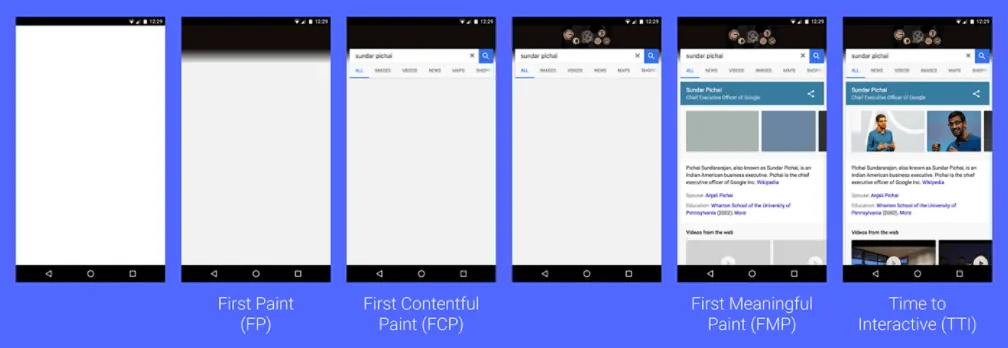
Referencing wedevs optimization suggestions, the front-end HTML page generally has four loading stages: from initially loading the page file (.html) to First Paint (blank page), then First Contentful Paint (rendering the page skeleton), followed by First Meaningful Paint (adding page content), and finally Time To Interactive (when the user can interact).
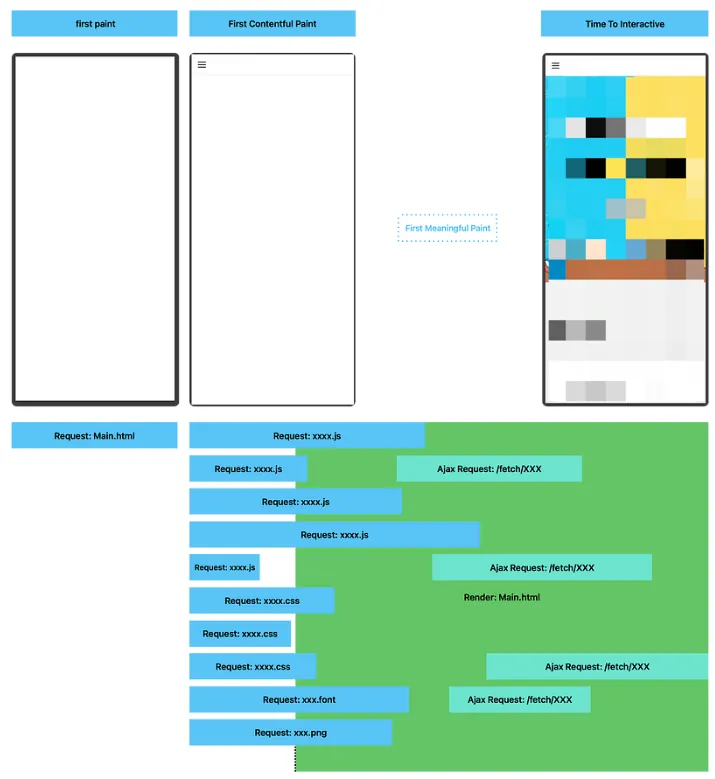
Test with our page; browsers and WKWebView first request the main .html page, then load the required resources, while building the UI for the user according to the scripts. Compared to the article, the page stage only includes First Paint (blank) to Time To Interactive (First Contentful Paint showing only the Navigation Bar, which probably doesn’t count much…), missing intermediate staged rendering for the user. As a result, the overall user wait time is extended.
Currently, only resource files have HTTP Cache set, not the page itself.
You can also refer to Google PageSpeed Insights for optimization suggestions, such as compression, reducing script size, and more.
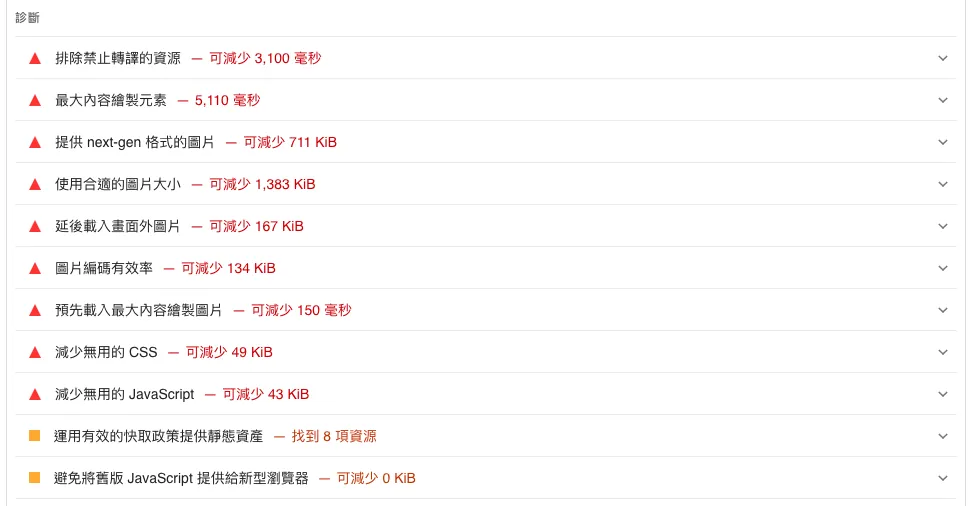
Because the core of in-app WKWebView is still the web page itself, optimizing from the front-end web side is an effective and efficient approach. 🎉🎉🎉
Focus on User Experience 🎉🎉🎉

A simple implementation: improve user experience by adding a Loading Progress Bar. Don’t just show a blank page that leaves users confused. Let them know the page is loading and how far along it is. 🎉🎉🎉
Conclusion
This concludes our exploration of feasible WKWebView preload and cache solutions. Technology itself is not the biggest issue; the key is choosing methods that are most effective for users while minimizing development costs. Selecting the right approach may only require minor adjustments to achieve the goal directly. Choosing the wrong method can lead to wasting significant resources in circles and may cause difficulties in maintenance and usage later on.
There are always more solutions than difficulties; sometimes it’s just a lack of imagination.
There might be other brilliant combinations I haven’t thought of. Everyone is welcome to contribute additional ideas.
References
WKWebView Preload Pure Resources 🎉 Refer to the following video for the solution
<iframe class=”embed-video” loading=”lazy” src=”https://www.youtube.com/embed/ZQvyfFieBfs” title=”“Preload strategies using WKWebView” by Jonatán Urquiza” frameborder=”0” allow=”accelerometer; autoplay; clipboard-write; encrypted-media; gyroscope; picture-in-picture” allowfullscreen ></iframe>
The author also mentioned the WKURLSchemeHandler method.
The complete demo repo from the video is as follows:
iOS Veteran Weekly Report
The sharing about WKWebView in the Old Driver Weekly Report is also worth reading.
Miscellaneous Talks
A long-awaited return to writing in-depth articles about iOS development.



Comments