
[iOS] Exploring NSAttributedString: Using NSTextList or NSTextTab to Implement List Indentation
iOS Swift Using NSAttributedString’s NSTextList or NSTextTab to Achieve HTML-Like List OL/UL/LI Indentation Functionality
Technical Background
Previously, while developing my open-source project “ZMarkupParser,” a library for converting HTML strings into NSAttributedString objects, I needed to study and implement different HTML components purely using NSAttributedString. That was when I first encountered the .paragraphStyle: NSParagraphStyle attributes textLists: [NSTextList] and tabStops: [NSTextTab]. These are two very obscure properties with scarce information available online.
When implementing HTML list indentation conversion, I found examples using these two properties to achieve it. First, let’s look at the nested tag structure of HTML list indentation:
<ul>
    <li>ZMarkupParser is a pure-Swift library that helps you convert HTML strings into NSAttributedString with customized styles and tags.</li>
    <li>ZMarkupParser is a pure-Swift library that helps you convert HTML strings into NSAttributedString with customized styles and tags.</li>
    <li>
        ZMarkupParser is a pure-Swift library that helps you convert HTML strings into NSAttributedString with customized styles and tags.
        <ol>
            <li>ZMarkupParser is a pure-Swift library that helps you convert HTML strings into NSAttributedString with customized styles and tags.</li>
            <li>ZMarkupParser is a pure-Swift library that helps you convert HTML strings into NSAttributedString with customized styles and tags.</li>
            <li>ZMarkupParser is a pure-Swift library that helps you convert HTML strings into NSAttributedString with customized styles and tags.</li>
        </ol>
    </li>
</ul>
Display effect in the browser:
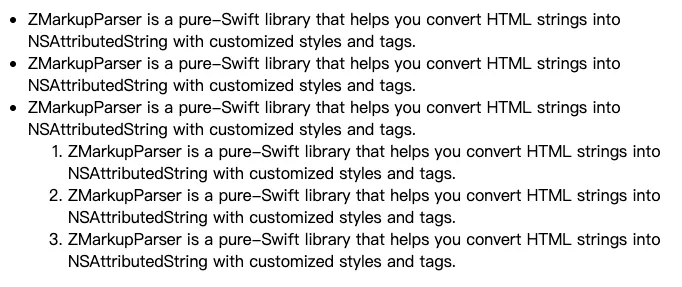
As shown in the above image, the list supports multiple nested levels and requires indentation according to the level.
At that time, there were many other HTML tag conversions to implement, so the workload was heavy; I only quickly tried to use NSTextList or NSTextTab to create list indentation without deep understanding. The results were unsatisfactory: too much spacing, no alignment, multi-line issues, unclear nested structure, and no control over spacing. After a brief attempt without finding a solution, I gave up and temporarily used a makeshift layout:
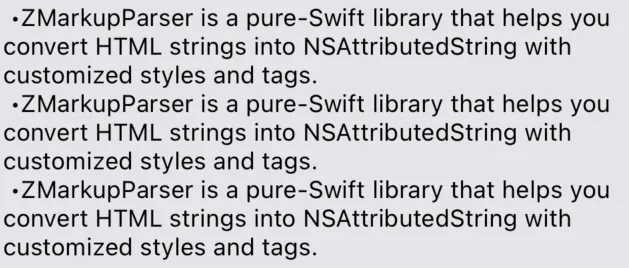
The effect in the above image is poor because it is manually formatted using spaces and the symbol -, with no indentation effect. The only advantage is that the spacing consists of space characters, allowing you to control the size.
This matter was left unresolved, and after more than a year of open source, I didn’t make any special changes to it. Until recently, I started receiving Issues requesting improved List conversion, and a developer provided a solution PR. By referring to the NSParagraphStyle usage in that PR, I gained new insights. Studying NSTextList or NSTextTab shows there is a chance to perfectly implement indented lists!
Final Result
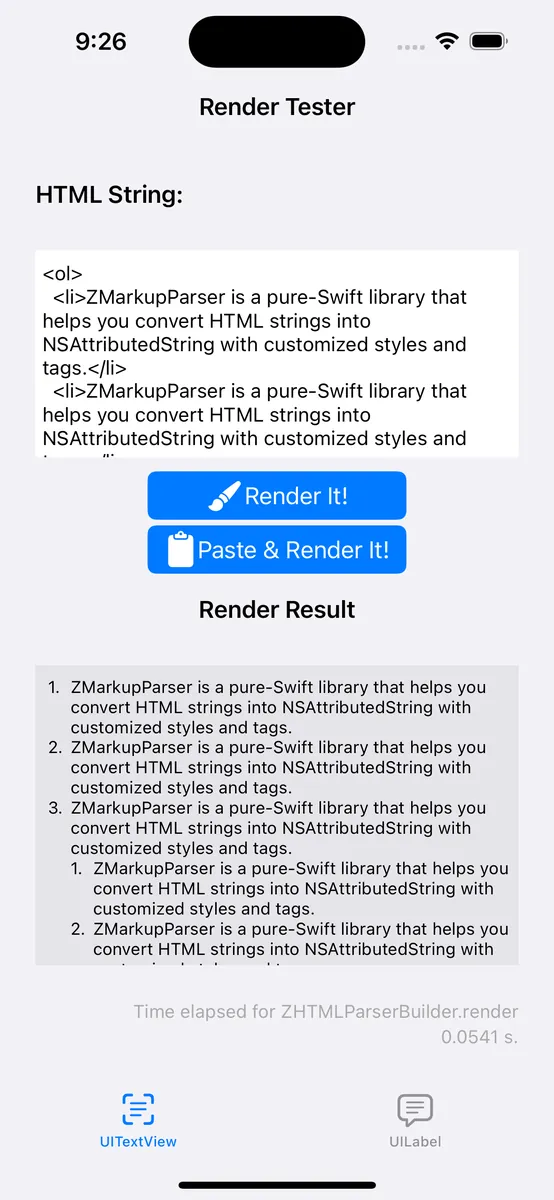
As usual, here is the final result image.
-
It is now possible to perfectly convert HTML List Items into NSAttributedString objects in ZMarkupParser ~>
v1.9.4and later versions. -
Support Line Breaks While Maintaining Indentation
-
Support Custom Indentation Spacing Size
-
Support Nested Structure Indentation
-
Support different List Item Styles, such as Bullet, Disc, Decimal… and even custom symbols
The main content begins.
Exploring List Indentation Methods Using NSTextList or NSTextTab
It is “or,” not “and.” NSTextList and NSTextTab are not used together; each can independently achieve list indentation functionality.
Method (1) Exploring List Indentation Using NSTextList
let listLevel1ParagraphStyle = NSMutableParagraphStyle()
listLevel1ParagraphStyle.textLists = [textListLevel1]

let listLevel2ParagraphStyle = NSMutableParagraphStyle()
listLevel2ParagraphStyle.textLists = [textListLevel1, textListLevel2]

let attributedString = NSMutableAttributedString()
attributedString.append(NSAttributedString(string: "\t\(textListLevel1.marker(forItemNumber: 1))\tList Level 1 - 1 StringStringStringStringStringStringStringStringStringStringStringString\n", attributes: [.paragraphStyle: listLevel1ParagraphStyle]))
attributedString.append(NSAttributedString(string: "\t\(textListLevel1.marker(forItemNumber: 2))\tList Level 1 - 2\n", attributes: [.paragraphStyle: listLevel1ParagraphStyle]))
attributedString.append(NSAttributedString(string: "\t\(textListLevel1.marker(forItemNumber: 3))\tList Level 1 - 3\n", attributes: [.paragraphStyle: listLevel1ParagraphStyle]))
attributedString.append(NSAttributedString(string: "\t\(textListLevel2.marker(forItemNumber: 1))\tList Level 2 - 1\n", attributes: [.paragraphStyle: listLevel2ParagraphStyle]))
attributedString.append(NSAttributedString(string: "\t\(textListLevel2.marker(forItemNumber: 2))\tList Level 2 - 2 StringStringStringStringStringStringStringStringStringStringStringString\n", attributes: [.paragraphStyle: listLevel2ParagraphStyle]))
attributedString.append(NSAttributedString(string: "\t\(textListLevel1.marker(forItemNumber: 4))\tList Level 1 - 4\n", attributes: [.paragraphStyle: listLevel1ParagraphStyle]))

textView.attributedText = attributedString
Display Effect:
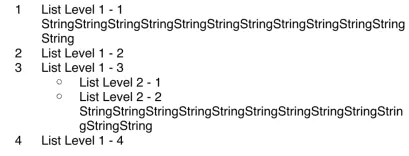
NSTextList provides very few public APIs, and the controllable parameters are limited to these:
// Item display style
var markerFormat: NSTextList.MarkerFormat { get }

// Starting number for ordered items
var startingItemNumber: Int

// Whether it is an ordered numeric item (available only on iOS >= 16, this API is still being updated)
@available(iOS 16.0, *)
open var isOrdered: Bool { get }

// Returns the marker string, itemNumber is the item index; can be omitted for unordered items
open func marker(forItemNumber itemNumber: Int) -> String
NSTextList.MarkerFormat Style Reference:
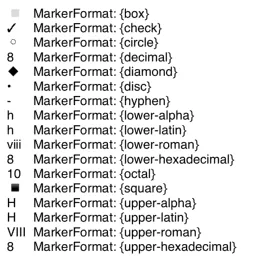
- To increase visibility, display at list item position 8.
Usage:
// Define an NSMutableParagraphStyle
let listLevel1ParagraphStyle = NSMutableParagraphStyle()
// Define List Item style, item start position
let textListLevel1 = NSTextList(markerFormat: .decimal, startingItemNumber: 1)
// Assign NSTextList to textLists array
listLevel1ParagraphStyle.textLists = [textListLevel1]
//
NSAttributedString(string: "\t\(textListLevel1.marker(forItemNumber: 1))\Item One\n", attributes: [.paragraphStyle: listLevel1ParagraphStyle])

// Add nested subitems:
// Define subitem List Item style, item start position
let textListLevel2 = NSTextList(markerFormat: .circle, startingItemNumber: 1)
// Define subitem NSMutableParagraphStyle
let listLevel2ParagraphStyle = NSMutableParagraphStyle()
// Assign parent and child NSTextList to textLists array
listLevel1ParagraphStyle.textLists = [textListLevel1, textListLevel2]

NSAttributedString(string: "\t\(textListLevel1.marker(forItemNumber: 1))\Subitem One-One\n", attributes: [.paragraphStyle: listLevel2ParagraphStyle])

// For nested sub-subitems...
// Just continue appending NSTextList to the textLists array
-
Use
\nto separate each list item -
Using
\tbullet\tis intended to letattributedString.stringreturn the list result when accessing the plain text string. -
\tBullet\twill not be displayed, so any changes after the bullet will not appear (e.g., adding.will not affect the display).
Usage Issues:
-
Cannot control the left and right spacing of the bullet points
-
Cannot customize bullet symbols; numbered items cannot include a
.like1. -
It was found that if the parent list is an unordered item (e.g.,
.circle), and the child list is an ordered numeric item (e.g.,.decimal), the child item’sstartingItemNumbersetting will be ignored.
What NSTextList can do is as described above, but it is not very practical for actual product development; the spacing is too wide, and numbered items lack a . which greatly reduces usability. Online, I only found a method to change spacing via TextKit NSTextStorage, but I think this approach is too hard-coded, so I gave up. The only advantage is that you can easily add nested indented sublists by appending to the textLists array without having to calculate complex layout issues.
Method (2) Exploring List Indentation Using NSTextTab
NSTextTab allows us to set the position of the \t tab placeholder, with a default interval of 28.
We achieve a list-like effect by setting NSMutableParagraphStyle’s tabStops + headIndent + defaultTabInterval.
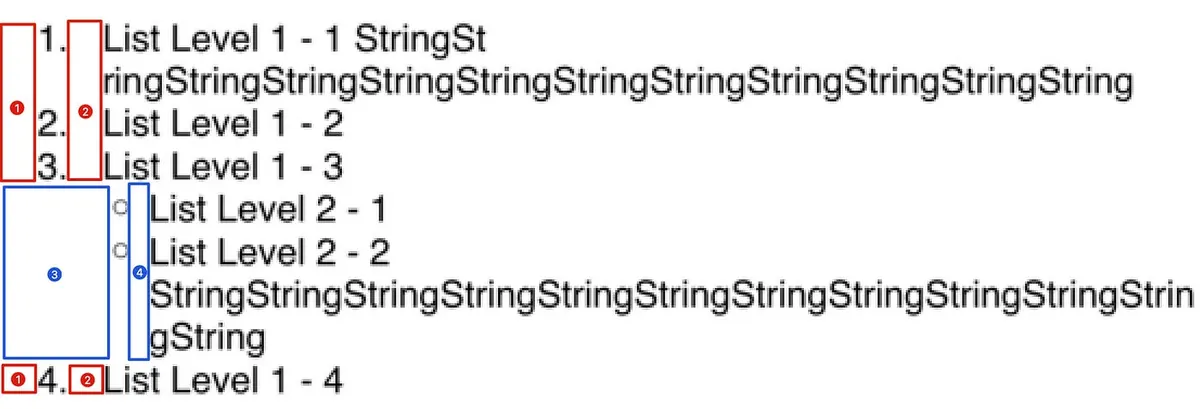
let textListLevel1 = NSTextList(markerFormat: .decimal, startingItemNumber: 1)
let textListLevel2 = NSTextList(markerFormat: .circle, startingItemNumber: 1)

let listLevel1ParagraphStyle = NSMutableParagraphStyle()
listLevel1ParagraphStyle.defaultTabInterval = 28
listLevel1ParagraphStyle.headIndent = 29
listLevel1ParagraphStyle.tabStops = [
  NSTextTab(textAlignment: .left, location: 8), // Corresponds to setting in image (1) Location
  NSTextTab(textAlignment: .left, location: 29), // Corresponds to setting in image (2) Location
]

let listLevel2ParagraphStyle = NSMutableParagraphStyle()
listLevel2ParagraphStyle.defaultTabInterval = 28
listLevel2ParagraphStyle.headIndent = 44
listLevel2ParagraphStyle.tabStops = [
    NSTextTab(textAlignment: .left, location: 29), // Corresponds to setting in image (3) Location
    NSTextTab(textAlignment: .left, location: 44), // Corresponds to setting in image (4) Location
]

let attributedString = NSMutableAttributedString()
attributedString.append(NSAttributedString(string: "\t\(textListLevel1.marker(forItemNumber: 1)).\tList Level 1 - 1 StringStringStringStringStringStringStringStringStringStringStringString\n", attributes: [.paragraphStyle: listLevel1ParagraphStyle]))
attributedString.append(NSAttributedString(string: "\t\(textListLevel1.marker(forItemNumber: 2)).\tList Level 1 - 2\n", attributes: [.paragraphStyle: listLevel1ParagraphStyle]))
attributedString.append(NSAttributedString(string: "\t\(textListLevel1.marker(forItemNumber: 3)).\tList Level 1 - 3\n", attributes: [.paragraphStyle: listLevel1ParagraphStyle]))
attributedString.append(NSAttributedString(string: "\t\(textListLevel2.marker(forItemNumber: 1))\tList Level 2 - 1\n", attributes: [.paragraphStyle: listLevel2ParagraphStyle]))
attributedString.append(NSAttributedString(string: "\t\(textListLevel2.marker(forItemNumber: 2))\tList Level 2 - 2 StringStringStringStringStringStringStringStringStringStringStringString\n", attributes: [.paragraphStyle: listLevel2ParagraphStyle]))
attributedString.append(NSAttributedString(string: "\t\(textListLevel1.marker(forItemNumber: 4)).\tList Level 1 - 4\n", attributes: [.paragraphStyle: listLevel1ParagraphStyle]))

textView.attributedText = attributedString
-
The
tabStopsarray corresponds to each\tcharacter in the text.NSTextTabcan set the alignment direction and location (note this is the position in the text, not the width!) -
headIndentsets the position from the starting point for lines after the first one, usually set to the location of the second\tso that wrapped lines align with the bullet. -
defaultTabIntervalsets the default interval spacing for\t. If there are additional\tcharacters in the text, their spacing will follow this setting. -
location:Since NSTextTab specifies direction and position, you need to calculate the position yourself; you must calculate the bullet width (the number of digits also affects this) + spacing + the parent item’s indentation distance to achieve the effect shown above. -
Item bullets are fully customizable.
-
If the
locationis incorrect or cannot be matched, a direct line break will occur.
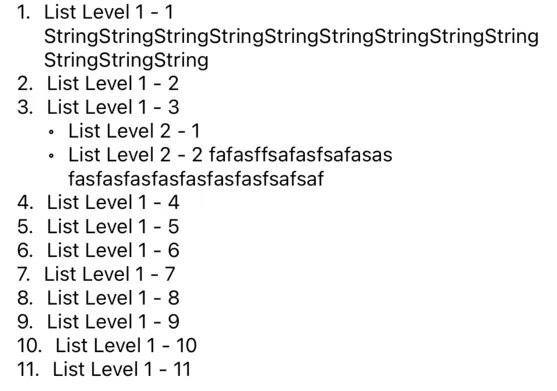
The above example simplifies the calculation process to help everyone understand how NSTextTab layout works by directly providing the results. For real-world use, you can refer to the complete code below:
let attributedStringFont = UIFont.systemFont(ofSize: UIFont.systemFontSize)
let iterator = ListItemIterator(font: attributedStringFont)

//
let listItem = ListItem(type: .decimal, text: "", subItems: [
  ListItem(type: .circle, text: "List Level 1 - 1 StringStringStringStringStringStringStringStringStringStringStringString", subItems: []),
  ListItem(type: .circle, text: "List Level 1 - 2", subItems: []),
  ListItem(type: .circle, text: "List Level 1 - 3", subItems: [
    ListItem(type: .circle, text: "List Level 2 - 1", subItems: []),
    ListItem(type: .circle, text: "List Level 2 - 2 fafasffsafasfsafasas\tfasfasfasfasfasfasfasfsafsaf", subItems: [])
  ]),
  ListItem(type: .circle, text: "List Level 1 - 4", subItems: []),
  ListItem(type: .circle, text: "List Level 1 - 5", subItems: []),
  ListItem(type: .circle, text: "List Level 1 - 6", subItems: []),
  ListItem(type: .circle, text: "List Level 1 - 7", subItems: []),
  ListItem(type: .circle, text: "List Level 1 - 8", subItems: []),
  ListItem(type: .circle, text: "List Level 1 - 9", subItems: []),
  ListItem(type: .circle, text: "List Level 1 - 10", subItems: []),
  ListItem(type: .circle, text: "List Level 1 - 11", subItems: [])
])
let listItemIndent = ListItemIterator.ListItemIndent(preIndent: 8, sufIndent: 8)
textView.attributedText = iterator.start(item: listItem, type: .decimal, indent: listItemIndent)


//
private extension UIFont {
    func widthOf(string: String) -> CGFloat {
        return (string as NSString).size(withAttributes: [.font: self]).width
    }
}

private struct ListItemIterator {
    let font: UIFont

    struct ListItemIndent {
        let preIndent: CGFloat
        let sufIndent: CGFloat
    }

    func start(item: ListItem, type: NSTextList.MarkerFormat, indent: ListItemIndent) -> NSAttributedString {
        let textList = NSTextList(markerFormat: type, startingItemNumber: 1)
        return item.subItems.enumerated().reduce(NSMutableAttributedString()) { partialResult, listItem in
            partialResult.append(self.iterator(parentTextList: textList, parentIndent: indent.preIndent, sufIndent: indent.sufIndent, item: listItem.element, itemNumber: listItem.offset + 1))
            return partialResult
        }
    }

    private func iterator(parentTextList: NSTextList, parentIndent: CGFloat, sufIndent: CGFloat, item: ListItem, itemNumber:Int) -> NSAttributedString {
        let paragraphStyle = NSMutableParagraphStyle()


        // e.g. 1.
        var itemSymbol = parentTextList.marker(forItemNumber: itemNumber)
        switch parentTextList.markerFormat {
        case .decimal, .uppercaseAlpha, .uppercaseLatin, .uppercaseRoman, .uppercaseHexadecimal, .lowercaseAlpha, .lowercaseLatin, .lowercaseRoman, .lowercaseHexadecimal:
            itemSymbol += "."
        default:
            break
        }

        // width of "1."
        let itemSymbolIndent: CGFloat = ceil(font.widthOf(string: itemSymbol))

        let tabStops: [NSTextTab] = [
            .init(textAlignment: .left, location: parentIndent),
            .init(textAlignment: .left, location: parentIndent + itemSymbolIndent + sufIndent)
        ]

        let thisIndent = parentIndent + itemSymbolIndent + sufIndent
        paragraphStyle.headIndent = thisIndent
        paragraphStyle.tabStops = tabStops
        paragraphStyle.defaultTabInterval = 28

        let thisTextList = NSTextList(markerFormat: item.type, startingItemNumber: 1)
        //
        return item.subItems.enumerated().reduce(NSMutableAttributedString(string: "\t\(itemSymbol)\t\(item.text)\n", attributes: [.paragraphStyle: paragraphStyle, .font: font])) { partialResult, listItem in
            partialResult.append(self.iterator(parentTextList: thisTextList, parentIndent: thisIndent, sufIndent: sufIndent, item: listItem.element, itemNumber: listItem.offset + 1))
            return partialResult
        }
    }
}

private struct ListItem {
    var type: NSTextList.MarkerFormat
    var text: String
    var subItems: [ListItem]
}
-
We declare a simple
ListItemobject to encapsulate sublist items, using recursion to combine and calculate the spacing and content of the list items. -
NSTextListonly uses themarkermethod to generate list symbols, but you can choose not to use it and implement your own. -
To increase the width before and after the bullet, you can directly set
preIndentandsufIndent. -
Because position calculation requires using the
Fontto measure width, the text needs to have.fontset to ensure accurate calculation.
Done
At first, I hoped to achieve this directly using NSTextList, but the results and customization options were poor. In the end, I had to rely on a DIY approach with NSTextTab, controlling the position of \t to combine the list symbols manually. It’s a bit troublesome, but the effect perfectly meets the requirements!
The goal was achieved, but I still haven’t fully mastered
NSTextTab(e.g., different directions? Relative position of Location?). Official documentation and online resources are very limited, so I’ll study it more when I have the chance.
Full Example Download
Commercial Notice
A small tool that converts HTML String into NSAttributedString, supporting custom style specifications and custom tag features.
References
- ObjC String Rendering / ObjC China — String Rendering This article offers complete examples of using NSAttributedString, including list and table implementations.



Comments