
iOS APP Version Number Matters
Version Number Rules and Comparison Solution

Photo by James Yarema
Preface
Every iOS app developer encounters two numbers: Version Number and Build Number. Recently, I had a requirement related to version numbers to prompt users for app reviews. Along the way, I explored version number details. At the end of the article, I will also share my complete solution for version number comparison.
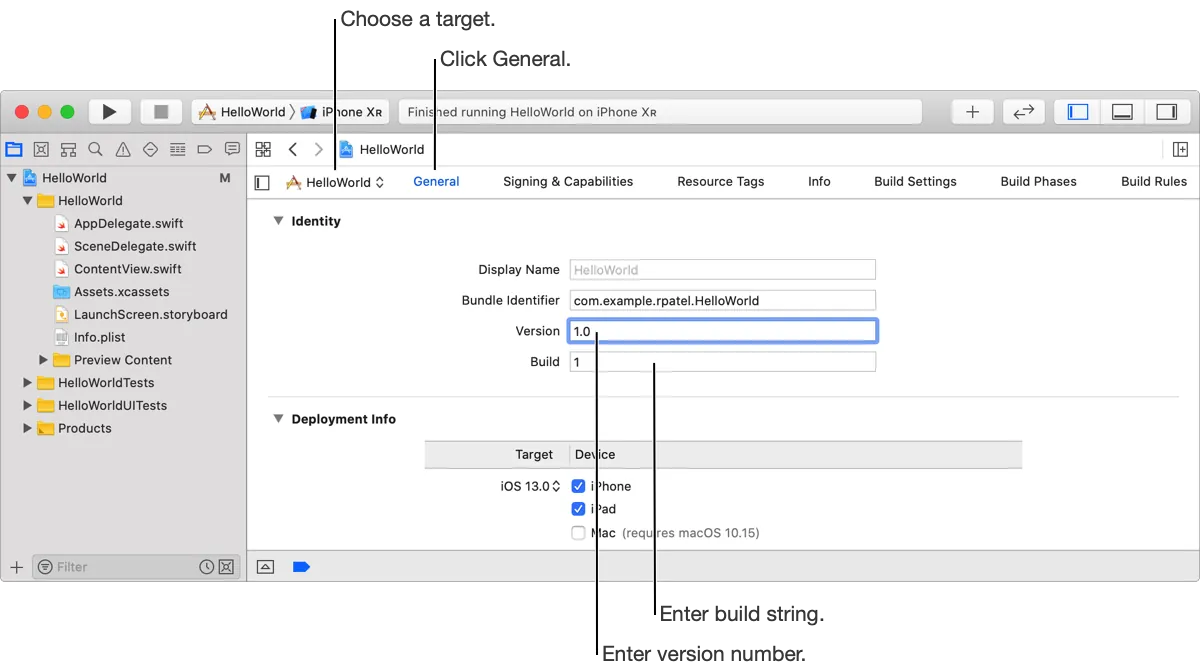
Semantic Versioning x.y.z
First, let’s introduce the Semantic Versioning specification, which mainly addresses issues in software dependencies and management. For example, in Cocoapods, if I use Moya 4.0, which depends on Alamofire 2.0.0, and Alamofire gets updated—whether with new features, bug fixes, or a complete incompatible overhaul—without a common versioning standard, things can get chaotic because you won’t know which versions are compatible or safe to update to.
Semantic versioning consists of three parts: x.y.z
-
x: Major version (major): when you make incompatible API changes
-
y: Minor version number: when you add backward-compatible new features
-
z: Patch number: when you make backward-compatible bug fixes
General Rules:
-
Must be a non-negative integer
-
No zero padding
-
0.y.z indicates the initial development stage and should not be used for official release versions.
-
Incrementing Numerically
Comparison Methods:
First compare the major version. If the major versions are equal, then compare the minor version. If the minor versions are also equal, then compare the patch version.
ex: 1.0.0 < 2.0.0 < 2.1.0 < 2.1.1
You can also add “pre-release version info (e.g., 1.0.1-alpha)” or “build metadata (e.g., 1.0.0-alpha+001)” after the patch number. However, iOS app versions do not allow these two formats to be uploaded to the App Store, so they will not be discussed here. For details, please refer to Semantic Versioning.
✅:1.0.1, 1.0.0, 5.6.7
❌:01.5.6, a1.2.3, 2.005.6
Practical Use
Regarding the actual use in iOS APP version control, since we only use it as a marker for Release APP versions and there are no dependencies with other apps or software, the definition in practice is defined by each team. The following are just personal thoughts:
-
x: Major version (major): for significant updates (multiple page interface redesigns, major feature releases)
-
y: Minor version: for optimizing or enhancing existing features (adding small features under major functions)
-
z: Patch number: used when fixing bugs in the current version
Usually, the patch number is only changed for urgent fixes (Hot Fixes) and is normally set to 0; when a new version is released, it can be reset to 0.
EX: First release (1.0.0) -> Enhance features of the first version (1.1.0) -> Found issues to fix (1.1.1) -> Found more issues (1.1.2) -> Continue enhancing first version features (1.2.0) -> Major update (2.0.0) -> Found issues to fix (2.0.1) … and so on
Version Number vs. Build Number
Version Number (APP Version Number)
-
For App Store and external identification use
-
Property List Key:
CFBundleShortVersionString -
Content can only contain numbers and “.”
-
The official recommendation is to use the semantic versioning format x.y.z
-
2020121701, 2.0, and 2.0.0.1 are all acceptable
(The summary table below shows the naming conventions of App versions on the App Store) -
No more than 18 characters
-
The format may be incorrect; you can build & run but cannot upload the package to the App Store.
-
Can only increment upwards, cannot repeat, cannot decrease
It is common practice to use semantic versioning x.y.z or x.y.
Build Number
-
Used internally during development and for stage identification; not exposed to users.
-
Used for packaging and uploading to the App Store (the same build number cannot be uploaded repeatedly).
-
Property List Key:
CFBundleVersion -
Content can only consist of numbers and “.”
-
The official recommendation is to use the semantic versioning format x.y.z
-
1, 2020121701, 2.0, and 2.0.0.1 are all acceptable.
-
No more than 18 characters
-
The format may be incorrect; you can build & run but cannot upload the package to the App Store.
-
The same APP version number cannot be duplicated, but different APPs can have the same version number.
Example: 1.0.0 build: 1.0.0, 1.1.0 build: 1.0.0 ✅
It is common to use dates or numbers (starting from 0 for each new version) along with CI/fastlane to automatically increment the build number during packaging.
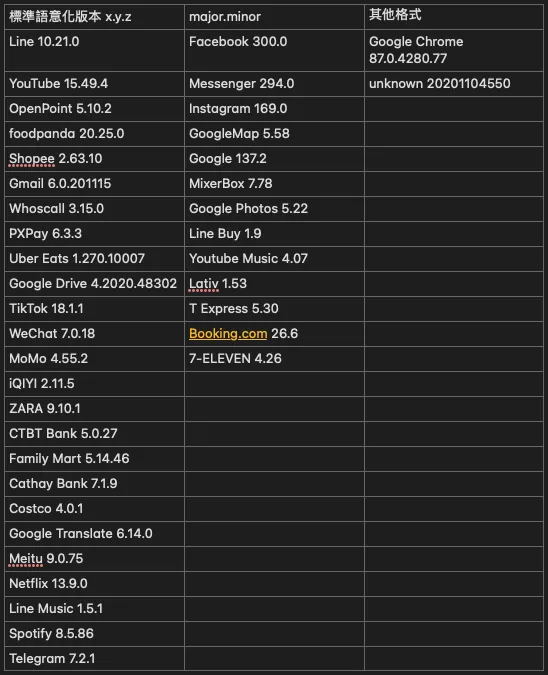
I did a brief survey of the version number formats of apps on the leaderboard, as shown in the image above.
Generally, x.y.z is still the main format.
Version Number Comparison and Judgment Methods
Sometimes we need to use versions for decision-making, such as forcing an update if the version is below x.y.z, or prompting for a review if it equals a specific version. In these cases, the ability to compare two version strings is necessary.
Simple Method
let version = "1.0.0"
print(version.compare("1.0.0", options: .numeric) == .orderedSame) // true 1.0.0 = 1.0.0
print(version.compare("1.22.0", options: .numeric) == .orderedAscending) // true 1.0.0 < 1.22.0
print(version.compare("0.0.9", options: .numeric) == .orderedDescending) // true 1.0.0 > 0.0.9
print(version.compare("2", options: .numeric) == .orderedAscending) // true 1.0.0 < 2
You can also write a String Extension:
extension String {
    func versionCompare(_ otherVersion: String) -> ComparisonResult {
        return self.compare(otherVersion, options: .numeric)
    }
}
⚠️ However, be aware that comparing versions with different formats as equal can cause errors:
let version = "1.0.0"
version.compare("1", options: .numeric) //.orderedDescending
In practice, we know 1 == 1.0.0, but using this method will result in .orderedDescending; you can refer to this article for padding zeros before comparison. Normally, once you choose the app version format, it should remain consistent—if you use x.y.z, always use x.y.z, not sometimes x.y.z and sometimes x.y.
Complex Method
You can directly use an existing library: mrackwitz/Version The following is a reimplementation.
The complex method follows the semantic versioning format x.y.z, using Regex to parse the string and implementing comparison operators. In addition to the basic =/>/≥/</≤ operators, it also implements the ~> operator (same as Cocoapods version specification) and supports static input.
The definition of the ~> operator is:
Greater than or equal to this version but less than (the next major version + 1)
EX:
~> 1.2.1: (1.2.1 <= version < 1.3) 1.2.3,1.2.4...
~> 1.2: (1.2 <= version < 2) 1.3,1.4,1.5,1.3.2,1.4.1...
~> 1: (1 <= version < 2) 1.1.2,1.2.3,1.5.9,1.9.0...
- First, we need to define the Version object:
@objcMembers
class Version: NSObject {
    private(set) var major: Int
    private(set) var minor: Int
    private(set) var patch: Int

    override var description: String {
        return "\(self.major),\(self.minor),\(self.patch)"
    }

    init(_ major: Int, _ minor: Int, _ patch: Int) {
        self.major = major
        self.minor = minor
        self.patch = patch
    }

    init(_ string: String) throws {
        let result = try Version.parse(string: string)
        self.major = result.version.major
        self.minor = result.version.minor
        self.patch = result.version.patch
    }

    static func parse(string: String) throws -> VersionParseResult {
        let regex = "^(?:(>=\\|>\\|<=\\|<\\|~>\\|=\\|!=){1}\\s*)?(0\\|[1-9]\\d*)\\.(0\\|[1-9]\\d*)\\.(0\\|[1-9]\\d*)$"
        let result = string.groupInMatches(regex)

        if result.count == 4 {
            // start with operator...
            let versionOperator = VersionOperator(string: result[0])
            guard versionOperator != .unSupported else {
                throw VersionUnSupported()
            }
            let major = Int(result[1]) ?? 0
            let minor = Int(result[2]) ?? 0
            let patch = Int(result[3]) ?? 0
            return VersionParseResult(versionOperator, Version(major, minor, patch))
        } else if result.count == 3 {
            // unspecified operator...
            let major = Int(result[0]) ?? 0
            let minor = Int(result[1]) ?? 0
            let patch = Int(result[2]) ?? 0
            return VersionParseResult(.unSpecified, Version(major, minor, patch))
        } else {
            throw VersionUnSupported()
        }
    }
}

// Supported Objects
@objc class VersionUnSupported: NSObject, Error { }

@objc enum VersionOperator: Int {
    case equal
    case notEqual
    case higherThan
    case lowerThan
    case lowerThanOrEqual
    case higherThanOrEqual
    case optimistic

    case unSpecified
    case unSupported

    init(string: String) {
        switch string {
        case ">":
            self = .higherThan
        case "<":
            self = .lowerThan
        case "<=":
            self = .lowerThanOrEqual
        case ">=":
            self = .higherThanOrEqual
        case "~>":
            self = .optimistic
        case "=":
            self = .equal
        case "!=":
            self = .notEqual
        default:
            self = .unSupported
        }
    }
}

@objcMembers
class VersionParseResult: NSObject {
    var versionOperator: VersionOperator
    var version: Version
    init(_ versionOperator: VersionOperator, _ version: Version) {
        self.versionOperator = versionOperator
        self.version = version
    }
}
You can see that Version is basically a storage for major, minor, and patch. The parsing method is written as static for easy external use, allowing input like 1.0.0 or ≥1.0.1. This makes string parsing and config file parsing more convenient.
Input: 1.0.0 => Output: .unSpecified, Version(1.0.0)
Input: ≥ 1.0.1 => Output: .higherThanOrEqual, Version(1.0.0)
The regex is modified based on the reference provided in the Semantic Versioning document.
^(0\\|[1-9]\d*)\.(0\\|[1-9]\d*)\.(0\\|[1-9]\d*)(?:-((?:0\\|[1-9]\d*\\|\d*[a-zA-Z-][0-9a-zA-Z-]*)(?:\.(?:0\\|[1-9]\d*\\|\d*[a-zA-Z-][0-9a-zA-Z-]*))*))?(?:\+([0-9a-zA-Z-]+(?:\.[0-9a-zA-Z-]+)*))?$
Considering the project mixes Objective-C and must also be usable in OC, all are declared as @objcMembers, and compatible OC syntax is used as a compromise.
(Actually, you can directly use enum: String for VersionOperator and tuple/struct for Result)
*If your implementation object inherits from NSObject, remember to implement != when implementing Comparable/Equatable ==, because the original NSObject’s != operator will not behave as expected.
2. Implementing the Comparable Method:
extension Version: Comparable {
    static func < (lhs: Version, rhs: Version) -> Bool {
        if lhs.major < rhs.major {
            return true
        } else if lhs.major == rhs.major {
            if lhs.minor < rhs.minor {
                return true
            } else if lhs.minor == rhs.minor {
                if lhs.patch < rhs.patch {
                    return true
                }
            }
        }

        return false
    }

    static func == (lhs: Version, rhs: Version) -> Bool {
        return lhs.major == rhs.major && lhs.minor == rhs.minor && lhs.patch == rhs.patch
    }

    static func != (lhs: Version, rhs: Version) -> Bool {
        return !(lhs == rhs)
    }

    static func ~> (lhs: Version, rhs: Version) -> Bool {
        let start = Version(lhs.major, lhs.minor, lhs.patch)
        let end = Version(lhs.major, lhs.minor, lhs.patch)

        if end.patch >= 0 {
            end.minor += 1
            end.patch = 0
        } else if end.minor > 0 {
            end.major += 1
            end.minor = 0
        } else {
            end.major += 1
        }
        return start <= rhs && rhs < end
    }

    func compareWith(_ version: Version, operator: VersionOperator) -> Bool {
        switch `operator` {
        case .equal, .unSpecified:
            return self == version
        case .notEqual:
            return self != version
        case .higherThan:
            return self > version
        case .lowerThan:
            return self < version
        case .lowerThanOrEqual:
            return self <= version
        case .higherThanOrEqual:
            return self >= version
        case .optimistic:
            return self ~> version
        case .unSupported:
            return false
        }
    }
}
This actually implements the previously described comparison logic, and finally opens a compareWith method to allow external input of the parsed results for the final judgment.
Usage Example:
let shouldAskUserFeedbackVersion = ">= 2.0.0"
let currentVersion = "3.0.0"
do {
  let result = try Version.parse(shouldAskUserFeedbackVersion)
  result.version.comparWith(currentVersion, result.operator) // true
} catch {
  print("version string parse error!")
}
Or…
Version(1,0,0) >= Version(0,0,9) //true...
Supports
>/≥/</≤/=/!=/~>operators.
Next Steps
Test cases…
import XCTest

class VersionTests: XCTestCase {
    func testHigher() throws {
        let version = Version(3, 12, 1)
        XCTAssertEqual(version > Version(2, 100, 120), true)
        XCTAssertEqual(version > Version(3, 12, 0), true)
        XCTAssertEqual(version > Version(3, 10, 0), true)
        XCTAssertEqual(version >= Version(3, 12, 1), true)

        XCTAssertEqual(version > Version(3, 12, 1), false)
        XCTAssertEqual(version > Version(3, 12, 2), false)
        XCTAssertEqual(version > Version(4, 0, 0), false)
        XCTAssertEqual(version > Version(3, 13, 1), false)
    }

    func testLower() throws {
        let version = Version(3, 12, 1)
        XCTAssertEqual(version < Version(2, 100, 120), false)
        XCTAssertEqual(version < Version(3, 12, 0), false)
        XCTAssertEqual(version < Version(3, 10, 0), false)
        XCTAssertEqual(version <= Version(3, 12, 1), true)

        XCTAssertEqual(version < Version(3, 12, 1), false)
        XCTAssertEqual(version < Version(3, 12, 2), true)
        XCTAssertEqual(version < Version(4, 0, 0), true)
        XCTAssertEqual(version < Version(3, 13, 1), true)
    }

    func testEqual() throws {
        let version = Version(3, 12, 1)
        XCTAssertEqual(version == Version(3, 12, 1), true)
        XCTAssertEqual(version == Version(3, 12, 21), false)
        XCTAssertEqual(version != Version(3, 12, 1), false)
        XCTAssertEqual(version != Version(3, 12, 2), true)
    }

    func testOptimistic() throws {
        let version = Version(3, 12, 1)
        XCTAssertEqual(version ~> Version(3, 12, 1), true) //3.12.1 <= $0 < 3.13.0
        XCTAssertEqual(version ~> Version(3, 12, 9), true) //3.12.1 <= $0 < 3.13.0
        XCTAssertEqual(version ~> Version(3, 13, 0), false) //3.12.1 <= $0 < 3.13.0
        XCTAssertEqual(version ~> Version(3, 11, 1), false) //3.12.1 <= $0 < 3.13.0
        XCTAssertEqual(version ~> Version(3, 13, 1), false) //3.12.1 <= $0 < 3.13.0
        XCTAssertEqual(version ~> Version(2, 13, 0), false) //3.12.1 <= $0 < 3.13.0
        XCTAssertEqual(version ~> Version(3, 11, 100), false) //3.12.1 <= $0 < 3.13.0
    }

    func testVersionParse() throws {
        let unSpecifiedVersion = try? Version.parse(string: "1.2.3")
        XCTAssertNotNil(unSpecifiedVersion)
        XCTAssertEqual(unSpecifiedVersion!.version == Version(1, 2, 3), true)
        XCTAssertEqual(unSpecifiedVersion!.versionOperator, .unSpecified)

        let optimisticVersion = try? Version.parse(string: "~> 1.2.3")
        XCTAssertNotNil(optimisticVersion)
        XCTAssertEqual(optimisticVersion!.version == Version(1, 2, 3), true)
        XCTAssertEqual(optimisticVersion!.versionOperator, .optimistic)

        let higherThanVersion = try? Version.parse(string: "> 1.2.3")
        XCTAssertNotNil(higherThanVersion)
        XCTAssertEqual(higherThanVersion!.version == Version(1, 2, 3), true)
        XCTAssertEqual(higherThanVersion!.versionOperator, .higherThan)

        XCTAssertThrowsError(try Version.parse(string: "!! 1.2.3")) { error in
            XCTAssertEqual(error is VersionUnSupported, true)
        }
    }
}
Currently planning to further optimize Version, conduct performance testing and adjustments, organize packaging, and then run the process to create my own CocoaPods.
However, there is already a complete Version for handling Pod projects, so there’s no need to reinvent the wheel. I just wanted to streamline the setup process XD.
Maybe I will also submit a PR implementing ~> for existing libraries.



Comments