
Quickly Build a Testable API Service Using Firebase Firestore + Functions
When Push Notification Statistics Meet Firebase Firestore + Functions

Photo by Carlos Muza
Introduction
Precise Push Notification Statistics Function
Recently, for a feature we want to add to the app, before implementation, we could only use the backend’s success or failure response when posting data to APNS/FCM as the push notification base, and record push clicks to calculate the “click rate.” However, this method is very inaccurate because the base includes many invalid devices, such as deleted apps (which may not become invalid immediately) and devices with push permissions turned off, which still return success when posting from the backend.
After iOS 10, you can implement a Notification Service Extension to secretly call an API for statistics at the moment the push notification banner appears. The advantage is high accuracy since the call only happens when the user actually sees the notification banner. If the app is deleted, notifications are turned off, or banners are disabled, no action occurs. The banner appearance equals a received notification, which can be used as the push base count. Combining this with click counts allows you to get an “accurate click-through rate.”
For detailed principles and implementation, please refer to the previous article: “i OS ≥ 10 Notification Service Extension Application (Swift)”
Currently, the app’s loss rate is estimated at 0% based on tests. Common real-world examples include Line’s end-to-end encryption for messages (push notifications are encrypted and only decrypted on the device before display).
Problem
The app side doesn’t actually require much work. Both iOS and Android just need to implement similar features (but for Android, if targeting the Chinese market, it gets more complicated as you need to implement push notification frameworks for multiple platforms). The bigger challenge lies in handling backend and server load because each push notification triggers API calls to record data, which can easily max out the server’s connections. This issue can be worse if using RDBMS to store records. Most data loss in statistics usually happens at this stage.
Here you can record logs by writing to files and perform statistics for display during queries.
Also, considering the scenario where requests are sent and received simultaneously, the volume may not be as large as expected; since push notifications are not sent all at once in hundreds of thousands or millions, but in small batches; it only needs to handle the number of requests sent and returned in batches!
Prototype
Due to the issues considered earlier, the backend requires significant effort to research and modify, and the market may not necessarily care about the results; so I decided to first use available resources to create a prototype to test the waters.
Here, we choose Firebase services that are commonly used by apps, specifically the Functions and Firestore features.
Firebase Functions
Functions is a serverless service provided by Google. You only need to write the program logic, and Google automatically handles the server, runtime environment, and scaling without worrying about server expansion or traffic issues.
Firebase Functions is basically Google Cloud Functions but only supports JavaScript (node.js). I haven’t tried it, but if you use Google Cloud Functions with other languages and import Firebase services, it should also work.
For APIs, I can write a node.js file to get a physical URL (e.g., my-project.cloudfunctions.net/getUser) and implement the logic to retrieve Request information and provide the corresponding Response.
Previously wrote an article about Google Functions: “Using Python + Google Cloud Platform + Line Bot to Automate Routine Tasks”
Firebase Functions requires enabling a Blaze project (pay-as-you-go) to use.

Firebase Firestore
Firebase Firestore, a NoSQL database used to store and manage data.
Combining Firebase Functions allows you to import Firestore during a request to operate the database, then respond to the user, enabling you to build a simple RESTful API service!
Let’s start hands-on!
Installing node.js Environment
It is recommended to use NVM, a Node.js version manager, for installation and management (similar to using pyenv for Python).
Copy the installation shell script from the NVM Github project:
curl -o- https://raw.githubusercontent.com/nvm-sh/nvm/v0.37.2/install.sh \\| bash
If you encounter errors during installation, please make sure you have a ~/.bashrc or ~/.zshrc file. If not, create one using touch ~/.bashrc or touch ~/.zshrc and then run the install script again.
Next, you can use nvm install node to install the latest version of node.js.

You can run npm --version to confirm that npm is installed successfully and check its version:

Deploy Firebase Functions
Install Firebase-tools:
npm install -g firebase-tools
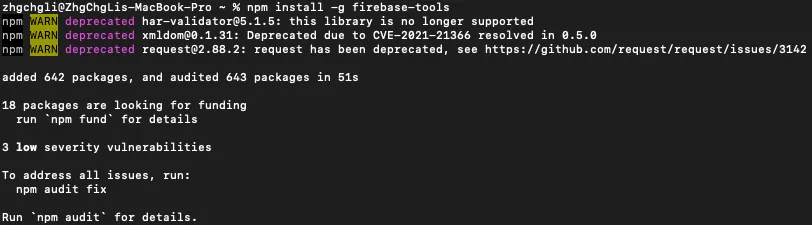
After successful installation, please enter the following for first-time use:
firebase login
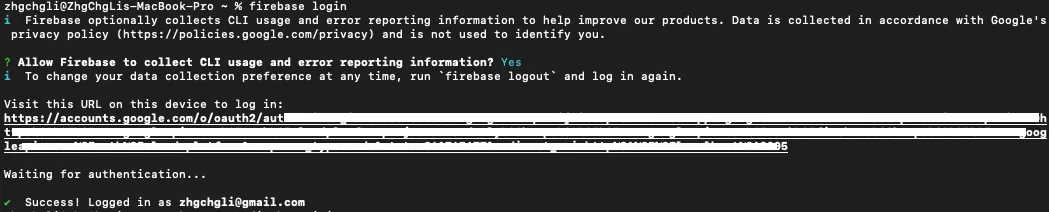
Complete Firebase login authentication.
Start the project:
firebase init
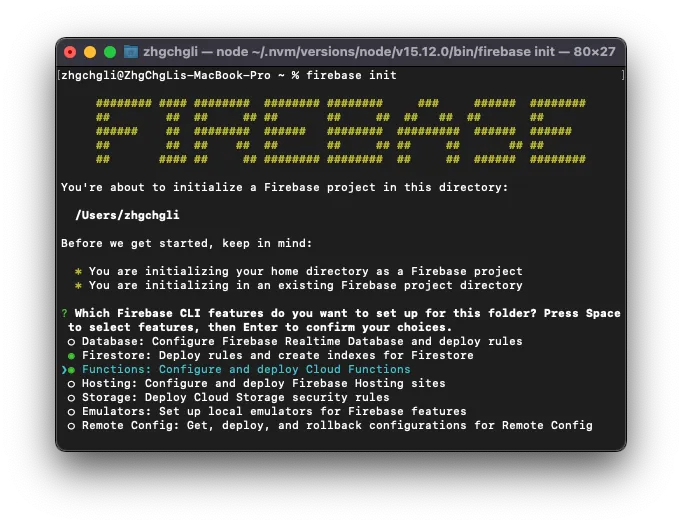
Note the path where Firebase init is located:
You're about to initialize a Firebase project in this directory:
/Users/zhgchgli
Here you can choose which Firebase CLI tools to install. Use the “↑” and “↓” keys to navigate and the “spacebar” to select. You can choose to install only “Functions” or include “Firestore” as well.
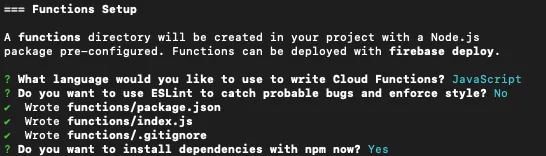
=== Functions Setup
-
Language selection “JavaScript”
-
Regarding “use ESLint to catch probable bugs and enforce style” syntax style checking, YES / NO both are acceptable.
-
install dependencies with npm? YES
===Emulators Setup
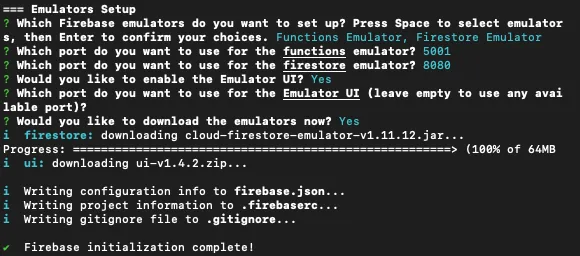
You can test Functions and Firestore features and settings in your local environment. This does not count toward usage and does not require deployment to test.
Install according to your needs. I installed it but didn’t use it… because it’s just a small feature.
Coding!
Go to the previously noted path, find the functions folder, and open the index.js file inside with an editor.
index.js:
const functions = require('firebase-functions');
const admin = require('firebase-admin');
admin.initializeApp();

exports.hello = functions.https.onRequest((req, res) => {
    const targetID = req.query.targetID
    const action = req.body.action
    const name = req.body.name

    res.send({"targetID": targetID, "action": action, "name": name});
    return
})
We defined a route /hello that returns URL Query ?targetID=, POST action, and name parameter information.
After editing and saving, return to the console:
firebase deploy
Remember to run the
firebase deploycommand after every change to apply the updates.
Start verification & deploy to Firebase…
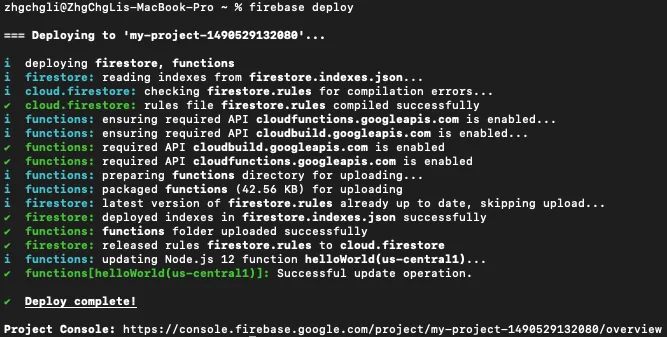
You might need to wait a moment. After Deploy complete!, your first Request & Response webpage will be ready!
At this point, you can return to the Firebase -> Functions page:
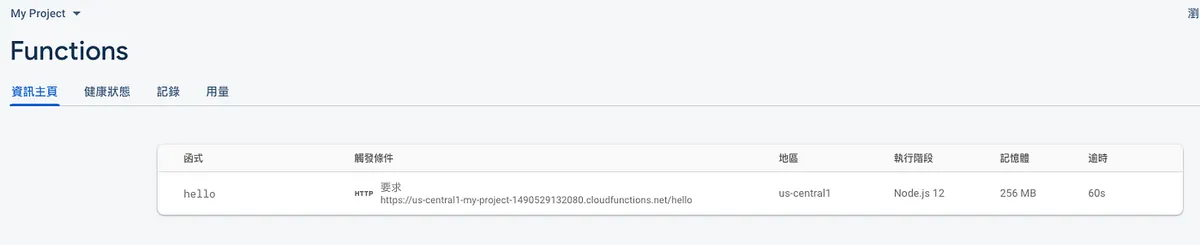
You will see the interface and URL location you just created.
Copy the URL below and paste it into PostMan to test:
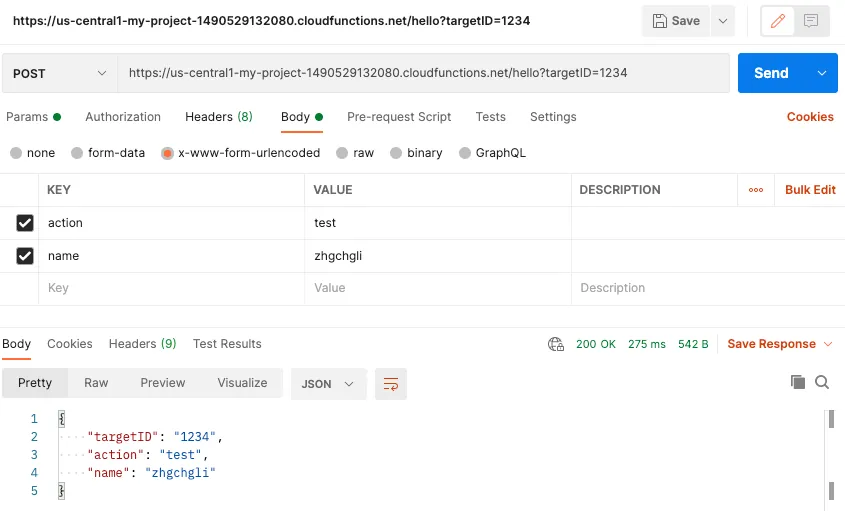
Remember to select
x-www-form-urlencodedfor the POST Body.
Success!
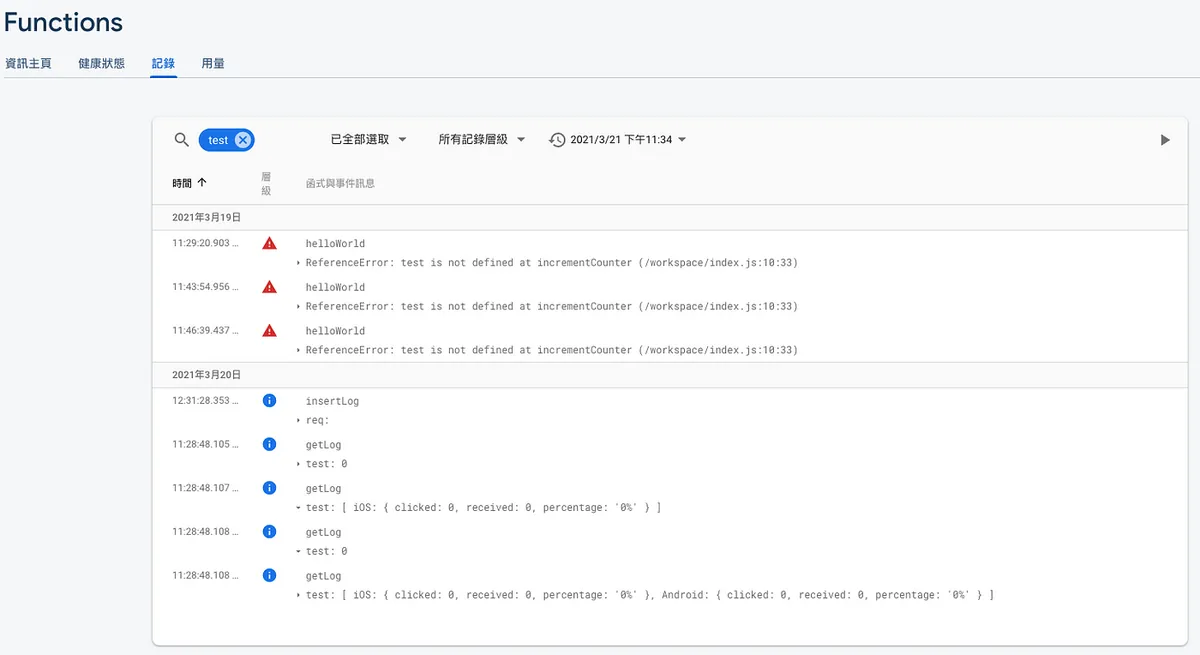
Log
We can use in the code:
functions.logger.log("log:", value);
Perform Log Recording.
You can view the log results in Firebase -> Functions -> Logs:
Example Goal
Create an API to add, update, delete, query articles, and like posts
We want to achieve RESTful API design, so we can no longer use the pure Path method from the example above. Instead, we need to use the Express framework.
POST Add New Article
index.js:
const functions = require('firebase-functions');
const admin = require('firebase-admin');
const express = require('express');
const cors = require('cors');
const app = express();

admin.initializeApp();
app.use(cors({ origin: true }));

// Insert
app.post('/', async (req, res) => { // Here POST refers to the HTTP Method POST
    const title = req.body.title;
    const content = req.body.content;
    const author = req.body.author;

    if (title == null \\|\\| content == null \\|\\| author == null) {
        return res.status(400).send({"message":"Parameter error!"});
    }

    var post = {"title":title, "content":content, "author": author, "created_at": new Date()};
    await admin.firestore().collection('posts').add(post);
    res.status(201).send({"message":"Creation successful!"});
});

exports.post= functions.https.onRequest(app); // Here POST refers to the /post path
Now we switch to using Express to handle web requests. Here, we first add a POST method for the / path. The last line indicates that all routes are under /post. Next, we will add APIs for update and delete.
After successfully deploying with firebase deploy, return to Post Man to test:
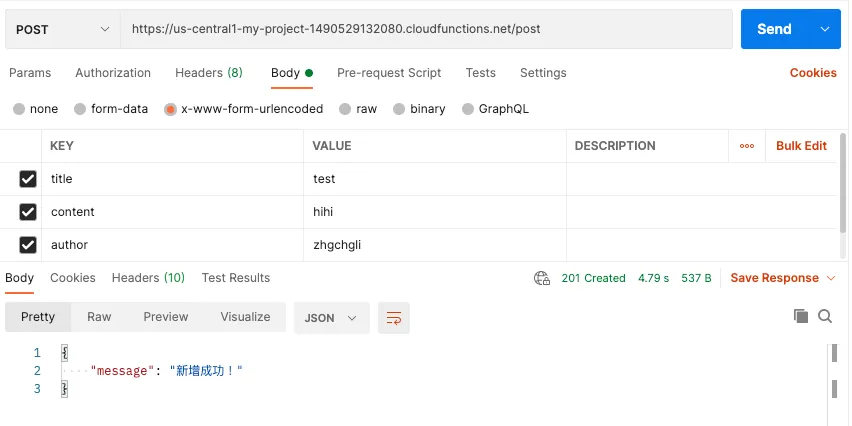
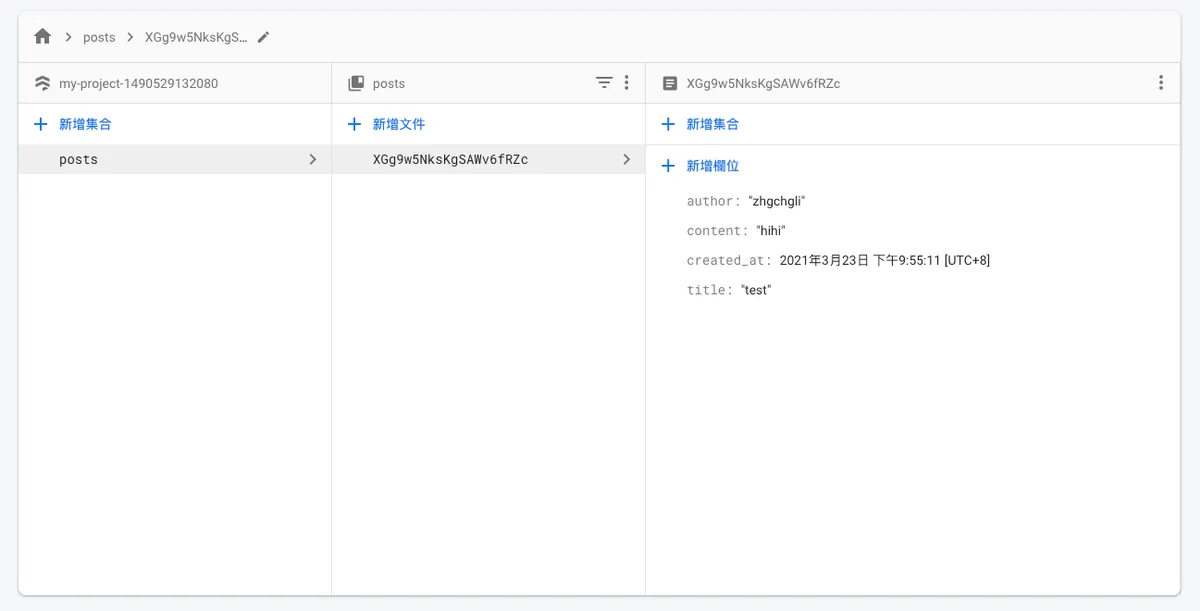
After a successful Postman request, you can check Firebase -> Firestore to see if the data was written correctly:
PUT Update Article
index.js:
const functions = require('firebase-functions');
const admin = require('firebase-admin');
const express = require('express');
const cors = require('cors');
const app = express();

admin.initializeApp();
app.use(cors({ origin: true }));

// Update
app.put("/:id", async (req, res) => {
    const title = req.body.title;
    const content = req.body.content;
    const author = req.body.author;
    const doc = await admin.firestore().collection('posts').doc(req.params.id).get();

    if (!doc.exists) {
        return res.status(404).send({"message":"Article not found!"});
    } else if (title == null \\|\\| content == null \\|\\| author == null) {
        return res.status(400).send({"message":"Invalid parameters!"});
    }

    var post = {"title":title, "content":content, "author": author};
    await admin.firestore().collection('posts').doc(req.params.id).update(post);
    res.status(200).send({"message":"Update successful!"});
});

exports.post= functions.https.onRequest(app);
Deployment & testing method is the same as adding; remember to change the Post Man HTTP Method to PUT.
DELETE Delete Article
index.js:
const functions = require('firebase-functions');
const admin = require('firebase-admin');
const express = require('express');
const cors = require('cors');
const app = express();

admin.initializeApp();
app.use(cors({ origin: true }));

// Delete
app.delete("/:id", async (req, res) => {
    const doc = await admin.firestore().collection('posts').doc(req.params.id).get();

    if (!doc.exists) {
        return res.status(404).send({"message":"Post not found!"});
    }

    await admin.firestore().collection("posts").doc(req.params.id).delete();
    res.status(200).send({"message":"Post deleted successfully!"});
})

exports.post= functions.https.onRequest(app);
Deployment & testing method is the same as adding; remember to change the Post Man HTTP Method to DELETE.
Create, update, and delete are done, now let’s do the query!
SELECT Query Articles
index.js:
const functions = require('firebase-functions');
const admin = require('firebase-admin');
const express = require('express');
const cors = require('cors');
const app = express();

admin.initializeApp();
app.use(cors({ origin: true }));

// Select List
app.get('/', async (req, res) => {
    const posts = await admin.firestore().collection('posts').get();
    var result = [];
    posts.forEach(doc => {
      let id = doc.id;
      let data = doc.data();
      result.push({"id":id, ...data})
    });
    res.status(200).send({"result":result});
});

// Select One
app.get("/:id", async (req, res) => {
    const doc = await admin.firestore().collection('posts').doc(req.params.id).get();

    if (!doc.exists) {
        return res.status(404).send({"message":"Article not found!"});
    }

    res.status(200).send({"result":{"id":doc.id, ...doc.data()}});
});

exports.post= functions.https.onRequest(app);
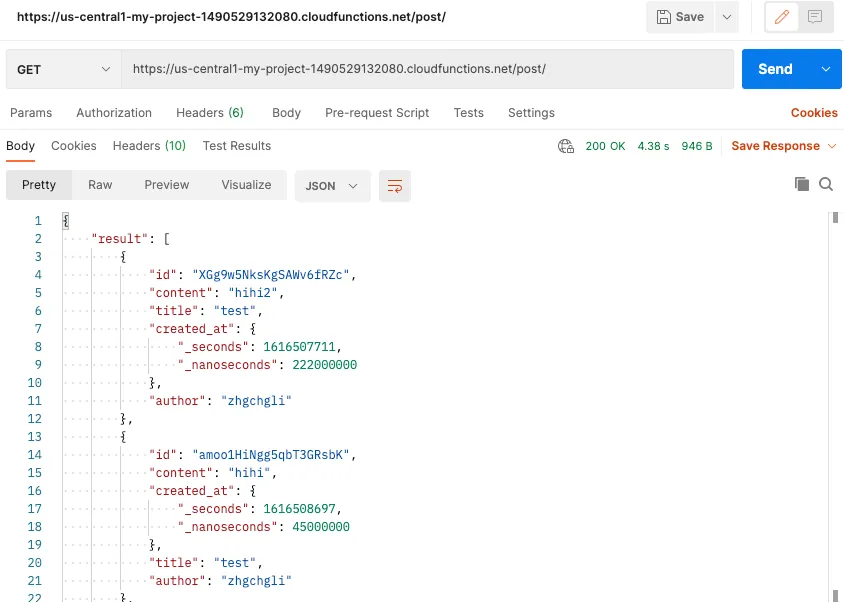
Deployment & testing method is the same as adding; remember to change the Postman HTTP Method to GET and set the Body back to none.
InsertOrUpdate?
Sometimes we need to update when the document exists, and create it when it doesn’t. In this case, we can use set with merge: true:
index.js:
const functions = require('firebase-functions');
const admin = require('firebase-admin');
const express = require('express');
const cors = require('cors');
const app = express();

admin.initializeApp();
app.use(cors({ origin: true }));

// InsertOrUpdate
app.post("/tag", async (req, res) => {
    const name = req.body.name;

    if (name == null) {
        return res.status(400).send({"message":"Parameter error!"});
    }

    var tag = {"name":name};
    await admin.firestore().collection('tags').doc(name).set({created_at: new Date()}, {merge: true});
    res.status(201).send({"message":"Successfully added!"});
});

exports.post= functions.https.onRequest(app);
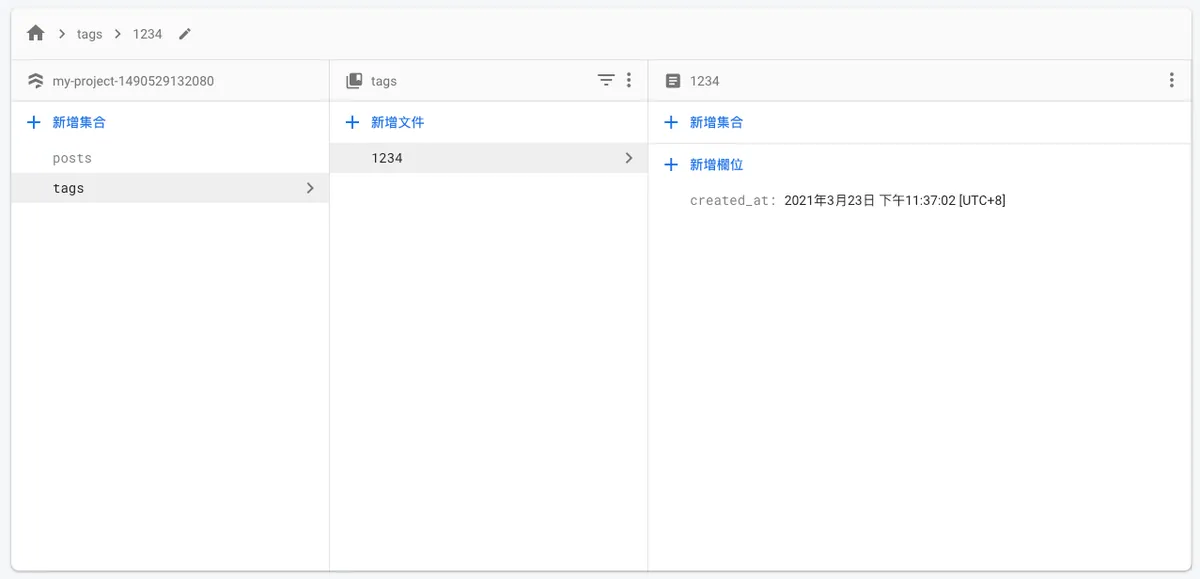
Here, using adding a tag as an example, the deployment and testing method is the same as adding new data. You can see that Firestore does not repeatedly add new entries.
Article Like Counter
Assuming our article data now has an additional likeCount field to record the number of likes, how should we handle it?
index.js:
const functions = require('firebase-functions');
const admin = require('firebase-admin');
const express = require('express');
const cors = require('cors');
const app = express();

admin.initializeApp();
app.use(cors({ origin: true }));

// Like Post
app.post("/like/:id", async (req, res) => {
    const doc = await admin.firestore().collection('posts').doc(req.params.id).get();
    const increment = admin.firestore.FieldValue.increment(1)

    if (!doc.exists) {
        return res.status(404).send({"message":"Post not found!"});
    }

    await admin.firestore().collection('posts').doc(req.params.id).set({likeCount: increment}, {merge: true});
    res.status(201).send({"message":"Like successful!"});
});

exports.post= functions.https.onRequest(app);
Using the increment variable allows you to directly perform the operation of value +1.
High-Traffic Article Like Counter
Because Firestore has write speed limits:
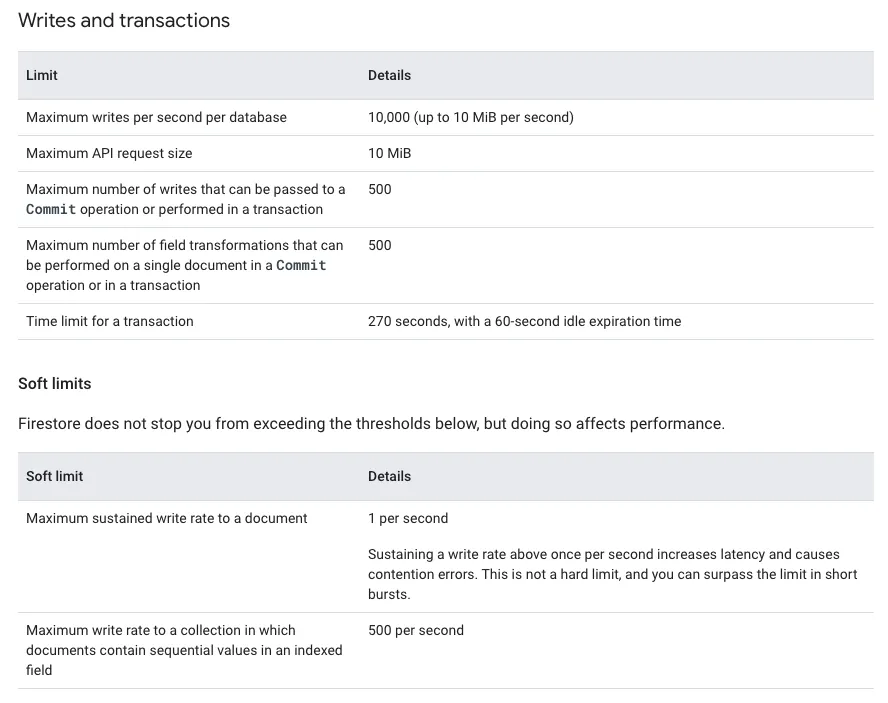
A single document can only be written once per second, so when many people like a post, simultaneous requests may become slow.
The official solution “Distributed counters” is not very complicated. It simply uses multiple distributed likeCount fields for counting, then sums them up when reading.
index.js:
const functions = require('firebase-functions');
const admin = require('firebase-admin');
const express = require('express');
const cors = require('cors');
const app = express();

admin.initializeApp();
app.use(cors({ origin: true }));

// Distributed counters Like Post
app.post("/like2/:id", async (req, res) => {
    const doc = await admin.firestore().collection('posts').doc(req.params.id).get();
    const increment = admin.firestore.FieldValue.increment(1)

    if (!doc.exists) {
        return res.status(404).send({"message":"Post not found!"});
    }

    //1~10
    await admin.firestore().collection('posts').doc(req.params.id).collection("likeCounter").doc("likeCount_"+(Math.floor(Math.random()*10)+1).toString())
    .set({count: increment}, {merge: true});
    res.status(201).send({"message":"Like successful!"});
});


exports.post= functions.https.onRequest(app);
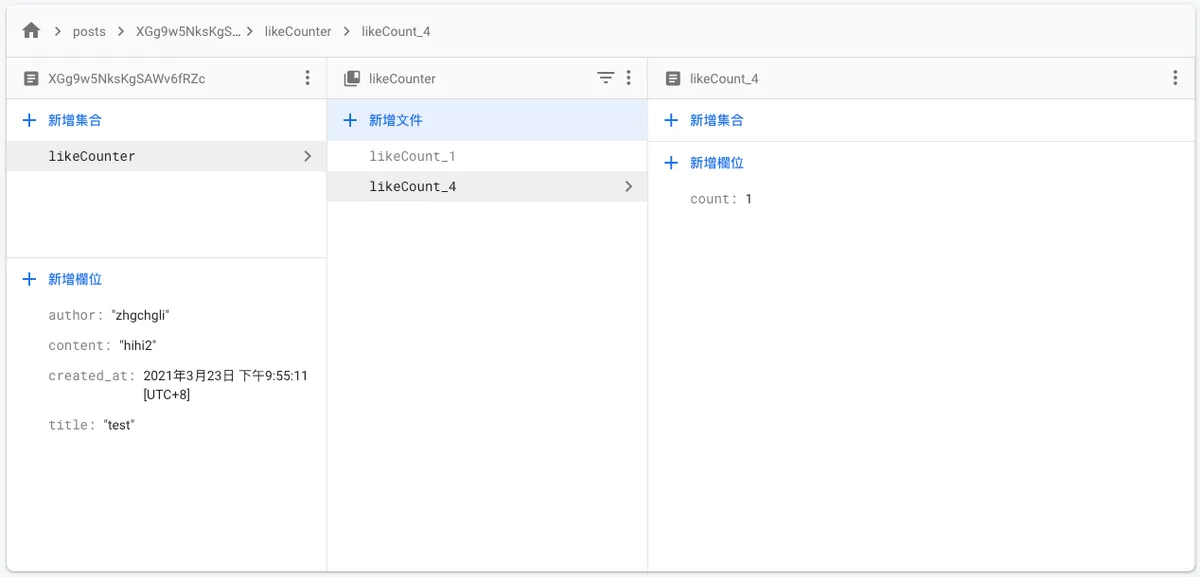
This is how distributing fields to record Counts avoids slow writes; however, having too many distributed fields increases read costs ($$), but it should still be cheaper than adding a new record for every like.
Load Testing with Siege Tool
Install siege using brew
brew install siege
p.s If you get brew: command not found, please install the brew package manager first:
/usr/bin/ruby -e "$(curl -fsSL https://raw.githubusercontent.com/Homebrew/install/master/install)"
After installation, run:
siege -c 100 -r 1 -H 'Content-Type: application/json' 'https://us-central1-project.cloudfunctions.net/post/like/id POST {}'
Conduct stress testing:
-
-c 100: 100 tasks running concurrently -
-r 1: Each task executes 1 request -
-H 'Content-Type: application/json': Required when using POST requests -
‘https://us-central1-project.cloudfunctions.net/post/like/id POST {}’: POST URL, Post Body (ex:{“name”:”1234”})
After execution, you can see the results:
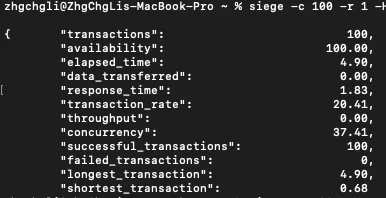
successful_transactions: 100 means 100 successful executions.
You can check Firebase -> Firestore to see if there is any Loss Data:
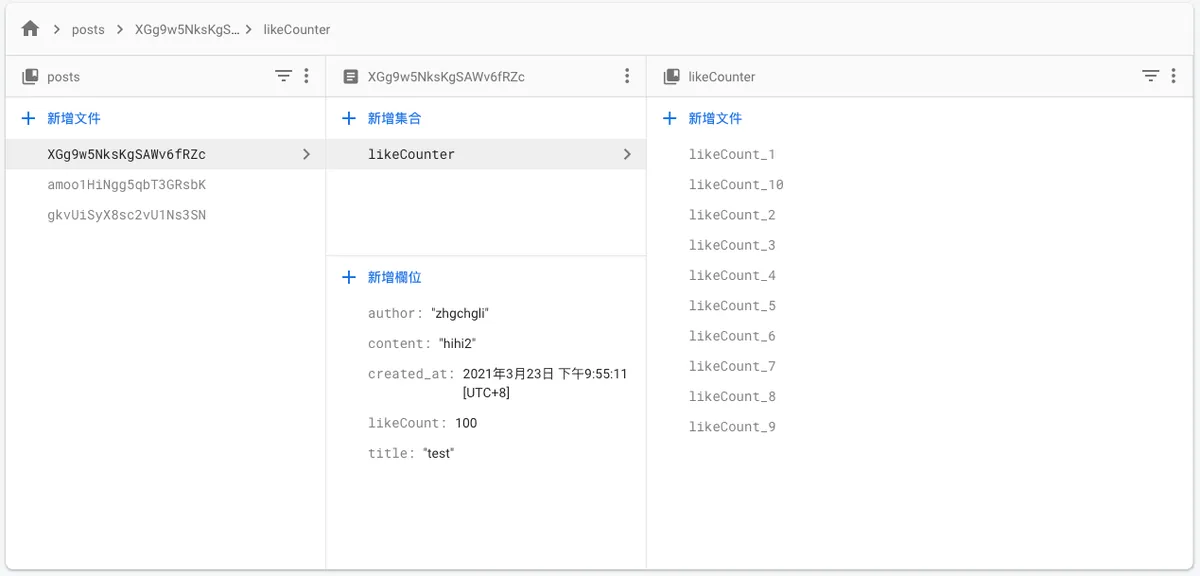
Success!
Complete Example Code
index.js:
const functions = require('firebase-functions');
const admin = require('firebase-admin');
const express = require('express');
const cors = require('cors');
const app = express();

admin.initializeApp();
app.use(cors({ origin: true }));

// Insert
app.post('/', async (req, res) => {
    const title = req.body.title;
    const content = req.body.content;
    const author = req.body.author;

    if (title == null \\|\\| content == null \\|\\| author == null) {
        return res.status(400).send({"message":"Parameter error!"});
    }

    var post = {"title":title, "content":content, "author": author, "created_at": new Date()};
    await admin.firestore().collection('posts').add(post);
    res.status(201).send({"message":"Added successfully!"});
});

// Update
app.put("/:id", async (req, res) => {
    const title = req.body.title;
    const content = req.body.content;
    const author = req.body.author;
    const doc = await admin.firestore().collection('posts').doc(req.params.id).get();

    if (!doc.exists) {
        return res.status(404).send({"message":"Post not found!"});
    } else if (title == null \\|\\| content == null \\|\\| author == null) {
        return res.status(400).send({"message":"Parameter error!"});
    }

    var post = {"title":title, "content":content, "author": author};
    await admin.firestore().collection('posts').doc(req.params.id).update(post);
    res.status(200).send({"message":"Updated successfully!"});
});

// Delete
app.delete("/:id", async (req, res) => {
    const doc = await admin.firestore().collection('posts').doc(req.params.id).get();

    if (!doc.exists) {
        return res.status(404).send({"message":"Post not found!"});
    }

    await admin.firestore().collection("posts").doc(req.params.id).delete();
    res.status(200).send({"message":"Post deleted successfully!"});
});

// Select List
app.get('/', async (req, res) => {
    const posts = await admin.firestore().collection('posts').get();
    var result = [];
    posts.forEach(doc => {
      let id = doc.id;
      let data = doc.data();
      result.push({"id":id, ...data})
    });
    res.status(200).send({"result":result});
});

// Select One
app.get("/:id", async (req, res) => {
    const doc = await admin.firestore().collection('posts').doc(req.params.id).get();

    if (!doc.exists) {
        return res.status(404).send({"message":"Post not found!"});
    }

    res.status(200).send({"result":{"id":doc.id, ...doc.data()}});
});

// InsertOrUpdate
app.post("/tag", async (req, res) => {
    const name = req.body.name;

    if (name == null) {
        return res.status(400).send({"message":"Parameter error!"});
    }

    var tag = {"name":name};
    await admin.firestore().collection('tags').doc(name).set({created_at: new Date()}, {merge: true});
    res.status(201).send({"message":"Added successfully!"});
});

// Like Post
app.post("/like/:id", async (req, res) => {
    const doc = await admin.firestore().collection('posts').doc(req.params.id).get();
    const increment = admin.firestore.FieldValue.increment(1)

    if (!doc.exists) {
        return res.status(404).send({"message":"Post not found!"});
    }

    await admin.firestore().collection('posts').doc(req.params.id).set({likeCount: increment}, {merge: true});
    res.status(201).send({"message":"Liked successfully!"});
});

// Distributed counters Like Post
app.post("/like2/:id", async (req, res) => {
    const doc = await admin.firestore().collection('posts').doc(req.params.id).get();
    const increment = admin.firestore.FieldValue.increment(1)

    if (!doc.exists) {
        return res.status(404).send({"message":"Post not found!"});
    }

    //1~10
    await admin.firestore().collection('posts').doc(req.params.id).collection("likeCounter").doc("likeCount_"+(Math.floor(Math.random()*10)+1).toString())
    .set({count: increment}, {merge: true});
    res.status(201).send({"message":"Liked successfully!"});
});


exports.post= functions.https.onRequest(app);
Back to the Topic: Push Notification Statistics
Back to what we originally wanted to do: the push notification statistics feature.
index.js:
const functions = require('firebase-functions');
const admin = require('firebase-admin');
const express = require('express');
const cors = require('cors');
const app = express();

admin.initializeApp();
app.use(cors({ origin: true }));

const vaildPlatformTypes = ["iOS","Android"]
const vaildActionTypes = ["clicked","received"]

// Insert Log
app.post('/', async (req, res) => {
    const increment = admin.firestore.FieldValue.increment(1);
    const platformType = req.body.platformType;
    const pushID = req.body.pushID;
    const actionType =  req.body.actionType;

    if (!vaildPlatformTypes.includes(platformType) \\|\\| pushID == undefined \\|\\| !vaildActionTypes.includes(actionType)) {
        return res.status(400).send({"message":"Parameter error!"});
    } else {
        await admin.firestore().collection(platformType).doc(actionType+"_"+pushID).collection("shards").doc((Math.floor(Math.random()*10)+1).toString())
        .set({count: increment}, {merge: true})
        res.status(201).send({"message":"Record successful!"});
    }
});

// View Log
app.get('/:type/:id', async (req, res) => {
    // received
    const receivedDocs = await admin.firestore().collection(req.params.type).doc("received_"+req.params.id).collection("shards").get();
    var received = 0;
    receivedDocs.forEach(doc => {
      received += doc.data().count;
    });

    // clicked
    const clickedDocs = await admin.firestore().collection(req.params.type).doc("clicked_"+req.params.id).collection("shards").get();
    var clicked = 0;
    clickedDocs.forEach(doc => {
        clicked += doc.data().count;
    });

    res.status(200).send({"received":received,"clicked":clicked});
});

exports.notification = functions.https.onRequest(app);
Add Push Notification Record
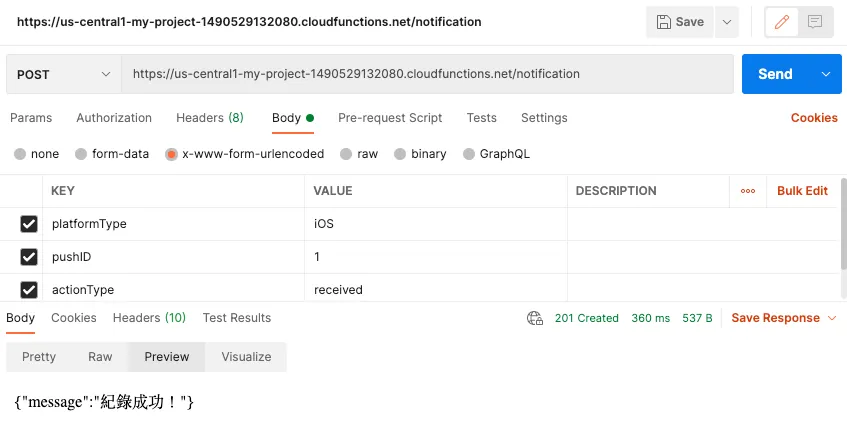
View Push Notification Statistics
https://us-centra1-xxx.cloudfunctions.net/notification/iOS/1
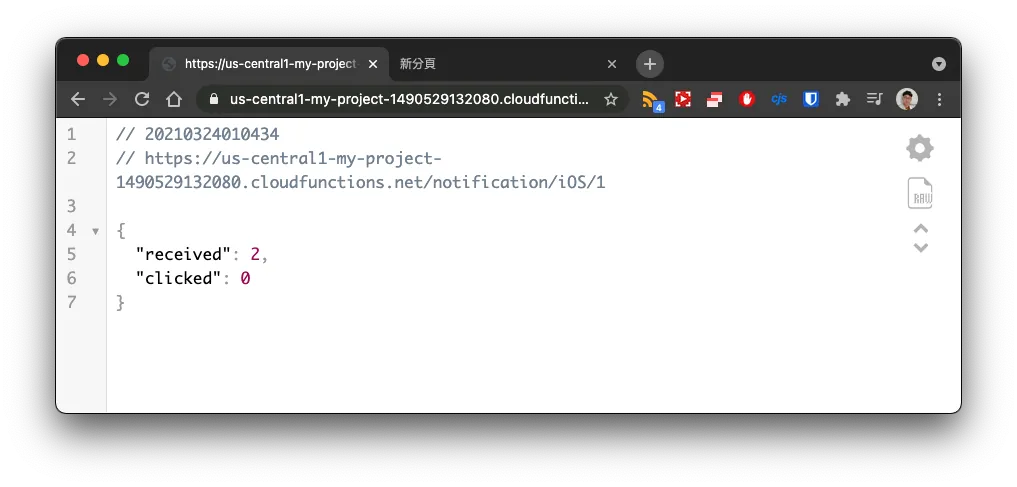
Also created an interface to track push notification statistics.
Pitfalls
Because I was not very familiar with node.js usage, at first when adding data I forgot to add
await. Combined with write speed limits, this caused data loss under high traffic conditions…

Pricing
Don’t forget to refer to the pricing strategy of Firebase Functions & Firestore.
Functions

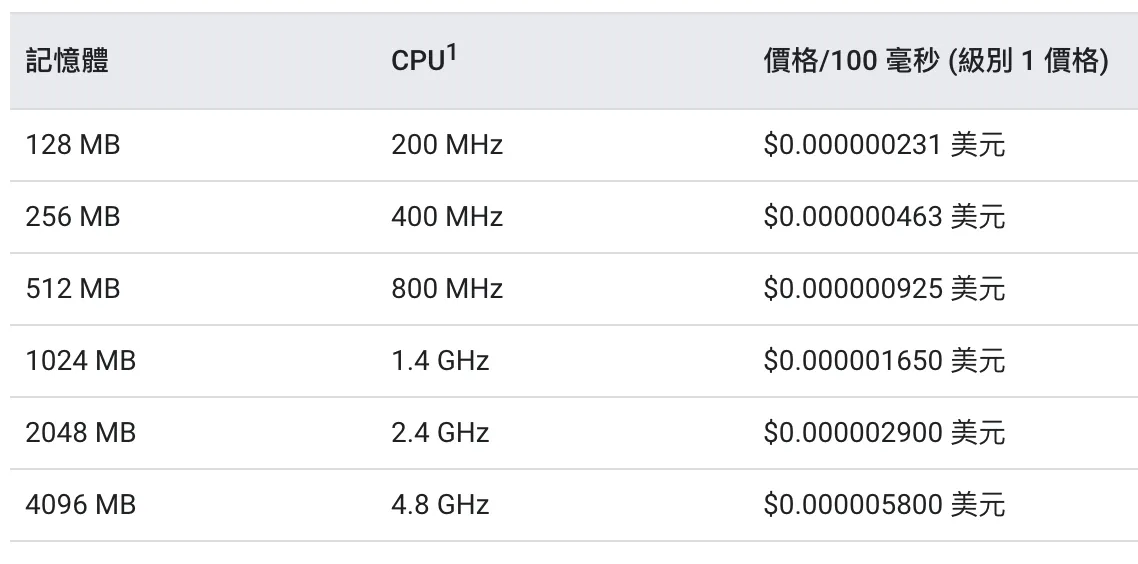
Execution Time

Network
Cloud Functions offers a permanent free tier for compute time resources, including GB-seconds and GHz-seconds of compute time. Besides 2 million invocations, the free tier also provides 400,000 GB-seconds and 200,000 GHz-seconds of compute time, along with 5 GB of internet egress per month.
Firestore

Prices may change at any time. Please refer to the official website for the latest information.
Conclusion
As stated in the title, “for testing purposes,” “for testing purposes,” “for testing purposes,” it is not recommended to use the above services in a production environment or as the core of a product launch.
Expensive and Hard to Migrate
I once heard that a fairly large service was built using Firebase. However, as data and traffic grew, the costs skyrocketed. Migrating was very difficult—code was manageable, but data was extremely hard to move. It’s a case of saving a little money early on but causing huge losses later, not worth it.
For Testing Only
For the above reasons, I personally recommend using Firebase Functions + Firestore API services only for testing or prototype product demos.
More Features
Functions can also integrate with Authentication and Storage, but I haven’t explored those parts.
References
-
https://firebase.google.com/docs/firestore/query-data/queries
-
https://firebase.google.com/docs/firestore/solutions/counters#node.js_1



Comments