
Converting Medium Posts to Markdown
Writing a Tool to Backup Medium Articles & Convert Them to Markdown Format

[EN] ZMediumToMarkdown
I’ve written a project to let you download Medium posts and convert them to markdown format easily.
Features
-
Support downloading posts and converting to markdown format
-
Support downloading all posts and converting to markdown format from any user without login access.
-
Support download of paid content
-
Support downloading all post images locally and converting to local paths
-
Support parsing Twitter tweet content into blockquotes
-
Support download of paid content
-
Support command line interface
-
Convert Gist source code to markdown code block
-
Convert YouTube links embedded in posts to preview images
-
Adjust post’s last modification date from Medium to the local downloaded markdown file
-
Auto skip when post has been downloaded and the last modification date from Medium hasn’t changed (convenient for auto-sync or auto-backup services, saving server bandwidth and execution time)
-
Highly optimized markdown format for Medium
-
Native Markdown Style Render Engine (Feel free to contribute if you have any optimization ideas!
MarkupStyleRender.rb) -
jekyll & social share (og: tag) friendly
-
100% Ruby @ RubyGem
[CH] ZMediumToMarkdown
A backup tool that crawls content from Medium article links or all articles of a Medium user, converts them into Markdown format, and downloads the articles along with embedded images.
[2022/07/18 Update]: Step-by-step Guide to Seamlessly Migrate Medium to a Self-hosted Website
Features
-
No login, no special permissions needed
-
Support downloading and converting a single article or all articles from a user into Markdown
-
Supports downloading and backing up all images within the article and converting them to corresponding image paths
-
Supports deep parsing of embedded Gist in articles and converts them into Markdown code blocks of the corresponding language
-
Supports parsing Twitter content and embedding it into the article
-
Supports parsing embedded YouTube videos in articles, converting them into video preview images and links displayed in Markdown
-
When downloading all articles of a user, the tool scans for embedded related articles within the content and replaces the links with local ones if found
-
Specially optimized for Medium format styles
-
Automatically updates the downloaded article’s last modified/created time to match the Medium article’s publish time
-
Automatically compares the downloaded article’s last modification time; if it is not older than the Medium article’s last modification time, skips the download
(This helps users create automatic sync/backup tools, saving server bandwidth and time) -
CLI operation with automation support
This project and article are for technical research only. Do not use for any commercial purposes or illegal activities. The author is not responsible for any illegal actions taken by others using this content.
Please ensure you have the rights to use and reproduce the articles before downloading and backing them up.
Origin
In my third year of managing Medium, I have published over 65 articles; all were written directly on the Medium platform with no other backups. Honestly, I have always feared that issues with Medium or other factors might cause the loss of these years of hard work.
I used to back up manually, which was very boring and time-consuming, so I have been looking for a tool that can automatically back up and download all articles, preferably converting them to Markdown format.
Backup Requirements
-
Markdown Format
-
Automatically download all Medium posts of the User based on the User
-
Article images can also be downloaded and backed up.
-
Must be able to parse Gist into Markdown code blocks
(My Medium posts heavily use gist to embed source code, so this feature is very important)
Backup Solutions
Medium Official
Although the official platform provides an export backup feature, the export format can only be used for importing back into Medium, not Markdown or common formats, and it does not handle embedded content such as Github Gist … and others.
The API provided by Medium is barely maintained and only offers the Create Post function.
Makes sense, because Medium officially does not want users to easily transfer content to other platforms.
Chrome Extension
I found and tried several Chrome Extensions (most have been removed), but the results were poor. First, you have to manually open and back up each article one by one. Second, the parsed format contained many errors, and they couldn’t deeply parse Gist source code or back up all images in the articles.
medium-to-markdown command line
A skilled developer wrote it in JS, achieving basic downloading and conversion to Markdown, but it still lacks image backup and deep parsing of Gist source code.
ZMediumToMarkdown
After finding no perfect solution, I decided to write my own backup and conversion tool; it took about three weeks of after-work hours using Ruby to complete.
Technical Details
How to Get the Article List by Entering a Username?
-
Get UserID: View the source code of the user homepage (https://medium.com/@#{username}) to find the
UserIDcorresponding to theUsername.
Note that since Medium has reopened custom domains, you need to handle 30X redirects accordingly. -
Sniffing network requests reveals that Medium uses GraphQL to fetch the homepage article list information
-
Copy the Query & Replace UserID in the Request Information
HOST: https://medium.com/_/graphql
METHOD: POST
query = [{
"operationName": "UserProfileQuery",
"variables": {
"homepagePostsFrom": homepagePostsFrom,
"includeDistributedResponses": true,
"id": userID,
"homepagePostsLimit": 10
},
"query": "query Us...."
}]
- Get Response
Only 10 items can be fetched at a time; pagination is required.
-
Article list: can be found in
result[0]->userResult->homepagePostsConnection->posts -
homepagePostsFrompagination info: can be found inresult[0]->userResult->homepagePostsConnection->pagingInfo->next
UsehomepagePostsFromin the request to access pagination;nilmeans there is no next page.
How to Analyze Article Content?
After inspecting the article’s source code, it can be seen that Medium uses Apollo Client for its service; the HTML is actually rendered from JS. Therefore, by checking the
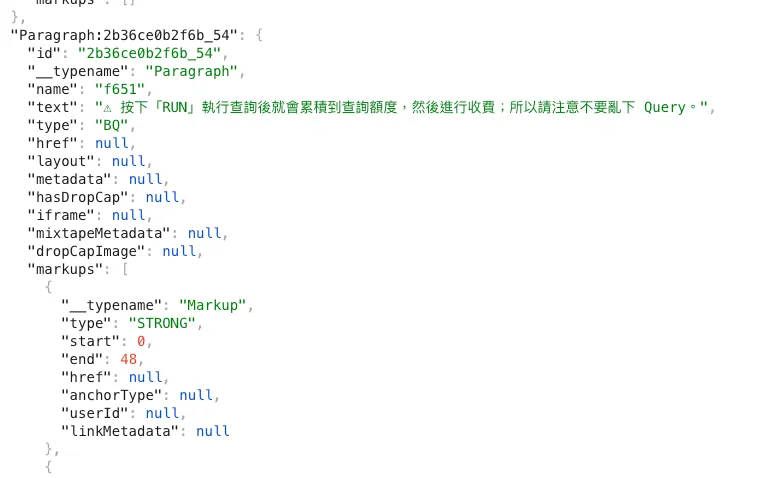
What we need to do is the same: parse this JSON, match the Type to the Markdown style, and assemble the Markdown format.
Technical Challenges
Here is a technical challenge when rendering paragraph text styles, the structure provided by Medium is as follows:
"Paragraph": {
    "text": "code in text, and link in text, and ZhgChgLi, and bold, and I, only i",
    "markups": [
      {
        "type": "CODE",
        "start": 5,
        "end": 7
      },
      {
        "start": 18,
        "end": 22,
        "href": "http://zhgchg.li",
        "type": "LINK"
      },
      {
        "type": "STRONG",
        "start": 50,
        "end": 63
      },
      {
        "type": "EM",
        "start": 55,
        "end": 69
      }
    ]
}
The meaning of code in text, and link in text, and ZhgChgLi, and bold, and I, only i in this text:
- Characters 5 to 7 should be marked as code (wrapped with `Text` format)
- Characters 18 to 22 should be marked as a link (using [Text](URL) format)
- Characters 50 to 63 should be marked as bold (using *Text* format)
- Characters 55 to 69 should be marked as italic (using _Text_ format)
Lines 5 to 7 & 18 to 22 are easy to handle in this example because there is no overlap; however, lines 50–63 & 55–69 have overlapping issues, which Markdown cannot represent with the following overlapping method:
code `in` text, and [ink](http://zhgchg.li) in text, and ZhgChgLi, and **bold,_ and I, **only i_
The correct combination result is as follows:
code `in` text, and [ink](http://zhgchg.li) in text, and ZhgChgLi, and **bold,_ and I, _**_only i_
50–55 STRONG
55–63 STRONG, EM
63–69 EM
Also note:
-
The opening and closing strings of a wrapping format must be distinguishable. Strong happens to have both opening and closing as
**, but for a Link, the opening is[and the closing is](URL). -
When combining Markdown symbols with text, make sure there are no spaces before or after, or it will not work.
This part was studied for a long time, and currently, an existing package is used to solve it: reverse_markdown.
Special thanks to former colleagues Nick, Chun-Hsiu Liu , and James for their collaboration in research. I will rewrite it in native code when I have time.



Comments