
TripEZGo Made Easy: Travel Planning and Essentials All in One
Starting from the pain points of independent travel, building a travel app with native iOS technology: TripEZGo
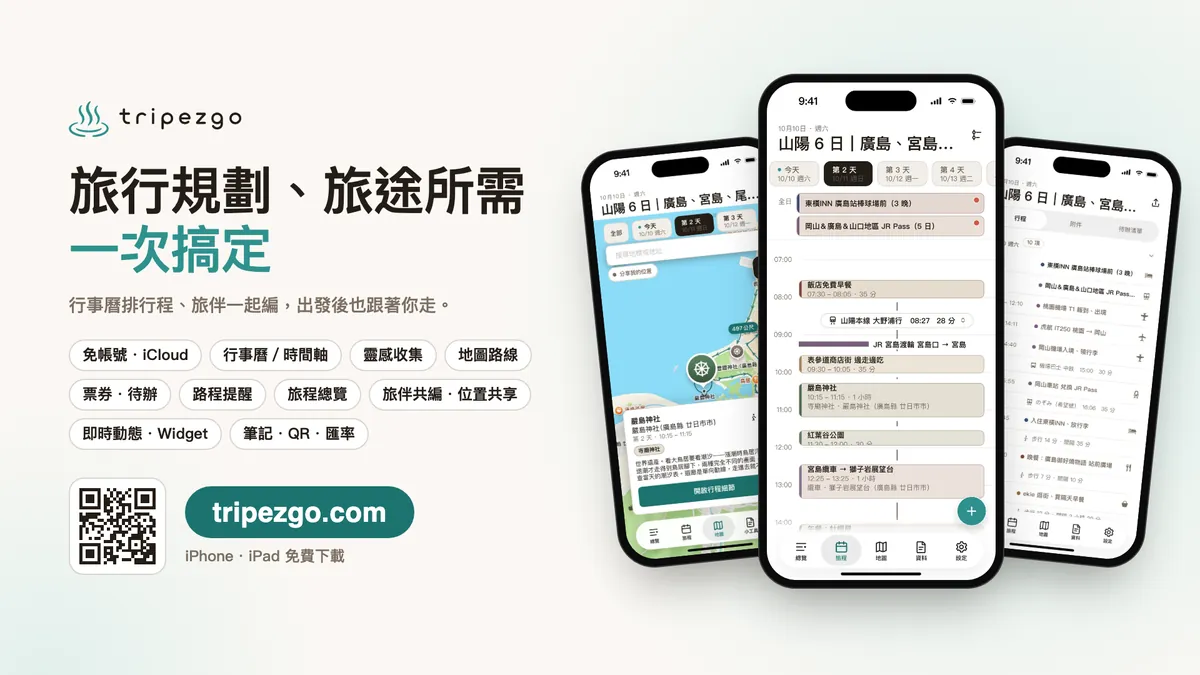
TripEZGo App

Official Website

🔒 Privacy First
No own servers, no collection of trip data, your data stays with you.
🛜 Offline Available
View and edit your itinerary even without internet.
☁️ iCloud Backup and Sync
Backup to your iCloud and sync across devices.
👫 Group Travel
Collaborate on itineraries with travel companions and share locations for easy gathering and peace of mind.
⚡️ Quickly Save Inspirations
Share from apps like Safari, Google Maps, Instagram, Threads, etc., save to “Inspirations,” and convert them into itineraries.
🗓️ Calendar and Timeline
See your daily plans at a glance. Drag and drop to arrange and adjust your itinerary.
🗒️ Itinerary and Transportation
Tickets, reservations, and to-dos follow your itinerary and are ready to use with a tap. You can also preset transportation info and reminders for your routes.
📱 Live Updates
Keep track of your next trip without constantly searching.
⚙️ Widgets
View trip information directly from the home screen.
📔 Travel Tools
Notes, shopping lists, currency conversion, and QR Code scanning—all at your fingertips.
🤖 AI Trip Planning
Supports MCP connection, allowing AI to turn travel ideas into itineraries.
Background
As an iOS developer who loves traveling and with AI booming everywhere, not creating my own app product just wouldn’t make sense.
A few years ago, when traveling solo or on independent trips, I used Apple Notes and Calendar to plan my itinerary, but the experience was not very good.
Notes are just plain text editors. If plans change during the trip, you can only copy and paste to adjust, making it hard to track the latest itinerary on the go. Calendars offer a better experience in this regard but have limited features, and data is scattered across events, making overall management difficult.
So I started designing and developing the TripEZGo app, and actually took the beta version on a 10-day solo trip to Nagoya and Mie to test its features.
Product Planning
Divided into two scenarios.
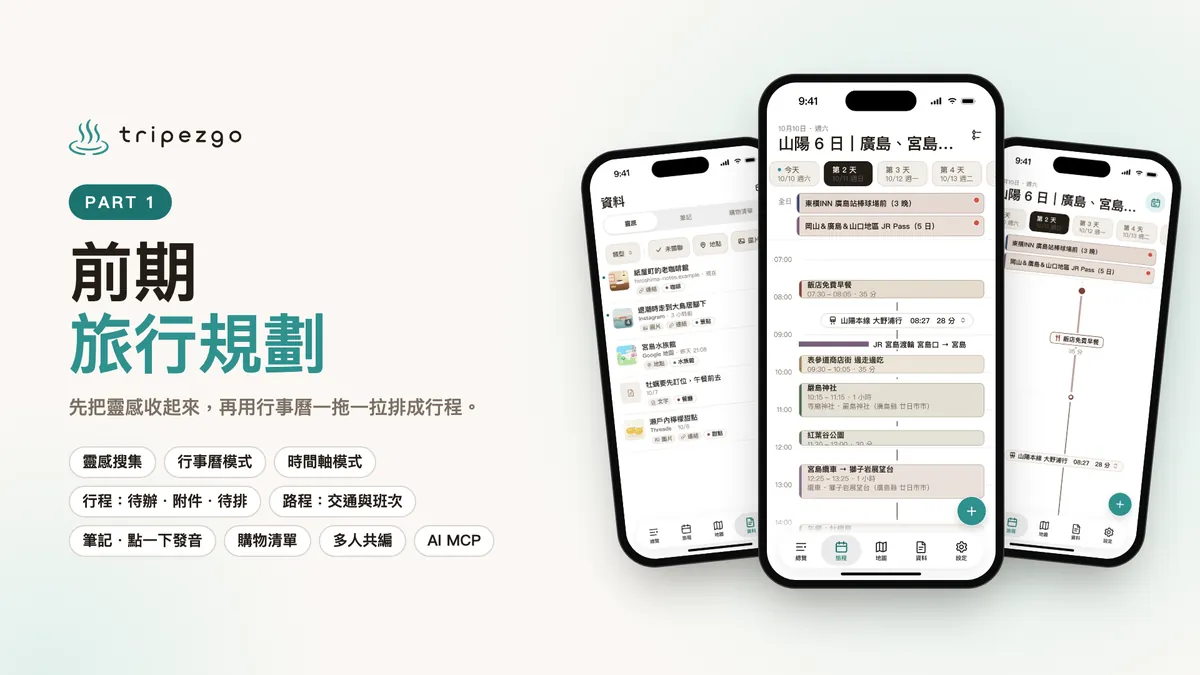
Pre-trip Planning
-
Privacy First: All data is stored locally or encrypted and backed up via iCloud, with offline availability.
-
Inspiration Collection: During the planning phase, various attraction recommendations are gathered, such as Google Maps locations shared by colleagues or videos seen on Instagram. A place is needed to store these first and then convert them into an itinerary later.
-
Calendar Mode: Previously used Apple Calendar for scheduling trips, and the overall experience was great. Scheduling is still based on the calendar, allowing you to add and adjust plans with simple drag and drop.
-
Timeline Mode: Solves the calendar’s limitation of not accurately showing itinerary times. In this mode, setting travel routes and transportation methods is easier.
-
Itinerary: Besides the title, description, and location, there are to-do items, like remembering to call for confirmation. You can also add attachments, such as tickets or itinerary details. The itinerary supports “unscheduled” items, which you can drag and drop to officially schedule.
-
Route: Set the transportation method between itinerary items. Walking and driving automatically calculate the suggested time; for public transit, you can pre-fill multiple checked schedules for easy access during the trip. — Notes: Mainly because my Japanese is not good, I need to refer to a Japanese reference note anytime; therefore, notes support both text and images, and sentences can be tapped to play pronunciation directly.
-
Shopping List: Select photos or take pictures to quickly add items you want to buy.
-
Collaborative Editing: Supports multiple travel companions planning the trip together.
-
AI MCP: Supports integration with AI Agents to help you plan your trip.
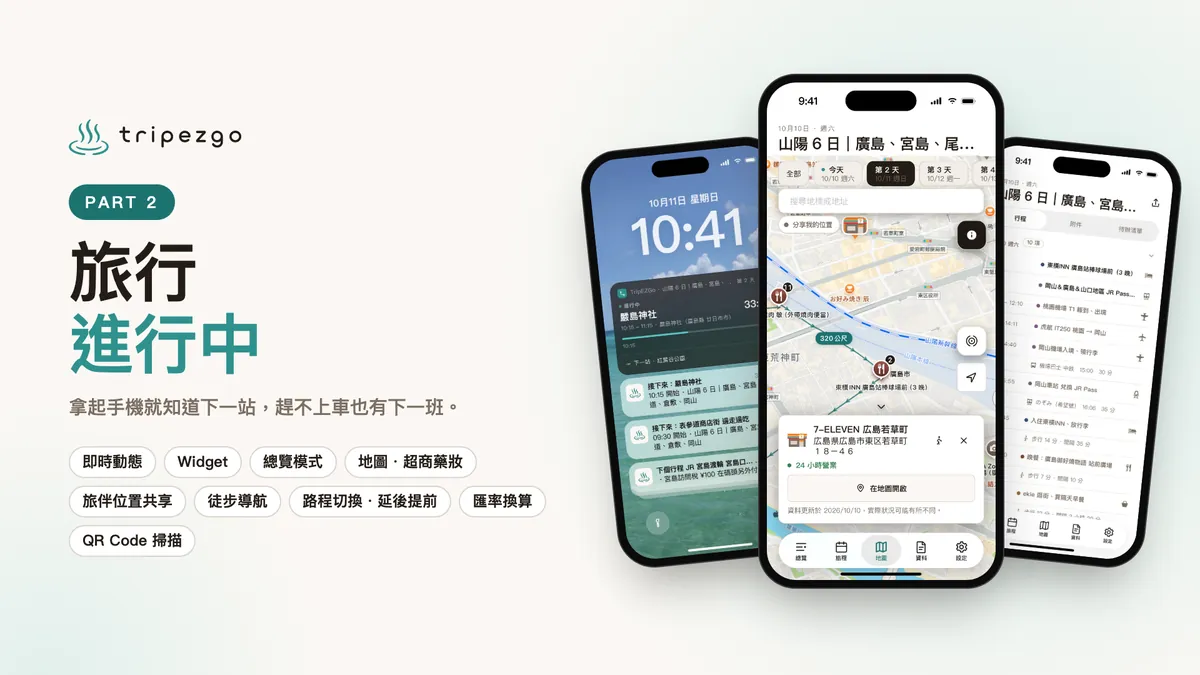
During the Trip
-
Live Updates: Check your current itinerary, next event, and transportation info without opening the app—just pick up your phone.
-
Widget: Home screen and lock screen widgets for quick access to trip status.
-
Overview Mode: Manage your entire trip plan, remaining tasks, and quickly access files all on one page.
-
Map Mode: One of the core features, it allows you to see the relationship between daily itinerary locations on a map. It also includes map data for major convenience stores and drugstores in Japan. Want to explore more? Open it anytime to find more places to go.
— Travel Companion Location Sharing: Safe departure and return, supports multiple companions sharing their locations on the map to look out for each other. -
Walking Navigation: Tap on nearby places you want to visit to see how to get there.
-
Route switching, itinerary delay/advance: Trips are unpredictable. If you miss a scheduled departure, you can quickly check the next pre-entered departure; if you arrive early or late, you can batch delay or advance the following itinerary accordingly.
-
Currency Conversion: A widget for quick currency conversion. Note that “tax-free” does not mean “free of charge.”
-
QR Code Scanning: Scan QR Codes and keep a record, which is also synced with your travel companions, so no more scanning twice.
Future Plans
-
Make the App Smarter: Automatically recognize input content, arrange itineraries through conversations, and automatically plan suitable trips based on type.
Privacy remains a priority; AI features only use local models or Apple Private Cloud Compute. -
Apple Weather Integration: Check the weather directly during planning and while traveling.
-
Translation Feature: Instantly translate any content you don’t understand during your trip directly within the app.
Technical Details
-
Core Data: The app has no backend server, and trip data never passes through us. All data is stored locally on the user’s device using Core Data.
-
CloudKit: Data backup, cross-device sync, and multi-user collaboration are handled directly with CloudKit. Data is stored in the user’s own iCloud, with storage limits based on their iCloud plan. Location sharing between travel companions also uses CloudKit.
-
MapKit: The map feature relies solely on Apple MapKit.
-
ActivityKit / WidgetKit: Both Live Activities and Home Screen Widgets use native iOS frameworks.
-
App Intents: Supports Siri and Shortcuts, allowing you to check the next stop without opening the app.
-
EventKit: Trips can be synced to the iPhone’s built-in Calendar.
-
Vision: Image and scanned content recognition.
-
Core ML: Automatically recognizes itinerary types, inspirations, and shopping lists.
-
MCP: The AI itinerary planner connects directly to the phone over the same Wi-Fi as the computer, without needing an extra relay server.
-
Native Development: The entire app is developed natively using UIKit.
AI Tools
-
Using open design drafts
-
Main Development of Claude Opus 5.5 (20x)
Payment Methods
Free to use, better with payment.
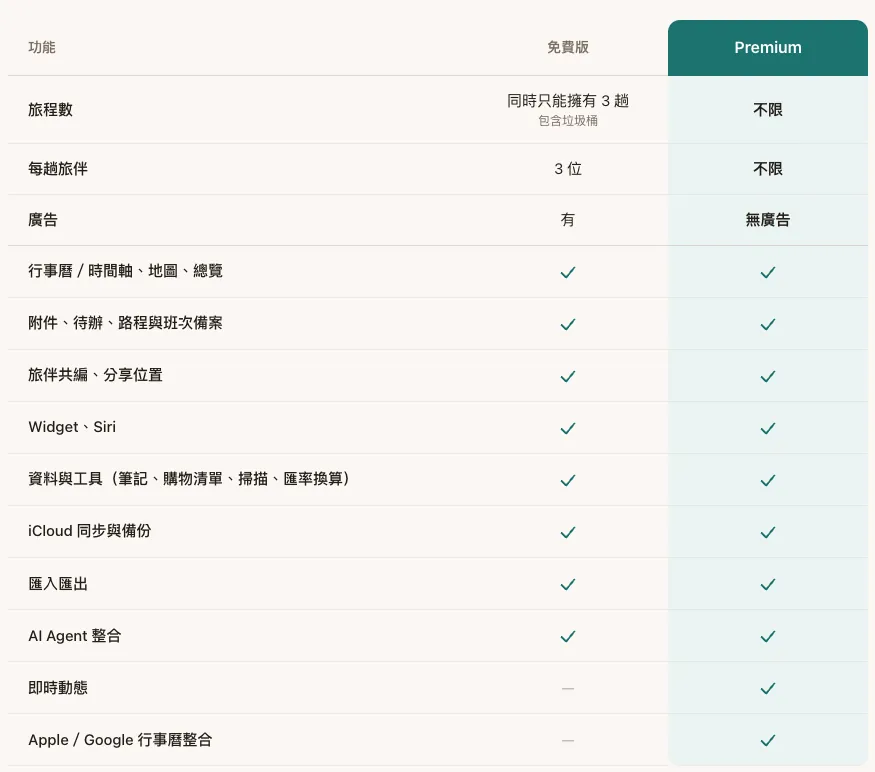
- Plans include: weekly, monthly, yearly, and lifetime purchase.
Exclusive Offer for Readers
One-Year Premium Redemption Code (No automatic renewal or charges after expiration)

-
Click Redemption Link
-
Redeem in the App Store
-
Go back to TripEZGo App -> Settings -> Subscription Management -> At the bottom, “Restore Purchases”
-
Activation complete.
Download Now



Comments