
Complete Guide to Implementing Local Cache with AVPlayer
AVPlayer/AVQueuePlayer with AVURLAsset Implementing AVAssetResourceLoaderDelegate

Photo by Tyler Lastovich
[2023/03/12] Update
I have open-sourced my previous implementation. Feel free to use it if you need.
-
Custom Cache Strategy, you can use PINCache or others…
-
Externally, just call the make AVAsset factory with a URL, and the AVAsset will support caching.
-
Implementing Data Flow Strategy with Combine
-
Wrote some tests
Preface
It has been over half a year since the previous article “iOS HLS Cache Implementation Exploration.” Our team still aims to implement real-time caching during playback because it greatly impacts costs. We are a music streaming platform, and if we have to download the entire file every time the same song is played, it wastes data for both us and users without unlimited plans. Although music files are only a few MBs, small amounts add up to significant costs!
Additionally, since Android has already implemented streaming with caching, previous comparisons showed significant data savings after the Android version launched; similarly, with more iOS users, there should be even better data saving effects.
Based on the experience from the previous article, if we continue to use HLS (.m3u8/.ts) to achieve the goal, things will become very complicated or even impossible. Instead, we fallback to using mp3 files, which allows direct implementation with AVAssetResourceLoaderDelegate.
Goal
-
Played music will generate a local Cache backup
-
Check local Cache before playing music; if available, do not request the file from the server again.
-
Cache strategy can be set; when the total capacity limit is exceeded, the oldest cache files will be deleted.
-
Do Not Interfere with the Original AVPlayer Playback Mechanism
(The fastest way would be to download the mp3 first using URLSession and then feed it to AVPlayer, but this loses the original on-demand streaming feature. Users would have to wait longer and consume more data.)
Prerequisite Knowledge (1) — HTTP/1.1 Range Requests and Connection Keep-Alive
HTTP/1.1 Range Requests
First, we need to understand how data is requested from the server when playing videos or music. Generally, video and audio files are large, so it’s impossible to wait until the entire file is downloaded before starting playback. Commonly, data is fetched as playback progresses; as long as the currently playing segment’s data is available, playback can proceed.
The way to achieve this function is by using HTTP/1.1 Range to return only the specified byte range of data. For example, specifying 0–100 will return only the 100 bytes from 0 to 100. Using this method, data can be obtained in segments sequentially and then combined into a complete file. This method can also be applied to file download resume functionality.
How to Apply?
We first use HEAD to check the Response Header to understand whether the server supports Range requests, the total resource length, and the file type:
curl -i -X HEAD http://zhgchg.li/music.mp3
Using HEAD, we can get the following information from the Response Header:
-
Accept-Ranges: bytes means the server supports Range requests.
If the response lacks this value or shows Accept-Ranges: none, it means Range requests are not supported. -
Content-Length: The total length of the resource. We need to know the total length to request data in segments.
-
Content-Type: File type information required by AVPlayer during playback.
Sometimes we also use GET Range: bytes=0–1, meaning we request the data in the 0–1 range but actually don’t care about the content of 0–1; we just want to check the Response Header information. Native AVPlayer uses GET this way, so this article follows the same approach.
However, it is recommended to use HEAD to check. On one hand, this method is more accurate; on the other hand, if the server does not support the Range feature, using GET will force the full file to be downloaded.
curl -i -X GET http://zhgchg.li/music.mp3 -H "Range: bytes=0–1"
Using GET, we can obtain the following information from the Response Header:
-
Accept-Ranges: bytes means the server supports Range requests.
If the response lacks this or shows Accept-Ranges: none, it means Range requests are not supported. -
Content-Range: bytes 0–1/total resource length — The number after “/” indicates the total resource length. Knowing the total length is necessary to request data in segments.
-
Content-Type: File type information required by AVPlayer during playback.
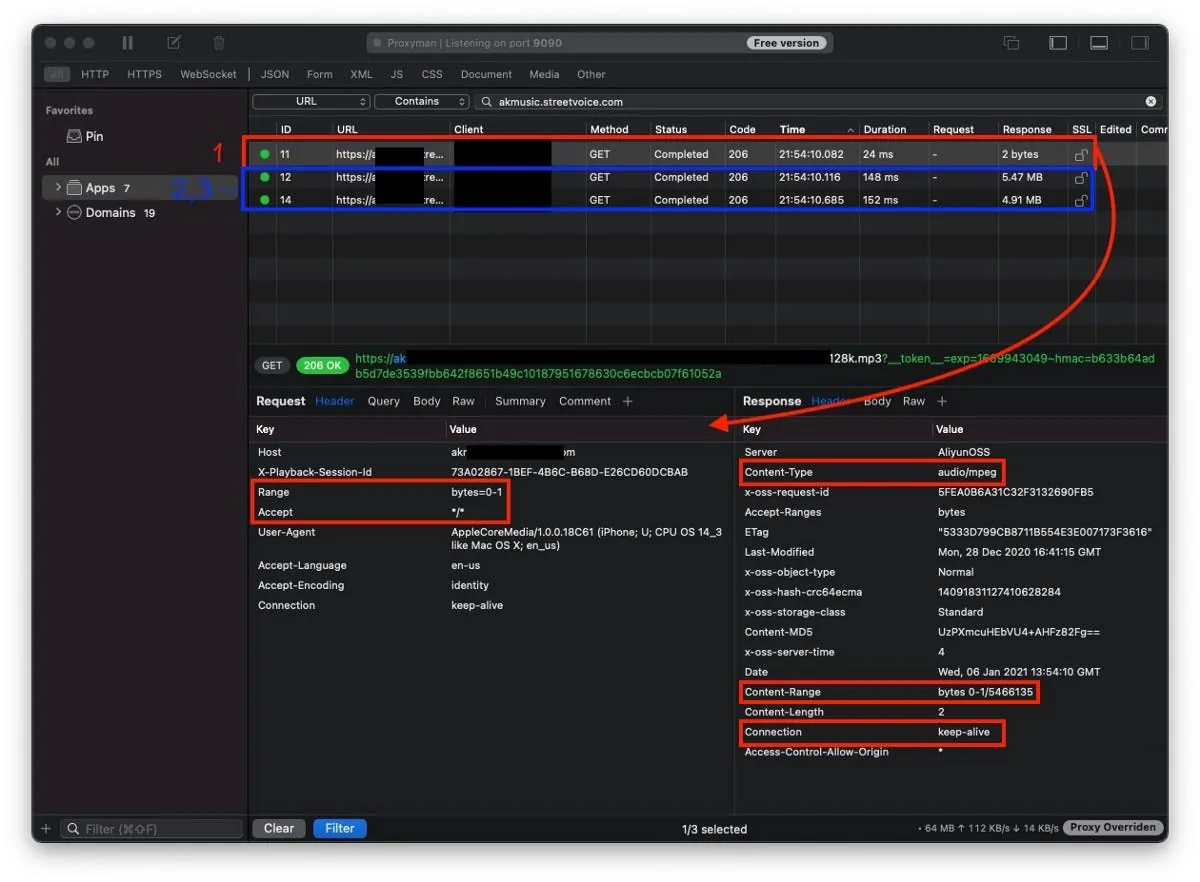
Once you know the server supports Range requests, you can send segmented Range requests:
curl -i -X GET http://zhgchg.li/music.mp3 -H "Range: bytes=0–100"
The server will return 206 Partial Content:
Content-Range: bytes 0-100/total length
Content-Length: 100
...
(binary content)
At this point, we obtain Data for Range 0–100 and can continue sending new requests for Range 100–200, 200–300, and so on until completion.
If the requested Range exceeds the total length of the resource, a 416 Range Not Satisfiable response will be returned.
Additionally, to get the complete file data, you can request Range 0 to the total length, or simply use 0- as well:
curl -i -X GET http://zhgchg.li/music.mp3 -H "Range: bytes=0–"
It is also possible to request multiple Range data and set conditions in the same request, but we do not use these features. For details, please refer to this.
Connection Keep-Alive
HTTP 1.1 is enabled by default, this feature allows real-time access to downloaded data. For example, a 5 MB file can be retrieved in 16 KB, 16 KB, 16 KB… chunks, without waiting for the entire 5 MB to finish downloading.
Connection: Keep-Alive
What if the server does not support Range or Keep-Alive?
Then there’s no need to do all this; just download the mp3 file using URLSession and feed it to the player directly… But this is not the result we want. We can ask the backend to help modify the server settings.
Prerequisite Knowledge (2) — How Does AVPlayer Natively Handle AVURLAsset Resources?
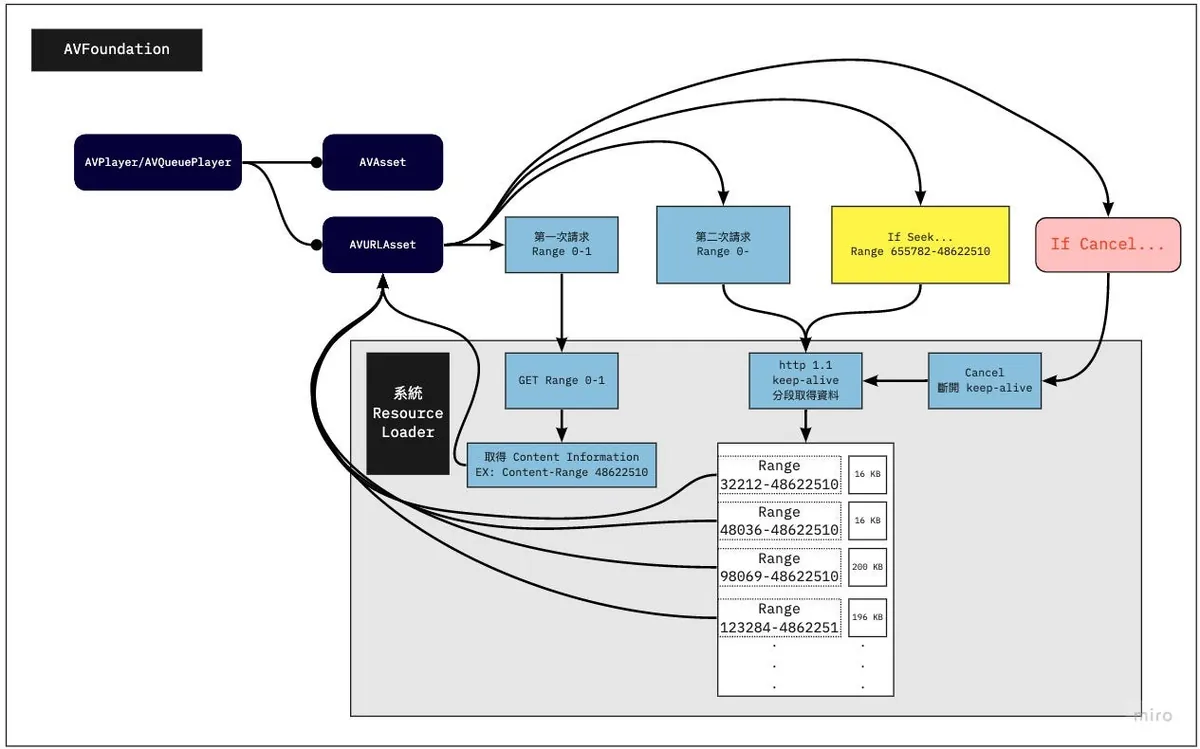
When we use AVURLAsset initialized with a URL resource and assign it to AVPlayer/AVQueuePlayer to start playback, as mentioned above, it will first use a GET Range 0–1 request to check if Range requests are supported, the total resource length, and the file type.
After obtaining the file information, a second request will be made to fetch data from 0 to the total length.
⚠️ AVPlayer requests data from 0 to the total length and receives downloaded data in real-time chunks (16 kb, 16 kb, 16 kb…) **Once it considers enough data is available, it will send a Cancel to stop the network request (so it usually doesn’t download the entire file unless the file is very small).
Only after playback resumes will data be requested later via Range.
- (This part differs from what I previously thought; I assumed the requests would be 0–100, 100–200, and so on)*
AVPlayer Request Example:
1. GET Range 0-1 => Response: total length 150000 / public.mp3 / true
2. GET 0-150000...
3. 16 kb receive
4. 16 kb receive...
5. cancel() // current offset is 700
6. continue playing
7. GET 700-150000...
8. 16 kb receive
9. 16 kb receive...
10. cancel() // current offset is 1500
11. continue playing
12. GET 1500-150000...
13. 16 kb receive
14. 16 kb receive...
16. If seek to...5000
17. cancel(12.) // current offset is 2000
18. GET 5000-150000...
19. 16 kb receive
20. 16 kb receive...
...
⚠️ For iOS ≤12, it will first send a few shorter requests to probe (?), then send a request for the total length; iOS ≥ 13 will directly request the total length.
There was an unexpected issue when I was observing how resources were fetched. I used the mitmproxy tool to sniff the traffic, but it showed errors. It waited until the entire response was received before displaying anything, instead of showing segmented requests with persistent connections continuing the download. It really scared me! I thought iOS was so dumb that it always downloaded the whole file at once! Next time I use a tool, I need to stay a bit skeptical. Orz
When Cancel is Triggered
-
The second request mentioned earlier requests the resource from 0 to the total length. Once enough data is received, it will initiate a Cancel to stop the request.
-
When seeking, a Cancel request is first sent to cancel the previous request.
⚠️ Switching to the next resource in AVQueuePlayer or changing the playback resource in AVPlayer does not trigger Cancel to stop the previous request.
AVQueue Pre-buffering
It actually still calls the Resource Loader to handle it, but the requested data range is smaller.
Implementation
With the above foundational knowledge, let’s look at the principles and methods for implementing AVPlayer local cache functionality.
This is the previously mentioned AVAssetResourceLoaderDelegate interface, which allows us to implement our own Resource Loader for the Asset.
The Resource Loader is essentially a worker; whether the player needs file info or file data, and which range, it tells us, and we just handle it.
I saw an example where one Resource Loader serves all AVURLAssets, which I think is wrong. There should be one Resource Loader per AVURLAsset, following the AVURLAsset’s lifecycle, as it inherently belongs to the AVURLAsset.
Having one Resource Loader serve all AVURLAssets on an AVQueuePlayer becomes very complex and hard to manage.
When to Enter the Custom Resource Loader
Note that just implementing your own Resource Loader doesn’t guarantee it will be used. The system will only use your Resource Loader when it cannot recognize or handle the resource itself.
So before providing the URL resource to AVURLAsset, we need to replace the Scheme with our custom Scheme. It cannot be http/https or other system-handled Schemes.
http://zhgchg.li/music.mp3 => cacheable://zhgchg.li/music.mp3
AVAssetResourceLoaderDelegate
Only two methods need to be implemented:
- func resourceLoader(_ resourceLoader: AVAssetResourceLoader, shouldWaitForLoadingOfRequestedResource loadingRequest : AVAssetResourceLoadingRequest) -> Bool :
This method asks if we can handle this resource. Returning true means yes, returning false means we do not handle it (unsupported URL).
We can extract from loadingRequest what is being requested (whether it’s the first request for file info or a data request, and if it’s a data request, the Range from-to). Once we know the request, we can initiate the request ourselves to get the data. At this point, we can decide whether to start a URLSession request or return Data from local storage.
You can also perform data encryption and decryption here to protect the original data.
- func resourceLoader(_ resourceLoader: AVAssetResourceLoader, didCancel loadingRequest : AVAssetResourceLoadingRequest) :
The previously mentioned Cancel initiation timing When initiating Cancel…
We can cancel the ongoing URLSession request here.

Local Cache Implementation Method
For caching, I directly use PINCache, delegating the cache management to it. This avoids dealing with cache read/write deadlocks and implementing the LRU cache eviction strategy ourselves.
️️⚠️️️️️️️️️️OOM Warning!
Because this is for music caching with file sizes around 10 MB, PINCache can be used as the local cache tool; for videos, this method is not suitable (as it may require loading several GB of data into memory at once).
■■■■■■■■■■■■■■
Lex Tang @ Twitter Says:
@zhgchgli The traditional conservative approach is using FileHandle. I wrote about 200 lines of Swift to handle this, and its seek and read/write effectively prevent OOM during read/write operations. For the logic of responding to data requests, you can refer to segment tree related problems on LeetCode, such as leetcode.com/problems/range…
Tweeted at 2021-01-06 14:35:13.
■■■■■■■■■■■■■■
For this requirement, you can refer to the author’s approach using FileHandle’s seek and read/write features for handling.
Let’s get started!
No more talk, here is the complete project:
AssetData
The local Cache data object implements NSCoding because PINCache relies on the archivedData method for encoding/decoding.
import Foundation
import CryptoKit

class AssetDataContentInformation: NSObject, NSCoding {
    @objc var contentLength: Int64 = 0
    @objc var contentType: String = ""
    @objc var isByteRangeAccessSupported: Bool = false

    func encode(with coder: NSCoder) {
        coder.encode(self.contentLength, forKey: #keyPath(AssetDataContentInformation.contentLength))
        coder.encode(self.contentType, forKey: #keyPath(AssetDataContentInformation.contentType))
        coder.encode(self.isByteRangeAccessSupported, forKey: #keyPath(AssetDataContentInformation.isByteRangeAccessSupported))
    }

    override init() {
        super.init()
    }

    required init?(coder: NSCoder) {
        super.init()
        self.contentLength = coder.decodeInt64(forKey: #keyPath(AssetDataContentInformation.contentLength))
        self.contentType = coder.decodeObject(forKey: #keyPath(AssetDataContentInformation.contentType)) as? String ?? ""
        self.isByteRangeAccessSupported = coder.decodeObject(forKey: #keyPath(AssetDataContentInformation.isByteRangeAccessSupported)) as? Bool ?? false
    }
}

class AssetData: NSObject, NSCoding {
    @objc var contentInformation: AssetDataContentInformation = AssetDataContentInformation()
    @objc var mediaData: Data = Data()

    override init() {
        super.init()
    }

    func encode(with coder: NSCoder) {
        coder.encode(self.contentInformation, forKey: #keyPath(AssetData.contentInformation))
        coder.encode(self.mediaData, forKey: #keyPath(AssetData.mediaData))
    }

    required init?(coder: NSCoder) {
        super.init()
        self.contentInformation = coder.decodeObject(forKey: #keyPath(AssetData.contentInformation)) as? AssetDataContentInformation ?? AssetDataContentInformation()
        self.mediaData = coder.decodeObject(forKey: #keyPath(AssetData.mediaData)) as? Data ?? Data()
    }
}
AssetData stores:
-
contentInformation: AssetDataContentInformation
AssetDataContentInformation:
Stores whether Range requests are supported (isByteRangeAccessSupported), total resource length (contentLength), and file type (contentType) -
mediaData: Original audio Data (Large files here may cause OOM)
■■■■■■■■■■■■■■
Lex Tang @ Twitter Says:
@zhgchgli If AssetData.mediaData fetches a 5GB 4K HDR video, it will still cause OOM, right? Also, to be cautious, you should check Accept-Ranges before requesting Content-Range.
Tweeted at 2021-01-31 15:06:09.
■■■■■■■■■■■■■■
PINCacheAssetDataManager
Encapsulate the logic for storing and retrieving Data in PINCache.
import PINCache
import Foundation

protocol AssetDataManager: NSObject {
    func retrieveAssetData() -> AssetData?
    func saveContentInformation(_ contentInformation: AssetDataContentInformation)
    func saveDownloadedData(_ data: Data, offset: Int)
    func mergeDownloadedDataIfIsContinuted(from: Data, with: Data, offset: Int) -> Data?
}

extension AssetDataManager {
    func mergeDownloadedDataIfIsContinuted(from: Data, with: Data, offset: Int) -> Data? {
        if offset <= from.count && (offset + with.count) > from.count {
            let start = from.count - offset
            var data = from
            data.append(with.subdata(in: start..<with.count))
            return data
        }
        return nil
    }
}

//

class PINCacheAssetDataManager: NSObject, AssetDataManager {

    static let Cache: PINCache = PINCache(name: "ResourceLoader")
    let cacheKey: String

    init(cacheKey: String) {
        self.cacheKey = cacheKey
        super.init()
    }

    func saveContentInformation(_ contentInformation: AssetDataContentInformation) {
        let assetData = AssetData()
        assetData.contentInformation = contentInformation
        PINCacheAssetDataManager.Cache.setObjectAsync(assetData, forKey: cacheKey, completion: nil)
    }

    func saveDownloadedData(_ data: Data, offset: Int) {
        guard let assetData = self.retrieveAssetData() else {
            return
        }

        if let mediaData = self.mergeDownloadedDataIfIsContinuted(from: assetData.mediaData, with: data, offset: offset) {
            assetData.mediaData = mediaData

            PINCacheAssetDataManager.Cache.setObjectAsync(assetData, forKey: cacheKey, completion: nil)
        }
    }

    func retrieveAssetData() -> AssetData? {
        guard let assetData = PINCacheAssetDataManager.Cache.object(forKey: cacheKey) as? AssetData else {
            return nil
        }
        return assetData
    }
}
Here, the Protocol is extracted separately because other storage methods may replace PINCache in the future. Therefore, other code depends on the Protocol rather than the Class instance.
⚠️ The
mergeDownloadedDataIfIsContinutedmethod is extremely important.
For linear playback, simply appending new data to the cached data is enough. However, in reality, it’s more complex. Users might play Range 0–100, then directly seek to Range 200–500; how to merge the existing 0–100 data with the new 200–500 data becomes a major challenge.
⚠️ Data merging issues can cause severe playback glitches….
The answer here is, we do not handle non-continuous data; since this project is audio only and the files are just a few MB (≤ 10MB), we decided not to implement it to save development cost. I only handle merging continuous data (for example, if we currently have 0~100 and the new data is 75~200, after merging it becomes 0~200; if the new data is 150~200, I will ignore it and not merge).
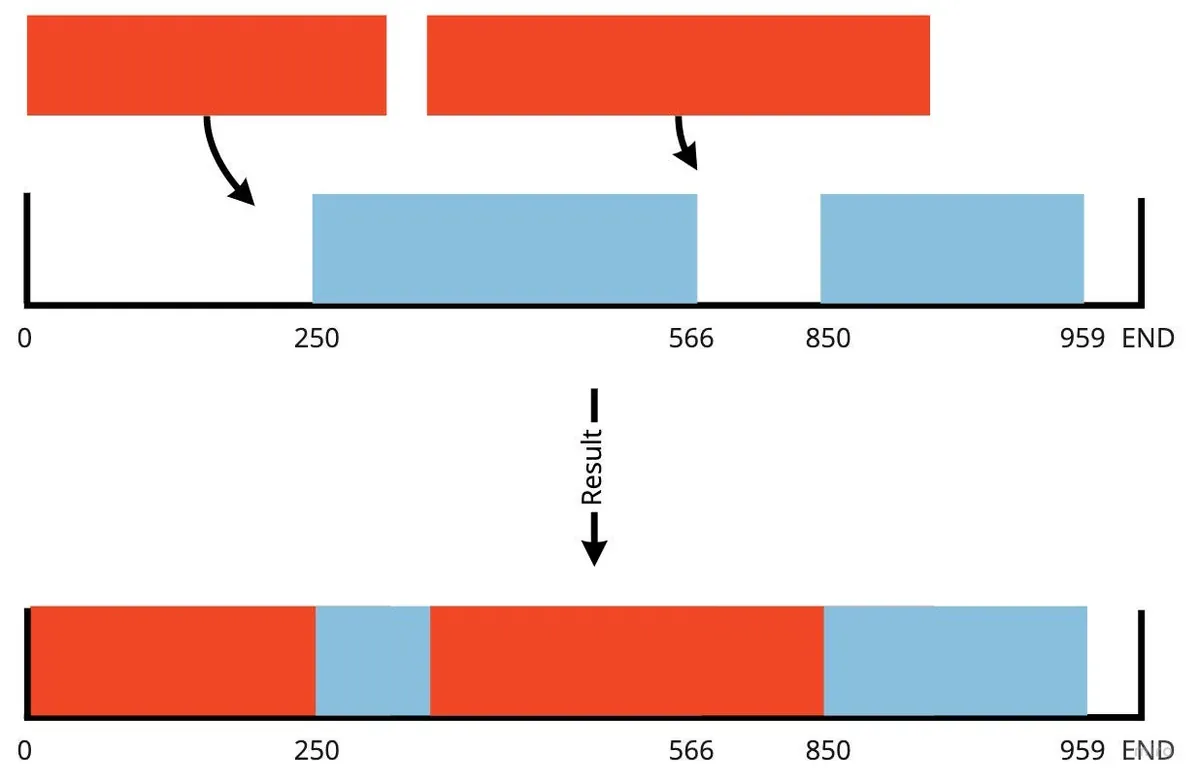
If considering non-continuous merging, besides using other methods for storage (able to identify missing parts), the request must also be able to query which segments require network requests and which come from local cache. Implementing this scenario can be very complex.
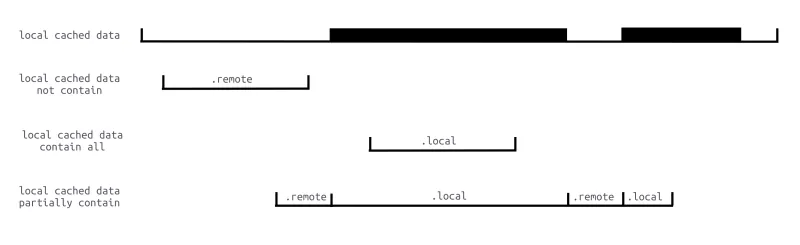
Image source: iOS AVPlayer Video Cache Design and Implementation
[2026/05/10] Updated
Five years later, looking back at the compromise of “not handling discontinuous data,” there is finally a cleaner solution — extracting the set problem of “which byte ranges are cached” and delegating it to a generic, integer-coordinate, closed-interval container: Rangeable.
Rangeable is a container that maps
Hashableelements to a merged set of disjoint integer intervals. It was originally extracted from the markdown render of ZMediumToMarkdown; the same API also solves the non-continuous cache issue in this article, so this case was added to RFC §1.3.1 as the second reference consumer.
Corresponding to the two pain points in the original text
-
(Q1) Read edge: Given
Range: bytes=lo-hi, be able to answer in O(log n): “Where is the first cached prefix within [lo, hi]? Where does the first gap start?” -
(Q2) Writing side: After receiving a new byte range
[a, b], it should automatically merge with existing ranges like[0, 100],[200, 500], etc., including integer-adjacent cases such as100/101. The originalmergeDownloadedDataIfIsContinutedin this article only handled the case where the new data exactly follows the tail; all other cases were discarded.
Rangeable splits these two tasks into three APIs: transitions(over:), subscript[i], and insert(...); at the same time, it decouples the byte indexing from the byte storage — the index is handled by Rangeable<CacheToken>, while the bytes themselves are written into a sparse file using FileHandle.seek + write (which also resolves the original ⚠️OOM warning, no longer needing to package the entire mp3 as Data to store in PINCache).
1) Rewrite AssetDataManager Protocol
The old protocol relies on mergeDownloadedDataIfIsContinuted to concatenate continuous Data; the new protocol changes to “tell me which segments are cached,” allowing ResourceLoader to decide which parts use files and which fetch from the network:
protocol AssetDataManager: AnyObject {
    var contentInformation: AssetDataContentInformation? { get }
    func saveContentInformation(_ info: AssetDataContentInformation)
    /// Write downloaded segments, automatically merge into cache index; continuity not required.
    func saveDownloadedData(_ data: Data, offset: Int64) throws
    /// Read the continuous cached prefix from start within [start, end].
    /// Returns nil if hitting a gap.
    func cachedPrefix(in range: ClosedRange<Int64>) throws -> Data?
    /// Get the first gap within [start, end]; returns nil if fully cached.
    func missingRange(in range: ClosedRange<Int64>) -> ClosedRange<Int64>?
}
2) RangeableAssetDataManager (Replacing PINCacheAssetDataManager)
Two key points:
-
Write bytes into a sparse file using
FileHandle(theFileHandle seek read/writeapproach mentioned by Lex Tang in the article). -
The byte range index uses
Rangeable<CacheToken>(replacing all the if-else statements inmergeDownloadedDataIfIsContinuted).
import Foundation
import Rangeable
private enum CacheToken: Hashable { case cached }
final class RangeableAssetDataManager: AssetDataManager {
    private let queue = DispatchQueue(label: "li.zhgchg.rangeableAssetDataManager")
    private let fileURL: URL
    private let metaURL: URL
    private let handle: FileHandle
    private(set) var contentInformation: AssetDataContentInformation?
    private var ranges = Rangeable<CacheToken>()
    init(cacheKey: String, root: URL) throws {
        let dir = root.appendingPathComponent("ResourceLoader", isDirectory: true)
        try FileManager.default.createDirectory(at: dir, withIntermediateDirectories: true)
        self.fileURL = dir.appendingPathComponent("\(cacheKey).bin")
        self.metaURL = dir.appendingPathComponent("\(cacheKey).meta")
        if !FileManager.default.fileExists(atPath: fileURL.path) {
            FileManager.default.createFile(atPath: fileURL.path, contents: nil)
        }
        self.handle = try FileHandle(forUpdating: fileURL)
        loadMeta()
    }
    deinit { try? handle.close() }
    func saveContentInformation(_ info: AssetDataContentInformation) {
        queue.sync {
            self.contentInformation = info
            persistMeta()
        }
    }
    func saveDownloadedData(_ data: Data, offset: Int64) throws {
        guard !data.isEmpty else { return }
        try queue.sync {
            try handle.seek(toOffset: UInt64(offset))
            try handle.write(contentsOf: data)
            // Rangeable automatically unions adjacent/overlapping segments; non-contiguous remain disjoint.
            try ranges.insert(.cached,
                              start: Int(offset),
                              end:   Int(offset) + data.count - 1)
            persistMeta()
        }
    }
    func cachedPrefix(in range: ClosedRange<Int64>) throws -> Data? {
        try queue.sync {
            guard ranges[Int(range.lowerBound)].objs.contains(.cached) else { return nil }
            let evs = try ranges.transitions(lo: Int(range.lowerBound),
                                             hi: Int(range.upperBound))
            // The close coordinate is the cached segment's end + 1 (RFC §4.1.1)
            let runEndExclusive: Int64 = {
                if let close = evs.first(where: { $0.kind == .close }),
                   let c = close.coordinate {
                    return Int64(c)
                }
                return range.upperBound + 1
            }()
            let sliceEndExclusive = min(runEndExclusive, range.upperBound + 1)
            let length = Int(sliceEndExclusive - range.lowerBound)
            try handle.seek(toOffset: UInt64(range.lowerBound))
            return try handle.read(upToCount: length)
        }
    }
    func missingRange(in range: ClosedRange<Int64>) -> ClosedRange<Int64>? {
        queue.sync {
            let evs = (try? ranges.transitions(lo: Int(range.lowerBound),
                                               hi: Int(range.upperBound))) ?? []
            let firstByteCached = ranges[Int(range.lowerBound)].objs.contains(.cached)
            if firstByteCached {
                guard let close = evs.first(where: { $0.kind == .close }),
                      let gapStart = close.coordinate,
                      Int64(gapStart) <= range.upperBound else { return nil }
                let nextOpen = evs.first(where: {
                    $0.kind == .open && ($0.coordinate ?? .max) > gapStart
                })?.coordinate
                let gapEnd = nextOpen.map { Int64($0) - 1 } ?? range.upperBound
                return Int64(gapStart)...min(gapEnd, range.upperBound)
            } else {
                let nextOpen = evs.first(where: { $0.kind == .open })?.coordinate
                let gapEnd = nextOpen.map { Int64($0) - 1 } ?? range.upperBound
                return range.lowerBound...gapEnd
            }
        }
    }
    private func loadMeta() {
        guard let data = try? Data(contentsOf: metaURL),
              let dict = try? JSONSerialization.jsonObject(with: data) as? [String: Any]
        else { return }
        if let info = dict["info"] as? [String: Any] {
            let ci = AssetDataContentInformation()
            ci.contentLength = (info["len"] as? NSNumber)?.int64Value ?? 0
            ci.contentType = info["type"] as? String ?? ""
            ci.isByteRangeAccessSupported = (info["range"] as? Bool) ?? false
            self.contentInformation = ci
        }
        if let segs = dict["segments"] as? [[Int]] {
            for seg in segs where seg.count == 2 {
                try? ranges.insert(.cached, start: seg[0], end: seg[1])
            }
        }
    }
    private func persistMeta() {
        var dict: [String: Any] = [:]
        if let ci = contentInformation {
            dict["info"] = ["len": ci.contentLength,
                            "type": ci.contentType,
                            "range": ci.isByteRangeAccessSupported]
        }
        // Rangeable.getRange(of:) returns all merged disjoint segments at once
        dict["segments"] = ranges.getRange(of: .cached).map { [$0.lo, $0.hi] }
        if let data = try? JSONSerialization.data(withJSONObject: dict) {
            try? data.write(to: metaURL, options: .atomic)
        }
    }
}
The original
mergeDownloadedDataIfIsContinutedentire if-else block is removed; instead,ranges.insert(.cached, ...)is used, and Rangeable handles overlapping/adjacent merges by itself.
3) Rewrite ResourceLoader.shouldWait…
The old version “If local cache is insufficient, request the whole segment from the network” is changed to “First serve the cached prefix → then request the gap from the network.” If the later segment was previously downloaded, the next loadingRequest will advance currentOffset and be handled by the cachedPrefix:
func resourceLoader(_ resourceLoader: AVAssetResourceLoader,
                    shouldWaitForLoadingOfRequestedResource loadingRequest: AVAssetResourceLoadingRequest) -> Bool {
    let type = ResourceLoader.resourceLoaderRequestType(loadingRequest)
    if type == .contentInformation {
        if let info = manager.contentInformation {
            loadingRequest.contentInformationRequest?.contentLength = info.contentLength
            loadingRequest.contentInformationRequest?.contentType   = info.contentType
            loadingRequest.contentInformationRequest?.isByteRangeAccessSupported = info.isByteRangeAccessSupported
            loadingRequest.finishLoading()
            return true
        }
        return startNetworkRequest(for: loadingRequest, type: .contentInformation)
    }
    let req = ResourceLoader.resourceLoaderRequestRange(type, loadingRequest)
    let lo = req.start
    let hi: Int64 = {
        switch req.end {
        case .requestTo(let e): return e - 1
        case .requestToEnd:     return manager.contentInformation?.contentLength ?? lo
        }
    }()
    guard lo <= hi else { loadingRequest.finishLoading(); return true }
    // 1) First feed the prefix data available from local cache to the player
    if let cached = try? manager.cachedPrefix(in: lo...hi), !cached.isEmpty {
        loadingRequest.dataRequest?.respond(with: cached)
        let nextOffset = lo + Int64(cached.count)
        if nextOffset > hi {
            loadingRequest.finishLoading()
            return true
        }
        // 2) After feeding cached data, if there's still missing data, start a network request from the gap start
        return startNetworkRequest(for: loadingRequest,
                                   type: .dataRequest,
                                   from: nextOffset, to: hi)
    }
    return startNetworkRequest(for: loadingRequest,
                               type: .dataRequest,
                               from: lo, to: hi)
}
No need to change AVPlayer’s cancel/seek mechanism: seeking to 5000 triggers a new
loadingRequest, and the newcachedPrefixdirectly takes data from the 5000 offset (as long as it was downloaded before); canceling the previous request keeps the partially written bytes in the sparse file within theRangeableindex, so no data is lost.
CachingAVURLAsset
AVURLAsset holds the ResourceLoader Delegate weakly, so it is recommended to create a custom AVURLAsset subclass. Inside, instantiate, assign, and retain the ResourceLoader to tie it to the AVURLAsset lifecycle. You can also store the original URL, CacheKey, and other related information.
class CachingAVURLAsset: AVURLAsset {
    static let customScheme = "cacheable"
    let originalURL: URL
    private var _resourceLoader: ResourceLoader?

    var cacheKey: String {
        return self.url.lastPathComponent
    }

    static func isSchemeSupport(_ url: URL) -> Bool {
        guard let components = URLComponents(url: url, resolvingAgainstBaseURL: false) else {
            return false
        }

        return ["http", "https"].contains(components.scheme)
    }

    override init(url URL: URL, options: [String: Any]? = nil) {
        self.originalURL = URL

        guard var components = URLComponents(url: URL, resolvingAgainstBaseURL: false) else {
            super.init(url: URL, options: options)
            return
        }

        components.scheme = CachingAVURLAsset.customScheme
        guard let url = components.url else {
            super.init(url: URL, options: options)
            return
        }

        super.init(url: url, options: options)

        let resourceLoader = ResourceLoader(asset: self)
        self.resourceLoader.setDelegate(resourceLoader, queue: resourceLoader.loaderQueue)
        self._resourceLoader = resourceLoader
    }
}
Usage:
if CachingAVURLAsset.isSchemeSupport(url) {
  let asset = CachingAVURLAsset(url: url)
  let avplayer = AVPlayer(asset)
  avplayer.play()
}
The isSchemeSupport() function is used to determine whether the URL supports our Resource Loader (excluding file://).
originalURL stores the original resource URL.
cacheKey stores the Cache Key for this resource. Here, the file name is used directly as the Cache Key.
Adjust the cacheKey according to real scenarios. If the file name is not hashed and might cause duplicates, it is recommended to hash it first to avoid collisions. If hashing the entire URL as the key, also consider whether the URL may change (e.g., when using a CDN).
Hash can use md5…sha…, on iOS ≥ 13 you can directly use Apple’s CryptoKit, otherwise just search on Github!
ResourceLoaderRequest
import Foundation
import CoreServices

protocol ResourceLoaderRequestDelegate: AnyObject {
    func dataRequestDidReceive(_ resourceLoaderRequest: ResourceLoaderRequest, _ data: Data)
    func dataRequestDidComplete(_ resourceLoaderRequest: ResourceLoaderRequest, _ error: Error?, _ downloadedData: Data)
    func contentInformationDidComplete(_ resourceLoaderRequest: ResourceLoaderRequest, _ result: Result<AssetDataContentInformation, Error>)
}

class ResourceLoaderRequest: NSObject, URLSessionDataDelegate {
    struct RequestRange {
        var start: Int64
        var end: RequestRangeEnd

        enum RequestRangeEnd {
            case requestTo(Int64)
            case requestToEnd
        }
    }

    enum RequestType {
        case contentInformation
        case dataRequest
    }

    struct ResponseUnExpectedError: Error { }

    private let loaderQueue: DispatchQueue

    let originalURL: URL
    let type: RequestType

    private var session: URLSession?
    private var dataTask: URLSessionDataTask?
    private var assetDataManager: AssetDataManager?

    private(set) var requestRange: RequestRange?
    private(set) var response: URLResponse?
    private(set) var downloadedData: Data = Data()

    private(set) var isCancelled: Bool = false {
        didSet {
            if isCancelled {
                self.dataTask?.cancel()
                self.session?.invalidateAndCancel()
            }
        }
    }
    private(set) var isFinished: Bool = false {
        didSet {
            if isFinished {
                self.session?.finishTasksAndInvalidate()
            }
        }
    }

    weak var delegate: ResourceLoaderRequestDelegate?

    init(originalURL: URL, type: RequestType, loaderQueue: DispatchQueue, assetDataManager: AssetDataManager?) {
        self.originalURL = originalURL
        self.type = type
        self.loaderQueue = loaderQueue
        self.assetDataManager = assetDataManager
        super.init()
    }

    func start(requestRange: RequestRange) {
        guard isCancelled == false, isFinished == false else {
            return
        }

        self.loaderQueue.async { [weak self] in
            guard let self = self else {
                return
            }

            var request = URLRequest(url: self.originalURL)
            self.requestRange = requestRange
            let start = String(requestRange.start)
            let end: String
            switch requestRange.end {
            case .requestTo(let rangeEnd):
                end = String(rangeEnd)
            case .requestToEnd:
                end = ""
            }

            let rangeHeader = "bytes=\(start)-\(end)"
            request.setValue(rangeHeader, forHTTPHeaderField: "Range")

            let session = URLSession(configuration: .default, delegate: self, delegateQueue: nil)
            self.session = session
            let dataTask = session.dataTask(with: request)
            self.dataTask = dataTask
            dataTask.resume()
        }
    }

    func cancel() {
        self.isCancelled = true
    }

    func urlSession(_ session: URLSession, dataTask: URLSessionDataTask, didReceive data: Data) {
        guard self.type == .dataRequest else {
            return
        }

        self.loaderQueue.async {
            self.delegate?.dataRequestDidReceive(self, data)
            self.downloadedData.append(data)
        }
    }

    func urlSession(_ session: URLSession, dataTask: URLSessionDataTask, didReceive response: URLResponse, completionHandler: @escaping (URLSession.ResponseDisposition) -> Void) {
        self.response = response
        completionHandler(.allow)
    }

    func urlSession(_ session: URLSession, task: URLSessionTask, didCompleteWithError error: Error?) {
        self.isFinished = true
        self.loaderQueue.async {
            if self.type == .contentInformation {
                guard error == nil,
                      let response = self.response as? HTTPURLResponse else {
                    let responseError = error ?? ResponseUnExpectedError()
                    self.delegate?.contentInformationDidComplete(self, .failure(responseError))
                    return
                }

                let contentInformation = AssetDataContentInformation()

                if let rangeString = response.allHeaderFields["Content-Range"] as? String,
                   let bytesString = rangeString.split(separator: "/").map({String($0)}).last,
                   let bytes = Int64(bytesString) {
                    contentInformation.contentLength = bytes
                }

                if let mimeType = response.mimeType,
                   let contentType = UTTypeCreatePreferredIdentifierForTag(kUTTagClassMIMEType, mimeType as CFString, nil)?.takeRetainedValue() {
                    contentInformation.contentType = contentType as String
                }

                if let value = response.allHeaderFields["Accept-Ranges"] as? String,
                   value == "bytes" {
                    contentInformation.isByteRangeAccessSupported = true
                } else {
                    contentInformation.isByteRangeAccessSupported = false
                }

                self.assetDataManager?.saveContentInformation(contentInformation)
                self.delegate?.contentInformationDidComplete(self, .success(contentInformation))
            } else {
                if let offset = self.requestRange?.start, self.downloadedData.count > 0 {
                    self.assetDataManager?.saveDownloadedData(self.downloadedData, offset: Int(offset))
                }
                self.delegate?.dataRequestDidComplete(self, error, self.downloadedData)
            }
        }
    }
}
The encapsulation of Remote Request mainly serves the data requests initiated by the ResourceLoader.
RequestType: Used to distinguish whether this request is the first request for file information (contentInformation) or a data request (dataRequest)
RequestRange: The requested Range, where end can be specified up to a certain point (requestTo(Int64)) or to the end (requestToEnd).
File information can be obtained from:
func urlSession(_ session: URLSession, dataTask: URLSessionDataTask, didReceive response: URLResponse, completionHandler: @escaping (URLSession.ResponseDisposition) -> Void)
Obtain the Response Header here. Also, note that if you want to use HEAD requests, this method won’t be triggered; you’ll need to use other approaches.
-
isByteRangeAccessSupported: Check if the Response Header contains Accept-Ranges == bytes -
contentType: The file type information required by the player, formatted as a Uniform Type Identifier (UTI), not audio/mpeg but written as public.mp3 -
contentLength: Check the Content-Range in the Response Header: bytes 0–1/ total resource length
⚠️ Pay attention to the case format provided by the server; it may not always be Accept-Ranges/Content-Range. Some servers use lowercase accept-ranges, Accept-ranges, etc.
Supplement: To handle case sensitivity, you can write an HTTPURLResponse Extension
import CoreServices

extension HTTPURLResponse {
    func parseContentLengthFromContentRange() -> Int64? {
        let contentRangeKeys: [String] = [
            "Content-Range",
            "content-range",
            "Content-range",
            "content-Range"
        ]

        var rangeString: String?
        for key in contentRangeKeys {
            if let value = self.allHeaderFields[key] as? String {
                rangeString = value
                break
            }
        }

        guard let rangeString = rangeString,
              let contentLengthString = rangeString.split(separator: "/").map({String($0)}).last,
              let contentLength = Int64(contentLengthString) else {
            return nil
        }

        return contentLength
    }

    func parseAcceptRanges() -> Bool? {
        let contentRangeKeys: [String] = [
            "Accept-Ranges",
            "accept-ranges",
            "Accept-ranges",
            "accept-Ranges"
        ]

        var rangeString: String?
        for key in contentRangeKeys {
            if let value = self.allHeaderFields[key] as? String {
                rangeString = value
                break
            }
        }

        guard let rangeString = rangeString else {
            return nil
        }

        return rangeString == "bytes" \\|\\| rangeString == "Bytes"
    }

    func mimeTypeUTI() -> String? {
        guard let mimeType = self.mimeType,
           let contentType = UTTypeCreatePreferredIdentifierForTag(kUTTagClassMIMEType, mimeType as CFString, nil)?.takeRetainedValue() else {
            return nil
        }

        return contentType as String
    }
}
Usage:
-
contentLength = response.parseContentLengthFromContentRange()
-
isByteRangeAccessSupported = response.parseAcceptRanges() // Check if the server supports byte-range requests
-
contentType = response.mimeTypeUTI()
func urlSession(_ session: URLSession, dataTask: URLSessionDataTask, didReceive data: Data)
As mentioned in the previous context, the downloaded data is obtained in real-time, so this method is called repeatedly to receive data in segments; we append these segments into downloadedData.
func urlSession(_ session: URLSession, task: URLSessionTask, didCompleteWithError error: Error?)
This method is called whenever a task is canceled or finished. Here, the downloaded data is saved.
As mentioned in the pre-knowledge about the Cancel mechanism, the player will issue a Cancel or Cancel Request once it has enough data; therefore, when entering this method, the actual error will be NSURLErrorCancelled. Regardless of the error, if we have received data, we will still attempt to save it.
⚠️ Since URLSession makes requests concurrently, please ensure all operations run within a DispatchQueue to avoid data corruption (data corruption can cause severe playback glitches).
️️⚠️If URLSession does not call either
finishTasksAndInvalidateorinvalidateAndCancel, it will strongly retain objects causing a memory leak; therefore, whether canceling or completing, we must call one of these to release the request when the task ends.
️️⚠️️️️️️️️️️If you worry about
downloadedDatacausing OOM, you can save it locally within didReceive Data.
ResourceLoader
import AVFoundation
import Foundation

class ResourceLoader: NSObject {

    let loaderQueue = DispatchQueue(label: "li.zhgchg.resourceLoader.queue")

    private var requests: [AVAssetResourceLoadingRequest: ResourceLoaderRequest] = [:]
    private let cacheKey: String
    private let originalURL: URL

    init(asset: CachingAVURLAsset) {
        self.cacheKey = asset.cacheKey
        self.originalURL = asset.originalURL
        super.init()
    }

    deinit {
        self.requests.forEach { (request) in
            request.value.cancel()
        }
    }
}

extension ResourceLoader: AVAssetResourceLoaderDelegate {
    func resourceLoader(_ resourceLoader: AVAssetResourceLoader, shouldWaitForLoadingOfRequestedResource loadingRequest: AVAssetResourceLoadingRequest) -> Bool {

        let type = ResourceLoader.resourceLoaderRequestType(loadingRequest)
        let assetDataManager = PINCacheAssetDataManager(cacheKey: self.cacheKey)

        if let assetData = assetDataManager.retrieveAssetData() {
            if type == .contentInformation {
                loadingRequest.contentInformationRequest?.contentLength = assetData.contentInformation.contentLength
                loadingRequest.contentInformationRequest?.contentType = assetData.contentInformation.contentType
                loadingRequest.contentInformationRequest?.isByteRangeAccessSupported = assetData.contentInformation.isByteRangeAccessSupported
                loadingRequest.finishLoading()
                return true
            } else {
                let range = ResourceLoader.resourceLoaderRequestRange(type, loadingRequest)
                if assetData.mediaData.count > 0 {
                    let end: Int64
                    switch range.end {
                    case .requestTo(let rangeEnd):
                        end = rangeEnd
                    case .requestToEnd:
                        end = assetData.contentInformation.contentLength
                    }

                    if assetData.mediaData.count >= end {
                        let subData = assetData.mediaData.subdata(in: Int(range.start)..<Int(end))
                        loadingRequest.dataRequest?.respond(with: subData)
                        loadingRequest.finishLoading()
                       return true
                    } else if range.start <= assetData.mediaData.count {
                        // has cache data...but not enough
                        let subEnd = (assetData.mediaData.count > end) ? Int((end)) : (assetData.mediaData.count)
                        let subData = assetData.mediaData.subdata(in: Int(range.start)..<subEnd)
                        loadingRequest.dataRequest?.respond(with: subData)
                    }
                }
            }
        }

        let range = ResourceLoader.resourceLoaderRequestRange(type, loadingRequest)
        let resourceLoaderRequest = ResourceLoaderRequest(originalURL: self.originalURL, type: type, loaderQueue: self.loaderQueue, assetDataManager: assetDataManager)
        resourceLoaderRequest.delegate = self
        self.requests[loadingRequest]?.cancel()
        self.requests[loadingRequest] = resourceLoaderRequest
        resourceLoaderRequest.start(requestRange: range)

        return true
    }

    func resourceLoader(_ resourceLoader: AVAssetResourceLoader, didCancel loadingRequest: AVAssetResourceLoadingRequest) {
        guard let resourceLoaderRequest = self.requests[loadingRequest] else {
            return
        }

        resourceLoaderRequest.cancel()
        requests.removeValue(forKey: loadingRequest)
    }
}

extension ResourceLoader: ResourceLoaderRequestDelegate {
    func contentInformationDidComplete(_ resourceLoaderRequest: ResourceLoaderRequest, _ result: Result<AssetDataContentInformation, Error>) {
        guard let loadingRequest = self.requests.first(where: { $0.value == resourceLoaderRequest })?.key else {
            return
        }

        switch result {
        case .success(let contentInformation):
            loadingRequest.contentInformationRequest?.contentType = contentInformation.contentType
            loadingRequest.contentInformationRequest?.contentLength = contentInformation.contentLength
            loadingRequest.contentInformationRequest?.isByteRangeAccessSupported = contentInformation.isByteRangeAccessSupported
            loadingRequest.finishLoading()
        case .failure(let error):
            loadingRequest.finishLoading(with: error)
        }
    }

    func dataRequestDidReceive(_ resourceLoaderRequest: ResourceLoaderRequest, _ data: Data) {
        guard let loadingRequest = self.requests.first(where: { $0.value == resourceLoaderRequest })?.key else {
            return
        }

        loadingRequest.dataRequest?.respond(with: data)
    }

    func dataRequestDidComplete(_ resourceLoaderRequest: ResourceLoaderRequest, _ error: Error?, _ downloadedData: Data) {
        guard let loadingRequest = self.requests.first(where: { $0.value == resourceLoaderRequest })?.key else {
            return
        }

        loadingRequest.finishLoading(with: error)
        requests.removeValue(forKey: loadingRequest)
    }
}

extension ResourceLoader {
    static func resourceLoaderRequestType(_ loadingRequest: AVAssetResourceLoadingRequest) -> ResourceLoaderRequest.RequestType {
        if let _ = loadingRequest.contentInformationRequest {
            return .contentInformation
        } else {
            return .dataRequest
        }
    }

    static func resourceLoaderRequestRange(_ type: ResourceLoaderRequest.RequestType, _ loadingRequest: AVAssetResourceLoadingRequest) -> ResourceLoaderRequest.RequestRange {
        if type == .contentInformation {
            return ResourceLoaderRequest.RequestRange(start: 0, end: .requestTo(1))
        } else {
            if loadingRequest.dataRequest?.requestsAllDataToEndOfResource == true {
                let lowerBound = loadingRequest.dataRequest?.currentOffset ?? 0
                return ResourceLoaderRequest.RequestRange(start: lowerBound, end: .requestToEnd)
            } else {
                let lowerBound = loadingRequest.dataRequest?.currentOffset ?? 0
                let length = Int64(loadingRequest.dataRequest?.requestedLength ?? 1)
                let upperBound = lowerBound + length
                return ResourceLoaderRequest.RequestRange(start: lowerBound, end: .requestTo(upperBound))
            }
        }
    }
}
If loadingRequest.contentInformationRequest != nil, it means this is the first request, and the player asks for the file information first.
When requesting file information, we need to provide these three pieces of information:
-
loadingRequest.contentInformationRequest?.isByteRangeAccessSupported: Whether Range requests for data are supported -
loadingRequest.contentInformationRequest?.contentType: Uniform Type Identifier -
loadingRequest.contentInformationRequest?.contentLength: Total file length Int64
loadingRequest.dataRequest?.requestedOffset can get the starting offset of the requested Range.
loadingRequest.dataRequest?.requestedLength can get the length of the requested Range.
If loadingRequest.dataRequest?.requestsAllDataToEndOfResource == true, then regardless of the requested Range length, fetch until the end.
loadingRequest.dataRequest?.respond(with: Data) returns the loaded Data to the player.
loadingRequest.dataRequest?.currentOffset can get the current data offset. After dataRequest?.respond(with: Data), the currentOffset will advance accordingly.
loadingRequest.finishLoading() indicates that all data has been loaded and notifies the player.
func resourceLoader(_ resourceLoader: AVAssetResourceLoader, shouldWaitForLoadingOfRequestedResource loadingRequest: AVAssetResourceLoadingRequest) -> Bool
When the player requests data, we first check if the local Cache has the data; if so, we return it. If only partial data is available, we return that partial data as well. For example, if the local cache has 0–100 and the player requests 0–200, we return 0–100 first.
If there is no local Cache or the returned data is insufficient, a ResourceLoaderRequest will be initiated to fetch data from the network.
func resourceLoader(_ resourceLoader: AVAssetResourceLoader, didCancel loadingRequest: AVAssetResourceLoadingRequest)
Player cancels request, cancel ResourceLoaderRequest.
You might have noticed
resourceLoaderRequestRangeoffset is based oncurrentOffsetbecause we first respond with locally downloaded data usingdataRequest?.respond(with: Data); so we just look at the updated offset directly.
func private var requests: [AVAssetResourceLoadingRequest: ResourceLoaderRequest] = [:]
⚠️ Some examples use only
currentRequest: ResourceLoaderRequestto store the request, which causes an issue. The current request might be fetching data when the user seeks, canceling the old request and starting a new one; however, the order may not be guaranteed—it might start the new request before canceling the old one. Therefore, using a Dictionary to manage requests is safer!
⚠️Perform all operations on the same DispatchQueue to prevent data glitches.
Cancel all ongoing requests during deinit
Resource Loader deinit means AVURLAsset deinit, indicating the player no longer needs this resource; therefore, we can cancel any requests still fetching data, while already downloaded data will still be written to Cache.
Supplement and Acknowledgments
Thanks to Lex 汤 for the great guidance.
Thanks to granddaughter for providing development advice and support.
This article focuses only on small music files
Large video files may cause Out Of Memory issues in downloadedData and AssetData/PINCacheAssetDataManager.
As mentioned above, to solve this issue, use fileHandler seek read/write to operate local Cache reading and writing (replacing AssetData/PINCacheAssetDataManager); or look for existing GitHub projects that handle large data write/read to file.
Canceling Ongoing Downloads When AVQueuePlayer Switches Playback Items
As mentioned in the previous knowledge, switching the playback target does not trigger a Cancel; for AVPlayer, it goes through AVURLAsset Deinit, so the download is also interrupted. However, AVQueuePlayer does not cancel because the items are still in the queue; it just switches the playback target to the next item.
The only approach here is to listen for the playback target change notification, and upon receiving it, cancel the previous AVURLAsset loading.
asset.cancelLoading()
Audio Data Encryption and Decryption
Audio encryption and decryption can be done within ResourceLoaderRequest when accessing Data, and also during storage by performing encryption/decryption on the locally stored Data in AssetData’s encode/decode methods.
CryptoKit SHA Usage Example:
class AssetData: NSObject, NSCoding {
    static let encryptionKeyString = "encryptionKeyExzhgchgli"
    ...
    func encode(with coder: NSCoder) {
        coder.encode(self.contentInformation, forKey: #keyPath(AssetData.contentInformation))

        if #available(iOS 13.0, *),
           let encryptionData = try? ChaChaPoly.seal(self.mediaData, using: AssetData.encryptionKey).combined {
            coder.encode(encryptionData, forKey: #keyPath(AssetData.mediaData))
        } else {
          //
        }
    }

    required init?(coder: NSCoder) {
        super.init()
        ...
        if let mediaData = coder.decodeObject(forKey: #keyPath(AssetData.mediaData)) as? Data {
            if #available(iOS 13.0, *),
               let sealedBox = try? ChaChaPoly.SealedBox(combined: mediaData),
               let decryptedData = try? ChaChaPoly.open(sealedBox, using: AssetData.encryptionKey) {
                self.mediaData = decryptedData
            } else {
              //
            }
        } else {
            //
        }
    }
}
PINCache Related Operations
PINCache includes PINMemoryCache and PINDiskCache. PINCache handles reading from files into memory and writing from memory to files for us. We only need to interact with PINCache.
Finding Cache File Location in the Simulator:

Using NSHomeDirectory() to get the simulator file path
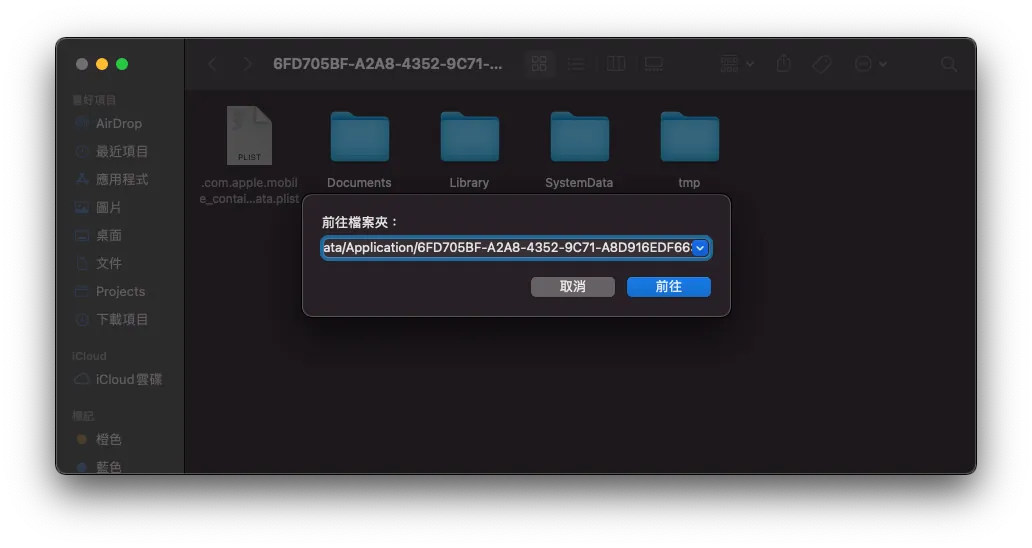
Finder -> Go -> Paste Path
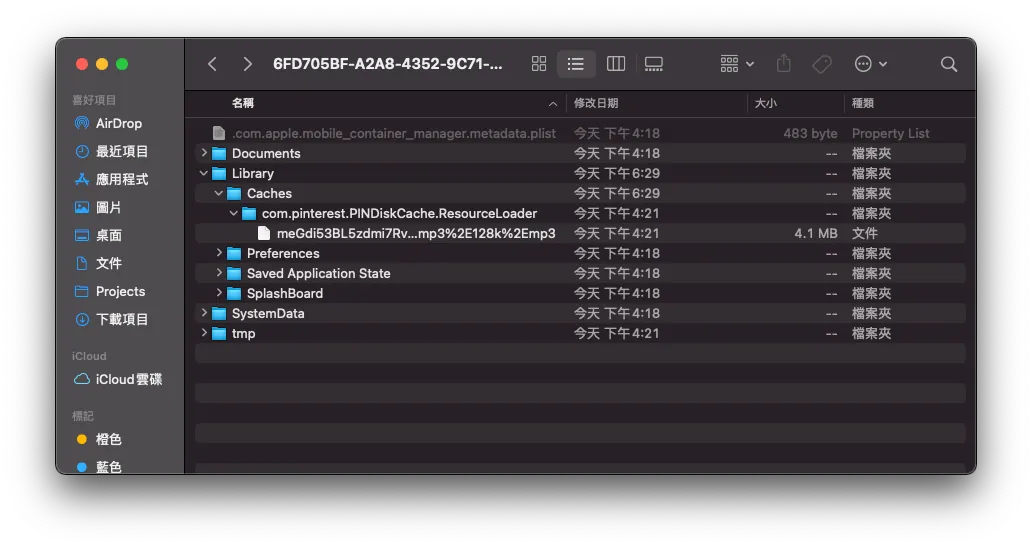
In Library -> Caches -> com.pinterest.PINDiskCache.ResourceLoader is the Resource Loader Cache directory we created.
PINCache(name: “ResourceLoader”) where the name is the directory name.
You can also specify rootPath, so the directory can be changed to under Documents (not at risk of being cleared by the system).
Set PINCache Maximum Limit:
 PINCacheAssetDataManager.Cache.diskCache.byteCount = 300 * 1024 * 1024 // max: 300mb
 PINCacheAssetDataManager.Cache.diskCache.byteLimit = 90 * 60 * 60 * 24 // 90 days
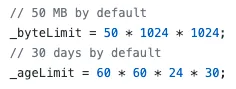
System Default Limit
Setting it to 0 means files will not be deleted automatically.
Postscript
I originally underestimated the difficulty of this feature, thinking it could be handled quickly; however, I ran into many troubles and spent about two more weeks dealing with data storage issues. But through this process, I gained a thorough understanding of the entire Resource Loader mechanism, GCD, and Data handling.
References
Finally, references for research on implementation are provided.
-
iOS AVPlayer Video Cache Design and Implementation Theory Only
-
Implementing Audio and Video Playback with AVPlayer and Caching, Supporting Synchronized Video Output [ SZAVPlayer ] includes code (very complete but complex)
-
CachingPlayerItem (Simple implementation, easier to understand but incomplete)
-
Possibly the Best AVPlayer Audio and Video Caching Solution AVAssetResourceLoaderDelegate
-
Douyin Swift Version [ Github ] (An interesting project that recreates the Douyin app; it also uses Resource Loader)
Extension
- DLCachePlayer (Objective-C version)



Comments