
Common Real-World Decode Issues When Using Codable (Part 1)
From Basics to Advanced: Deep Dive into Using Decodable to Handle All Possible Problem Scenarios

Photo by Gustas Brazaitis
Preface
Due to the backend API upgrade, we needed to adjust the API handling architecture. Recently, we took this opportunity to update the original network handling architecture, which was written in Objective-C, to Swift. Because of the language difference, it’s no longer suitable to use the original Restkit to manage the network layer. However, we must admit that Restkit’s features are very comprehensive and powerful. It worked smoothly in our project with almost no major issues. On the downside, it is very heavy, barely maintained, and purely Objective-C; it will inevitably need to be replaced in the future.
Restkit almost handles all the features needed for network requests, from basic network handling, API calls, network processing, to response handling like JSON String to Object, and even saving objects into Core Data. It’s a truly powerful framework that can do the work of ten.
With the evolution of time, current frameworks no longer focus on an all-in-one package. Instead, they emphasize flexibility, lightweight design, and modularity to create more variations. Therefore, when switching to Swift, we chose Moya as the networking library and combined other needed functionalities through different methods.
Main Topic
Regarding the JSON String to Object Mapping section, we use Swift’s built-in Codable (Decodable) protocol and JSONDecoder for processing; we also separate Entity/Model to enhance responsibility division, operation, and readability. Additionally, the codebase mixing Objective-C and Swift must be taken into consideration.
* The Encodable part is omitted; examples only show Decodable implementation, which is similar. If you can decode, you can also encode.
Getting Started
Assuming our initial API Response JSON String is as follows:
{
  "id": 123456,
  "comment": "It's AccuseFive, not FiveAccuse!",
  "target_object": {
    "type": "song",
    "id": 99,
    "name": "Thinking of You Under the Stars"
  },
  "commenter": {
    "type": "user",
    "id": 1,
    "name": "zhgchgli",
    "email": "[email protected]"
  }
}
From the above example, we can split into three Entities & Models: User, Song, and Comment, allowing for reusable composition. For convenience, the Entity and Model are written in the same file for demonstration.
User:
// Entity:
struct UserEntity: Decodable {
    var id: Int
    var name: String
    var email: String
}

// Model:
class UserModel: NSObject {
    init(_ entity: UserEntity) {
      self.id = entity.id
      self.name = entity.name
      self.email = entity.email
    }
    var id: Int
    var name: String
    var email: String
}
Song:
// Entity:
struct SongEntity: Decodable {
    var id: Int
    var name: String
}

//Model:
class SongModel: NSObject {
    init(_ entity: SongEntity) {
      self.id = entity.id
      self.name = entity.name
    }
    var id: Int
    var name: String
}
Comment:
// Entity:
struct CommentEntity: Decodable {
    enum CodingKeys: String, CodingKey {
      case id
      case comment
      case targetObject = "target_object"
      case commenter
    }

    var id: Int
    var comment: String
    var targetObject: SongEntity
    var commenter: UserEntity
}

//Model:
class CommentModel: NSObject {
    init(_ entity: CommentEntity) {
      self.id = entity.id
      self.comment = entity.comment
      self.targetObject = SongModel(entity.targetObject)
      self.commenter = UserModel(entity.commenter)
    }
    var id: Int
    var comment: String
    var targetObject: SongModel
    var commenter: UserModel
}
JSONDecoder:
let jsonString = "{ \"id\": 123456, \"comment\": \"It's AccuseFive, not FiveAccuse!\", \"target_object\": { \"type\": \"song\", \"id\": 99, \"name\": \"Thinking of You Under the Stars\" }, \"commenter\": { \"type\": \"user\", \"id\": 1, \"name\": \"zhgchgli\", \"email\": \"[email protected]\" } }"
let jsonDecoder = JSONDecoder()
do {
    let result = try jsonDecoder.decode(CommentEntity.self, from: jsonString.data(using: .utf8)!)
} catch {
    print(error)
}
CodingKeys Enum?
When our JSON string key names do not match the entity object’s property names, we can add a CodingKeys enum internally to map them, since the backend data source’s naming convention is beyond our control.
case PropertyKeyName = "BackendFieldName"
case PropertyKeyName //If not specified, PropertyKeyName is used as the backend field name by default
Once you add the CodingKeys enum, you must list all non-Optional fields; you cannot list only the keys you want to customize.
Another approach is to set the JSONDecoder’s keyDecodingStrategy. If the response data fields differ from the property names only by snake_case <-> camelCase, you can directly set .keyDecodingStrategy = .convertFromSnakeCase to automatically handle the mapping.
let jsonDecoder = JSONDecoder()
jsonDecoder.keyDecodingStrategy = .convertFromSnakeCase
try jsonDecoder.decode(CommentEntity.self, from: jsonString.data(using: .utf8)!)
When the returned data is an array:
struct SongListEntity: Decodable {
    var songs:[SongEntity]
}
Adding Constraints to String:
struct SongEntity: Decodable {
  var id: Int
  var name: String
  var type: SongType

  enum SongType {
    case rock
    case pop
    case country
  }
}
Suitable for string types with a limited range, writing as an Enum makes it easier for us to pass and use; decoding will fail if the value is not one of the enum cases!
Use Generics to Wrap Fixed Structures:
Assuming the JSON String returned in multiple records has a fixed format:
{
  "count": 10,
  "offset": 0,
  "limit": 0,
  "results": [
    {
      "type": "song",
      "id": 1,
      "name": "1"
    }
  ]
}
You can wrap it using generics:
struct PageEntity<E: Decodable>: Decodable {
    var count: Int
    var offset: Int
    var limit: Int
    var results: [E]
}
Use: PageEntity<Song>.self
Date/Timestamp Auto Decode:
Setting the dateDecodingStrategy of JSONDecoder
-
.secondsSince1970/.millisecondsSince1970: Unix timestamp -
.deferredToDate: Apple’s timestamp, rarely used, different from Unix timestamp, counted from 2001/01/01 -
.iso8601: ISO 8601 date format -
.formatted(DateFormatter): Decode Date according to the provided DateFormatter -
.custom: Custom Date decode logic
.custom example: Assume the API returns two formats, YYYY/MM/DD and ISO 8601, and both need to be decoded:
var dateFormatter = DateFormatter()
var iso8601DateFormatter = ISO8601DateFormatter()

let decoder: JSONDecoder = JSONDecoder()
decoder.dateDecodingStrategy = .custom({ (decoder) -> Date in
    let container = try decoder.singleValueContainer()
    let dateString = try container.decode(String.self)

    // ISO8601:
    if let date = iso8601DateFormatter.date(from: dateString) {
        return date
    }

    // YYYY-MM-DD:
    dateFormatter.dateFormat = "yyyy-MM-dd"
    if let date = dateFormatter.date(from: dateString) {
        return date
    }

    throw DecodingError.dataCorruptedError(in: container, debugDescription: "Cannot decode date string \(dateString)")
})

let result = try jsonDecoder.decode(CommentEntity.self, from: jsonString.data(using: .utf8)!)
*DateFormatter is very performance-intensive during init, so reuse it as much as possible.
Basic Decode Knowledge:
-
The field types (struct/class/enum) within the Decodable Protocol must all conform to the Decodable Protocol; alternatively, values can be assigned during the init decoder.
-
Decoding fails when field types do not match.
-
If a field in a Decodable object is set as Optional, it means the field is optional and will be decoded only if present.
-
Optional fields can accept: JSON string with no field, or given but set to nil.
-
Blank or 0 is not equal to nil; nil is nil. Be cautious with weakly typed backend APIs!
-
By default, if a Decodable object has a non-optional enum property, decoding will fail if the JSON string does not provide a value for it (handling this will be explained later).
-
By default, decoding failure will immediately stop the process and cannot simply skip the erroneous data (methods to handle this will be explained later).

Advanced Usage
So far, the basic usage is complete, but the real world is not that simple; below are several advanced scenarios and applicable Codable solutions. From this point on, we can no longer rely on the default Decode to handle mapping for us and must implement init(from decoder: Decoder) to customize the decoding process.
*Here, only the Entity part is shown temporarily; the Model is not used yet.
init(from decoder: Decoder)
init decoder must assign initial values to all non-Optional fields (that’s what init is for!).
When customizing the Decode operation, we need to get a container from the decoder to extract values. There are three types of containers to obtain content.
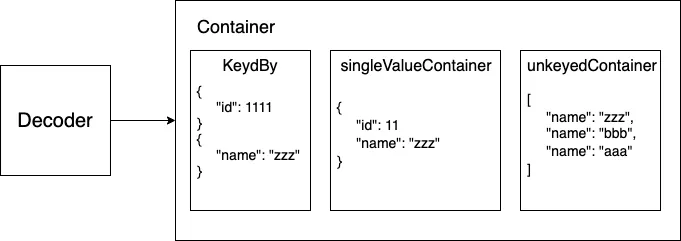
The first container (keyedBy: CodingKeys.self) Operate according to CodingKeys:
struct SongEntity: Decodable {
    var id: Int
    var name: String

    enum CodingKeys: String, CodingKey {
      case id
      case name
    }

    init(from decoder: Decoder) throws {
        let container = try decoder.container(keyedBy: CodingKeys.self)
        self.id = try container.decode(Int.self, forKey: .id)
        // Parameter 1 accepts: a class implementing Decodable
        // Parameter 2 CodingKeys

        self.name = try container.decode(String.self, forKey: .name)
    }
}
The second type: singleValueContainer Extract and operate the entire package (single value):
enum HandsomeLevel: Decodable {
    case handsome(String)
    case normal(String)
    init(from decoder: Decoder) throws {
        let container = try decoder.singleValueContainer()
        let name = try container.decode(String.self)
        if name == "zhgchgli" {
            self = .handsome(name)
        } else {
            self = .normal(name)
        }
    }
}

struct UserEntity: Decodable {
    var id: Int
    var name: HandsomeLevel
    var email: String

    enum CodingKeys: String, CodingKey {
        case id
        case name
        case email
    }
}
Applicable to Associated Value Enum field types, for example, name also comes with a coolness level!
The third type: unkeyedContainer Treat the entire package as an array:
struct ListEntity: Decodable {
    var items:[Decodable]
    init(from decoder: Decoder) throws {
        var unkeyedContainer = try decoder.unkeyedContainer()
        self.items = []
        while !unkeyedContainer.isAtEnd {
            // The internal pointer of unkeyedContainer automatically moves to the next element after decode
            // When it reaches the end, it means the iteration is complete
            if let id = try? unkeyedContainer.decode(Int.self) {
                items.append(id)
            } else if let name = try? unkeyedContainer.decode(String.self) {
                items.append(name)
            }
        }
    }
}

let jsonString = "[\"test\",1234,5566]"
let jsonDecoder = JSONDecoder()
let result = try jsonDecoder.decode(ListEntity.self, from: jsonString.data(using: .utf8)!)
print(result)
Applicable to array fields with variable types.
Under a Container, we can also use nestedContainer / nestedUnkeyedContainer to operate on specific fields:
*Flatten Data Fields (Similar to flatMap)
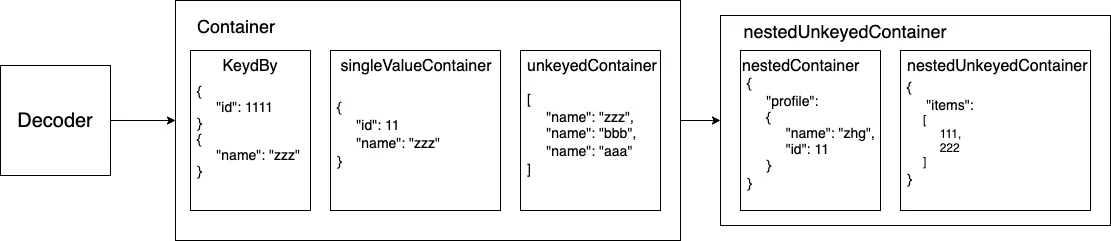
struct ListEntity: Decodable {

    enum CodingKeys: String, CodingKey {
        case items
        case date
        case name
        case target
    }

    enum PredictKey: String, CodingKey {
        case type
    }

    var date: Date
    var name: String
    var items: [Decodable]
    var target: Decodable

    init(from decoder: Decoder) throws {
        let container = try decoder.container(keyedBy: CodingKeys.self)

        self.date = try container.decode(Date.self, forKey: .date)
        self.name = try container.decode(String.self, forKey: .name)

        let nestedContainer = try container.nestedContainer(keyedBy: PredictKey.self, forKey: .target)

        let type = try nestedContainer.decode(String.self, forKey: .type)
        if type == "song" {
            self.target = try container.decode(SongEntity.self, forKey: .target)
        } else {
            self.target = try container.decode(UserEntity.self, forKey: .target)
        }

        var unkeyedContainer = try container.nestedUnkeyedContainer(forKey: .items)
        self.items = []
        while !unkeyedContainer.isAtEnd {
            if let song = try? unkeyedContainer.decode(SongEntity.self) {
                items.append(song)
            } else if let user = try? unkeyedContainer.decode(UserEntity.self) {
                items.append(user)
            }
        }
    }
}
Accessing and decoding objects at different levels: the example shows using nestedContainer on target/items to extract the type, then decode accordingly based on the type.
Decode & DecodeIfPresent
-
DecodeIfPresent: Decode only happens if the response includes the data field (when the Codable property is Optional).
-
Decode: Perform the decode operation; if the response lacks the data field, it will throw an error.
*The above is just a brief introduction to init decoder and the methods and functions of containers. If it’s hard to understand, no worries. Let’s dive into real-world scenarios and experience how these operations come together through examples.
Real-world Scenarios
Back to the original example JSON String.
Scenario 1. Suppose a comment can be directed to either a song or a person. The targetObject field could be either a User or a Song. How should this be handled?
{
  "results": [
    {
      "id": 123456,
      "comment": "It's '告五人', not '五告人'!",
      "target_object": {
        "type": "song",
        "id": 99,
        "name": "Thinking of You Under the Stars"
      },
      "commenter": {
        "type": "user",
        "id": 1,
        "name": "zhgchgli",
        "email": "[email protected]"
      }
    },
    {
      "id": 55,
      "comment": "66666!",
      "target_object": {
        "type": "user",
        "id": 1,
        "name": "zhgchgli"
      },
      "commenter": {
        "type": "user",
        "id": 2,
        "name": "aaaa",
        "email": "[email protected]"
      }
    }
  ]
}
Method a.
Using Enum as a Container to Decode.
struct CommentEntity: Decodable {

    enum CodingKeys: String, CodingKey {
      case id
      case comment
      case targetObject = "target_object"
      case commenter
    }

    var id: Int
    var comment: String
    var targetObject: TargetObject
    var commenter: UserEntity

    enum TargetObject: Decodable {
        case song(SongEntity)
        case user(UserEntity)

        enum PredictKey: String, CodingKey {
            case type
        }

        enum TargetObjectType: String, Decodable {
            case song
            case user
        }

        init(from decoder: Decoder) throws {
            let container = try decoder.container(keyedBy: PredictKey.self)
            let singleValueContainer = try decoder.singleValueContainer()
            let targetObjectType = try container.decode(TargetObjectType.self, forKey: .type)

            switch targetObjectType {
            case .song:
                let song = try singleValueContainer.decode(SongEntity.self)
                self = .song(song)
            case .user:
                let user = try singleValueContainer.decode(UserEntity.self)
                self = .user(user)
            }
        }
    }
}
We replace the properties of targetObject with an Associated Value Enum, deciding the content inside the Enum only during decoding.
The core practice is to create a Decodable-compliant Enum as a container. During decoding, first extract the key field (the type field in the example JSON string) to determine the type. If it is Song, use a singleValueContainer to decode the entire package into a SongEntity; if it is User, do the same accordingly.
Only extract from the Enum when needed:
// if case let
if case let CommentEntity.TargetObject.user(user) = result.targetObject {
    print(user)
} else if case let CommentEntity.TargetObject.song(song) = result.targetObject {
    print(song)
}

// switch case let
switch result.targetObject {
case .song(let song):
    print(song)
case .user(let user):
    print(user)
}
Method b.
Change the declared property to a Base Class.
struct CommentEntity: Decodable {
    enum CodingKeys: String, CodingKey {
      case id
      case comment
      case targetObject = "target_object"
      case commenter
    }
    enum PredictKey: String, CodingKey {
        case type
    }

    var id: Int
    var comment: String
    var targetObject: Decodable
    var commenter: UserEntity

    init(from decoder: Decoder) throws {
        let container = try decoder.container(keyedBy: CodingKeys.self)
        self.id = try container.decode(Int.self, forKey: .id)
        self.comment = try container.decode(String.self, forKey: .comment)
        self.commenter = try container.decode(UserEntity.self, forKey: .commenter)

        //
        let targetObjectContainer = try container.nestedContainer(keyedBy: PredictKey.self, forKey: .targetObject)
        let targetObjectType = try targetObjectContainer.decode(String.self, forKey: .type)
        if targetObjectType == "user" {
            self.targetObject = try container.decode(UserEntity.self, forKey: .targetObject)
        } else {
            self.targetObject = try container.decode(SongEntity.self, forKey: .targetObject)
        }
    }
}
The principle is similar, but here we first use nestedContainer to access targetObject and get the type to determine which type targetObject should be decoded into.
Cast only when needed:
if let song = result.targetObject as? Song {
  print(song)
} else if let user = result.targetObject as? User {
  print(user)
}
Scenario 2. How to Decode When an Array Field Contains Multiple Types of Data?
{
  "results": [
    {
      "type": "song",
      "id": 99,
      "name": "Thinking of You Under the Stars"
    },
    {
      "type": "user",
      "id": 1,
      "name": "zhgchgli",
      "email": "[email protected]"
    }
  ]
}
struct ListEntity: Decodable {
    enum CodingKeys: String, CodingKey {
        case results
    }
    enum PredictKey: String, CodingKey {
        case type
    }

    var results:[Decodable]
    init(from decoder: Decoder) throws {
        let container = try decoder.container(keyedBy: CodingKeys.self)
        var nestedUnkeyedContainer = try container.nestedUnkeyedContainer(forKey: .results)

        self.results = []
        while !nestedUnkeyedContainer.isAtEnd {
            let type = try nestedUnkeyedContainer.nestedContainer(keyedBy: PredictKey.self).decode(String.self, forKey: .type)
            if type == "song" {
                results.append(try nestedUnkeyedContainer.decode(SongEntity.self))
            } else {
                results.append(try nestedUnkeyedContainer.decode(UserEntity.self))
            }
        }
    }
}
Combine the previously mentioned nestedUnkeyedContainer with the solution from Scenario 1; here, you can also use Scenario 1.’s a. solution by accessing values with an Associated Value Enum.
Scenario 3. Decode Only When JSON String Field Has a Value
[
  {
    "type": "song",
    "id": 99,
    "name": "Thinking of You Under the Stars and Moon"
  },
    {
    "type": "song",
    "id": 11
  }
]
struct TargetEntity: Decodable {
    enum CodingKeys: String, CodingKey {
        case type
        case id
        case name
    }
    var type: String
    var id: Int
    var name: String

    init(from decoder: Decoder) throws {
        let container = try decoder.container(keyedBy: CodingKeys.self)
        self.id = try container.decode(Int.self, forKey: .id)
        self.type = try container.decode(String.self, forKey: .type)

        // Approach 1:
        self.name = try container.decodeIfPresent(String.self, forKey: .name) ?? ""
        // or Approach 2:
        self.name = (try? container.decode(String.self, forKey: .name)) ?? "" // not good
    }
}

let jsonString = "[ { \"type\": \"song\", \"id\": 99, \"name\": \"Thinking of You Under the Stars and Moon\" }, { \"type\": \"song\", \"id\": 11 } ]"
let jsonDecoder = JSONDecoder()
let result = try jsonDecoder.decode([TargetEntity].self, from: jsonString.data(using: .utf8)!)
Using decodeIfPresent for decoding.
Scenario 4. Skip Decoding Failed Items in Array Data
{
  "results": [
    {
      "type": "song",
      "id": 99,
      "name": "Thinking of You Under the Stars"
    },
    {
      "error": "errro"
    },
    {
      "type": "song",
      "id": 19,
      "name": "Take Me to Find Nightlife"
    }
  ]
}
As mentioned earlier, Decodable by default requires all data parsing to be correct in order to map the output; sometimes the backend provides unstable data, giving a long array where a few entries are missing fields or have mismatched field types causing Decode to fail; this results in the entire batch failing and returning nil.
struct ResultsEntity: Decodable {
    enum CodingKeys: String, CodingKey {
        case results
    }
    var results: [SongEntity]

    init(from decoder: Decoder) throws {
        let container = try decoder.container(keyedBy: CodingKeys.self)
        var nestedUnkeyedContainer = try container.nestedUnkeyedContainer(forKey: .results)

        self.results = []
        while !nestedUnkeyedContainer.isAtEnd {
            if let song = try? nestedUnkeyedContainer.decode(SongEntity.self) {
                self.results.append(song)
            } else {
                let _ = try nestedUnkeyedContainer.decode(EmptyEntity.self)
            }
        }
    }
}

struct EmptyEntity: Decodable { }

struct SongEntity: Decodable {
    var type: String
    var id: Int
    var name: String
}

let jsonString = "{ \"results\": [ { \"type\": \"song\", \"id\": 99, \"name\": \"披星戴月的想你\" }, { \"error\": \"errro\" }, { \"type\": \"song\", \"id\": 19, \"name\": \"帶我去找夜生活\" } ] }"
let jsonDecoder = JSONDecoder()
let result = try jsonDecoder.decode(ResultsEntity.self, from: jsonString.data(using: .utf8)!)
print(result)
The solution is similar to Scenario 2’s solution; use nestedUnkeyedContainer to iterate through each item and perform a try? Decode. If the Decode fails, use an Empty Decode to allow the nestedUnkeyedContainer internal pointer to continue.
*This method is a bit of a workaround because we cannot command
nestedUnkeyedContainerto skip, andnestedUnkeyedContainermust successfully decode to continue execution; that’s why we do it this way. Some in the Swift community have suggested adding moveNext(), but it is not yet implemented in the current version.
Scenario 5. Some fields are used internally in my code and do not need to be decoded
Method a. Entity/Model
Here we need to mention the purpose of splitting Entity and Model as stated at the beginning; Entity is solely responsible for JSON String to Entity (Decodable) mapping; Model initializes with Entity, and the actual program passing, operations, and business logic all use Model.
struct SongEntity: Decodable {
    var type: String
    var id: Int
    var name: String
}

class SongModel: NSObject {
    init(_ entity: SongEntity) {
        self.type = entity.type
        self.id = entity.id
        self.name = entity.name
    }

    var type: String
    var id: Int
    var name: String

    var isSave:Bool = false // business logic
}
Advantages of Splitting Entity/Model:
-
Clear Responsibility: Entity for JSON String to Decodable, Model for Business Logic
-
You can clearly see which fields are mapped just by looking at the Entity.
-
Avoid putting all fields together when there are many.
-
Objective-C is also supported (because Model is just NSObject or struct/Decodable, which are not visible in Objective-C).
-
Business logic and fields for internal use should be placed in the Model.
Method b. Handling with init
List the CodingKeys and exclude fields used internally. Providing default values during init, having default values for fields, or setting them as Optional are not good practices; they just allow the code to run.
[2020/06/26 Update] — Part 2 Scenario 6. How to Decode API Response Using 0/1 to Represent Bool?
[2020/06/26 Update] — Next: Scenario 7. Avoid rewriting init decoder every time
[2020/06/26 Update] — Part 2 Scenario 8. Proper Handling of Response Null Field Data
Comprehensive Scenario Example
A complete example combining the basic and advanced usage above:
{
  "count": 5,
  "offset": 0,
  "limit": 10,
  "results": [
    {
      "id": 123456,
      "comment": "It's Accuse Five, not Five Accuse!",
      "target_object": {
        "type": "song",
        "id": 99,
        "name": "Thinking of You Under the Stars",
        "create_date": "2020-06-13T15:21:42+0800"
      },
      "commenter": {
        "type": "user",
        "id": 1,
        "name": "zhgchgli",
        "email": "[email protected]",
        "birthday": "1994/07/18"
      }
    },
    {
      "error": "not found"
    },
    {
      "error": "not found"
    },
    {
      "id": 2,
      "comment": "Haha, me too!",
      "target_object": {
        "type": "user",
        "id": 1,
        "name": "zhgchgli",
        "email": "[email protected]",
        "birthday": "1994/07/18"
      },
      "commenter": {
        "type": "user",
        "id": 1,
        "name": "Random User",
        "email": "[email protected]",
        "birthday": "2000/01/12"
      }
    }
  ]
}
import Foundation
//

let jsonString = """
{
  "count": 3,
  "offset": 0,
  "limit": 10,
  "results": [
    {
      "id": 123456,
      "comment": "It's Accuse Five, not Five Accuse!",
      "target_object": {
        "type": "song",
        "id": 99,
        "name": "Thinking of You Under the Stars",
        "create_date": "2020-06-13T15:21:42+0800"
      },
      "commenter": {
        "type": "user",
        "id": 1,
        "name": "zhgchgli",
        "email": "[email protected]",
        "birthday": "1994/07/18"
      }
    },
    {
      "error": "not found"
    },
    {
      "error": "not found"
    },
    {
      "id": 2,
      "comment": "Haha, me too!",
      "target_object": {
        "type": "user",
        "id": 1,
        "name": "zhgchgli",
        "email": "[email protected]",
        "birthday": "1994/07/18"
      },
      "commenter": {
        "type": "user",
        "id": 1,
        "name": "Random User",
        "email": "[email protected]",
        "birthday": "2000/01/12"
      }
    }
  ]
}
"""
//
// Entity:
struct SongEntity: Decodable {
    enum CodingKeys: String, CodingKey {
        case type
        case id
        case name
        case createDate = "create_date"
    }
    var type: String
    var id: Int
    var name: String
    var createDate: Date
}

struct UserEntity: Decodable {
    var type: String
    var id: Int
    var name: String
    var email: String
    var birthday: Date
}

struct CommentEntity: Decodable {
    enum CodingKeys: String, CodingKey {
        case id
        case comment
        case commenter
        case targetObject = "target_object"
    }
    enum PredictKey: String, CodingKey {
        case type
    }
    enum ObjectType: String, Decodable {
        case song
        case user
    }
    var id: Int
    var comment: String
    var commenter: UserEntity
    var targetObject: Decodable

    init(from decoder: Decoder) throws {
        let container = try decoder.container(keyedBy: CodingKeys.self)
        self.id = try container.decode(Int.self, forKey: .id)
        self.comment = try container.decode(String.self, forKey: .comment)
        self.commenter = try container.decode(UserEntity.self, forKey: .commenter)

        // targetObject could be UserEntity or SongEntity
        let targetObjectNestedContainer = try container.nestedContainer(keyedBy: PredictKey.self, forKey: .targetObject)
        let type = try targetObjectNestedContainer.decode(ObjectType.self, forKey: .type)
        switch type {
        case .song:
            self.targetObject = try container.decode(SongEntity.self, forKey: .targetObject)
        case .user:
            self.targetObject = try container.decode(UserEntity.self, forKey: .targetObject)
        }
    }
}

struct EmptyEntity: Decodable { }

struct PageEntity<E: Decodable>: Decodable {
    enum CodingKeys: String, CodingKey {
        case count
        case offset
        case limit
        case results
    }
    var count: Int
    var offset: Int
    var limit: Int
    var results: [E]

    init(from decoder: Decoder) throws {
        let container = try decoder.container(keyedBy: CodingKeys.self)
        self.count = try container.decode(Int.self, forKey: .count)
        self.offset = try container.decode(Int.self, forKey: .offset)
        self.limit = try container.decode(Int.self, forKey: .limit)

        var nestedUnkeyedContainer = try container.nestedUnkeyedContainer(forKey: .results)

        self.results = []
        while !nestedUnkeyedContainer.isAtEnd {
            if let entity = try? nestedUnkeyedContainer.decode(E.self) {
                self.results.append(entity)
            } else {
                let _ = try nestedUnkeyedContainer.decode(EmptyEntity.self)
            }
        }
    }
}

// Model:
class UserModel: NSObject {
    var type: String
    var id: Int
    var name: String
    var email: String
    var birthday: Date
    init(_ entity: UserEntity) {
        self.type = entity.type
        self.id = entity.id
        self.name = entity.name
        self.email = entity.email
        self.birthday = entity.birthday
    }
}

class SongModel: NSObject {
    var type: String
    var id: Int
    var name: String
    var createDate: Date
    init(_ entity: SongEntity) {
        self.type = entity.type
        self.id = entity.id
        self.name = entity.name
        self.createDate = entity.createDate
    }
}

class CommentModel: NSObject {
    var id: Int
    var comment: String
    var commenter: UserModel
    var targetObject: NSObject?

    var displayMessage: String // simulation business logic

    init(_ entity: CommentEntity) {
        self.id = entity.id
        self.comment = entity.comment
        self.commenter = UserModel(entity.commenter)
        if let userEntity = entity.targetObject as? UserEntity {
            self.targetObject = UserModel(userEntity)
        } else if let songEntity = entity.targetObject as? SongEntity {
            self.targetObject = SongModel(songEntity)
        }
        self.displayMessage = "\(entity.commenter.name):\(entity.comment)"
    }
}
//

let jsonDecoder = JSONDecoder()
let iso8601DateFormatter = ISO8601DateFormatter()
var dateFormatter = DateFormatter()

jsonDecoder.dateDecodingStrategy = .custom({ (decoder) -> Date in
    let container = try decoder.singleValueContainer()
    let dateString = try container.decode(String.self)

    // ISO8601:
    if let date = iso8601DateFormatter.date(from: dateString) {
        return date
    }

    // YYYY-MM-DD:
    dateFormatter.dateFormat = "yyyy/MM/dd"
    if let date = dateFormatter.date(from: dateString) {
        return date
    }

    throw DecodingError.dataCorruptedError(in: container, debugDescription: "Cannot decode date string \(dateString)")
})

do {
    let pageEntity = try jsonDecoder.decode(PageEntity<CommentEntity>.self, from: jsonString.data(using: .utf8)!)
    let comments = pageEntity.results.compactMap { CommentModel($0) }
    comments.forEach { (comment) in
        print(comment.displayMessage)
    }
} catch {
    print(error)
}
Output:
zhgchgli: It's "告五人", not "五告人"!
Passerby A: Haha, me too!
The complete example demonstration is as above!
Part 2 & Other Scenarios Updated:
Summary
The main advantage of using Codable is that it’s native, so there’s no worry about lack of future maintenance, and the code looks clean. However, it has stricter limitations and less flexibility in parsing JSON strings. Otherwise, you need to do more work as shown in this article. Also, its performance is not better than other mapping libraries (Decodable still uses the Objective-C era NSJSONSerialization for parsing). But I believe Apple may optimize this in future updates, so we won’t need to change our code then.
Some scenarios or examples in the article might be extreme, but sometimes you just have to deal with them; of course, we hope that simple Codable can meet our needs in most cases. However, with the techniques above, there should be no problem that can’t be solved!
Thanks to @saiday for the technical support.


Comments